Focus and productivity apps abound, all to help you stave off the many distractions coming from your phone. Or the annoying people at your open-office desk. Digital well-being tools can silence notifications, limit apps like TikTok and Instagram, and help you focus on the task at hand. But you can also turn them off very easily as soon as you feel like you haven’t endlessly scrolled enough.
This is where Flipper’s Busy Bar comes in, a hardware clock with an LED screen that doubles as a clock and a dedicated timer. Slap the big button in the middle, and the screen displays a bright red “BUSY” sign or another message that lets the people around you know you’re, well, busy. (Maybe try “GO AWAY” or “GET OUT OF MY ROOM, MOM.”) The bar goes on sale today and costs $249.
“How do you let people know politely, yet firmly, that you don’t want to be disturbed?” says Callum Tennent, a creative writer at Flipper. “We decided the politest way to do it was a massive red light on your desk.”
Courtesy of Flipper Devices
Flipper Devices made the Flipper Zero, a $200 portable hacking tool that got big on TikTok in 2022 for using a Tamagotchi-esque dolphin character to detect wireless frequencies and potentially break RFID-controlled locks. It was a device that raised a variety of security concerns. Canada proposed a ban on the device out of fear that it might enable car thefts. In 2023, the US Customs and Border Protection seized 15,000 Flipper Zero devices, then ultimately released them. Flipper is currently working on another model, the Flipper One, that has even more advanced capabilities.
In between those more controversial devices comes the Busy Bar. The bar also works with the separate Busy app, yet another one of those productivity and focus tools living on your phone. What it doesn’t have is the capability of hacking anything. “It’s being made by us here at Flipper, but there’s no real connection to them,” Tennent says. “They’re totally disconnected products.”
Fundamentally, the Busy Bar is a pricey “On Air” light. It offers many of the same productivity capabilities that are likely already baked into your phone’s operating system—like blocking notifications on your phone. But Flipper is making the case that—much like the Brick, a hardware gadget you tap to block access to certain apps—having a hardware option to shut off the distractions around you is meaningfully different than just trying to use software productivity tools on your device.
Focus and productivity apps abound, all to help you stave off the many distractions coming from your phone. Or the annoying people at your open-office desk. Digital well-being tools can silence notifications, limit apps like TikTok and Instagram, and help you focus on the task at hand. But you can also turn them off very easily as soon as you feel like you haven’t endlessly scrolled enough.
This is where Flipper’s Busy Bar comes in, a hardware clock with an LED screen that doubles as a clock and a dedicated timer. Slap the big button in the middle, and the screen displays a bright red “BUSY” sign or another message that lets the people around you know you’re, well, busy. (Maybe try “GO AWAY” or “GET OUT OF MY ROOM, MOM.”) The bar goes on sale today and costs $249.
“How do you let people know politely, yet firmly, that you don’t want to be disturbed?” says Callum Tennent, a creative writer at Flipper. “We decided the politest way to do it was a massive red light on your desk.”
Courtesy of Flipper Devices
Flipper Devices made the Flipper Zero, a $200 portable hacking tool that got big on TikTok in 2022 for using a Tamagotchi-esque dolphin character to detect wireless frequencies and potentially break RFID-controlled locks. It was a device that raised a variety of security concerns. Canada proposed a ban on the device out of fear that it might enable car thefts. In 2023, the US Customs and Border Protection seized 15,000 Flipper Zero devices, then ultimately released them. Flipper is currently working on another model, the Flipper One, that has even more advanced capabilities.
In between those more controversial devices comes the Busy Bar. The bar also works with the separate Busy app, yet another one of those productivity and focus tools living on your phone. What it doesn’t have is the capability of hacking anything. “It’s being made by us here at Flipper, but there’s no real connection to them,” Tennent says. “They’re totally disconnected products.”
Fundamentally, the Busy Bar is a pricey “On Air” light. It offers many of the same productivity capabilities that are likely already baked into your phone’s operating system—like blocking notifications on your phone. But Flipper is making the case that—much like the Brick, a hardware gadget you tap to block access to certain apps—having a hardware option to shut off the distractions around you is meaningfully different than just trying to use software productivity tools on your device.
#Busy #Bar #Gadget #People #Leavehacks,gadgets,smart home,apps,distractions,productivity,design">The Busy Bar Is a Gadget to Get People to Leave You Alone
Focus and productivityapps abound, all to help you stave off the many distractions coming from your phone. Or the annoying people at your open-office desk. Digital well-being tools can silence notifications, limit apps like TikTok and Instagram, and help you focus on the task at hand. But you can also turn them off very easily as soon as you feel like you haven’t endlessly scrolled enough.
This is where Flipper’s Busy Bar comes in, a hardware clock with an LED screen that doubles as a clock and a dedicated timer. Slap the big button in the middle, and the screen displays a bright red “BUSY” sign or another message that lets the people around you know you’re, well, busy. (Maybe try “GO AWAY” or “GET OUT OF MY ROOM, MOM.”) The bar goes on sale today and costs $249.
“How do you let people know politely, yet firmly, that you don’t want to be disturbed?” says Callum Tennent, a creative writer at Flipper. “We decided the politest way to do it was a massive red light on your desk.”
Courtesy of Flipper Devices
Flipper Devices made the Flipper Zero, a $200 portable hacking tool that got big on TikTok in 2022 for using a Tamagotchi-esque dolphin character to detect wireless frequencies and potentially break RFID-controlled locks. It was a device that raised a variety of security concerns. Canada proposed a ban on the device out of fear that it might enable car thefts. In 2023, the US Customs and Border Protection seized 15,000 Flipper Zero devices, then ultimately released them. Flipper is currently working on another model, the Flipper One, that has even more advanced capabilities.
In between those more controversial devices comes the Busy Bar. The bar also works with the separate Busy app, yet another one of those productivity and focus tools living on your phone. What it doesn’t have is the capability of hacking anything. “It’s being made by us here at Flipper, but there’s no real connection to them,” Tennent says. “They’re totally disconnected products.”
Fundamentally, the Busy Bar is a pricey “On Air” light. It offers many of the same productivity capabilities that are likely already baked into your phone’s operating system—like blocking notifications on your phone. But Flipper is making the case that—much like the Brick, a hardware gadget you tap to block access to certain apps—having a hardware option to shut off the distractions around you is meaningfully different than just trying to use software productivity tools on your device.
Focus and productivity apps abound, all to help you stave off the many distractions coming…
Nearly a year after it was announced, Instagram says it’s delivering the ability to rearrange the posts in your profile grid. It had been available to some people in test groups, but as of June 8th, it’s rolling out widely via the Android and iPhone mobile apps.
Until now, the posts on your Instagram profile have been locked in chronological order beyond the ability to pin three posts at the top, but once the feature is live on your account, you can long-press and drag posts freely, no matter how old they are. Any posts that are pinned will remain at the top.
Nearly a year after it was announced, Instagram says it’s delivering the ability to rearrange the posts in your profile grid. It had been available to some people in test groups, but as of June 8th, it’s rolling out widely via the Android and iPhone mobile apps.
Until now, the posts on your Instagram profile have been locked in chronological order beyond the ability to pin three posts at the top, but once the feature is live on your account, you can long-press and drag posts freely, no matter how old they are. Any posts that are pinned will remain at the top.
#Instagram #finally #letting #reorganize #profile #gridApps,Instagram,Meta,News,Tech">Instagram is finally letting everyone reorganize their profile grid
Nearly a year after it was announced, Instagram says it’s delivering the ability to rearrange the posts in your profile grid. It had been available to some people in test groups, but as of June 8th, it’s rolling out widely via the Android and iPhone mobile apps.
Until now, the posts on your Instagram profile have been locked in chronological order beyond the ability to pin three posts at the top, but once the feature is live on your account, you can long-press and drag posts freely, no matter how old they are. Any posts that are pinned will remain at the top.
Rolling out first in the U.S., Clips will include…well, clips of shows on Prime Video that are designed to hook a viewer and get them to give the full show a try. From that clip, users can add a title to their watchlist, share it with a friend, or navigate to rent, buy, or access the title through their subscription.
“Clips gives customers a whole new way to browse with short, personalized snippets tailored to their interests,” said Prime Video’s director of global application experiences, Brian Griffin, in a press release. “Whether they have a few minutes to scroll or are looking for something to watch when they have more time, entertainment is just a tap away.”
Amazon first tested this short-form feed during the NBA season, showing highlights that users can scroll through as though they’re watching TikToks.
It’s not a surprise to see Prime Video make this change — Netflix, Peacock, Tubi, Disney, and others have recently rolled out similar experiences, which are designed to promote discovery. Netflix’s short-form feed even shares the Clips name.
Clips is first rolling out to select U.S. customers on iOS, Android, and Fire tablets, but it will be available more broadly this summer. Users can navigate to Clips by scrolling down on the Clips carousel on the Prime Video mobile home page, which will surface a full-screen vertical feed.
When you purchase through links in our articles, we may earn a small commission. This doesn’t affect our editorial independence.
Rolling out first in the U.S., Clips will include…well, clips of shows on Prime Video that are designed to hook a viewer and get them to give the full show a try. From that clip, users can add a title to their watchlist, share it with a friend, or navigate to rent, buy, or access the title through their subscription.
“Clips gives customers a whole new way to browse with short, personalized snippets tailored to their interests,” said Prime Video’s director of global application experiences, Brian Griffin, in a press release. “Whether they have a few minutes to scroll or are looking for something to watch when they have more time, entertainment is just a tap away.”
Amazon first tested this short-form feed during the NBA season, showing highlights that users can scroll through as though they’re watching TikToks.
It’s not a surprise to see Prime Video make this change — Netflix, Peacock, Tubi, Disney, and others have recently rolled out similar experiences, which are designed to promote discovery. Netflix’s short-form feed even shares the Clips name.
Clips is first rolling out to select U.S. customers on iOS, Android, and Fire tablets, but it will be available more broadly this summer. Users can navigate to Clips by scrolling down on the Clips carousel on the Prime Video mobile home page, which will surface a full-screen vertical feed.
When you purchase through links in our articles, we may earn a small commission. This doesn’t affect our editorial independence.
#Prime #Video #Netflix #Disney #adding #TikToklike #Clips #feed #app #TechCrunchAmazon,Apps,prime video,Video">Prime Video follows Netflix and Disney by adding a TikTok-like ‘Clips’ feed in its app | TechCrunch
Amazon is adding a short-form video feed to the Prime Video app called “Clips,” the company announced on Friday.
Rolling out first in the U.S., Clips will include…well, clips of shows on Prime Video that are designed to hook a viewer and get them to give the full show a try. From that clip, users can add a title to their watchlist, share it with a friend, or navigate to rent, buy, or access the title through their subscription.
“Clips gives customers a whole new way to browse with short, personalized snippets tailored to their interests,” said Prime Video’s director of global application experiences, Brian Griffin, in a press release. “Whether they have a few minutes to scroll or are looking for something to watch when they have more time, entertainment is just a tap away.”
Amazon first tested this short-form feed during the NBA season, showing highlights that users can scroll through as though they’re watching TikToks.
It’s not a surprise to see Prime Video make this change — Netflix, Peacock, Tubi, Disney, and others have recently rolled out similar experiences, which are designed to promote discovery. Netflix’s short-form feed even shares the Clips name.
Clips is first rolling out to select U.S. customers on iOS, Android, and Fire tablets, but it will be available more broadly this summer. Users can navigate to Clips by scrolling down on the Clips carousel on the Prime Video mobile home page, which will surface a full-screen vertical feed.
When you purchase through links in our articles, we may earn a small commission. This doesn’t affect our editorial independence.
These apps all work more or less in the same way, giving you a straightforward method of tracking how long you’re spending on a task, and offering some sort of incentive to keep going for the allotted amount of time. Sometimes you get a few extra features as well, like the ability to block access to other apps.
In the interest of trying to write this specific article without switching between browser tabs and apps every two minutes, I gave three of the best focus tools a try. Here’s how they stack up.
Focus Friend
Focus Friend gives you a companion bean to focus with.
Photograph: David Nield
The vibe of Focus Friend is very much a warm and cozy one. When you first set up the app, you get your own personal bean, which you can give a name to. Once you’re through the intro screens, your bean will start knitting—and anytime you pick up your phone after that, the knitting stops.
The idea is that if you stick to the block of time you’ve set, your bean can come up with a variety of knitted creations, which can then be traded for different decorations for your bean’s living space. As you might expect, you can pay for decorations too, and a Pro subscription ($2 a month) means your bean is able to get more creative with its knitting.
It’s up to you how long your focus sessions are, and you have the option of playing some relaxing music, blocking access to other apps, or keeping the screen on while you work or study—and while your bean gets busy doing some knitting. It’s all quite whimsical and easy to set up. You don’t even need to register a user account.
How effective you find Focus Friend really depends on how taken you are by your bean and its knitting projects. At its core the app is really just a stopwatch, though the option to actually block other apps is useful. For me, the extra dollop of cutesy companionship does make a difference, and helps sticking to a task.
Focus Friend for Android and iOS (free or from $2 a month)
Forest
Forest grows virtual trees while you work or study.
Photograph: David Nield
The trick that Forest uses to keep you focused is growing virtual trees inside the app. The longer you stay engaged and able to avoid distractions, the more trees you get—until you have your very own forest on your phone. The app developers have partnered with the nonprofit Trees for the Future to grow millions of actual trees out in the real world too.
These apps all work more or less in the same way, giving you a straightforward method of tracking how long you’re spending on a task, and offering some sort of incentive to keep going for the allotted amount of time. Sometimes you get a few extra features as well, like the ability to block access to other apps.
In the interest of trying to write this specific article without switching between browser tabs and apps every two minutes, I gave three of the best focus tools a try. Here’s how they stack up.
Focus Friend
Focus Friend gives you a companion bean to focus with.
Photograph: David Nield
The vibe of Focus Friend is very much a warm and cozy one. When you first set up the app, you get your own personal bean, which you can give a name to. Once you’re through the intro screens, your bean will start knitting—and anytime you pick up your phone after that, the knitting stops.
The idea is that if you stick to the block of time you’ve set, your bean can come up with a variety of knitted creations, which can then be traded for different decorations for your bean’s living space. As you might expect, you can pay for decorations too, and a Pro subscription ($2 a month) means your bean is able to get more creative with its knitting.
It’s up to you how long your focus sessions are, and you have the option of playing some relaxing music, blocking access to other apps, or keeping the screen on while you work or study—and while your bean gets busy doing some knitting. It’s all quite whimsical and easy to set up. You don’t even need to register a user account.
How effective you find Focus Friend really depends on how taken you are by your bean and its knitting projects. At its core the app is really just a stopwatch, though the option to actually block other apps is useful. For me, the extra dollop of cutesy companionship does make a difference, and helps sticking to a task.
Focus Friend for Android and iOS (free or from $2 a month)
Forest
Forest grows virtual trees while you work or study.
Photograph: David Nield
The trick that Forest uses to keep you focused is growing virtual trees inside the app. The longer you stay engaged and able to avoid distractions, the more trees you get—until you have your very own forest on your phone. The app developers have partnered with the nonprofit Trees for the Future to grow millions of actual trees out in the real world too.
#Focus #Timer #Apps #Taskapps,how-to,software,tips,productivity">These 3 Focus Timer Apps Will Keep You on Task
when you’re trying to stay focused on something, there’s no shortage of distractions on your phone, through your web browser, or out the window. And with attention spans crumbling in the TikTok era, we now have an entire category of apps dedicated to helping you stick to what you’re supposed to be doing.
These apps all work more or less in the same way, giving you a straightforward method of tracking how long you’re spending on a task, and offering some sort of incentive to keep going for the allotted amount of time. Sometimes you get a few extra features as well, like the ability to block access to other apps.
In the interest of trying to write this specific article without switching between browser tabs and apps every two minutes, I gave three of the best focus tools a try. Here’s how they stack up.
Focus Friend
Focus Friend gives you a companion bean to focus with.
Photograph: David Nield
The vibe of Focus Friend is very much a warm and cozy one. When you first set up the app, you get your own personal bean, which you can give a name to. Once you’re through the intro screens, your bean will start knitting—and anytime you pick up your phone after that, the knitting stops.
The idea is that if you stick to the block of time you’ve set, your bean can come up with a variety of knitted creations, which can then be traded for different decorations for your bean’s living space. As you might expect, you can pay for decorations too, and a Pro subscription ($2 a month) means your bean is able to get more creative with its knitting.
It’s up to you how long your focus sessions are, and you have the option of playing some relaxing music, blocking access to other apps, or keeping the screen on while you work or study—and while your bean gets busy doing some knitting. It’s all quite whimsical and easy to set up. You don’t even need to register a user account.
How effective you find Focus Friend really depends on how taken you are by your bean and its knitting projects. At its core the app is really just a stopwatch, though the option to actually block other apps is useful. For me, the extra dollop of cutesy companionship does make a difference, and helps sticking to a task.
Focus Friend for Android and iOS (free or from $2 a month)
Forest
Forest grows virtual trees while you work or study.
Photograph: David Nield
The trick that Forest uses to keep you focused is growing virtual trees inside the app. The longer you stay engaged and able to avoid distractions, the more trees you get—until you have your very own forest on your phone. The app developers have partnered with the nonprofit Trees for the Future to grow millions of actual trees out in the real world too.
Besides being a visual indicator for your neighbors that something is amiss, ADT says the Live Light could be useful in helping first responders identify which house is yours. It would also serve the same purpose as the stickers and yard signs that came before it: letting would-be intruders know that they risk triggering an alarm by messing with your stuff. And while it can activate automatically, you can also turn it on using the ADT+ app if you want.
The Live Light is wireless and powered by three included AAA lithium batteries. It’s IP65-rated, meaning it should be dust-proof and resistant to water jets from any direction, and should operate in temperatures ranging from 4 to 122 degrees Fahrenheit. Both good things if you’re expecting people to leave their light-up sign out in the elements year-round (although those of us in the Midwest might want to bring it in for a couple of months in the winter). The sign itself is 10 x 10 inches tall and 1.75 inches thick, and goes into the ground with a 21-inch stake, although it can also be wall-mounted.
The Live Light requires a $25-per-month ADT Professional Monitoring subscription and costs $50, including professional installation. There’s no option to install it yourself; ADT requires that one of its own installers carry out what doesn’t strike me as a terribly complicated procedure. (But what do I know? I’m just a little ol’ country technology reporter.)
ADT also announced a new ADT+ app feature called My Safety. My Safety extends ADT’s subscriber service beyond your house by letting you do things like set a check-in timer that, if missed, will prompt ADT to contact emergency services for you. It also offers the manual options of speaking or texting with ADT agents, or setting an “Emergency Phrase” that lets you speak a custom phrase to summon help—that is, ADT will again contact emergency services for you. The company says subscribers will be able to use that last feature even if their phone isn’t in their hand, and I’ve asked exactly how that works.
For the My Safety feature, there’s no call history, and for subscriptions with multiple people on them, only the person who initiates a call with ADT monitoring will be able to see status, activity, alerts, and notifications. It’s nice to see the company has thought of that—it can be important for victims of abuse to be able to discreetly seek help. An ADT representative told Gizmodo via email that the ADT+ app update with My Safety is available now for all subscribers in the U.S., except in Milwaukee, WI.
Besides being a visual indicator for your neighbors that something is amiss, ADT says the Live Light could be useful in helping first responders identify which house is yours. It would also serve the same purpose as the stickers and yard signs that came before it: letting would-be intruders know that they risk triggering an alarm by messing with your stuff. And while it can activate automatically, you can also turn it on using the ADT+ app if you want.
The Live Light is wireless and powered by three included AAA lithium batteries. It’s IP65-rated, meaning it should be dust-proof and resistant to water jets from any direction, and should operate in temperatures ranging from 4 to 122 degrees Fahrenheit. Both good things if you’re expecting people to leave their light-up sign out in the elements year-round (although those of us in the Midwest might want to bring it in for a couple of months in the winter). The sign itself is 10 x 10 inches tall and 1.75 inches thick, and goes into the ground with a 21-inch stake, although it can also be wall-mounted.
The Live Light requires a $25-per-month ADT Professional Monitoring subscription and costs $50, including professional installation. There’s no option to install it yourself; ADT requires that one of its own installers carry out what doesn’t strike me as a terribly complicated procedure. (But what do I know? I’m just a little ol’ country technology reporter.)
ADT also announced a new ADT+ app feature called My Safety. My Safety extends ADT’s subscriber service beyond your house by letting you do things like set a check-in timer that, if missed, will prompt ADT to contact emergency services for you. It also offers the manual options of speaking or texting with ADT agents, or setting an “Emergency Phrase” that lets you speak a custom phrase to summon help—that is, ADT will again contact emergency services for you. The company says subscribers will be able to use that last feature even if their phone isn’t in their hand, and I’ve asked exactly how that works.
For the My Safety feature, there’s no call history, and for subscriptions with multiple people on them, only the person who initiates a call with ADT monitoring will be able to see status, activity, alerts, and notifications. It’s nice to see the company has thought of that—it can be important for victims of abuse to be able to discreetly seek help. An ADT representative told Gizmodo via email that the ADT+ app update with My Safety is available now for all subscribers in the U.S., except in Milwaukee, WI.
#ADTs #Big #Idea #LightUp #ADT #Sign #YardADT,apps,Home security,Smart Home">ADT’s New Big Idea Is a Light-Up ADT Sign for Your Yard
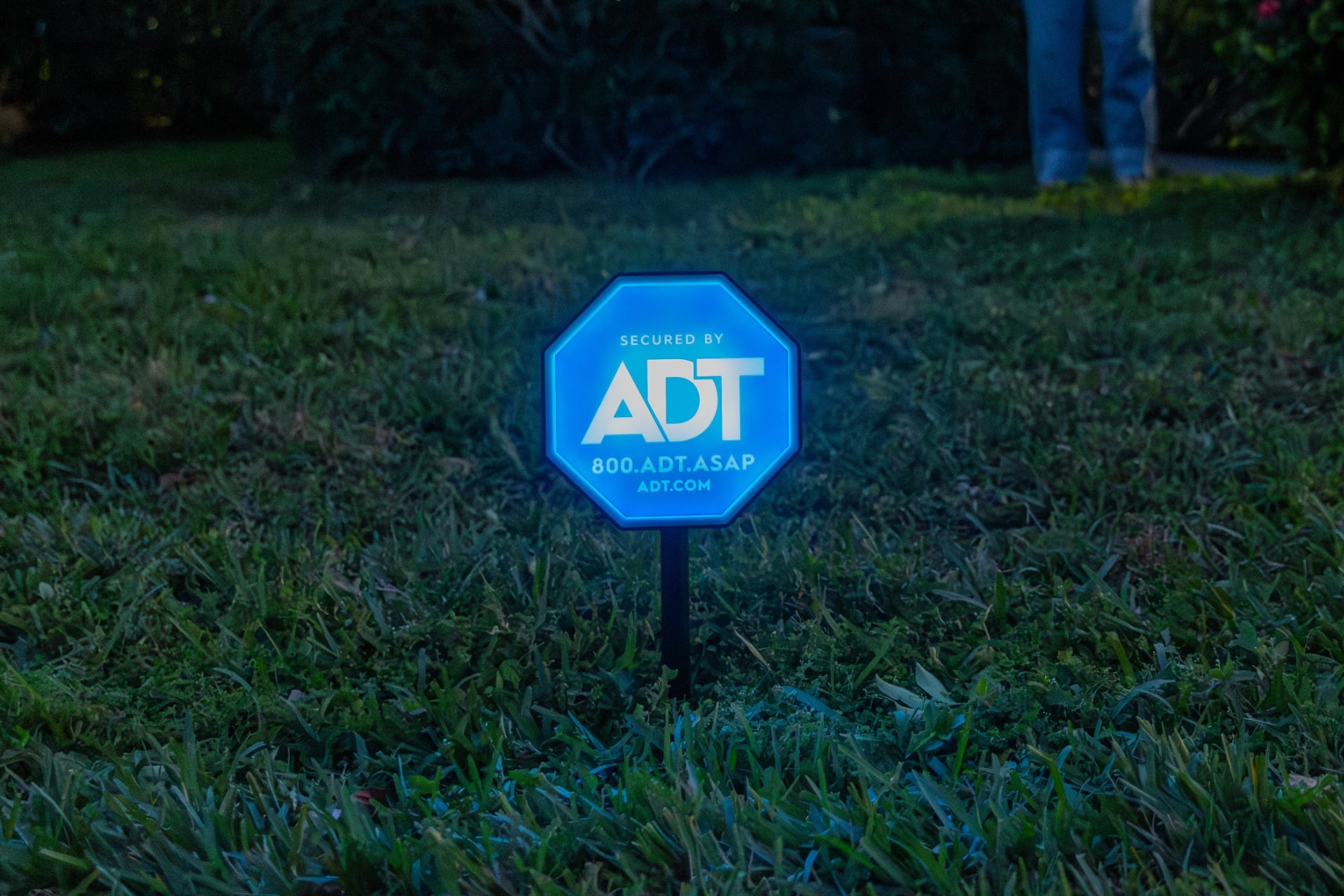
You know those little ADT security signs? You know, the ADT logo-emblazoned yard signs or stickers you find in front of houses or slapped on a window by the front door. Well, ADT is rethinking them: today, the home security company announced the ADT Live Light, a light-up version of its logo yard sign that will—you guessed it—shine when your ADT alarm system has been tripped.
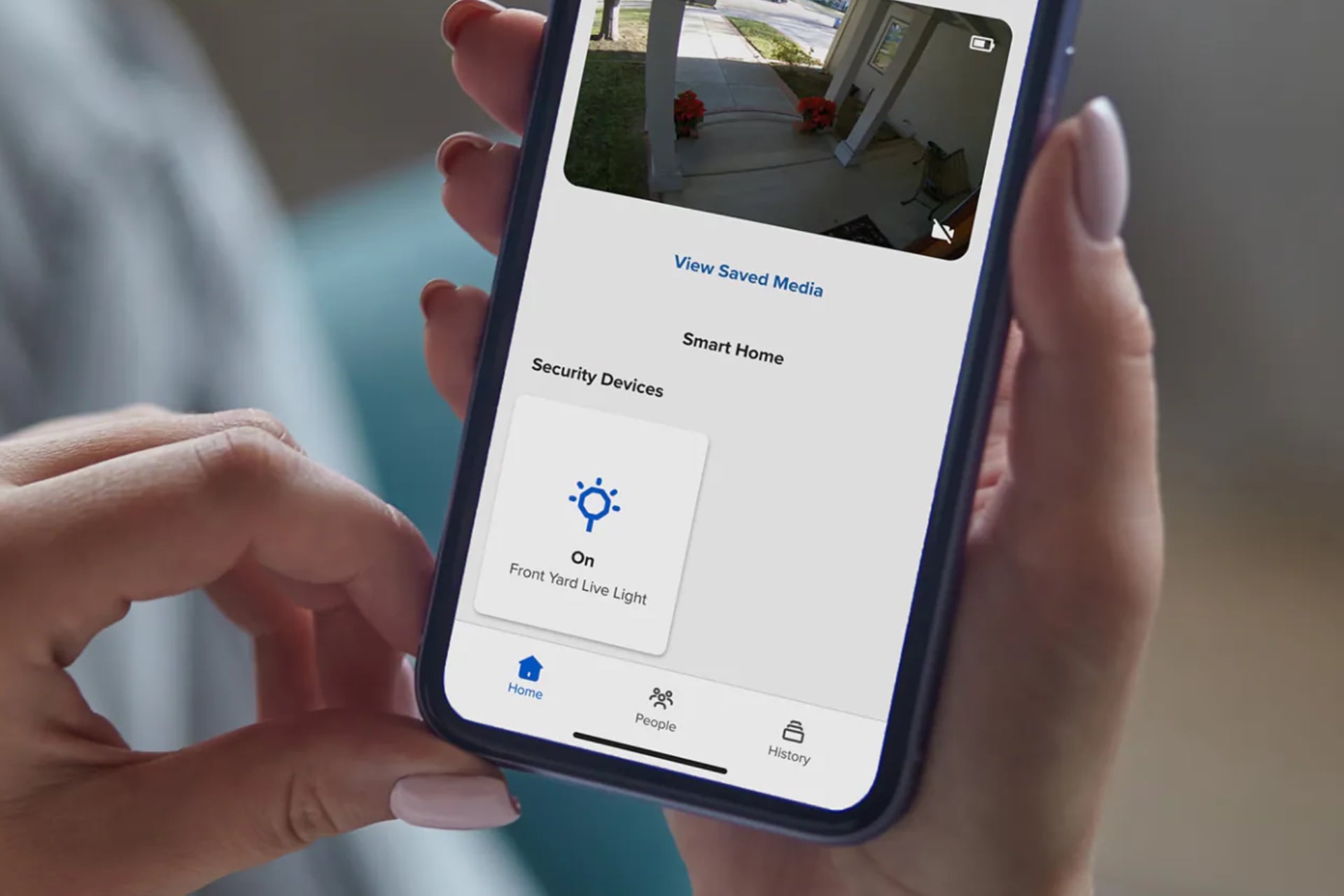
Besides being a visual indicator for your neighbors that something is amiss, ADT says the Live Light could be useful in helping first responders identify which house is yours. It would also serve the same purpose as the stickers and yard signs that came before it: letting would-be intruders know that they risk triggering an alarm by messing with your stuff. And while it can activate automatically, you can also turn it on using the ADT+ app if you want.
The Live Light is wireless and powered by three included AAA lithium batteries. It’s IP65-rated, meaning it should be dust-proof and resistant to water jets from any direction, and should operate in temperatures ranging from 4 to 122 degrees Fahrenheit. Both good things if you’re expecting people to leave their light-up sign out in the elements year-round (although those of us in the Midwest might want to bring it in for a couple of months in the winter). The sign itself is 10 x 10 inches tall and 1.75 inches thick, and goes into the ground with a 21-inch stake, although it can also be wall-mounted.
The Live Light requires a $25-per-month ADT Professional Monitoring subscription and costs $50, including professional installation. There’s no option to install it yourself; ADT requires that one of its own installers carry out what doesn’t strike me as a terribly complicated procedure. (But what do I know? I’m just a little ol’ country technology reporter.)
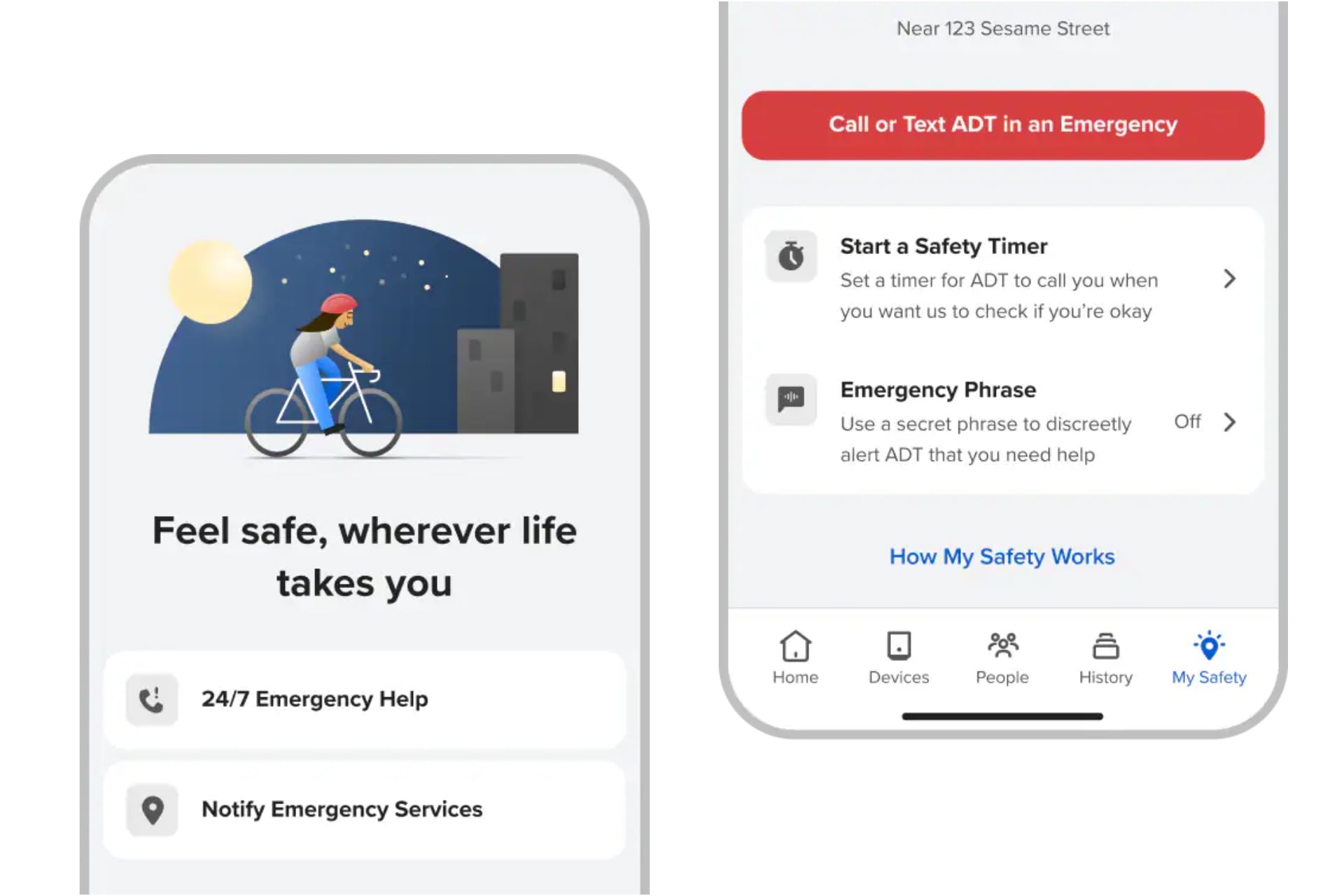
ADT also announced a new ADT+ app feature called My Safety. My Safety extends ADT’s subscriber service beyond your house by letting you do things like set a check-in timer that, if missed, will prompt ADT to contact emergency services for you. It also offers the manual options of speaking or texting with ADT agents, or setting an “Emergency Phrase” that lets you speak a custom phrase to summon help—that is, ADT will again contact emergency services for you. The company says subscribers will be able to use that last feature even if their phone isn’t in their hand, and I’ve asked exactly how that works.
For the My Safety feature, there’s no call history, and for subscriptions with multiple people on them, only the person who initiates a call with ADT monitoring will be able to see status, activity, alerts, and notifications. It’s nice to see the company has thought of that—it can be important for victims of abuse to be able to discreetly seek help. An ADT representative told Gizmodo via email that the ADT+ app update with My Safety is available now for all subscribers in the U.S., except in Milwaukee, WI.
#ADTs #Big #Idea #LightUp #ADT #Sign #YardADT,apps,Home security,Smart Home
You know those little ADT security signs? You know, the ADT logo-emblazoned yard signs or…