#49ers #coach #Tesla #Autopilot #crashedElectric Cars,Entertainment,News,Sports,Tesla,Transportation">49ers coach says his Tesla was on Autopilot when he crashed
“I’ve had Autopilot for nine years, so I’m pretty comfortable with it and, you know, who knows what happened when I turned around? Whether it malfunctioned or whether I knocked it off? That’s something I don’t know yet. But regardless, that’s… it is always your fault, whether you’re on Autopilot or not. You can’t take your eyes off the road. It’s a partnership driving, you don’t just turn it over to a computer.”
Mixed in with the new developments are trendy food spots like Hoppers and BAO. Hop a train from King’s Cross, and founders can be in Cambridge in 45 minutes to source talent or can be in Paris in two hours to strike a deal.
Who would have guessed that a little more than 20 years ago, this was one of the seediest areas in London?
“In the ’80s, crack and heroin made the area a major narcotics market,” Hussein Kanji, an investor at Hoxton Ventures, said, recalling syringes in tree trunks and gangs patrolling the streets. “In 1982, the local church was occupied by the English Collective of Prostitutes for 12 straight days.” Then, in the early 2000s, a real estate developer had a dream and, well, “now it is the AI hotbed of the United Kingdom,” Kanji said. “What a change.”
Around 18 months ago, his portfolio company BioCorteX moved from the neighborhood Holborn to the Jellicoe building in King’s Cross, hoping to be near the action. “Lots going on in London right now,” Nik Sharma, co-founder of BioCorteX, told me. “Lots of hyperscalers moving in.” That includes, reportedly, Jeff Bezos’ AI company Prometheus, which is also said to be in talks to move into the Jellicoe.
There are around 3,600 AI startups in London, which, together, have raised around $12.1 billion out of the $14.8 billion raised in the city since late July, according to Dealroom. Since the start of June, AI-related startups have leased more than 1 million square feet of office space in London, according to the real estate firm Knight Frank. With that, prime rents in King’s Cross have risen 18% over the past three years, Chris Dunn, a commercial insight associate at the firm, told me.
That percentage represents only the largest leases encompassing at least 10,000 square feet, like the ones OpenAI and Prometheus are signing. The shorter deals go for even more, he said, and now the vacancy rate for conventional office space is just 0.9%. “Demand has outstripped supply,” he continued.
Today, one of the big topics of the area is sovereignty. It was a wake-up call for many when Anthropic shut off access to Mythos and Fable this summer, leaving some in the ecosystem to conclude: “We’d better look after ourselves,” Saul Klein, co-founder of the VC firm Phoenix Court, told me.
Phoenix Court is located in the King’s Cross area and has three portfolio companies in the vicinity, including Olix (which just announced a $3.3 billion valuation), Early Health and CoMind. Robin Klein, co-founder of the firm, said the shutdown of Fable and Mythos access was a “small but sharp reminder that Europe can’t simply rent its AI capabilities and capacity; it needs to build and hold some of its own.” King’s Cross, he said, is where much of this building is actually happening.
“The bigger question,” he continued, “is whether the U.K. builds the infrastructure, compute, energy, capital, to make this self-reliance durable, rather than just hosting outposts of U.S. labs.”
Image Credits:Phoenix Court
Top founders want to stay
Simon Kohl, founder of Latent Labs, has offices in King’s Cross and San Francisco. The London office, at the moment, is growing faster, and he’s more bullish than ever on the ecosystem, he said. “The mood right now feels less like London trying to catch up and more like London becoming one of the default places to start a serious AI company,” he said.
Look around and you are likely to see Wayve testing its autonomous cars. Founded in 2017 by co-founder Alex Kendall, the unicorn is one of London’s biggest success stories.
“Ten years ago, building a frontier AI company from London felt like an unusual choice,” Kendall told me. “Now it feels like an obvious one.” Wayve moved into King’s Cross in 2018 looking for a space that could double as a garage — “a rare combination in Central London,” Kendall said. He has watched the ecosystem mature around him — and it’s now evident that a startup can stay in London, raise serious capital, hire world-class AI talent, and remain globally competitive, he said.
Down the street from Anthropic’s new 158,000-square-foot office is the AI agent builder Sierra and the AI video platform Synthesia.
Laura Gonzalez Florez, Synthesia’s chief of staff and head of people, says the company moved into its glossy new office building a year ago to accommodate its growing team. They were drawn to the area for the same reason as everyone else: “It’s very close to the airport … very close to where a lot of investors are,” she said.
Image Credits:Synthesia
Around two-thirds of Synthesia’s engineers are remote, Gonzalez Florez said, letting the company tap into an affordable, international, and diverse talent pool and helping it scale faster. “From London, we can hire and work, without any problem, people from anywhere, from Slovenia to Portugal,” she said.
Unsurprisingly, London’s AI boom is also causing a talent war.
U.K. AI job postings have skyrocketed in the past few years, per data from PwC. When Anthropic announced it moved into town earlier this year, it listed, for example, a salary range of £260,000 to £630,000 for a machine learning research engineer when the average salary in London for the same role is around £102,000. Some founders in the U.K., like those in Silicon Valley, are being forced to raise more and bigger rounds to keep up.
“The real test is whether more globally significant AI companies are founded, funded, and scaled from the U.K., while continuing to attract the world’s best talent to build them here,” Zain Ali, founder of the King’s Cross-based AI legal firm Centuro, told me. “If that continues to happen, King’s Cross won’t just be an AI hub. It’ll become one of the U.K.’s most important strategic assets.”
When you purchase through links in our articles, we may earn a small commission. This doesn’t affect our editorial independence.
Mixed in with the new developments are trendy food spots like Hoppers and BAO. Hop a train from King’s Cross, and founders can be in Cambridge in 45 minutes to source talent or can be in Paris in two hours to strike a deal.
Who would have guessed that a little more than 20 years ago, this was one of the seediest areas in London?
“In the ’80s, crack and heroin made the area a major narcotics market,” Hussein Kanji, an investor at Hoxton Ventures, said, recalling syringes in tree trunks and gangs patrolling the streets. “In 1982, the local church was occupied by the English Collective of Prostitutes for 12 straight days.” Then, in the early 2000s, a real estate developer had a dream and, well, “now it is the AI hotbed of the United Kingdom,” Kanji said. “What a change.”
Around 18 months ago, his portfolio company BioCorteX moved from the neighborhood Holborn to the Jellicoe building in King’s Cross, hoping to be near the action. “Lots going on in London right now,” Nik Sharma, co-founder of BioCorteX, told me. “Lots of hyperscalers moving in.” That includes, reportedly, Jeff Bezos’ AI company Prometheus, which is also said to be in talks to move into the Jellicoe.
There are around 3,600 AI startups in London, which, together, have raised around $12.1 billion out of the $14.8 billion raised in the city since late July, according to Dealroom. Since the start of June, AI-related startups have leased more than 1 million square feet of office space in London, according to the real estate firm Knight Frank. With that, prime rents in King’s Cross have risen 18% over the past three years, Chris Dunn, a commercial insight associate at the firm, told me.
That percentage represents only the largest leases encompassing at least 10,000 square feet, like the ones OpenAI and Prometheus are signing. The shorter deals go for even more, he said, and now the vacancy rate for conventional office space is just 0.9%. “Demand has outstripped supply,” he continued.
Today, one of the big topics of the area is sovereignty. It was a wake-up call for many when Anthropic shut off access to Mythos and Fable this summer, leaving some in the ecosystem to conclude: “We’d better look after ourselves,” Saul Klein, co-founder of the VC firm Phoenix Court, told me.
Phoenix Court is located in the King’s Cross area and has three portfolio companies in the vicinity, including Olix (which just announced a $3.3 billion valuation), Early Health and CoMind. Robin Klein, co-founder of the firm, said the shutdown of Fable and Mythos access was a “small but sharp reminder that Europe can’t simply rent its AI capabilities and capacity; it needs to build and hold some of its own.” King’s Cross, he said, is where much of this building is actually happening.
“The bigger question,” he continued, “is whether the U.K. builds the infrastructure, compute, energy, capital, to make this self-reliance durable, rather than just hosting outposts of U.S. labs.”
Image Credits:Phoenix Court
Top founders want to stay
Simon Kohl, founder of Latent Labs, has offices in King’s Cross and San Francisco. The London office, at the moment, is growing faster, and he’s more bullish than ever on the ecosystem, he said. “The mood right now feels less like London trying to catch up and more like London becoming one of the default places to start a serious AI company,” he said.
Look around and you are likely to see Wayve testing its autonomous cars. Founded in 2017 by co-founder Alex Kendall, the unicorn is one of London’s biggest success stories.
“Ten years ago, building a frontier AI company from London felt like an unusual choice,” Kendall told me. “Now it feels like an obvious one.” Wayve moved into King’s Cross in 2018 looking for a space that could double as a garage — “a rare combination in Central London,” Kendall said. He has watched the ecosystem mature around him — and it’s now evident that a startup can stay in London, raise serious capital, hire world-class AI talent, and remain globally competitive, he said.
Down the street from Anthropic’s new 158,000-square-foot office is the AI agent builder Sierra and the AI video platform Synthesia.
Laura Gonzalez Florez, Synthesia’s chief of staff and head of people, says the company moved into its glossy new office building a year ago to accommodate its growing team. They were drawn to the area for the same reason as everyone else: “It’s very close to the airport … very close to where a lot of investors are,” she said.
Image Credits:Synthesia
Around two-thirds of Synthesia’s engineers are remote, Gonzalez Florez said, letting the company tap into an affordable, international, and diverse talent pool and helping it scale faster. “From London, we can hire and work, without any problem, people from anywhere, from Slovenia to Portugal,” she said.
Unsurprisingly, London’s AI boom is also causing a talent war.
U.K. AI job postings have skyrocketed in the past few years, per data from PwC. When Anthropic announced it moved into town earlier this year, it listed, for example, a salary range of £260,000 to £630,000 for a machine learning research engineer when the average salary in London for the same role is around £102,000. Some founders in the U.K., like those in Silicon Valley, are being forced to raise more and bigger rounds to keep up.
“The real test is whether more globally significant AI companies are founded, funded, and scaled from the U.K., while continuing to attract the world’s best talent to build them here,” Zain Ali, founder of the King’s Cross-based AI legal firm Centuro, told me. “If that continues to happen, King’s Cross won’t just be an AI hub. It’ll become one of the U.K.’s most important strategic assets.”
When you purchase through links in our articles, we may earn a small commission. This doesn’t affect our editorial independence.
#Thisformernotorious #redlight #districtis #nowone #worlds #top #hubs #TechCrunchUK">This former notorious red-light district is now one of the world’s top AI hubs | TechCrunch
What every U.K. AI startup wants to know these days is, how can I get office space in King’s Cross?
The area is so hot that a VC firm allegedly recently won a deal by promising a founder office space in the neighborhood. “We stop at nothing to win deals [for] and to support” founders, “including helping them source office space when needed,” the firm told me when asked about the rumor, declining to confirm or deny any details.
The neighborhood’s popularity began back in 2016 when DeepMind — then newly acquired by Google — moved in. Soon after, a flood of AI startups followed, wanting to be around the Google DeepMind magic. Today, they hope to take advantage of the cluster of AI talent there.
This has transformed King’s Cross into one of the world’s top AI hubs, rivaled only by San Francisco and Beijing. Around London, it’s known by the sobriquet “Knowledge Quarter,” as it’s home to names like OpenAI, Meta, Isomorphic Labs, Cusp AI, Wayne, Recursive, and, a little farther down the road, Synthesia and Anthropic. The European Technology Network (ETN) just moved into a glossy new office nearby, while University College London sits around the corner.
Mixed in with the new developments are trendy food spots like Hoppers and BAO. Hop a train from King’s Cross, and founders can be in Cambridge in 45 minutes to source talent or can be in Paris in two hours to strike a deal.
Who would have guessed that a little more than 20 years ago, this was one of the seediest areas in London?
“In the ’80s, crack and heroin made the area a major narcotics market,” Hussein Kanji, an investor at Hoxton Ventures, said, recalling syringes in tree trunks and gangs patrolling the streets. “In 1982, the local church was occupied by the English Collective of Prostitutes for 12 straight days.” Then, in the early 2000s, a real estate developer had a dream and, well, “now it is the AI hotbed of the United Kingdom,” Kanji said. “What a change.”
Around 18 months ago, his portfolio company BioCorteX moved from the neighborhood Holborn to the Jellicoe building in King’s Cross, hoping to be near the action. “Lots going on in London right now,” Nik Sharma, co-founder of BioCorteX, told me. “Lots of hyperscalers moving in.” That includes, reportedly, Jeff Bezos’ AI company Prometheus, which is also said to be in talks to move into the Jellicoe.
There are around 3,600 AI startups in London, which, together, have raised around $12.1 billion out of the $14.8 billion raised in the city since late July, according to Dealroom. Since the start of June, AI-related startups have leased more than 1 million square feet of office space in London, according to the real estate firm Knight Frank. With that, prime rents in King’s Cross have risen 18% over the past three years, Chris Dunn, a commercial insight associate at the firm, told me.
That percentage represents only the largest leases encompassing at least 10,000 square feet, like the ones OpenAI and Prometheus are signing. The shorter deals go for even more, he said, and now the vacancy rate for conventional office space is just 0.9%. “Demand has outstripped supply,” he continued.
Today, one of the big topics of the area is sovereignty. It was a wake-up call for many when Anthropic shut off access to Mythos and Fable this summer, leaving some in the ecosystem to conclude: “We’d better look after ourselves,” Saul Klein, co-founder of the VC firm Phoenix Court, told me.
Phoenix Court is located in the King’s Cross area and has three portfolio companies in the vicinity, including Olix (which just announced a $3.3 billion valuation), Early Health and CoMind. Robin Klein, co-founder of the firm, said the shutdown of Fable and Mythos access was a “small but sharp reminder that Europe can’t simply rent its AI capabilities and capacity; it needs to build and hold some of its own.” King’s Cross, he said, is where much of this building is actually happening.
“The bigger question,” he continued, “is whether the U.K. builds the infrastructure, compute, energy, capital, to make this self-reliance durable, rather than just hosting outposts of U.S. labs.”
Image Credits:Phoenix Court
Top founders want to stay
Simon Kohl, founder of Latent Labs, has offices in King’s Cross and San Francisco. The London office, at the moment, is growing faster, and he’s more bullish than ever on the ecosystem, he said. “The mood right now feels less like London trying to catch up and more like London becoming one of the default places to start a serious AI company,” he said.
Look around and you are likely to see Wayve testing its autonomous cars. Founded in 2017 by co-founder Alex Kendall, the unicorn is one of London’s biggest success stories.
“Ten years ago, building a frontier AI company from London felt like an unusual choice,” Kendall told me. “Now it feels like an obvious one.” Wayve moved into King’s Cross in 2018 looking for a space that could double as a garage — “a rare combination in Central London,” Kendall said. He has watched the ecosystem mature around him — and it’s now evident that a startup can stay in London, raise serious capital, hire world-class AI talent, and remain globally competitive, he said.
Down the street from Anthropic’s new 158,000-square-foot office is the AI agent builder Sierra and the AI video platform Synthesia.
Laura Gonzalez Florez, Synthesia’s chief of staff and head of people, says the company moved into its glossy new office building a year ago to accommodate its growing team. They were drawn to the area for the same reason as everyone else: “It’s very close to the airport … very close to where a lot of investors are,” she said.
Image Credits:Synthesia
Around two-thirds of Synthesia’s engineers are remote, Gonzalez Florez said, letting the company tap into an affordable, international, and diverse talent pool and helping it scale faster. “From London, we can hire and work, without any problem, people from anywhere, from Slovenia to Portugal,” she said.
Unsurprisingly, London’s AI boom is also causing a talent war.
U.K. AI job postings have skyrocketed in the past few years, per data from PwC. When Anthropic announced it moved into town earlier this year, it listed, for example, a salary range of £260,000 to £630,000 for a machine learning research engineer when the average salary in London for the same role is around £102,000. Some founders in the U.K., like those in Silicon Valley, are being forced to raise more and bigger rounds to keep up.
“The real test is whether more globally significant AI companies are founded, funded, and scaled from the U.K., while continuing to attract the world’s best talent to build them here,” Zain Ali, founder of the King’s Cross-based AI legal firm Centuro, told me. “If that continues to happen, King’s Cross won’t just be an AI hub. It’ll become one of the U.K.’s most important strategic assets.”
When you purchase through links in our articles, we may earn a small commission. This doesn’t affect our editorial independence.
Every step you take closes the doors that the attacker may open slightly, and when you combine everything, you would have a door to a series of locked gates.
Why Do I Need a Bastion Host?
When it comes to teams working with many servers, deploying a bastion host (jump box) may be a clean and effective way to solve the long-term problem. With this method, you only expose SSH to the bastion, and the other servers accept it only when it’s from the bastion’s internal IP. This centralizes logging and makes auditing access far simpler.
Using a virtual private network (VPN) and a bastion host together is perfectly fine – and many solutions use both: a safe way to access the private network via a VPN, followed by use of a bastion host to restrict which servers can be accessed. Some teams may decide to forgo the bastion because they don’t have the manpower to manage one, and so use a combination of a VPN and a set of firewall rules that still quite a bit lowers the exposure, but without the extra effort.
Mistakes Leading to Leaving Cloud Servers Open
The Mistakes That Cause Leaving Cloud Servers Open: Even the safest development teams may have slip-ups from time to time. One of the most frequent is leaving staged, or test servers with relaxed firewall rules equivalent to those of the production environment – hackers don’t concern themselves with which environment they first land on. Another frequent error is reusing the same SSH key on several servers and clients, causing one hacked laptop to compromise all servers that key has access to.
Another common human error is not removing or changing access when someone leaves the team, so stale credentials remain valid and accessible. At last, putting trust in the strategy of “security through obscurity” – meaning one thinks that setting up the unusual port or hiding the hostname from the public is actually sufficient security – creates a wrong impression of security. This is mostly true; in reality, modern-day attackers scan all ports anyway, and there is no way to hide from them.
System Administrators Guide to Secure Remote Access
Prohibit SSH password logins totally and depend exclusively on key-based authentication
Surely no one wants to type in the password every time; because of this, use only key-based authentication
Deter the user from logging in as root by default and instead use the sudo command to do root tasks
A firewall or security group rule can provide great help with IP address-based restrictions on SSH logins
For access that comes from untrusted sources or external networks, use a secure tunnel like a vpn or bastion host
Periodically change SSH keys and inspect access lists
Maintain records of login attempts and detect brute-force attacks as quickly as possible
Frequently Asked Questions
What is the principal means by which cloud servers suffer break-ins through remote access?
By far the biggest reason why this can happen is unauthorized password-based SSH logins that have been cracked by brute force. The scenario is most likely to develop where the administrator allows root login via password and leaves the default port open.
Sufficient security measures for the server via SSH keys: Do you think it is safe to rely only on key authentication?
It is true that SSH keys drastically decrease the danger of a successful brute-force attack. However, if there is only key authentication on the server, there are still risks – the server administrator can always enable root login or disable the IP-based login restrictions. So it is recommended to always have these three in the server configuration: disabled root login, restricted access to known IPs, and rotating the keys regularly as the main components of meaningful protection.
Is it really necessary to set up a separate VPN network while I am able to connect via SSH keys?
A VPN gives extra security by first encrypting your computer traffic before it reaches your network, where the SSH connection will be used. This is mostly important when working on untrusted networks – like public wi-fi – where there is a threat of a potential hacker in your local network looking at your data.
Bastion host vs VPN as methods of accessing the server?
The bastion host works by funneling SSH sessions from many users through a single, carefully monitored server point while the rest of the network (and mostly the servers) remains protected from the internet. At the same time, a vpn will fully encrypt the communication between the user and the corporate network or servers. The combination is very common among larger security teams as a part of the defense-in-depth principle.
How often should SSH keys be rotated?
The ideal period to change your SSH keys depends on the security practices of your organization, but generally a good practice is to change SSH keys between 90 and 180 days, or in the case that the user who had access with the key leaves or is no longer able to be contacted, such as when a team member leaves.
Why is only changing the port number for SSH enough to secure that port?
Changing the port reduces automated scanning noise in your logs but isn’t a real security control on its own — port scanners check all ports, so it should never replace key-based auth and firewall rules.
Every step you take closes the doors that the attacker may open slightly, and when you combine everything, you would have a door to a series of locked gates.
Why Do I Need a Bastion Host?
When it comes to teams working with many servers, deploying a bastion host (jump box) may be a clean and effective way to solve the long-term problem. With this method, you only expose SSH to the bastion, and the other servers accept it only when it’s from the bastion’s internal IP. This centralizes logging and makes auditing access far simpler.
Using a virtual private network (VPN) and a bastion host together is perfectly fine – and many solutions use both: a safe way to access the private network via a VPN, followed by use of a bastion host to restrict which servers can be accessed. Some teams may decide to forgo the bastion because they don’t have the manpower to manage one, and so use a combination of a VPN and a set of firewall rules that still quite a bit lowers the exposure, but without the extra effort.
Mistakes Leading to Leaving Cloud Servers Open
The Mistakes That Cause Leaving Cloud Servers Open: Even the safest development teams may have slip-ups from time to time. One of the most frequent is leaving staged, or test servers with relaxed firewall rules equivalent to those of the production environment – hackers don’t concern themselves with which environment they first land on. Another frequent error is reusing the same SSH key on several servers and clients, causing one hacked laptop to compromise all servers that key has access to.
Another common human error is not removing or changing access when someone leaves the team, so stale credentials remain valid and accessible. At last, putting trust in the strategy of “security through obscurity” – meaning one thinks that setting up the unusual port or hiding the hostname from the public is actually sufficient security – creates a wrong impression of security. This is mostly true; in reality, modern-day attackers scan all ports anyway, and there is no way to hide from them.
System Administrators Guide to Secure Remote Access
Prohibit SSH password logins totally and depend exclusively on key-based authentication
Surely no one wants to type in the password every time; because of this, use only key-based authentication
Deter the user from logging in as root by default and instead use the sudo command to do root tasks
A firewall or security group rule can provide great help with IP address-based restrictions on SSH logins
For access that comes from untrusted sources or external networks, use a secure tunnel like a vpn or bastion host
Periodically change SSH keys and inspect access lists
Maintain records of login attempts and detect brute-force attacks as quickly as possible
Frequently Asked Questions
What is the principal means by which cloud servers suffer break-ins through remote access?
By far the biggest reason why this can happen is unauthorized password-based SSH logins that have been cracked by brute force. The scenario is most likely to develop where the administrator allows root login via password and leaves the default port open.
Sufficient security measures for the server via SSH keys: Do you think it is safe to rely only on key authentication?
It is true that SSH keys drastically decrease the danger of a successful brute-force attack. However, if there is only key authentication on the server, there are still risks – the server administrator can always enable root login or disable the IP-based login restrictions. So it is recommended to always have these three in the server configuration: disabled root login, restricted access to known IPs, and rotating the keys regularly as the main components of meaningful protection.
Is it really necessary to set up a separate VPN network while I am able to connect via SSH keys?
A VPN gives extra security by first encrypting your computer traffic before it reaches your network, where the SSH connection will be used. This is mostly important when working on untrusted networks – like public wi-fi – where there is a threat of a potential hacker in your local network looking at your data.
Bastion host vs VPN as methods of accessing the server?
The bastion host works by funneling SSH sessions from many users through a single, carefully monitored server point while the rest of the network (and mostly the servers) remains protected from the internet. At the same time, a vpn will fully encrypt the communication between the user and the corporate network or servers. The combination is very common among larger security teams as a part of the defense-in-depth principle.
How often should SSH keys be rotated?
The ideal period to change your SSH keys depends on the security practices of your organization, but generally a good practice is to change SSH keys between 90 and 180 days, or in the case that the user who had access with the key leaves or is no longer able to be contacted, such as when a team member leaves.
Why is only changing the port number for SSH enough to secure that port?
Changing the port reduces automated scanning noise in your logs but isn’t a real security control on its own — port scanners check all ports, so it should never replace key-based auth and firewall rules.
#Secure #Remote #Access #Cloud #ServerCloud,remote access">How to Secure Remote Access to Your Cloud Server in 2026
Protection against unauthorized remote logins to your cloud server is a matter of SSH key-based authentication, a strict security policy on the firewall, two-factor authentication, and a secure communication channel – no individual component will give adequate protection by itself. The major risk point in breaches is not the server but the open door to remote login. To patch that vulnerability, you need a series of countermeasures, not a magical setting.
Why Remote Server Access Is a Common Attack Vector
Every cloud server exposes at least one remote access point – usually SSH on port 22 – and that port is scanned constantly by bots looking for weak credentials. Password-based login is the most common way a system can be attacked by brute force, and it is quite common with a standard setup that the system is left in a state where an admin/user of that system – “root user” – can log in directly by guessing the user ID and the password combination. Add in shared team credentials, forgotten firewall rules from old projects, and staging servers left publicly reachable, and it’s clear why misconfigured remote access – not zero-day exploits – is behind most cloud server compromises. The fix is simple, though you’ll need to do some setup yourself instead of trusting the default setting.
How to lock down SSH access in the right way
The best way to secure remote access is through a series of small improvements rather than one major overhaul. The following is a real working method:
Switch to SSH key authentication, then turn off password login completely in the same location: sshd_config. Keys are far harder to brute-force than passwords.
Disable root login over SSH and require a non-root user with sudo privileges instead; this is a security advantage that even without any change, one key compromising would limit the impact.
Change the default SSH port away from 22 to cut down on automated scanning noise (not a security measure on its own, but it reduces log clutter).
Restrict access by IP using your firewall or security group, allowing SSH only from known office or VPN IP ranges rather than the entire internet.
Add a VPN as a connection layer for anyone accessing servers from outside a trusted network – a VPN like Planet VPN’s free VPN service can encrypt the connection between a remote worker’s laptop and the server before SSH traffic ever leaves their device, which matters especially on public wi-fi or shared networks.
Every step you take closes the doors that the attacker may open slightly, and when you combine everything, you would have a door to a series of locked gates.
Why Do I Need a Bastion Host?
When it comes to teams working with many servers, deploying a bastion host (jump box) may be a clean and effective way to solve the long-term problem. With this method, you only expose SSH to the bastion, and the other servers accept it only when it’s from the bastion’s internal IP. This centralizes logging and makes auditing access far simpler.
Using a virtual private network (VPN) and a bastion host together is perfectly fine – and many solutions use both: a safe way to access the private network via a VPN, followed by use of a bastion host to restrict which servers can be accessed. Some teams may decide to forgo the bastion because they don’t have the manpower to manage one, and so use a combination of a VPN and a set of firewall rules that still quite a bit lowers the exposure, but without the extra effort.
Mistakes Leading to Leaving Cloud Servers Open
The Mistakes That Cause Leaving Cloud Servers Open: Even the safest development teams may have slip-ups from time to time. One of the most frequent is leaving staged, or test servers with relaxed firewall rules equivalent to those of the production environment – hackers don’t concern themselves with which environment they first land on. Another frequent error is reusing the same SSH key on several servers and clients, causing one hacked laptop to compromise all servers that key has access to.
Another common human error is not removing or changing access when someone leaves the team, so stale credentials remain valid and accessible. At last, putting trust in the strategy of “security through obscurity” – meaning one thinks that setting up the unusual port or hiding the hostname from the public is actually sufficient security – creates a wrong impression of security. This is mostly true; in reality, modern-day attackers scan all ports anyway, and there is no way to hide from them.
System Administrators Guide to Secure Remote Access
Prohibit SSH password logins totally and depend exclusively on key-based authentication
Surely no one wants to type in the password every time; because of this, use only key-based authentication
Deter the user from logging in as root by default and instead use the sudo command to do root tasks
A firewall or security group rule can provide great help with IP address-based restrictions on SSH logins
For access that comes from untrusted sources or external networks, use a secure tunnel like a vpn or bastion host
Periodically change SSH keys and inspect access lists
Maintain records of login attempts and detect brute-force attacks as quickly as possible
Frequently Asked Questions
What is the principal means by which cloud servers suffer break-ins through remote access?
By far the biggest reason why this can happen is unauthorized password-based SSH logins that have been cracked by brute force. The scenario is most likely to develop where the administrator allows root login via password and leaves the default port open.
Sufficient security measures for the server via SSH keys: Do you think it is safe to rely only on key authentication?
It is true that SSH keys drastically decrease the danger of a successful brute-force attack. However, if there is only key authentication on the server, there are still risks – the server administrator can always enable root login or disable the IP-based login restrictions. So it is recommended to always have these three in the server configuration: disabled root login, restricted access to known IPs, and rotating the keys regularly as the main components of meaningful protection.
Is it really necessary to set up a separate VPN network while I am able to connect via SSH keys?
A VPN gives extra security by first encrypting your computer traffic before it reaches your network, where the SSH connection will be used. This is mostly important when working on untrusted networks – like public wi-fi – where there is a threat of a potential hacker in your local network looking at your data.
Bastion host vs VPN as methods of accessing the server?
The bastion host works by funneling SSH sessions from many users through a single, carefully monitored server point while the rest of the network (and mostly the servers) remains protected from the internet. At the same time, a vpn will fully encrypt the communication between the user and the corporate network or servers. The combination is very common among larger security teams as a part of the defense-in-depth principle.
How often should SSH keys be rotated?
The ideal period to change your SSH keys depends on the security practices of your organization, but generally a good practice is to change SSH keys between 90 and 180 days, or in the case that the user who had access with the key leaves or is no longer able to be contacted, such as when a team member leaves.
Why is only changing the port number for SSH enough to secure that port?
Changing the port reduces automated scanning noise in your logs but isn’t a real security control on its own — port scanners check all ports, so it should never replace key-based auth and firewall rules.
Protection against unauthorized remote logins to your cloud server is a matter of SSH key-based…
Do you remember a few years ago when it was reported the Leprechaun franchise was coming back? Lionsgate apparently means it for real this time, as it’s brought on two writers to script its new film.
That would be Patrick Melton and Marcus Dunstan, according to Deadline. After previously teaming on 2022’s Unhuman and the screen story for 2019’s Scary Stories to Tell in the Dark, the pair have reunited to revitalize this dormant franchise. In the producer’s chair are father-and-son duo Oren and Miles Koules—longtime producers on the Saw franchise—with the latter telling Deadline he was ready to work on “a terrifying new way into the rich world of Leprechaun.“
Last we heard in 2023, Lionsgate had filmmaker Felipe Vargas on hand to direct a new Leprechaun in what would’ve been his feature film debut. (Vargas’ takes comes after Jane Schoenbrun was approached to helm a reboot a year prior, which they ultimately passed on in favor of I Saw the TV Glow.) Plans with Vargas fell through, but the studio’s not given up, likely because of the success Alienand Predatorsaw when they came back to theaters. And they’re not the only ones: Texas Chainsaw Massacre and Nightmare on Elm Streetaren’t far behind, and Saw could be joining them as well.
Plot details on the Leprechaun revival are currently under wraps, but we’ll have more as news emerges—including whether Warwick Davis is game to make a return of some kind.
Do you remember a few years ago when it was reported the Leprechaun franchise was coming back? Lionsgate apparently means it for real this time, as it’s brought on two writers to script its new film.
That would be Patrick Melton and Marcus Dunstan, according to Deadline. After previously teaming on 2022’s Unhuman and the screen story for 2019’s Scary Stories to Tell in the Dark, the pair have reunited to revitalize this dormant franchise. In the producer’s chair are father-and-son duo Oren and Miles Koules—longtime producers on the Saw franchise—with the latter telling Deadline he was ready to work on “a terrifying new way into the rich world of Leprechaun.“
Last we heard in 2023, Lionsgate had filmmaker Felipe Vargas on hand to direct a new Leprechaun in what would’ve been his feature film debut. (Vargas’ takes comes after Jane Schoenbrun was approached to helm a reboot a year prior, which they ultimately passed on in favor of I Saw the TV Glow.) Plans with Vargas fell through, but the studio’s not given up, likely because of the success Alienand Predatorsaw when they came back to theaters. And they’re not the only ones: Texas Chainsaw Massacre and Nightmare on Elm Streetaren’t far behind, and Saw could be joining them as well.
Plot details on the Leprechaun revival are currently under wraps, but we’ll have more as news emerges—including whether Warwick Davis is game to make a return of some kind.
#Lionsgate #Bring #Leprechaun #LifeLeprechaun,Lionsgate">Lionsgate Is Trying to Bring ‘Leprechaun’ Back to Life (Again)
Do you remember a few years ago when it was reported the Leprechaun franchise was coming back? Lionsgate apparently means it for real this time, as it’s brought on two writers to script its new film.
That would be Patrick Melton and Marcus Dunstan, according to Deadline. After previously teaming on 2022’s Unhuman and the screen story for 2019’s Scary Stories to Tell in the Dark, the pair have reunited to revitalize this dormant franchise. In the producer’s chair are father-and-son duo Oren and Miles Koules—longtime producers on the Saw franchise—with the latter telling Deadline he was ready to work on “a terrifying new way into the rich world of Leprechaun.“
Last we heard in 2023, Lionsgate had filmmaker Felipe Vargas on hand to direct a new Leprechaun in what would’ve been his feature film debut. (Vargas’ takes comes after Jane Schoenbrun was approached to helm a reboot a year prior, which they ultimately passed on in favor of I Saw the TV Glow.) Plans with Vargas fell through, but the studio’s not given up, likely because of the success Alienand Predatorsaw when they came back to theaters. And they’re not the only ones: Texas Chainsaw Massacre and Nightmare on Elm Streetaren’t far behind, and Saw could be joining them as well.
Plot details on the Leprechaun revival are currently under wraps, but we’ll have more as news emerges—including whether Warwick Davis is game to make a return of some kind.
Do you remember a few years ago when it was reported the Leprechaun franchise was coming back?…
The US Department of Commerce, which oversees the Census Bureau, is circulating a proposed rule that would cease the collection of demographic data on racial minorities and LGBTQ+ people and prevent undocumented immigrants from being counted in the 2030 census, according to documents viewed by WIRED.
The decision could have far-reaching implications for federal funding, particularly in states where there are substantial numbers of racial and ethnic minorities, as well as on immigrant communities across the country.
The proposed rule, which is being circulated across government agencies for review, says the census will eliminate questions about race and sexual orientation “to protect from any distortions created from the inclusion of personal questions.” The memo also states that “illegal aliens (among others) should not be included in the apportionment count, they are not true inhabitants, members of the body politics [sic], or persons with ‘usual residence’ in the United States.”
This would likely require the reintroduction of a census question about a respondent’s citizenship. During Donald Trump’s first presidential term, Republicans attempted to add a citizenship question to the census for the first time since 1950. The effort was struck down by the Supreme Court, 5-4, with Chief Justice John Roberts siding with the Court’s then-larger liberal bloc on the grounds that the justification for adding the question was “contrived.” The decision did not, though, find that citizenship questions are inherently unconstitutional.
The Department of Commerce did not reply to requests for comment.
“This is about the Voting Rights Act,” says Danah Boyd, a professor at Cornell University who studies the census, referencing the landmark voter protection legislation that the Supreme Court dismantled earlier this year. Eliminating the collection of these data, she says, would make it difficult to make basic assessments, like whether a congressional district is predominantly made of minorities.
“If we don’t know certain things, we can’t challenge them politically,” says Boyd. “If we don’t know that certain peoples live in a particular geography, we can’t say, ‘Oh my gosh, here’s some massive inequality.’”
Republicans and the Trump administration have long taken aim at the census. More recently, members of the Trump administration have attacked a little-known statistical method called “differential privacy,” which is used to prevent census data from being used to reidentify individual respondents, claiming that it makes the results inaccurate. In August 2025, Republican representative August Pfluger made another attempt to reintroduce a citizenship question on the census, sponsoring a bill called the COUNT Act, and in October, Republican senator Jim Banks of Indiana published a letter to Commerce secretary Howard Lutnick, writing, “There is a credible argument that the framers of the Constitution designed the Census to cover lawful inhabitants and not those who are present illegally.”
Census questions are set between two and three years in advance of the actual survey, based on priorities set by the administration. The data from the census inform everything from the apportionment of congressional seats to federal funding that is allocated based on the size of a population.
An employee at the Department of Health and Human Services, who asked to remain anonymous because they are not authorized to speak to the press, tells WIRED that “many HHS programs use Census data to appropriate funding. Removing undocumented individuals from the census will cause localities with high numbers of those populations to lose critical federal funding.”
The employee says that removal of racial categories could specifically impact Native populations, which sometimes receive specialized funding. “Some programs use the ‘American Indian or Alaska Native’ category from the Census to make determinations of grants set aside for Tribal entities,” they say.
The US Department of Commerce, which oversees the Census Bureau, is circulating a proposed rule that would cease the collection of demographic data on racial minorities and LGBTQ+ people and prevent undocumented immigrants from being counted in the 2030 census, according to documents viewed by WIRED.
The decision could have far-reaching implications for federal funding, particularly in states where there are substantial numbers of racial and ethnic minorities, as well as on immigrant communities across the country.
The proposed rule, which is being circulated across government agencies for review, says the census will eliminate questions about race and sexual orientation “to protect from any distortions created from the inclusion of personal questions.” The memo also states that “illegal aliens (among others) should not be included in the apportionment count, they are not true inhabitants, members of the body politics [sic], or persons with ‘usual residence’ in the United States.”
This would likely require the reintroduction of a census question about a respondent’s citizenship. During Donald Trump’s first presidential term, Republicans attempted to add a citizenship question to the census for the first time since 1950. The effort was struck down by the Supreme Court, 5-4, with Chief Justice John Roberts siding with the Court’s then-larger liberal bloc on the grounds that the justification for adding the question was “contrived.” The decision did not, though, find that citizenship questions are inherently unconstitutional.
The Department of Commerce did not reply to requests for comment.
“This is about the Voting Rights Act,” says Danah Boyd, a professor at Cornell University who studies the census, referencing the landmark voter protection legislation that the Supreme Court dismantled earlier this year. Eliminating the collection of these data, she says, would make it difficult to make basic assessments, like whether a congressional district is predominantly made of minorities.
“If we don’t know certain things, we can’t challenge them politically,” says Boyd. “If we don’t know that certain peoples live in a particular geography, we can’t say, ‘Oh my gosh, here’s some massive inequality.’”
Republicans and the Trump administration have long taken aim at the census. More recently, members of the Trump administration have attacked a little-known statistical method called “differential privacy,” which is used to prevent census data from being used to reidentify individual respondents, claiming that it makes the results inaccurate. In August 2025, Republican representative August Pfluger made another attempt to reintroduce a citizenship question on the census, sponsoring a bill called the COUNT Act, and in October, Republican senator Jim Banks of Indiana published a letter to Commerce secretary Howard Lutnick, writing, “There is a credible argument that the framers of the Constitution designed the Census to cover lawful inhabitants and not those who are present illegally.”
Census questions are set between two and three years in advance of the actual survey, based on priorities set by the administration. The data from the census inform everything from the apportionment of congressional seats to federal funding that is allocated based on the size of a population.
An employee at the Department of Health and Human Services, who asked to remain anonymous because they are not authorized to speak to the press, tells WIRED that “many HHS programs use Census data to appropriate funding. Removing undocumented individuals from the census will cause localities with high numbers of those populations to lose critical federal funding.”
The employee says that removal of racial categories could specifically impact Native populations, which sometimes receive specialized funding. “Some programs use the ‘American Indian or Alaska Native’ category from the Census to make determinations of grants set aside for Tribal entities,” they say.
#Census #Proposal #Stop #Counting #Undocumented #Immigrantsand #Ignore #Race #Sexual #Orientationus census,immigration,undocumented immigrants,race,lgbtq+">Census Proposal Would Stop Counting Undocumented Immigrants—and Ignore Race and Sexual Orientation
The US Department of Commerce, which oversees the Census Bureau, is circulating a proposed rule that would cease the collection of demographic data on racial minorities and LGBTQ+ people and prevent undocumented immigrants from being counted in the 2030 census, according to documents viewed by WIRED.
The decision could have far-reaching implications for federal funding, particularly in states where there are substantial numbers of racial and ethnic minorities, as well as on immigrant communities across the country.
The proposed rule, which is being circulated across government agencies for review, says the census will eliminate questions about race and sexual orientation “to protect from any distortions created from the inclusion of personal questions.” The memo also states that “illegal aliens (among others) should not be included in the apportionment count, they are not true inhabitants, members of the body politics [sic], or persons with ‘usual residence’ in the United States.”
This would likely require the reintroduction of a census question about a respondent’s citizenship. During Donald Trump’s first presidential term, Republicans attempted to add a citizenship question to the census for the first time since 1950. The effort was struck down by the Supreme Court, 5-4, with Chief Justice John Roberts siding with the Court’s then-larger liberal bloc on the grounds that the justification for adding the question was “contrived.” The decision did not, though, find that citizenship questions are inherently unconstitutional.
The Department of Commerce did not reply to requests for comment.
“This is about the Voting Rights Act,” says Danah Boyd, a professor at Cornell University who studies the census, referencing the landmark voter protection legislation that the Supreme Court dismantled earlier this year. Eliminating the collection of these data, she says, would make it difficult to make basic assessments, like whether a congressional district is predominantly made of minorities.
“If we don’t know certain things, we can’t challenge them politically,” says Boyd. “If we don’t know that certain peoples live in a particular geography, we can’t say, ‘Oh my gosh, here’s some massive inequality.’”
Republicans and the Trump administration have long taken aim at the census. More recently, members of the Trump administration have attacked a little-known statistical method called “differential privacy,” which is used to prevent census data from being used to reidentify individual respondents, claiming that it makes the results inaccurate. In August 2025, Republican representative August Pfluger made another attempt to reintroduce a citizenship question on the census, sponsoring a bill called the COUNT Act, and in October, Republican senator Jim Banks of Indiana published a letter to Commerce secretary Howard Lutnick, writing, “There is a credible argument that the framers of the Constitution designed the Census to cover lawful inhabitants and not those who are present illegally.”
Census questions are set between two and three years in advance of the actual survey, based on priorities set by the administration. The data from the census inform everything from the apportionment of congressional seats to federal funding that is allocated based on the size of a population.
An employee at the Department of Health and Human Services, who asked to remain anonymous because they are not authorized to speak to the press, tells WIRED that “many HHS programs use Census data to appropriate funding. Removing undocumented individuals from the census will cause localities with high numbers of those populations to lose critical federal funding.”
The employee says that removal of racial categories could specifically impact Native populations, which sometimes receive specialized funding. “Some programs use the ‘American Indian or Alaska Native’ category from the Census to make determinations of grants set aside for Tribal entities,” they say.
According to the announcement, X stopped accepting new Revenue Sharing enrollments immediately and will wind the program down entirely after Sept. 7. Creators currently enrolled will receive three final payouts — two on the standard schedule in mid- and late August, and a final payment around Sept. 11 covering earnings through the cutoff date. Starting Sept. 8, existing Revenue Sharing members can apply for the new program if they meet its eligibility requirements, the company said.
Per X’s announcement, the new program ties earnings to “qualified impressions” a creator’s original content receives, rather than the advertising-revenue split that defined the old system. Qualified impressions must come from unique, verified Premium subscribers viewing at least half of a post on the Home Timeline; impressions that are duplicated, paid, promoted, or fraudulent don’t count.
Mashable Light Speed
To qualify, X says creators must be at least 18, live in an eligible country, hold a Personal or Business account in good standing, subscribe to a paid X tier, and have at least 500 verified followers, along with 500,000 Home Timeline impressions from verified users over the prior 90 days. Those requirements must be maintained continuously to keep receiving payouts, according to the announcement.
X’s guidelines lean heavily on defining what counts as “original.” Per the company’s post, content that is copied, reuploaded without authorship, generated through automated means, or reposted with only minor edits — such as captions, watermarks, or basic text overlays — won’t qualify. Users can earn from reposting others’ material only if they add substantive commentary, analysis, or creative editing. So, simply describing what’s already happening in a post doesn’t meet the bar.
As noted in Engadget’s report on the news, X adjusted its Revenue Sharing formula in March to weight engagement more heavily toward a creator’s home region. That shift, they wrote, likely followed revelations that a number of popular accounts posting pro-Trump content and US-focused commentary were not actually based in the United States.
Whether the new Original Content Rewards Program carries over a similar regional weighting is not yet clear.
According to the announcement, X stopped accepting new Revenue Sharing enrollments immediately and will wind the program down entirely after Sept. 7. Creators currently enrolled will receive three final payouts — two on the standard schedule in mid- and late August, and a final payment around Sept. 11 covering earnings through the cutoff date. Starting Sept. 8, existing Revenue Sharing members can apply for the new program if they meet its eligibility requirements, the company said.
Per X’s announcement, the new program ties earnings to “qualified impressions” a creator’s original content receives, rather than the advertising-revenue split that defined the old system. Qualified impressions must come from unique, verified Premium subscribers viewing at least half of a post on the Home Timeline; impressions that are duplicated, paid, promoted, or fraudulent don’t count.
Mashable Light Speed
To qualify, X says creators must be at least 18, live in an eligible country, hold a Personal or Business account in good standing, subscribe to a paid X tier, and have at least 500 verified followers, along with 500,000 Home Timeline impressions from verified users over the prior 90 days. Those requirements must be maintained continuously to keep receiving payouts, according to the announcement.
X’s guidelines lean heavily on defining what counts as “original.” Per the company’s post, content that is copied, reuploaded without authorship, generated through automated means, or reposted with only minor edits — such as captions, watermarks, or basic text overlays — won’t qualify. Users can earn from reposting others’ material only if they add substantive commentary, analysis, or creative editing. So, simply describing what’s already happening in a post doesn’t meet the bar.
As noted in Engadget’s report on the news, X adjusted its Revenue Sharing formula in March to weight engagement more heavily toward a creator’s home region. That shift, they wrote, likely followed revelations that a number of popular accounts posting pro-Trump content and US-focused commentary were not actually based in the United States.
Whether the new Original Content Rewards Program carries over a similar regional weighting is not yet clear.
#retires #revenue #sharing #Original #Content #Rewards #program">X retires revenue sharing for new ‘Original Content Rewards’ program
X is overhauling how it pays creators, phasing out its long-running Revenue Sharing program in favor of a new system called the Original Content Rewards Program.
The platform’s Creators account announced the change in a post, saying the program is meant to “reward creators who bring original ideas, expertise, reporting, creativity, and commentary to X.”
According to the announcement, X stopped accepting new Revenue Sharing enrollments immediately and will wind the program down entirely after Sept. 7. Creators currently enrolled will receive three final payouts — two on the standard schedule in mid- and late August, and a final payment around Sept. 11 covering earnings through the cutoff date. Starting Sept. 8, existing Revenue Sharing members can apply for the new program if they meet its eligibility requirements, the company said.
Per X’s announcement, the new program ties earnings to “qualified impressions” a creator’s original content receives, rather than the advertising-revenue split that defined the old system. Qualified impressions must come from unique, verified Premium subscribers viewing at least half of a post on the Home Timeline; impressions that are duplicated, paid, promoted, or fraudulent don’t count.
Mashable Light Speed
To qualify, X says creators must be at least 18, live in an eligible country, hold a Personal or Business account in good standing, subscribe to a paid X tier, and have at least 500 verified followers, along with 500,000 Home Timeline impressions from verified users over the prior 90 days. Those requirements must be maintained continuously to keep receiving payouts, according to the announcement.
X’s guidelines lean heavily on defining what counts as “original.” Per the company’s post, content that is copied, reuploaded without authorship, generated through automated means, or reposted with only minor edits — such as captions, watermarks, or basic text overlays — won’t qualify. Users can earn from reposting others’ material only if they add substantive commentary, analysis, or creative editing. So, simply describing what’s already happening in a post doesn’t meet the bar.
As noted in Engadget’s report on the news, X adjusted its Revenue Sharing formula in March to weight engagement more heavily toward a creator’s home region. That shift, they wrote, likely followed revelations that a number of popular accounts posting pro-Trump content and US-focused commentary were not actually based in the United States.
Whether the new Original Content Rewards Program carries over a similar regional weighting is not yet clear.
X is overhauling how it pays creators, phasing out its long-running Revenue Sharing program in…
Buc-ee’s became something of a viralsensation during the World Cup, but it has a troubling history of suing small gas stations and convenience stores. On a recent episode of Last Week Tonight, John Oliver literally begged the company to sue him for selling merch featuring his squirrel mascot, Mr. Nutterbutter, with branding that reads “Buc-Off.” But Buc-ee’s has so far declined to take the bait, instead targeting yet another small business that lacks the deep pockets and legal team of HBO.
According to WDTN, an NBC affiliate in Miami Valley, Ohio, Buc-ee’s opened its first locations in the state earlier this year. And now it’s targeting established local businesses through trademark suits. Beaver’s Mini Mart in Beavercreek has been a staple of the city for “decades.” But Buc-ee’s is claiming that this long-running store’s beaver logo could confuse customers. WDTN says:
In the suit, filed days ago, Buc-ee’s alleges that the Mini Mart’s cartoon beaver mascot is too similar to their own, with its “wide eyes and a smile” that also “uses red as a predominant color,” and could cause confusion.
Oliver and Mr. Nutterbutter have already fended off one lawsuit, with Bob Murray, a mining executive, having unsuccessfully sued for defamation following a 2017 episode about the coal industry.
Buc-ee’s became something of a viralsensation during the World Cup, but it has a troubling history of suing small gas stations and convenience stores. On a recent episode of Last Week Tonight, John Oliver literally begged the company to sue him for selling merch featuring his squirrel mascot, Mr. Nutterbutter, with branding that reads “Buc-Off.” But Buc-ee’s has so far declined to take the bait, instead targeting yet another small business that lacks the deep pockets and legal team of HBO.
According to WDTN, an NBC affiliate in Miami Valley, Ohio, Buc-ee’s opened its first locations in the state earlier this year. And now it’s targeting established local businesses through trademark suits. Beaver’s Mini Mart in Beavercreek has been a staple of the city for “decades.” But Buc-ee’s is claiming that this long-running store’s beaver logo could confuse customers. WDTN says:
In the suit, filed days ago, Buc-ee’s alleges that the Mini Mart’s cartoon beaver mascot is too similar to their own, with its “wide eyes and a smile” that also “uses red as a predominant color,” and could cause confusion.
Oliver and Mr. Nutterbutter have already fended off one lawsuit, with Bob Murray, a mining executive, having unsuccessfully sued for defamation following a 2017 episode about the coal industry.
#Bucees #dodges #John #Oliver #sue #small #businessBusiness,Culture,Entertainment,Internet Culture,Law,News,Policy,TV Shows">Buc-ee’s dodges John Oliver to sue another small business
Buc-ee’s became something of a viralsensation during the World Cup, but it has a troubling history of suing small gas stations and convenience stores. On a recent episode of Last Week Tonight, John Oliver literally begged the company to sue him for selling merch featuring his squirrel mascot, Mr. Nutterbutter, with branding that reads “Buc-Off.” But Buc-ee’s has so far declined to take the bait, instead targeting yet another small business that lacks the deep pockets and legal team of HBO.
According to WDTN, an NBC affiliate in Miami Valley, Ohio, Buc-ee’s opened its first locations in the state earlier this year. And now it’s targeting established local businesses through trademark suits. Beaver’s Mini Mart in Beavercreek has been a staple of the city for “decades.” But Buc-ee’s is claiming that this long-running store’s beaver logo could confuse customers. WDTN says:
In the suit, filed days ago, Buc-ee’s alleges that the Mini Mart’s cartoon beaver mascot is too similar to their own, with its “wide eyes and a smile” that also “uses red as a predominant color,” and could cause confusion.
Oliver and Mr. Nutterbutter have already fended off one lawsuit, with Bob Murray, a mining executive, having unsuccessfully sued for defamation following a 2017 episode about the coal industry.
OpenAI said in a blog post Friday that this model, which is still in development, reached its “critical cybersecurity threshold,” meaning it could independently identify and carry out cyberattacks against traditionally well-protected real-world systems. Under the company’s “Preparedness Framework,” which it created in 2023, this triggered additional safeguards.
“While we continue to benchmark and assess this model, our preliminary evaluations indicate strong enough performance that we cannot rule out Critical capability level at this time,” OpenAI wrote. “Astra is an upcoming model, and was not involved in exploiting Hugging Face.”
The disclosure highlights an unusual moment in the topsy-turvy and still nascent frontier AI labs sector. Companies across every industry hold back products over potential risks, including for safety and cybersecurity concerns. But they rarely announce those decisions publicly when it’s a product that is still under development.
In this case, OpenAI is already under scrutiny after a different unreleased model breached Hugging Face’s systems during internal testing — the first verifiable incident of an AI lab losing control of its model. Since then, OpenAI and AI labs such as Anthropic have disclosed other incidents in which AI models breached their sandboxes and posed threats during cybersecurity tests.
The string of cases — seems like a new disclosure every day now — has triggered varying reactions from cybersecurity experts, lawmakers, and the AI labs themselves. Some express fear and call for stricter oversight. But there’s also a bit of flexing. In certain circles, any AI lab with a model that has that kind of capability will be seen as an impressive advancement.
OpenAI said it was sharing this information because it believes “it’s important to be transparent with the public and the safety and security communities about this potential shift in capabilities.”
The AI lab said it’s also taking action, including enacting stricter security controls and pausing internal activities involving Astra that don’t meet these beefed guardrails. OpenAI said it is working with relevant government agencies and “select AI safety organizations” to test the capabilities for this model.
When you purchase through links in our articles, we may earn a small commission. This doesn’t affect our editorial independence.
OpenAI said in a blog post Friday that this model, which is still in development, reached its “critical cybersecurity threshold,” meaning it could independently identify and carry out cyberattacks against traditionally well-protected real-world systems. Under the company’s “Preparedness Framework,” which it created in 2023, this triggered additional safeguards.
“While we continue to benchmark and assess this model, our preliminary evaluations indicate strong enough performance that we cannot rule out Critical capability level at this time,” OpenAI wrote. “Astra is an upcoming model, and was not involved in exploiting Hugging Face.”
The disclosure highlights an unusual moment in the topsy-turvy and still nascent frontier AI labs sector. Companies across every industry hold back products over potential risks, including for safety and cybersecurity concerns. But they rarely announce those decisions publicly when it’s a product that is still under development.
In this case, OpenAI is already under scrutiny after a different unreleased model breached Hugging Face’s systems during internal testing — the first verifiable incident of an AI lab losing control of its model. Since then, OpenAI and AI labs such as Anthropic have disclosed other incidents in which AI models breached their sandboxes and posed threats during cybersecurity tests.
The string of cases — seems like a new disclosure every day now — has triggered varying reactions from cybersecurity experts, lawmakers, and the AI labs themselves. Some express fear and call for stricter oversight. But there’s also a bit of flexing. In certain circles, any AI lab with a model that has that kind of capability will be seen as an impressive advancement.
OpenAI said it was sharing this information because it believes “it’s important to be transparent with the public and the safety and security communities about this potential shift in capabilities.”
The AI lab said it’s also taking action, including enacting stricter security controls and pausing internal activities involving Astra that don’t meet these beefed guardrails. OpenAI said it is working with relevant government agencies and “select AI safety organizations” to test the capabilities for this model.
When you purchase through links in our articles, we may earn a small commission. This doesn’t affect our editorial independence.
#OpenAI #slowed #Astra #model #development #security #concerns #TechCrunchOpenAI">OpenAI says it slowed Astra model development over security concerns | TechCrunch
OpenAI said Friday it has suspended work on some aspects of its upcoming model Astra after an internal review found it had made significant advancements in agentic coding and cybersecurity — enough to warrant concern over its capabilities.
OpenAI said in a blog post Friday that this model, which is still in development, reached its “critical cybersecurity threshold,” meaning it could independently identify and carry out cyberattacks against traditionally well-protected real-world systems. Under the company’s “Preparedness Framework,” which it created in 2023, this triggered additional safeguards.
“While we continue to benchmark and assess this model, our preliminary evaluations indicate strong enough performance that we cannot rule out Critical capability level at this time,” OpenAI wrote. “Astra is an upcoming model, and was not involved in exploiting Hugging Face.”
The disclosure highlights an unusual moment in the topsy-turvy and still nascent frontier AI labs sector. Companies across every industry hold back products over potential risks, including for safety and cybersecurity concerns. But they rarely announce those decisions publicly when it’s a product that is still under development.
In this case, OpenAI is already under scrutiny after a different unreleased model breached Hugging Face’s systems during internal testing — the first verifiable incident of an AI lab losing control of its model. Since then, OpenAI and AI labs such as Anthropic have disclosed other incidents in which AI models breached their sandboxes and posed threats during cybersecurity tests.
The string of cases — seems like a new disclosure every day now — has triggered varying reactions from cybersecurity experts, lawmakers, and the AI labs themselves. Some express fear and call for stricter oversight. But there’s also a bit of flexing. In certain circles, any AI lab with a model that has that kind of capability will be seen as an impressive advancement.
OpenAI said it was sharing this information because it believes “it’s important to be transparent with the public and the safety and security communities about this potential shift in capabilities.”
The AI lab said it’s also taking action, including enacting stricter security controls and pausing internal activities involving Astra that don’t meet these beefed guardrails. OpenAI said it is working with relevant government agencies and “select AI safety organizations” to test the capabilities for this model.
When you purchase through links in our articles, we may earn a small commission. This doesn’t affect our editorial independence.
OpenAI said Friday it has suspended work on some aspects of its upcoming model Astra…
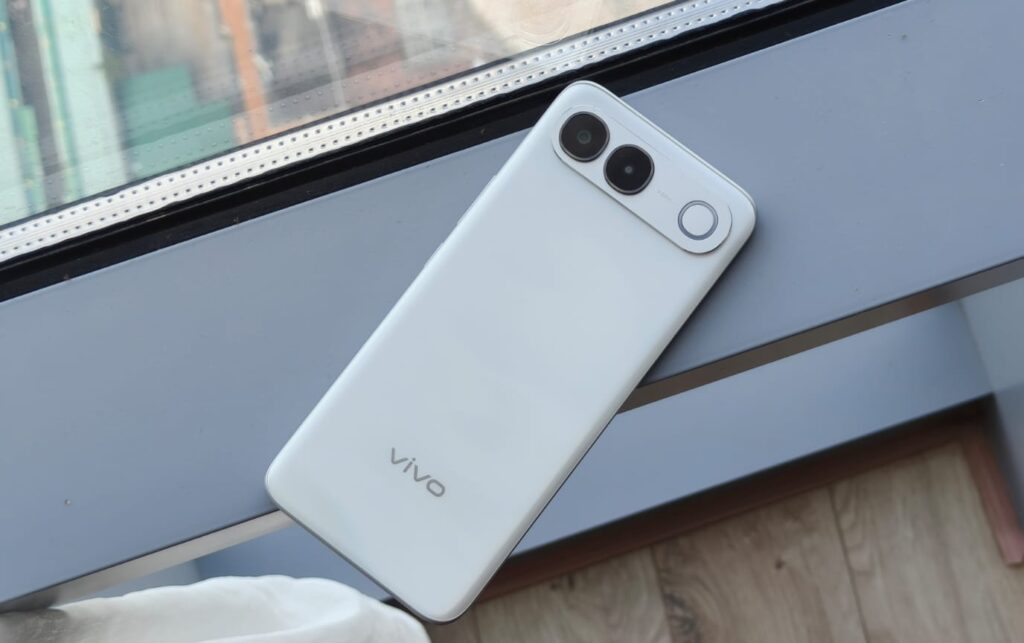
S2 follows the same formula. It features a camera visor-inspired design, with fun colors, a Sony IMX852 camera sensor, and the MediaTek Dimensity 7360 Turbo processor.
All this at a price of ₹39,999 seems like a decent deal given the great AI price surge of 2026. But is it worth your money? To find out, I got the S2 for review and took it with me on a trip to Vietnam. It served as my primary phone in the country, thanks to the eSIM support, and I took about 300 photos in the brutal summer heat on the beaches of Nha Trang.
vivo S2 Review
Hisan Kidwai
Summary
The vivo S2’s design is simply lovely. It’s practical while still managing to turn heads. Beyond that, there’s a big 6.8-inch AMOLED panel that’s great for watching movies, while the Dimensity 7360 Turbo proved capable of handling everyday tasks and games like “CODM” without much trouble. The cameras, or should I say the camera, are good enough for daytime photos, but struggle with sharpness at night, so keep that in mind.
Design & Hardware
Design is where the vivo S2 gets full marks, simply because it’s beautiful to look at. I’ll say this straight: the horizontal visor is the best implementation of the camera module. It not only doesn’t get in the way but also keeps the phone from wobbling on a table. The same benefits apply here. There are two cutouts for the camera setup, with the flash sitting on the right. Color options, of which there are three, comprise Silk White, Regal Bronze, and Sapphire Blue. I received the Silk White model for review, and it’s a looker. The back has a silk-like finish that shines in different ways as the light hits. There’s also a wave-like pattern that adds to the overall appeal and makes it more premium. Thankfully, the finish is matte, so you don’t need to worry about greasy fingers.
To confirm it wasn’t just me liking the design, I also gave the phone to my friends and family, all of whom had similar reactions. I could also see a few people looking at what phone I was using at the airport. Another thing you’ll notice with the S2 immediately is its build. Instead of the flat sides we’ve all gotten used to, the S2 has a curved aesthetic. The frame and rear glass curve toward each other, and it really does feel good. Sometimes I miss the old curved aesthetic, and it’s nice that vivo is keeping the trend alive. The corners don’t dig into your palms, and people with smaller hands shouldn’t have much trouble using it one-handed.
The sides are obviously plastic, and that’s not necessarily a bad thing. While I was fiddling around at the airport looking for my passport, I dropped the phone on the moving walkway, and it landed directly on one corner. The S2 survived unscathed, and after that, I just kept it inside the pre-bundled case. Since it was rainy season in Vietnam, the S2’s IP68 and IP69 ratings were quickly put to the test. The phone can survive being submerged in water, so all your pool photos should be fine. That said, please don’t take your phone into the ocean since saltwater can still cause damage. There’s also the fingerprint sensor on the front, and it’s pretty standard. It’s an optical unit, so dirty fingers could be a problem, and it’s a bit slow.
Display
Good smartphone displays have become pretty common, especially on flagships. And even though the S2 isn’t a flagship phone, its display is up to the mark. For some context, the 6.8-inch AMOLED panel has a 1.5K resolution and a 120Hz refresh rate. All this, as expected, translates to a great multimedia experience. Colors look vibrant, blacks are inky deep, and skin tones look natural while I binge-watched “Ted Lasso” at the airport.
vivo claims a peak brightness of 3,000 nits, and while I don’t carry a light meter on vacations, I can tell you that it’s plenty bright. The S2’s display was legible even in direct sunlight when I tried to read the cab number, and I wasn’t squinting much. A few other nice additions include an SGS-certified eye protection filter and Low Flicker Certification. Both are designed to make the display easier on the eyes, particularly at night. vivo hasn’t specified the exact type of glass it uses on the S2. Since I didn’t drop the phone after the first fall, I can’t comment much on how it’ll survive drops. But as a general rule of thumb, curved panels are less resistant than flat ones, so I’d recommend keeping the pre-applied screen protector.
Performance & Software
You can have all the fancy design and display in the world, but none of it is of any use if the phone can’t open Instagram quickly for a little doom scroll session. Fortunately, that’s not the case with the vivo S2. It’s powered by MediaTek’s Dimensity 7360 Turbo processor, paired with up to 8GB of LPDDR4X RAM and 256GB of UFS 3.1 storage. I’ll say this straight: DDR4X RAM should not be inside a sub-40K phone. Sadly, that’s the consequence of AI, and we can’t really blame vivo for that.
Everyday performance on the S2 is quite good. It opens and closes regular apps without a hitch or stutter, keeping the experience smooth. Heavy apps open quickly, and vivo’s new OriginOS is a great version of Android. Animations are fluid and clean, and the UI is full of customization options for you to change the phone’s vibe. It’s not overwhelming, and I got used to the interface in just a couple of days.
Since this is 2026, vivo has bundled a few AI features, including transcription tools and Smart Call Assistant, along with the vivo Office Kit. Sadly, except for AI erase, you don’t get many AI editing features, which was a bummer. I also noticed some stutters when flicking through different applications, but nothing major. What was more annoying, though, was the bloatware. I counted roughly 20 pre-installed applications even after saying no to installing anything in the first place. Thankfully, vivo vivo allows users to remove all apps.
I also ran a series of benchmarks to test the raw performance of the Dimensity 7360 Turbo. In Geekbench, scored 1,017 in the single-core test and 2,987 in the multi-core test. In AnTuTu, the S2 went just shy of the million mark with a score of 990,781. For context, those numbers are similar to the Snapdragon 7 Gen 3. vivo has also incorporated a big vapor chamber inside the S2, which I put to the test in CODM. Even on Very High graphics settings and Ultra frame rate, it held up pretty well. There was no noticeable lag or jitter during intense combat, and the phone only got warm after a 30-minute session. To help protect battery health, there’s bypass charging as well.
Battery Life & Charging
Given the slim profile of the S2, I expected the battery life to be nothing to write home about. The truth is, however, way different. With a capacity of 7,050 mAh, the S2 is a battery champ, capable of lasting multiple days on a single charge. I used the phone for navigation while walking around Nha Trang looking for a lunch spot. I then headed to the beach in the evening to capture some photos, and ended the day by taking a few more photos and watching some YouTube videos. I ended that day with about 40% charge remaining, which is pretty impressive.
When it was finally time to recharge, the 44W fast charger came in handy. It took the phone from 20% to 80% in around 50 minutes, which should be enough for any demanding day. vivo also says the cell should be good for over 1200 charging cycles without losing much health.
Cameras
Given that the vivo S2 targets younger, style-conscious buyers, photography is understandably a big part of the pitch. The vivo S2 houses the 50MP Sony IMX852 sensor, and that’s it. There is a secondary camera, but it’s a 2MP sensor and no ultrawide action. That said, the photos from the main sensor are really good. With enough light, the S2 captured rather pleasing photos of Nha Trang’s cityscapes. The shots had plenty of detail, while colors leaned toward the vibrant side, which I personally like. Contrast was mostly spot on as well. The camera sometimes overexposed the sun, but nothing major.
Since there’s no telephoto sensor, the S2’s main camera also doubles as the portrait lens. The same generally held true for portrait shots, with skin tones being true to their color, and a nice shallow depth of field. As far as nighttime photos are concerned, the images do benefit from vivo’s processing, which tries to retain colors and balance everything. However, I did notice a lack of sharpness in photos here, which was further exaggerated by the long shutter times. Moving subjects can be a problem. Video recording tops out at 4K 30 FPS, and they are fine. The resulting shots are clear and very usable in daytime. Selfies are another highlight, with rather good sharpness and colors. Plus, you can also record 4K videos from the front.
Verdict
Starting at ₹39,999, the vivo S2 is an interesting phone, marking vivo’s return to a segment it hasn’t explored in a while. And I must admit, I love this design. It’s practical while still managing to turn heads. If you like your tech to make a statement, then there aren’t many choices in the market. Beyond the design, there’s a big 6.8-inch AMOLED panel that’s great for watching movies, while the Dimensity 7360 Turbo proved capable of handling everyday tasks and games like “CODM” without much trouble. The cameras, or should I say the camera, are good enough for daytime photos, but struggle with sharpness at night, so keep that in mind.
S2 follows the same formula. It features a camera visor-inspired design, with fun colors, a Sony IMX852 camera sensor, and the MediaTek Dimensity 7360 Turbo processor.
All this at a price of ₹39,999 seems like a decent deal given the great AI price surge of 2026. But is it worth your money? To find out, I got the S2 for review and took it with me on a trip to Vietnam. It served as my primary phone in the country, thanks to the eSIM support, and I took about 300 photos in the brutal summer heat on the beaches of Nha Trang.
vivo S2 Review
Hisan Kidwai
Summary
The vivo S2’s design is simply lovely. It’s practical while still managing to turn heads. Beyond that, there’s a big 6.8-inch AMOLED panel that’s great for watching movies, while the Dimensity 7360 Turbo proved capable of handling everyday tasks and games like “CODM” without much trouble. The cameras, or should I say the camera, are good enough for daytime photos, but struggle with sharpness at night, so keep that in mind.
Design & Hardware
Design is where the vivo S2 gets full marks, simply because it’s beautiful to look at. I’ll say this straight: the horizontal visor is the best implementation of the camera module. It not only doesn’t get in the way but also keeps the phone from wobbling on a table. The same benefits apply here. There are two cutouts for the camera setup, with the flash sitting on the right. Color options, of which there are three, comprise Silk White, Regal Bronze, and Sapphire Blue. I received the Silk White model for review, and it’s a looker. The back has a silk-like finish that shines in different ways as the light hits. There’s also a wave-like pattern that adds to the overall appeal and makes it more premium. Thankfully, the finish is matte, so you don’t need to worry about greasy fingers.
To confirm it wasn’t just me liking the design, I also gave the phone to my friends and family, all of whom had similar reactions. I could also see a few people looking at what phone I was using at the airport. Another thing you’ll notice with the S2 immediately is its build. Instead of the flat sides we’ve all gotten used to, the S2 has a curved aesthetic. The frame and rear glass curve toward each other, and it really does feel good. Sometimes I miss the old curved aesthetic, and it’s nice that vivo is keeping the trend alive. The corners don’t dig into your palms, and people with smaller hands shouldn’t have much trouble using it one-handed.
The sides are obviously plastic, and that’s not necessarily a bad thing. While I was fiddling around at the airport looking for my passport, I dropped the phone on the moving walkway, and it landed directly on one corner. The S2 survived unscathed, and after that, I just kept it inside the pre-bundled case. Since it was rainy season in Vietnam, the S2’s IP68 and IP69 ratings were quickly put to the test. The phone can survive being submerged in water, so all your pool photos should be fine. That said, please don’t take your phone into the ocean since saltwater can still cause damage. There’s also the fingerprint sensor on the front, and it’s pretty standard. It’s an optical unit, so dirty fingers could be a problem, and it’s a bit slow.
Display
Good smartphone displays have become pretty common, especially on flagships. And even though the S2 isn’t a flagship phone, its display is up to the mark. For some context, the 6.8-inch AMOLED panel has a 1.5K resolution and a 120Hz refresh rate. All this, as expected, translates to a great multimedia experience. Colors look vibrant, blacks are inky deep, and skin tones look natural while I binge-watched “Ted Lasso” at the airport.
vivo claims a peak brightness of 3,000 nits, and while I don’t carry a light meter on vacations, I can tell you that it’s plenty bright. The S2’s display was legible even in direct sunlight when I tried to read the cab number, and I wasn’t squinting much. A few other nice additions include an SGS-certified eye protection filter and Low Flicker Certification. Both are designed to make the display easier on the eyes, particularly at night. vivo hasn’t specified the exact type of glass it uses on the S2. Since I didn’t drop the phone after the first fall, I can’t comment much on how it’ll survive drops. But as a general rule of thumb, curved panels are less resistant than flat ones, so I’d recommend keeping the pre-applied screen protector.
Performance & Software
You can have all the fancy design and display in the world, but none of it is of any use if the phone can’t open Instagram quickly for a little doom scroll session. Fortunately, that’s not the case with the vivo S2. It’s powered by MediaTek’s Dimensity 7360 Turbo processor, paired with up to 8GB of LPDDR4X RAM and 256GB of UFS 3.1 storage. I’ll say this straight: DDR4X RAM should not be inside a sub-40K phone. Sadly, that’s the consequence of AI, and we can’t really blame vivo for that.
Everyday performance on the S2 is quite good. It opens and closes regular apps without a hitch or stutter, keeping the experience smooth. Heavy apps open quickly, and vivo’s new OriginOS is a great version of Android. Animations are fluid and clean, and the UI is full of customization options for you to change the phone’s vibe. It’s not overwhelming, and I got used to the interface in just a couple of days.
Since this is 2026, vivo has bundled a few AI features, including transcription tools and Smart Call Assistant, along with the vivo Office Kit. Sadly, except for AI erase, you don’t get many AI editing features, which was a bummer. I also noticed some stutters when flicking through different applications, but nothing major. What was more annoying, though, was the bloatware. I counted roughly 20 pre-installed applications even after saying no to installing anything in the first place. Thankfully, vivo vivo allows users to remove all apps.
I also ran a series of benchmarks to test the raw performance of the Dimensity 7360 Turbo. In Geekbench, scored 1,017 in the single-core test and 2,987 in the multi-core test. In AnTuTu, the S2 went just shy of the million mark with a score of 990,781. For context, those numbers are similar to the Snapdragon 7 Gen 3. vivo has also incorporated a big vapor chamber inside the S2, which I put to the test in CODM. Even on Very High graphics settings and Ultra frame rate, it held up pretty well. There was no noticeable lag or jitter during intense combat, and the phone only got warm after a 30-minute session. To help protect battery health, there’s bypass charging as well.
Battery Life & Charging
Given the slim profile of the S2, I expected the battery life to be nothing to write home about. The truth is, however, way different. With a capacity of 7,050 mAh, the S2 is a battery champ, capable of lasting multiple days on a single charge. I used the phone for navigation while walking around Nha Trang looking for a lunch spot. I then headed to the beach in the evening to capture some photos, and ended the day by taking a few more photos and watching some YouTube videos. I ended that day with about 40% charge remaining, which is pretty impressive.
When it was finally time to recharge, the 44W fast charger came in handy. It took the phone from 20% to 80% in around 50 minutes, which should be enough for any demanding day. vivo also says the cell should be good for over 1200 charging cycles without losing much health.
Cameras
Given that the vivo S2 targets younger, style-conscious buyers, photography is understandably a big part of the pitch. The vivo S2 houses the 50MP Sony IMX852 sensor, and that’s it. There is a secondary camera, but it’s a 2MP sensor and no ultrawide action. That said, the photos from the main sensor are really good. With enough light, the S2 captured rather pleasing photos of Nha Trang’s cityscapes. The shots had plenty of detail, while colors leaned toward the vibrant side, which I personally like. Contrast was mostly spot on as well. The camera sometimes overexposed the sun, but nothing major.
Since there’s no telephoto sensor, the S2’s main camera also doubles as the portrait lens. The same generally held true for portrait shots, with skin tones being true to their color, and a nice shallow depth of field. As far as nighttime photos are concerned, the images do benefit from vivo’s processing, which tries to retain colors and balance everything. However, I did notice a lack of sharpness in photos here, which was further exaggerated by the long shutter times. Moving subjects can be a problem. Video recording tops out at 4K 30 FPS, and they are fine. The resulting shots are clear and very usable in daytime. Selfies are another highlight, with rather good sharpness and colors. Plus, you can also record 4K videos from the front.
Verdict
Starting at ₹39,999, the vivo S2 is an interesting phone, marking vivo’s return to a segment it hasn’t explored in a while. And I must admit, I love this design. It’s practical while still managing to turn heads. If you like your tech to make a statement, then there aren’t many choices in the market. Beyond the design, there’s a big 6.8-inch AMOLED panel that’s great for watching movies, while the Dimensity 7360 Turbo proved capable of handling everyday tasks and games like “CODM” without much trouble. The cameras, or should I say the camera, are good enough for daytime photos, but struggle with sharpness at night, so keep that in mind.
#vivo #Review #Stylish #MidRanger #Battery #Life #SpareVivo">vivo S2 Review: A Stylish Mid-Ranger With Battery Life to Spare
The 2026 smartphone market has been a bit difficult to deal with. Buying a phone has always been about choosing what matters most to you. Some need their phone to run demanding games for hours, while others love to show off a fancy design and a camera that takes pictures worthy of an Instagram story. If you’re the latter, vivo has just resurrected the S-lineup. For the uninitiated, the first S1 targeted style-conscious, younger consumers, and the new S2 follows the same formula. It features a camera visor-inspired design, with fun colors, a Sony IMX852 camera sensor, and the MediaTek Dimensity 7360 Turbo processor.
All this at a price of ₹39,999 seems like a decent deal given the great AI price surge of 2026. But is it worth your money? To find out, I got the S2 for review and took it with me on a trip to Vietnam. It served as my primary phone in the country, thanks to the eSIM support, and I took about 300 photos in the brutal summer heat on the beaches of Nha Trang.
vivo S2 Review
Hisan Kidwai
Summary
The vivo S2’s design is simply lovely. It’s practical while still managing to turn heads. Beyond that, there’s a big 6.8-inch AMOLED panel that’s great for watching movies, while the Dimensity 7360 Turbo proved capable of handling everyday tasks and games like “CODM” without much trouble. The cameras, or should I say the camera, are good enough for daytime photos, but struggle with sharpness at night, so keep that in mind.
Design & Hardware
Design is where the vivo S2 gets full marks, simply because it’s beautiful to look at. I’ll say this straight: the horizontal visor is the best implementation of the camera module. It not only doesn’t get in the way but also keeps the phone from wobbling on a table. The same benefits apply here. There are two cutouts for the camera setup, with the flash sitting on the right. Color options, of which there are three, comprise Silk White, Regal Bronze, and Sapphire Blue. I received the Silk White model for review, and it’s a looker. The back has a silk-like finish that shines in different ways as the light hits. There’s also a wave-like pattern that adds to the overall appeal and makes it more premium. Thankfully, the finish is matte, so you don’t need to worry about greasy fingers.
To confirm it wasn’t just me liking the design, I also gave the phone to my friends and family, all of whom had similar reactions. I could also see a few people looking at what phone I was using at the airport. Another thing you’ll notice with the S2 immediately is its build. Instead of the flat sides we’ve all gotten used to, the S2 has a curved aesthetic. The frame and rear glass curve toward each other, and it really does feel good. Sometimes I miss the old curved aesthetic, and it’s nice that vivo is keeping the trend alive. The corners don’t dig into your palms, and people with smaller hands shouldn’t have much trouble using it one-handed.
The sides are obviously plastic, and that’s not necessarily a bad thing. While I was fiddling around at the airport looking for my passport, I dropped the phone on the moving walkway, and it landed directly on one corner. The S2 survived unscathed, and after that, I just kept it inside the pre-bundled case. Since it was rainy season in Vietnam, the S2’s IP68 and IP69 ratings were quickly put to the test. The phone can survive being submerged in water, so all your pool photos should be fine. That said, please don’t take your phone into the ocean since saltwater can still cause damage. There’s also the fingerprint sensor on the front, and it’s pretty standard. It’s an optical unit, so dirty fingers could be a problem, and it’s a bit slow.
Display
Good smartphone displays have become pretty common, especially on flagships. And even though the S2 isn’t a flagship phone, its display is up to the mark. For some context, the 6.8-inch AMOLED panel has a 1.5K resolution and a 120Hz refresh rate. All this, as expected, translates to a great multimedia experience. Colors look vibrant, blacks are inky deep, and skin tones look natural while I binge-watched “Ted Lasso” at the airport.
vivo claims a peak brightness of 3,000 nits, and while I don’t carry a light meter on vacations, I can tell you that it’s plenty bright. The S2’s display was legible even in direct sunlight when I tried to read the cab number, and I wasn’t squinting much. A few other nice additions include an SGS-certified eye protection filter and Low Flicker Certification. Both are designed to make the display easier on the eyes, particularly at night. vivo hasn’t specified the exact type of glass it uses on the S2. Since I didn’t drop the phone after the first fall, I can’t comment much on how it’ll survive drops. But as a general rule of thumb, curved panels are less resistant than flat ones, so I’d recommend keeping the pre-applied screen protector.
Performance & Software
You can have all the fancy design and display in the world, but none of it is of any use if the phone can’t open Instagram quickly for a little doom scroll session. Fortunately, that’s not the case with the vivo S2. It’s powered by MediaTek’s Dimensity 7360 Turbo processor, paired with up to 8GB of LPDDR4X RAM and 256GB of UFS 3.1 storage. I’ll say this straight: DDR4X RAM should not be inside a sub-40K phone. Sadly, that’s the consequence of AI, and we can’t really blame vivo for that.
Everyday performance on the S2 is quite good. It opens and closes regular apps without a hitch or stutter, keeping the experience smooth. Heavy apps open quickly, and vivo’s new OriginOS is a great version of Android. Animations are fluid and clean, and the UI is full of customization options for you to change the phone’s vibe. It’s not overwhelming, and I got used to the interface in just a couple of days.
Since this is 2026, vivo has bundled a few AI features, including transcription tools and Smart Call Assistant, along with the vivo Office Kit. Sadly, except for AI erase, you don’t get many AI editing features, which was a bummer. I also noticed some stutters when flicking through different applications, but nothing major. What was more annoying, though, was the bloatware. I counted roughly 20 pre-installed applications even after saying no to installing anything in the first place. Thankfully, vivo vivo allows users to remove all apps.
I also ran a series of benchmarks to test the raw performance of the Dimensity 7360 Turbo. In Geekbench, scored 1,017 in the single-core test and 2,987 in the multi-core test. In AnTuTu, the S2 went just shy of the million mark with a score of 990,781. For context, those numbers are similar to the Snapdragon 7 Gen 3. vivo has also incorporated a big vapor chamber inside the S2, which I put to the test in CODM. Even on Very High graphics settings and Ultra frame rate, it held up pretty well. There was no noticeable lag or jitter during intense combat, and the phone only got warm after a 30-minute session. To help protect battery health, there’s bypass charging as well.
Battery Life & Charging
Given the slim profile of the S2, I expected the battery life to be nothing to write home about. The truth is, however, way different. With a capacity of 7,050 mAh, the S2 is a battery champ, capable of lasting multiple days on a single charge. I used the phone for navigation while walking around Nha Trang looking for a lunch spot. I then headed to the beach in the evening to capture some photos, and ended the day by taking a few more photos and watching some YouTube videos. I ended that day with about 40% charge remaining, which is pretty impressive.
When it was finally time to recharge, the 44W fast charger came in handy. It took the phone from 20% to 80% in around 50 minutes, which should be enough for any demanding day. vivo also says the cell should be good for over 1200 charging cycles without losing much health.
Cameras
Given that the vivo S2 targets younger, style-conscious buyers, photography is understandably a big part of the pitch. The vivo S2 houses the 50MP Sony IMX852 sensor, and that’s it. There is a secondary camera, but it’s a 2MP sensor and no ultrawide action. That said, the photos from the main sensor are really good. With enough light, the S2 captured rather pleasing photos of Nha Trang’s cityscapes. The shots had plenty of detail, while colors leaned toward the vibrant side, which I personally like. Contrast was mostly spot on as well. The camera sometimes overexposed the sun, but nothing major.
Since there’s no telephoto sensor, the S2’s main camera also doubles as the portrait lens. The same generally held true for portrait shots, with skin tones being true to their color, and a nice shallow depth of field. As far as nighttime photos are concerned, the images do benefit from vivo’s processing, which tries to retain colors and balance everything. However, I did notice a lack of sharpness in photos here, which was further exaggerated by the long shutter times. Moving subjects can be a problem. Video recording tops out at 4K 30 FPS, and they are fine. The resulting shots are clear and very usable in daytime. Selfies are another highlight, with rather good sharpness and colors. Plus, you can also record 4K videos from the front.
Verdict
Starting at ₹39,999, the vivo S2 is an interesting phone, marking vivo’s return to a segment it hasn’t explored in a while. And I must admit, I love this design. It’s practical while still managing to turn heads. If you like your tech to make a statement, then there aren’t many choices in the market. Beyond the design, there’s a big 6.8-inch AMOLED panel that’s great for watching movies, while the Dimensity 7360 Turbo proved capable of handling everyday tasks and games like “CODM” without much trouble. The cameras, or should I say the camera, are good enough for daytime photos, but struggle with sharpness at night, so keep that in mind.
The 2026 smartphone market has been a bit difficult to deal with. Buying a phone…
Flock Safety’s automatic license plate reader cameras have become targets of public ire and, increasingly, vandalism, with people stealing or destroying them in the dead of night. The company at one point had a plan to keep its eyes open in a way that would be harder to detect, according to 404 Media: by equipping dashcams on rideshare and delivery vehicles with the ability to scan plates while on the road.
In a pitch presentation apparently prepared for the Georgia Office of the Attorney General, Flock reportedly talked up a planned partnership with Nexar, a popular dashcam manufacturer. The theoretical deal would have used Nexar’s network of cameras to scan vehicle plates as drivers went about their business. Flock apparently suggested that it would create a network of more than 350,000 Uber, Lyft, and other delivery service drivers who would all serve as eyes for the company.
Flock’s partnership with Nexar never came to fruition. But the fact that it failed doesn’t really minimize the concern that the company tried to make it happen. Importantly, it’s not clear that drivers would have been made aware of the fact that their camera was serving as a snitch or not—it’s possible the scans would have taken place without any obvious indication that what was being captured on their dashcam was being shared with Flock—and presumably with law enforcement.
Gizmodo reached out to Flock for additional information but did not receive a response at the time of publication.
Nexar is already engaged in a pretty massive project of collecting data from its drivers. The company claims to anonymize data collected from its dashcams and sells it to third parties and publishes a fully user-generated, real-time map called CityStream. Whether drivers are aware of the fact that they are contributing to this or not is unclear—per 404 Media, in some jurisdictions, users are automatically contributing their data to CityStream and have to opt out of sharing.
Flock also isn’t the only company to apparently think up the idea of turning vehicles into mobile surveillance for “safety” purposes. Earlier this year, a company called BusPatrol—which uses cameras on school buses to identify people who blow past the “Stop” sign arm deployed—came under fire when it was revealed that it was planning to let law enforcement use those cameras to scan license plates. Given the abuses that law enforcement across the country have already committed with access to Flock cameras, seems the last thing they need is more camera angles to sift through.
Flock Safety’s automatic license plate reader cameras have become targets of public ire and, increasingly, vandalism, with people stealing or destroying them in the dead of night. The company at one point had a plan to keep its eyes open in a way that would be harder to detect, according to 404 Media: by equipping dashcams on rideshare and delivery vehicles with the ability to scan plates while on the road.
In a pitch presentation apparently prepared for the Georgia Office of the Attorney General, Flock reportedly talked up a planned partnership with Nexar, a popular dashcam manufacturer. The theoretical deal would have used Nexar’s network of cameras to scan vehicle plates as drivers went about their business. Flock apparently suggested that it would create a network of more than 350,000 Uber, Lyft, and other delivery service drivers who would all serve as eyes for the company.
Flock’s partnership with Nexar never came to fruition. But the fact that it failed doesn’t really minimize the concern that the company tried to make it happen. Importantly, it’s not clear that drivers would have been made aware of the fact that their camera was serving as a snitch or not—it’s possible the scans would have taken place without any obvious indication that what was being captured on their dashcam was being shared with Flock—and presumably with law enforcement.
Gizmodo reached out to Flock for additional information but did not receive a response at the time of publication.
Nexar is already engaged in a pretty massive project of collecting data from its drivers. The company claims to anonymize data collected from its dashcams and sells it to third parties and publishes a fully user-generated, real-time map called CityStream. Whether drivers are aware of the fact that they are contributing to this or not is unclear—per 404 Media, in some jurisdictions, users are automatically contributing their data to CityStream and have to opt out of sharing.
Flock also isn’t the only company to apparently think up the idea of turning vehicles into mobile surveillance for “safety” purposes. Earlier this year, a company called BusPatrol—which uses cameras on school buses to identify people who blow past the “Stop” sign arm deployed—came under fire when it was revealed that it was planning to let law enforcement use those cameras to scan license plates. Given the abuses that law enforcement across the country have already committed with access to Flock cameras, seems the last thing they need is more camera angles to sift through.
#Flock #Reportedly #Turn #Uber #Drivers #Mobile #Snitchesartifical intelligence,Dashcams,flock,Flock Safety,license plate readers,Lyft,Uber">Flock Reportedly Tried to Turn Uber Drivers Into Mobile Snitches
Flock Safety’s automatic license plate reader cameras have become targets of public ire and, increasingly, vandalism, with people stealing or destroying them in the dead of night. The company at one point had a plan to keep its eyes open in a way that would be harder to detect, according to 404 Media: by equipping dashcams on rideshare and delivery vehicles with the ability to scan plates while on the road.
In a pitch presentation apparently prepared for the Georgia Office of the Attorney General, Flock reportedly talked up a planned partnership with Nexar, a popular dashcam manufacturer. The theoretical deal would have used Nexar’s network of cameras to scan vehicle plates as drivers went about their business. Flock apparently suggested that it would create a network of more than 350,000 Uber, Lyft, and other delivery service drivers who would all serve as eyes for the company.
Flock’s partnership with Nexar never came to fruition. But the fact that it failed doesn’t really minimize the concern that the company tried to make it happen. Importantly, it’s not clear that drivers would have been made aware of the fact that their camera was serving as a snitch or not—it’s possible the scans would have taken place without any obvious indication that what was being captured on their dashcam was being shared with Flock—and presumably with law enforcement.
Gizmodo reached out to Flock for additional information but did not receive a response at the time of publication.
Nexar is already engaged in a pretty massive project of collecting data from its drivers. The company claims to anonymize data collected from its dashcams and sells it to third parties and publishes a fully user-generated, real-time map called CityStream. Whether drivers are aware of the fact that they are contributing to this or not is unclear—per 404 Media, in some jurisdictions, users are automatically contributing their data to CityStream and have to opt out of sharing.
Flock also isn’t the only company to apparently think up the idea of turning vehicles into mobile surveillance for “safety” purposes. Earlier this year, a company called BusPatrol—which uses cameras on school buses to identify people who blow past the “Stop” sign arm deployed—came under fire when it was revealed that it was planning to let law enforcement use those cameras to scan license plates. Given the abuses that law enforcement across the country have already committed with access to Flock cameras, seems the last thing they need is more camera angles to sift through.

![This former notorious red-light district is now one of the world’s top AI hubs | TechCrunch
What every U.K. AI startup wants to know these days is, how can I get office space in King’s Cross?
The area is so hot that a VC firm allegedly recently won a deal by promising a founder office space in the neighborhood. “We stop at nothing to win deals [for] and to support” founders, “including helping them source office space when needed,” the firm told me when asked about the rumor, declining to confirm or deny any details.
The neighborhood’s popularity began back in 2016 when DeepMind — then newly acquired by Google — moved in. Soon after, a flood of AI startups followed, wanting to be around the Google DeepMind magic. Today, they hope to take advantage of the cluster of AI talent there.
This has transformed King’s Cross into one of the world’s top AI hubs, rivaled only by San Francisco and Beijing. Around London, it’s known by the sobriquet “Knowledge Quarter,” as it’s home to names like OpenAI, Meta, Isomorphic Labs, Cusp AI, Wayne, Recursive, and, a little farther down the road, Synthesia and Anthropic. The European Technology Network (ETN) just moved into a glossy new office nearby, while University College London sits around the corner.
Mixed in with the new developments are trendy food spots like Hoppers and BAO. Hop a train from King’s Cross, and founders can be in Cambridge in 45 minutes to source talent or can be in Paris in two hours to strike a deal.
Who would have guessed that a little more than 20 years ago, this was one of the seediest areas in London?
“In the ’80s, crack and heroin made the area a major narcotics market,” Hussein Kanji, an investor at Hoxton Ventures, said, recalling syringes in tree trunks and gangs patrolling the streets. “In 1982, the local church was occupied by the English Collective of Prostitutes for 12 straight days.” Then, in the early 2000s, a real estate developer had a dream and, well, “now it is the AI hotbed of the United Kingdom,” Kanji said. “What a change.” Around 18 months ago, his portfolio company BioCorteX moved from the neighborhood Holborn to the Jellicoe building in King’s Cross, hoping to be near the action. “Lots going on in London right now,” Nik Sharma, co-founder of BioCorteX, told me. “Lots of hyperscalers moving in.” That includes, reportedly, Jeff Bezos’ AI company Prometheus, which is also said to be in talks to move into the Jellicoe.
There are around 3,600 AI startups in London, which, together, have raised around .1 billion out of the .8 billion raised in the city since late July, according to Dealroom. Since the start of June, AI-related startups have leased more than 1 million square feet of office space in London, according to the real estate firm Knight Frank. With that, prime rents in King’s Cross have risen 18% over the past three years, Chris Dunn, a commercial insight associate at the firm, told me. That percentage represents only the largest leases encompassing at least 10,000 square feet, like the ones OpenAI and Prometheus are signing. The shorter deals go for even more, he said, and now the vacancy rate for conventional office space is just 0.9%. “Demand has outstripped supply,” he continued.
Today, one of the big topics of the area is sovereignty. It was a wake-up call for many when Anthropic shut off access to Mythos and Fable this summer, leaving some in the ecosystem to conclude: “We’d better look after ourselves,” Saul Klein, co-founder of the VC firm Phoenix Court, told me.
Phoenix Court is located in the King’s Cross area and has three portfolio companies in the vicinity, including Olix (which just announced a .3 billion valuation), Early Health and CoMind. Robin Klein, co-founder of the firm, said the shutdown of Fable and Mythos access was a “small but sharp reminder that Europe can’t simply rent its AI capabilities and capacity; it needs to build and hold some of its own.” King’s Cross, he said, is where much of this building is actually happening.
“The bigger question,” he continued, “is whether the U.K. builds the infrastructure, compute, energy, capital, to make this self-reliance durable, rather than just hosting outposts of U.S. labs.”
Image Credits:Phoenix Court
Top founders want to stay
Simon Kohl, founder of Latent Labs, has offices in King’s Cross and San Francisco. The London office, at the moment, is growing faster, and he’s more bullish than ever on the ecosystem, he said. “The mood right now feels less like London trying to catch up and more like London becoming one of the default places to start a serious AI company,” he said. Look around and you are likely to see Wayve testing its autonomous cars. Founded in 2017 by co-founder Alex Kendall, the unicorn is one of London’s biggest success stories.
“Ten years ago, building a frontier AI company from London felt like an unusual choice,” Kendall told me. “Now it feels like an obvious one.” Wayve moved into King’s Cross in 2018 looking for a space that could double as a garage — “a rare combination in Central London,” Kendall said. He has watched the ecosystem mature around him — and it’s now evident that a startup can stay in London, raise serious capital, hire world-class AI talent, and remain globally competitive, he said. Down the street from Anthropic’s new 158,000-square-foot office is the AI agent builder Sierra and the AI video platform Synthesia.
Laura Gonzalez Florez, Synthesia’s chief of staff and head of people, says the company moved into its glossy new office building a year ago to accommodate its growing team. They were drawn to the area for the same reason as everyone else: “It’s very close to the airport … very close to where a lot of investors are,” she said.
Image Credits:Synthesia
Around two-thirds of Synthesia’s engineers are remote, Gonzalez Florez said, letting the company tap into an affordable, international, and diverse talent pool and helping it scale faster. “From London, we can hire and work, without any problem, people from anywhere, from Slovenia to Portugal,” she said.
Unsurprisingly, London’s AI boom is also causing a talent war.U.K. AI job postings have skyrocketed in the past few years, per data from PwC. When Anthropic announced it moved into town earlier this year, it listed, for example, a salary range of £260,000 to £630,000 for a machine learning research engineer when the average salary in London for the same role is around £102,000. Some founders in the U.K., like those in Silicon Valley, are being forced to raise more and bigger rounds to keep up.
“The real test is whether more globally significant AI companies are founded, funded, and scaled from the U.K., while continuing to attract the world’s best talent to build them here,” Zain Ali, founder of the King’s Cross-based AI legal firm Centuro, told me. “If that continues to happen, King’s Cross won’t just be an AI hub. It’ll become one of the U.K.’s most important strategic assets.”
When you purchase through links in our articles, we may earn a small commission. This doesn’t affect our editorial independence.#Thisformernotorious #redlight #districtis #nowone #worlds #top #hubs #TechCrunchUK](https://techcrunch.com/wp-content/uploads/2026/08/DM9A2852.jpg?w=680 "This former notorious red-light district is now one of the world’s top AI hubs | TechCrunch
What every U.K. AI startup wants to know these days is, how can I get office space in King’s Cross?
The area is so hot that a VC firm allegedly recently won a deal by promising a founder office space in the neighborhood. “We stop at nothing to win deals [for] and to support” founders, “including helping them source office space when needed,” the firm told me when asked about the rumor, declining to confirm or deny any details.
The neighborhood’s popularity began back in 2016 when DeepMind — then newly acquired by Google — moved in. Soon after, a flood of AI startups followed, wanting to be around the Google DeepMind magic. Today, they hope to take advantage of the cluster of AI talent there.
This has transformed King’s Cross into one of the world’s top AI hubs, rivaled only by San Francisco and Beijing. Around London, it’s known by the sobriquet “Knowledge Quarter,” as it’s home to names like OpenAI, Meta, Isomorphic Labs, Cusp AI, Wayne, Recursive, and, a little farther down the road, Synthesia and Anthropic. The European Technology Network (ETN) just moved into a glossy new office nearby, while University College London sits around the corner.
Mixed in with the new developments are trendy food spots like Hoppers and BAO. Hop a train from King’s Cross, and founders can be in Cambridge in 45 minutes to source talent or can be in Paris in two hours to strike a deal.
Who would have guessed that a little more than 20 years ago, this was one of the seediest areas in London?
“In the ’80s, crack and heroin made the area a major narcotics market,” Hussein Kanji, an investor at Hoxton Ventures, said, recalling syringes in tree trunks and gangs patrolling the streets. “In 1982, the local church was occupied by the English Collective of Prostitutes for 12 straight days.” Then, in the early 2000s, a real estate developer had a dream and, well, “now it is the AI hotbed of the United Kingdom,” Kanji said. “What a change.” Around 18 months ago, his portfolio company BioCorteX moved from the neighborhood Holborn to the Jellicoe building in King’s Cross, hoping to be near the action. “Lots going on in London right now,” Nik Sharma, co-founder of BioCorteX, told me. “Lots of hyperscalers moving in.” That includes, reportedly, Jeff Bezos’ AI company Prometheus, which is also said to be in talks to move into the Jellicoe.
There are around 3,600 AI startups in London, which, together, have raised around .1 billion out of the .8 billion raised in the city since late July, according to Dealroom. Since the start of June, AI-related startups have leased more than 1 million square feet of office space in London, according to the real estate firm Knight Frank. With that, prime rents in King’s Cross have risen 18% over the past three years, Chris Dunn, a commercial insight associate at the firm, told me. That percentage represents only the largest leases encompassing at least 10,000 square feet, like the ones OpenAI and Prometheus are signing. The shorter deals go for even more, he said, and now the vacancy rate for conventional office space is just 0.9%. “Demand has outstripped supply,” he continued.
Today, one of the big topics of the area is sovereignty. It was a wake-up call for many when Anthropic shut off access to Mythos and Fable this summer, leaving some in the ecosystem to conclude: “We’d better look after ourselves,” Saul Klein, co-founder of the VC firm Phoenix Court, told me.
Phoenix Court is located in the King’s Cross area and has three portfolio companies in the vicinity, including Olix (which just announced a .3 billion valuation), Early Health and CoMind. Robin Klein, co-founder of the firm, said the shutdown of Fable and Mythos access was a “small but sharp reminder that Europe can’t simply rent its AI capabilities and capacity; it needs to build and hold some of its own.” King’s Cross, he said, is where much of this building is actually happening.
“The bigger question,” he continued, “is whether the U.K. builds the infrastructure, compute, energy, capital, to make this self-reliance durable, rather than just hosting outposts of U.S. labs.”
Image Credits:Phoenix Court
Top founders want to stay
Simon Kohl, founder of Latent Labs, has offices in King’s Cross and San Francisco. The London office, at the moment, is growing faster, and he’s more bullish than ever on the ecosystem, he said. “The mood right now feels less like London trying to catch up and more like London becoming one of the default places to start a serious AI company,” he said. Look around and you are likely to see Wayve testing its autonomous cars. Founded in 2017 by co-founder Alex Kendall, the unicorn is one of London’s biggest success stories.
“Ten years ago, building a frontier AI company from London felt like an unusual choice,” Kendall told me. “Now it feels like an obvious one.” Wayve moved into King’s Cross in 2018 looking for a space that could double as a garage — “a rare combination in Central London,” Kendall said. He has watched the ecosystem mature around him — and it’s now evident that a startup can stay in London, raise serious capital, hire world-class AI talent, and remain globally competitive, he said. Down the street from Anthropic’s new 158,000-square-foot office is the AI agent builder Sierra and the AI video platform Synthesia.
Laura Gonzalez Florez, Synthesia’s chief of staff and head of people, says the company moved into its glossy new office building a year ago to accommodate its growing team. They were drawn to the area for the same reason as everyone else: “It’s very close to the airport … very close to where a lot of investors are,” she said.
Image Credits:Synthesia
Around two-thirds of Synthesia’s engineers are remote, Gonzalez Florez said, letting the company tap into an affordable, international, and diverse talent pool and helping it scale faster. “From London, we can hire and work, without any problem, people from anywhere, from Slovenia to Portugal,” she said.
Unsurprisingly, London’s AI boom is also causing a talent war.U.K. AI job postings have skyrocketed in the past few years, per data from PwC. When Anthropic announced it moved into town earlier this year, it listed, for example, a salary range of £260,000 to £630,000 for a machine learning research engineer when the average salary in London for the same role is around £102,000. Some founders in the U.K., like those in Silicon Valley, are being forced to raise more and bigger rounds to keep up.
“The real test is whether more globally significant AI companies are founded, funded, and scaled from the U.K., while continuing to attract the world’s best talent to build them here,” Zain Ali, founder of the King’s Cross-based AI legal firm Centuro, told me. “If that continues to happen, King’s Cross won’t just be an AI hub. It’ll become one of the U.K.’s most important strategic assets.”
When you purchase through links in our articles, we may earn a small commission. This doesn’t affect our editorial independence.#Thisformernotorious #redlight #districtis #nowone #worlds #top #hubs #TechCrunchUK")

![This former notorious red-light district is now one of the world’s top AI hubs | TechCrunch
What every U.K. AI startup wants to know these days is, how can I get office space in King’s Cross?
The area is so hot that a VC firm allegedly recently won a deal by promising a founder office space in the neighborhood. “We stop at nothing to win deals [for] and to support” founders, “including helping them source office space when needed,” the firm told me when asked about the rumor, declining to confirm or deny any details.
The neighborhood’s popularity began back in 2016 when DeepMind — then newly acquired by Google — moved in. Soon after, a flood of AI startups followed, wanting to be around the Google DeepMind magic. Today, they hope to take advantage of the cluster of AI talent there.
This has transformed King’s Cross into one of the world’s top AI hubs, rivaled only by San Francisco and Beijing. Around London, it’s known by the sobriquet “Knowledge Quarter,” as it’s home to names like OpenAI, Meta, Isomorphic Labs, Cusp AI, Wayne, Recursive, and, a little farther down the road, Synthesia and Anthropic. The European Technology Network (ETN) just moved into a glossy new office nearby, while University College London sits around the corner.
Mixed in with the new developments are trendy food spots like Hoppers and BAO. Hop a train from King’s Cross, and founders can be in Cambridge in 45 minutes to source talent or can be in Paris in two hours to strike a deal.
Who would have guessed that a little more than 20 years ago, this was one of the seediest areas in London?
“In the ’80s, crack and heroin made the area a major narcotics market,” Hussein Kanji, an investor at Hoxton Ventures, said, recalling syringes in tree trunks and gangs patrolling the streets. “In 1982, the local church was occupied by the English Collective of Prostitutes for 12 straight days.” Then, in the early 2000s, a real estate developer had a dream and, well, “now it is the AI hotbed of the United Kingdom,” Kanji said. “What a change.” Around 18 months ago, his portfolio company BioCorteX moved from the neighborhood Holborn to the Jellicoe building in King’s Cross, hoping to be near the action. “Lots going on in London right now,” Nik Sharma, co-founder of BioCorteX, told me. “Lots of hyperscalers moving in.” That includes, reportedly, Jeff Bezos’ AI company Prometheus, which is also said to be in talks to move into the Jellicoe.
There are around 3,600 AI startups in London, which, together, have raised around .1 billion out of the .8 billion raised in the city since late July, according to Dealroom. Since the start of June, AI-related startups have leased more than 1 million square feet of office space in London, according to the real estate firm Knight Frank. With that, prime rents in King’s Cross have risen 18% over the past three years, Chris Dunn, a commercial insight associate at the firm, told me. That percentage represents only the largest leases encompassing at least 10,000 square feet, like the ones OpenAI and Prometheus are signing. The shorter deals go for even more, he said, and now the vacancy rate for conventional office space is just 0.9%. “Demand has outstripped supply,” he continued.
Today, one of the big topics of the area is sovereignty. It was a wake-up call for many when Anthropic shut off access to Mythos and Fable this summer, leaving some in the ecosystem to conclude: “We’d better look after ourselves,” Saul Klein, co-founder of the VC firm Phoenix Court, told me.
Phoenix Court is located in the King’s Cross area and has three portfolio companies in the vicinity, including Olix (which just announced a .3 billion valuation), Early Health and CoMind. Robin Klein, co-founder of the firm, said the shutdown of Fable and Mythos access was a “small but sharp reminder that Europe can’t simply rent its AI capabilities and capacity; it needs to build and hold some of its own.” King’s Cross, he said, is where much of this building is actually happening.
“The bigger question,” he continued, “is whether the U.K. builds the infrastructure, compute, energy, capital, to make this self-reliance durable, rather than just hosting outposts of U.S. labs.”
Image Credits:Phoenix Court
Top founders want to stay
Simon Kohl, founder of Latent Labs, has offices in King’s Cross and San Francisco. The London office, at the moment, is growing faster, and he’s more bullish than ever on the ecosystem, he said. “The mood right now feels less like London trying to catch up and more like London becoming one of the default places to start a serious AI company,” he said. Look around and you are likely to see Wayve testing its autonomous cars. Founded in 2017 by co-founder Alex Kendall, the unicorn is one of London’s biggest success stories.
“Ten years ago, building a frontier AI company from London felt like an unusual choice,” Kendall told me. “Now it feels like an obvious one.” Wayve moved into King’s Cross in 2018 looking for a space that could double as a garage — “a rare combination in Central London,” Kendall said. He has watched the ecosystem mature around him — and it’s now evident that a startup can stay in London, raise serious capital, hire world-class AI talent, and remain globally competitive, he said. Down the street from Anthropic’s new 158,000-square-foot office is the AI agent builder Sierra and the AI video platform Synthesia.
Laura Gonzalez Florez, Synthesia’s chief of staff and head of people, says the company moved into its glossy new office building a year ago to accommodate its growing team. They were drawn to the area for the same reason as everyone else: “It’s very close to the airport … very close to where a lot of investors are,” she said.
Image Credits:Synthesia
Around two-thirds of Synthesia’s engineers are remote, Gonzalez Florez said, letting the company tap into an affordable, international, and diverse talent pool and helping it scale faster. “From London, we can hire and work, without any problem, people from anywhere, from Slovenia to Portugal,” she said.
Unsurprisingly, London’s AI boom is also causing a talent war.U.K. AI job postings have skyrocketed in the past few years, per data from PwC. When Anthropic announced it moved into town earlier this year, it listed, for example, a salary range of £260,000 to £630,000 for a machine learning research engineer when the average salary in London for the same role is around £102,000. Some founders in the U.K., like those in Silicon Valley, are being forced to raise more and bigger rounds to keep up.
“The real test is whether more globally significant AI companies are founded, funded, and scaled from the U.K., while continuing to attract the world’s best talent to build them here,” Zain Ali, founder of the King’s Cross-based AI legal firm Centuro, told me. “If that continues to happen, King’s Cross won’t just be an AI hub. It’ll become one of the U.K.’s most important strategic assets.”
When you purchase through links in our articles, we may earn a small commission. This doesn’t affect our editorial independence.#Thisformernotorious #redlight #districtis #nowone #worlds #top #hubs #TechCrunchUK](https://i0.wp.com/techcrunch.com/wp-content/uploads/2026/08/DM9A2852.jpg?w=680&ssl=1 "This former notorious red-light district is now one of the world’s top AI hubs | TechCrunch
What every U.K. AI startup wants to know these days is, how can I get office space in King’s Cross?
The area is so hot that a VC firm allegedly recently won a deal by promising a founder office space in the neighborhood. “We stop at nothing to win deals [for] and to support” founders, “including helping them source office space when needed,” the firm told me when asked about the rumor, declining to confirm or deny any details.
The neighborhood’s popularity began back in 2016 when DeepMind — then newly acquired by Google — moved in. Soon after, a flood of AI startups followed, wanting to be around the Google DeepMind magic. Today, they hope to take advantage of the cluster of AI talent there.
This has transformed King’s Cross into one of the world’s top AI hubs, rivaled only by San Francisco and Beijing. Around London, it’s known by the sobriquet “Knowledge Quarter,” as it’s home to names like OpenAI, Meta, Isomorphic Labs, Cusp AI, Wayne, Recursive, and, a little farther down the road, Synthesia and Anthropic. The European Technology Network (ETN) just moved into a glossy new office nearby, while University College London sits around the corner.
Mixed in with the new developments are trendy food spots like Hoppers and BAO. Hop a train from King’s Cross, and founders can be in Cambridge in 45 minutes to source talent or can be in Paris in two hours to strike a deal.
Who would have guessed that a little more than 20 years ago, this was one of the seediest areas in London?
“In the ’80s, crack and heroin made the area a major narcotics market,” Hussein Kanji, an investor at Hoxton Ventures, said, recalling syringes in tree trunks and gangs patrolling the streets. “In 1982, the local church was occupied by the English Collective of Prostitutes for 12 straight days.” Then, in the early 2000s, a real estate developer had a dream and, well, “now it is the AI hotbed of the United Kingdom,” Kanji said. “What a change.” Around 18 months ago, his portfolio company BioCorteX moved from the neighborhood Holborn to the Jellicoe building in King’s Cross, hoping to be near the action. “Lots going on in London right now,” Nik Sharma, co-founder of BioCorteX, told me. “Lots of hyperscalers moving in.” That includes, reportedly, Jeff Bezos’ AI company Prometheus, which is also said to be in talks to move into the Jellicoe.
There are around 3,600 AI startups in London, which, together, have raised around .1 billion out of the .8 billion raised in the city since late July, according to Dealroom. Since the start of June, AI-related startups have leased more than 1 million square feet of office space in London, according to the real estate firm Knight Frank. With that, prime rents in King’s Cross have risen 18% over the past three years, Chris Dunn, a commercial insight associate at the firm, told me. That percentage represents only the largest leases encompassing at least 10,000 square feet, like the ones OpenAI and Prometheus are signing. The shorter deals go for even more, he said, and now the vacancy rate for conventional office space is just 0.9%. “Demand has outstripped supply,” he continued.
Today, one of the big topics of the area is sovereignty. It was a wake-up call for many when Anthropic shut off access to Mythos and Fable this summer, leaving some in the ecosystem to conclude: “We’d better look after ourselves,” Saul Klein, co-founder of the VC firm Phoenix Court, told me.
Phoenix Court is located in the King’s Cross area and has three portfolio companies in the vicinity, including Olix (which just announced a .3 billion valuation), Early Health and CoMind. Robin Klein, co-founder of the firm, said the shutdown of Fable and Mythos access was a “small but sharp reminder that Europe can’t simply rent its AI capabilities and capacity; it needs to build and hold some of its own.” King’s Cross, he said, is where much of this building is actually happening.
“The bigger question,” he continued, “is whether the U.K. builds the infrastructure, compute, energy, capital, to make this self-reliance durable, rather than just hosting outposts of U.S. labs.”
Image Credits:Phoenix Court
Top founders want to stay
Simon Kohl, founder of Latent Labs, has offices in King’s Cross and San Francisco. The London office, at the moment, is growing faster, and he’s more bullish than ever on the ecosystem, he said. “The mood right now feels less like London trying to catch up and more like London becoming one of the default places to start a serious AI company,” he said. Look around and you are likely to see Wayve testing its autonomous cars. Founded in 2017 by co-founder Alex Kendall, the unicorn is one of London’s biggest success stories.
“Ten years ago, building a frontier AI company from London felt like an unusual choice,” Kendall told me. “Now it feels like an obvious one.” Wayve moved into King’s Cross in 2018 looking for a space that could double as a garage — “a rare combination in Central London,” Kendall said. He has watched the ecosystem mature around him — and it’s now evident that a startup can stay in London, raise serious capital, hire world-class AI talent, and remain globally competitive, he said. Down the street from Anthropic’s new 158,000-square-foot office is the AI agent builder Sierra and the AI video platform Synthesia.
Laura Gonzalez Florez, Synthesia’s chief of staff and head of people, says the company moved into its glossy new office building a year ago to accommodate its growing team. They were drawn to the area for the same reason as everyone else: “It’s very close to the airport … very close to where a lot of investors are,” she said.
Image Credits:Synthesia
Around two-thirds of Synthesia’s engineers are remote, Gonzalez Florez said, letting the company tap into an affordable, international, and diverse talent pool and helping it scale faster. “From London, we can hire and work, without any problem, people from anywhere, from Slovenia to Portugal,” she said.
Unsurprisingly, London’s AI boom is also causing a talent war.U.K. AI job postings have skyrocketed in the past few years, per data from PwC. When Anthropic announced it moved into town earlier this year, it listed, for example, a salary range of £260,000 to £630,000 for a machine learning research engineer when the average salary in London for the same role is around £102,000. Some founders in the U.K., like those in Silicon Valley, are being forced to raise more and bigger rounds to keep up.
“The real test is whether more globally significant AI companies are founded, funded, and scaled from the U.K., while continuing to attract the world’s best talent to build them here,” Zain Ali, founder of the King’s Cross-based AI legal firm Centuro, told me. “If that continues to happen, King’s Cross won’t just be an AI hub. It’ll become one of the U.K.’s most important strategic assets.”
When you purchase through links in our articles, we may earn a small commission. This doesn’t affect our editorial independence.#Thisformernotorious #redlight #districtis #nowone #worlds #top #hubs #TechCrunchUK")



![Census Proposal Would Stop Counting Undocumented Immigrants—and Ignore Race and Sexual OrientationThe US Department of Commerce, which oversees the Census Bureau, is circulating a proposed rule that would cease the collection of demographic data on racial minorities and LGBTQ+ people and prevent undocumented immigrants from being counted in the 2030 census, according to documents viewed by WIRED.The decision could have far-reaching implications for federal funding, particularly in states where there are substantial numbers of racial and ethnic minorities, as well as on immigrant communities across the country.The proposed rule, which is being circulated across government agencies for review, says the census will eliminate questions about race and sexual orientation “to protect from any distortions created from the inclusion of personal questions.” The memo also states that “illegal aliens (among others) should not be included in the apportionment count, they are not true inhabitants, members of the body politics [sic], or persons with ‘usual residence’ in the United States.”This would likely require the reintroduction of a census question about a respondent’s citizenship. During Donald Trump’s first presidential term, Republicans attempted to add a citizenship question to the census for the first time since 1950. The effort was struck down by the Supreme Court, 5-4, with Chief Justice John Roberts siding with the Court’s then-larger liberal bloc on the grounds that the justification for adding the question was “contrived.” The decision did not, though, find that citizenship questions are inherently unconstitutional.The Department of Commerce did not reply to requests for comment.“This is about the Voting Rights Act,” says Danah Boyd, a professor at Cornell University who studies the census, referencing the landmark voter protection legislation that the Supreme Court dismantled earlier this year. Eliminating the collection of these data, she says, would make it difficult to make basic assessments, like whether a congressional district is predominantly made of minorities.“If we don’t know certain things, we can’t challenge them politically,” says Boyd. “If we don’t know that certain peoples live in a particular geography, we can’t say, ‘Oh my gosh, here’s some massive inequality.’”Republicans and the Trump administration have long taken aim at the census. More recently, members of the Trump administration have attacked a little-known statistical method called “differential privacy,” which is used to prevent census data from being used to reidentify individual respondents, claiming that it makes the results inaccurate. In August 2025, Republican representative August Pfluger made another attempt to reintroduce a citizenship question on the census, sponsoring a bill called the COUNT Act, and in October, Republican senator Jim Banks of Indiana published a letter to Commerce secretary Howard Lutnick, writing, “There is a credible argument that the framers of the Constitution designed the Census to cover lawful inhabitants and not those who are present illegally.”Census questions are set between two and three years in advance of the actual survey, based on priorities set by the administration. The data from the census inform everything from the apportionment of congressional seats to federal funding that is allocated based on the size of a population.An employee at the Department of Health and Human Services, who asked to remain anonymous because they are not authorized to speak to the press, tells WIRED that “many HHS programs use Census data to appropriate funding. Removing undocumented individuals from the census will cause localities with high numbers of those populations to lose critical federal funding.”The employee says that removal of racial categories could specifically impact Native populations, which sometimes receive specialized funding. “Some programs use the ‘American Indian or Alaska Native’ category from the Census to make determinations of grants set aside for Tribal entities,” they say.#Census #Proposal #Stop #Counting #Undocumented #Immigrantsand #Ignore #Race #Sexual #Orientationus census,immigration,undocumented immigrants,race,lgbtq+](https://i0.wp.com/media.wired.com/photos/6a7630b55d2ebc1c5247b509/191:100/w_1280,c_limit/GettyImages-157580450-edited.jpg?ssl=1 "Census Proposal Would Stop Counting Undocumented Immigrants—and Ignore Race and Sexual OrientationThe US Department of Commerce, which oversees the Census Bureau, is circulating a proposed rule that would cease the collection of demographic data on racial minorities and LGBTQ+ people and prevent undocumented immigrants from being counted in the 2030 census, according to documents viewed by WIRED.The decision could have far-reaching implications for federal funding, particularly in states where there are substantial numbers of racial and ethnic minorities, as well as on immigrant communities across the country.The proposed rule, which is being circulated across government agencies for review, says the census will eliminate questions about race and sexual orientation “to protect from any distortions created from the inclusion of personal questions.” The memo also states that “illegal aliens (among others) should not be included in the apportionment count, they are not true inhabitants, members of the body politics [sic], or persons with ‘usual residence’ in the United States.”This would likely require the reintroduction of a census question about a respondent’s citizenship. During Donald Trump’s first presidential term, Republicans attempted to add a citizenship question to the census for the first time since 1950. The effort was struck down by the Supreme Court, 5-4, with Chief Justice John Roberts siding with the Court’s then-larger liberal bloc on the grounds that the justification for adding the question was “contrived.” The decision did not, though, find that citizenship questions are inherently unconstitutional.The Department of Commerce did not reply to requests for comment.“This is about the Voting Rights Act,” says Danah Boyd, a professor at Cornell University who studies the census, referencing the landmark voter protection legislation that the Supreme Court dismantled earlier this year. Eliminating the collection of these data, she says, would make it difficult to make basic assessments, like whether a congressional district is predominantly made of minorities.“If we don’t know certain things, we can’t challenge them politically,” says Boyd. “If we don’t know that certain peoples live in a particular geography, we can’t say, ‘Oh my gosh, here’s some massive inequality.’”Republicans and the Trump administration have long taken aim at the census. More recently, members of the Trump administration have attacked a little-known statistical method called “differential privacy,” which is used to prevent census data from being used to reidentify individual respondents, claiming that it makes the results inaccurate. In August 2025, Republican representative August Pfluger made another attempt to reintroduce a citizenship question on the census, sponsoring a bill called the COUNT Act, and in October, Republican senator Jim Banks of Indiana published a letter to Commerce secretary Howard Lutnick, writing, “There is a credible argument that the framers of the Constitution designed the Census to cover lawful inhabitants and not those who are present illegally.”Census questions are set between two and three years in advance of the actual survey, based on priorities set by the administration. The data from the census inform everything from the apportionment of congressional seats to federal funding that is allocated based on the size of a population.An employee at the Department of Health and Human Services, who asked to remain anonymous because they are not authorized to speak to the press, tells WIRED that “many HHS programs use Census data to appropriate funding. Removing undocumented individuals from the census will cause localities with high numbers of those populations to lose critical federal funding.”The employee says that removal of racial categories could specifically impact Native populations, which sometimes receive specialized funding. “Some programs use the ‘American Indian or Alaska Native’ category from the Census to make determinations of grants set aside for Tribal entities,” they say.#Census #Proposal #Stop #Counting #Undocumented #Immigrantsand #Ignore #Race #Sexual #Orientationus census,immigration,undocumented immigrants,race,lgbtq+")