×
, it is not available on many older devices. However, you do have several options for checking your battery health. In this guide, we’ll explain how to check battery health on older iPads and share some useful tips to help extend battery life.

Which iPads Support Apple’s Built-in Battery Health Feature?

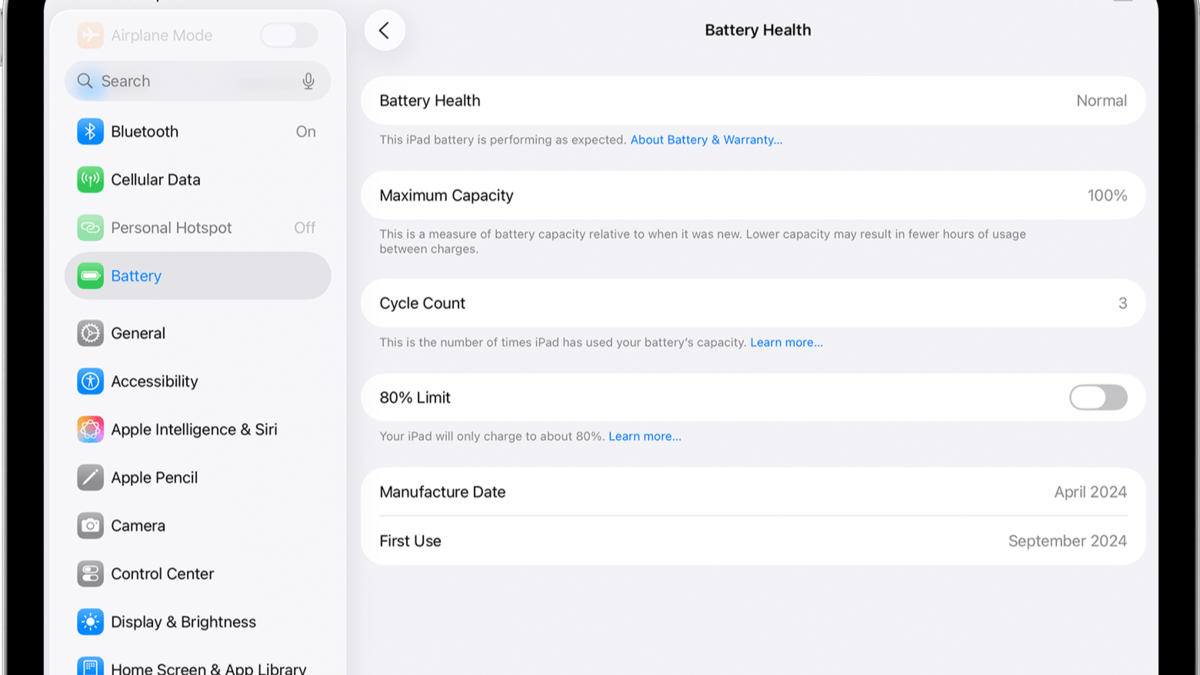
Apple provides a built-in Battery Health feature for selected iPad models. If your iPad supports it, you can view important battery information in the Settings app without installing any additional apps. This feature is available for iPad Pro M4, iPad Air M2, iPad mini (A17 Pro), iPad (A16), and newer iPads.

  1. Go to Settings.
  2. Tap Battery.
  3. Open Battery Health.
    Apple Doesn’t Show Battery Health on Older iPads—Here’s How to Check It Anyway
	
Checking your battery health will not only provide you with information about your iPad’s performance but also indicate whether you need to replace your device. Although Apple provides a built-in Battery Health feature on newer iPads, it is not available on many older devices. However, you do have several options for checking your battery health. In this guide, we’ll explain how to check battery health on older iPads and share some useful tips to help extend battery life.


Which iPads Support Apple’s Built-in Battery Health Feature?


Apple provides a built-in Battery Health feature for selected iPad models. If your iPad supports it, you can view important battery information in the Settings app without installing any additional apps. This feature is available for iPad Pro M4, iPad Air M2, iPad mini (A17 Pro), iPad (A16), and newer iPads.


Go to Settings.


Tap Battery.


Open Battery Health.


View details such as Maximum Capacity, Cycle Count, Battery Status, Manufacturing Date, First Use Date, and the 80% Charging Limit.


If you have an old iPad, you won’t see the Battery Health option in the Settings menu. The reason behind this restriction remains unknown, as Apple has not disclosed it yet. The old operating system of these iPads does not even support the Battery Health menu.


How to Check Battery Health on Older iPads


Apple provides an online battery diagnostic process for iPads that do not have the Battery Health option. This is the proper way to diagnose your device’s battery without downloading any additional software. First, contact Apple Support and describe your battery problems, which may include rapid battery drain, slow charging, and automatic shutdowns of your iPad. Apple Support will conduct a remote battery diagnostic on your iPad. They will be able to tell you all the vital information regarding your battery.


Use coconutBattery on a Mac


Another way to check your iPad’s battery health is through coconutBattery. The app is available for macOS and supports Apple devices, including iPads.


Download coconutBattery on your Mac.


Connect your iPad via a USB cable.


Launch the application.


Select your device and see its battery details.


It provides information on Battery Health, Current Capacity, Design Capacity, Charge Cycles, Battery Temperature, and Charging Status. Please note that some more advanced options will be available only in the paid version.


Tips to Keep Your Older iPad Battery Healthy


Ensure that you only use certified chargers: Your iPad should be charged by Apple-certified and MFi-certified chargers and cables.


Avoid using your iPad in extreme temperatures: it should not be exposed to direct sunlight or extremely high temperatures.


Keep your iPad software up to date: Update your device to the latest iPadOS.


Screen lock: Locking your iPad helps conserve battery power.


Airplane mode in areas with poor signal: If the signal strength is low, activate airplane mode to conserve battery.


Wi-Fi connection: Connect to Wi-Fi whenever it is possible.


Unplug unnecessary devices: Unplug any USB-C device that is no longer needed.


#Apple #Doesnt #Show #Battery #Health #Older #iPadsHeres #Checkapple
  4. View details such as Maximum Capacity, Cycle Count, Battery Status, Manufacturing Date, First Use Date, and the 80% Charging Limit.

If you have an old iPad, you won’t see the Battery Health option in the Settings menu. The reason behind this restriction remains unknown, as Apple has not disclosed it yet. The old operating system of these iPads does not even support the Battery Health menu.

How to Check Battery Health on Older iPads

ipad

Apple provides an online battery diagnostic process for iPads that do not have the Battery Health option. This is the proper way to diagnose your device’s battery without downloading any additional software. First, contact Apple Support and describe your battery problems, which may include rapid battery drain, slow charging, and automatic shutdowns of your iPad. Apple Support will conduct a remote battery diagnostic on your iPad. They will be able to tell you all the vital information regarding your battery.

Use coconutBattery on a Mac

Another way to check your iPad’s battery health is through coconutBattery. The app is available for macOS and supports Apple devices, including iPads.

  • Download coconutBattery on your Mac.
  • Connect your iPad via a USB cable.
  • Launch the application.
  • Select your device and see its battery details.
    Use coconutBattery on a Mac to check battery health

It provides information on Battery Health, Current Capacity, Design Capacity, Charge Cycles, Battery Temperature, and Charging Status. Please note that some more advanced options will be available only in the paid version.

Tips to Keep Your Older iPad Battery Healthy

  1. Ensure that you only use certified chargers: Your iPad should be charged by Apple-certified and MFi-certified chargers and cables.
  2. Avoid using your iPad in extreme temperatures: it should not be exposed to direct sunlight or extremely high temperatures.
  3. Keep your iPad software up to date: Update your device to the latest iPadOS.
  4. Screen lock: Locking your iPad helps conserve battery power.
  5. Airplane mode in areas with poor signal: If the signal strength is low, activate airplane mode to conserve battery.
  6. Wi-Fi connection: Connect to Wi-Fi whenever it is possible.
  7. Unplug unnecessary devices: Unplug any USB-C device that is no longer needed.
#Apple #Doesnt #Show #Battery #Health #Older #iPadsHeres #Checkapple"> Apple Doesn’t Show Battery Health on Older iPads—Here’s How to Check It Anyway
	
Checking your battery health will not only provide you with information about your iPad’s performance but also indicate whether you need to replace your device. Although Apple provides a built-in Battery Health feature on newer iPads, it is not available on many older devices. However, you do have several options for checking your battery health. In this guide, we’ll explain how to check battery health on older iPads and share some useful tips to help extend battery life.


Which iPads Support Apple’s Built-in Battery Health Feature?


Apple provides a built-in Battery Health feature for selected iPad models. If your iPad supports it, you can view important battery information in the Settings app without installing any additional apps. This feature is available for iPad Pro M4, iPad Air M2, iPad mini (A17 Pro), iPad (A16), and newer iPads.


Go to Settings.


Tap Battery.


Open Battery Health.


View details such as Maximum Capacity, Cycle Count, Battery Status, Manufacturing Date, First Use Date, and the 80% Charging Limit.


If you have an old iPad, you won’t see the Battery Health option in the Settings menu. The reason behind this restriction remains unknown, as Apple has not disclosed it yet. The old operating system of these iPads does not even support the Battery Health menu.


How to Check Battery Health on Older iPads


Apple provides an online battery diagnostic process for iPads that do not have the Battery Health option. This is the proper way to diagnose your device’s battery without downloading any additional software. First, contact Apple Support and describe your battery problems, which may include rapid battery drain, slow charging, and automatic shutdowns of your iPad. Apple Support will conduct a remote battery diagnostic on your iPad. They will be able to tell you all the vital information regarding your battery.


Use coconutBattery on a Mac


Another way to check your iPad’s battery health is through coconutBattery. The app is available for macOS and supports Apple devices, including iPads.


Download coconutBattery on your Mac.


Connect your iPad via a USB cable.


Launch the application.


Select your device and see its battery details.


It provides information on Battery Health, Current Capacity, Design Capacity, Charge Cycles, Battery Temperature, and Charging Status. Please note that some more advanced options will be available only in the paid version.


Tips to Keep Your Older iPad Battery Healthy


Ensure that you only use certified chargers: Your iPad should be charged by Apple-certified and MFi-certified chargers and cables.


Avoid using your iPad in extreme temperatures: it should not be exposed to direct sunlight or extremely high temperatures.


Keep your iPad software up to date: Update your device to the latest iPadOS.


Screen lock: Locking your iPad helps conserve battery power.


Airplane mode in areas with poor signal: If the signal strength is low, activate airplane mode to conserve battery.


Wi-Fi connection: Connect to Wi-Fi whenever it is possible.


Unplug unnecessary devices: Unplug any USB-C device that is no longer needed.


#Apple #Doesnt #Show #Battery #Health #Older #iPadsHeres #Checkapple
Tech-news

, it is not available on many older devices. However, you do have several options for checking your battery health. In this guide, we’ll explain how to check battery health on older iPads and share some useful tips to help extend battery life.

Which iPads Support Apple’s Built-in Battery Health Feature?

Apple provides a built-in Battery Health feature for selected iPad models. If your iPad supports it, you can view important battery information in the Settings app without installing any additional apps. This feature is available for iPad Pro M4, iPad Air M2, iPad mini (A17 Pro), iPad (A16), and newer iPads.

  1. Go to Settings.
  2. Tap Battery.
  3. Open Battery Health.
    Apple Doesn’t Show Battery Health on Older iPads—Here’s How to Check It Anyway
	
Checking your battery health will not only provide you with information about your iPad’s performance but also indicate whether you need to replace your device. Although Apple provides a built-in Battery Health feature on newer iPads, it is not available on many older devices. However, you do have several options for checking your battery health. In this guide, we’ll explain how to check battery health on older iPads and share some useful tips to help extend battery life.


Which iPads Support Apple’s Built-in Battery Health Feature?


Apple provides a built-in Battery Health feature for selected iPad models. If your iPad supports it, you can view important battery information in the Settings app without installing any additional apps. This feature is available for iPad Pro M4, iPad Air M2, iPad mini (A17 Pro), iPad (A16), and newer iPads.


Go to Settings.


Tap Battery.


Open Battery Health.


View details such as Maximum Capacity, Cycle Count, Battery Status, Manufacturing Date, First Use Date, and the 80% Charging Limit.


If you have an old iPad, you won’t see the Battery Health option in the Settings menu. The reason behind this restriction remains unknown, as Apple has not disclosed it yet. The old operating system of these iPads does not even support the Battery Health menu.


How to Check Battery Health on Older iPads


Apple provides an online battery diagnostic process for iPads that do not have the Battery Health option. This is the proper way to diagnose your device’s battery without downloading any additional software. First, contact Apple Support and describe your battery problems, which may include rapid battery drain, slow charging, and automatic shutdowns of your iPad. Apple Support will conduct a remote battery diagnostic on your iPad. They will be able to tell you all the vital information regarding your battery.


Use coconutBattery on a Mac


Another way to check your iPad’s battery health is through coconutBattery. The app is available for macOS and supports Apple devices, including iPads.


Download coconutBattery on your Mac.


Connect your iPad via a USB cable.


Launch the application.


Select your device and see its battery details.


It provides information on Battery Health, Current Capacity, Design Capacity, Charge Cycles, Battery Temperature, and Charging Status. Please note that some more advanced options will be available only in the paid version.


Tips to Keep Your Older iPad Battery Healthy


Ensure that you only use certified chargers: Your iPad should be charged by Apple-certified and MFi-certified chargers and cables.


Avoid using your iPad in extreme temperatures: it should not be exposed to direct sunlight or extremely high temperatures.


Keep your iPad software up to date: Update your device to the latest iPadOS.


Screen lock: Locking your iPad helps conserve battery power.


Airplane mode in areas with poor signal: If the signal strength is low, activate airplane mode to conserve battery.


Wi-Fi connection: Connect to Wi-Fi whenever it is possible.


Unplug unnecessary devices: Unplug any USB-C device that is no longer needed.



#Apple #Doesnt #Show #Battery #Health #Older #iPadsHeres #Checkapple
  4. View details such as Maximum Capacity, Cycle Count, Battery Status, Manufacturing Date, First Use Date, and the 80% Charging Limit.

If you have an old iPad, you won’t see the Battery Health option in the Settings menu. The reason behind this restriction remains unknown, as Apple has not disclosed it yet. The old operating system of these iPads does not even support the Battery Health menu.

How to Check Battery Health on Older iPads

ipad

Apple provides an online battery diagnostic process for iPads that do not have the Battery Health option. This is the proper way to diagnose your device’s battery without downloading any additional software. First, contact Apple Support and describe your battery problems, which may include rapid battery drain, slow charging, and automatic shutdowns of your iPad. Apple Support will conduct a remote battery diagnostic on your iPad. They will be able to tell you all the vital information regarding your battery.

Use coconutBattery on a Mac

Another way to check your iPad’s battery health is through coconutBattery. The app is available for macOS and supports Apple devices, including iPads.

  • Download coconutBattery on your Mac.
  • Connect your iPad via a USB cable.
  • Launch the application.
  • Select your device and see its battery details.
    Use coconutBattery on a Mac to check battery health

It provides information on Battery Health, Current Capacity, Design Capacity, Charge Cycles, Battery Temperature, and Charging Status. Please note that some more advanced options will be available only in the paid version.

Tips to Keep Your Older iPad Battery Healthy

  1. Ensure that you only use certified chargers: Your iPad should be charged by Apple-certified and MFi-certified chargers and cables.
  2. Avoid using your iPad in extreme temperatures: it should not be exposed to direct sunlight or extremely high temperatures.
  3. Keep your iPad software up to date: Update your device to the latest iPadOS.
  4. Screen lock: Locking your iPad helps conserve battery power.
  5. Airplane mode in areas with poor signal: If the signal strength is low, activate airplane mode to conserve battery.
  6. Wi-Fi connection: Connect to Wi-Fi whenever it is possible.
  7. Unplug unnecessary devices: Unplug any USB-C device that is no longer needed.

#Apple #Doesnt #Show #Battery #Health #Older #iPadsHeres #Checkapple">Apple Doesn’t Show Battery Health on Older iPads—Here’s How to Check It Anyway

Checking your battery health will not only provide you with information about your iPad’s performance but also indicate whether you need to replace your device. Although Apple provides a built-in Battery Health feature on newer iPads, it is not available on many older devices. However, you do have several options for checking your battery health. In this guide, we’ll explain how to check battery health on older iPads and share some useful tips to help extend battery life.

Which iPads Support Apple’s Built-in Battery Health Feature?

Apple provides a built-in Battery Health feature for selected iPad models. If your iPad supports it, you can view important battery information in the Settings app without installing any additional apps. This feature is available for iPad Pro M4, iPad Air M2, iPad mini (A17 Pro), iPad (A16), and newer iPads.

  1. Go to Settings.
  2. Tap Battery.
  3. Open Battery Health.
    Apple Doesn’t Show Battery Health on Older iPads—Here’s How to Check It Anyway
	
Checking your battery health will not only provide you with information about your iPad’s performance but also indicate whether you need to replace your device. Although Apple provides a built-in Battery Health feature on newer iPads, it is not available on many older devices. However, you do have several options for checking your battery health. In this guide, we’ll explain how to check battery health on older iPads and share some useful tips to help extend battery life.


Which iPads Support Apple’s Built-in Battery Health Feature?


Apple provides a built-in Battery Health feature for selected iPad models. If your iPad supports it, you can view important battery information in the Settings app without installing any additional apps. This feature is available for iPad Pro M4, iPad Air M2, iPad mini (A17 Pro), iPad (A16), and newer iPads.


Go to Settings.


Tap Battery.


Open Battery Health.


View details such as Maximum Capacity, Cycle Count, Battery Status, Manufacturing Date, First Use Date, and the 80% Charging Limit.


If you have an old iPad, you won’t see the Battery Health option in the Settings menu. The reason behind this restriction remains unknown, as Apple has not disclosed it yet. The old operating system of these iPads does not even support the Battery Health menu.


How to Check Battery Health on Older iPads


Apple provides an online battery diagnostic process for iPads that do not have the Battery Health option. This is the proper way to diagnose your device’s battery without downloading any additional software. First, contact Apple Support and describe your battery problems, which may include rapid battery drain, slow charging, and automatic shutdowns of your iPad. Apple Support will conduct a remote battery diagnostic on your iPad. They will be able to tell you all the vital information regarding your battery.


Use coconutBattery on a Mac


Another way to check your iPad’s battery health is through coconutBattery. The app is available for macOS and supports Apple devices, including iPads.


Download coconutBattery on your Mac.


Connect your iPad via a USB cable.


Launch the application.


Select your device and see its battery details.


It provides information on Battery Health, Current Capacity, Design Capacity, Charge Cycles, Battery Temperature, and Charging Status. Please note that some more advanced options will be available only in the paid version.


Tips to Keep Your Older iPad Battery Healthy


Ensure that you only use certified chargers: Your iPad should be charged by Apple-certified and MFi-certified chargers and cables.


Avoid using your iPad in extreme temperatures: it should not be exposed to direct sunlight or extremely high temperatures.


Keep your iPad software up to date: Update your device to the latest iPadOS.


Screen lock: Locking your iPad helps conserve battery power.


Airplane mode in areas with poor signal: If the signal strength is low, activate airplane mode to conserve battery.


Wi-Fi connection: Connect to Wi-Fi whenever it is possible.


Unplug unnecessary devices: Unplug any USB-C device that is no longer needed.


#Apple #Doesnt #Show #Battery #Health #Older #iPadsHeres #Checkapple
  4. View details such as Maximum Capacity, Cycle Count, Battery Status, Manufacturing Date, First Use Date, and the 80% Charging Limit.

If you have an old iPad, you won’t see the Battery Health option in the Settings menu. The reason behind this restriction remains unknown, as Apple has not disclosed it yet. The old operating system of these iPads does not even support the Battery Health menu.

How to Check Battery Health on Older iPads

ipad

Apple provides an online battery diagnostic process for iPads that do not have the Battery Health option. This is the proper way to diagnose your device’s battery without downloading any additional software. First, contact Apple Support and describe your battery problems, which may include rapid battery drain, slow charging, and automatic shutdowns of your iPad. Apple Support will conduct a remote battery diagnostic on your iPad. They will be able to tell you all the vital information regarding your battery.

Use coconutBattery on a Mac

Another way to check your iPad’s battery health is through coconutBattery. The app is available for macOS and supports Apple devices, including iPads.

  • Download coconutBattery on your Mac.
  • Connect your iPad via a USB cable.
  • Launch the application.
  • Select your device and see its battery details.
    Use coconutBattery on a Mac to check battery health

It provides information on Battery Health, Current Capacity, Design Capacity, Charge Cycles, Battery Temperature, and Charging Status. Please note that some more advanced options will be available only in the paid version.

Tips to Keep Your Older iPad Battery Healthy

  1. Ensure that you only use certified chargers: Your iPad should be charged by Apple-certified and MFi-certified chargers and cables.
  2. Avoid using your iPad in extreme temperatures: it should not be exposed to direct sunlight or extremely high temperatures.
  3. Keep your iPad software up to date: Update your device to the latest iPadOS.
  4. Screen lock: Locking your iPad helps conserve battery power.
  5. Airplane mode in areas with poor signal: If the signal strength is low, activate airplane mode to conserve battery.
  6. Wi-Fi connection: Connect to Wi-Fi whenever it is possible.
  7. Unplug unnecessary devices: Unplug any USB-C device that is no longer needed.

#Apple #Doesnt #Show #Battery #Health #Older #iPadsHeres #Checkapple

Checking your battery health will not only provide you with information about your iPad’s performance…

World news

再審=裁判のやり直しの制度の見直しをめぐり、再審開始の決定に対する検察による不服申し立てを原則禁止することなどを盛り込んだ改正刑事訴訟法は、参議院本会議で採決が行われ、賛成多数で可決・成立しました。 Source link #再審制度見直し #改正刑事訴訟法が参議院本会議で可決成立 #NHKニュース

Bollywood hindi news

एक दर्दनाक हादसा, ज़िंदगी बदल देने वाला राज़ और सात साल का लीप जो सबकुछ…

International news

{"_id":"6a59245a5e80953acc0ddabd","slug":"ind-vs-eng-rohit-sharma-could-retire-after-lords-odi-selectors-not-thinking-to-pick-him-for-odi-world-cup-2026-07-17","type":"feature-story","status":"publish","title_hn":"Rohit Sharma: लॉर्ड्स वनडे के बाद खत्म हो जाएगा रोहित का करियर? वनडे विश्व कप…