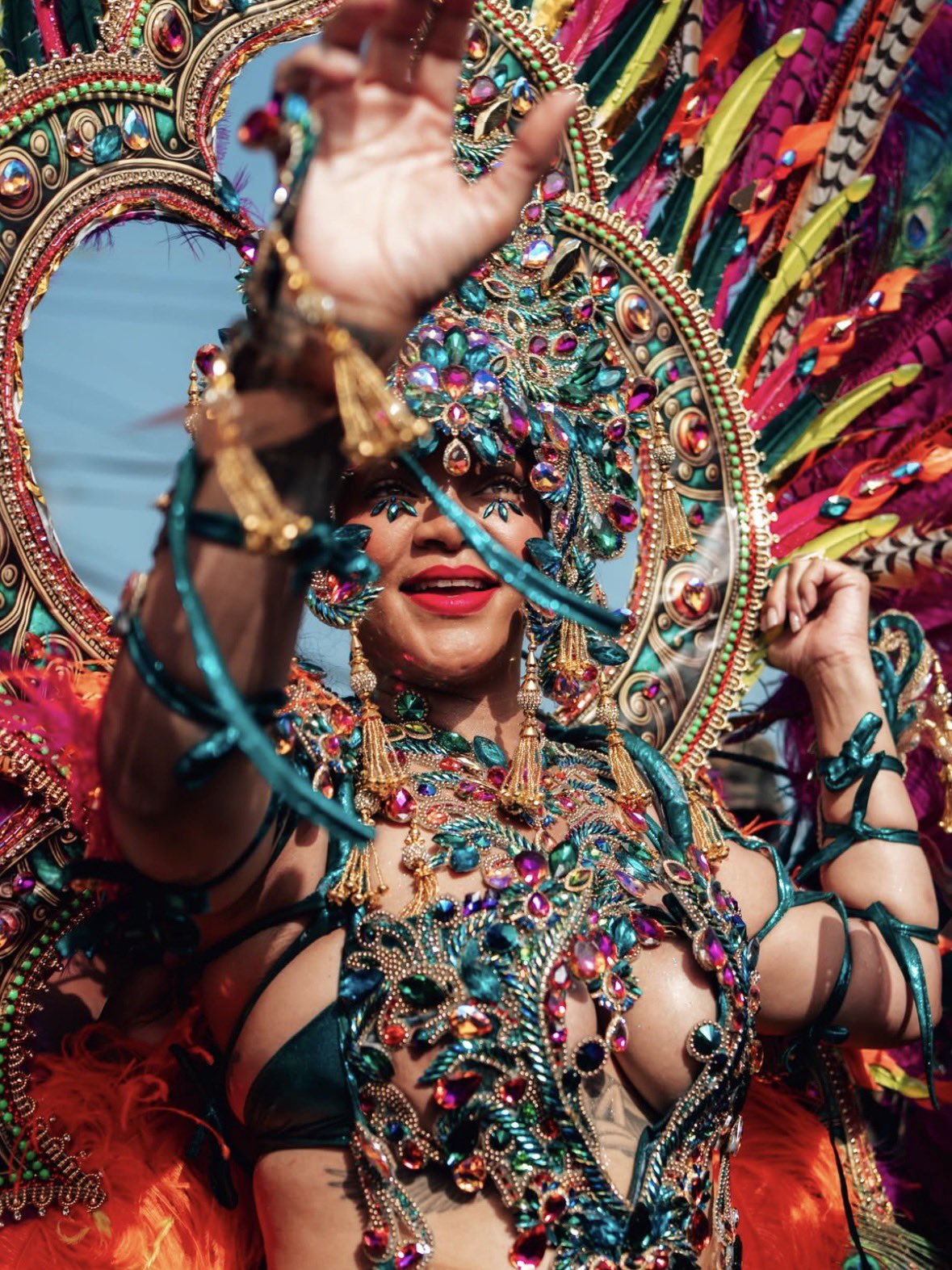
For Rihanna, returning home to Barbados for Crop Over has become one of the most anticipated fashion moments of the summer, and this year’s carnival outfit was no exception. The global superstar once again commanded attention as she turned the streets of Bridgetown into her own runway during Grand Kadooment Day, dazzling in a jewel-encrusted design that celebrated her Barbadian roots.
The Grammy winner’s latest appearance quickly set social media ablaze as photos and videos captured her shimmering in colorful gemstones, dramatic feathers, and sparkling embellishments. As always, Rihanna embraced the carnival celebration to spotlight local designers, proving once again why her annual festival appearances remain among the most talked-about celebrity fashion moments of the year.
Rihanna Returns to Crop Over in Spectacular Fashion
Rihanna at Barbados’ Grand Kadooment Day. pic.twitter.com/DR7oIFoF9C
— 𝖌𝖆𝖇 (@gabgonebad) August 4, 2026
Rihanna made a triumphant return to Barbados on Monday for Grand Kadooment Day, the grand finale of the island’s annual Crop Over festival. The singer joined thousands of revelers celebrating the end of the Caribbean nation’s sugar cane harvest. This tradition dating back to the 1700s that has grown into one of the region’s biggest cultural events.
The Fenty Beauty founder was spotted parading through the streets with her brother’s masquerade band, Aura, where she immediately became one of the day’s biggest attractions. Fans lined the streets while countless videos circulated online, capturing the singer dancing, smiling, and embracing the vibrant festivities that have become synonymous with her annual homecoming.
Although Rihanna skipped last year’s festivities, her return for this year’s celebration was met with excitement, with many eager to see what unforgettable fashion statement she would unveil next.
A Jewel-Covered Costume Stole the Show
The carnival costume Rihanna wore certainly lived up to expectations.
Designed by Barbadian designer Lauren Austin, the custom creation featured a shimmering body harness decorated with multicolored gemstones, sparkling crystals, intricate beadwork, and playful tassels. The dramatic look highlighted the elaborate craftsmanship that has become a hallmark of Crop Over fashion while embracing the bold aesthetic Rihanna has become known for.
Towering above the singer was an elaborate jeweled headpiece bursting with brilliant colors, while an oversized feathered bustle cascaded behind her, adding movement and theatrical flair as she made her way through the parade.
Her glamorous beauty look completed the ensemble, featuring bright lipstick, glowing skin, and delicate gemstones placed beneath her eyes to complement the sparkling design.
Rihanna Continues to Champion Barbadian Designers
One of the defining aspects of every carnival outfit Rihanna wears is her commitment to showcasing homegrown talent.
Lauren Austin has created several of the superstar’s Crop Over looks over the years, becoming one of the creative forces behind Rihanna’s memorable festival appearances. Rather than relying on international luxury fashion houses, the singer consistently uses one of the world’s most photographed cultural celebrations to spotlight Barbadian craftsmanship.
Austin has previously praised Rihanna’s fearless sense of style, describing her as someone who never hesitates to embrace daring designs or push fashion boundaries. Their long-running collaboration has helped produce some of the most recognizable Carnival looks of the past decade.
For local designers, Rihanna’s global influence provides an invaluable platform, introducing Barbadian artistry to millions of fans around the world.
Crop Over Remains One of Her Most Anticipated Appearances
Unlike red carpet events or fashion weeks, Crop Over allows Rihanna to celebrate both style and heritage in equal measure.
Over the years, she has become famous for transforming the festival into an unofficial runway, wearing everything from metallic designs and crystal-covered accessories to dramatic feathered wings and vibrant headpieces. Every appearance builds anticipation for the next, with fans eagerly waiting to see how she’ll reinvent her look.
This year’s costume continued that tradition, combining luxurious embellishments with the colorful energy that defines Caribbean Carnival. The design reflected both the extravagance of the festival and Rihanna’s signature confidence, making it one of the standout celebrity fashion moments of the season.
A Celebration of Culture Beyond Fashion
While the extravagant designs often dominate headlines, Rihanna’s participation carries a deeper meaning.
Crop Over is Barbados’ largest cultural festival, celebrating music, dance, community, and the country’s history. By returning whenever possible, the singer continues to honor the traditions that shaped her long before international fame.
Rather than treating the event as another celebrity appearance, Rihanna embraces the experience alongside fellow revelers, reinforcing her close connection to her homeland. Her decision to parade with Aura also highlighted the family-centered spirit that remains at the heart of the celebration.
The festival has become an opportunity for Rihanna not only to showcase extraordinary fashion but also to celebrate Barbadian identity on a global stage.
Another Viral Fashion Moment for Rihanna
Rihanna’s latest carnival outfit has already become one of the defining celebrity fashion moments of the summer. Between the dazzling gemstones, towering feathers, and intricate craftsmanship, the custom design perfectly captured the vibrant spirit of Crop Over while once again demonstrating the singer’s fearless approach to style.
As photos from Grand Kadooment Day continue to circulate across social media, Rihanna has once again reminded fans why her annual return to Barbados remains one of the most anticipated events of the festival. With another unforgettable costume created by Lauren Austin and a joyful celebration of her roots, the superstar proved that no one blends culture, confidence, and high-impact fashion quite like she does.
Featured image: Kristopher Streek
—Read Also
Source link
#Rihanna #Dazzles #JewelCovered #Carnival #Costume #Barbados #Crop #Festival


Post Comment