×
The Verge staff on the Switch 2: what we love and what we don’t

The Verge staff on the Switch 2: what we love and what we don’t

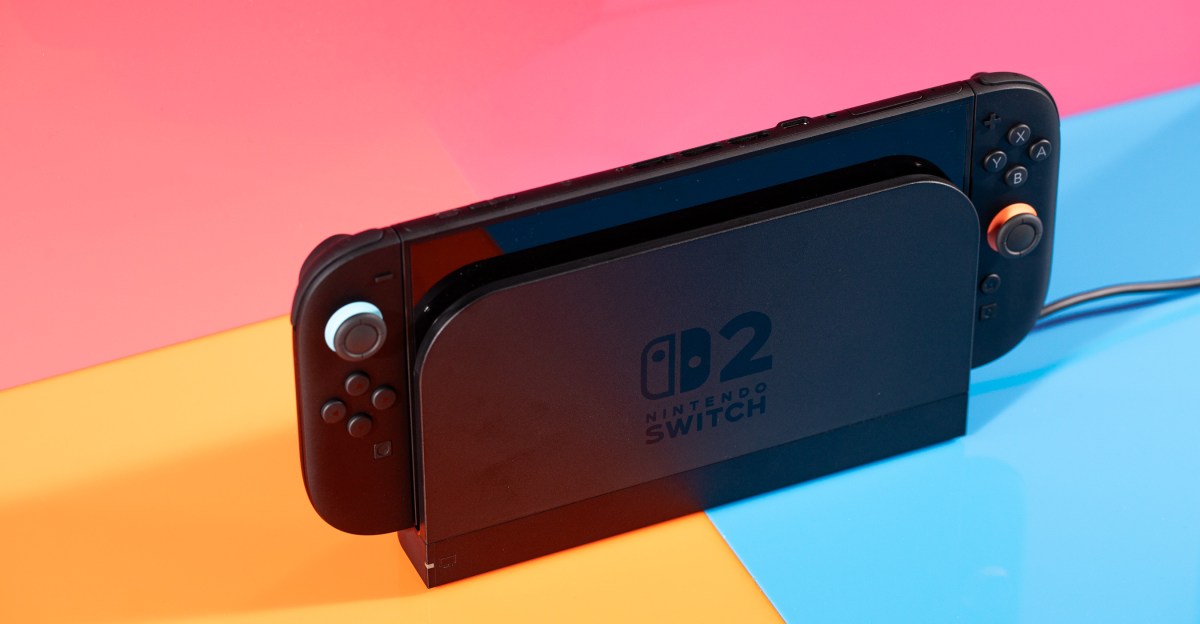
The Nintendo Switch 2 is finally, officially out, and Verge staffers have spent a bunch of time playing with it. The new console has a lot of improvements, like a bigger screen and an extra USB-C port. There’s a bunch of games to play, too, including a new Mario Kart and nice updates to older games.

Here’s our impressions of our first few days with the Switch 2. Our full review is coming soon.

I wish the Switch 2 had an OLED screen, particularly considering the price, but this 7.9-inch, 1080p 120Hz panel absolutely makes my original 6.2-inch Switch seem like a bargain basement tablet by comparison. It’s so much more real estate, it’s crisper and clearer, navigating the UI feels smoother thanks to the high refresh rate, and I no longer feel like my field of vision is getting squeezed by loads of ugly bezel.

But the Switch OLED already solved a few of those issues. And while reasonably bright, the Switch 2’s screen can’t compare to the Steam Deck OLED’s amazingly bright and colorful HDR panel. —Sean Hollister, senior editor

The Switch 2’s slim launch lineup is supplemented by updates to some of the original Switch’s most popular games — some free, some paid. In a lot of cases, the vision and ambition of these games stretched or even exceeded the capabilities of the original Switch hardware, and their performance on the Switch 2 is a drastic improvement.

I’m glad some great games are finally able to escape the shackles of the original Switch and really shine, but it also highlights just how overdue the Switch 2’s improvements really are. —Kallie Plagge, senior copy editor

A screenshot from The Legend of Zelda: Breath of the Wild — Nintendo Switch 2 Edition.
Image: Nintendo

Speaking as a man with a bona fide Joy-Con collecting problem — I racked up six pairs for the Switch because I like all the colors and am bad at managing my money — it was bittersweet news that the Switch 2 only comes in black with tiny red and blue accents. It saved me from spending even more at launch, but that’s only delaying the inevitable.

Does it mean future Joy-Con designs will be similarly understated, with pops of color below the control sticks? Will we have to live with the knowledge that future colored controllers won’t match the hidden accents on the console itself? Most importantly, will I be able to curb my collection compulsion this time around? —Dominic Preston, news editor

To my surprise, my favorite change for the Switch 2 so far is the extra USB-C port on the top of the console. Maybe that’s just because of the way I work: my desk is usually an overflowing pile of various gadgets and cables, so I like having the extra port on top for charging or plugging in a webcam for some Mario Kart. (Which I’m definitely only testing for work, pinky promise.) —Jay Peters, news editor

A photo of the Joy-Con 2 controllers for the Nintendo Switch 2 in a controller grip.

Photo: Amelia Holowaty Krales / The Verge

The original Switch wasn’t comfortable to hold for an extended time, and I thought the Switch 2’s larger size could remedy that. But to me, the Switch 2 might actually be worse.

The slightly bigger Joy-Con 2 controllers give you a little more to wrap your fingers around in handheld mode, but they’re not contoured like larger third-party gamepads or chunkier PC handhelds. The hard edge along the bottom of its Joy-Con 2 controllers digs into my palms when I’m leaning back on the couch. I felt noticeable discomfort after playing Mario Kart World in this position for less than an hour. By the end of my two-ish hour session, it was unbearable.

Maybe my soft hands just aren’t burly enough. (After all, I’m on the record complaining about uncomfortable cameras.) But I think the move from the original Switch Joy-Cons’ rounded borders to the Switch 2’s hard bottom edge is a small downgrade I’ll have to work around. —Antonio G. Di Benedetto, reviewer

There was so much hype ahead of the Switch 2’s launch (even before its announcement) that it’s impossible for a device to live up to it all. And yet, after a weekend with the Switch 2, it’s great, though I’m surprised that all of my personal feelings of mystique surrounding it are gone. What it can or can’t do is no longer a mystery, even if figuring out which webcams will work remains one.

I agree with my colleague Andrew Webster who said in his in-progress testing that it’s “a pleasant upgrade, as opposed to a next-gen shift.” However, I’m disappointed that the mystique didn’t stick around a little longer, like it did with the Steam Deck. Turns out, when a handheld doubles as a Linux PC, the possibilities feel limitless.

The same can’t be said for the Switch 2. It’s a better Switch, but conceptually, it’s the same formula. I’m still getting used to that. —Cameron Faulkner, commerce editor

Source link
#Verge #staff #Switch #love #dont

There are a lot of valid reasons for looking for a hookup and you certainly don’t need to justify your quest for a fling to us.

If you want to protect your privacy or at least keep a low profile while you swipe through sexy singles in your area, there are a few different approaches you can take, some general guidance that works across all apps and sites, and some more targeted advice depending on the service you’re using.

General tips for browsing hookup apps discreetly

The following tips work well across all hookup sites. Think of them as general guidelines for limiting your exposure:

Hookup apps for everyone

AdultFriendFinder readers’ pick for casual connections

Tinder top pick for finding hookups

Hinge popular choice for regular meetups

  • Sign up using an alternative email address. Not only does this spare you in the event of a data breach (and trust us: they’re more common than you would think), but it also means that no one who catches a glance at your inbox will ever find out which hookup sites you frequent.

  • Anonymize your photos as far as possible. You don’t have to blur your face, but neither should you be taking photos of yourself that could show someone what neighborhood you live in or where you work. Additionally, ensure you leave out any identifying marks, such as unique tattoos, from any of your profile photos.  

  • Don’t link your social media in your profile. Too many people share their Instagram pages or TikTok handles in their profiles, but doing so dramatically increases your exposure, since every image and story you post there could inadvertently contain identifying information about you, from who your friends are to where you hang out.  

  • Take advantage of gift cards or prepaid credit cards. If you opt to purchase a premium membership to a hookup app or site, the paper trail linking your bank account or credit card to the service is a definite liability. To maximize your anonymity, use a prepaid card or purchase a gift card rather than using your main credit or debit card to register your membership. 

App-specific tips to retain your anonymity

Feeld

For the privacy-conscious dater, Feeld’s Incognito mode is a game-changer: you can scout the Discover feed without leaving a digital footprint, remaining invisible to anyone you haven’t explicitly “liked.” The app also supports private photo vaults that only unlock for confirmed connections.

Tinder

Tinder offers a few unique features that can help you lower your profile, even as you swipe away. First, consider turning off Discovery mode when you’re trying to keep a low profile. This will make it impossible for new people to find your profile in search without preventing you from speaking to the people you’ve already matched with.

If you really want to take things up a notch and you already have a Tinder Plus, Gold or Platinum membership, you can use Passport Mode to browse singles in a nearby city, or a place you’re travelling to for work or on a vacation. This is a great way to prevent your local friends and family from accidentally coming across your profile. 

You can also block phone numbers if you really don’t want certain individuals coming across your profile, like your boss or sibling.

Grindr

The first line of defence on Grindr is a relatively new feature called Profile Hide that works on one user at a time. Say, for example, you come across a co-worker on the app, and don’t want them to know you’re also using it. Simply click on their profile and find the Hide icon. If you tap this, your profile will become invisible to them and their profile will become invisible to you, like magic.

If you want to take things up a notch, you’ll need a Grindr Unlimited membership, which unlocks a really useful privacy feature called Incignito mode, which essentially allows you to use the service in total secrecy, without anyone knowing you’re there until you initiate an interaction. 

AdultFriendFinder

AdultFriendFinder is like the Wild West of hookup sites, a place where seemingly anything goes, but that carefree attitude can also be a privacy nightmare. We strongly recommend you limit the amount of identifiable information you put on your profile, including being very selective about which photos you choose to share.

One good way to strike a balance between total anonymity and a modicum of privacy is to take advantage of AFF’s many photo features, specifically their photo permissions options. You can make your main profile photo something reasonably discrete, such as a full-length picture of you wearing a hat or a photo shot from a distance or even a photo with your face blurred out, but then you can create a photo album of more identifiable, personal photos that you choose to share only with friends. 

That way, you become the final gatekeeper over your photos, allowing you to be selective about who you share them with.

#tips #hookup #apps #discretely #advice #Feeld #Tinder #AdultFriendFinder #Grindr">4 tips for using hookup apps discretely — advice for Feeld, Tinder, AdultFriendFinder, and Grindr
                                                            There are a lot of valid reasons for looking for a hookup and you certainly don’t need to justify your quest for a fling to us.If you want to protect your privacy or at least keep a low profile while you swipe through sexy singles in your area, there are a few different approaches you can take, some general guidance that works across all apps and sites, and some more targeted advice depending on the service you’re using.General tips for browsing hookup apps discreetlyThe following tips work well across all hookup sites. Think of them as general guidelines for limiting your exposure:
        
            Hookup apps for everyone
                            
                    
    AdultFriendFinder

                                             —
                    readers’ pick for casual connections


    Tinder

                                             —
                    top pick for finding hookups


    Hinge

                                             —
                    popular choice for regular meetups


Sign up using an alternative email address. Not only does this spare you in the event of a data breach (and trust us: they’re more common than you would think), but it also means that no one who catches a glance at your inbox will ever find out which hookup sites you frequent.Anonymize your photos as far as possible. You don’t have to blur your face, but neither should you be taking photos of yourself that could show someone what neighborhood you live in or where you work. Additionally, ensure you leave out any identifying marks, such as unique tattoos, from any of your profile photos.  Don’t link your social media in your profile. Too many people share their Instagram pages or TikTok handles in their profiles, but doing so dramatically increases your exposure, since every image and story you post there could inadvertently contain identifying information about you, from who your friends are to where you hang out.  Take advantage of gift cards or prepaid credit cards. If you opt to purchase a premium membership to a hookup app or site, the paper trail linking your bank account or credit card to the service is a definite liability. To maximize your anonymity, use a prepaid card or purchase a gift card rather than using your main credit or debit card to register your membership. App-specific tips to retain your anonymityFeeldFor the privacy-conscious dater, Feeld’s Incognito mode is a game-changer: you can scout the Discover feed without leaving a digital footprint, remaining invisible to anyone you haven’t explicitly “liked.” The app also supports private photo vaults that only unlock for confirmed connections. TinderTinder offers a few unique features that can help you lower your profile, even as you swipe away. First, consider turning off Discovery mode when you’re trying to keep a low profile. This will make it impossible for new people to find your profile in search without preventing you from speaking to the people you’ve already matched with.
        
            Mashable Trend Report


If you really want to take things up a notch and you already have a Tinder Plus, Gold or Platinum membership, you can use Passport Mode to browse singles in a nearby city, or a place you’re travelling to for work or on a vacation. This is a great way to prevent your local friends and family from accidentally coming across your profile. You can also block phone numbers if you really don’t want certain individuals coming across your profile, like your boss or sibling.GrindrThe first line of defence on Grindr is a relatively new feature called Profile Hide that works on one user at a time. Say, for example, you come across a co-worker on the app, and don’t want them to know you’re also using it. Simply click on their profile and find the Hide icon. If you tap this, your profile will become invisible to them and their profile will become invisible to you, like magic.If you want to take things up a notch, you’ll need a Grindr Unlimited membership, which unlocks a really useful privacy feature called Incignito mode, which essentially allows you to use the service in total secrecy, without anyone knowing you’re there until you initiate an interaction. AdultFriendFinderAdultFriendFinder is like the Wild West of hookup sites, a place where seemingly anything goes, but that carefree attitude can also be a privacy nightmare. We strongly recommend you limit the amount of identifiable information you put on your profile, including being very selective about which photos you choose to share.One good way to strike a balance between total anonymity and a modicum of privacy is to take advantage of AFF’s many photo features, specifically their photo permissions options. You can make your main profile photo something reasonably discrete, such as a full-length picture of you wearing a hat or a photo shot from a distance or even a photo with your face blurred out, but then you can create a photo album of more identifiable, personal photos that you choose to share only with friends. That way, you become the final gatekeeper over your photos, allowing you to be selective about who you share them with.


                                    #tips #hookup #apps #discretely #advice #Feeld #Tinder #AdultFriendFinder #Grindr

hookup and you certainly don’t need to justify your quest for a fling to us.

If you want to protect your privacy or at least keep a low profile while you swipe through sexy singles in your area, there are a few different approaches you can take, some general guidance that works across all apps and sites, and some more targeted advice depending on the service you’re using.

General tips for browsing hookup apps discreetly

The following tips work well across all hookup sites. Think of them as general guidelines for limiting your exposure:

Hookup apps for everyone

AdultFriendFinder readers’ pick for casual connections

Tinder top pick for finding hookups

Hinge popular choice for regular meetups

  • Sign up using an alternative email address. Not only does this spare you in the event of a data breach (and trust us: they’re more common than you would think), but it also means that no one who catches a glance at your inbox will ever find out which hookup sites you frequent.

  • Anonymize your photos as far as possible. You don’t have to blur your face, but neither should you be taking photos of yourself that could show someone what neighborhood you live in or where you work. Additionally, ensure you leave out any identifying marks, such as unique tattoos, from any of your profile photos.  

  • Don’t link your social media in your profile. Too many people share their Instagram pages or TikTok handles in their profiles, but doing so dramatically increases your exposure, since every image and story you post there could inadvertently contain identifying information about you, from who your friends are to where you hang out.  

  • Take advantage of gift cards or prepaid credit cards. If you opt to purchase a premium membership to a hookup app or site, the paper trail linking your bank account or credit card to the service is a definite liability. To maximize your anonymity, use a prepaid card or purchase a gift card rather than using your main credit or debit card to register your membership. 

App-specific tips to retain your anonymity

Feeld

For the privacy-conscious dater, Feeld’s Incognito mode is a game-changer: you can scout the Discover feed without leaving a digital footprint, remaining invisible to anyone you haven’t explicitly “liked.” The app also supports private photo vaults that only unlock for confirmed connections.

Tinder

Tinder offers a few unique features that can help you lower your profile, even as you swipe away. First, consider turning off Discovery mode when you’re trying to keep a low profile. This will make it impossible for new people to find your profile in search without preventing you from speaking to the people you’ve already matched with.

If you really want to take things up a notch and you already have a Tinder Plus, Gold or Platinum membership, you can use Passport Mode to browse singles in a nearby city, or a place you’re travelling to for work or on a vacation. This is a great way to prevent your local friends and family from accidentally coming across your profile. 

You can also block phone numbers if you really don’t want certain individuals coming across your profile, like your boss or sibling.

Grindr

The first line of defence on Grindr is a relatively new feature called Profile Hide that works on one user at a time. Say, for example, you come across a co-worker on the app, and don’t want them to know you’re also using it. Simply click on their profile and find the Hide icon. If you tap this, your profile will become invisible to them and their profile will become invisible to you, like magic.

If you want to take things up a notch, you’ll need a Grindr Unlimited membership, which unlocks a really useful privacy feature called Incignito mode, which essentially allows you to use the service in total secrecy, without anyone knowing you’re there until you initiate an interaction. 

AdultFriendFinder

AdultFriendFinder is like the Wild West of hookup sites, a place where seemingly anything goes, but that carefree attitude can also be a privacy nightmare. We strongly recommend you limit the amount of identifiable information you put on your profile, including being very selective about which photos you choose to share.

One good way to strike a balance between total anonymity and a modicum of privacy is to take advantage of AFF’s many photo features, specifically their photo permissions options. You can make your main profile photo something reasonably discrete, such as a full-length picture of you wearing a hat or a photo shot from a distance or even a photo with your face blurred out, but then you can create a photo album of more identifiable, personal photos that you choose to share only with friends. 

That way, you become the final gatekeeper over your photos, allowing you to be selective about who you share them with.

#tips #hookup #apps #discretely #advice #Feeld #Tinder #AdultFriendFinder #Grindr">4 tips for using hookup apps discretely — advice for Feeld, Tinder, AdultFriendFinder, and Grindr

There are a lot of valid reasons for looking for a hookup and you certainly don’t need to justify your quest for a fling to us.

If you want to protect your privacy or at least keep a low profile while you swipe through sexy singles in your area, there are a few different approaches you can take, some general guidance that works across all apps and sites, and some more targeted advice depending on the service you’re using.

General tips for browsing hookup apps discreetly

The following tips work well across all hookup sites. Think of them as general guidelines for limiting your exposure:

Hookup apps for everyone

AdultFriendFinder readers’ pick for casual connections

Tinder top pick for finding hookups

Hinge popular choice for regular meetups

  • Sign up using an alternative email address. Not only does this spare you in the event of a data breach (and trust us: they’re more common than you would think), but it also means that no one who catches a glance at your inbox will ever find out which hookup sites you frequent.

  • Anonymize your photos as far as possible. You don’t have to blur your face, but neither should you be taking photos of yourself that could show someone what neighborhood you live in or where you work. Additionally, ensure you leave out any identifying marks, such as unique tattoos, from any of your profile photos.  

  • Don’t link your social media in your profile. Too many people share their Instagram pages or TikTok handles in their profiles, but doing so dramatically increases your exposure, since every image and story you post there could inadvertently contain identifying information about you, from who your friends are to where you hang out.  

  • Take advantage of gift cards or prepaid credit cards. If you opt to purchase a premium membership to a hookup app or site, the paper trail linking your bank account or credit card to the service is a definite liability. To maximize your anonymity, use a prepaid card or purchase a gift card rather than using your main credit or debit card to register your membership. 

App-specific tips to retain your anonymity

Feeld

For the privacy-conscious dater, Feeld’s Incognito mode is a game-changer: you can scout the Discover feed without leaving a digital footprint, remaining invisible to anyone you haven’t explicitly “liked.” The app also supports private photo vaults that only unlock for confirmed connections.

Tinder

Tinder offers a few unique features that can help you lower your profile, even as you swipe away. First, consider turning off Discovery mode when you’re trying to keep a low profile. This will make it impossible for new people to find your profile in search without preventing you from speaking to the people you’ve already matched with.

If you really want to take things up a notch and you already have a Tinder Plus, Gold or Platinum membership, you can use Passport Mode to browse singles in a nearby city, or a place you’re travelling to for work or on a vacation. This is a great way to prevent your local friends and family from accidentally coming across your profile. 

You can also block phone numbers if you really don’t want certain individuals coming across your profile, like your boss or sibling.

Grindr

The first line of defence on Grindr is a relatively new feature called Profile Hide that works on one user at a time. Say, for example, you come across a co-worker on the app, and don’t want them to know you’re also using it. Simply click on their profile and find the Hide icon. If you tap this, your profile will become invisible to them and their profile will become invisible to you, like magic.

If you want to take things up a notch, you’ll need a Grindr Unlimited membership, which unlocks a really useful privacy feature called Incignito mode, which essentially allows you to use the service in total secrecy, without anyone knowing you’re there until you initiate an interaction. 

AdultFriendFinder

AdultFriendFinder is like the Wild West of hookup sites, a place where seemingly anything goes, but that carefree attitude can also be a privacy nightmare. We strongly recommend you limit the amount of identifiable information you put on your profile, including being very selective about which photos you choose to share.

One good way to strike a balance between total anonymity and a modicum of privacy is to take advantage of AFF’s many photo features, specifically their photo permissions options. You can make your main profile photo something reasonably discrete, such as a full-length picture of you wearing a hat or a photo shot from a distance or even a photo with your face blurred out, but then you can create a photo album of more identifiable, personal photos that you choose to share only with friends. 

That way, you become the final gatekeeper over your photos, allowing you to be selective about who you share them with.

#tips #hookup #apps #discretely #advice #Feeld #Tinder #AdultFriendFinder #Grindr

Post Comment