×
The Verge staff on the Switch 2: what we love and what we don’t

The Verge staff on the Switch 2: what we love and what we don’t

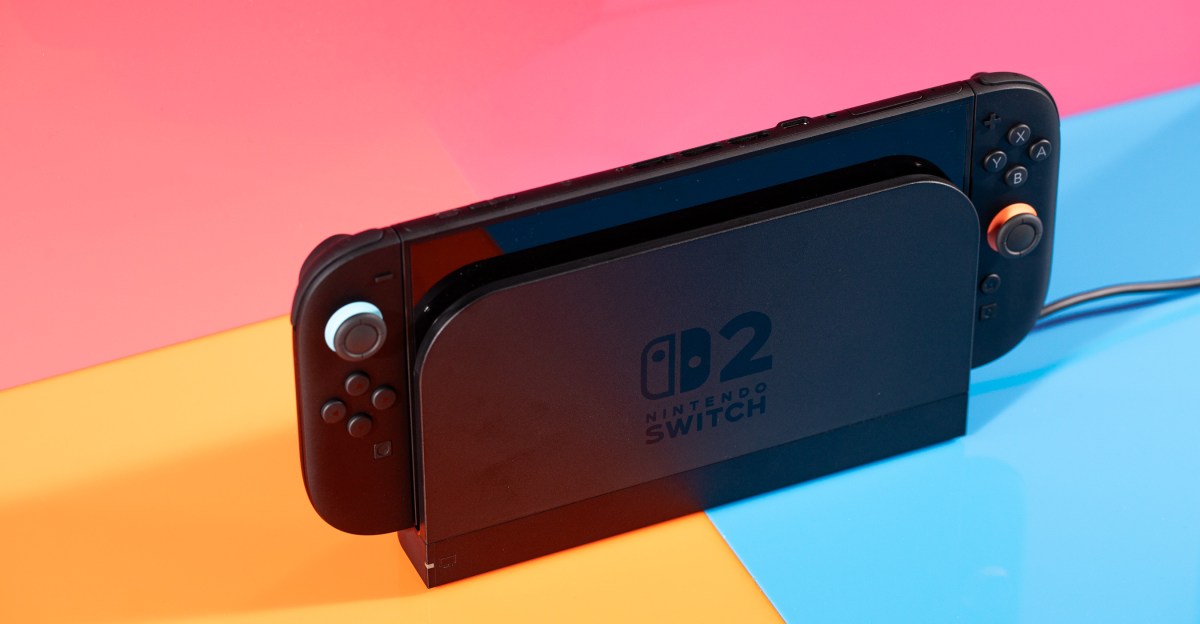
The Nintendo Switch 2 is finally, officially out, and Verge staffers have spent a bunch of time playing with it. The new console has a lot of improvements, like a bigger screen and an extra USB-C port. There’s a bunch of games to play, too, including a new Mario Kart and nice updates to older games.

Here’s our impressions of our first few days with the Switch 2. Our full review is coming soon.

I wish the Switch 2 had an OLED screen, particularly considering the price, but this 7.9-inch, 1080p 120Hz panel absolutely makes my original 6.2-inch Switch seem like a bargain basement tablet by comparison. It’s so much more real estate, it’s crisper and clearer, navigating the UI feels smoother thanks to the high refresh rate, and I no longer feel like my field of vision is getting squeezed by loads of ugly bezel.

But the Switch OLED already solved a few of those issues. And while reasonably bright, the Switch 2’s screen can’t compare to the Steam Deck OLED’s amazingly bright and colorful HDR panel. —Sean Hollister, senior editor

The Switch 2’s slim launch lineup is supplemented by updates to some of the original Switch’s most popular games — some free, some paid. In a lot of cases, the vision and ambition of these games stretched or even exceeded the capabilities of the original Switch hardware, and their performance on the Switch 2 is a drastic improvement.

I’m glad some great games are finally able to escape the shackles of the original Switch and really shine, but it also highlights just how overdue the Switch 2’s improvements really are. —Kallie Plagge, senior copy editor

A screenshot from The Legend of Zelda: Breath of the Wild — Nintendo Switch 2 Edition.
Image: Nintendo

Speaking as a man with a bona fide Joy-Con collecting problem — I racked up six pairs for the Switch because I like all the colors and am bad at managing my money — it was bittersweet news that the Switch 2 only comes in black with tiny red and blue accents. It saved me from spending even more at launch, but that’s only delaying the inevitable.

Does it mean future Joy-Con designs will be similarly understated, with pops of color below the control sticks? Will we have to live with the knowledge that future colored controllers won’t match the hidden accents on the console itself? Most importantly, will I be able to curb my collection compulsion this time around? —Dominic Preston, news editor

To my surprise, my favorite change for the Switch 2 so far is the extra USB-C port on the top of the console. Maybe that’s just because of the way I work: my desk is usually an overflowing pile of various gadgets and cables, so I like having the extra port on top for charging or plugging in a webcam for some Mario Kart. (Which I’m definitely only testing for work, pinky promise.) —Jay Peters, news editor

A photo of the Joy-Con 2 controllers for the Nintendo Switch 2 in a controller grip.

Photo: Amelia Holowaty Krales / The Verge

The original Switch wasn’t comfortable to hold for an extended time, and I thought the Switch 2’s larger size could remedy that. But to me, the Switch 2 might actually be worse.

The slightly bigger Joy-Con 2 controllers give you a little more to wrap your fingers around in handheld mode, but they’re not contoured like larger third-party gamepads or chunkier PC handhelds. The hard edge along the bottom of its Joy-Con 2 controllers digs into my palms when I’m leaning back on the couch. I felt noticeable discomfort after playing Mario Kart World in this position for less than an hour. By the end of my two-ish hour session, it was unbearable.

Maybe my soft hands just aren’t burly enough. (After all, I’m on the record complaining about uncomfortable cameras.) But I think the move from the original Switch Joy-Cons’ rounded borders to the Switch 2’s hard bottom edge is a small downgrade I’ll have to work around. —Antonio G. Di Benedetto, reviewer

There was so much hype ahead of the Switch 2’s launch (even before its announcement) that it’s impossible for a device to live up to it all. And yet, after a weekend with the Switch 2, it’s great, though I’m surprised that all of my personal feelings of mystique surrounding it are gone. What it can or can’t do is no longer a mystery, even if figuring out which webcams will work remains one.

I agree with my colleague Andrew Webster who said in his in-progress testing that it’s “a pleasant upgrade, as opposed to a next-gen shift.” However, I’m disappointed that the mystique didn’t stick around a little longer, like it did with the Steam Deck. Turns out, when a handheld doubles as a Linux PC, the possibilities feel limitless.

The same can’t be said for the Switch 2. It’s a better Switch, but conceptually, it’s the same formula. I’m still getting used to that. —Cameron Faulkner, commerce editor

Source link
#Verge #staff #Switch #love #dont
When you’re jumping between the many different apps Google offers—Gmail, Google Maps, Google Calendar, YouTube, and all the rest—you may not be giving much thought to the Google account that underpins them all or to the myriad settings you can access that help to define your experience across all these apps.

If you’ve never opened up your Google account page on the web or on your phone, there are a host of options to browse through there. They cover everything from data security and browsing history to the backup email Google needs in case you ever get locked out of your account.

Here we’re going to focus on seven of the lesser-known settings: the ones that don’t necessarily get a lot of attention but which are still an important part of how your account and your Google apps operate. It’s worth spending a few minutes to review these and to make sure they’re set up in the way you’d like.

Also pause to consider how much personal information you want to share with Google, or how much of your information you’re making visible on the web. Let your own level of comfort guide your decisions on how you tweak these settings.

The starting point for all these settings is your Google account page on the web.

Set Your Home and Work Addresses

Google will use the information about where you live and work to personalize your experience. This is most useful in Google Maps, because it means you can get directions back home or to your office with a single tap rather than typing in the address each time. (You should see Home and Work shortcuts appear whenever you search for a destination.)

There are benefits for getting more accurate weather forecasts and more relevant search results too. The usual Google privacy policy rules apply: No one else will see the address information you’ve saved, but you might start seeing more ads for sandwich shops in your local area.

To set these addresses from your Google account page, click Personal info and then either Home address or Work address. You can either type out the address manually, or select a location on a map.

Edit Your Google Profile Information

Settings for your Google Profile Information

Settings for your Google Profile Information

Courtesy of David Nield

You may not think about your Google account in the same way as a Facebook or Instagram profile, but Google does share bits of information about you with other people. If you send someone an email through Gmail, they can click on your profile photo and see whatever’s public on your Google account page. Similarly, if you leave a review on Google Maps, the viewers of that review can tap on your name or picture and see any public information on your Google account page.

#LesserKnown #Google #Account #Settings #Changegoogle,how-to,tips,privacy,gmail,google maps">7 Lesser-Known Google Account Settings You Should ChangeWhen you’re jumping between the many different apps Google offers—Gmail, Google Maps, Google Calendar, YouTube, and all the rest—you may not be giving much thought to the Google account that underpins them all or to the myriad settings you can access that help to define your experience across all these apps.If you’ve never opened up your Google account page on the web or on your phone, there are a host of options to browse through there. They cover everything from data security and browsing history to the backup email Google needs in case you ever get locked out of your account.Here we’re going to focus on seven of the lesser-known settings: the ones that don’t necessarily get a lot of attention but which are still an important part of how your account and your Google apps operate. It’s worth spending a few minutes to review these and to make sure they’re set up in the way you’d like.Also pause to consider how much personal information you want to share with Google, or how much of your information you’re making visible on the web. Let your own level of comfort guide your decisions on how you tweak these settings.The starting point for all these settings is your Google account page on the web.Set Your Home and Work AddressesGoogle will use the information about where you live and work to personalize your experience. This is most useful in Google Maps, because it means you can get directions back home or to your office with a single tap rather than typing in the address each time. (You should see Home and Work shortcuts appear whenever you search for a destination.)There are benefits for getting more accurate weather forecasts and more relevant search results too. The usual Google privacy policy rules apply: No one else will see the address information you’ve saved, but you might start seeing more ads for sandwich shops in your local area.To set these addresses from your Google account page, click Personal info and then either Home address or Work address. You can either type out the address manually, or select a location on a map.Edit Your Google Profile InformationSettings for your Google Profile Information
Courtesy of David NieldYou may not think about your Google account in the same way as a Facebook or Instagram profile, but Google does share bits of information about you with other people. If you send someone an email through Gmail, they can click on your profile photo and see whatever’s public on your Google account page. Similarly, if you leave a review on Google Maps, the viewers of that review can tap on your name or picture and see any public information on your Google account page.#LesserKnown #Google #Account #Settings #Changegoogle,how-to,tips,privacy,gmail,google maps

Google offers—Gmail, Google Maps, Google Calendar, YouTube, and all the rest—you may not be giving much thought to the Google account that underpins them all or to the myriad settings you can access that help to define your experience across all these apps.

If you’ve never opened up your Google account page on the web or on your phone, there are a host of options to browse through there. They cover everything from data security and browsing history to the backup email Google needs in case you ever get locked out of your account.

Here we’re going to focus on seven of the lesser-known settings: the ones that don’t necessarily get a lot of attention but which are still an important part of how your account and your Google apps operate. It’s worth spending a few minutes to review these and to make sure they’re set up in the way you’d like.

Also pause to consider how much personal information you want to share with Google, or how much of your information you’re making visible on the web. Let your own level of comfort guide your decisions on how you tweak these settings.

The starting point for all these settings is your Google account page on the web.

Set Your Home and Work Addresses

Google will use the information about where you live and work to personalize your experience. This is most useful in Google Maps, because it means you can get directions back home or to your office with a single tap rather than typing in the address each time. (You should see Home and Work shortcuts appear whenever you search for a destination.)

There are benefits for getting more accurate weather forecasts and more relevant search results too. The usual Google privacy policy rules apply: No one else will see the address information you’ve saved, but you might start seeing more ads for sandwich shops in your local area.

To set these addresses from your Google account page, click Personal info and then either Home address or Work address. You can either type out the address manually, or select a location on a map.

Edit Your Google Profile Information

Settings for your Google Profile Information

Settings for your Google Profile Information

Courtesy of David Nield

You may not think about your Google account in the same way as a Facebook or Instagram profile, but Google does share bits of information about you with other people. If you send someone an email through Gmail, they can click on your profile photo and see whatever’s public on your Google account page. Similarly, if you leave a review on Google Maps, the viewers of that review can tap on your name or picture and see any public information on your Google account page.

#LesserKnown #Google #Account #Settings #Changegoogle,how-to,tips,privacy,gmail,google maps">7 Lesser-Known Google Account Settings You Should Change

When you’re jumping between the many different apps Google offers—Gmail, Google Maps, Google Calendar, YouTube, and all the rest—you may not be giving much thought to the Google account that underpins them all or to the myriad settings you can access that help to define your experience across all these apps.

If you’ve never opened up your Google account page on the web or on your phone, there are a host of options to browse through there. They cover everything from data security and browsing history to the backup email Google needs in case you ever get locked out of your account.

Here we’re going to focus on seven of the lesser-known settings: the ones that don’t necessarily get a lot of attention but which are still an important part of how your account and your Google apps operate. It’s worth spending a few minutes to review these and to make sure they’re set up in the way you’d like.

Also pause to consider how much personal information you want to share with Google, or how much of your information you’re making visible on the web. Let your own level of comfort guide your decisions on how you tweak these settings.

The starting point for all these settings is your Google account page on the web.

Set Your Home and Work Addresses

Google will use the information about where you live and work to personalize your experience. This is most useful in Google Maps, because it means you can get directions back home or to your office with a single tap rather than typing in the address each time. (You should see Home and Work shortcuts appear whenever you search for a destination.)

There are benefits for getting more accurate weather forecasts and more relevant search results too. The usual Google privacy policy rules apply: No one else will see the address information you’ve saved, but you might start seeing more ads for sandwich shops in your local area.

To set these addresses from your Google account page, click Personal info and then either Home address or Work address. You can either type out the address manually, or select a location on a map.

Edit Your Google Profile Information

Settings for your Google Profile Information

Settings for your Google Profile Information

Courtesy of David Nield

You may not think about your Google account in the same way as a Facebook or Instagram profile, but Google does share bits of information about you with other people. If you send someone an email through Gmail, they can click on your profile photo and see whatever’s public on your Google account page. Similarly, if you leave a review on Google Maps, the viewers of that review can tap on your name or picture and see any public information on your Google account page.

#LesserKnown #Google #Account #Settings #Changegoogle,how-to,tips,privacy,gmail,google maps

TL;DR: Unblock Pornhub from Iowa with a VPN. The best service for unblocking porn sites is ExpressVPN.


The world of porn continues to be rocked by new laws that require visitors to upload ID before accessing sites. After a number of states introduced these restrictions, Pornhub hit back by banning visitors from these locations. It’s an ongoing battle that shows no signs of slowing down.

Age-verification laws for adult content have now been passed in Iowa. Pornhub has not yet been banned in Iowa, but access is still restricted. Fortunately, users can bypass these restrictions in just a few simple steps.

Hookup apps for everyone

AdultFriendFinder readers’ pick for casual connections

Tinder top pick for finding hookups

Hinge popular choice for regular meetups

How to unblock Pornhub for free in Iowa

VPNs are useful tools that can hide your real IP address (digital location) and connect you to secure servers in other locations. This process bypasses geo-restrictions so you can access sites like Pornhub from anywhere in the world.

Unblock Pornhub by following these simple steps:

  1. Sign up for a VPN (we recommend ExpressVPN)

  2. Download the app to your device of choice (the best VPNs have apps for Windows, Mac, iOS, Android, Linux, and more)

  3. Open up the app and connect to a server in a location that supports access to Pornhub

  4. Visit Pornhub

$12.99 only at ExpressVPN (with money-back guarantee)

The best VPNs for unblocking porn sites are not free, but most do offer free-trial peiods or money-back guarantees. By leveraging these offers, you can unblock porn sites like Pornhub without actually spending anything. This is obviously not a long-term solution, but it does give you the opportunity to temporarily retain access to Pornhub before recovering your investment.

If you want to retain permanent access to sites like Pornhub, you’ll need a subscription. Fortunately, the best VPN for bypassing content restrictions is on sale for a limited time.

What is the best VPN for Pornhub?

ExpressVPN is the top choice for unblocking porn sites like Pornhub, for a number of reasons:

  • Servers in 105 countries

  • Easy-to-use app available on all major devices including iPhone, Android, Windows, Mac, and more

  • Strict no-logging policy so your data is always secure

  • Fast streaming speeds free from throttling

  • Up to eight simultaneous connections

  • 30-day money-back guarantee

A two-year subscription to ExpressVPN is on sale for $68.40 and includes an extra four months for free — 81% off for a limited time. This plan includes a year of free unlimited cloud backup and a generous 30-day money-back guarantee. Alternatively, you can get a one-month plan for just $12.99 (with money-back guarantee).

Unblock Pornhub for free in Iowa with ExpressVPN.

#unblock #Pornhub #free #Iowa">How to unblock Pornhub for free in Iowa
                                                            TL;DR: Unblock Pornhub from Iowa with a VPN. The best service for unblocking porn sites is ExpressVPN.The world of porn continues to be rocked by new laws that require visitors to upload ID before accessing sites. After a number of states introduced these restrictions, Pornhub hit back by banning visitors from these locations. It’s an ongoing battle that shows no signs of slowing down. Age-verification laws for adult content have now been passed in Iowa. Pornhub has not yet been banned in Iowa, but access is still restricted. Fortunately, users can bypass these restrictions in just a few simple steps.

        
            Hookup apps for everyone
                            
                    
    AdultFriendFinder

                                             —
                    readers’ pick for casual connections


    Tinder

                                             —
                    top pick for finding hookups


    Hinge

                                             —
                    popular choice for regular meetups


How to unblock Pornhub for free in IowaVPNs are useful tools that can hide your real IP address (digital location) and connect you to secure servers in other locations. This process bypasses geo-restrictions so you can access sites like Pornhub from anywhere in the world. Unblock Pornhub by following these simple steps:
        
            Mashable Trend Report


Sign up for a VPN (we recommend ExpressVPN)Download the app to your device of choice (the best VPNs have apps for Windows, Mac, iOS, Android, Linux, and more)Open up the app and connect to a server in a location that supports access to PornhubVisit Pornhub


                                                    .99 only at ExpressVPN (with money-back guarantee)


The best VPNs for unblocking porn sites are not free, but most do offer free-trial peiods or money-back guarantees. By leveraging these offers, you can unblock porn sites like Pornhub without actually spending anything. This is obviously not a long-term solution, but it does give you the opportunity to temporarily retain access to Pornhub before recovering your investment.If you want to retain permanent access to sites like Pornhub, you’ll need a subscription. Fortunately, the best VPN for bypassing content restrictions is on sale for a limited time.What is the best VPN for Pornhub?ExpressVPN is the top choice for unblocking porn sites like Pornhub, for a number of reasons: Servers in 105 countries Easy-to-use app available on all major devices including iPhone, Android, Windows, Mac, and moreStrict no-logging policy so your data is always secureFast streaming speeds free from throttlingUp to eight simultaneous connections30-day money-back guaranteeA two-year subscription to ExpressVPN is on sale for .40 and includes an extra four months for free — 81% off for a limited time. This plan includes a year of free unlimited cloud backup and a generous 30-day money-back guarantee. Alternatively, you can get a one-month plan for just .99 (with money-back guarantee).Unblock Pornhub for free in Iowa with ExpressVPN.


                                    #unblock #Pornhub #free #Iowa

ExpressVPN.


The world of porn continues to be rocked by new laws that require visitors to upload ID before accessing sites. After a number of states introduced these restrictions, Pornhub hit back by banning visitors from these locations. It’s an ongoing battle that shows no signs of slowing down.

Age-verification laws for adult content have now been passed in Iowa. Pornhub has not yet been banned in Iowa, but access is still restricted. Fortunately, users can bypass these restrictions in just a few simple steps.

Hookup apps for everyone

AdultFriendFinder readers’ pick for casual connections

Tinder top pick for finding hookups

Hinge popular choice for regular meetups

How to unblock Pornhub for free in Iowa

VPNs are useful tools that can hide your real IP address (digital location) and connect you to secure servers in other locations. This process bypasses geo-restrictions so you can access sites like Pornhub from anywhere in the world.

Unblock Pornhub by following these simple steps:

  1. Sign up for a VPN (we recommend ExpressVPN)

  2. Download the app to your device of choice (the best VPNs have apps for Windows, Mac, iOS, Android, Linux, and more)

  3. Open up the app and connect to a server in a location that supports access to Pornhub

  4. Visit Pornhub

$12.99 only at ExpressVPN (with money-back guarantee)

The best VPNs for unblocking porn sites are not free, but most do offer free-trial peiods or money-back guarantees. By leveraging these offers, you can unblock porn sites like Pornhub without actually spending anything. This is obviously not a long-term solution, but it does give you the opportunity to temporarily retain access to Pornhub before recovering your investment.

If you want to retain permanent access to sites like Pornhub, you’ll need a subscription. Fortunately, the best VPN for bypassing content restrictions is on sale for a limited time.

What is the best VPN for Pornhub?

ExpressVPN is the top choice for unblocking porn sites like Pornhub, for a number of reasons:

  • Servers in 105 countries

  • Easy-to-use app available on all major devices including iPhone, Android, Windows, Mac, and more

  • Strict no-logging policy so your data is always secure

  • Fast streaming speeds free from throttling

  • Up to eight simultaneous connections

  • 30-day money-back guarantee

A two-year subscription to ExpressVPN is on sale for $68.40 and includes an extra four months for free — 81% off for a limited time. This plan includes a year of free unlimited cloud backup and a generous 30-day money-back guarantee. Alternatively, you can get a one-month plan for just $12.99 (with money-back guarantee).

Unblock Pornhub for free in Iowa with ExpressVPN.

#unblock #Pornhub #free #Iowa">How to unblock Pornhub for free in Iowa

TL;DR: Unblock Pornhub from Iowa with a VPN. The best service for unblocking porn sites is ExpressVPN.


The world of porn continues to be rocked by new laws that require visitors to upload ID before accessing sites. After a number of states introduced these restrictions, Pornhub hit back by banning visitors from these locations. It’s an ongoing battle that shows no signs of slowing down.

Age-verification laws for adult content have now been passed in Iowa. Pornhub has not yet been banned in Iowa, but access is still restricted. Fortunately, users can bypass these restrictions in just a few simple steps.

Hookup apps for everyone

AdultFriendFinder readers’ pick for casual connections

Tinder top pick for finding hookups

Hinge popular choice for regular meetups

How to unblock Pornhub for free in Iowa

VPNs are useful tools that can hide your real IP address (digital location) and connect you to secure servers in other locations. This process bypasses geo-restrictions so you can access sites like Pornhub from anywhere in the world.

Unblock Pornhub by following these simple steps:

  1. Sign up for a VPN (we recommend ExpressVPN)

  2. Download the app to your device of choice (the best VPNs have apps for Windows, Mac, iOS, Android, Linux, and more)

  3. Open up the app and connect to a server in a location that supports access to Pornhub

  4. Visit Pornhub

$12.99 only at ExpressVPN (with money-back guarantee)

The best VPNs for unblocking porn sites are not free, but most do offer free-trial peiods or money-back guarantees. By leveraging these offers, you can unblock porn sites like Pornhub without actually spending anything. This is obviously not a long-term solution, but it does give you the opportunity to temporarily retain access to Pornhub before recovering your investment.

If you want to retain permanent access to sites like Pornhub, you’ll need a subscription. Fortunately, the best VPN for bypassing content restrictions is on sale for a limited time.

What is the best VPN for Pornhub?

ExpressVPN is the top choice for unblocking porn sites like Pornhub, for a number of reasons:

  • Servers in 105 countries

  • Easy-to-use app available on all major devices including iPhone, Android, Windows, Mac, and more

  • Strict no-logging policy so your data is always secure

  • Fast streaming speeds free from throttling

  • Up to eight simultaneous connections

  • 30-day money-back guarantee

A two-year subscription to ExpressVPN is on sale for $68.40 and includes an extra four months for free — 81% off for a limited time. This plan includes a year of free unlimited cloud backup and a generous 30-day money-back guarantee. Alternatively, you can get a one-month plan for just $12.99 (with money-back guarantee).

Unblock Pornhub for free in Iowa with ExpressVPN.

#unblock #Pornhub #free #Iowa

Post Comment