×
How To Add Someone to Google Calendar?

How To Add Someone to Google Calendar?

Having trouble organizing a time that works for everyone? Google Calendar helps you invite others to your events so that they can see the plan and respond. Instead of texting out all the information, you can simply invite them to the event, and Google will handle the rest.

Step 1: How To create a Google Calendar Event

Creating an event on Google Calendar is fast and keeps you organized. The following are the steps on how to do it:

  1. Open Google Calendar on your phone or computer.
  2. Click the “+ Create” button or tap on the date you wish to add the event.
  3. Type in the event name: “Team Meeting” or “Dinner with Friends.”
  4. Schedule the date and time. You can also schedule it all day if necessary.
  5. Include additional data, like location, description, notes, notifications, or reminders.
  6. Once all seems well, click on “Save“.

Step 2: How To Add Someone to Google Calendar?

Below are the different ways by which you can add someone to Google Calendar:

1. Add Someone to a Specific Event

If you want to invite someone to just one meeting or event, follow the steps given below:

  1. Open Google Calendar on your phone or computer.
  2. Click on the date to make a new event, or pick one that’s already there.
  3. Add the basic details, such as the time, place, and description of the meeting.
  4. Next, find the area where it has “Add guests” or “Add people.”.
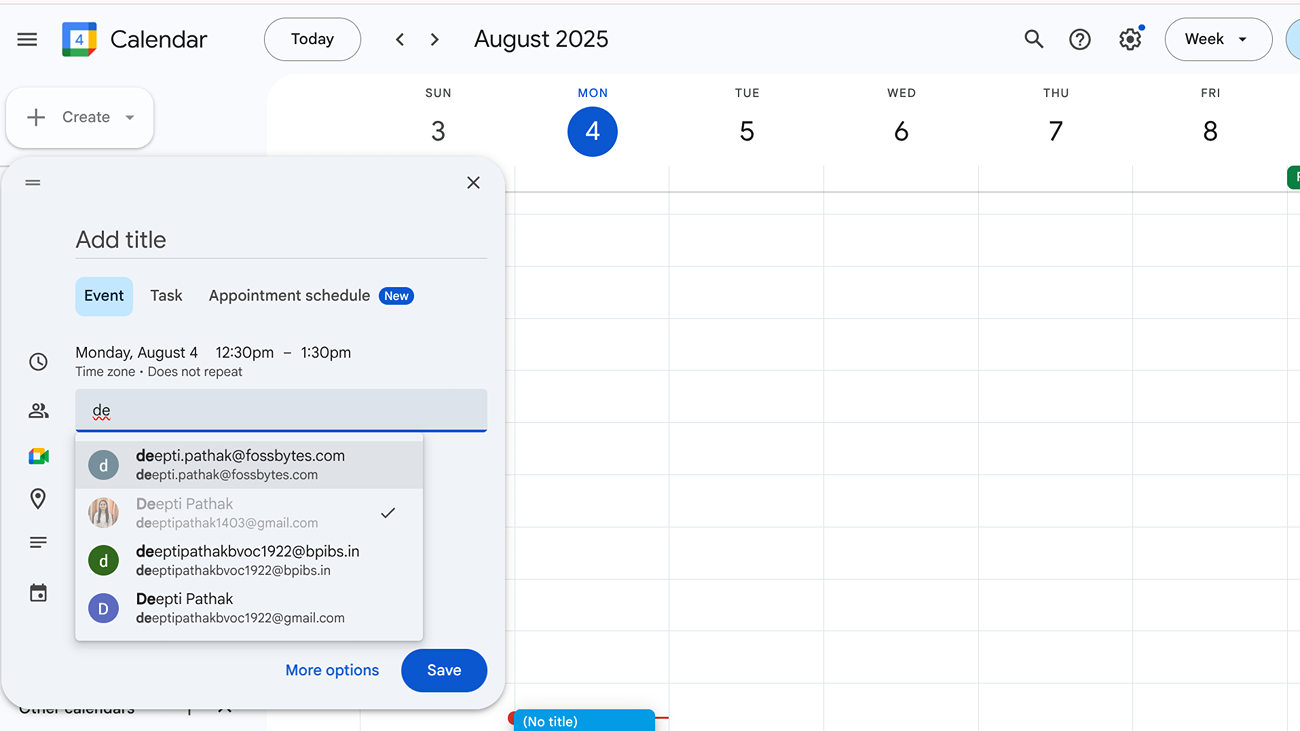
    image to Add Someone to a Specific Event
  5. Enter the email address of the individual whom you are inviting.
  6. Once you have added them, click on Save and choose to send the invitation.

2. Share Your Entire Calendar with Someone

If you wish the individual to see all that you have on your calendar, you can share your whole calendar with them.

  1. Open Google Calendar on your computer via a browser.
  2. On the left-hand side, find “My calendars” and hover your cursor over the calendar that you would like to share.
  3. Click the three dots next to it and select “Settings and sharing.”
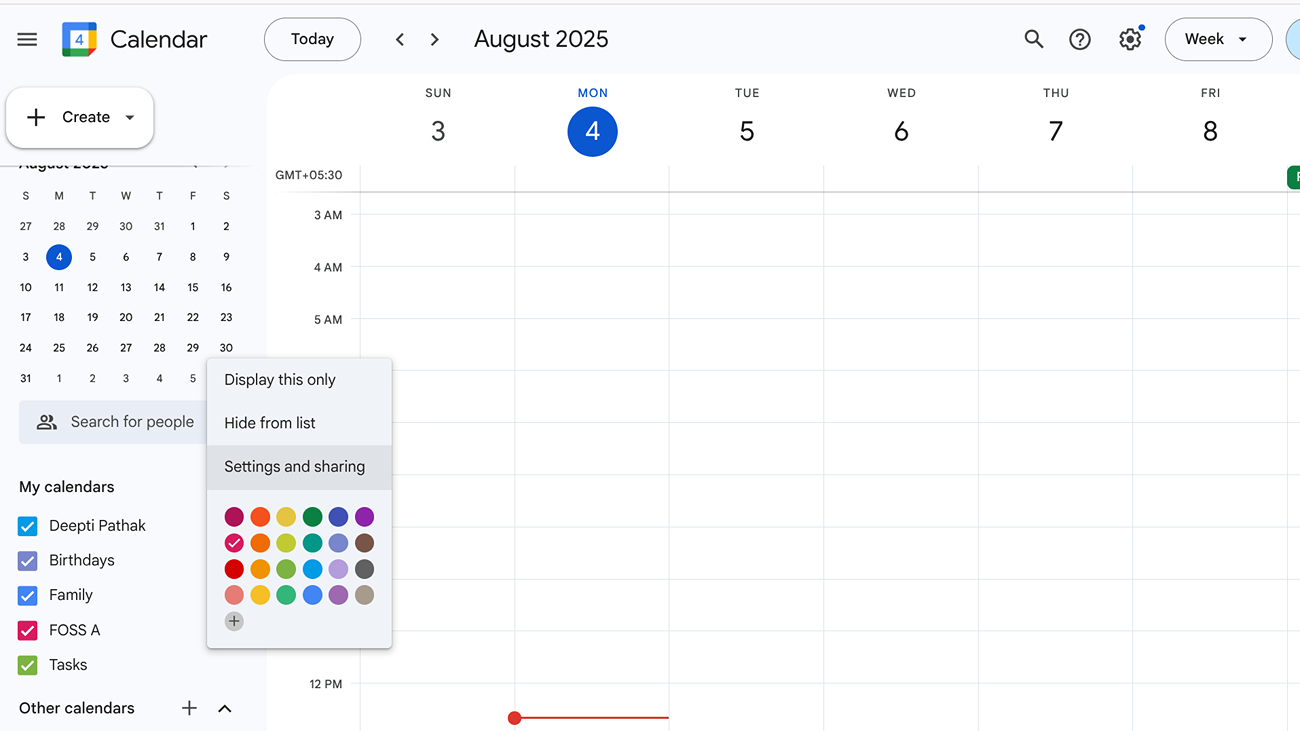
    image to Share Your Entire Calendar with Someone
  4. Scroll down to the section that says “Share with specific people.”
  5. Click “Add people” and type in the person’s email address.
  6. Select how much control you want to grant them (only view, edit, or complete control).
  7. Then click Send to post it.

3. Add someone else’s calendar to yours

You can easily import someone else’s calendar into your own so that you can view everything from one location. Just follow the instructions below:

  1. Open Google Calendar on your computer.
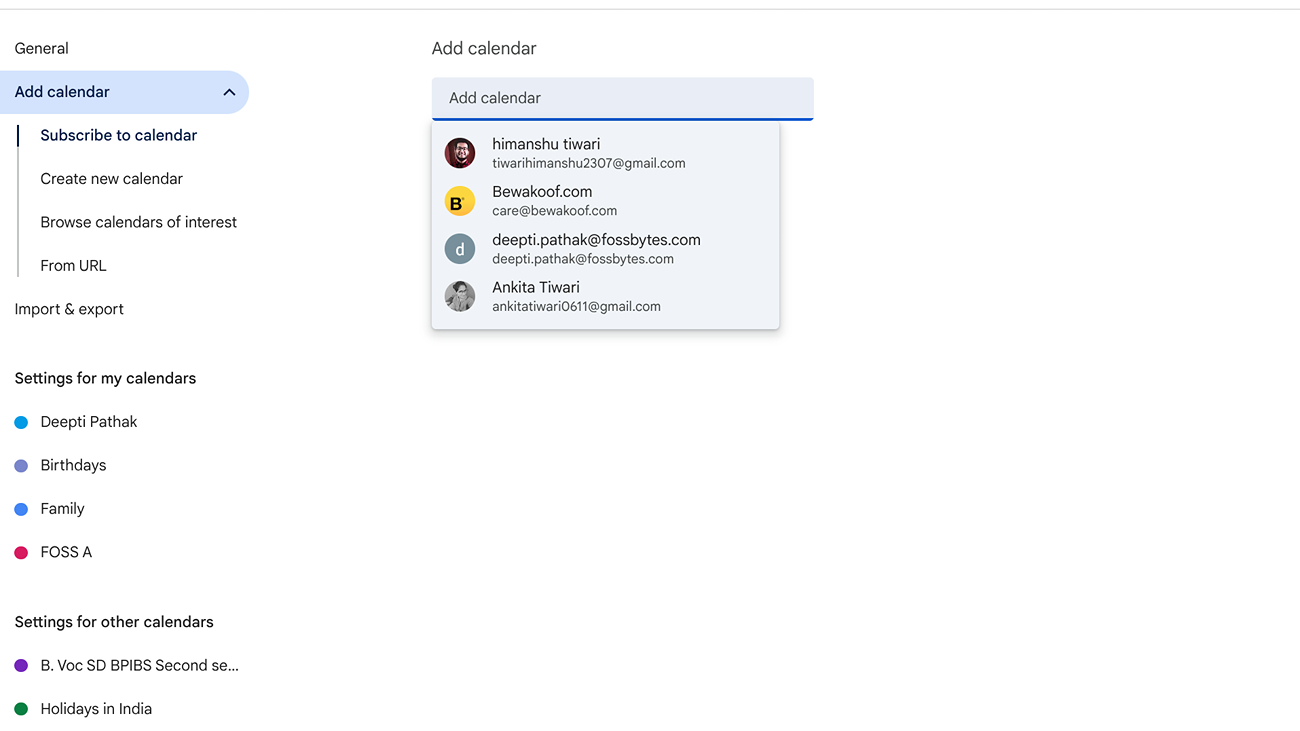
  2. On the left-hand side, search for “Other calendars” and then click on the “+” button beside it.
  3. Choose “Subscribe to calendar” from the list.

    image to Subscribe to calendar
  4. Type in the person’s email address.
    image to Choose Subscribe to calendar
  5. If their calendar is shared with you, it will show up right away.

Sharing a calendar or events prevents confusion and time wastage. Even non-Google Calendar users will receive the invite in their inbox. Don’t forget to verify the email address, and you can modify permissions at any time through settings.

Source link
#Add #Google #Calendar
A lot of these travel mugs tend to take the form of a sippy cup. But when sitting at home, my ideal pick is the Fellow Carter, which sips like a normal drinking vessel and is stainless steel—not plastic. It’s ceramic-lined on its interior to avoid coffee-oil buildup or any hint of metallic tang. If you like sippy cups, Fellow also offers a nice 3-in-1 lid system ($57) with straw and slider lids.

What I tend to do is drop a four-cup batch of coffee into the Carter, and screw the lid off and on when I take a sip. Sixteen ounces of coffee can stay warm for hours without introducing a lot of oxidation or heat. The coffee in a thermal-insulated drinking container tends to taste better, longer, than any coffee that’s been subjected to the heat and air of a coffee warmer.

This said, while the Carter is prettier than most travel mugs, it’s never going to be my favorite mug (which, for the record, is a Grinderman tour mug from 2010.) The Carter also doesn’t release aromatics quite as well as a more open-topped mug. I could, technically, keep coffee warm in the Carter and then pour it into another mug I am more sentimental about. But in practice, I don’t. I just drink out of the Carter. It’s still a good morning.

Other Coffee Mug Warmers We Recommend

Ember Mug 2 for $150: Oh, the Ember. It is likely the most sophisticated and technologically advanced of self-warming mugs. It has an app. It’ll light up a little LED or even notify your phone when your coffee is ready to drink. Honestly, one can go back and forth on its virtues and excesses. It’ll “wake up” when you pour coffee in. It’ll go to sleep when you’re not around. And unlike other picks here, it’s a true self-heating mug with a battery, and it can travel with you on your dog walk. But after using the Ember for years, WIRED reviewer Simon Hill turned instead to the Ohom Ui 3. Why? In part, it’s that the Ember only works with a proprietary mug that’s not dishwasher-safe or dunk-proof. Replacement mugs and heating elements are expensive. But mostly it was a yen for simplicity: Not everything needs an app, and thermal mugs are now good enough that I sort of prefer them while on the go. Still, the Ember mug has had fervent fans at WIRED, it’s a nifty device, and its makers are continually working to improve it. Arguably, the people at Ember are thinking harder about coffee warming than anyone alive, and I’ll always happily test the next and the next version to see what’s up their sleeve.

Bestinnkits Mug Warmer for $26: This utilitarian little mug warmer turns on when you have a mug atop it, and turns off when you don’t. The scale is its only “smart” feature. No Alexa, no Siri, no app. This is a nice feature, and great for safety. This said, it does mean the warmer doesn’t start warming till your cup’s atop it, vs a warmer like the Cosori or Mr. Coffee that can preheat before your cup is there and thus keep temp immediately. It’s a decision, and it’s yours to make. The cost difference is somewhat negligible among them all.

#Dont #Drink #Lukewarm #Coffee #Warmershopping,kitchen,buying guides,food and drink,coffee">You Don’t Have to Drink Lukewarm Coffee Ever Again. Get a WarmerA lot of these travel mugs tend to take the form of a sippy cup. But when sitting at home, my ideal pick is the Fellow Carter, which sips like a normal drinking vessel and is stainless steel—not plastic. It’s ceramic-lined on its interior to avoid coffee-oil buildup or any hint of metallic tang. If you like sippy cups, Fellow also offers a nice 3-in-1 lid system () with straw and slider lids.What I tend to do is drop a four-cup batch of coffee into the Carter, and screw the lid off and on when I take a sip. Sixteen ounces of coffee can stay warm for hours without introducing a lot of oxidation or heat. The coffee in a thermal-insulated drinking container tends to taste better, longer, than any coffee that’s been subjected to the heat and air of a coffee warmer.This said, while the Carter is prettier than most travel mugs, it’s never going to be my favorite mug (which, for the record, is a Grinderman tour mug from 2010.) The Carter also doesn’t release aromatics quite as well as a more open-topped mug. I could, technically, keep coffee warm in the Carter and then pour it into another mug I am more sentimental about. But in practice, I don’t. I just drink out of the Carter. It’s still a good morning.Other Coffee Mug Warmers We RecommendEmber Mug 2 for 0: Oh, the Ember. It is likely the most sophisticated and technologically advanced of self-warming mugs. It has an app. It’ll light up a little LED or even notify your phone when your coffee is ready to drink. Honestly, one can go back and forth on its virtues and excesses. It’ll “wake up” when you pour coffee in. It’ll go to sleep when you’re not around. And unlike other picks here, it’s a true self-heating mug with a battery, and it can travel with you on your dog walk. But after using the Ember for years, WIRED reviewer Simon Hill turned instead to the Ohom Ui 3. Why? In part, it’s that the Ember only works with a proprietary mug that’s not dishwasher-safe or dunk-proof. Replacement mugs and heating elements are expensive. But mostly it was a yen for simplicity: Not everything needs an app, and thermal mugs are now good enough that I sort of prefer them while on the go. Still, the Ember mug has had fervent fans at WIRED, it’s a nifty device, and its makers are continually working to improve it. Arguably, the people at Ember are thinking harder about coffee warming than anyone alive, and I’ll always happily test the next and the next version to see what’s up their sleeve.Bestinnkits Mug Warmer for : This utilitarian little mug warmer turns on when you have a mug atop it, and turns off when you don’t. The scale is its only “smart” feature. No Alexa, no Siri, no app. This is a nice feature, and great for safety. This said, it does mean the warmer doesn’t start warming till your cup’s atop it, vs a warmer like the Cosori or Mr. Coffee that can preheat before your cup is there and thus keep temp immediately. It’s a decision, and it’s yours to make. The cost difference is somewhat negligible among them all.#Dont #Drink #Lukewarm #Coffee #Warmershopping,kitchen,buying guides,food and drink,coffee

3-in-1 lid system ($57) with straw and slider lids.

What I tend to do is drop a four-cup batch of coffee into the Carter, and screw the lid off and on when I take a sip. Sixteen ounces of coffee can stay warm for hours without introducing a lot of oxidation or heat. The coffee in a thermal-insulated drinking container tends to taste better, longer, than any coffee that’s been subjected to the heat and air of a coffee warmer.

This said, while the Carter is prettier than most travel mugs, it’s never going to be my favorite mug (which, for the record, is a Grinderman tour mug from 2010.) The Carter also doesn’t release aromatics quite as well as a more open-topped mug. I could, technically, keep coffee warm in the Carter and then pour it into another mug I am more sentimental about. But in practice, I don’t. I just drink out of the Carter. It’s still a good morning.

Other Coffee Mug Warmers We Recommend

Ember Mug 2 for $150: Oh, the Ember. It is likely the most sophisticated and technologically advanced of self-warming mugs. It has an app. It’ll light up a little LED or even notify your phone when your coffee is ready to drink. Honestly, one can go back and forth on its virtues and excesses. It’ll “wake up” when you pour coffee in. It’ll go to sleep when you’re not around. And unlike other picks here, it’s a true self-heating mug with a battery, and it can travel with you on your dog walk. But after using the Ember for years, WIRED reviewer Simon Hill turned instead to the Ohom Ui 3. Why? In part, it’s that the Ember only works with a proprietary mug that’s not dishwasher-safe or dunk-proof. Replacement mugs and heating elements are expensive. But mostly it was a yen for simplicity: Not everything needs an app, and thermal mugs are now good enough that I sort of prefer them while on the go. Still, the Ember mug has had fervent fans at WIRED, it’s a nifty device, and its makers are continually working to improve it. Arguably, the people at Ember are thinking harder about coffee warming than anyone alive, and I’ll always happily test the next and the next version to see what’s up their sleeve.

Bestinnkits Mug Warmer for $26: This utilitarian little mug warmer turns on when you have a mug atop it, and turns off when you don’t. The scale is its only “smart” feature. No Alexa, no Siri, no app. This is a nice feature, and great for safety. This said, it does mean the warmer doesn’t start warming till your cup’s atop it, vs a warmer like the Cosori or Mr. Coffee that can preheat before your cup is there and thus keep temp immediately. It’s a decision, and it’s yours to make. The cost difference is somewhat negligible among them all.

#Dont #Drink #Lukewarm #Coffee #Warmershopping,kitchen,buying guides,food and drink,coffee">You Don’t Have to Drink Lukewarm Coffee Ever Again. Get a Warmer

A lot of these travel mugs tend to take the form of a sippy cup. But when sitting at home, my ideal pick is the Fellow Carter, which sips like a normal drinking vessel and is stainless steel—not plastic. It’s ceramic-lined on its interior to avoid coffee-oil buildup or any hint of metallic tang. If you like sippy cups, Fellow also offers a nice 3-in-1 lid system ($57) with straw and slider lids.

What I tend to do is drop a four-cup batch of coffee into the Carter, and screw the lid off and on when I take a sip. Sixteen ounces of coffee can stay warm for hours without introducing a lot of oxidation or heat. The coffee in a thermal-insulated drinking container tends to taste better, longer, than any coffee that’s been subjected to the heat and air of a coffee warmer.

This said, while the Carter is prettier than most travel mugs, it’s never going to be my favorite mug (which, for the record, is a Grinderman tour mug from 2010.) The Carter also doesn’t release aromatics quite as well as a more open-topped mug. I could, technically, keep coffee warm in the Carter and then pour it into another mug I am more sentimental about. But in practice, I don’t. I just drink out of the Carter. It’s still a good morning.

Other Coffee Mug Warmers We Recommend

Ember Mug 2 for $150: Oh, the Ember. It is likely the most sophisticated and technologically advanced of self-warming mugs. It has an app. It’ll light up a little LED or even notify your phone when your coffee is ready to drink. Honestly, one can go back and forth on its virtues and excesses. It’ll “wake up” when you pour coffee in. It’ll go to sleep when you’re not around. And unlike other picks here, it’s a true self-heating mug with a battery, and it can travel with you on your dog walk. But after using the Ember for years, WIRED reviewer Simon Hill turned instead to the Ohom Ui 3. Why? In part, it’s that the Ember only works with a proprietary mug that’s not dishwasher-safe or dunk-proof. Replacement mugs and heating elements are expensive. But mostly it was a yen for simplicity: Not everything needs an app, and thermal mugs are now good enough that I sort of prefer them while on the go. Still, the Ember mug has had fervent fans at WIRED, it’s a nifty device, and its makers are continually working to improve it. Arguably, the people at Ember are thinking harder about coffee warming than anyone alive, and I’ll always happily test the next and the next version to see what’s up their sleeve.

Bestinnkits Mug Warmer for $26: This utilitarian little mug warmer turns on when you have a mug atop it, and turns off when you don’t. The scale is its only “smart” feature. No Alexa, no Siri, no app. This is a nice feature, and great for safety. This said, it does mean the warmer doesn’t start warming till your cup’s atop it, vs a warmer like the Cosori or Mr. Coffee that can preheat before your cup is there and thus keep temp immediately. It’s a decision, and it’s yours to make. The cost difference is somewhat negligible among them all.

#Dont #Drink #Lukewarm #Coffee #Warmershopping,kitchen,buying guides,food and drink,coffee

If you like playing daily word games like Wordle, then Hurdle is a great game to add to your routine.

There are five rounds to the game. The first round sees you trying to guess the word, with correct, misplaced, and incorrect letters shown in each guess. If you guess the correct answer, it’ll take you to the next hurdle, providing the answer to the last hurdle as your first guess. This can give you several clues or none, depending on the words. For the final hurdle, every correct answer from previous hurdles is shown, with correct and misplaced letters clearly shown.

An important note is that the number of times a letter is highlighted from previous guesses does necessarily indicate the number of times that letter appears in the final hurdle.

Mashable 101 Fan Fave: Nominate your favorite creators today

If you find yourself stuck at any step of today’s Hurdle, don’t worry! We have you covered.

Hurdle Word 1 hint

Royalty.

Hurdle Word 1 answer

QUEEN

Hurdle Word 2 hint

A huge fight.

Hurdle Word 2 Answer

BRAWL

Mashable 101 Fan Fave: Nominate your favorite creators today

Hurdle Word 3 hint

Rope.

Hurdle Word 3 answer

NOOSE

Hurdle Word 4 hint

A particle.

Hurdle Word 4 answer

QUARK

Final Hurdle hint

An extension.

Hurdle Word 5 answer

ANNEX

If you’re looking for more puzzles, Mashable’s got games now! Check out our games hub for Mahjong, Sudoku, free crossword, and more.

#Todays #Hurdle #hints #answers #April">Today’s Hurdle hints and answers for April 12, 2026
                                                            If you like playing daily word games like Wordle, then Hurdle is a great game to add to your routine. There are five rounds to the game. The first round sees you trying to guess the word, with correct, misplaced, and incorrect letters shown in each guess. If you guess the correct answer, it’ll take you to the next hurdle, providing the answer to the last hurdle as your first guess. This can give you several clues or none, depending on the words. For the final hurdle, every correct answer from previous hurdles is shown, with correct and misplaced letters clearly shown.An important note is that the number of times a letter is highlighted from previous guesses does necessarily indicate the number of times that letter appears in the final hurdle. 
Mashable 101 Fan Fave: Nominate your favorite creators todayIf you find yourself stuck at any step of today’s Hurdle, don’t worry! We have you covered.
        SEE ALSO:
        
            Hurdle: Everything you need to know to find the answers


Hurdle Word 1 hintRoyalty.
        SEE ALSO:
        
            Apple’s new M3 MacBook Air is 0 off at Amazon. And yes, I’m tempted.


Hurdle Word 1 answerQUEEN
        
            Mashable Top Stories


Hurdle Word 2 hintA huge fight.
        SEE ALSO:
        
            Wordle today: Answer, hints for April 12, 2026


Hurdle Word 2 AnswerBRAWLMashable 101 Fan Fave: Nominate your favorite creators todayHurdle Word 3 hintRope. 
        SEE ALSO:
        
            NYT Connections Sports Edition today: Hints and answers for April 12


        SEE ALSO:
        
            NYT Connections hints today: Clues, answers for April 12, 2026


Hurdle Word 3 answerNOOSEHurdle Word 4 hintA particle.Hurdle Word 4 answerQUARKFinal Hurdle hintAn extension.
        SEE ALSO:
        
            Mahjong, Sudoku, free crossword, and more: Games available on Mashable


Hurdle Word 5 answerANNEXIf you’re looking for more puzzles, Mashable’s got games now! Check out our games hub for Mahjong, Sudoku, free crossword, and more.


                                    #Todays #Hurdle #hints #answers #April

Wordle, then Hurdle is a great game to add to your routine.

There are five rounds to the game. The first round sees you trying to guess the word, with correct, misplaced, and incorrect letters shown in each guess. If you guess the correct answer, it’ll take you to the next hurdle, providing the answer to the last hurdle as your first guess. This can give you several clues or none, depending on the words. For the final hurdle, every correct answer from previous hurdles is shown, with correct and misplaced letters clearly shown.

An important note is that the number of times a letter is highlighted from previous guesses does necessarily indicate the number of times that letter appears in the final hurdle.

Mashable 101 Fan Fave: Nominate your favorite creators today

If you find yourself stuck at any step of today’s Hurdle, don’t worry! We have you covered.

Hurdle Word 1 hint

Royalty.

Hurdle Word 1 answer

QUEEN

Hurdle Word 2 hint

A huge fight.

Hurdle Word 2 Answer

BRAWL

Mashable 101 Fan Fave: Nominate your favorite creators today

Hurdle Word 3 hint

Rope.

Hurdle Word 3 answer

NOOSE

Hurdle Word 4 hint

A particle.

Hurdle Word 4 answer

QUARK

Final Hurdle hint

An extension.

Hurdle Word 5 answer

ANNEX

If you’re looking for more puzzles, Mashable’s got games now! Check out our games hub for Mahjong, Sudoku, free crossword, and more.

#Todays #Hurdle #hints #answers #April">Today’s Hurdle hints and answers for April 12, 2026

If you like playing daily word games like Wordle, then Hurdle is a great game to add to your routine.

There are five rounds to the game. The first round sees you trying to guess the word, with correct, misplaced, and incorrect letters shown in each guess. If you guess the correct answer, it’ll take you to the next hurdle, providing the answer to the last hurdle as your first guess. This can give you several clues or none, depending on the words. For the final hurdle, every correct answer from previous hurdles is shown, with correct and misplaced letters clearly shown.

An important note is that the number of times a letter is highlighted from previous guesses does necessarily indicate the number of times that letter appears in the final hurdle.

Mashable 101 Fan Fave: Nominate your favorite creators today

If you find yourself stuck at any step of today’s Hurdle, don’t worry! We have you covered.

Hurdle Word 1 hint

Royalty.

Hurdle Word 1 answer

QUEEN

Hurdle Word 2 hint

A huge fight.

Hurdle Word 2 Answer

BRAWL

Mashable 101 Fan Fave: Nominate your favorite creators today

Hurdle Word 3 hint

Rope.

Hurdle Word 3 answer

NOOSE

Hurdle Word 4 hint

A particle.

Hurdle Word 4 answer

QUARK

Final Hurdle hint

An extension.

Hurdle Word 5 answer

ANNEX

If you’re looking for more puzzles, Mashable’s got games now! Check out our games hub for Mahjong, Sudoku, free crossword, and more.

#Todays #Hurdle #hints #answers #April

Post Comment