
Understandably, concerns around online privacy have continued to grow, so it’s no surprise that more and more users are turning to professional data removal services. They want to regain control of their personal information and manage their online presence consciously.
In 2026, Incogni and Kanary are among the most talked-about options, but each comes with a different approach to the task.
This article will walk you through all the relevant differences between Incogni and Kanary so that you can wholeheartedly trust the right provider.
At a Glance: Incogni vs Kanary (2026)
| Aspect | Incogni | Kanary |
| Starting price | From $15.98 (or $7.99/month when billed annually) | From $9.99 |
| Removal model | Fully automated + recurring suppression cycles | Partially automated (tier-dependent) |
| Coverage | 420+ public and private brokers | 300+ harmful sites and overall Google exposure |
| Free option | 30-day money-back guarantee | Free plan (limited functionality), 14-day trial for paid plans, 30-day money-back guarantee |
| Verification | Deloitte Independent Limited Assurance Assessment, industry recognition, reviews by industry authorities | Reviews by industry authorities |
| Best for | Hands-off, deep, ongoing protection | Visibility & app-based monitoring |
| Family plans | Yes | Yes |
| Enterprise option | Yes | Yes |
How They Remove Your Data
Incogni: Set-and-Forget Automation
Incogni is architectured to be a hands-off, background protection service.
Once you sign up and verify your identity, Incogni can act on your behalf and start sending removal requests to hundreds of data brokers. However, it doesn’t stop here; it continues to monitor the situation, discovering new sources with your data or resending removal requests to brokers that failed to respond.
It’s vital because some brokers refresh their databases and can re-list your data even months later. Incogni’s system stays on its toes, ready to act for you again. Unlimited plans also include unlimited custom removal requests from 2,000+ additional sites.
Moreover, Incogni is available in 34 countries.
For those wondering whether Incogni really works, the answer is yes, but the key is time. Many removals take weeks, sometimes longer; that’s why automation and follow-ups are essential.
Kanary: Guided Removal With Tier Differences
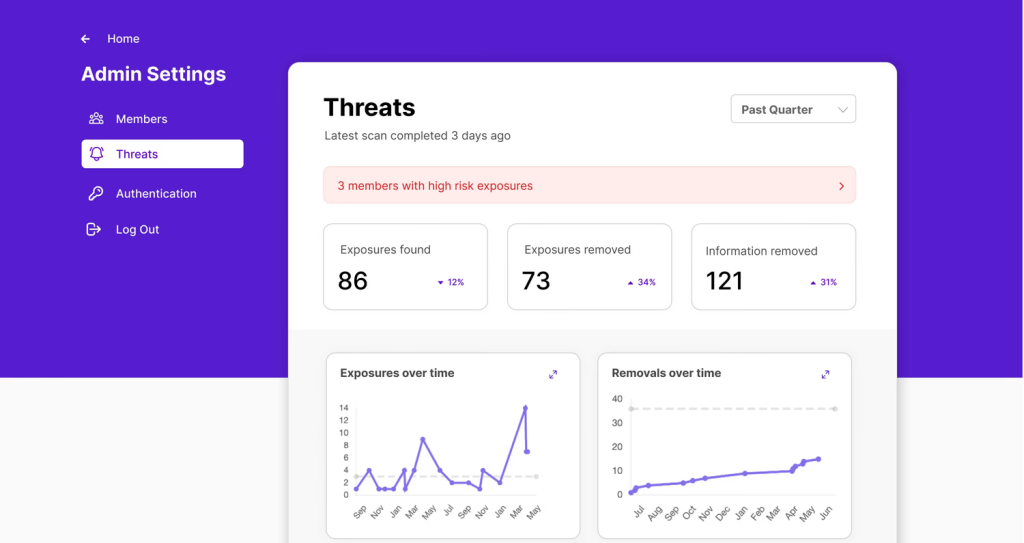
Kanary takes a different approach. It starts by scanning to find where your personal information exists online. Once it confirms exposure, it can generate removal requests and track responses. Many of these are handled automatically, but in certain cases, Kanary asks you to confirm or complete a request.
There are also significant differences across plans:
- Free plan: scans, finding, and removing leaks from the top databases, Google’s cache, and social media
- Professional plan: Kanary-managed scans of riskiest sites, up to 7 custom requests a week, reports
- Advanced plan: customizable
Kanary operates best for US citizens and residents, or if you have a US address.
Coverage Depth
Incogni
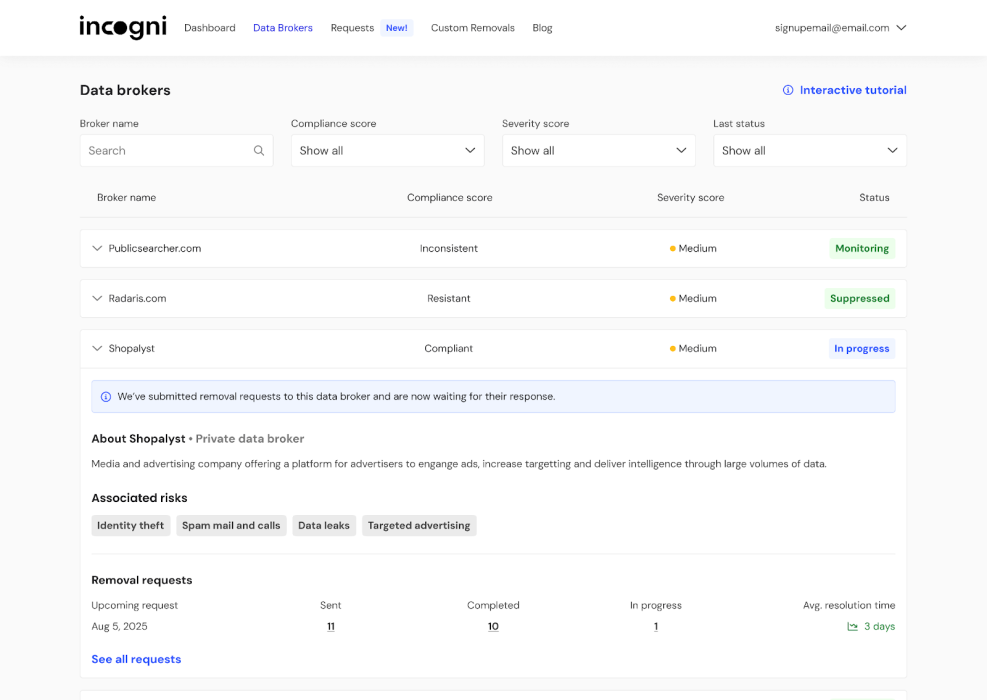
Incogni reports coverage of 420+ brokers and 2,000+ sites with the Unlimited plans. These include public people-search websites and private databases not visible on Google, like:
- Marketing directories
- Recruitment data vendors
- Risk and financial data brokers
This broad reach is important as much personal information gets traded across private databases you never see.
Incogni focuses on both visible and hidden data sources.
Kanary
Kanary covers 300+ sites and databases that include top data brokers, Google’s cache, and social media.
Its biggest strength is scanning public listings and searchable exposure. It also monitors some social media and identity exposure risks and can fix weak privacy settings.
Kanary’s coverage is solid for visible data. Only with a customizable Advanced plan do you get features like breach or dark web monitoring.
Credibility & Recognition
Incogni
Incogni has undergone a Deloitte Independent Limited Assurance assessment, which concluded that all its removal processes work as promised. This adds credibility and reassurance in an industry handling sensitive data, especially since such third-party verification is still extremely rare (if not unique) among data removal service providers.
The company has also received Editors’ Choice awards from PCMag and PCWorld, two major tech publications, as well as multiple positive reviews from industry authorities like TechRadar and Cybernews.
Kanary
Kanary has no public third-party assessment like Incogni. However, it has been reviewed positively by major tech publications, such as TechRadar, PCMag, and other platforms writing about online security. These reviews often highlight Kanary’s ease-of-use and clarity.
Kanary also emphasizes transparency in its product design, guiding its users through all the steps.
User Feedback & Reputation
Incogni
Incogni maintains an “Excellent” rating on Trustpilot with 4.4/5 stars based on over 2,000 reviews. Many reviews note successful removals, a very clear dashboard, helpful and efficient customer support, and ongoing data suppression.
There are some users who complain that removals can take time, though it’s normal in the industry, given broker response times.
Overall, feedback confirms that Incogni works – gradually but meaningfully.
Kanary
Kanary doesn’t have an active Trustpilot listing. The only source of user reviews is displayed on Kanary’s website in the form of testimonials in the Kanary Reviews section.
These short opinions highlight positive experiences with exposure monitoring, progress updates, and the straightforwardness of the whole platform. Many users appreciate the visibility offered at every step of the process.
While we don’t undermine these testimonials, it’s important to remember that they are hosted on the company’s own site. They can provide some helpful insight, but don’t offer the same level of reliability found on independent platforms.
Pricing & Value
Incogni
Incogni’s plans start at $7.99/month when billed annually. If billed monthly, it’s $15.98/month. Higher-tier plans add family coverage and priority handling, but all the features needed for continuous, broad protection are already available with the cheapest plan.
There is no free version, but the company offers a 30-day money-back guarantee to provide its users with a risk-free testing period.
Incogni also offers customizable business plans through Ironwall by Incogni.
Kanary
For users on a budget, Kanary offers a free tier with limited features. It may be a good idea if you’re new to this and want to explore exposure monitoring.
Its paid plans start at $9.99/month, regardless of whether you pay annually or monthly.
There’s also a customizable Advanced plan as well as family and enterprise options.
Ease-of-Use & Support
Incogni
Incogni is built for simplicity. Its dashboard is clean, easy to navigate, and mostly hands-off – you can use it to track progress, but it doesn’t require your engagement to work smoothly. Once you verify your identity, most users report that they don’t need to interact with the platform frequently. Reviews also mention that it’s intuitive and straightforward, especially for non-technical people.
Incogni offers multiple contact channels:
- Email support – available to all users (responses come within 24 hours)
- Live chat – available to all subscribers 24/7
- Phone support available to Unlimited subscribers 24/7
- Knowledge Base
Customer feedback notes that Incogni’s customer support is responsive, professional, and to the point.
Kanary
Kanary’s platform is all about guided visibility. Its dashboard clearly shows you where your data appears and how risky this exposure is, which helps users understand the situation and what’s being done – many of them appreciate that.
Kanary also offers a mobile app, though the functionalities between it and the website differ. It still is convenient, as it allows you to monitor exposures and removal statuses on the go (if you have such a need).
Kanary’s only support option is email. It promises to have an agent respond within 24 hours. Dedicated support comes solely with the Advanced plan.
Kanary also supports community support with its online forums and the Kanary Discord.
Users note, however, that differences in response times are visible across plan levels.
Strengths & Limitations
Incogni
| Strengths | Limitations |
| Broad broker coverage | No free tier |
| Full automation | Phone support only available with Unlimited plans |
| Wide availability | |
| Recurring removal cycles | |
| Independent Deloitte assurance | |
| Industry recognition |
Kanary
| Strengths | Limitations |
| Free plan | Narrow automated coverage |
| Clear visibility of exposures | Higher premium pricing |
| Mobile app | No third-party verification |
| Personal privacy advisors with some higher tiers | User engagement required |
| US users only |
Incogni vs Kanary: Which Makes More Sense in 2026?
Both services are legitimate and may be effective when used consistently.
Kanary is well-suited for users who want visibility and control or a free starting option.
Incogni is better for those who need broader coverage, a hands-off system, and ongoing suppression.
When comparing overall, Incogni currently offers the most comprehensive and long-lasting approach. Kanary remains a good option for those on a budget or valuing engagement.
FAQ
Can these services scrub my details from forums or social media?
Kanary specializes in finding visible exposures on niche sites like forums or Twitch chats. Incogni primarily targets commercial data brokers and commercial databases.
Does the removal process require ongoing user interaction?
Incogni is designed for full automation with minimal user input after setup. Kanary is a guided experience that often requires you to manually approve specific removals or verify broker requests.
Are there regional restrictions for these privacy platforms?
Incogni works across North America and Europe. Kanary is almost exclusively focused on US-based users with a US address history.
Source link
#Incogni #Kanary #Clear #Personal #Data #Removal #Services

![This former notorious red-light district is now one of the world’s top AI hubs | TechCrunch
What every U.K. AI startup wants to know these days is, how can I get office space in King’s Cross?
The area is so hot that a VC firm allegedly recently won a deal by promising a founder office space in the neighborhood. “We stop at nothing to win deals [for] and to support” founders, “including helping them source office space when needed,” the firm told me when asked about the rumor, declining to confirm or deny any details.
The neighborhood’s popularity began back in 2016 when DeepMind — then newly acquired by Google — moved in. Soon after, a flood of AI startups followed, wanting to be around the Google DeepMind magic. Today, they hope to take advantage of the cluster of AI talent there.
This has transformed King’s Cross into one of the world’s top AI hubs, rivaled only by San Francisco and Beijing. Around London, it’s known by the sobriquet “Knowledge Quarter,” as it’s home to names like OpenAI, Meta, Isomorphic Labs, Cusp AI, Wayne, Recursive, and, a little farther down the road, Synthesia and Anthropic. The European Technology Network (ETN) just moved into a glossy new office nearby, while University College London sits around the corner.
Mixed in with the new developments are trendy food spots like Hoppers and BAO. Hop a train from King’s Cross, and founders can be in Cambridge in 45 minutes to source talent or can be in Paris in two hours to strike a deal.
Who would have guessed that a little more than 20 years ago, this was one of the seediest areas in London?
“In the ’80s, crack and heroin made the area a major narcotics market,” Hussein Kanji, an investor at Hoxton Ventures, said, recalling syringes in tree trunks and gangs patrolling the streets. “In 1982, the local church was occupied by the English Collective of Prostitutes for 12 straight days.” Then, in the early 2000s, a real estate developer had a dream and, well, “now it is the AI hotbed of the United Kingdom,” Kanji said. “What a change.” Around 18 months ago, his portfolio company BioCorteX moved from the neighborhood Holborn to the Jellicoe building in King’s Cross, hoping to be near the action. “Lots going on in London right now,” Nik Sharma, co-founder of BioCorteX, told me. “Lots of hyperscalers moving in.” That includes, reportedly, Jeff Bezos’ AI company Prometheus, which is also said to be in talks to move into the Jellicoe.
There are around 3,600 AI startups in London, which, together, have raised around .1 billion out of the .8 billion raised in the city since late July, according to Dealroom. Since the start of June, AI-related startups have leased more than 1 million square feet of office space in London, according to the real estate firm Knight Frank. With that, prime rents in King’s Cross have risen 18% over the past three years, Chris Dunn, a commercial insight associate at the firm, told me. That percentage represents only the largest leases encompassing at least 10,000 square feet, like the ones OpenAI and Prometheus are signing. The shorter deals go for even more, he said, and now the vacancy rate for conventional office space is just 0.9%. “Demand has outstripped supply,” he continued.
Today, one of the big topics of the area is sovereignty. It was a wake-up call for many when Anthropic shut off access to Mythos and Fable this summer, leaving some in the ecosystem to conclude: “We’d better look after ourselves,” Saul Klein, co-founder of the VC firm Phoenix Court, told me.
Phoenix Court is located in the King’s Cross area and has three portfolio companies in the vicinity, including Olix (which just announced a .3 billion valuation), Early Health and CoMind. Robin Klein, co-founder of the firm, said the shutdown of Fable and Mythos access was a “small but sharp reminder that Europe can’t simply rent its AI capabilities and capacity; it needs to build and hold some of its own.” King’s Cross, he said, is where much of this building is actually happening.
“The bigger question,” he continued, “is whether the U.K. builds the infrastructure, compute, energy, capital, to make this self-reliance durable, rather than just hosting outposts of U.S. labs.”
Image Credits:Phoenix Court
Top founders want to stay
Simon Kohl, founder of Latent Labs, has offices in King’s Cross and San Francisco. The London office, at the moment, is growing faster, and he’s more bullish than ever on the ecosystem, he said. “The mood right now feels less like London trying to catch up and more like London becoming one of the default places to start a serious AI company,” he said. Look around and you are likely to see Wayve testing its autonomous cars. Founded in 2017 by co-founder Alex Kendall, the unicorn is one of London’s biggest success stories.
“Ten years ago, building a frontier AI company from London felt like an unusual choice,” Kendall told me. “Now it feels like an obvious one.” Wayve moved into King’s Cross in 2018 looking for a space that could double as a garage — “a rare combination in Central London,” Kendall said. He has watched the ecosystem mature around him — and it’s now evident that a startup can stay in London, raise serious capital, hire world-class AI talent, and remain globally competitive, he said. Down the street from Anthropic’s new 158,000-square-foot office is the AI agent builder Sierra and the AI video platform Synthesia.
Laura Gonzalez Florez, Synthesia’s chief of staff and head of people, says the company moved into its glossy new office building a year ago to accommodate its growing team. They were drawn to the area for the same reason as everyone else: “It’s very close to the airport … very close to where a lot of investors are,” she said.
Image Credits:Synthesia
Around two-thirds of Synthesia’s engineers are remote, Gonzalez Florez said, letting the company tap into an affordable, international, and diverse talent pool and helping it scale faster. “From London, we can hire and work, without any problem, people from anywhere, from Slovenia to Portugal,” she said.
Unsurprisingly, London’s AI boom is also causing a talent war.U.K. AI job postings have skyrocketed in the past few years, per data from PwC. When Anthropic announced it moved into town earlier this year, it listed, for example, a salary range of £260,000 to £630,000 for a machine learning research engineer when the average salary in London for the same role is around £102,000. Some founders in the U.K., like those in Silicon Valley, are being forced to raise more and bigger rounds to keep up.
“The real test is whether more globally significant AI companies are founded, funded, and scaled from the U.K., while continuing to attract the world’s best talent to build them here,” Zain Ali, founder of the King’s Cross-based AI legal firm Centuro, told me. “If that continues to happen, King’s Cross won’t just be an AI hub. It’ll become one of the U.K.’s most important strategic assets.”
When you purchase through links in our articles, we may earn a small commission. This doesn’t affect our editorial independence.#Thisformernotorious #redlight #districtis #nowone #worlds #top #hubs #TechCrunchUK](https://techcrunch.com/wp-content/uploads/2026/08/DM9A2852.jpg?w=680 "This former notorious red-light district is now one of the world’s top AI hubs | TechCrunch
What every U.K. AI startup wants to know these days is, how can I get office space in King’s Cross?
The area is so hot that a VC firm allegedly recently won a deal by promising a founder office space in the neighborhood. “We stop at nothing to win deals [for] and to support” founders, “including helping them source office space when needed,” the firm told me when asked about the rumor, declining to confirm or deny any details.
The neighborhood’s popularity began back in 2016 when DeepMind — then newly acquired by Google — moved in. Soon after, a flood of AI startups followed, wanting to be around the Google DeepMind magic. Today, they hope to take advantage of the cluster of AI talent there.
This has transformed King’s Cross into one of the world’s top AI hubs, rivaled only by San Francisco and Beijing. Around London, it’s known by the sobriquet “Knowledge Quarter,” as it’s home to names like OpenAI, Meta, Isomorphic Labs, Cusp AI, Wayne, Recursive, and, a little farther down the road, Synthesia and Anthropic. The European Technology Network (ETN) just moved into a glossy new office nearby, while University College London sits around the corner.
Mixed in with the new developments are trendy food spots like Hoppers and BAO. Hop a train from King’s Cross, and founders can be in Cambridge in 45 minutes to source talent or can be in Paris in two hours to strike a deal.
Who would have guessed that a little more than 20 years ago, this was one of the seediest areas in London?
“In the ’80s, crack and heroin made the area a major narcotics market,” Hussein Kanji, an investor at Hoxton Ventures, said, recalling syringes in tree trunks and gangs patrolling the streets. “In 1982, the local church was occupied by the English Collective of Prostitutes for 12 straight days.” Then, in the early 2000s, a real estate developer had a dream and, well, “now it is the AI hotbed of the United Kingdom,” Kanji said. “What a change.” Around 18 months ago, his portfolio company BioCorteX moved from the neighborhood Holborn to the Jellicoe building in King’s Cross, hoping to be near the action. “Lots going on in London right now,” Nik Sharma, co-founder of BioCorteX, told me. “Lots of hyperscalers moving in.” That includes, reportedly, Jeff Bezos’ AI company Prometheus, which is also said to be in talks to move into the Jellicoe.
There are around 3,600 AI startups in London, which, together, have raised around .1 billion out of the .8 billion raised in the city since late July, according to Dealroom. Since the start of June, AI-related startups have leased more than 1 million square feet of office space in London, according to the real estate firm Knight Frank. With that, prime rents in King’s Cross have risen 18% over the past three years, Chris Dunn, a commercial insight associate at the firm, told me. That percentage represents only the largest leases encompassing at least 10,000 square feet, like the ones OpenAI and Prometheus are signing. The shorter deals go for even more, he said, and now the vacancy rate for conventional office space is just 0.9%. “Demand has outstripped supply,” he continued.
Today, one of the big topics of the area is sovereignty. It was a wake-up call for many when Anthropic shut off access to Mythos and Fable this summer, leaving some in the ecosystem to conclude: “We’d better look after ourselves,” Saul Klein, co-founder of the VC firm Phoenix Court, told me.
Phoenix Court is located in the King’s Cross area and has three portfolio companies in the vicinity, including Olix (which just announced a .3 billion valuation), Early Health and CoMind. Robin Klein, co-founder of the firm, said the shutdown of Fable and Mythos access was a “small but sharp reminder that Europe can’t simply rent its AI capabilities and capacity; it needs to build and hold some of its own.” King’s Cross, he said, is where much of this building is actually happening.
“The bigger question,” he continued, “is whether the U.K. builds the infrastructure, compute, energy, capital, to make this self-reliance durable, rather than just hosting outposts of U.S. labs.”
Image Credits:Phoenix Court
Top founders want to stay
Simon Kohl, founder of Latent Labs, has offices in King’s Cross and San Francisco. The London office, at the moment, is growing faster, and he’s more bullish than ever on the ecosystem, he said. “The mood right now feels less like London trying to catch up and more like London becoming one of the default places to start a serious AI company,” he said. Look around and you are likely to see Wayve testing its autonomous cars. Founded in 2017 by co-founder Alex Kendall, the unicorn is one of London’s biggest success stories.
“Ten years ago, building a frontier AI company from London felt like an unusual choice,” Kendall told me. “Now it feels like an obvious one.” Wayve moved into King’s Cross in 2018 looking for a space that could double as a garage — “a rare combination in Central London,” Kendall said. He has watched the ecosystem mature around him — and it’s now evident that a startup can stay in London, raise serious capital, hire world-class AI talent, and remain globally competitive, he said. Down the street from Anthropic’s new 158,000-square-foot office is the AI agent builder Sierra and the AI video platform Synthesia.
Laura Gonzalez Florez, Synthesia’s chief of staff and head of people, says the company moved into its glossy new office building a year ago to accommodate its growing team. They were drawn to the area for the same reason as everyone else: “It’s very close to the airport … very close to where a lot of investors are,” she said.
Image Credits:Synthesia
Around two-thirds of Synthesia’s engineers are remote, Gonzalez Florez said, letting the company tap into an affordable, international, and diverse talent pool and helping it scale faster. “From London, we can hire and work, without any problem, people from anywhere, from Slovenia to Portugal,” she said.
Unsurprisingly, London’s AI boom is also causing a talent war.U.K. AI job postings have skyrocketed in the past few years, per data from PwC. When Anthropic announced it moved into town earlier this year, it listed, for example, a salary range of £260,000 to £630,000 for a machine learning research engineer when the average salary in London for the same role is around £102,000. Some founders in the U.K., like those in Silicon Valley, are being forced to raise more and bigger rounds to keep up.
“The real test is whether more globally significant AI companies are founded, funded, and scaled from the U.K., while continuing to attract the world’s best talent to build them here,” Zain Ali, founder of the King’s Cross-based AI legal firm Centuro, told me. “If that continues to happen, King’s Cross won’t just be an AI hub. It’ll become one of the U.K.’s most important strategic assets.”
When you purchase through links in our articles, we may earn a small commission. This doesn’t affect our editorial independence.#Thisformernotorious #redlight #districtis #nowone #worlds #top #hubs #TechCrunchUK")

![This former notorious red-light district is now one of the world’s top AI hubs | TechCrunch
What every U.K. AI startup wants to know these days is, how can I get office space in King’s Cross?
The area is so hot that a VC firm allegedly recently won a deal by promising a founder office space in the neighborhood. “We stop at nothing to win deals [for] and to support” founders, “including helping them source office space when needed,” the firm told me when asked about the rumor, declining to confirm or deny any details.
The neighborhood’s popularity began back in 2016 when DeepMind — then newly acquired by Google — moved in. Soon after, a flood of AI startups followed, wanting to be around the Google DeepMind magic. Today, they hope to take advantage of the cluster of AI talent there.
This has transformed King’s Cross into one of the world’s top AI hubs, rivaled only by San Francisco and Beijing. Around London, it’s known by the sobriquet “Knowledge Quarter,” as it’s home to names like OpenAI, Meta, Isomorphic Labs, Cusp AI, Wayne, Recursive, and, a little farther down the road, Synthesia and Anthropic. The European Technology Network (ETN) just moved into a glossy new office nearby, while University College London sits around the corner.
Mixed in with the new developments are trendy food spots like Hoppers and BAO. Hop a train from King’s Cross, and founders can be in Cambridge in 45 minutes to source talent or can be in Paris in two hours to strike a deal.
Who would have guessed that a little more than 20 years ago, this was one of the seediest areas in London?
“In the ’80s, crack and heroin made the area a major narcotics market,” Hussein Kanji, an investor at Hoxton Ventures, said, recalling syringes in tree trunks and gangs patrolling the streets. “In 1982, the local church was occupied by the English Collective of Prostitutes for 12 straight days.” Then, in the early 2000s, a real estate developer had a dream and, well, “now it is the AI hotbed of the United Kingdom,” Kanji said. “What a change.” Around 18 months ago, his portfolio company BioCorteX moved from the neighborhood Holborn to the Jellicoe building in King’s Cross, hoping to be near the action. “Lots going on in London right now,” Nik Sharma, co-founder of BioCorteX, told me. “Lots of hyperscalers moving in.” That includes, reportedly, Jeff Bezos’ AI company Prometheus, which is also said to be in talks to move into the Jellicoe.
There are around 3,600 AI startups in London, which, together, have raised around .1 billion out of the .8 billion raised in the city since late July, according to Dealroom. Since the start of June, AI-related startups have leased more than 1 million square feet of office space in London, according to the real estate firm Knight Frank. With that, prime rents in King’s Cross have risen 18% over the past three years, Chris Dunn, a commercial insight associate at the firm, told me. That percentage represents only the largest leases encompassing at least 10,000 square feet, like the ones OpenAI and Prometheus are signing. The shorter deals go for even more, he said, and now the vacancy rate for conventional office space is just 0.9%. “Demand has outstripped supply,” he continued.
Today, one of the big topics of the area is sovereignty. It was a wake-up call for many when Anthropic shut off access to Mythos and Fable this summer, leaving some in the ecosystem to conclude: “We’d better look after ourselves,” Saul Klein, co-founder of the VC firm Phoenix Court, told me.
Phoenix Court is located in the King’s Cross area and has three portfolio companies in the vicinity, including Olix (which just announced a .3 billion valuation), Early Health and CoMind. Robin Klein, co-founder of the firm, said the shutdown of Fable and Mythos access was a “small but sharp reminder that Europe can’t simply rent its AI capabilities and capacity; it needs to build and hold some of its own.” King’s Cross, he said, is where much of this building is actually happening.
“The bigger question,” he continued, “is whether the U.K. builds the infrastructure, compute, energy, capital, to make this self-reliance durable, rather than just hosting outposts of U.S. labs.”
Image Credits:Phoenix Court
Top founders want to stay
Simon Kohl, founder of Latent Labs, has offices in King’s Cross and San Francisco. The London office, at the moment, is growing faster, and he’s more bullish than ever on the ecosystem, he said. “The mood right now feels less like London trying to catch up and more like London becoming one of the default places to start a serious AI company,” he said. Look around and you are likely to see Wayve testing its autonomous cars. Founded in 2017 by co-founder Alex Kendall, the unicorn is one of London’s biggest success stories.
“Ten years ago, building a frontier AI company from London felt like an unusual choice,” Kendall told me. “Now it feels like an obvious one.” Wayve moved into King’s Cross in 2018 looking for a space that could double as a garage — “a rare combination in Central London,” Kendall said. He has watched the ecosystem mature around him — and it’s now evident that a startup can stay in London, raise serious capital, hire world-class AI talent, and remain globally competitive, he said. Down the street from Anthropic’s new 158,000-square-foot office is the AI agent builder Sierra and the AI video platform Synthesia.
Laura Gonzalez Florez, Synthesia’s chief of staff and head of people, says the company moved into its glossy new office building a year ago to accommodate its growing team. They were drawn to the area for the same reason as everyone else: “It’s very close to the airport … very close to where a lot of investors are,” she said.
Image Credits:Synthesia
Around two-thirds of Synthesia’s engineers are remote, Gonzalez Florez said, letting the company tap into an affordable, international, and diverse talent pool and helping it scale faster. “From London, we can hire and work, without any problem, people from anywhere, from Slovenia to Portugal,” she said.
Unsurprisingly, London’s AI boom is also causing a talent war.U.K. AI job postings have skyrocketed in the past few years, per data from PwC. When Anthropic announced it moved into town earlier this year, it listed, for example, a salary range of £260,000 to £630,000 for a machine learning research engineer when the average salary in London for the same role is around £102,000. Some founders in the U.K., like those in Silicon Valley, are being forced to raise more and bigger rounds to keep up.
“The real test is whether more globally significant AI companies are founded, funded, and scaled from the U.K., while continuing to attract the world’s best talent to build them here,” Zain Ali, founder of the King’s Cross-based AI legal firm Centuro, told me. “If that continues to happen, King’s Cross won’t just be an AI hub. It’ll become one of the U.K.’s most important strategic assets.”
When you purchase through links in our articles, we may earn a small commission. This doesn’t affect our editorial independence.#Thisformernotorious #redlight #districtis #nowone #worlds #top #hubs #TechCrunchUK](https://i0.wp.com/techcrunch.com/wp-content/uploads/2026/08/DM9A2852.jpg?w=680&ssl=1 "This former notorious red-light district is now one of the world’s top AI hubs | TechCrunch
What every U.K. AI startup wants to know these days is, how can I get office space in King’s Cross?
The area is so hot that a VC firm allegedly recently won a deal by promising a founder office space in the neighborhood. “We stop at nothing to win deals [for] and to support” founders, “including helping them source office space when needed,” the firm told me when asked about the rumor, declining to confirm or deny any details.
The neighborhood’s popularity began back in 2016 when DeepMind — then newly acquired by Google — moved in. Soon after, a flood of AI startups followed, wanting to be around the Google DeepMind magic. Today, they hope to take advantage of the cluster of AI talent there.
This has transformed King’s Cross into one of the world’s top AI hubs, rivaled only by San Francisco and Beijing. Around London, it’s known by the sobriquet “Knowledge Quarter,” as it’s home to names like OpenAI, Meta, Isomorphic Labs, Cusp AI, Wayne, Recursive, and, a little farther down the road, Synthesia and Anthropic. The European Technology Network (ETN) just moved into a glossy new office nearby, while University College London sits around the corner.
Mixed in with the new developments are trendy food spots like Hoppers and BAO. Hop a train from King’s Cross, and founders can be in Cambridge in 45 minutes to source talent or can be in Paris in two hours to strike a deal.
Who would have guessed that a little more than 20 years ago, this was one of the seediest areas in London?
“In the ’80s, crack and heroin made the area a major narcotics market,” Hussein Kanji, an investor at Hoxton Ventures, said, recalling syringes in tree trunks and gangs patrolling the streets. “In 1982, the local church was occupied by the English Collective of Prostitutes for 12 straight days.” Then, in the early 2000s, a real estate developer had a dream and, well, “now it is the AI hotbed of the United Kingdom,” Kanji said. “What a change.” Around 18 months ago, his portfolio company BioCorteX moved from the neighborhood Holborn to the Jellicoe building in King’s Cross, hoping to be near the action. “Lots going on in London right now,” Nik Sharma, co-founder of BioCorteX, told me. “Lots of hyperscalers moving in.” That includes, reportedly, Jeff Bezos’ AI company Prometheus, which is also said to be in talks to move into the Jellicoe.
There are around 3,600 AI startups in London, which, together, have raised around .1 billion out of the .8 billion raised in the city since late July, according to Dealroom. Since the start of June, AI-related startups have leased more than 1 million square feet of office space in London, according to the real estate firm Knight Frank. With that, prime rents in King’s Cross have risen 18% over the past three years, Chris Dunn, a commercial insight associate at the firm, told me. That percentage represents only the largest leases encompassing at least 10,000 square feet, like the ones OpenAI and Prometheus are signing. The shorter deals go for even more, he said, and now the vacancy rate for conventional office space is just 0.9%. “Demand has outstripped supply,” he continued.
Today, one of the big topics of the area is sovereignty. It was a wake-up call for many when Anthropic shut off access to Mythos and Fable this summer, leaving some in the ecosystem to conclude: “We’d better look after ourselves,” Saul Klein, co-founder of the VC firm Phoenix Court, told me.
Phoenix Court is located in the King’s Cross area and has three portfolio companies in the vicinity, including Olix (which just announced a .3 billion valuation), Early Health and CoMind. Robin Klein, co-founder of the firm, said the shutdown of Fable and Mythos access was a “small but sharp reminder that Europe can’t simply rent its AI capabilities and capacity; it needs to build and hold some of its own.” King’s Cross, he said, is where much of this building is actually happening.
“The bigger question,” he continued, “is whether the U.K. builds the infrastructure, compute, energy, capital, to make this self-reliance durable, rather than just hosting outposts of U.S. labs.”
Image Credits:Phoenix Court
Top founders want to stay
Simon Kohl, founder of Latent Labs, has offices in King’s Cross and San Francisco. The London office, at the moment, is growing faster, and he’s more bullish than ever on the ecosystem, he said. “The mood right now feels less like London trying to catch up and more like London becoming one of the default places to start a serious AI company,” he said. Look around and you are likely to see Wayve testing its autonomous cars. Founded in 2017 by co-founder Alex Kendall, the unicorn is one of London’s biggest success stories.
“Ten years ago, building a frontier AI company from London felt like an unusual choice,” Kendall told me. “Now it feels like an obvious one.” Wayve moved into King’s Cross in 2018 looking for a space that could double as a garage — “a rare combination in Central London,” Kendall said. He has watched the ecosystem mature around him — and it’s now evident that a startup can stay in London, raise serious capital, hire world-class AI talent, and remain globally competitive, he said. Down the street from Anthropic’s new 158,000-square-foot office is the AI agent builder Sierra and the AI video platform Synthesia.
Laura Gonzalez Florez, Synthesia’s chief of staff and head of people, says the company moved into its glossy new office building a year ago to accommodate its growing team. They were drawn to the area for the same reason as everyone else: “It’s very close to the airport … very close to where a lot of investors are,” she said.
Image Credits:Synthesia
Around two-thirds of Synthesia’s engineers are remote, Gonzalez Florez said, letting the company tap into an affordable, international, and diverse talent pool and helping it scale faster. “From London, we can hire and work, without any problem, people from anywhere, from Slovenia to Portugal,” she said.
Unsurprisingly, London’s AI boom is also causing a talent war.U.K. AI job postings have skyrocketed in the past few years, per data from PwC. When Anthropic announced it moved into town earlier this year, it listed, for example, a salary range of £260,000 to £630,000 for a machine learning research engineer when the average salary in London for the same role is around £102,000. Some founders in the U.K., like those in Silicon Valley, are being forced to raise more and bigger rounds to keep up.
“The real test is whether more globally significant AI companies are founded, funded, and scaled from the U.K., while continuing to attract the world’s best talent to build them here,” Zain Ali, founder of the King’s Cross-based AI legal firm Centuro, told me. “If that continues to happen, King’s Cross won’t just be an AI hub. It’ll become one of the U.K.’s most important strategic assets.”
When you purchase through links in our articles, we may earn a small commission. This doesn’t affect our editorial independence.#Thisformernotorious #redlight #districtis #nowone #worlds #top #hubs #TechCrunchUK")

Post Comment