×
Lenovo Chromebook Plus With MediaTek Kompanio Ultra 910, Google AI Features and Dolby Atmos Launched

Lenovo Chromebook Plus With MediaTek Kompanio Ultra 910, Google AI Features and Dolby Atmos Launched

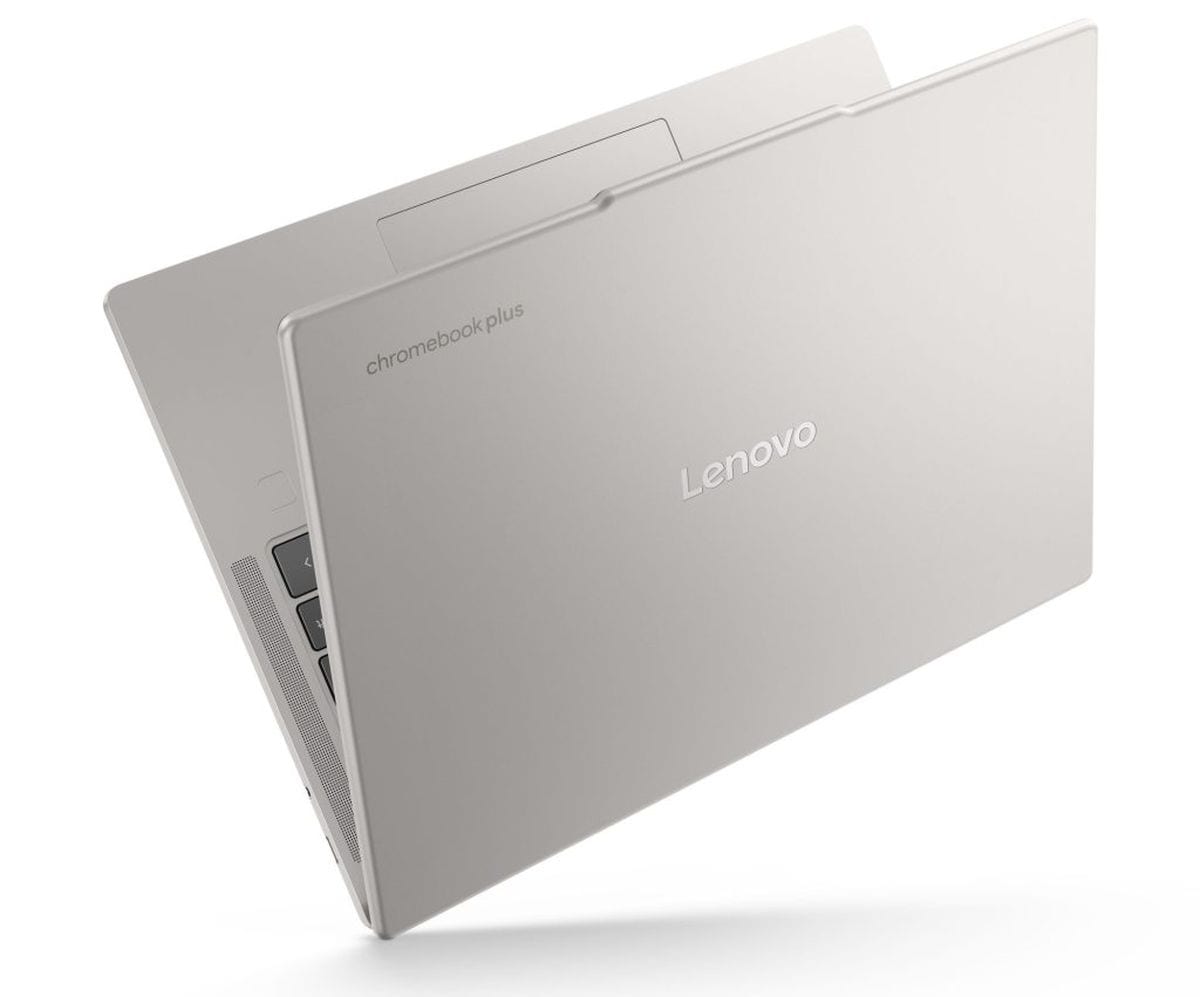
Lenovo Chromebook Plus was launched on Monday as the first Chromebook to be powered by a MediaTek Kompanio Ultra processor. It offers support for on-device and cloud based AI features from Google. The Lenovo Chromebook Plus sports a 14-inch OLED screen and a 5-megapixel webcam, and it is equipped with four speakers along with Dolby Atmos. The laptop also offers support for Wi-Fi 7 connectivity and is claimed to offer up to 17 hours of battery life on a single charge.

Lenovo Chromebook Plus Price, Availability

The Lenovo Chromebook Plus is priced at $749 (roughly Rs. 64,400) and the laptop is currently available in the US in Lunar Grey and Seashell colourways, via the company’s website or Best Buy. The company has yet to announce plans to launch the Chromebook in other markets, including India.

Lenovo Chromebook Plus Specifications, Features

While the Lenovo Chromebook Plus runs on Google’s ChromeOS operating system, it is one of the first Chromebooks to arrive with support for Google’s new AI features. It runs on a MediaTek Kompanio Ultra 910 processor, along with an Arm Immortalis-G925 MC11 GPU and MediaTek NPU 890.

The Chromebook delivers up to 50 trillion operations per second (TOPS) for on-device AI tasks and lets users access features like Smart grouping (for tabs), image editing, Select to search with Lens, and Help Me Read.

Lenovo Chromebook Plus
Photo Credit: Lenovo


The new Chromebook Plus sports a 14-inch WUXGA (1,920×1,200 pixels) OLED screen with up to 100 percent coverage of the DCI:P3 colour gamut. The laptop is equipped with up to 16GB of RAM and up to 256GB of built-in storage.

Lenovo has equipped its latest Chromebook with a 5-megapixel webcam with two microphones and a physical shutter. It also has four 2W speakers with Dolby Atmos. Connectivity options include Wi-Fi 7, Bluetooth 5.4, two USB Type-C ports, a USB Type-A port, and a 3.5mm combo audio jack.

The Lenovo Chromebook Plus packs a 60Wh battery with support for fast charging using a 65W Rapid Charge adapter. The company claims that it can offer up to 17 hours of battery life on a single charge. It measures 314.4×219.1×15.8mm and weighs 1.17kg.

Affiliate links may be automatically generated – see our ethics statement for details.

For the latest tech news and reviews, follow Gadgets 360 on X, Facebook, WhatsApp, Threads and Google News. For the latest videos on gadgets and tech, subscribe to our YouTube channel. If you want to know everything about top influencers, follow our in-house Who’sThat360 on Instagram and YouTube.
Why Now Is the Time to Upgrade: The End of Windows 10 and the Start of a Safer, Smarter Future


Source link
#Lenovo #Chromebook #MediaTek #Kompanio #Ultra #Google #Features #Dolby #Atmos #Launched

After days of almost (and complete) darkness, the Moon is finally starting to reappear. We’re currently in the Waxing Crescent phase of the lunar cycle, which means each night until the Full Moon we’ll see it get more illuminated from the right side.

What is today’s Moon phase?

As of Sunday, April 19, the Moon phase is Waxing Crescent. Tonight, 5% of the moon will be lit up, according to NASA’s Daily Moon Guide.

Despite more of it now being illuminated, the percentage of surface is still too little to be able to spot any surface details. Check again tomorrow.

When is the next Full Moon?

The next Full Moon is predicted to take place on May 1, the first of two in May.

What are Moon phases?

NASA states that the Moon takes about 29.5 days to orbit Earth, during which it passes through eight distinct phases. We always see the same side of the Moon, but the amount of sunlight reflecting off it changes as it moves along its orbit, creating the familiar pattern of full, partial, and crescent shapes. We call these the lunar phases, and there are eight in total:

New Moon – The Moon is between Earth and the sun, so the side we see is dark (in other words, it’s invisible to the eye).

Waxing Crescent – A small sliver of light appears on the right side (Northern Hemisphere).

First Quarter – Half of the Moon is lit on the right side. It looks like a half-Moon.

Waxing Gibbous – More than half is lit up, but it’s not quite full yet.

Full Moon – The whole face of the Moon is illuminated and fully visible.

Waning Gibbous – The Moon starts losing light on the right side. (Northern Hemisphere)

Third Quarter (or Last Quarter) – Another half-Moon, but now the left side is lit.

Waning Crescent – A thin sliver of light remains on the left side before going dark again.

#Moon #phase #today #explained #Moon #April">Moon phase today explained: What the Moon will look like on April 19, 2026
                                                            After days of almost (and complete) darkness, the Moon is finally starting to reappear. We’re currently in the Waxing Crescent phase of the lunar cycle, which means each night until the Full Moon we’ll see it get more illuminated from the right side.What is today’s Moon phase?As of Sunday, April 19, the Moon phase is Waxing Crescent. Tonight, 5% of the moon will be lit up, according to NASA’s Daily Moon Guide.Despite more of it now being illuminated, the percentage of surface is still too little to be able to spot any surface details. Check again tomorrow.
When is the next Full Moon?The next Full Moon is predicted to take place on May 1, the first of two in May.What are Moon phases?NASA states that the Moon takes about 29.5 days to orbit Earth, during which it passes through eight distinct phases. We always see the same side of the Moon, but the amount of sunlight reflecting off it changes as it moves along its orbit, creating the familiar pattern of full, partial, and crescent shapes. We call these the lunar phases, and there are eight in total:New Moon – The Moon is between Earth and the sun, so the side we see is dark (in other words, it’s invisible to the eye).
        
            Mashable Light Speed


Waxing Crescent – A small sliver of light appears on the right side (Northern Hemisphere).First Quarter – Half of the Moon is lit on the right side. It looks like a half-Moon.Waxing Gibbous – More than half is lit up, but it’s not quite full yet.Full Moon – The whole face of the Moon is illuminated and fully visible.Waning Gibbous – The Moon starts losing light on the right side. (Northern Hemisphere)Third Quarter (or Last Quarter) – Another half-Moon, but now the left side is lit.Waning Crescent – A thin sliver of light remains on the left side before going dark again.

                    
                                    #Moon #phase #today #explained #Moon #April

Moon phase is Waxing Crescent. Tonight, 5% of the moon will be lit up, according to NASA’s Daily Moon Guide.

Despite more of it now being illuminated, the percentage of surface is still too little to be able to spot any surface details. Check again tomorrow.

When is the next Full Moon?

The next Full Moon is predicted to take place on May 1, the first of two in May.

What are Moon phases?

NASA states that the Moon takes about 29.5 days to orbit Earth, during which it passes through eight distinct phases. We always see the same side of the Moon, but the amount of sunlight reflecting off it changes as it moves along its orbit, creating the familiar pattern of full, partial, and crescent shapes. We call these the lunar phases, and there are eight in total:

New Moon – The Moon is between Earth and the sun, so the side we see is dark (in other words, it’s invisible to the eye).

Waxing Crescent – A small sliver of light appears on the right side (Northern Hemisphere).

First Quarter – Half of the Moon is lit on the right side. It looks like a half-Moon.

Waxing Gibbous – More than half is lit up, but it’s not quite full yet.

Full Moon – The whole face of the Moon is illuminated and fully visible.

Waning Gibbous – The Moon starts losing light on the right side. (Northern Hemisphere)

Third Quarter (or Last Quarter) – Another half-Moon, but now the left side is lit.

Waning Crescent – A thin sliver of light remains on the left side before going dark again.

#Moon #phase #today #explained #Moon #April">Moon phase today explained: What the Moon will look like on April 19, 2026

After days of almost (and complete) darkness, the Moon is finally starting to reappear. We’re currently in the Waxing Crescent phase of the lunar cycle, which means each night until the Full Moon we’ll see it get more illuminated from the right side.

What is today’s Moon phase?

As of Sunday, April 19, the Moon phase is Waxing Crescent. Tonight, 5% of the moon will be lit up, according to NASA’s Daily Moon Guide.

Despite more of it now being illuminated, the percentage of surface is still too little to be able to spot any surface details. Check again tomorrow.

When is the next Full Moon?

The next Full Moon is predicted to take place on May 1, the first of two in May.

What are Moon phases?

NASA states that the Moon takes about 29.5 days to orbit Earth, during which it passes through eight distinct phases. We always see the same side of the Moon, but the amount of sunlight reflecting off it changes as it moves along its orbit, creating the familiar pattern of full, partial, and crescent shapes. We call these the lunar phases, and there are eight in total:

New Moon – The Moon is between Earth and the sun, so the side we see is dark (in other words, it’s invisible to the eye).

Waxing Crescent – A small sliver of light appears on the right side (Northern Hemisphere).

First Quarter – Half of the Moon is lit on the right side. It looks like a half-Moon.

Waxing Gibbous – More than half is lit up, but it’s not quite full yet.

Full Moon – The whole face of the Moon is illuminated and fully visible.

Waning Gibbous – The Moon starts losing light on the right side. (Northern Hemisphere)

Third Quarter (or Last Quarter) – Another half-Moon, but now the left side is lit.

Waning Crescent – A thin sliver of light remains on the left side before going dark again.

#Moon #phase #today #explained #Moon #April
According to Nikkei Asia, even as suppliers ramp up DRAM production, manufacturers are only expected to meet 60 percent of demand by the end of 2027. SK Group chairman has even said that shortages could last until 2030.

The world’s largest memory makers — Samsung, SK Hynix, and Micron — are all working to add new fabrication capacity, but almost none of it will be online until at least 2027, if not 2028. SK opened a fab in Cheongju in February, but that is the only increase in production among the three for 2026.

Nikkei says that production would need to increase by 12 percent a year in 2026 and 2027 to meet demand. But according to Counterpoint Research, an increase of only 7.5 percent is planned.

The new facilities will primarily focus on producing high-bandwidth memory (HBM), which is used in AI data centers. With the companies already prioritizing HBM over general-purpose DRAM used in computers and phones, it’s not clear how much these new fabs will help alleviate the price crunch facing consumer electronics. Everything from phones and laptops, to VR headsets and gaming handhelds have seen price increases due to the RAM shortage.

#RAM #shortage #yearsAI,News,Tech">The RAM shortage could last yearsAccording to Nikkei Asia, even as suppliers ramp up DRAM production, manufacturers are only expected to meet 60 percent of demand by the end of 2027. SK Group chairman has even said that shortages could last until 2030.The world’s largest memory makers — Samsung, SK Hynix, and Micron — are all working to add new fabrication capacity, but almost none of it will be online until at least 2027, if not 2028. SK opened a fab in Cheongju in February, but that is the only increase in production among the three for 2026.Nikkei says that production would need to increase by 12 percent a year in 2026 and 2027 to meet demand. But according to Counterpoint Research, an increase of only 7.5 percent is planned.The new facilities will primarily focus on producing high-bandwidth memory (HBM), which is used in AI data centers. With the companies already prioritizing HBM over general-purpose DRAM used in computers and phones, it’s not clear how much these new fabs will help alleviate the price crunch facing consumer electronics. Everything from phones and laptops, to VR headsets and gaming handhelds have seen price increases due to the RAM shortage.#RAM #shortage #yearsAI,News,Tech

Nikkei Asia, even as suppliers ramp up DRAM production, manufacturers are only expected to meet 60 percent of demand by the end of 2027. SK Group chairman has even said that shortages could last until 2030.

The world’s largest memory makers — Samsung, SK Hynix, and Micron — are all working to add new fabrication capacity, but almost none of it will be online until at least 2027, if not 2028. SK opened a fab in Cheongju in February, but that is the only increase in production among the three for 2026.

Nikkei says that production would need to increase by 12 percent a year in 2026 and 2027 to meet demand. But according to Counterpoint Research, an increase of only 7.5 percent is planned.

The new facilities will primarily focus on producing high-bandwidth memory (HBM), which is used in AI data centers. With the companies already prioritizing HBM over general-purpose DRAM used in computers and phones, it’s not clear how much these new fabs will help alleviate the price crunch facing consumer electronics. Everything from phones and laptops, to VR headsets and gaming handhelds have seen price increases due to the RAM shortage.

#RAM #shortage #yearsAI,News,Tech">The RAM shortage could last years

According to Nikkei Asia, even as suppliers ramp up DRAM production, manufacturers are only expected to meet 60 percent of demand by the end of 2027. SK Group chairman has even said that shortages could last until 2030.

The world’s largest memory makers — Samsung, SK Hynix, and Micron — are all working to add new fabrication capacity, but almost none of it will be online until at least 2027, if not 2028. SK opened a fab in Cheongju in February, but that is the only increase in production among the three for 2026.

Nikkei says that production would need to increase by 12 percent a year in 2026 and 2027 to meet demand. But according to Counterpoint Research, an increase of only 7.5 percent is planned.

The new facilities will primarily focus on producing high-bandwidth memory (HBM), which is used in AI data centers. With the companies already prioritizing HBM over general-purpose DRAM used in computers and phones, it’s not clear how much these new fabs will help alleviate the price crunch facing consumer electronics. Everything from phones and laptops, to VR headsets and gaming handhelds have seen price increases due to the RAM shortage.

#RAM #shortage #yearsAI,News,Tech

Post Comment