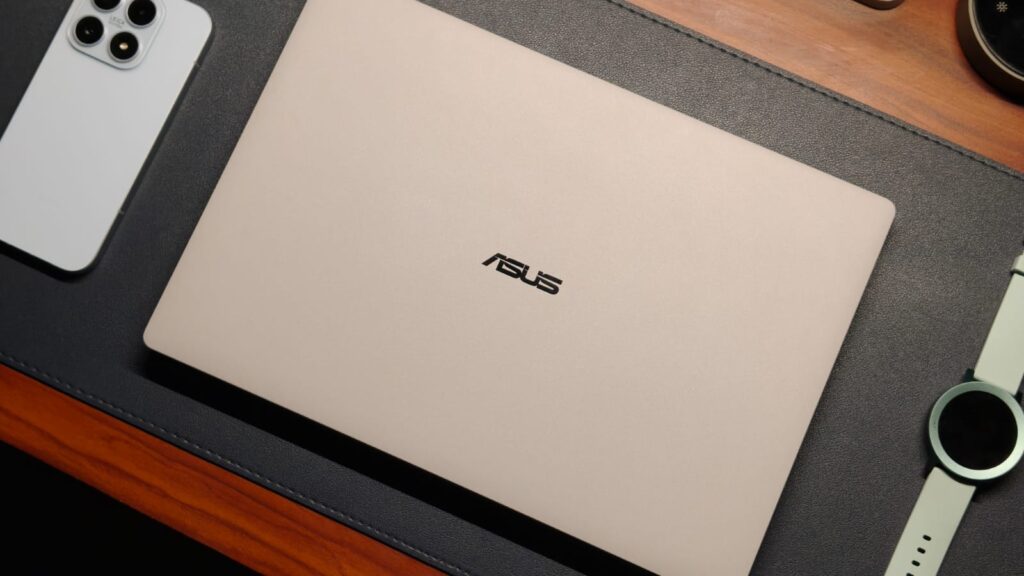
ASUS has unveiled the Ascent QN10, a new mini PC that brings premium desktop capabilities into a compact form factor. This device comes equipped with all the benefits of a desktop computer, packed in a compact design. ASUS has managed to pack the device with all the essential functionalities through its integration with the powerful Snapdragon X2 Elite processor. The compact size of the product also allows users to use it in any residential or office setting.
Asus Ascent QN10 Specifications
As for the hardware specifications, the ASUS Ascent QN10 comes with the powerful Snapdragon X2 Elite processor from Qualcomm to deliver contemporary computing capabilities. The on-board NPU offers up to 80 TOPS computing capabilities. The processing unit also performs various tasks and runs everyday applications easily. ASUS calls this device the first mini PC to feature this chipset and run both versions of Windows 11.
It supports a range of AI models, agents, and orchestration tools. Compatible applications include OpenClaw, Hermes, Cursor, Claude Desktop, OpenAI Codex, and OpenCode. Running AI tasks locally helps reduce delays and keeps more data on the device. This can benefit users who work with coding, content creation, and AI development.
The mini PC features a silver finish and a space-saving 0.75L chassis. ASUS says the design is 86% smaller than a conventional 5L mini PC. The front section includes the ASUS branding and power button, while side vents support cooling. The mini PC measures around 130×130×39.96mm and weighs only 0.75kg, along with ventilation vents along the side to improve cooling.
ASUS places multiple USB Type-A and Type-C ports on the device, including USB 4 Gen 2 connections. The front panel provides easy access to frequently used ports. The mini PC also features an HDMI port, Ethernet connection, and a 3.5 mm audio connector. ASUS provides the Ascent QN10 with an 180W power supply along with a sleek design. The mini PC is ideal for use in offices, content creation, coding, and AI-based tasks. The small form factor not only decreases desktop clutter but also ensures desktop-like performance.
Price And Availability
The ASUS Ascent QN10 has yet to be officially announced regarding pricing and availability. ASUS is expected to provide more details about the mini PC’s launch in the coming days. As of today, ASUS has simply introduced it as part of their mini PC range.
ASUS has unveiled the Ascent QN10, a new mini PC that brings premium desktop capabilities into a compact form factor. This device comes equipped with all the benefits of a desktop computer, packed in a compact design. ASUS has managed to pack the device with all the essential functionalities through its integration with the powerful Snapdragon X2 Elite processor. The compact size of the product also allows users to use it in any residential or office setting.
Asus Ascent QN10 Specifications
As for the hardware specifications, the ASUS Ascent QN10 comes with the powerful Snapdragon X2 Elite processor from Qualcomm to deliver contemporary computing capabilities. The on-board NPU offers up to 80 TOPS computing capabilities. The processing unit also performs various tasks and runs everyday applications easily. ASUS calls this device the first mini PC to feature this chipset and run both versions of Windows 11.
It supports a range of AI models, agents, and orchestration tools. Compatible applications include OpenClaw, Hermes, Cursor, Claude Desktop, OpenAI Codex, and OpenCode. Running AI tasks locally helps reduce delays and keeps more data on the device. This can benefit users who work with coding, content creation, and AI development.
The mini PC features a silver finish and a space-saving 0.75L chassis. ASUS says the design is 86% smaller than a conventional 5L mini PC. The front section includes the ASUS branding and power button, while side vents support cooling. The mini PC measures around 130×130×39.96mm and weighs only 0.75kg, along with ventilation vents along the side to improve cooling.
ASUS places multiple USB Type-A and Type-C ports on the device, including USB 4 Gen 2 connections. The front panel provides easy access to frequently used ports. The mini PC also features an HDMI port, Ethernet connection, and a 3.5 mm audio connector. ASUS provides the Ascent QN10 with an 180W power supply along with a sleek design. The mini PC is ideal for use in offices, content creation, coding, and AI-based tasks. The small form factor not only decreases desktop clutter but also ensures desktop-like performance.
Price And Availability
The ASUS Ascent QN10 has yet to be officially announced regarding pricing and availability. ASUS is expected to provide more details about the mini PC’s launch in the coming days. As of today, ASUS has simply introduced it as part of their mini PC range.
#ASUS #Unveils #Ascent #QN10 #Mini #Powered #Snapdragon #EliteAsus">ASUS Unveils Ascent QN10 Mini PC Powered by Snapdragon X2 Elite
ASUS has unveiled the Ascent QN10, a new mini PC that brings premium desktop capabilities into a compact form factor. This device comes equipped with all the benefits of a desktop computer, packed in a compact design. ASUS has managed to pack the device with all the essential functionalities through its integration with the powerful Snapdragon X2 Elite processor. The compact size of the product also allows users to use it in any residential or office setting.
Asus Ascent QN10 Specifications
As for the hardware specifications, the ASUS Ascent QN10 comes with the powerful Snapdragon X2 Elite processor from Qualcomm to deliver contemporary computing capabilities. The on-board NPU offers up to 80 TOPS computing capabilities. The processing unit also performs various tasks and runs everyday applications easily. ASUS calls this device the first mini PC to feature this chipset and run both versions of Windows 11.
It supports a range of AI models, agents, and orchestration tools. Compatible applications include OpenClaw, Hermes, Cursor, Claude Desktop, OpenAI Codex, and OpenCode. Running AI tasks locally helps reduce delays and keeps more data on the device. This can benefit users who work with coding, content creation, and AI development.
The mini PC features a silver finish and a space-saving 0.75L chassis. ASUS says the design is 86% smaller than a conventional 5L mini PC. The front section includes the ASUS branding and power button, while side vents support cooling. The mini PC measures around 130×130×39.96mm and weighs only 0.75kg, along with ventilation vents along the side to improve cooling.
ASUS places multiple USB Type-A and Type-C ports on the device, including USB 4 Gen 2 connections. The front panel provides easy access to frequently used ports. The mini PC also features an HDMI port, Ethernet connection, and a 3.5 mm audio connector. ASUS provides the Ascent QN10 with an 180W power supply along with a sleek design. The mini PC is ideal for use in offices, content creation, coding, and AI-based tasks. The small form factor not only decreases desktop clutter but also ensures desktop-like performance.
Price And Availability
The ASUS Ascent QN10 has yet to be officially announced regarding pricing and availability. ASUS is expected to provide more details about the mini PC’s launch in the coming days. As of today, ASUS has simply introduced it as part of their mini PC range.
I was one of the few journalists invited to the ExpertBook launch event about a month back, and that’s where I first went hands-on with the laptop. The first thought I had was how different it looks and feels compared to other premium laptops. You might know the feeling of the all-aluminum MacBook, but the ExpertBook Ultra is completely different.
It’s made of CNC-machined magnesium alloy with a ceramic coating on top. It’s hard to put it into words, but the finish feels textured, almost powdery in a way, yet still very premium. You also don’t have to deal with smudges and fingerprint stains on your expensive machine. Color options are limited to two: either black or an off-white. I got the Morn Grey unit, and it’s definitely the way to go. Thanks to the texture, the color shimmers in sunlight, and wherever I went with the laptop, people asked what I was using.
A business laptop is for those who’re running from one office or coffee shop to another, most of the time with a laptop in hand. This means portability and weight are the main concerns. When I first picked up the ExpertBook Ultra, I expected it to weigh a decent amount because of its powerful internals. Well, looks can certainly be deceiving since it only weighs 0.99 kg, which is quite frankly insane. For context, my MacBook Air M1 weighs 1.29 kgs. And this weight difference is noticeable when carrying the laptop every day.
But you might ask, if the Ultra doesn’t weigh much, surely it won’t be durable. That surely won’t be the case, as ExpertBook laptops are the most durable machines I’ve ever tested. I’ve even stood on one, and it escaped without any damage. The Ultra is MIL-STD-810H-rated and should survive several bumps and drops just fine. At the event, Asus also told us to hold it up by the corner of the screen for a photo, which was a weird flex.
Since connecting to other gadgets is a basic requirement in an office, the ExpertBook Ultra has a decent selection of ports. You get dual Thunderbolt 4 USB-C (one on each side), along with a full-size HDMI 2.1, a USB 3.2 Type-A, and a headphone/microphone combo jack.
Best Windows Keyboard & Trackpad Combo
From spending over five years in the MacBook world, I’ve grown accustomed to the haptic touchpad, and it’s easy to see why. A haptic trackpad eliminates one more physical component, making it durable and ensuring consistent actuation energy wherever you click. That’s something Windows laptops have suffered from for years, because clicking on the top corners requires more force than moving a mountain.
The ExpertBook Ultra is one of the few laptops that has fixed this problem, and I couldn’t be happier. The trackpad is a large glass surface that spans edge to edge and comprises six pressure sensors. I found the tracking to be exceptionally good, without that sticky feeling. While the pressure actuation was a little lower than on the MacBook, I got used to it in no time. The palm rejection works beautifully, and the gestures are well supported.
The keyboard is high on the priority list of professionals, and Asus has kept that in mind. The layout is fairly standard in the sense that there is no learning curve. All keys are in the correct place, and even the 1.5mm travel is pretty respectable. The keys feel tactile without making much noise. There are different stages of backlit, and it’s bright enough to overcome the lack of contrast with the white keyboard deck. Still, the best part about the ExpertBook Ultra’s keyboard is that it’s splash-resistant. A small coffee spill or splash of water shouldn’t cause any issues as long as you clean it up quickly.
Display & Camera
We’ve seen OLED displays on laptops for quite some time. In fact, Asus was one of the first to implement it. Still, they are yet to reach the masses because OLED panels, unlike those on phones, consume more power. That’s one problem the Asus ExpertBook Ultra doesn’t have because it uses a 14-inch 3K Tandem OLED with a 120Hz refresh rate. For the uninitiated, a Tandem OLED panel combines multiple layers of light-emitting organic material to deliver higher brightness and lower power consumption. Thanks to this, the laptop has a peak brightness of over 1400 nits in HDR and 600 nits in regular mode.
If I had to use just one word to describe the Ultra’s display, it would be perfect. You can’t get any better than this, with colors that look exceptionally vibrant thanks to 100% DCI-P3 coverage, Pantone validation, and a Delta-E of less than 1. That’s more than enough for creative work like video editing without a hitch. As expected, movies and TV shows were a dream to watch.
That’s not all, as the laptop fixes one major pain point I’ve had with premium laptops. That’s glossy displays. They pick up dust quickly and get dirty with smudges that are almost impossible to clean. With the ExpertBook Ultra, you get a matte glass panel that cancels out almost all reflections pretty effectively, meaning I could work with the sun shining behind my back. Just don’t try this in 45-degree heat. Another upside is the touch functionality. Say what you want, touch is great for working on the go. For the people concerned with durability, Asus has used Gorilla Glass Victus, which is super durable. Enough to withstand over 100 kg of pressure, as they showcased in the event.
The 1080p webcam on the ExpertBook Ultra is perhaps the only thing that’s not very special. It’s decent for calls, and looks comparable to the MacBook. The wide field of view means you don’t have to squeeze into the frame during presentations, and it also supports Windows Hello functionality.
Performance
No business laptop will ever be desirable if it doesn’t have enough power to run multiple apps. Since the Asus ExpertBook Ultra is the first to get the Panther Lake chips, specifically the Core Ultra X7 358H, I was quite excited to test it out. The processor has a total of 16 cores, out of which four are performance cores, another eight are efficiency cores, and the last four are low-power efficiency cores. It’s paired with 32GB of LPDDR5x RAM at 8533 transfers per second and 2TB of Gen 5 storage, which can achieve read speeds over 14,000 MB/s.
As expected, the laptop feels effortlessly fast in everyday use. For example, my work is mainly on Chrome and Slack, where the processor handled everything super efficiently. I could open up more tabs than I need without a hitch, all while still running something in the background. Productivity apps are handled similarly well, and I connected them to my 2K monitor, where the experience was absolutely spotless.
What I found fascinating about the Ultra is that it’s not just a laptop for business people. In fact, if you’re a creator and need a serious on-the-go machine, you actually could take a look here. That’s because I fired up Da Vinci Resolve and tried my hand at editing a 4K reel I shot in Thailand. While my editing skills need a lot of sharpening, the Ultra could handle multiple streams of 4K videos and even play them back without slowing down. I also added some color grading to the videos, and it all went fine. In typical Asus fashion, there are several AI-centric features, such as MyExpert. It’s a personalized AI chatbot that quickly helps with your needs with on-device processing.
Since my skill set with demanding tasks only goes so far, I also ran a series of benchmarks to see how the Panther Lake processor ranks among its peers. Starting with Cinebench R24, the Ultra X7 358H scored 1,019 points in the multi-core test, roughly doubling the performance of the Ultra 7 258H, found in the likes of the ThinkPad X Carbon. With PCMark 10, we saw a 30% jump in the Ultra X7 358H’s performance compared to last-gen alternatives, reaching scores of 9,903.
Graphics in the ExpertBook Ultra are handled by the integrated Arc B390 GPU. Intel’s recent emphasis on GPUs means the B390 means serious business. I put it to the test with 3DMark’s TimeSpy test, where it scored 6,712 points. To put this number in context, though, I also played a series of games. Don’t get me wrong, the ExpertBook Ultra is not designed for serious gaming, but can it play AA or sometimes even AAA games? Yes, absolutely. Starting with lighter titles like F1 2025, I easily got over 100 fps on High settings with XeSS turned off. Kicking things up to titles like Indiana Jones: The Great Circle and Cyberpunk 2077, I averaged around 50-60 fps at 1080p with Ultra detail settings. If you’re concerned with eSports titles like Counter-Strike 2 and Valorant, they won’t break the ExpertBook Ultra, as it can easily achieve full 120 fps at the highest settings.
Battery Life & Speakers
While the 70Whr cell is pretty standard for a thin-and-light laptop, Asus has incorporated a new 2S2P architecture, which, in theory, is more efficient. My testing proved that theory to be right. On an average workday, which includes spending hours on Chrome, watching YouTube, and a few episodes of Better Call Saul, the ExpertBook Ultra lasted me a full day with some charge left to spare. Charging is handled with a 90W USB-C PD charger, which means you can go from 0%-50% in just thirty minutes. That’s enough time to charge between meetings and have enough for your super-long presentation.
Speakers on Windows laptops have usually not been a priority for forever. Most of them fire directly on the table, which inherently limits their output. But the Asus ExpertBook Ultra is the first laptop I’ve heard of that blew my MacBook out of the park. The speakers, of which there are six, sound at least twice as loud, with a wider soundstage, accurate dialogues, and bass that hits the spot. The treble is usually on point. You can make out the different instruments, and the highs don’t screech the ears at all. Almost everyone whom I showed the Ultra’s speakers was in awe of the quality, so you know it’s not just me yapping.
Verdict
Starting at ₹2,39,000, the Asus ExpertBook Ultra is playing a serious game against heavy hitters like the Dell XPS and the Lenovo ThinkPad series. Asus markets it like a business laptop, but my testing found the ExpertBook Ultra to be more capable than just handling spreadsheets. It’s a machine that caters to power users, irrespective of whether they work in an office or from a cozy cafe in Bali, editing videos or programming for their clients.
There’s something for everyone. The design is exceptional, quite possibly the best I’ve tested, with durability that should withstand anything. The 3K Tandem OLED 120Hz display is perfect, and you won’t have to deal with reflections. Let’s not forget the performance that is comfortably a mile ahead of the competition, in both numbers and thermal headroom. Sure, Dell and Lenovo are more established names when it comes to professional laptops, but I think it’s time we give Asus that status as well. And if you’re shopping in the segment, it’ll be a shame not to consider the ExpertBook Ultra.
I was one of the few journalists invited to the ExpertBook launch event about a month back, and that’s where I first went hands-on with the laptop. The first thought I had was how different it looks and feels compared to other premium laptops. You might know the feeling of the all-aluminum MacBook, but the ExpertBook Ultra is completely different.
It’s made of CNC-machined magnesium alloy with a ceramic coating on top. It’s hard to put it into words, but the finish feels textured, almost powdery in a way, yet still very premium. You also don’t have to deal with smudges and fingerprint stains on your expensive machine. Color options are limited to two: either black or an off-white. I got the Morn Grey unit, and it’s definitely the way to go. Thanks to the texture, the color shimmers in sunlight, and wherever I went with the laptop, people asked what I was using.
A business laptop is for those who’re running from one office or coffee shop to another, most of the time with a laptop in hand. This means portability and weight are the main concerns. When I first picked up the ExpertBook Ultra, I expected it to weigh a decent amount because of its powerful internals. Well, looks can certainly be deceiving since it only weighs 0.99 kg, which is quite frankly insane. For context, my MacBook Air M1 weighs 1.29 kgs. And this weight difference is noticeable when carrying the laptop every day.
But you might ask, if the Ultra doesn’t weigh much, surely it won’t be durable. That surely won’t be the case, as ExpertBook laptops are the most durable machines I’ve ever tested. I’ve even stood on one, and it escaped without any damage. The Ultra is MIL-STD-810H-rated and should survive several bumps and drops just fine. At the event, Asus also told us to hold it up by the corner of the screen for a photo, which was a weird flex.
Since connecting to other gadgets is a basic requirement in an office, the ExpertBook Ultra has a decent selection of ports. You get dual Thunderbolt 4 USB-C (one on each side), along with a full-size HDMI 2.1, a USB 3.2 Type-A, and a headphone/microphone combo jack.
Best Windows Keyboard & Trackpad Combo
From spending over five years in the MacBook world, I’ve grown accustomed to the haptic touchpad, and it’s easy to see why. A haptic trackpad eliminates one more physical component, making it durable and ensuring consistent actuation energy wherever you click. That’s something Windows laptops have suffered from for years, because clicking on the top corners requires more force than moving a mountain.
The ExpertBook Ultra is one of the few laptops that has fixed this problem, and I couldn’t be happier. The trackpad is a large glass surface that spans edge to edge and comprises six pressure sensors. I found the tracking to be exceptionally good, without that sticky feeling. While the pressure actuation was a little lower than on the MacBook, I got used to it in no time. The palm rejection works beautifully, and the gestures are well supported.
The keyboard is high on the priority list of professionals, and Asus has kept that in mind. The layout is fairly standard in the sense that there is no learning curve. All keys are in the correct place, and even the 1.5mm travel is pretty respectable. The keys feel tactile without making much noise. There are different stages of backlit, and it’s bright enough to overcome the lack of contrast with the white keyboard deck. Still, the best part about the ExpertBook Ultra’s keyboard is that it’s splash-resistant. A small coffee spill or splash of water shouldn’t cause any issues as long as you clean it up quickly.
Display & Camera
We’ve seen OLED displays on laptops for quite some time. In fact, Asus was one of the first to implement it. Still, they are yet to reach the masses because OLED panels, unlike those on phones, consume more power. That’s one problem the Asus ExpertBook Ultra doesn’t have because it uses a 14-inch 3K Tandem OLED with a 120Hz refresh rate. For the uninitiated, a Tandem OLED panel combines multiple layers of light-emitting organic material to deliver higher brightness and lower power consumption. Thanks to this, the laptop has a peak brightness of over 1400 nits in HDR and 600 nits in regular mode.
If I had to use just one word to describe the Ultra’s display, it would be perfect. You can’t get any better than this, with colors that look exceptionally vibrant thanks to 100% DCI-P3 coverage, Pantone validation, and a Delta-E of less than 1. That’s more than enough for creative work like video editing without a hitch. As expected, movies and TV shows were a dream to watch.
That’s not all, as the laptop fixes one major pain point I’ve had with premium laptops. That’s glossy displays. They pick up dust quickly and get dirty with smudges that are almost impossible to clean. With the ExpertBook Ultra, you get a matte glass panel that cancels out almost all reflections pretty effectively, meaning I could work with the sun shining behind my back. Just don’t try this in 45-degree heat. Another upside is the touch functionality. Say what you want, touch is great for working on the go. For the people concerned with durability, Asus has used Gorilla Glass Victus, which is super durable. Enough to withstand over 100 kg of pressure, as they showcased in the event.
The 1080p webcam on the ExpertBook Ultra is perhaps the only thing that’s not very special. It’s decent for calls, and looks comparable to the MacBook. The wide field of view means you don’t have to squeeze into the frame during presentations, and it also supports Windows Hello functionality.
Performance
No business laptop will ever be desirable if it doesn’t have enough power to run multiple apps. Since the Asus ExpertBook Ultra is the first to get the Panther Lake chips, specifically the Core Ultra X7 358H, I was quite excited to test it out. The processor has a total of 16 cores, out of which four are performance cores, another eight are efficiency cores, and the last four are low-power efficiency cores. It’s paired with 32GB of LPDDR5x RAM at 8533 transfers per second and 2TB of Gen 5 storage, which can achieve read speeds over 14,000 MB/s.
As expected, the laptop feels effortlessly fast in everyday use. For example, my work is mainly on Chrome and Slack, where the processor handled everything super efficiently. I could open up more tabs than I need without a hitch, all while still running something in the background. Productivity apps are handled similarly well, and I connected them to my 2K monitor, where the experience was absolutely spotless.
What I found fascinating about the Ultra is that it’s not just a laptop for business people. In fact, if you’re a creator and need a serious on-the-go machine, you actually could take a look here. That’s because I fired up Da Vinci Resolve and tried my hand at editing a 4K reel I shot in Thailand. While my editing skills need a lot of sharpening, the Ultra could handle multiple streams of 4K videos and even play them back without slowing down. I also added some color grading to the videos, and it all went fine. In typical Asus fashion, there are several AI-centric features, such as MyExpert. It’s a personalized AI chatbot that quickly helps with your needs with on-device processing.
Since my skill set with demanding tasks only goes so far, I also ran a series of benchmarks to see how the Panther Lake processor ranks among its peers. Starting with Cinebench R24, the Ultra X7 358H scored 1,019 points in the multi-core test, roughly doubling the performance of the Ultra 7 258H, found in the likes of the ThinkPad X Carbon. With PCMark 10, we saw a 30% jump in the Ultra X7 358H’s performance compared to last-gen alternatives, reaching scores of 9,903.
Graphics in the ExpertBook Ultra are handled by the integrated Arc B390 GPU. Intel’s recent emphasis on GPUs means the B390 means serious business. I put it to the test with 3DMark’s TimeSpy test, where it scored 6,712 points. To put this number in context, though, I also played a series of games. Don’t get me wrong, the ExpertBook Ultra is not designed for serious gaming, but can it play AA or sometimes even AAA games? Yes, absolutely. Starting with lighter titles like F1 2025, I easily got over 100 fps on High settings with XeSS turned off. Kicking things up to titles like Indiana Jones: The Great Circle and Cyberpunk 2077, I averaged around 50-60 fps at 1080p with Ultra detail settings. If you’re concerned with eSports titles like Counter-Strike 2 and Valorant, they won’t break the ExpertBook Ultra, as it can easily achieve full 120 fps at the highest settings.
Battery Life & Speakers
While the 70Whr cell is pretty standard for a thin-and-light laptop, Asus has incorporated a new 2S2P architecture, which, in theory, is more efficient. My testing proved that theory to be right. On an average workday, which includes spending hours on Chrome, watching YouTube, and a few episodes of Better Call Saul, the ExpertBook Ultra lasted me a full day with some charge left to spare. Charging is handled with a 90W USB-C PD charger, which means you can go from 0%-50% in just thirty minutes. That’s enough time to charge between meetings and have enough for your super-long presentation.
Speakers on Windows laptops have usually not been a priority for forever. Most of them fire directly on the table, which inherently limits their output. But the Asus ExpertBook Ultra is the first laptop I’ve heard of that blew my MacBook out of the park. The speakers, of which there are six, sound at least twice as loud, with a wider soundstage, accurate dialogues, and bass that hits the spot. The treble is usually on point. You can make out the different instruments, and the highs don’t screech the ears at all. Almost everyone whom I showed the Ultra’s speakers was in awe of the quality, so you know it’s not just me yapping.
Verdict
Starting at ₹2,39,000, the Asus ExpertBook Ultra is playing a serious game against heavy hitters like the Dell XPS and the Lenovo ThinkPad series. Asus markets it like a business laptop, but my testing found the ExpertBook Ultra to be more capable than just handling spreadsheets. It’s a machine that caters to power users, irrespective of whether they work in an office or from a cozy cafe in Bali, editing videos or programming for their clients.
There’s something for everyone. The design is exceptional, quite possibly the best I’ve tested, with durability that should withstand anything. The 3K Tandem OLED 120Hz display is perfect, and you won’t have to deal with reflections. Let’s not forget the performance that is comfortably a mile ahead of the competition, in both numbers and thermal headroom. Sure, Dell and Lenovo are more established names when it comes to professional laptops, but I think it’s time we give Asus that status as well. And if you’re shopping in the segment, it’ll be a shame not to consider the ExpertBook Ultra.
#Perfect #Professional #Laptop #Asus #ExpertBook #Ultra #ReviewAsus">An ALMOST Perfect Professional Laptop: Asus ExpertBook Ultra Review
As a tech reviewer, I have a confession to make. Despite my years of testing Windows laptops, I’ve always come back to my MacBook after a review period with a sigh of relief. That’s because, regardless of how expensive a Windows laptop is, it’s never really had the cohesive experience I’ve come to love in Apple’s walled garden. Maybe their speakers aren’t good, or the physical trackpad requires a lot of force to actuate. You get the point. So, when Asus sent over their new executive ExpertBook Ultra, I thought I’d test it out, run a few tests, and be back on my MacBook in no time. Well, that hasn’t happened.
The Asus ExpertBook Ultra is the first laptop I’ve tested that has crossed that threshold of desirability. But what makes a great Windows business laptop? Some might say portability, while others could point to factors like performance, sufficient RAM, and AI capabilities. What if you want all those features rolled into one? That’s what best describes the Asus ExpertBook Ultra. It starts at ₹2,39,000 or $3,499, and is the first laptop to debut Intel’s latest Panther Lake processors. I’ve been testing it for a better part of three weeks now, and this review should help you decide if it’s worth splurging the big bucks.
Asus ExpertBook Ultra Review
Hisan Kidwai
Summary
The Asus ExpertBook Ultra is playing a serious game against heavy hitters like the Dell XPS and the Lenovo ThinkPad series. And there’s something for everyone. The design is exceptional, quite possibly the best I’ve tested, with durability that should withstand anything. The 3K Tandem OLED 120Hz display is perfect, and you won’t have to deal with reflections. Let’s not forget the performance that is comfortably a mile ahead of the competition, in both numbers and thermal headroom
Design & Hardware
I was one of the few journalists invited to the ExpertBook launch event about a month back, and that’s where I first went hands-on with the laptop. The first thought I had was how different it looks and feels compared to other premium laptops. You might know the feeling of the all-aluminum MacBook, but the ExpertBook Ultra is completely different.
It’s made of CNC-machined magnesium alloy with a ceramic coating on top. It’s hard to put it into words, but the finish feels textured, almost powdery in a way, yet still very premium. You also don’t have to deal with smudges and fingerprint stains on your expensive machine. Color options are limited to two: either black or an off-white. I got the Morn Grey unit, and it’s definitely the way to go. Thanks to the texture, the color shimmers in sunlight, and wherever I went with the laptop, people asked what I was using.
A business laptop is for those who’re running from one office or coffee shop to another, most of the time with a laptop in hand. This means portability and weight are the main concerns. When I first picked up the ExpertBook Ultra, I expected it to weigh a decent amount because of its powerful internals. Well, looks can certainly be deceiving since it only weighs 0.99 kg, which is quite frankly insane. For context, my MacBook Air M1 weighs 1.29 kgs. And this weight difference is noticeable when carrying the laptop every day.
But you might ask, if the Ultra doesn’t weigh much, surely it won’t be durable. That surely won’t be the case, as ExpertBook laptops are the most durable machines I’ve ever tested. I’ve even stood on one, and it escaped without any damage. The Ultra is MIL-STD-810H-rated and should survive several bumps and drops just fine. At the event, Asus also told us to hold it up by the corner of the screen for a photo, which was a weird flex.
Since connecting to other gadgets is a basic requirement in an office, the ExpertBook Ultra has a decent selection of ports. You get dual Thunderbolt 4 USB-C (one on each side), along with a full-size HDMI 2.1, a USB 3.2 Type-A, and a headphone/microphone combo jack.
Best Windows Keyboard & Trackpad Combo
From spending over five years in the MacBook world, I’ve grown accustomed to the haptic touchpad, and it’s easy to see why. A haptic trackpad eliminates one more physical component, making it durable and ensuring consistent actuation energy wherever you click. That’s something Windows laptops have suffered from for years, because clicking on the top corners requires more force than moving a mountain.
The ExpertBook Ultra is one of the few laptops that has fixed this problem, and I couldn’t be happier. The trackpad is a large glass surface that spans edge to edge and comprises six pressure sensors. I found the tracking to be exceptionally good, without that sticky feeling. While the pressure actuation was a little lower than on the MacBook, I got used to it in no time. The palm rejection works beautifully, and the gestures are well supported.
The keyboard is high on the priority list of professionals, and Asus has kept that in mind. The layout is fairly standard in the sense that there is no learning curve. All keys are in the correct place, and even the 1.5mm travel is pretty respectable. The keys feel tactile without making much noise. There are different stages of backlit, and it’s bright enough to overcome the lack of contrast with the white keyboard deck. Still, the best part about the ExpertBook Ultra’s keyboard is that it’s splash-resistant. A small coffee spill or splash of water shouldn’t cause any issues as long as you clean it up quickly.
Display & Camera
We’ve seen OLED displays on laptops for quite some time. In fact, Asus was one of the first to implement it. Still, they are yet to reach the masses because OLED panels, unlike those on phones, consume more power. That’s one problem the Asus ExpertBook Ultra doesn’t have because it uses a 14-inch 3K Tandem OLED with a 120Hz refresh rate. For the uninitiated, a Tandem OLED panel combines multiple layers of light-emitting organic material to deliver higher brightness and lower power consumption. Thanks to this, the laptop has a peak brightness of over 1400 nits in HDR and 600 nits in regular mode.
If I had to use just one word to describe the Ultra’s display, it would be perfect. You can’t get any better than this, with colors that look exceptionally vibrant thanks to 100% DCI-P3 coverage, Pantone validation, and a Delta-E of less than 1. That’s more than enough for creative work like video editing without a hitch. As expected, movies and TV shows were a dream to watch.
That’s not all, as the laptop fixes one major pain point I’ve had with premium laptops. That’s glossy displays. They pick up dust quickly and get dirty with smudges that are almost impossible to clean. With the ExpertBook Ultra, you get a matte glass panel that cancels out almost all reflections pretty effectively, meaning I could work with the sun shining behind my back. Just don’t try this in 45-degree heat. Another upside is the touch functionality. Say what you want, touch is great for working on the go. For the people concerned with durability, Asus has used Gorilla Glass Victus, which is super durable. Enough to withstand over 100 kg of pressure, as they showcased in the event.
The 1080p webcam on the ExpertBook Ultra is perhaps the only thing that’s not very special. It’s decent for calls, and looks comparable to the MacBook. The wide field of view means you don’t have to squeeze into the frame during presentations, and it also supports Windows Hello functionality.
Performance
No business laptop will ever be desirable if it doesn’t have enough power to run multiple apps. Since the Asus ExpertBook Ultra is the first to get the Panther Lake chips, specifically the Core Ultra X7 358H, I was quite excited to test it out. The processor has a total of 16 cores, out of which four are performance cores, another eight are efficiency cores, and the last four are low-power efficiency cores. It’s paired with 32GB of LPDDR5x RAM at 8533 transfers per second and 2TB of Gen 5 storage, which can achieve read speeds over 14,000 MB/s.
As expected, the laptop feels effortlessly fast in everyday use. For example, my work is mainly on Chrome and Slack, where the processor handled everything super efficiently. I could open up more tabs than I need without a hitch, all while still running something in the background. Productivity apps are handled similarly well, and I connected them to my 2K monitor, where the experience was absolutely spotless.
What I found fascinating about the Ultra is that it’s not just a laptop for business people. In fact, if you’re a creator and need a serious on-the-go machine, you actually could take a look here. That’s because I fired up Da Vinci Resolve and tried my hand at editing a 4K reel I shot in Thailand. While my editing skills need a lot of sharpening, the Ultra could handle multiple streams of 4K videos and even play them back without slowing down. I also added some color grading to the videos, and it all went fine. In typical Asus fashion, there are several AI-centric features, such as MyExpert. It’s a personalized AI chatbot that quickly helps with your needs with on-device processing.
Since my skill set with demanding tasks only goes so far, I also ran a series of benchmarks to see how the Panther Lake processor ranks among its peers. Starting with Cinebench R24, the Ultra X7 358H scored 1,019 points in the multi-core test, roughly doubling the performance of the Ultra 7 258H, found in the likes of the ThinkPad X Carbon. With PCMark 10, we saw a 30% jump in the Ultra X7 358H’s performance compared to last-gen alternatives, reaching scores of 9,903.
Graphics in the ExpertBook Ultra are handled by the integrated Arc B390 GPU. Intel’s recent emphasis on GPUs means the B390 means serious business. I put it to the test with 3DMark’s TimeSpy test, where it scored 6,712 points. To put this number in context, though, I also played a series of games. Don’t get me wrong, the ExpertBook Ultra is not designed for serious gaming, but can it play AA or sometimes even AAA games? Yes, absolutely. Starting with lighter titles like F1 2025, I easily got over 100 fps on High settings with XeSS turned off. Kicking things up to titles like Indiana Jones: The Great Circle and Cyberpunk 2077, I averaged around 50-60 fps at 1080p with Ultra detail settings. If you’re concerned with eSports titles like Counter-Strike 2 and Valorant, they won’t break the ExpertBook Ultra, as it can easily achieve full 120 fps at the highest settings.
Battery Life & Speakers
While the 70Whr cell is pretty standard for a thin-and-light laptop, Asus has incorporated a new 2S2P architecture, which, in theory, is more efficient. My testing proved that theory to be right. On an average workday, which includes spending hours on Chrome, watching YouTube, and a few episodes of Better Call Saul, the ExpertBook Ultra lasted me a full day with some charge left to spare. Charging is handled with a 90W USB-C PD charger, which means you can go from 0%-50% in just thirty minutes. That’s enough time to charge between meetings and have enough for your super-long presentation.
Speakers on Windows laptops have usually not been a priority for forever. Most of them fire directly on the table, which inherently limits their output. But the Asus ExpertBook Ultra is the first laptop I’ve heard of that blew my MacBook out of the park. The speakers, of which there are six, sound at least twice as loud, with a wider soundstage, accurate dialogues, and bass that hits the spot. The treble is usually on point. You can make out the different instruments, and the highs don’t screech the ears at all. Almost everyone whom I showed the Ultra’s speakers was in awe of the quality, so you know it’s not just me yapping.
Verdict
Starting at ₹2,39,000, the Asus ExpertBook Ultra is playing a serious game against heavy hitters like the Dell XPS and the Lenovo ThinkPad series. Asus markets it like a business laptop, but my testing found the ExpertBook Ultra to be more capable than just handling spreadsheets. It’s a machine that caters to power users, irrespective of whether they work in an office or from a cozy cafe in Bali, editing videos or programming for their clients.
There’s something for everyone. The design is exceptional, quite possibly the best I’ve tested, with durability that should withstand anything. The 3K Tandem OLED 120Hz display is perfect, and you won’t have to deal with reflections. Let’s not forget the performance that is comfortably a mile ahead of the competition, in both numbers and thermal headroom. Sure, Dell and Lenovo are more established names when it comes to professional laptops, but I think it’s time we give Asus that status as well. And if you’re shopping in the segment, it’ll be a shame not to consider the ExpertBook Ultra.
As a tech reviewer, I have a confession to make. Despite my years of testing…
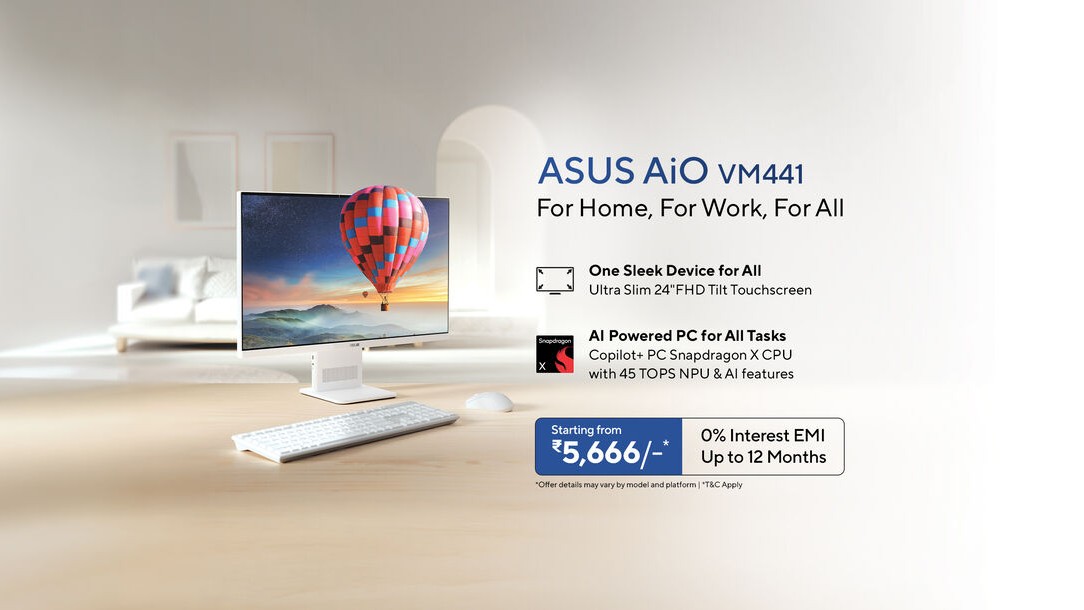
VM441 AiO, which is designed to offer a smarter desktop experience by combining the Snapdragon X platform with Microsoft’s Copilot+ PC features. In simpler terms, ASUS wants this to feel less like a traditional bulky desktop and more like a modern AI-first machine for everyday users.
ASUS VM441 AiO Features
The AiO delivers up to 45 TOPS of NPU performance for advanced functions on the device. The Copilot+ PC helps its users perform all their daily activities, multitask, and communicate during discussions and collaborations. The VM441 AiO comes with an impressive 24-inch full-HD touch-screen monitor with great aesthetics. The screen has a wide 178-degree viewing angle and 100% sRGB color coverage.
ASUS VM441 AiO comes with two 3W stereo speakers that feature Dolby Atmos technology for clear, immersive audio. The inclusion of a bass reflex system helps deliver clearer audio output while you stream content and participate in video conferencing sessions. It also features a 5 MP IR camera with Windows Hello technology.
ASUS has designed the device to provide a complete desktop package for everyday users. It comes with quick SSD storage options, free wireless accessories, and compatibility with productivity suite software. Buyers also receive a one-year Microsoft 365 Basic subscription with 100GB cloud storage access for files and backups.
Price and Availability
ASUS has priced the ASUS VM441 AiO starting at ₹1,01,990 for the 512GB model. The higher 1TB storage variant starts at ₹1,11,990. The desktop will be available across online and offline platforms, including Amazon, Flipkart, ASUS stores, and Croma. ASUS also includes No Cost EMI plans and cashback benefits on eligible bank cards.
VM441 AiO, which is designed to offer a smarter desktop experience by combining the Snapdragon X platform with Microsoft’s Copilot+ PC features. In simpler terms, ASUS wants this to feel less like a traditional bulky desktop and more like a modern AI-first machine for everyday users.
ASUS VM441 AiO Features
The AiO delivers up to 45 TOPS of NPU performance for advanced functions on the device. The Copilot+ PC helps its users perform all their daily activities, multitask, and communicate during discussions and collaborations. The VM441 AiO comes with an impressive 24-inch full-HD touch-screen monitor with great aesthetics. The screen has a wide 178-degree viewing angle and 100% sRGB color coverage.
ASUS VM441 AiO comes with two 3W stereo speakers that feature Dolby Atmos technology for clear, immersive audio. The inclusion of a bass reflex system helps deliver clearer audio output while you stream content and participate in video conferencing sessions. It also features a 5 MP IR camera with Windows Hello technology.
ASUS has designed the device to provide a complete desktop package for everyday users. It comes with quick SSD storage options, free wireless accessories, and compatibility with productivity suite software. Buyers also receive a one-year Microsoft 365 Basic subscription with 100GB cloud storage access for files and backups.
Price and Availability
ASUS has priced the ASUS VM441 AiO starting at ₹1,01,990 for the 512GB model. The higher 1TB storage variant starts at ₹1,11,990. The desktop will be available across online and offline platforms, including Amazon, Flipkart, ASUS stores, and Croma. ASUS also includes No Cost EMI plans and cashback benefits on eligible bank cards.
#ASUS #VM441 #AiO #Launched #Snapdragon #Chip #Copilot #FeaturesAsus">ASUS VM441 AiO Launched With Snapdragon X Chip and Copilot+ Features
AI PCs are quickly becoming the next big thing in the laptop world, but desktops haven’t seen the same level of attention yet. ASUS now wants to change that with the launch of the new VM441 AiO, which is designed to offer a smarter desktop experience by combining the Snapdragon X platform with Microsoft’s Copilot+ PC features. In simpler terms, ASUS wants this to feel less like a traditional bulky desktop and more like a modern AI-first machine for everyday users.
ASUS VM441 AiO Features
The AiO delivers up to 45 TOPS of NPU performance for advanced functions on the device. The Copilot+ PC helps its users perform all their daily activities, multitask, and communicate during discussions and collaborations. The VM441 AiO comes with an impressive 24-inch full-HD touch-screen monitor with great aesthetics. The screen has a wide 178-degree viewing angle and 100% sRGB color coverage.
ASUS VM441 AiO comes with two 3W stereo speakers that feature Dolby Atmos technology for clear, immersive audio. The inclusion of a bass reflex system helps deliver clearer audio output while you stream content and participate in video conferencing sessions. It also features a 5 MP IR camera with Windows Hello technology.
ASUS has designed the device to provide a complete desktop package for everyday users. It comes with quick SSD storage options, free wireless accessories, and compatibility with productivity suite software. Buyers also receive a one-year Microsoft 365 Basic subscription with 100GB cloud storage access for files and backups.
Price and Availability
ASUS has priced the ASUS VM441 AiO starting at ₹1,01,990 for the 512GB model. The higher 1TB storage variant starts at ₹1,11,990. The desktop will be available across online and offline platforms, including Amazon, Flipkart, ASUS stores, and Croma. ASUS also includes No Cost EMI plans and cashback benefits on eligible bank cards.
AI PCs are quickly becoming the next big thing in the laptop world, but desktops…
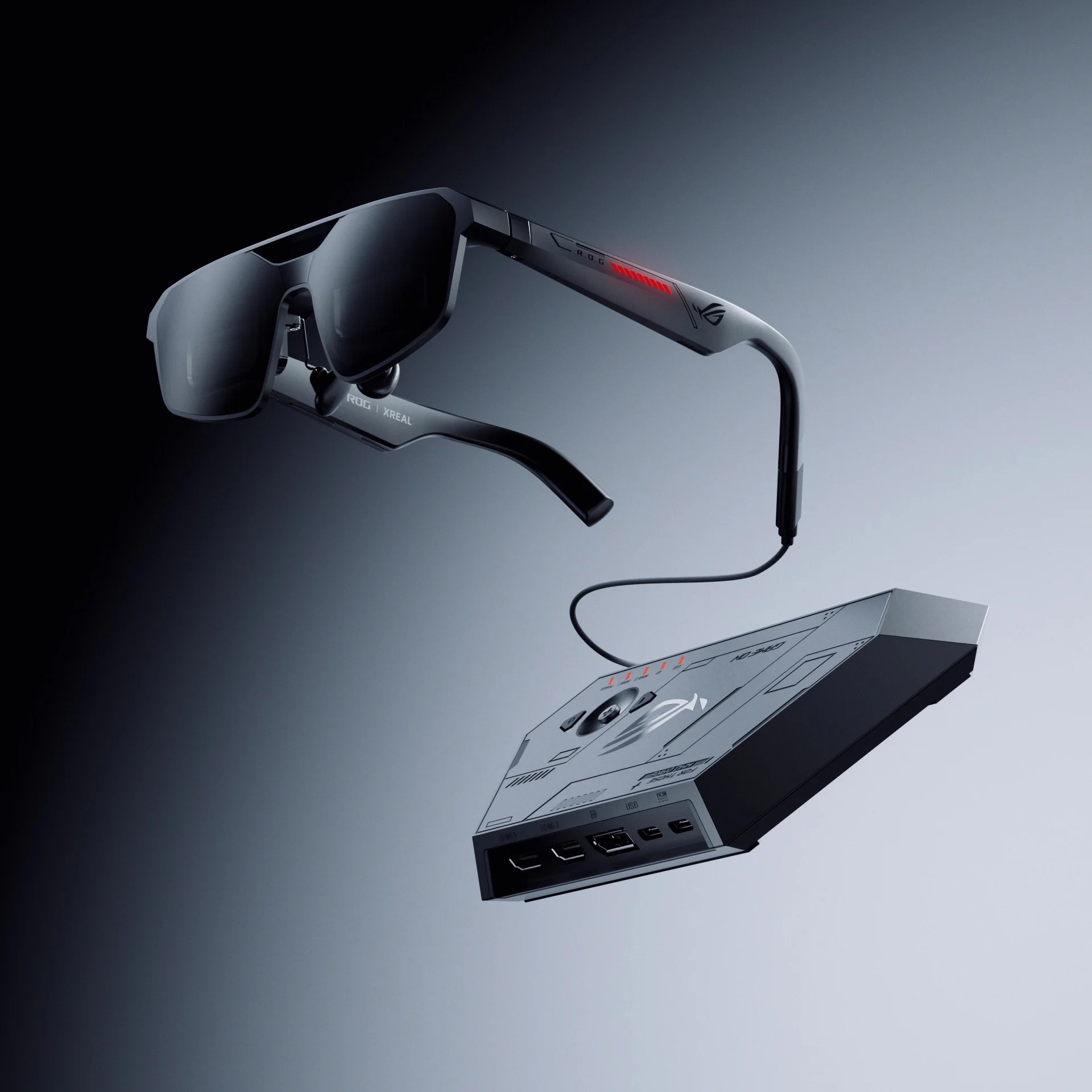
Asus ROG’s Xreal R1, the world’s first pair of AR smart glasses capable of projecting a virtual screen before your eyes with a blistering 240Hz rate, finally has… a price and preorder dates.
Ahead of Google I/O 2026, Asus ROG has announced the Xreal R1 costs $849—$200 more than the $650 MSRP for the Xreal One Pro, which top out at a 120Hz refresh rate. The gaming-focused AR smart glasses can be ordered from Best Buy starting today, May 15. The Xreal store will accept preorders on May 17 at 3 a.m. ET / 12 a.m. PT.
Spec for spec, the Xreal R1 and the Xreal One Pro are the same, except for that refresh rate and the slightly more gamer-y design. You get the same 171-inch (1,920 x 1,080) virtual display through the micro OLED panel, 57-degree field of view, Bose-tuned sound, 3DoF (three degrees of freedom) tracking technology used for anchoring virtual windows, and more. Asus ROG is hoping the 240Hz refresh rate will be worth the additional cost.
The only other difference is that the Xreal R1 comes with an “ROG Control Dock.” This docking station lets you switch between three connected devices (two via HDMI 2.0 and one through DisplayPort 1.4). So for example, with the push of a button, you could flip between a PS5, Switch 2, and a PC. Asus ROG touts the Xreal R1 as requiring no additional software to get up and running. Just plug the AR smart glasses into the Control Dock, select an input, and get gaming on your 171-inch virtual screen. You can also connect the Xreal R1 to any phone, tablet, laptop, or handheld that supports display out. For the Switch 2, you will need to use the Control Dock, as the Xreal Neo adapter/video was canceled before it could launch.
Will a 240Hz refresh rate in video smart glasses make any meaningful difference when you’re gaming? Who knows, but we’re hoping to find out soon when we get a pair to try out.
Asus ROG’s Xreal R1, the world’s first pair of AR smart glasses capable of projecting a virtual screen before your eyes with a blistering 240Hz rate, finally has… a price and preorder dates.
Ahead of Google I/O 2026, Asus ROG has announced the Xreal R1 costs $849—$200 more than the $650 MSRP for the Xreal One Pro, which top out at a 120Hz refresh rate. The gaming-focused AR smart glasses can be ordered from Best Buy starting today, May 15. The Xreal store will accept preorders on May 17 at 3 a.m. ET / 12 a.m. PT.
Spec for spec, the Xreal R1 and the Xreal One Pro are the same, except for that refresh rate and the slightly more gamer-y design. You get the same 171-inch (1,920 x 1,080) virtual display through the micro OLED panel, 57-degree field of view, Bose-tuned sound, 3DoF (three degrees of freedom) tracking technology used for anchoring virtual windows, and more. Asus ROG is hoping the 240Hz refresh rate will be worth the additional cost.
The only other difference is that the Xreal R1 comes with an “ROG Control Dock.” This docking station lets you switch between three connected devices (two via HDMI 2.0 and one through DisplayPort 1.4). So for example, with the push of a button, you could flip between a PS5, Switch 2, and a PC. Asus ROG touts the Xreal R1 as requiring no additional software to get up and running. Just plug the AR smart glasses into the Control Dock, select an input, and get gaming on your 171-inch virtual screen. You can also connect the Xreal R1 to any phone, tablet, laptop, or handheld that supports display out. For the Switch 2, you will need to use the Control Dock, as the Xreal Neo adapter/video was canceled before it could launch.
Will a 240Hz refresh rate in video smart glasses make any meaningful difference when you’re gaming? Who knows, but we’re hoping to find out soon when we get a pair to try out.
#Worlds #240Hz #Video #Smart #Glasses #Gaming #Arent #CheapAsus,Asus ROG,Gaming,smart glasses,XReal">The World’s First 240Hz Video Smart Glasses for Gaming Aren’t Cheap
Asus ROG’s Xreal R1, the world’s first pair of AR smart glasses capable of projecting a virtual screen before your eyes with a blistering 240Hz rate, finally has… a price and preorder dates.
Ahead of Google I/O 2026, Asus ROG has announced the Xreal R1 costs $849—$200 more than the $650 MSRP for the Xreal One Pro, which top out at a 120Hz refresh rate. The gaming-focused AR smart glasses can be ordered from Best Buy starting today, May 15. The Xreal store will accept preorders on May 17 at 3 a.m. ET / 12 a.m. PT.
Spec for spec, the Xreal R1 and the Xreal One Pro are the same, except for that refresh rate and the slightly more gamer-y design. You get the same 171-inch (1,920 x 1,080) virtual display through the micro OLED panel, 57-degree field of view, Bose-tuned sound, 3DoF (three degrees of freedom) tracking technology used for anchoring virtual windows, and more. Asus ROG is hoping the 240Hz refresh rate will be worth the additional cost.
The only other difference is that the Xreal R1 comes with an “ROG Control Dock.” This docking station lets you switch between three connected devices (two via HDMI 2.0 and one through DisplayPort 1.4). So for example, with the push of a button, you could flip between a PS5, Switch 2, and a PC. Asus ROG touts the Xreal R1 as requiring no additional software to get up and running. Just plug the AR smart glasses into the Control Dock, select an input, and get gaming on your 171-inch virtual screen. You can also connect the Xreal R1 to any phone, tablet, laptop, or handheld that supports display out. For the Switch 2, you will need to use the Control Dock, as the Xreal Neo adapter/video was canceled before it could launch.
Will a 240Hz refresh rate in video smart glasses make any meaningful difference when you’re gaming? Who knows, but we’re hoping to find out soon when we get a pair to try out.
Asus ROG’s Xreal R1, the world’s first pair of AR smart glasses capable of projecting…
The performance boost on Geekbench is particularly striking, with the A16 scoring 50 to 100 percent faster than competing systems from AMD and Intel. It’s even faster than the Apple MacBook M4 Pro, the last Mac for which I have comparable benchmark scores. However, that Mac did beat the Asus on the Cinebench benchmark, but not by much, and the Asus now stands solidly in second place in my testing archive.
Graphics performance is much better than in previous generations of Snapdragon X chips, with frame rates quadrupling on average, depending on the test. That’s a dramatic and much-needed improvement for the CPU, and while no one will accuse the A16 of being a gaming rig, it does at least make for a workable experience with less taxing games and graphics-heavy workloads.
Beige Belies Performance
Photograph: Chris Null
I’m happy enough with how the Snapdragon X2 Elite Extreme performs to sign off on its performance claims, but there’s a lot more to the Zenbook A16 than its CPU.
Under the hood, the Snapdragon X2 Elite Extreme X2E94100 CPU is complemented by 48 GB of RAM and a 1-TB SSD. The 16-inch touchscreen offers a solid resolution of 2880 x 1800 pixels, and it’s incredibly bright. A weight of 2.9 pounds is impressive (if not unheard of) for the 16-inch category, and at 0.65 inches (at its thickest), it has a svelte, quite portable carrying experience. Asus’s Ceraluminum technology (now with added magnesium) is used in the machine’s lid, base, and keyboard frame. That helps keep it thin and light, though when adjusted or touched, the screen shimmied more than I expected.
The performance boost on Geekbench is particularly striking, with the A16 scoring 50 to 100 percent faster than competing systems from AMD and Intel. It’s even faster than the Apple MacBook M4 Pro, the last Mac for which I have comparable benchmark scores. However, that Mac did beat the Asus on the Cinebench benchmark, but not by much, and the Asus now stands solidly in second place in my testing archive.
Graphics performance is much better than in previous generations of Snapdragon X chips, with frame rates quadrupling on average, depending on the test. That’s a dramatic and much-needed improvement for the CPU, and while no one will accuse the A16 of being a gaming rig, it does at least make for a workable experience with less taxing games and graphics-heavy workloads.
Beige Belies Performance
Photograph: Chris Null
I’m happy enough with how the Snapdragon X2 Elite Extreme performs to sign off on its performance claims, but there’s a lot more to the Zenbook A16 than its CPU.
Under the hood, the Snapdragon X2 Elite Extreme X2E94100 CPU is complemented by 48 GB of RAM and a 1-TB SSD. The 16-inch touchscreen offers a solid resolution of 2880 x 1800 pixels, and it’s incredibly bright. A weight of 2.9 pounds is impressive (if not unheard of) for the 16-inch category, and at 0.65 inches (at its thickest), it has a svelte, quite portable carrying experience. Asus’s Ceraluminum technology (now with added magnesium) is used in the machine’s lid, base, and keyboard frame. That helps keep it thin and light, though when adjusted or touched, the screen shimmied more than I expected.
#Asus #Zenbook #Delivers #Great #Performance #Mediocre #Laptopasus,laptops,shopping,reviews,review,computers,qualcomm,windows">The Asus Zenbook 16 Delivers Great Performance in an Otherwise Mediocre Laptop
So, what’s not to like? Well, early compatibility problems slowed the initial uptake of Snapdragon X, and the CPU’s integrated graphics performance turned out to be pretty terrible. And to date, powerful onboard AI features just haven’t proven important, as most AI workloads are still being done in the cloud. With the second-generation X2, Qualcomm set out to deliver on the original promise of faster performance.
But what exactly does “faster” mean? As with most claims in the PC computing space, it’s all about the benchmarks. On the Zenbook A16, the tests I ran indeed showcased exemplary performance from the X2 Elite Extreme, in some of the most widely used benchmarking tools, namely Geekbench 6 and Cinebench 2024. (I don’t have enough competitive Cinebench 2026 results to make wide comparisons yet on that benchmark.)
The performance boost on Geekbench is particularly striking, with the A16 scoring 50 to 100 percent faster than competing systems from AMD and Intel. It’s even faster than the Apple MacBook M4 Pro, the last Mac for which I have comparable benchmark scores. However, that Mac did beat the Asus on the Cinebench benchmark, but not by much, and the Asus now stands solidly in second place in my testing archive.
Graphics performance is much better than in previous generations of Snapdragon X chips, with frame rates quadrupling on average, depending on the test. That’s a dramatic and much-needed improvement for the CPU, and while no one will accuse the A16 of being a gaming rig, it does at least make for a workable experience with less taxing games and graphics-heavy workloads.
Beige Belies Performance
Photograph: Chris Null
I’m happy enough with how the Snapdragon X2 Elite Extreme performs to sign off on its performance claims, but there’s a lot more to the Zenbook A16 than its CPU.
Under the hood, the Snapdragon X2 Elite Extreme X2E94100 CPU is complemented by 48 GB of RAM and a 1-TB SSD. The 16-inch touchscreen offers a solid resolution of 2880 x 1800 pixels, and it’s incredibly bright. A weight of 2.9 pounds is impressive (if not unheard of) for the 16-inch category, and at 0.65 inches (at its thickest), it has a svelte, quite portable carrying experience. Asus’s Ceraluminum technology (now with added magnesium) is used in the machine’s lid, base, and keyboard frame. That helps keep it thin and light, though when adjusted or touched, the screen shimmied more than I expected.
So, what's not to like? Well, early compatibility problems slowed the initial uptake of Snapdragon…
ExpertBook Ultra. This laptop debuts Intel’s Panther Lake processors in India, and they pack serious performance not only in the CPU but also in the graphics department, with the Taiwanese laptop maker claiming GPU performance similar to the RTX 4050 on the ExpertBook Ultra, which weighs less than 1kg. Here’s everything you need to know about it.
Flagship All Around
Asus is pitching the ExpertBook Ultra as its most premium business laptop yet, and it’s easy to see why. It features an ultra-light design starting at just 0.99 kg and is built using magnesium-aluminum alloy. We took the Ultra for a spin at the launch event, and it looked beautiful. The finish shimmers in sunlight, making the whole experience even more premium.
Open the lid, and you’re greeted by a beautiful 3K Tandem OLED display that nails the colors and delivers deep blacks. But that’s not actually the highlight. The highlight is the 1400-nit peak brightness in HDR mode, which keeps the display legible even in direct sunlight. The nano coating also keeps the panel smudge-free.
Under the hood lie Intel’s latest Core Ultra Series 3 processors, along with an integrated AI engine (NPU) to handle on-device AI workloads. While we are yet to test the performance of the ExpertBook Ultra, Asus’s demos have set expectations very high, as their benchmarks show the laptop topping the charts among other laptops. The processor can be coupled with up to 64GB of LPDDR5X RAM and 2TB of M.2 2280 NVMe PCIe 5.0 SSD.
Graphics are handled by the Intel Arc B390, which Asus says offers performance comparable to the RTX 4050. The company also ran a series of benchmarks comparing the two in a variety of games. The ExpertBook Ultra is run by a 70WHrs battery with a claimed all-day battery life of up to 26 hours.
ExpertBook P Series Gets an Upgrade
Alongside the Ultra, ASUS has expanded its ExpertBook P series with new models like the P3 and P5, targeting a wider range of business users.
These laptops will deliver scalable performance and AI capabilities for professionals and small- to medium-sized businesses. ASUS says the goal is to provide flexibility across configurations while maintaining strong performance and reliability.
Pricing & Availability
The ASUS ExpertBook Ultra is now available for pre-order on Flipkart, starting at ₹2,39,990. Pre-order offers include extended warranty, accidental damage protection, bank discounts, and bundled subscriptions. Meanwhile, the ExpertBook P3 starts at ₹94,990, while the P5 is expected to launch soon with a starting price of ₹2,14,990
ExpertBook Ultra. This laptop debuts Intel’s Panther Lake processors in India, and they pack serious performance not only in the CPU but also in the graphics department, with the Taiwanese laptop maker claiming GPU performance similar to the RTX 4050 on the ExpertBook Ultra, which weighs less than 1kg. Here’s everything you need to know about it.
Flagship All Around
Asus is pitching the ExpertBook Ultra as its most premium business laptop yet, and it’s easy to see why. It features an ultra-light design starting at just 0.99 kg and is built using magnesium-aluminum alloy. We took the Ultra for a spin at the launch event, and it looked beautiful. The finish shimmers in sunlight, making the whole experience even more premium.
Open the lid, and you’re greeted by a beautiful 3K Tandem OLED display that nails the colors and delivers deep blacks. But that’s not actually the highlight. The highlight is the 1400-nit peak brightness in HDR mode, which keeps the display legible even in direct sunlight. The nano coating also keeps the panel smudge-free.
Under the hood lie Intel’s latest Core Ultra Series 3 processors, along with an integrated AI engine (NPU) to handle on-device AI workloads. While we are yet to test the performance of the ExpertBook Ultra, Asus’s demos have set expectations very high, as their benchmarks show the laptop topping the charts among other laptops. The processor can be coupled with up to 64GB of LPDDR5X RAM and 2TB of M.2 2280 NVMe PCIe 5.0 SSD.
Graphics are handled by the Intel Arc B390, which Asus says offers performance comparable to the RTX 4050. The company also ran a series of benchmarks comparing the two in a variety of games. The ExpertBook Ultra is run by a 70WHrs battery with a claimed all-day battery life of up to 26 hours.
ExpertBook P Series Gets an Upgrade
Alongside the Ultra, ASUS has expanded its ExpertBook P series with new models like the P3 and P5, targeting a wider range of business users.
These laptops will deliver scalable performance and AI capabilities for professionals and small- to medium-sized businesses. ASUS says the goal is to provide flexibility across configurations while maintaining strong performance and reliability.
Pricing & Availability
The ASUS ExpertBook Ultra is now available for pre-order on Flipkart, starting at ₹2,39,990. Pre-order offers include extended warranty, accidental damage protection, bank discounts, and bundled subscriptions. Meanwhile, the ExpertBook P3 starts at ₹94,990, while the P5 is expected to launch soon with a starting price of ₹2,14,990
#ASUS #ExpertBook #Ultra #Sets #Benchmark #Business #LaptopsAsus">ASUS ExpertBook Ultra Sets a New Benchmark for AI Business Laptops
Business laptops are a niche that suits only a few, but if there were one laptop you could do every single job with, it’s the ExpertBook Ultra. This laptop debuts Intel’s Panther Lake processors in India, and they pack serious performance not only in the CPU but also in the graphics department, with the Taiwanese laptop maker claiming GPU performance similar to the RTX 4050 on the ExpertBook Ultra, which weighs less than 1kg. Here’s everything you need to know about it.
Flagship All Around
Asus is pitching the ExpertBook Ultra as its most premium business laptop yet, and it’s easy to see why. It features an ultra-light design starting at just 0.99 kg and is built using magnesium-aluminum alloy. We took the Ultra for a spin at the launch event, and it looked beautiful. The finish shimmers in sunlight, making the whole experience even more premium.
Open the lid, and you’re greeted by a beautiful 3K Tandem OLED display that nails the colors and delivers deep blacks. But that’s not actually the highlight. The highlight is the 1400-nit peak brightness in HDR mode, which keeps the display legible even in direct sunlight. The nano coating also keeps the panel smudge-free.
Under the hood lie Intel’s latest Core Ultra Series 3 processors, along with an integrated AI engine (NPU) to handle on-device AI workloads. While we are yet to test the performance of the ExpertBook Ultra, Asus’s demos have set expectations very high, as their benchmarks show the laptop topping the charts among other laptops. The processor can be coupled with up to 64GB of LPDDR5X RAM and 2TB of M.2 2280 NVMe PCIe 5.0 SSD.
Graphics are handled by the Intel Arc B390, which Asus says offers performance comparable to the RTX 4050. The company also ran a series of benchmarks comparing the two in a variety of games. The ExpertBook Ultra is run by a 70WHrs battery with a claimed all-day battery life of up to 26 hours.
ExpertBook P Series Gets an Upgrade
Alongside the Ultra, ASUS has expanded its ExpertBook P series with new models like the P3 and P5, targeting a wider range of business users.
These laptops will deliver scalable performance and AI capabilities for professionals and small- to medium-sized businesses. ASUS says the goal is to provide flexibility across configurations while maintaining strong performance and reliability.
Pricing & Availability
The ASUS ExpertBook Ultra is now available for pre-order on Flipkart, starting at ₹2,39,990. Pre-order offers include extended warranty, accidental damage protection, bank discounts, and bundled subscriptions. Meanwhile, the ExpertBook P3 starts at ₹94,990, while the P5 is expected to launch soon with a starting price of ₹2,14,990
Business laptops are a niche that suits only a few, but if there were one…
VivoBook laptops have recently been released in the Indian market. The latest range comprises high-end and budget-friendly models that boast enhanced processing capabilities, light weight, and advanced AI features. Users can purchase these laptops through various online and offline mediums.
Design, Performance, and AI Features
All the laptops in this range are powered by next-gen Intel Core Ultra Series 3 and Snapdragon X2 processors. With AI capabilities built into the chips, users get improved speed and performance, especially for modern tasks.
This results in faster switching between apps, better support for creative work, and longer battery life. Overall, the experience feels more responsive and reliable for daily use, whether for office work, learning, or streaming.
Another feature that stands out in this line of ASUS laptops is its design. This particular design uses Ceraluminum, a material used to create the laptop casing, making the laptops very durable yet lightweight. In other words, they look luxurious while being highly portable.
Complete Lineup and Pricing
The newly launched portfolio includes a wide range of models:
Zenbook S14 (UX5406AA) – starting at INR 1,79,990
Zenbook DUO (UX8407AA) – starting at INR 2,99,990
Zenbook A14 (UX3407NA) – starting at INR 1,85,990
Vivobook 14 (X1407AA) – starting at INR 98,990
Vivobook 16 (X1607AA) – starting at INR 1,01,990
Vivobook S14 (S3407AA) – starting at INR 1,28,990
Vivobook S16 (S3607AA) – starting at INR 1,31,990
Zenbook Series Highlights
The Zenbook series focuses on premium design and performance, with each model built for different needs. The Zenbook S14 is a lightweight laptop at around 1.2 kg, featuring a slim design and a 14-inch 3K OLED touch display, along with up to 27 hours of battery life, making it ideal for users who need portability.
Moreover, the Zenbook DUO is equipped with two 14-inch 3K OLED touchscreen displays that offer an improved multitasking environment, as well as a battery life of up to 32 hours. Conversely, the Zenbook A14 focuses more on its portability, as it weighs less than 1 kg and uses the Snapdragon X2 chipset, which highlights its AI performance and battery life.
Vivobook Series Highlights
The main theme of the Vivobook laptops is to provide efficient performance but at an affordable price. The Vivobook 14 and 16 models are best suited for general use, and their functionality supports productivity and provides additional security. On the other hand, the Vivobook S14 and S16 models would be suitable for users with greater knowledge, as they offer excellent performance and longer battery life.
Availability Details
Both laptops are easily available throughout India, via both online and offline channels. They are available in ASUS Exclusive Stores, Hybrid Stores, ASUS E-shop, Flipkart, and Amazon. They are also sold through authorized retail partners across the country. The Zenbook A16 is expected to be available from June onwards.
VivoBook laptops have recently been released in the Indian market. The latest range comprises high-end and budget-friendly models that boast enhanced processing capabilities, light weight, and advanced AI features. Users can purchase these laptops through various online and offline mediums.
Design, Performance, and AI Features
All the laptops in this range are powered by next-gen Intel Core Ultra Series 3 and Snapdragon X2 processors. With AI capabilities built into the chips, users get improved speed and performance, especially for modern tasks.
This results in faster switching between apps, better support for creative work, and longer battery life. Overall, the experience feels more responsive and reliable for daily use, whether for office work, learning, or streaming.
Another feature that stands out in this line of ASUS laptops is its design. This particular design uses Ceraluminum, a material used to create the laptop casing, making the laptops very durable yet lightweight. In other words, they look luxurious while being highly portable.
Complete Lineup and Pricing
The newly launched portfolio includes a wide range of models:
Zenbook S14 (UX5406AA) – starting at INR 1,79,990
Zenbook DUO (UX8407AA) – starting at INR 2,99,990
Zenbook A14 (UX3407NA) – starting at INR 1,85,990
Vivobook 14 (X1407AA) – starting at INR 98,990
Vivobook 16 (X1607AA) – starting at INR 1,01,990
Vivobook S14 (S3407AA) – starting at INR 1,28,990
Vivobook S16 (S3607AA) – starting at INR 1,31,990
Zenbook Series Highlights
The Zenbook series focuses on premium design and performance, with each model built for different needs. The Zenbook S14 is a lightweight laptop at around 1.2 kg, featuring a slim design and a 14-inch 3K OLED touch display, along with up to 27 hours of battery life, making it ideal for users who need portability.
Moreover, the Zenbook DUO is equipped with two 14-inch 3K OLED touchscreen displays that offer an improved multitasking environment, as well as a battery life of up to 32 hours. Conversely, the Zenbook A14 focuses more on its portability, as it weighs less than 1 kg and uses the Snapdragon X2 chipset, which highlights its AI performance and battery life.
Vivobook Series Highlights
The main theme of the Vivobook laptops is to provide efficient performance but at an affordable price. The Vivobook 14 and 16 models are best suited for general use, and their functionality supports productivity and provides additional security. On the other hand, the Vivobook S14 and S16 models would be suitable for users with greater knowledge, as they offer excellent performance and longer battery life.
Availability Details
Both laptops are easily available throughout India, via both online and offline channels. They are available in ASUS Exclusive Stores, Hybrid Stores, ASUS E-shop, Flipkart, and Amazon. They are also sold through authorized retail partners across the country. The Zenbook A16 is expected to be available from June onwards.
#ASUS #Zenbook #Vivobook #Laptops #Sale #IndiaAsus">New ASUS Zenbook and Vivobook Laptops Now Up for Sale in India
The 2026 versions of the ASUS Zenbook and VivoBook laptops have recently been released in the Indian market. The latest range comprises high-end and budget-friendly models that boast enhanced processing capabilities, light weight, and advanced AI features. Users can purchase these laptops through various online and offline mediums.
Design, Performance, and AI Features
All the laptops in this range are powered by next-gen Intel Core Ultra Series 3 and Snapdragon X2 processors. With AI capabilities built into the chips, users get improved speed and performance, especially for modern tasks.
This results in faster switching between apps, better support for creative work, and longer battery life. Overall, the experience feels more responsive and reliable for daily use, whether for office work, learning, or streaming.
Another feature that stands out in this line of ASUS laptops is its design. This particular design uses Ceraluminum, a material used to create the laptop casing, making the laptops very durable yet lightweight. In other words, they look luxurious while being highly portable.
Complete Lineup and Pricing
The newly launched portfolio includes a wide range of models:
Zenbook S14 (UX5406AA) – starting at INR 1,79,990
Zenbook DUO (UX8407AA) – starting at INR 2,99,990
Zenbook A14 (UX3407NA) – starting at INR 1,85,990
Vivobook 14 (X1407AA) – starting at INR 98,990
Vivobook 16 (X1607AA) – starting at INR 1,01,990
Vivobook S14 (S3407AA) – starting at INR 1,28,990
Vivobook S16 (S3607AA) – starting at INR 1,31,990
Zenbook Series Highlights
The Zenbook series focuses on premium design and performance, with each model built for different needs. The Zenbook S14 is a lightweight laptop at around 1.2 kg, featuring a slim design and a 14-inch 3K OLED touch display, along with up to 27 hours of battery life, making it ideal for users who need portability.
Moreover, the Zenbook DUO is equipped with two 14-inch 3K OLED touchscreen displays that offer an improved multitasking environment, as well as a battery life of up to 32 hours. Conversely, the Zenbook A14 focuses more on its portability, as it weighs less than 1 kg and uses the Snapdragon X2 chipset, which highlights its AI performance and battery life.
Vivobook Series Highlights
The main theme of the Vivobook laptops is to provide efficient performance but at an affordable price. The Vivobook 14 and 16 models are best suited for general use, and their functionality supports productivity and provides additional security. On the other hand, the Vivobook S14 and S16 models would be suitable for users with greater knowledge, as they offer excellent performance and longer battery life.
Availability Details
Both laptops are easily available throughout India, via both online and offline channels. They are available in ASUS Exclusive Stores, Hybrid Stores, ASUS E-shop, Flipkart, and Amazon. They are also sold through authorized retail partners across the country. The Zenbook A16 is expected to be available from June onwards.
The 2026 versions of the ASUS Zenbook and VivoBook laptops have recently been released in the Indian…
Asus launched the Drop Zone program last year, it was seen as a commendable gesture to make repairs less taxing for consumers. Now, keeping in the same vein, Asus is expanding its Drop Zone initiative in India by adding 22 new stores to the network. The program, which allows users to submit laptops for servicing at ASUS Exclusive Stores instead of dedicated service centers, is now being rolled out across multiple regions, including Delhi NCR, Haryana, Karnataka, Kerala, Maharashtra, Tamil Nadu, Uttarakhand, Uttar Pradesh, and West Bengal.
What is Asus Drop Zone Service?
The Drop Zone initiative is designed to simplify the repair process by allowing customers to drop off and collect their devices at nearby ASUS stores. This eliminates the need to travel to service centers, which can often be inconvenient—especially for users in tier-2 and tier-3 cities.
With this expansion, ASUS is clearly trying to address common pain points like accessibility, turnaround time, and service transparency. Customers also get multiple service options, including carry-in support for immediate consultation, on-site servicing by technicians, and the Drop Zone model for easier logistics.
ASUS says it already has a wide after-sales network in India, with over 200 service centers and on-site support covering more than 17,000 pin codes across 761 districts. The Drop Zone expansion adds another layer to this ecosystem, bringing services closer to users. The company also offers 24/7 support through calls, chat, email, and remote troubleshooting. Speaking on the matter, Arnold Su, VP, Consumer and Gaming PC, System Business Group, ASUS India, said
At ASUS, our focus has always been on delivering a reliable and consistent ownership experience that extends well beyond the product itself. The expansion of our Drop Zone initiative into 22 additional stores marks a significant step towards making after-sales support more accessible and transparent for our customers. Guided by our 4A framework, we remain committed to building a service ecosystem that is responsive, convenient, and aligned with evolving customer needs.
Asus launched the Drop Zone program last year, it was seen as a commendable gesture to make repairs less taxing for consumers. Now, keeping in the same vein, Asus is expanding its Drop Zone initiative in India by adding 22 new stores to the network. The program, which allows users to submit laptops for servicing at ASUS Exclusive Stores instead of dedicated service centers, is now being rolled out across multiple regions, including Delhi NCR, Haryana, Karnataka, Kerala, Maharashtra, Tamil Nadu, Uttarakhand, Uttar Pradesh, and West Bengal.
What is Asus Drop Zone Service?
The Drop Zone initiative is designed to simplify the repair process by allowing customers to drop off and collect their devices at nearby ASUS stores. This eliminates the need to travel to service centers, which can often be inconvenient—especially for users in tier-2 and tier-3 cities.
With this expansion, ASUS is clearly trying to address common pain points like accessibility, turnaround time, and service transparency. Customers also get multiple service options, including carry-in support for immediate consultation, on-site servicing by technicians, and the Drop Zone model for easier logistics.
ASUS says it already has a wide after-sales network in India, with over 200 service centers and on-site support covering more than 17,000 pin codes across 761 districts. The Drop Zone expansion adds another layer to this ecosystem, bringing services closer to users. The company also offers 24/7 support through calls, chat, email, and remote troubleshooting. Speaking on the matter, Arnold Su, VP, Consumer and Gaming PC, System Business Group, ASUS India, said
At ASUS, our focus has always been on delivering a reliable and consistent ownership experience that extends well beyond the product itself. The expansion of our Drop Zone initiative into 22 additional stores marks a significant step towards making after-sales support more accessible and transparent for our customers. Guided by our 4A framework, we remain committed to building a service ecosystem that is responsive, convenient, and aligned with evolving customer needs.
#ASUS #Drop #Zone #Service #Cities #IndiaAsus">ASUS Drop Zone Service Now Available in More Cities Across India
When Asus launched the Drop Zone program last year, it was seen as a commendable gesture to make repairs less taxing for consumers. Now, keeping in the same vein, Asus is expanding its Drop Zone initiative in India by adding 22 new stores to the network. The program, which allows users to submit laptops for servicing at ASUS Exclusive Stores instead of dedicated service centers, is now being rolled out across multiple regions, including Delhi NCR, Haryana, Karnataka, Kerala, Maharashtra, Tamil Nadu, Uttarakhand, Uttar Pradesh, and West Bengal.
What is Asus Drop Zone Service?
The Drop Zone initiative is designed to simplify the repair process by allowing customers to drop off and collect their devices at nearby ASUS stores. This eliminates the need to travel to service centers, which can often be inconvenient—especially for users in tier-2 and tier-3 cities.
With this expansion, ASUS is clearly trying to address common pain points like accessibility, turnaround time, and service transparency. Customers also get multiple service options, including carry-in support for immediate consultation, on-site servicing by technicians, and the Drop Zone model for easier logistics.
ASUS says it already has a wide after-sales network in India, with over 200 service centers and on-site support covering more than 17,000 pin codes across 761 districts. The Drop Zone expansion adds another layer to this ecosystem, bringing services closer to users. The company also offers 24/7 support through calls, chat, email, and remote troubleshooting. Speaking on the matter, Arnold Su, VP, Consumer and Gaming PC, System Business Group, ASUS India, said
At ASUS, our focus has always been on delivering a reliable and consistent ownership experience that extends well beyond the product itself. The expansion of our Drop Zone initiative into 22 additional stores marks a significant step towards making after-sales support more accessible and transparent for our customers. Guided by our 4A framework, we remain committed to building a service ecosystem that is responsive, convenient, and aligned with evolving customer needs.
#ASUS #Drop #Zone #Service #Cities #IndiaAsus
When Asus launched the Drop Zone program last year, it was seen as a commendable…
VivoBook and ZenBook laptops are quite the hotcakes in the Indian market, simply because they strike the right balance between portability and performance. Keeping up that momentum, the Taiwanese laptop maker has opened pre-orders for its latest premium Zenbook lineup in India, introducing a range of new laptops focused on design, portability, and AI-powered performance. The lineup includes the Zenbook S14, Zenbook DUO, Zenbook A14, and the upcoming Zenbook A16, alongside refreshed Vivobook models. Prices for the ZenBook series start at ₹1,79,990, while the Vivobook lineup begins at ₹98,990. Here’s everything you need to know about them.
What’s New with the ZenBooks & VivoBooks?
ASUS is doubling down on its “Design You Can Feel” philosophy with this launch. One of the key highlights is Ceraluminum, a proprietary material that aims to combine durability with a lightweight, premium finish. The flagship Zenbook S14, for instance, features an ultra-slim profile of around 1.1cm and weighs roughly 1.2kg, making it highly portable. It also gets a 14-inch 3K OLED display and a claimed battery life of up to 27 hours. Under the hood, the ZenBook S14 series packs Ultra Series 3 processors, with the highest tier going to the Ultra 9.
Meanwhile, the newest version of my favorite ZenBook Duo takes things to another level by packing dual 14-inch 3K 144Hz ASUS Lumina Pro OLED touch displays. It’s powered by Intel’s latest Core Ultra 7-series processors and offers 32 hours of claimed battery life. Lastly, there’s the Zenbook A Series (A14 & A16), which targets more casual, yet premium users. It’s made from the same Ceraluminum material and focuses primarily on portability, weighing under 1 kg. On the power side, the ZenBook A series uses the Snapdragon X2 series processors. While this should pay pretty big dividends in the battery life department, we have yet to test the laptops, so stay tuned for a full review.
The next-gen VivoBook classic series will be powered by the updated Intel Core Ultra 5 Series 3 processors, delivering 47 TOPS of NPU performance for all your AI tasks. On the other hand, the Vivobook S14 and S16 will feature sleeker metallic designs and Ultra 7 Series processors with up to 49 TOPS of NPU performance. Battery life for these is rated for 29 hours.
VivoBook and ZenBook laptops are quite the hotcakes in the Indian market, simply because they strike the right balance between portability and performance. Keeping up that momentum, the Taiwanese laptop maker has opened pre-orders for its latest premium Zenbook lineup in India, introducing a range of new laptops focused on design, portability, and AI-powered performance. The lineup includes the Zenbook S14, Zenbook DUO, Zenbook A14, and the upcoming Zenbook A16, alongside refreshed Vivobook models. Prices for the ZenBook series start at ₹1,79,990, while the Vivobook lineup begins at ₹98,990. Here’s everything you need to know about them.
What’s New with the ZenBooks & VivoBooks?
ASUS is doubling down on its “Design You Can Feel” philosophy with this launch. One of the key highlights is Ceraluminum, a proprietary material that aims to combine durability with a lightweight, premium finish. The flagship Zenbook S14, for instance, features an ultra-slim profile of around 1.1cm and weighs roughly 1.2kg, making it highly portable. It also gets a 14-inch 3K OLED display and a claimed battery life of up to 27 hours. Under the hood, the ZenBook S14 series packs Ultra Series 3 processors, with the highest tier going to the Ultra 9.
Meanwhile, the newest version of my favorite ZenBook Duo takes things to another level by packing dual 14-inch 3K 144Hz ASUS Lumina Pro OLED touch displays. It’s powered by Intel’s latest Core Ultra 7-series processors and offers 32 hours of claimed battery life. Lastly, there’s the Zenbook A Series (A14 & A16), which targets more casual, yet premium users. It’s made from the same Ceraluminum material and focuses primarily on portability, weighing under 1 kg. On the power side, the ZenBook A series uses the Snapdragon X2 series processors. While this should pay pretty big dividends in the battery life department, we have yet to test the laptops, so stay tuned for a full review.
The next-gen VivoBook classic series will be powered by the updated Intel Core Ultra 5 Series 3 processors, delivering 47 TOPS of NPU performance for all your AI tasks. On the other hand, the Vivobook S14 and S16 will feature sleeker metallic designs and Ultra 7 Series processors with up to 49 TOPS of NPU performance. Battery life for these is rated for 29 hours.
#ASUS #Launches #Gen #ZenBook #S14 #Duo #Aseries #VivoBook #Lineup #IndiaAsus">ASUS Launches Next Gen ZenBook S14, Duo, A-series & VivoBook Lineup In India
The Asus VivoBook and ZenBook laptops are quite the hotcakes in the Indian market, simply because they strike the right balance between portability and performance. Keeping up that momentum, the Taiwanese laptop maker has opened pre-orders for its latest premium Zenbook lineup in India, introducing a range of new laptops focused on design, portability, and AI-powered performance. The lineup includes the Zenbook S14, Zenbook DUO, Zenbook A14, and the upcoming Zenbook A16, alongside refreshed Vivobook models. Prices for the ZenBook series start at ₹1,79,990, while the Vivobook lineup begins at ₹98,990. Here’s everything you need to know about them.
What’s New with the ZenBooks & VivoBooks?
ASUS is doubling down on its “Design You Can Feel” philosophy with this launch. One of the key highlights is Ceraluminum, a proprietary material that aims to combine durability with a lightweight, premium finish. The flagship Zenbook S14, for instance, features an ultra-slim profile of around 1.1cm and weighs roughly 1.2kg, making it highly portable. It also gets a 14-inch 3K OLED display and a claimed battery life of up to 27 hours. Under the hood, the ZenBook S14 series packs Ultra Series 3 processors, with the highest tier going to the Ultra 9.
Meanwhile, the newest version of my favorite ZenBook Duo takes things to another level by packing dual 14-inch 3K 144Hz ASUS Lumina Pro OLED touch displays. It’s powered by Intel’s latest Core Ultra 7-series processors and offers 32 hours of claimed battery life. Lastly, there’s the Zenbook A Series (A14 & A16), which targets more casual, yet premium users. It’s made from the same Ceraluminum material and focuses primarily on portability, weighing under 1 kg. On the power side, the ZenBook A series uses the Snapdragon X2 series processors. While this should pay pretty big dividends in the battery life department, we have yet to test the laptops, so stay tuned for a full review.
The next-gen VivoBook classic series will be powered by the updated Intel Core Ultra 5 Series 3 processors, delivering 47 TOPS of NPU performance for all your AI tasks. On the other hand, the Vivobook S14 and S16 will feature sleeker metallic designs and Ultra 7 Series processors with up to 49 TOPS of NPU performance. Battery life for these is rated for 29 hours.