×
भारत-नीदरलैंड के रिश्तों की एक अहम पहचान खेल भी है, यूरोपीय दौरे पर पीएम मोदी ने ओलंपिक की मेजबानी पर भी की बात

भारत-नीदरलैंड के रिश्तों की एक अहम पहचान खेल भी है, यूरोपीय दौरे पर पीएम मोदी ने ओलंपिक की मेजबानी पर भी की बात

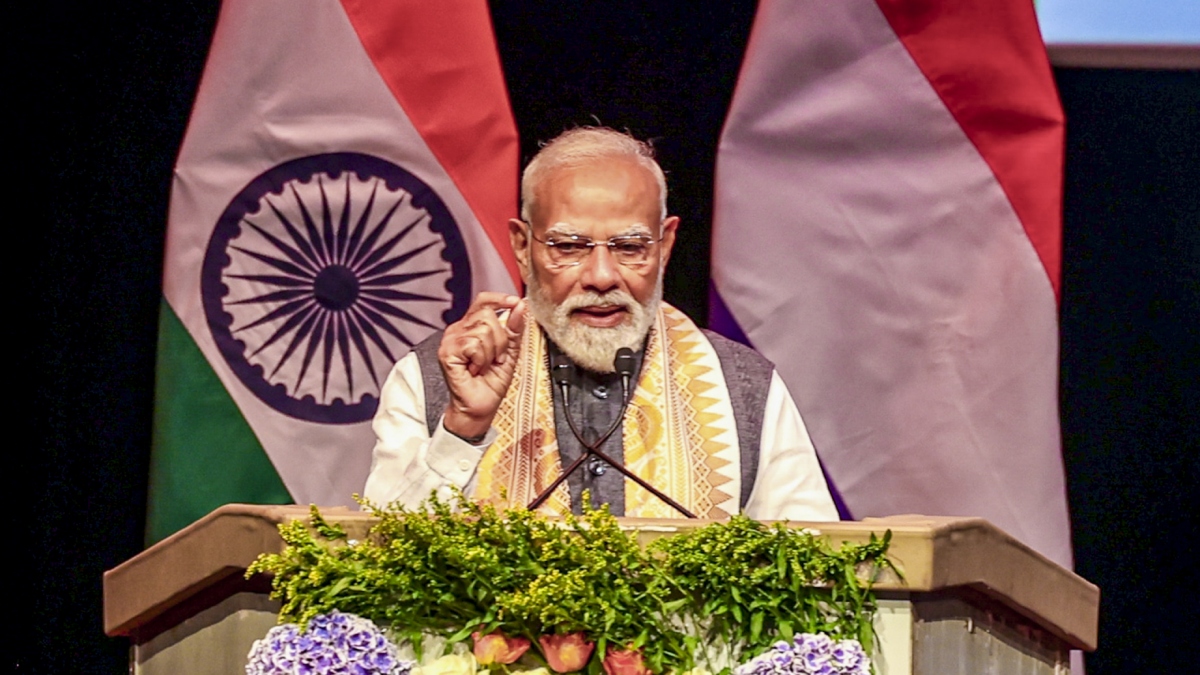
प्रधानमंत्री नरेंद्र मोदी अभी चार यूरोपीय दौरों पर हैं, जिसमें 16 मई को उन्होंने नीदरलैंड पहुंचने के बाद वहां पर उन्होंने जब भारतीय समुदाय को संबोधित किया तो इस दौरान पीएम मोदी ने ओलंपिक गेम्स की मेजबानी करने को लेकर और क्रिकेट को लेकर भी बात की। नीदरलैंड में पीएम मोदी वहां के राजा विलियम और क्वीन मैक्सिमा से भी मुलाकात करेंगे। नीदरलैंड की राजधानी एम्सटर्डम पहुंचने के बाद प्रधानमंत्री नरेंद्र मोदी का वहां पर काफी गर्मजोशी से स्वागत किया गया, जिसके बाद उन्होंने हेग में भारतीय प्रवासियों से एक छोटी मुलाकात करने के साथ उनको संबोधित भी किया, जिसमें पीएम मोदी ने खेल को लेकर भी बात की।

भारत-नीदरलैंड के रिश्तों की एक अहम पहचान खेल भी है

भारतीय प्रवासियों के साथ आयोजित कार्यक्रम में प्रधानमंत्री नरेंद्र मोदी ने भारत और नीदरलैंड के रिश्तों को लेकर कहा कि इसकी एक अहम पहचान खेल भी है, जिसको लेकर काफी कम बात की जाती है। दोनों ही देश का खेल के क्षेत्र में काफी लंबे समय से एक-दूसरे के साथ रिश्ता है और लगातार काफी मजबूती के साथ आगे बढ़ रहा है। इस दौरान प्रधानमंत्री नरेंद्र मोदी ने नीदरलैंड क्रिकेट टीम का उदाहरण दिया जिसमें हाल में इस साल की शुरुआत में हुए टी20 वर्ल्ड कप 2026 में कई भारतीय मूल के खिलाड़ी भी शामिल थे। पीएम मोदी ने आर्यन दत्त जैसे खिलाड़ियों का जिक्र करते हुए कहा कि जब भारतीय मूल के खिलाड़ी डच टीम के लिए अच्छा प्रदर्शन करते हैं, तो यह हम सभी के लिए गर्व की बात होती है।

ओलंपिक की मेजबानी को लेकर भी पीएम मोदी ने कही बात

ओलंपिक गेम्स की मेजबानी को लेकर देश की तरफ से प्रक्रिया आगे बढ़ाई गई है। इसी को लेकर प्रधानमंत्री नरेंद्र मोदी ने भारतीय समुदाय को संबोधित करते हुए कहा कि भारत बड़ी आकांक्षाओं से भरा है और निकट भविष्य में वह ओलंपिक खेलों की मेजबानी करना चाहेगा और वैश्विक विनिर्माण केंद्र बनने का भी बड़ा सपना देखेगा। वहीं पीएम मोदी ने दोनों देशों के बीच खेलों के रिश्तों को लेकर अपने संबोधन में आगे कहा कि भारत की हॉकी को बेहतर बनाने में नीदरलैंड के कोचों का अहम योगदान रहा है। इस दौरान उन्होंने भारतीय महिला हॉकी टीम के अच्छे प्रदर्शन में कोच सजोर्ड मारिजने की भूमिका की भी प्रशंसा की।

ये भी पढ़ें

हॉकी इंडिया ने जूनियर टीम के नए हेड कोच का किया ऐलान, श्रीजेश की जगह फ्रांस का ये पूर्व खिलाड़ी संभालेगा जिम्मेदारी

Thailand Open 2026: सात्विक-चिराग की जोड़ी ने थाईलैंड ओपन में दिखाया कमाल, फाइनल में पक्की की जगह


#भरतनदरलड #क #रशत #क #एक #अहम #पहचन #खल #भ #ह #यरपय #दर #पर #पएम #मद #न #ओलपक #क #मजबन #पर #भ #क #बत


Previous post

How To Fix ChatGPT When It’s Not Working?<div> <p><a href="https://fossbytes.com/?s=chatgpt" target="_blank" rel="noreferrer noopener">ChatGPT </a>is now one of the most popular <a href="https://chatgpt.com/" target="_blank" rel="noreferrer noopener nofollow">tools </a>people use online. From content creation to quick problem-solving, ChatGPT has become a go-to tool for millions of users. It helps save your precious time and simplify your routine work, but at times, glitches can occur, and you may see ChatGPT not loading or responding to you. However, there is no need to worry since most of these problems have quite easy solutions.</p> <h2 class="kt-adv-heading350263_cc6728-f7 wp-block-kadence-advancedheading" data-kb-block="kb-adv-heading350263_cc6728-f7">1. Check if ChatGPT Is Down</h2> <figure class="wp-block-image size-full"><img class="wp-image-350637 br-lazy" src="https://fossbytes.com/wp-content/uploads/2026/05/OpenAI-status.jpeg" decoding="async" width="1316" height="678" alt="ChatGPT status" data-brsrcset="https://fossbytes.com/wp-content/uploads/2026/05/OpenAI-status.jpeg 1316w, https://fossbytes.com/wp-content/uploads/2026/05/OpenAI-status-300x155.jpeg 300w, https://fossbytes.com/wp-content/uploads/2026/05/OpenAI-status-1024x528.jpeg 1024w, https://fossbytes.com/wp-content/uploads/2026/05/OpenAI-status-768x396.jpeg 768w, https://fossbytes.com/wp-content/uploads/2026/05/OpenAI-status-150x77.jpeg 150w" data-brsizes="(max-width: 1316px) 100vw, 1316px"/></figure> <p>Before trying any fixes, it’s important to check whether the problem is actually on ChatGPT’s side. The server could be under maintenance or facing an issue due to high traffic, and a message would indicate a problem when trying to load ChatGPT. This would affect all users, since they all depend on the same server. The easiest way to check is to visit <a href="https://status.openai.com/" target="_blank" rel="noreferrer noopener nofollow">OpenAI’s website</a>.</p> <p>Furthermore, if the site is functioning normally, but ChatGPT isn’t providing results, it might be due to high traffic. High amounts of users at the same time can affect the system. No problem should arise in such situations; you only have to be patient. Everything will likely resolve itself shortly.</p> <h2 class="kt-adv-heading350263_61bb75-45 wp-block-kadence-advancedheading" data-kb-block="kb-adv-heading350263_61bb75-45">2. Check Your Internet Connection</h2> <p>It could even be a problem with your internet connection rather than ChatGPT. Slow Internet speeds can sometimes interfere with your connection, regardless of the service you’re using. Test whether you can browse other websites. You may also try restarting your router or using mobile data if you have been relying on Wi-Fi up until now.</p> <h2 class="kt-adv-heading350263_d9677e-30 wp-block-kadence-advancedheading" data-kb-block="kb-adv-heading350263_d9677e-30">3. Log Out and Log Back In</h2> <figure class="wp-block-image size-large"><img class="wp-image-350450 br-lazy" src="https://fossbytes.com/wp-content/uploads/2026/05/Screenshot-2026-05-11-131218-1024x576.png" loading="lazy" decoding="async" width="1024" height="576" alt="image to log out in chatgpt" data-brsrcset="https://fossbytes.com/wp-content/uploads/2026/05/Screenshot-2026-05-11-131218-1024x576.png 1024w, https://fossbytes.com/wp-content/uploads/2026/05/Screenshot-2026-05-11-131218-300x169.png 300w, https://fossbytes.com/wp-content/uploads/2026/05/Screenshot-2026-05-11-131218-768x432.png 768w, https://fossbytes.com/wp-content/uploads/2026/05/Screenshot-2026-05-11-131218-150x84.png 150w, https://fossbytes.com/wp-content/uploads/2026/05/Screenshot-2026-05-11-131218.png 1392w" data-brsizes="(max-width: 1024px) 100vw, 1024px"/></figure> <p>Sometimes, ChatGPT may stop working because your login session has expired without you noticing. This can happen if you’ve been inactive for a while or left the tab open. When the session expires, the chatbot may stop responding. To fix this, log out of your account and log in again. This simple step often solves the issue.</p> <h2 class="kt-adv-heading350263_3fc2c3-94 wp-block-kadence-advancedheading" data-kb-block="kb-adv-heading350263_3fc2c3-94">4. Use the ChatGPT Mobile App and Incognito Mode</h2> <p>When the web version of ChatGPT doesn’t work as expected, using the mobile app can help. It doesn’t depend on your browser, which means it can avoid many common web-related problems. The app is available on Android and iOS.</p> <p>An extension or browser setting may affect your ability to use the website properly. The solution to this problem is to access ChatGPT in an incognito window or disable extensions altogether. If that does not solve the problem, you can also try using another browser.</p> <h2 class="kt-adv-heading350263_dde5d9-2a wp-block-kadence-advancedheading" data-kb-block="kb-adv-heading350263_dde5d9-2a">5. Clear Browser Cache and Data</h2> <figure class="wp-block-image size-large"><img class="wp-image-350451 br-lazy" src="https://fossbytes.com/wp-content/uploads/2026/05/Screenshot-2026-05-11-132533-1024x576.png" loading="lazy" decoding="async" width="1024" height="576" alt="image to Clear Out Cache Data" data-brsrcset="https://fossbytes.com/wp-content/uploads/2026/05/Screenshot-2026-05-11-132533-1024x576.png 1024w, https://fossbytes.com/wp-content/uploads/2026/05/Screenshot-2026-05-11-132533-300x169.png 300w, https://fossbytes.com/wp-content/uploads/2026/05/Screenshot-2026-05-11-132533-768x432.png 768w, https://fossbytes.com/wp-content/uploads/2026/05/Screenshot-2026-05-11-132533-1536x864.png 1536w, https://fossbytes.com/wp-content/uploads/2026/05/Screenshot-2026-05-11-132533-150x84.png 150w, https://fossbytes.com/wp-content/uploads/2026/05/Screenshot-2026-05-11-132533.png 1685w" data-brsizes="(max-width: 1024px) 100vw, 1024px"/></figure> <p>Another reason ChatGPT may stop functioning is your browser’s cache. Your browser cache may prevent sites from loading properly in some cases. All you need to do in such cases is clear your cache and browse through data; after that, restart your browser. However, keep in mind that all your accounts will be logged out.</p> <h2 class="kt-adv-heading350263_8e5941-4b wp-block-kadence-advancedheading" data-kb-block="kb-adv-heading350263_8e5941-4b">6. Disable VPN</h2> <p>A VPN connection can sometimes create issues while using ChatGPT. VPNs use shared IP addresses, and some of these may be restricted or flagged by the system. This can lead to problems like the website not loading, showing errors, or not responding properly. To check if this is the cause, turn off your VPN and reload the ChatGPT website. If everything starts working normally, then the VPN was likely affecting your connection.</p> </div>#Fix #ChatGPT #WorkingChatGPT

Next post

Indore News : तेज हवाओं ने पारे को थामा, भीषण गर्मी से मिली राहत, मानसून की आमद भी जल्द

Post Comment