×
vivo X300 Pro Review: Brings Out the Photographer In you

vivo X300 Pro Review: Brings Out the Photographer In you

It’s not often, as a tech reviewer, that you receive a new phone and fall in love with it. This happened to me last year, when I tested the X200 Pro for a month, and it blew my mind away. Never did I think smartphone cameras could get this good, but with that phone, I unlocked a photographer side of me that I didn’t know I had. It’s cameras that made me go, “oh, I can capture this, too,” and ever since vivo asked for the review unit back, I’ve been chasing that feeling. Competition this year has stiffened up, with OPPO’s X9 series carrying decent improvements in the camera department. So, that made me wonder, can vivo defend its title of the camera king with the X300 Pro?

To answer that very question, I got the vivo X300 Pro in for a review and swapped my primary SIM. I then used the phone extensively for two weeks, during which I took countless trips to nearby heritage sites I had never visited, played hours of games, mindlessly scrolled through reels, and a lot more. The result? vivo has done it again with a phone that hits all the basics, all while being the best camera system in any phone.

vivo X300 Pro Review

Hisan Kidwai

Summary

The vivo X300 Pro is the most complete phone. For the price, you get a mature design, a display that’s on par, if not better, than other flagships, a competent flagship processor that’ll serve for years to come, and a fantastic camera system. While it may seem a bit of a stretch, the vivo X300 Pro has the best cameras out of any smartphone.

Design & Hardware

vivo has made some handsome-looking smartphones, as the new V60 shows, and I can say the same about the X300 Pro. The company has stuck to its original X-series design, and I’m a fan. You essentially get a massive camera bump on the back, but that look is now what people expect from the X series. During my testing, many of my tech-savvy friends just knew what I was using. This creates a brand identity, which is a great thing when you’re trying to compete with the likes of Samsung and Apple. People need to know a brand to buy it, and OPPO could take a lesson or two from these guys.

On the topic of the camera module, it has lost its ring that hid the massive bump. Instead, the X300 Pro’s back glass now curves into the module, with a smaller concentric ring that facilitates the lens mount for the photography kit. Thankfully, the module is centered, so the phone doesn’t wobble on the table, and as a bonus of the enormous size, your phone sits at the perfect angle on the table. Just note that since the island is what the phone rests on, it can pick up scratches. The good news is that vivo has bundled a case in the box.

The bump is also a really lovely place to rest your finger, which will get tired. I was using the regular Find X9 before, and the X300 Pro’s 228 g weight was quite noticeable. It’s a two-handed phone by all means. Though if you have bigger hands, the experience should be pretty fine. I also got used to the weight quickly. vivo has done a pretty decent job of balancing the weight, with the center of gravity being just below the camera bump.

Moving over to aesthetics, there’s a new Dune color that almost looks like beige. Photos don’t do it much justice, but I really like what vivo has done with the finish, which is matte but also shiny at the same time. The phone looks super sophisticated and doesn’t slide off a slanted surface when you set it down, which is a huge plus. The sides are pretty much unchanged; you still get the SIM tray at the bottom, coupled with the charging port and speakers. As for buttons, vivo has added a new iPhone-inspired action key that can be customized for double-tap and long-press actions.

vivo Side key

The ultrasonic fingerprint scanner stays in its comfy place where your thumb naturally rests, and it works really well. Keeping up with the trend, the X300 Pro supports all IP rating variations, including IP68 and IP69. These ratings were put to the test pretty quickly when I dropped a protein shake on the phone and had to wash it. The phone survived, but I’ll still recommend people avoid taking their phones underwater, as water damage is never covered under warranty.

Display

X300 Pro kept sideways with the display on

Displays on all flagships today are pretty similar, and the same goes for the X300 Pro. It features a 6.78-inch AMOLED display with a 2800 × 1260 resolution and a 120Hz refresh rate. This time, vivo has gone for even thinner bezels, which bumps the screen-to-body ratio to 94.85%. Keeping the numbers aside, the panel is exceptionally pretty to use in both daytime and lowlight scenarios. Colors pop, and the HDR performance makes movie watching, especially the new Pluribus episodes, a breeze.

vivo claims a peak brightness of 4500 nits, and while I didn’t test it with a light meter, the panel was easy to see while scrolling through reels in direct sunlight. There’s also PWM Dimming that helps the display get down to 1 nit. It’s great news for all my midnight doomscrollers, who will hurt their eyes a bit less than before. Beyond that, there’s a new eye fatigue feature that automatically adjusts the brightness depending on your screen time. As for protection, the panel is covered with a new Schott Sensation glass, and it performed well in my testing. Sure, there were some microscratches, but that’ll happen with every smartphone, and the X300 Pro also handled drops onto hard surfaces.

Software & Performance

Origin OS setting in the X300 Pro

Under the hood, the vivo X300 Pro is powered by MediaTek’s flagship Dimensity 9500 processor that includes a total of eight cores, out of which there is one C1-Ultra core running at 4210 MHz, three  C1-Premium cores running at 3600 MHz, and four C1-Pro cores running at 2700 MHz, along with Mali-G1 Ultra MP12 GPU. Along with it, you get up to 16GB of LPDDR5X RAM and 512GB UFS 4.1 storage.

With these monster specs in mind, the day-to-day performance of the X300 Pro is exceptional. Apps open quickly, there is no stutter in between, and the RAM helps keep everything in memory. The bigger question, when I received the device, was OriginOS. If you’ve read my previous reviews, you know I haven’t been the biggest FunTouchOS fan, with criticisms ranging from a bloated UI to jittery animations and a lack of new styling. Fortunately, vivo has heard all our complaints, and the new OriginOS skin is much better. There are new animations that feel smooth, a whole host of new customization options for the lock screen (inspired by iOS), and a fresh layer of translucent design on almost all aspects.

Side key change interface in the X300

As you may have guessed, AI takes the center stage in terms of features, and the best ones are in the Photos app. Apart from the obvious ones, like the object eraser, the newest addition is the move feature, which lets you change the position of a subject in a photo to your liking. This is the dream for people like me who love to tinker with images. It works really well in practice. Then there is the Imag Expander that can help you expand a shot using generative AI. The camera app has also received a fresh AI coat, though I’ll talk more about it later.

Unfortunately, it’s not all sunshine and rainbows. While vivo has done an excellent job, its UI doesn’t have the refinement of ColorOS. For starters, when I get notifications for new messages, the newest one is at the top, with older ones below. It’s caused me a lot more headaches than I wish it had. Then, to expand a notification, I have to click that tiny arrow button, which is easy to miss, and just opens the chatbox instead. The back gesture is enabled in the keyboard area, so when deleting a long message, I accidentally activate the back gesture. Sure, these problems are not that big, but it’s the small things that can make or break the experience. Finally, vivo has promised a full 5 years of software updates and 7 years of security patches, which is pretty decent.

Benchmarks & Gaming

BGMI Game setttings

Keeping my rant for the UI aside, I also ran a series of benchmarks to push the Dimensity 9500’s limits. The results? Actually quite impressive. In Geekbench’s single-core and multi-core tests, X300 Pro scored 2,857 and 7451, respectively. In AnTuTu, the cumulative score for both the GPU and CPU was a staggering 3,382,529 points. For some context, the OPPO Find X9, which features the same chipset, scored 3,316,065 points.

Moving to gaming, I had absolutely no complaints playing long sessions of BGMI with my friends over the weekend. Graphics settings in BGMI were set to Smooth and Ultra Extreme for the 120FPS gameplay. Over a couple of hours, the phone neither got too hot to touch nor dropped frames in complex situations. There are also plenty of gaming features, including bypass charging, 4D haptics, and different performance modes.

Battery Life
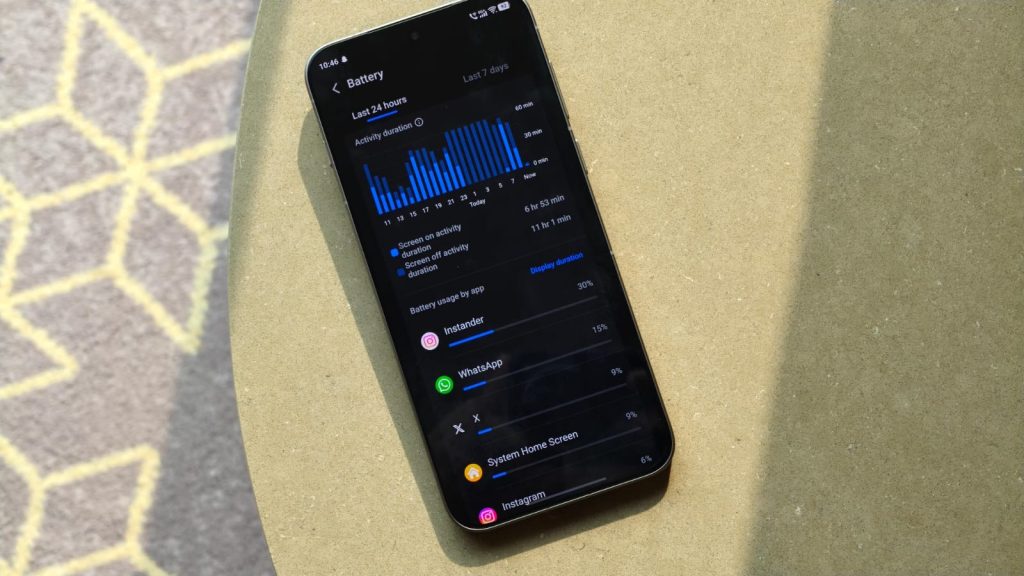
Battery stats of the X300 Pro

vivo introduced silicon-carbon technology with the X200 series last year, and it was phenomenal. The phone easily lasted a full day of heavy usage, and I can gladly say the same for the X300 Pro. The phone houses vivo’s 4th-gen battery tech, and with a capacity of 6,510mAh, it’s an easy two-day phone. For context, on days when I roamed around the city to capture samples and then finished with a two-hour BGMI (PUBG) session, I ended up with 20% charge. On other lighter days, the X300 Pro finished with 35% to 45% battery remaining. Just note that some European variants, particularly in Austria, Germany, and Hungary, use a smaller 5,440 mAh cell.

Beyond that, charging is another strong point for the X300 Pro, as it comes with a 90W FlashCharge brick in the box (only in Asian markets), capable of taking the phone from 20% to 80% in under 30 minutes. There’s also 50W USB PD and 40W wireless charging support.

Cameras
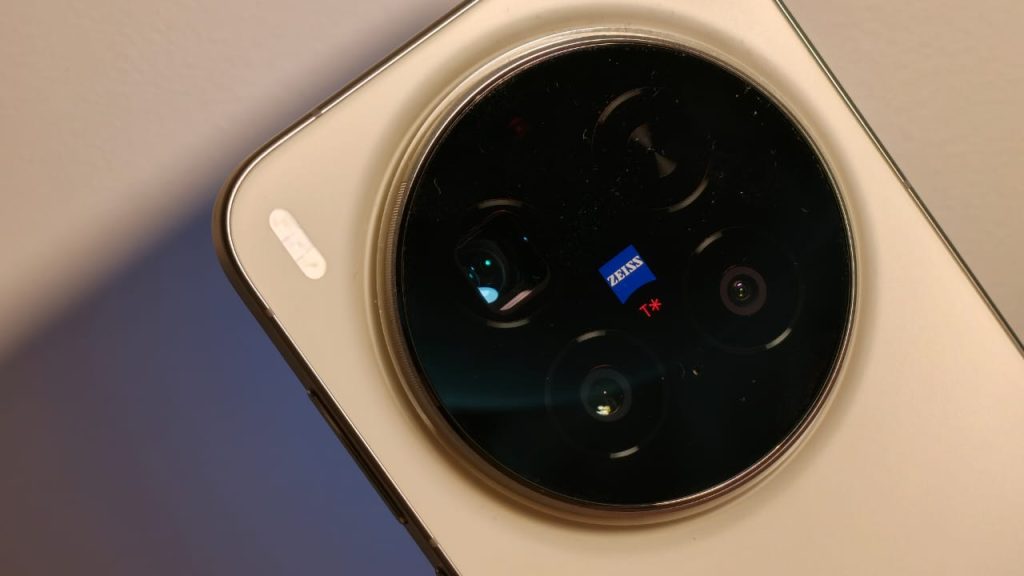
Close up shot of the camera lenses

Let’s talk about what most came here for: the cameras. Under the massive camera module, the vivo X300 Pro houses a triple camera setup, consisting of a 50 MP Sony LYT-828 primary sensor, an eye-watering 200 MP custom 3.5x Samsung HPB sensor, and another 50 MP 119-degree Samsung JNI UltraWide sensor. You can also buy an optional telephoto extender kit that extends the 85mm lens to 200mm. Though I should point out that all my testing was done without the extender lens.

Keeping the optic specs aside, I really don’t have many words to express how excellent the cameras on the X300 Pro are. The photos it captures are crisp, lavishly detailed, with ample HDR and really aesthetic colors that please everyone. The best way to describe the cameras on the X300 Pro is that it brings out the photographer in you. I’ve never had this many “oh, I should capture this” moments with a phone, and every time, I was amazed by the results. Zeiss’s color science lends itself beautifully to the capturing experience, making you want to experiment with different looks and styles.

If you love capturing portraits, it doesn’t get any better than the X300 Pro. The 200 MP sensor delivers a lot of natural depth, which, coupled with vivo’s superb color and edge detection, creates a cinematic look that I’ve only come to expect from professional-grade cameras. On the topic of zoom, it’s perfect. The lens captures super-crisp, clear photos up to 30x, and even 50x in good lighting, keeping the subject in focus all the time. The UltraWide, while the same as last year, has also received a fresh coat of tuning, which helps it handle edges better and maintain consistency with the other lenses.

The good news continues with the low-light photos, where the X300 Pro comes alive. It one-ups any phone I’ve used this year, with a distinct look that makes you want to post every photo thanks to the insane levels of detail and accurate colors. Another thing to note is that the low-light experience stays consistent with the other two lenses. Video is another area where vivo has made significant improvements. Both the primary and telephoto sensors produce beautiful videos up to 4K120FPS, with accurate skin tones, balanced HDR, and minimal noise even in low-light conditions. Portrait video, which tops at 4K60FPS, is decent enough, though you do need ample lighting for it to work well.

As I mentioned in the software section, the camera app has a new AI mode in the Landscape and Night section, which blew me away to the point where I questioned what even a photo is. For context, the mode lets you choose whether to remove people from the image, which is fairly common. But it can also simulate various seasons and times of day, changing the overall look of an image. Beyond that, the feature lets users configure different regions, such as snowy, desert, and island, and can directly convert the image to a preferred animation style. We do need to remember that these images are processed in vivo data centers, not on the device.


Verdict
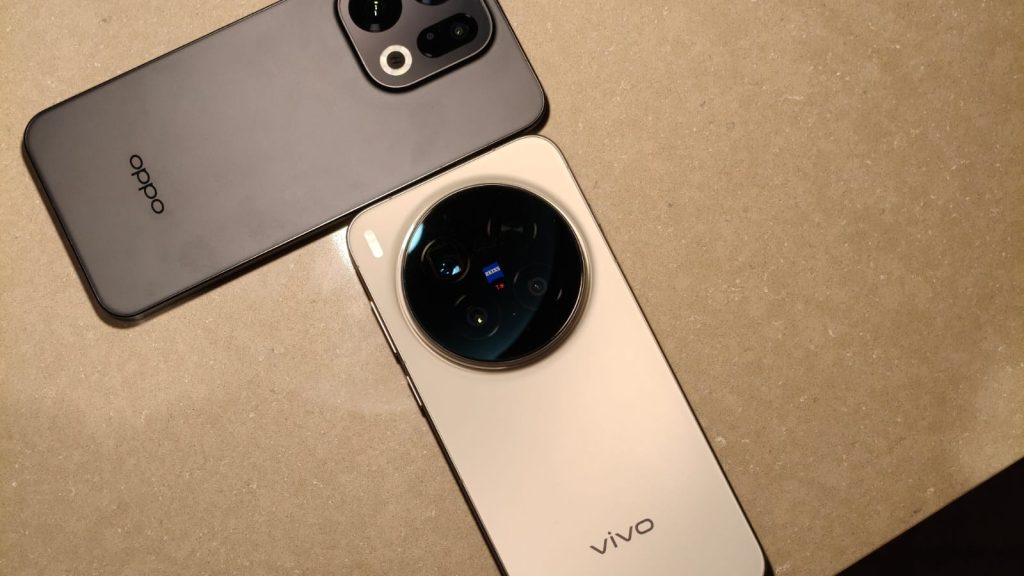
vivo X300 Pro kept next to the OPPO Find X9

The vivo X300 Pro, like other smartphones launched this year, has received a price bump due to the soaring memory chip prices and AI demand. Still, even at INR 1,09,999 or EUR 1,049, it’s the most complete phone not only for this year but also for 2026. All thanks to the mature design, a display that’s on par, if not better, than other flagships, a competent flagship processor that’ll serve for years to come, and a fantastic camera system. While it may seem a bit of a stretch, the vivo X300 Pro has the best cameras out of any smartphone. Google and Apple aren’t even close to the sheer flexibility the X300 Pro offers. If you like this versatility, there is nothing better out there, and with the new OriginOS skin being a pretty major upgrade, the X300 Pro is hard to ignore, even for iPhone or Samsung buyers.

Source link
#vivo #X300 #Pro #Review #Brings #Photographer

At a trendy venue near the San Francisco pier, Sam Altman’s verification project World celebrated its next evolution and rapid expansion of its ambitions.  And it’s starting with Tinder.

Tools for Humanity (TFH), the company behind the World project, announced Friday plans to integrate its verification tech into dating apps, event and concert ticketing systems, business organizations, email, and other arenas of public life.

“The world is getting close to very powerful AI, and this is doing a lot of wonderful things,” said Altman, speaking before a packed crowd at The Midway. “We are also heading to a world now where there’s going to be more stuff generated by AI than by humans,” he added. “I’m sure many of you [have had moments] where you’re like, ‘Am I interacting with an AI or a person, or how much of each, and how do I know?”

World (formerly Worldcoin) distinguishes itself from many of its ID verification peers by offering the ability to verify that a real, living human is using a digital service while still protecting that person’s anonymity. There is some complex cryptographic alchemy behind this (something called “zero-knowledge proof-based authentication”). The upshot: The company is creating what it calls “proof of human” tools, which are mechanisms that can verify human activity in a world rife with AI agents and bots.

Its chief tool for verification is a spherical digital reader called the Orb that scans a user’s eyes, converting their iris into a unique and anonymous cryptographic identifier (known as a verified World ID). This can then be used to access World’s services, although users can also access World’s app without one.

Altman kept his remarks brief on Friday (TFH’s co-founder and CEO, Alex Blania, was absent due to a last-minute hand surgery, Altman said). He then turned much of the presentation over to World’s chief product officer, Tiago Sada, and his team.

Sada explained that World was launching the newest version of its app (the last version was launched at an event in December), along with a plethora of new integrations for its technology.

World has been preparing, for some time, to deploy a verification service for dating apps — most notably, Tinder. Last year, Tinder launched a World ID pilot program in Japan. That pilot was apparently a success because World announced that Tinder would be launching its verification integration in global markets —including the U.S. The program integrates a World ID emblem into the profiles of users who have gone through its verification processes, thus authenticating them as a real person.

Sam Altman’s project World looks to scale its human verification empire. First stop: Tinder. | TechCrunch
At a trendy venue near the San Francisco pier, Sam Altman’s verification project World celebrated its next evolution and rapid expansion of its ambitions.  And it’s starting with Tinder.

Tools for Humanity (TFH), the company behind the World project, announced Friday plans to integrate its verification tech into dating apps, event and concert ticketing systems, business organizations, email, and other arenas of public life.


“The world is getting close to very powerful AI, and this is doing a lot of wonderful things,” said Altman, speaking before a packed crowd at The Midway. “We are also heading to a world now where there’s going to be more stuff generated by AI than by humans,” he added. “I’m sure many of you [have had moments] where you’re like, ‘Am I interacting with an AI or a person, or how much of each, and how do I know?”

World (formerly Worldcoin) distinguishes itself from many of its ID verification peers by offering the ability to verify that a real, living human is using a digital service while still protecting that person’s anonymity. There is some complex cryptographic alchemy behind this (something called “zero-knowledge proof-based authentication”). The upshot: The company is creating what it calls “proof of human” tools, which are mechanisms that can verify human activity in a world rife with AI agents and bots.

Its chief tool for verification is a spherical digital reader called the Orb that scans a user’s eyes, converting their iris into a unique and anonymous cryptographic identifier (known as a verified World ID). This can then be used to access World’s services, although users can also access World’s app without one.

Altman kept his remarks brief on Friday (TFH’s co-founder and CEO, Alex Blania, was absent due to a last-minute hand surgery, Altman said). He then turned much of the presentation over to World’s chief product officer, Tiago Sada, and his team.

Sada explained that World was launching the newest version of its app (the last version was launched at an event in December), along with a plethora of new integrations for its technology.

World has been preparing, for some time, to deploy a verification service for dating apps — most notably, Tinder. Last year, Tinder launched a World ID pilot program in Japan. That pilot was apparently a success because World announced that Tinder would be launching its verification integration in global markets —including the U.S. The program integrates a World ID emblem into the profiles of users who have gone through its verification processes, thus authenticating them as a real person.

Image Credits:World

World is also courting the entertainment industry by launching a new feature called Concert Kit, where musical artists can reserve a certain number of concert tickets for World ID-verified humans. This is designed to ensure that fans are safe from scalpers who often use automated ticket-buying bots to scarf up seats. Concert Kit is compatible with major ticketing systems, including Ticketmaster and Eventbrite, and the company is promoting it via partnerships with 30 Seconds to Mars and Bruno Mars — both of whom plan to use it for their upcoming tours.

The event was full of many other announcements, including some aimed at businesses. A Zoom/World ID verification integration seeks to battle a supposed deepfake threat to business calls, and a Docusign partnership is designed to ensure signatures come from authentic users.


The company is also working on a number of features in anticipation of the Wild West of the agentic web, including one called “agent delegation,” in which a person can delegate their World ID to an agent to carry out online activities on their behalf. A partnership with authentication firm Okta has also created a system (currently in beta) that verifies that an agent is acting on behalf of a human. The system is set up so that a World ID can be tied to a specific agent and then, when the agent goes out into the web to operate on that person’s behalf, websites will know a verified person is behind the behavior, said Okta’s chief product officer, Gareth Davies, at the event.

So far, it’s been difficult for World to scale, due largely to the verification process itself. For much of the company’s history, to get its gold standard, you had to travel to one of its offices and have your eyeballs scanned by an Orb — a fairly inconvenient (not to mention weird) experience.

Image Credits:World

However, World has continually made moves to increase the ease and incentive structure for verification. In the past, it offered its crypto asset, Worldcoin, to some members who signed up and has distributed its Orbs into big retail chains so that users can verify themselves while they’re out shopping or getting a coffee. Now the company is announcing that it is significantly expanding its Orb saturation in New York, Los Angeles, and San Francisco. The company also promoted a service where interested users could have World bring an Orb to their location for remote verification.

In a conversation with TechCrunch, Sada also shared that World has attempted to solve the scaling problem by creating different tiers of verification. The highest tier is Orb verification, but below that, World has previously offered a mid-level tier, which uses an anonymized scan of an official government ID via the card’s NFC chip. 

The company also introduced a low-level tier, or what Sada called “low friction”— meaning low effort, I guess, but also “low security” — which involves merely taking a selfie.

Selfie Check, which Sada’s team presented during the event, is designed to maintain user privacy.

“Selfie is private by design,” said Daniel Shorr, one of TFH’s executives, during the presentation. “That means that we maximize the local processing that’s happening on your device, on your phone, which means that your images are yours.”

Selfie verification obviously isn’t new, and fraudsters have long managed to spoof it. “Obviously, we do our best, and it’s like one of the best systems that you’ll see for this. But it has limits,” Sada told TechCrunch. Developers looking to integrate World’s services can choose from the three different verification tiers depending on the level of security that’s important to them, he noted.


#Sam #Altmans #project #World #scale #human #verification #empire #stop #Tinder #TechCrunchDocuSign,sam altman,Tinder,World,Worldcoin,zoom
Image Credits:World

World is also courting the entertainment industry by launching a new feature called Concert Kit, where musical artists can reserve a certain number of concert tickets for World ID-verified humans. This is designed to ensure that fans are safe from scalpers who often use automated ticket-buying bots to scarf up seats. Concert Kit is compatible with major ticketing systems, including Ticketmaster and Eventbrite, and the company is promoting it via partnerships with 30 Seconds to Mars and Bruno Mars — both of whom plan to use it for their upcoming tours.

The event was full of many other announcements, including some aimed at businesses. A Zoom/World ID verification integration seeks to battle a supposed deepfake threat to business calls, and a Docusign partnership is designed to ensure signatures come from authentic users.

The company is also working on a number of features in anticipation of the Wild West of the agentic web, including one called “agent delegation,” in which a person can delegate their World ID to an agent to carry out online activities on their behalf. A partnership with authentication firm Okta has also created a system (currently in beta) that verifies that an agent is acting on behalf of a human. The system is set up so that a World ID can be tied to a specific agent and then, when the agent goes out into the web to operate on that person’s behalf, websites will know a verified person is behind the behavior, said Okta’s chief product officer, Gareth Davies, at the event.

So far, it’s been difficult for World to scale, due largely to the verification process itself. For much of the company’s history, to get its gold standard, you had to travel to one of its offices and have your eyeballs scanned by an Orb — a fairly inconvenient (not to mention weird) experience.

Image Credits:World

However, World has continually made moves to increase the ease and incentive structure for verification. In the past, it offered its crypto asset, Worldcoin, to some members who signed up and has distributed its Orbs into big retail chains so that users can verify themselves while they’re out shopping or getting a coffee. Now the company is announcing that it is significantly expanding its Orb saturation in New York, Los Angeles, and San Francisco. The company also promoted a service where interested users could have World bring an Orb to their location for remote verification.

In a conversation with TechCrunch, Sada also shared that World has attempted to solve the scaling problem by creating different tiers of verification. The highest tier is Orb verification, but below that, World has previously offered a mid-level tier, which uses an anonymized scan of an official government ID via the card’s NFC chip.

The company also introduced a low-level tier, or what Sada called “low friction”— meaning low effort, I guess, but also “low security” — which involves merely taking a selfie.

Selfie Check, which Sada’s team presented during the event, is designed to maintain user privacy.

“Selfie is private by design,” said Daniel Shorr, one of TFH’s executives, during the presentation. “That means that we maximize the local processing that’s happening on your device, on your phone, which means that your images are yours.”

Selfie verification obviously isn’t new, and fraudsters have long managed to spoof it. “Obviously, we do our best, and it’s like one of the best systems that you’ll see for this. But it has limits,” Sada told TechCrunch. Developers looking to integrate World’s services can choose from the three different verification tiers depending on the level of security that’s important to them, he noted.

#Sam #Altmans #project #World #scale #human #verification #empire #stop #Tinder #TechCrunchDocuSign,sam altman,Tinder,World,Worldcoin,zoom">Sam Altman’s project World looks to scale its human verification empire. First stop: Tinder. | TechCrunch
At a trendy venue near the San Francisco pier, Sam Altman’s verification project World celebrated its next evolution and rapid expansion of its ambitions.  And it’s starting with Tinder.

Tools for Humanity (TFH), the company behind the World project, announced Friday plans to integrate its verification tech into dating apps, event and concert ticketing systems, business organizations, email, and other arenas of public life.


“The world is getting close to very powerful AI, and this is doing a lot of wonderful things,” said Altman, speaking before a packed crowd at The Midway. “We are also heading to a world now where there’s going to be more stuff generated by AI than by humans,” he added. “I’m sure many of you [have had moments] where you’re like, ‘Am I interacting with an AI or a person, or how much of each, and how do I know?”

World (formerly Worldcoin) distinguishes itself from many of its ID verification peers by offering the ability to verify that a real, living human is using a digital service while still protecting that person’s anonymity. There is some complex cryptographic alchemy behind this (something called “zero-knowledge proof-based authentication”). The upshot: The company is creating what it calls “proof of human” tools, which are mechanisms that can verify human activity in a world rife with AI agents and bots.

Its chief tool for verification is a spherical digital reader called the Orb that scans a user’s eyes, converting their iris into a unique and anonymous cryptographic identifier (known as a verified World ID). This can then be used to access World’s services, although users can also access World’s app without one.

Altman kept his remarks brief on Friday (TFH’s co-founder and CEO, Alex Blania, was absent due to a last-minute hand surgery, Altman said). He then turned much of the presentation over to World’s chief product officer, Tiago Sada, and his team.

Sada explained that World was launching the newest version of its app (the last version was launched at an event in December), along with a plethora of new integrations for its technology.

World has been preparing, for some time, to deploy a verification service for dating apps — most notably, Tinder. Last year, Tinder launched a World ID pilot program in Japan. That pilot was apparently a success because World announced that Tinder would be launching its verification integration in global markets —including the U.S. The program integrates a World ID emblem into the profiles of users who have gone through its verification processes, thus authenticating them as a real person.

Image Credits:World

World is also courting the entertainment industry by launching a new feature called Concert Kit, where musical artists can reserve a certain number of concert tickets for World ID-verified humans. This is designed to ensure that fans are safe from scalpers who often use automated ticket-buying bots to scarf up seats. Concert Kit is compatible with major ticketing systems, including Ticketmaster and Eventbrite, and the company is promoting it via partnerships with 30 Seconds to Mars and Bruno Mars — both of whom plan to use it for their upcoming tours.

The event was full of many other announcements, including some aimed at businesses. A Zoom/World ID verification integration seeks to battle a supposed deepfake threat to business calls, and a Docusign partnership is designed to ensure signatures come from authentic users.


The company is also working on a number of features in anticipation of the Wild West of the agentic web, including one called “agent delegation,” in which a person can delegate their World ID to an agent to carry out online activities on their behalf. A partnership with authentication firm Okta has also created a system (currently in beta) that verifies that an agent is acting on behalf of a human. The system is set up so that a World ID can be tied to a specific agent and then, when the agent goes out into the web to operate on that person’s behalf, websites will know a verified person is behind the behavior, said Okta’s chief product officer, Gareth Davies, at the event.

So far, it’s been difficult for World to scale, due largely to the verification process itself. For much of the company’s history, to get its gold standard, you had to travel to one of its offices and have your eyeballs scanned by an Orb — a fairly inconvenient (not to mention weird) experience.

Image Credits:World

However, World has continually made moves to increase the ease and incentive structure for verification. In the past, it offered its crypto asset, Worldcoin, to some members who signed up and has distributed its Orbs into big retail chains so that users can verify themselves while they’re out shopping or getting a coffee. Now the company is announcing that it is significantly expanding its Orb saturation in New York, Los Angeles, and San Francisco. The company also promoted a service where interested users could have World bring an Orb to their location for remote verification.

In a conversation with TechCrunch, Sada also shared that World has attempted to solve the scaling problem by creating different tiers of verification. The highest tier is Orb verification, but below that, World has previously offered a mid-level tier, which uses an anonymized scan of an official government ID via the card’s NFC chip. 

The company also introduced a low-level tier, or what Sada called “low friction”— meaning low effort, I guess, but also “low security” — which involves merely taking a selfie.

Selfie Check, which Sada’s team presented during the event, is designed to maintain user privacy.

“Selfie is private by design,” said Daniel Shorr, one of TFH’s executives, during the presentation. “That means that we maximize the local processing that’s happening on your device, on your phone, which means that your images are yours.”

Selfie verification obviously isn’t new, and fraudsters have long managed to spoof it. “Obviously, we do our best, and it’s like one of the best systems that you’ll see for this. But it has limits,” Sada told TechCrunch. Developers looking to integrate World’s services can choose from the three different verification tiers depending on the level of security that’s important to them, he noted.


#Sam #Altmans #project #World #scale #human #verification #empire #stop #Tinder #TechCrunchDocuSign,sam altman,Tinder,World,Worldcoin,zoom

verification project World celebrated its next evolution and rapid expansion of its ambitions.  And it’s starting with Tinder.

Tools for Humanity (TFH), the company behind the World project, announced Friday plans to integrate its verification tech into dating apps, event and concert ticketing systems, business organizations, email, and other arenas of public life.

“The world is getting close to very powerful AI, and this is doing a lot of wonderful things,” said Altman, speaking before a packed crowd at The Midway. “We are also heading to a world now where there’s going to be more stuff generated by AI than by humans,” he added. “I’m sure many of you [have had moments] where you’re like, ‘Am I interacting with an AI or a person, or how much of each, and how do I know?”

World (formerly Worldcoin) distinguishes itself from many of its ID verification peers by offering the ability to verify that a real, living human is using a digital service while still protecting that person’s anonymity. There is some complex cryptographic alchemy behind this (something called “zero-knowledge proof-based authentication”). The upshot: The company is creating what it calls “proof of human” tools, which are mechanisms that can verify human activity in a world rife with AI agents and bots.

Its chief tool for verification is a spherical digital reader called the Orb that scans a user’s eyes, converting their iris into a unique and anonymous cryptographic identifier (known as a verified World ID). This can then be used to access World’s services, although users can also access World’s app without one.

Altman kept his remarks brief on Friday (TFH’s co-founder and CEO, Alex Blania, was absent due to a last-minute hand surgery, Altman said). He then turned much of the presentation over to World’s chief product officer, Tiago Sada, and his team.

Sada explained that World was launching the newest version of its app (the last version was launched at an event in December), along with a plethora of new integrations for its technology.

World has been preparing, for some time, to deploy a verification service for dating apps — most notably, Tinder. Last year, Tinder launched a World ID pilot program in Japan. That pilot was apparently a success because World announced that Tinder would be launching its verification integration in global markets —including the U.S. The program integrates a World ID emblem into the profiles of users who have gone through its verification processes, thus authenticating them as a real person.

Sam Altman’s project World looks to scale its human verification empire. First stop: Tinder. | TechCrunch
At a trendy venue near the San Francisco pier, Sam Altman’s verification project World celebrated its next evolution and rapid expansion of its ambitions.  And it’s starting with Tinder.

Tools for Humanity (TFH), the company behind the World project, announced Friday plans to integrate its verification tech into dating apps, event and concert ticketing systems, business organizations, email, and other arenas of public life.


“The world is getting close to very powerful AI, and this is doing a lot of wonderful things,” said Altman, speaking before a packed crowd at The Midway. “We are also heading to a world now where there’s going to be more stuff generated by AI than by humans,” he added. “I’m sure many of you [have had moments] where you’re like, ‘Am I interacting with an AI or a person, or how much of each, and how do I know?”

World (formerly Worldcoin) distinguishes itself from many of its ID verification peers by offering the ability to verify that a real, living human is using a digital service while still protecting that person’s anonymity. There is some complex cryptographic alchemy behind this (something called “zero-knowledge proof-based authentication”). The upshot: The company is creating what it calls “proof of human” tools, which are mechanisms that can verify human activity in a world rife with AI agents and bots.

Its chief tool for verification is a spherical digital reader called the Orb that scans a user’s eyes, converting their iris into a unique and anonymous cryptographic identifier (known as a verified World ID). This can then be used to access World’s services, although users can also access World’s app without one.

Altman kept his remarks brief on Friday (TFH’s co-founder and CEO, Alex Blania, was absent due to a last-minute hand surgery, Altman said). He then turned much of the presentation over to World’s chief product officer, Tiago Sada, and his team.

Sada explained that World was launching the newest version of its app (the last version was launched at an event in December), along with a plethora of new integrations for its technology.

World has been preparing, for some time, to deploy a verification service for dating apps — most notably, Tinder. Last year, Tinder launched a World ID pilot program in Japan. That pilot was apparently a success because World announced that Tinder would be launching its verification integration in global markets —including the U.S. The program integrates a World ID emblem into the profiles of users who have gone through its verification processes, thus authenticating them as a real person.

Image Credits:World

World is also courting the entertainment industry by launching a new feature called Concert Kit, where musical artists can reserve a certain number of concert tickets for World ID-verified humans. This is designed to ensure that fans are safe from scalpers who often use automated ticket-buying bots to scarf up seats. Concert Kit is compatible with major ticketing systems, including Ticketmaster and Eventbrite, and the company is promoting it via partnerships with 30 Seconds to Mars and Bruno Mars — both of whom plan to use it for their upcoming tours.

The event was full of many other announcements, including some aimed at businesses. A Zoom/World ID verification integration seeks to battle a supposed deepfake threat to business calls, and a Docusign partnership is designed to ensure signatures come from authentic users.


The company is also working on a number of features in anticipation of the Wild West of the agentic web, including one called “agent delegation,” in which a person can delegate their World ID to an agent to carry out online activities on their behalf. A partnership with authentication firm Okta has also created a system (currently in beta) that verifies that an agent is acting on behalf of a human. The system is set up so that a World ID can be tied to a specific agent and then, when the agent goes out into the web to operate on that person’s behalf, websites will know a verified person is behind the behavior, said Okta’s chief product officer, Gareth Davies, at the event.

So far, it’s been difficult for World to scale, due largely to the verification process itself. For much of the company’s history, to get its gold standard, you had to travel to one of its offices and have your eyeballs scanned by an Orb — a fairly inconvenient (not to mention weird) experience.

Image Credits:World

However, World has continually made moves to increase the ease and incentive structure for verification. In the past, it offered its crypto asset, Worldcoin, to some members who signed up and has distributed its Orbs into big retail chains so that users can verify themselves while they’re out shopping or getting a coffee. Now the company is announcing that it is significantly expanding its Orb saturation in New York, Los Angeles, and San Francisco. The company also promoted a service where interested users could have World bring an Orb to their location for remote verification.

In a conversation with TechCrunch, Sada also shared that World has attempted to solve the scaling problem by creating different tiers of verification. The highest tier is Orb verification, but below that, World has previously offered a mid-level tier, which uses an anonymized scan of an official government ID via the card’s NFC chip. 

The company also introduced a low-level tier, or what Sada called “low friction”— meaning low effort, I guess, but also “low security” — which involves merely taking a selfie.

Selfie Check, which Sada’s team presented during the event, is designed to maintain user privacy.

“Selfie is private by design,” said Daniel Shorr, one of TFH’s executives, during the presentation. “That means that we maximize the local processing that’s happening on your device, on your phone, which means that your images are yours.”

Selfie verification obviously isn’t new, and fraudsters have long managed to spoof it. “Obviously, we do our best, and it’s like one of the best systems that you’ll see for this. But it has limits,” Sada told TechCrunch. Developers looking to integrate World’s services can choose from the three different verification tiers depending on the level of security that’s important to them, he noted.


#Sam #Altmans #project #World #scale #human #verification #empire #stop #Tinder #TechCrunchDocuSign,sam altman,Tinder,World,Worldcoin,zoom
Image Credits:World

World is also courting the entertainment industry by launching a new feature called Concert Kit, where musical artists can reserve a certain number of concert tickets for World ID-verified humans. This is designed to ensure that fans are safe from scalpers who often use automated ticket-buying bots to scarf up seats. Concert Kit is compatible with major ticketing systems, including Ticketmaster and Eventbrite, and the company is promoting it via partnerships with 30 Seconds to Mars and Bruno Mars — both of whom plan to use it for their upcoming tours.

The event was full of many other announcements, including some aimed at businesses. A Zoom/World ID verification integration seeks to battle a supposed deepfake threat to business calls, and a Docusign partnership is designed to ensure signatures come from authentic users.

The company is also working on a number of features in anticipation of the Wild West of the agentic web, including one called “agent delegation,” in which a person can delegate their World ID to an agent to carry out online activities on their behalf. A partnership with authentication firm Okta has also created a system (currently in beta) that verifies that an agent is acting on behalf of a human. The system is set up so that a World ID can be tied to a specific agent and then, when the agent goes out into the web to operate on that person’s behalf, websites will know a verified person is behind the behavior, said Okta’s chief product officer, Gareth Davies, at the event.

So far, it’s been difficult for World to scale, due largely to the verification process itself. For much of the company’s history, to get its gold standard, you had to travel to one of its offices and have your eyeballs scanned by an Orb — a fairly inconvenient (not to mention weird) experience.

Image Credits:World

However, World has continually made moves to increase the ease and incentive structure for verification. In the past, it offered its crypto asset, Worldcoin, to some members who signed up and has distributed its Orbs into big retail chains so that users can verify themselves while they’re out shopping or getting a coffee. Now the company is announcing that it is significantly expanding its Orb saturation in New York, Los Angeles, and San Francisco. The company also promoted a service where interested users could have World bring an Orb to their location for remote verification.

In a conversation with TechCrunch, Sada also shared that World has attempted to solve the scaling problem by creating different tiers of verification. The highest tier is Orb verification, but below that, World has previously offered a mid-level tier, which uses an anonymized scan of an official government ID via the card’s NFC chip.

The company also introduced a low-level tier, or what Sada called “low friction”— meaning low effort, I guess, but also “low security” — which involves merely taking a selfie.

Selfie Check, which Sada’s team presented during the event, is designed to maintain user privacy.

“Selfie is private by design,” said Daniel Shorr, one of TFH’s executives, during the presentation. “That means that we maximize the local processing that’s happening on your device, on your phone, which means that your images are yours.”

Selfie verification obviously isn’t new, and fraudsters have long managed to spoof it. “Obviously, we do our best, and it’s like one of the best systems that you’ll see for this. But it has limits,” Sada told TechCrunch. Developers looking to integrate World’s services can choose from the three different verification tiers depending on the level of security that’s important to them, he noted.

#Sam #Altmans #project #World #scale #human #verification #empire #stop #Tinder #TechCrunchDocuSign,sam altman,Tinder,World,Worldcoin,zoom">Sam Altman’s project World looks to scale its human verification empire. First stop: Tinder. | TechCrunch

At a trendy venue near the San Francisco pier, Sam Altman’s verification project World celebrated its next evolution and rapid expansion of its ambitions.  And it’s starting with Tinder.

Tools for Humanity (TFH), the company behind the World project, announced Friday plans to integrate its verification tech into dating apps, event and concert ticketing systems, business organizations, email, and other arenas of public life.

“The world is getting close to very powerful AI, and this is doing a lot of wonderful things,” said Altman, speaking before a packed crowd at The Midway. “We are also heading to a world now where there’s going to be more stuff generated by AI than by humans,” he added. “I’m sure many of you [have had moments] where you’re like, ‘Am I interacting with an AI or a person, or how much of each, and how do I know?”

World (formerly Worldcoin) distinguishes itself from many of its ID verification peers by offering the ability to verify that a real, living human is using a digital service while still protecting that person’s anonymity. There is some complex cryptographic alchemy behind this (something called “zero-knowledge proof-based authentication”). The upshot: The company is creating what it calls “proof of human” tools, which are mechanisms that can verify human activity in a world rife with AI agents and bots.

Its chief tool for verification is a spherical digital reader called the Orb that scans a user’s eyes, converting their iris into a unique and anonymous cryptographic identifier (known as a verified World ID). This can then be used to access World’s services, although users can also access World’s app without one.

Altman kept his remarks brief on Friday (TFH’s co-founder and CEO, Alex Blania, was absent due to a last-minute hand surgery, Altman said). He then turned much of the presentation over to World’s chief product officer, Tiago Sada, and his team.

Sada explained that World was launching the newest version of its app (the last version was launched at an event in December), along with a plethora of new integrations for its technology.

World has been preparing, for some time, to deploy a verification service for dating apps — most notably, Tinder. Last year, Tinder launched a World ID pilot program in Japan. That pilot was apparently a success because World announced that Tinder would be launching its verification integration in global markets —including the U.S. The program integrates a World ID emblem into the profiles of users who have gone through its verification processes, thus authenticating them as a real person.

Sam Altman’s project World looks to scale its human verification empire. First stop: Tinder. | TechCrunch
At a trendy venue near the San Francisco pier, Sam Altman’s verification project World celebrated its next evolution and rapid expansion of its ambitions.  And it’s starting with Tinder.

Tools for Humanity (TFH), the company behind the World project, announced Friday plans to integrate its verification tech into dating apps, event and concert ticketing systems, business organizations, email, and other arenas of public life.


“The world is getting close to very powerful AI, and this is doing a lot of wonderful things,” said Altman, speaking before a packed crowd at The Midway. “We are also heading to a world now where there’s going to be more stuff generated by AI than by humans,” he added. “I’m sure many of you [have had moments] where you’re like, ‘Am I interacting with an AI or a person, or how much of each, and how do I know?”

World (formerly Worldcoin) distinguishes itself from many of its ID verification peers by offering the ability to verify that a real, living human is using a digital service while still protecting that person’s anonymity. There is some complex cryptographic alchemy behind this (something called “zero-knowledge proof-based authentication”). The upshot: The company is creating what it calls “proof of human” tools, which are mechanisms that can verify human activity in a world rife with AI agents and bots.

Its chief tool for verification is a spherical digital reader called the Orb that scans a user’s eyes, converting their iris into a unique and anonymous cryptographic identifier (known as a verified World ID). This can then be used to access World’s services, although users can also access World’s app without one.

Altman kept his remarks brief on Friday (TFH’s co-founder and CEO, Alex Blania, was absent due to a last-minute hand surgery, Altman said). He then turned much of the presentation over to World’s chief product officer, Tiago Sada, and his team.

Sada explained that World was launching the newest version of its app (the last version was launched at an event in December), along with a plethora of new integrations for its technology.

World has been preparing, for some time, to deploy a verification service for dating apps — most notably, Tinder. Last year, Tinder launched a World ID pilot program in Japan. That pilot was apparently a success because World announced that Tinder would be launching its verification integration in global markets —including the U.S. The program integrates a World ID emblem into the profiles of users who have gone through its verification processes, thus authenticating them as a real person.

Image Credits:World

World is also courting the entertainment industry by launching a new feature called Concert Kit, where musical artists can reserve a certain number of concert tickets for World ID-verified humans. This is designed to ensure that fans are safe from scalpers who often use automated ticket-buying bots to scarf up seats. Concert Kit is compatible with major ticketing systems, including Ticketmaster and Eventbrite, and the company is promoting it via partnerships with 30 Seconds to Mars and Bruno Mars — both of whom plan to use it for their upcoming tours.

The event was full of many other announcements, including some aimed at businesses. A Zoom/World ID verification integration seeks to battle a supposed deepfake threat to business calls, and a Docusign partnership is designed to ensure signatures come from authentic users.


The company is also working on a number of features in anticipation of the Wild West of the agentic web, including one called “agent delegation,” in which a person can delegate their World ID to an agent to carry out online activities on their behalf. A partnership with authentication firm Okta has also created a system (currently in beta) that verifies that an agent is acting on behalf of a human. The system is set up so that a World ID can be tied to a specific agent and then, when the agent goes out into the web to operate on that person’s behalf, websites will know a verified person is behind the behavior, said Okta’s chief product officer, Gareth Davies, at the event.

So far, it’s been difficult for World to scale, due largely to the verification process itself. For much of the company’s history, to get its gold standard, you had to travel to one of its offices and have your eyeballs scanned by an Orb — a fairly inconvenient (not to mention weird) experience.

Image Credits:World

However, World has continually made moves to increase the ease and incentive structure for verification. In the past, it offered its crypto asset, Worldcoin, to some members who signed up and has distributed its Orbs into big retail chains so that users can verify themselves while they’re out shopping or getting a coffee. Now the company is announcing that it is significantly expanding its Orb saturation in New York, Los Angeles, and San Francisco. The company also promoted a service where interested users could have World bring an Orb to their location for remote verification.

In a conversation with TechCrunch, Sada also shared that World has attempted to solve the scaling problem by creating different tiers of verification. The highest tier is Orb verification, but below that, World has previously offered a mid-level tier, which uses an anonymized scan of an official government ID via the card’s NFC chip. 

The company also introduced a low-level tier, or what Sada called “low friction”— meaning low effort, I guess, but also “low security” — which involves merely taking a selfie.

Selfie Check, which Sada’s team presented during the event, is designed to maintain user privacy.

“Selfie is private by design,” said Daniel Shorr, one of TFH’s executives, during the presentation. “That means that we maximize the local processing that’s happening on your device, on your phone, which means that your images are yours.”

Selfie verification obviously isn’t new, and fraudsters have long managed to spoof it. “Obviously, we do our best, and it’s like one of the best systems that you’ll see for this. But it has limits,” Sada told TechCrunch. Developers looking to integrate World’s services can choose from the three different verification tiers depending on the level of security that’s important to them, he noted.


#Sam #Altmans #project #World #scale #human #verification #empire #stop #Tinder #TechCrunchDocuSign,sam altman,Tinder,World,Worldcoin,zoom
Image Credits:World

World is also courting the entertainment industry by launching a new feature called Concert Kit, where musical artists can reserve a certain number of concert tickets for World ID-verified humans. This is designed to ensure that fans are safe from scalpers who often use automated ticket-buying bots to scarf up seats. Concert Kit is compatible with major ticketing systems, including Ticketmaster and Eventbrite, and the company is promoting it via partnerships with 30 Seconds to Mars and Bruno Mars — both of whom plan to use it for their upcoming tours.

The event was full of many other announcements, including some aimed at businesses. A Zoom/World ID verification integration seeks to battle a supposed deepfake threat to business calls, and a Docusign partnership is designed to ensure signatures come from authentic users.

The company is also working on a number of features in anticipation of the Wild West of the agentic web, including one called “agent delegation,” in which a person can delegate their World ID to an agent to carry out online activities on their behalf. A partnership with authentication firm Okta has also created a system (currently in beta) that verifies that an agent is acting on behalf of a human. The system is set up so that a World ID can be tied to a specific agent and then, when the agent goes out into the web to operate on that person’s behalf, websites will know a verified person is behind the behavior, said Okta’s chief product officer, Gareth Davies, at the event.

So far, it’s been difficult for World to scale, due largely to the verification process itself. For much of the company’s history, to get its gold standard, you had to travel to one of its offices and have your eyeballs scanned by an Orb — a fairly inconvenient (not to mention weird) experience.

Image Credits:World

However, World has continually made moves to increase the ease and incentive structure for verification. In the past, it offered its crypto asset, Worldcoin, to some members who signed up and has distributed its Orbs into big retail chains so that users can verify themselves while they’re out shopping or getting a coffee. Now the company is announcing that it is significantly expanding its Orb saturation in New York, Los Angeles, and San Francisco. The company also promoted a service where interested users could have World bring an Orb to their location for remote verification.

In a conversation with TechCrunch, Sada also shared that World has attempted to solve the scaling problem by creating different tiers of verification. The highest tier is Orb verification, but below that, World has previously offered a mid-level tier, which uses an anonymized scan of an official government ID via the card’s NFC chip.

The company also introduced a low-level tier, or what Sada called “low friction”— meaning low effort, I guess, but also “low security” — which involves merely taking a selfie.

Selfie Check, which Sada’s team presented during the event, is designed to maintain user privacy.

“Selfie is private by design,” said Daniel Shorr, one of TFH’s executives, during the presentation. “That means that we maximize the local processing that’s happening on your device, on your phone, which means that your images are yours.”

Selfie verification obviously isn’t new, and fraudsters have long managed to spoof it. “Obviously, we do our best, and it’s like one of the best systems that you’ll see for this. But it has limits,” Sada told TechCrunch. Developers looking to integrate World’s services can choose from the three different verification tiers depending on the level of security that’s important to them, he noted.

#Sam #Altmans #project #World #scale #human #verification #empire #stop #Tinder #TechCrunchDocuSign,sam altman,Tinder,World,Worldcoin,zoom
Pro X2 Superstrike, has seen this trend and just said, “yeah, no.”

So, what’s the Pro X2 Superstrike about? It’s a mouse, of course, that takes the clicks of a conventional one and throws them away. Instead, the Superstrike takes a page from the MacBook playbook by borrowing its haptic motors for the clicking mechanism. It’s something that’s never been done before, yet still makes a ton of sense for serious gamers. But are these latency benefits even worth it? To answer this very question, I used the Pro X2 Superstrike for over two weeks. Spoiler alert: it might be the best gaming mouse I’ve used. Here’s why.

Logitech Pro X2 Superstrike Review

Hisan Kidwai

Summary

The Logitech Pro X2 Superstrike is something genuinely different. The haptic buttons are one-of-a-kind and work exceptionally well for both gaming and general productivity. In fast-paced games, the reduced actuation distance can actually make a noticeable difference to reaction times. The Logitech G Hub software is easy to use and offers plenty of customization, while the lightweight design makes it comfortable for long sessions.

Design & No Clicks???

Logitech Pro X2 Superstrike Review: This Gaming Mouse Has No Clicks and It’s Perfect
	
Gaming mice used to be at the forefront of exciting features, with brands working hard to gain a competitive edge. Sadly, that hasn’t happened in the last few years, as we’ve slowly gone down the numbers-game road, which isn’t scenic at all. These days, it’s only about which mouse has a DPI reaching high enough to operate a projector screen, or a weight so light it’s difficult to comprehend if you’re even holding something or not. Logitech, however, with its all-new Pro X2 Superstrike, has seen this trend and just said, “yeah, no.”


So, what’s the Pro X2 Superstrike about? It’s a mouse, of course, that takes the clicks of a conventional one and throws them away. Instead, the Superstrike takes a page from the MacBook playbook by borrowing its haptic motors for the clicking mechanism. It’s something that’s never been done before, yet still makes a ton of sense for serious gamers. But are these latency benefits even worth it? To answer this very question, I used the Pro X2 Superstrike for over two weeks. Spoiler alert: it might be the best gaming mouse I’ve used. Here’s why.


        Logitech Pro X2 Superstrike ReviewHisan KidwaiSummaryThe Logitech Pro X2 Superstrike is something genuinely different. The haptic buttons are one-of-a-kind and work exceptionally well for both gaming and general productivity. In fast-paced games, the reduced actuation distance can actually make a noticeable difference to reaction times. The Logitech G Hub software is easy to use and offers plenty of customization, while the lightweight design makes it comfortable for long sessions.


Design & No Clicks???


Despite the all-new mechanism, which we’ll talk about soon, Logitech hasn’t changed much about the Superstrike’s design. Instead, it bears a striking resemblance to the SuperLight 2, and that’s not a bad thing. I’m a fan of this new Stormtrooper-inspired color with the white shell and black buttons. The shape is fairly standard without all the ergonomic trickery. The finish is smooth, doesn’t attract any fingerprints, and is super easy to clean, if you like eating Doritos like me when gaming. Weight is kept at 61g, for which the company pulled a lot of strings, like using titanium screws and drilling holes in the PCB. While comfort is subjective, my pain-prone wrists did like the Superstrike during long gaming sessions.


Let’s talk buttons and clicks. The two extra buttons on the left side are the standard kind, meaning they push down when you press them. The real magic happens on the left and right clicks. Logitech has developed a new system called HITS (Haptic Inductive Trigger System). It’s a bit of a mouthful for something that means the mouse combines tiny haptic motors with an electrical sensor to register a click. Remember the Hall Effect on the keyboard? It’s pretty much the same thing, except you can change when the click is registered. 


The benefits of this system are pretty obvious. In most mice, the click is activated after 0.6mm of travel. It’s not a lot, but still more than an eSports player in the heat of a battle would like. With the Superstrike, you can set it to activate after just 0.1mm of travel. That’s incredibly sensitive and means your movements will be registered faster than anyone else’s when coming out of a corner in Valorant or CS2. Logitech claims up to a 30ms reduction in latency.


Speaking of those clicks, I do like them a lot. If you’ve used a MacBook trackpad, then these would be familiar. They are not quite as sharp but still really tactile. You can configure how hard the click should be. The feedback at the highest setting is simply lovely, and I’d actually much rather have these than buttons. What makes things even better is the consistency. Usually, when playing games that require rapid right-clicking, you need to press the button at the optimal area to minimize resistance. But with the Superstrike, you can tap anywhere, and both the feedback and actuation would remain the same.


Gaming on the Logitech Pro X2 Superstrike


Let me get one thing straight: the Pro X2 Superstrike won’t make a bad gamer like me into an eSports player. It can, however, put a good player into eSports territory. I noticed that difference right away, when I first used the mouse, and thought, “Yup, this is it.” Logitech’s Hero sensors play beautifully with the HITS system. Sure, DPI can be set to an oblivion-like 44,000, but for the sake of my tiny 27-inch monitor, I kept it between 900 and 2,000. Tracking was more precise than any other mouse I’ve tested.


Let’s talk numbers. For testing, I picked up a generic ASUS mouse that used the same 2.5 GHz connection. The software of choice was AimLabs, a training ground for players to improve their reaction time by quickly hitting different objects on the screen. I first locked in with the regular mouse (three tries) and got an average reaction time of 243ms (not bad, right?). Then I switched to the Superstrike, with the clicks set to activate as soon as possible. In my best attempt, the reaction time was 218ms, which was noticeably better than my usual results. 


But that’s not all the Superstrike has to offer. That’s because it introduces Rapid Triggers to a mouse for the very first time. For the uninitiated, Rapid Triggers are a keyboard technology that allows the keys to reset and re-actuate instantly after a slight lift of your finger.


I loved how it all comes together in games like CS2, where I went from averaging a few kills to at least landing some headshots. And that pretty much explains the Pro X2 Superstrike. It’s the best tool for gaming, and something you can rely on to help climb the eSports ladder.


For all my fellow Excel and Google Sheets users, while Superstrike isn’t really designed for productivity, I still used it as my daily driver for research. The results? I was doing spreadsheets a tad bit quicker thanks to the haptic clicks, which I configured to perfection. After a long day of work, I also noticed that my index finger didn’t hurt as much with a normal mouse.


Software & Customization


I talked about the customization part above, but to reiterate, the G Hub app handles it all. It’s available on both macOS and Windows and works pretty well. The app is neatly laid out with different sections. At the top is Sensitivity, which, as the name suggests, lets you adjust the DPI. If you’re new, Logitech has a bunch of presets baked in for different types of games. You can adjust the XY axis split, too. Beyond that, there are Assignments that let you assign different functions to the buttons and configure macros. The Scroll Wheel section has BHOP mode, designed to prevent activation from accidental bumps on the scroll wheel.


The real star is the HITS Configuration. Here, you adjust the Actuation point, or the point at which the haptic system registers a click. It can be set from a scale of 0-10, with zero requiring the least effort, and is better for gaming. Then there’s the Rapid Trigger adjustment, and lastly, Click Haptics. While a stronger haptic results in higher battery drain, I didn’t worry much as the Superstrike’s battery life is impressive. It lasted more than a week on a single charge, and I used it as my primary work mouse every day for 8 hours, too.


Verdict


At 9.99 or ₹23,995 on Amazon in India, I agree that the Logitech Pro X2 Superstrike is a premium mouse. But unlike others, it’s something genuinely different. The haptic buttons are one-of-a-kind and work exceptionally well for both gaming and general productivity. In fast-paced games, the reduced actuation distance can actually make a noticeable difference to reaction times. The Logitech G Hub software is easy to use and offers plenty of customization, while the lightweight design makes it comfortable for long sessions. I’m sure we’ll see this tech being copied by others, but until then, if you’re shopping for a serious mouse, the Logitech Pro X2 Superstrike should be on your list.

#Logitech #Pro #Superstrike #Review #Gaming #Mouse #Clicks #Perfectlogitech

Despite the all-new mechanism, which we’ll talk about soon, Logitech hasn’t changed much about the Superstrike’s design. Instead, it bears a striking resemblance to the SuperLight 2, and that’s not a bad thing. I’m a fan of this new Stormtrooper-inspired color with the white shell and black buttons. The shape is fairly standard without all the ergonomic trickery. The finish is smooth, doesn’t attract any fingerprints, and is super easy to clean, if you like eating Doritos like me when gaming. Weight is kept at 61g, for which the company pulled a lot of strings, like using titanium screws and drilling holes in the PCB. While comfort is subjective, my pain-prone wrists did like the Superstrike during long gaming sessions.

Let’s talk buttons and clicks. The two extra buttons on the left side are the standard kind, meaning they push down when you press them. The real magic happens on the left and right clicks. Logitech has developed a new system called HITS (Haptic Inductive Trigger System). It’s a bit of a mouthful for something that means the mouse combines tiny haptic motors with an electrical sensor to register a click. Remember the Hall Effect on the keyboard? It’s pretty much the same thing, except you can change when the click is registered.

Closeup of the HITS clicks

The benefits of this system are pretty obvious. In most mice, the click is activated after 0.6mm of travel. It’s not a lot, but still more than an eSports player in the heat of a battle would like. With the Superstrike, you can set it to activate after just 0.1mm of travel. That’s incredibly sensitive and means your movements will be registered faster than anyone else’s when coming out of a corner in Valorant or CS2. Logitech claims up to a 30ms reduction in latency.

Speaking of those clicks, I do like them a lot. If you’ve used a MacBook trackpad, then these would be familiar. They are not quite as sharp but still really tactile. You can configure how hard the click should be. The feedback at the highest setting is simply lovely, and I’d actually much rather have these than buttons. What makes things even better is the consistency. Usually, when playing games that require rapid right-clicking, you need to press the button at the optimal area to minimize resistance. But with the Superstrike, you can tap anywhere, and both the feedback and actuation would remain the same.

Gaming on the Logitech Pro X2 Superstrike

A person gaming on the Logitech Pro X2 Superstrike

Let me get one thing straight: the Pro X2 Superstrike won’t make a bad gamer like me into an eSports player. It can, however, put a good player into eSports territory. I noticed that difference right away, when I first used the mouse, and thought, “Yup, this is it.” Logitech’s Hero sensors play beautifully with the HITS system. Sure, DPI can be set to an oblivion-like 44,000, but for the sake of my tiny 27-inch monitor, I kept it between 900 and 2,000. Tracking was more precise than any other mouse I’ve tested.

Let’s talk numbers. For testing, I picked up a generic ASUS mouse that used the same 2.5 GHz connection. The software of choice was AimLabs, a training ground for players to improve their reaction time by quickly hitting different objects on the screen. I first locked in with the regular mouse (three tries) and got an average reaction time of 243ms (not bad, right?). Then I switched to the Superstrike, with the clicks set to activate as soon as possible. In my best attempt, the reaction time was 218ms, which was noticeably better than my usual results.

Logitech Pro X2 Superstrike against a regular Asus mouse

But that’s not all the Superstrike has to offer. That’s because it introduces Rapid Triggers to a mouse for the very first time. For the uninitiated, Rapid Triggers are a keyboard technology that allows the keys to reset and re-actuate instantly after a slight lift of your finger.

I loved how it all comes together in games like CS2, where I went from averaging a few kills to at least landing some headshots. And that pretty much explains the Pro X2 Superstrike. It’s the best tool for gaming, and something you can rely on to help climb the eSports ladder.

For all my fellow Excel and Google Sheets users, while Superstrike isn’t really designed for productivity, I still used it as my daily driver for research. The results? I was doing spreadsheets a tad bit quicker thanks to the haptic clicks, which I configured to perfection. After a long day of work, I also noticed that my index finger didn’t hurt as much with a normal mouse.

Software & Customization

I talked about the customization part above, but to reiterate, the G Hub app handles it all. It’s available on both macOS and Windows and works pretty well. The app is neatly laid out with different sections. At the top is Sensitivity, which, as the name suggests, lets you adjust the DPI. If you’re new, Logitech has a bunch of presets baked in for different types of games. You can adjust the XY axis split, too. Beyond that, there are Assignments that let you assign different functions to the buttons and configure macros. The Scroll Wheel section has BHOP mode, designed to prevent activation from accidental bumps on the scroll wheel.

The real star is the HITS Configuration. Here, you adjust the Actuation point, or the point at which the haptic system registers a click. It can be set from a scale of 0-10, with zero requiring the least effort, and is better for gaming. Then there’s the Rapid Trigger adjustment, and lastly, Click Haptics. While a stronger haptic results in higher battery drain, I didn’t worry much as the Superstrike’s battery life is impressive. It lasted more than a week on a single charge, and I used it as my primary work mouse every day for 8 hours, too.

Verdict

Logitech Pro X2 Superstrike from the back

At $189.99 or ₹23,995 on Amazon in India, I agree that the Logitech Pro X2 Superstrike is a premium mouse. But unlike others, it’s something genuinely different. The haptic buttons are one-of-a-kind and work exceptionally well for both gaming and general productivity. In fast-paced games, the reduced actuation distance can actually make a noticeable difference to reaction times. The Logitech G Hub software is easy to use and offers plenty of customization, while the lightweight design makes it comfortable for long sessions. I’m sure we’ll see this tech being copied by others, but until then, if you’re shopping for a serious mouse, the Logitech Pro X2 Superstrike should be on your list.

#Logitech #Pro #Superstrike #Review #Gaming #Mouse #Clicks #Perfectlogitech">Logitech Pro X2 Superstrike Review: This Gaming Mouse Has No Clicks and It’s Perfect
	
Gaming mice used to be at the forefront of exciting features, with brands working hard to gain a competitive edge. Sadly, that hasn’t happened in the last few years, as we’ve slowly gone down the numbers-game road, which isn’t scenic at all. These days, it’s only about which mouse has a DPI reaching high enough to operate a projector screen, or a weight so light it’s difficult to comprehend if you’re even holding something or not. Logitech, however, with its all-new Pro X2 Superstrike, has seen this trend and just said, “yeah, no.”


So, what’s the Pro X2 Superstrike about? It’s a mouse, of course, that takes the clicks of a conventional one and throws them away. Instead, the Superstrike takes a page from the MacBook playbook by borrowing its haptic motors for the clicking mechanism. It’s something that’s never been done before, yet still makes a ton of sense for serious gamers. But are these latency benefits even worth it? To answer this very question, I used the Pro X2 Superstrike for over two weeks. Spoiler alert: it might be the best gaming mouse I’ve used. Here’s why.


        Logitech Pro X2 Superstrike ReviewHisan KidwaiSummaryThe Logitech Pro X2 Superstrike is something genuinely different. The haptic buttons are one-of-a-kind and work exceptionally well for both gaming and general productivity. In fast-paced games, the reduced actuation distance can actually make a noticeable difference to reaction times. The Logitech G Hub software is easy to use and offers plenty of customization, while the lightweight design makes it comfortable for long sessions.


Design & No Clicks???


Despite the all-new mechanism, which we’ll talk about soon, Logitech hasn’t changed much about the Superstrike’s design. Instead, it bears a striking resemblance to the SuperLight 2, and that’s not a bad thing. I’m a fan of this new Stormtrooper-inspired color with the white shell and black buttons. The shape is fairly standard without all the ergonomic trickery. The finish is smooth, doesn’t attract any fingerprints, and is super easy to clean, if you like eating Doritos like me when gaming. Weight is kept at 61g, for which the company pulled a lot of strings, like using titanium screws and drilling holes in the PCB. While comfort is subjective, my pain-prone wrists did like the Superstrike during long gaming sessions.


Let’s talk buttons and clicks. The two extra buttons on the left side are the standard kind, meaning they push down when you press them. The real magic happens on the left and right clicks. Logitech has developed a new system called HITS (Haptic Inductive Trigger System). It’s a bit of a mouthful for something that means the mouse combines tiny haptic motors with an electrical sensor to register a click. Remember the Hall Effect on the keyboard? It’s pretty much the same thing, except you can change when the click is registered. 


The benefits of this system are pretty obvious. In most mice, the click is activated after 0.6mm of travel. It’s not a lot, but still more than an eSports player in the heat of a battle would like. With the Superstrike, you can set it to activate after just 0.1mm of travel. That’s incredibly sensitive and means your movements will be registered faster than anyone else’s when coming out of a corner in Valorant or CS2. Logitech claims up to a 30ms reduction in latency.


Speaking of those clicks, I do like them a lot. If you’ve used a MacBook trackpad, then these would be familiar. They are not quite as sharp but still really tactile. You can configure how hard the click should be. The feedback at the highest setting is simply lovely, and I’d actually much rather have these than buttons. What makes things even better is the consistency. Usually, when playing games that require rapid right-clicking, you need to press the button at the optimal area to minimize resistance. But with the Superstrike, you can tap anywhere, and both the feedback and actuation would remain the same.


Gaming on the Logitech Pro X2 Superstrike


Let me get one thing straight: the Pro X2 Superstrike won’t make a bad gamer like me into an eSports player. It can, however, put a good player into eSports territory. I noticed that difference right away, when I first used the mouse, and thought, “Yup, this is it.” Logitech’s Hero sensors play beautifully with the HITS system. Sure, DPI can be set to an oblivion-like 44,000, but for the sake of my tiny 27-inch monitor, I kept it between 900 and 2,000. Tracking was more precise than any other mouse I’ve tested.


Let’s talk numbers. For testing, I picked up a generic ASUS mouse that used the same 2.5 GHz connection. The software of choice was AimLabs, a training ground for players to improve their reaction time by quickly hitting different objects on the screen. I first locked in with the regular mouse (three tries) and got an average reaction time of 243ms (not bad, right?). Then I switched to the Superstrike, with the clicks set to activate as soon as possible. In my best attempt, the reaction time was 218ms, which was noticeably better than my usual results. 


But that’s not all the Superstrike has to offer. That’s because it introduces Rapid Triggers to a mouse for the very first time. For the uninitiated, Rapid Triggers are a keyboard technology that allows the keys to reset and re-actuate instantly after a slight lift of your finger.


I loved how it all comes together in games like CS2, where I went from averaging a few kills to at least landing some headshots. And that pretty much explains the Pro X2 Superstrike. It’s the best tool for gaming, and something you can rely on to help climb the eSports ladder.


For all my fellow Excel and Google Sheets users, while Superstrike isn’t really designed for productivity, I still used it as my daily driver for research. The results? I was doing spreadsheets a tad bit quicker thanks to the haptic clicks, which I configured to perfection. After a long day of work, I also noticed that my index finger didn’t hurt as much with a normal mouse.


Software & Customization


I talked about the customization part above, but to reiterate, the G Hub app handles it all. It’s available on both macOS and Windows and works pretty well. The app is neatly laid out with different sections. At the top is Sensitivity, which, as the name suggests, lets you adjust the DPI. If you’re new, Logitech has a bunch of presets baked in for different types of games. You can adjust the XY axis split, too. Beyond that, there are Assignments that let you assign different functions to the buttons and configure macros. The Scroll Wheel section has BHOP mode, designed to prevent activation from accidental bumps on the scroll wheel.


The real star is the HITS Configuration. Here, you adjust the Actuation point, or the point at which the haptic system registers a click. It can be set from a scale of 0-10, with zero requiring the least effort, and is better for gaming. Then there’s the Rapid Trigger adjustment, and lastly, Click Haptics. While a stronger haptic results in higher battery drain, I didn’t worry much as the Superstrike’s battery life is impressive. It lasted more than a week on a single charge, and I used it as my primary work mouse every day for 8 hours, too.


Verdict


At 9.99 or ₹23,995 on Amazon in India, I agree that the Logitech Pro X2 Superstrike is a premium mouse. But unlike others, it’s something genuinely different. The haptic buttons are one-of-a-kind and work exceptionally well for both gaming and general productivity. In fast-paced games, the reduced actuation distance can actually make a noticeable difference to reaction times. The Logitech G Hub software is easy to use and offers plenty of customization, while the lightweight design makes it comfortable for long sessions. I’m sure we’ll see this tech being copied by others, but until then, if you’re shopping for a serious mouse, the Logitech Pro X2 Superstrike should be on your list.

#Logitech #Pro #Superstrike #Review #Gaming #Mouse #Clicks #Perfectlogitech

, has seen this trend and just said, “yeah, no.”

So, what’s the Pro X2 Superstrike about? It’s a mouse, of course, that takes the clicks of a conventional one and throws them away. Instead, the Superstrike takes a page from the MacBook playbook by borrowing its haptic motors for the clicking mechanism. It’s something that’s never been done before, yet still makes a ton of sense for serious gamers. But are these latency benefits even worth it? To answer this very question, I used the Pro X2 Superstrike for over two weeks. Spoiler alert: it might be the best gaming mouse I’ve used. Here’s why.

Logitech Pro X2 Superstrike Review

Hisan Kidwai

Summary

The Logitech Pro X2 Superstrike is something genuinely different. The haptic buttons are one-of-a-kind and work exceptionally well for both gaming and general productivity. In fast-paced games, the reduced actuation distance can actually make a noticeable difference to reaction times. The Logitech G Hub software is easy to use and offers plenty of customization, while the lightweight design makes it comfortable for long sessions.

Design & No Clicks???

Logitech Pro X2 Superstrike Review: This Gaming Mouse Has No Clicks and It’s Perfect
	
Gaming mice used to be at the forefront of exciting features, with brands working hard to gain a competitive edge. Sadly, that hasn’t happened in the last few years, as we’ve slowly gone down the numbers-game road, which isn’t scenic at all. These days, it’s only about which mouse has a DPI reaching high enough to operate a projector screen, or a weight so light it’s difficult to comprehend if you’re even holding something or not. Logitech, however, with its all-new Pro X2 Superstrike, has seen this trend and just said, “yeah, no.”


So, what’s the Pro X2 Superstrike about? It’s a mouse, of course, that takes the clicks of a conventional one and throws them away. Instead, the Superstrike takes a page from the MacBook playbook by borrowing its haptic motors for the clicking mechanism. It’s something that’s never been done before, yet still makes a ton of sense for serious gamers. But are these latency benefits even worth it? To answer this very question, I used the Pro X2 Superstrike for over two weeks. Spoiler alert: it might be the best gaming mouse I’ve used. Here’s why.


        Logitech Pro X2 Superstrike ReviewHisan KidwaiSummaryThe Logitech Pro X2 Superstrike is something genuinely different. The haptic buttons are one-of-a-kind and work exceptionally well for both gaming and general productivity. In fast-paced games, the reduced actuation distance can actually make a noticeable difference to reaction times. The Logitech G Hub software is easy to use and offers plenty of customization, while the lightweight design makes it comfortable for long sessions.


Design & No Clicks???


Despite the all-new mechanism, which we’ll talk about soon, Logitech hasn’t changed much about the Superstrike’s design. Instead, it bears a striking resemblance to the SuperLight 2, and that’s not a bad thing. I’m a fan of this new Stormtrooper-inspired color with the white shell and black buttons. The shape is fairly standard without all the ergonomic trickery. The finish is smooth, doesn’t attract any fingerprints, and is super easy to clean, if you like eating Doritos like me when gaming. Weight is kept at 61g, for which the company pulled a lot of strings, like using titanium screws and drilling holes in the PCB. While comfort is subjective, my pain-prone wrists did like the Superstrike during long gaming sessions.


Let’s talk buttons and clicks. The two extra buttons on the left side are the standard kind, meaning they push down when you press them. The real magic happens on the left and right clicks. Logitech has developed a new system called HITS (Haptic Inductive Trigger System). It’s a bit of a mouthful for something that means the mouse combines tiny haptic motors with an electrical sensor to register a click. Remember the Hall Effect on the keyboard? It’s pretty much the same thing, except you can change when the click is registered. 


The benefits of this system are pretty obvious. In most mice, the click is activated after 0.6mm of travel. It’s not a lot, but still more than an eSports player in the heat of a battle would like. With the Superstrike, you can set it to activate after just 0.1mm of travel. That’s incredibly sensitive and means your movements will be registered faster than anyone else’s when coming out of a corner in Valorant or CS2. Logitech claims up to a 30ms reduction in latency.


Speaking of those clicks, I do like them a lot. If you’ve used a MacBook trackpad, then these would be familiar. They are not quite as sharp but still really tactile. You can configure how hard the click should be. The feedback at the highest setting is simply lovely, and I’d actually much rather have these than buttons. What makes things even better is the consistency. Usually, when playing games that require rapid right-clicking, you need to press the button at the optimal area to minimize resistance. But with the Superstrike, you can tap anywhere, and both the feedback and actuation would remain the same.


Gaming on the Logitech Pro X2 Superstrike


Let me get one thing straight: the Pro X2 Superstrike won’t make a bad gamer like me into an eSports player. It can, however, put a good player into eSports territory. I noticed that difference right away, when I first used the mouse, and thought, “Yup, this is it.” Logitech’s Hero sensors play beautifully with the HITS system. Sure, DPI can be set to an oblivion-like 44,000, but for the sake of my tiny 27-inch monitor, I kept it between 900 and 2,000. Tracking was more precise than any other mouse I’ve tested.


Let’s talk numbers. For testing, I picked up a generic ASUS mouse that used the same 2.5 GHz connection. The software of choice was AimLabs, a training ground for players to improve their reaction time by quickly hitting different objects on the screen. I first locked in with the regular mouse (three tries) and got an average reaction time of 243ms (not bad, right?). Then I switched to the Superstrike, with the clicks set to activate as soon as possible. In my best attempt, the reaction time was 218ms, which was noticeably better than my usual results. 


But that’s not all the Superstrike has to offer. That’s because it introduces Rapid Triggers to a mouse for the very first time. For the uninitiated, Rapid Triggers are a keyboard technology that allows the keys to reset and re-actuate instantly after a slight lift of your finger.


I loved how it all comes together in games like CS2, where I went from averaging a few kills to at least landing some headshots. And that pretty much explains the Pro X2 Superstrike. It’s the best tool for gaming, and something you can rely on to help climb the eSports ladder.


For all my fellow Excel and Google Sheets users, while Superstrike isn’t really designed for productivity, I still used it as my daily driver for research. The results? I was doing spreadsheets a tad bit quicker thanks to the haptic clicks, which I configured to perfection. After a long day of work, I also noticed that my index finger didn’t hurt as much with a normal mouse.


Software & Customization


I talked about the customization part above, but to reiterate, the G Hub app handles it all. It’s available on both macOS and Windows and works pretty well. The app is neatly laid out with different sections. At the top is Sensitivity, which, as the name suggests, lets you adjust the DPI. If you’re new, Logitech has a bunch of presets baked in for different types of games. You can adjust the XY axis split, too. Beyond that, there are Assignments that let you assign different functions to the buttons and configure macros. The Scroll Wheel section has BHOP mode, designed to prevent activation from accidental bumps on the scroll wheel.


The real star is the HITS Configuration. Here, you adjust the Actuation point, or the point at which the haptic system registers a click. It can be set from a scale of 0-10, with zero requiring the least effort, and is better for gaming. Then there’s the Rapid Trigger adjustment, and lastly, Click Haptics. While a stronger haptic results in higher battery drain, I didn’t worry much as the Superstrike’s battery life is impressive. It lasted more than a week on a single charge, and I used it as my primary work mouse every day for 8 hours, too.


Verdict


At 9.99 or ₹23,995 on Amazon in India, I agree that the Logitech Pro X2 Superstrike is a premium mouse. But unlike others, it’s something genuinely different. The haptic buttons are one-of-a-kind and work exceptionally well for both gaming and general productivity. In fast-paced games, the reduced actuation distance can actually make a noticeable difference to reaction times. The Logitech G Hub software is easy to use and offers plenty of customization, while the lightweight design makes it comfortable for long sessions. I’m sure we’ll see this tech being copied by others, but until then, if you’re shopping for a serious mouse, the Logitech Pro X2 Superstrike should be on your list.

#Logitech #Pro #Superstrike #Review #Gaming #Mouse #Clicks #Perfectlogitech

Despite the all-new mechanism, which we’ll talk about soon, Logitech hasn’t changed much about the Superstrike’s design. Instead, it bears a striking resemblance to the SuperLight 2, and that’s not a bad thing. I’m a fan of this new Stormtrooper-inspired color with the white shell and black buttons. The shape is fairly standard without all the ergonomic trickery. The finish is smooth, doesn’t attract any fingerprints, and is super easy to clean, if you like eating Doritos like me when gaming. Weight is kept at 61g, for which the company pulled a lot of strings, like using titanium screws and drilling holes in the PCB. While comfort is subjective, my pain-prone wrists did like the Superstrike during long gaming sessions.

Let’s talk buttons and clicks. The two extra buttons on the left side are the standard kind, meaning they push down when you press them. The real magic happens on the left and right clicks. Logitech has developed a new system called HITS (Haptic Inductive Trigger System). It’s a bit of a mouthful for something that means the mouse combines tiny haptic motors with an electrical sensor to register a click. Remember the Hall Effect on the keyboard? It’s pretty much the same thing, except you can change when the click is registered.

Closeup of the HITS clicks

The benefits of this system are pretty obvious. In most mice, the click is activated after 0.6mm of travel. It’s not a lot, but still more than an eSports player in the heat of a battle would like. With the Superstrike, you can set it to activate after just 0.1mm of travel. That’s incredibly sensitive and means your movements will be registered faster than anyone else’s when coming out of a corner in Valorant or CS2. Logitech claims up to a 30ms reduction in latency.

Speaking of those clicks, I do like them a lot. If you’ve used a MacBook trackpad, then these would be familiar. They are not quite as sharp but still really tactile. You can configure how hard the click should be. The feedback at the highest setting is simply lovely, and I’d actually much rather have these than buttons. What makes things even better is the consistency. Usually, when playing games that require rapid right-clicking, you need to press the button at the optimal area to minimize resistance. But with the Superstrike, you can tap anywhere, and both the feedback and actuation would remain the same.

Gaming on the Logitech Pro X2 Superstrike

A person gaming on the Logitech Pro X2 Superstrike

Let me get one thing straight: the Pro X2 Superstrike won’t make a bad gamer like me into an eSports player. It can, however, put a good player into eSports territory. I noticed that difference right away, when I first used the mouse, and thought, “Yup, this is it.” Logitech’s Hero sensors play beautifully with the HITS system. Sure, DPI can be set to an oblivion-like 44,000, but for the sake of my tiny 27-inch monitor, I kept it between 900 and 2,000. Tracking was more precise than any other mouse I’ve tested.

Let’s talk numbers. For testing, I picked up a generic ASUS mouse that used the same 2.5 GHz connection. The software of choice was AimLabs, a training ground for players to improve their reaction time by quickly hitting different objects on the screen. I first locked in with the regular mouse (three tries) and got an average reaction time of 243ms (not bad, right?). Then I switched to the Superstrike, with the clicks set to activate as soon as possible. In my best attempt, the reaction time was 218ms, which was noticeably better than my usual results.

Logitech Pro X2 Superstrike against a regular Asus mouse

But that’s not all the Superstrike has to offer. That’s because it introduces Rapid Triggers to a mouse for the very first time. For the uninitiated, Rapid Triggers are a keyboard technology that allows the keys to reset and re-actuate instantly after a slight lift of your finger.

I loved how it all comes together in games like CS2, where I went from averaging a few kills to at least landing some headshots. And that pretty much explains the Pro X2 Superstrike. It’s the best tool for gaming, and something you can rely on to help climb the eSports ladder.

For all my fellow Excel and Google Sheets users, while Superstrike isn’t really designed for productivity, I still used it as my daily driver for research. The results? I was doing spreadsheets a tad bit quicker thanks to the haptic clicks, which I configured to perfection. After a long day of work, I also noticed that my index finger didn’t hurt as much with a normal mouse.

Software & Customization

I talked about the customization part above, but to reiterate, the G Hub app handles it all. It’s available on both macOS and Windows and works pretty well. The app is neatly laid out with different sections. At the top is Sensitivity, which, as the name suggests, lets you adjust the DPI. If you’re new, Logitech has a bunch of presets baked in for different types of games. You can adjust the XY axis split, too. Beyond that, there are Assignments that let you assign different functions to the buttons and configure macros. The Scroll Wheel section has BHOP mode, designed to prevent activation from accidental bumps on the scroll wheel.

The real star is the HITS Configuration. Here, you adjust the Actuation point, or the point at which the haptic system registers a click. It can be set from a scale of 0-10, with zero requiring the least effort, and is better for gaming. Then there’s the Rapid Trigger adjustment, and lastly, Click Haptics. While a stronger haptic results in higher battery drain, I didn’t worry much as the Superstrike’s battery life is impressive. It lasted more than a week on a single charge, and I used it as my primary work mouse every day for 8 hours, too.

Verdict

Logitech Pro X2 Superstrike from the back

At $189.99 or ₹23,995 on Amazon in India, I agree that the Logitech Pro X2 Superstrike is a premium mouse. But unlike others, it’s something genuinely different. The haptic buttons are one-of-a-kind and work exceptionally well for both gaming and general productivity. In fast-paced games, the reduced actuation distance can actually make a noticeable difference to reaction times. The Logitech G Hub software is easy to use and offers plenty of customization, while the lightweight design makes it comfortable for long sessions. I’m sure we’ll see this tech being copied by others, but until then, if you’re shopping for a serious mouse, the Logitech Pro X2 Superstrike should be on your list.

#Logitech #Pro #Superstrike #Review #Gaming #Mouse #Clicks #Perfectlogitech">Logitech Pro X2 Superstrike Review: This Gaming Mouse Has No Clicks and It’s Perfect

Gaming mice used to be at the forefront of exciting features, with brands working hard to gain a competitive edge. Sadly, that hasn’t happened in the last few years, as we’ve slowly gone down the numbers-game road, which isn’t scenic at all. These days, it’s only about which mouse has a DPI reaching high enough to operate a projector screen, or a weight so light it’s difficult to comprehend if you’re even holding something or not. Logitech, however, with its all-new Pro X2 Superstrike, has seen this trend and just said, “yeah, no.”

So, what’s the Pro X2 Superstrike about? It’s a mouse, of course, that takes the clicks of a conventional one and throws them away. Instead, the Superstrike takes a page from the MacBook playbook by borrowing its haptic motors for the clicking mechanism. It’s something that’s never been done before, yet still makes a ton of sense for serious gamers. But are these latency benefits even worth it? To answer this very question, I used the Pro X2 Superstrike for over two weeks. Spoiler alert: it might be the best gaming mouse I’ve used. Here’s why.

Logitech Pro X2 Superstrike Review

Hisan Kidwai

Summary

The Logitech Pro X2 Superstrike is something genuinely different. The haptic buttons are one-of-a-kind and work exceptionally well for both gaming and general productivity. In fast-paced games, the reduced actuation distance can actually make a noticeable difference to reaction times. The Logitech G Hub software is easy to use and offers plenty of customization, while the lightweight design makes it comfortable for long sessions.

Design & No Clicks???

Logitech Pro X2 Superstrike Review: This Gaming Mouse Has No Clicks and It’s Perfect
	
Gaming mice used to be at the forefront of exciting features, with brands working hard to gain a competitive edge. Sadly, that hasn’t happened in the last few years, as we’ve slowly gone down the numbers-game road, which isn’t scenic at all. These days, it’s only about which mouse has a DPI reaching high enough to operate a projector screen, or a weight so light it’s difficult to comprehend if you’re even holding something or not. Logitech, however, with its all-new Pro X2 Superstrike, has seen this trend and just said, “yeah, no.”


So, what’s the Pro X2 Superstrike about? It’s a mouse, of course, that takes the clicks of a conventional one and throws them away. Instead, the Superstrike takes a page from the MacBook playbook by borrowing its haptic motors for the clicking mechanism. It’s something that’s never been done before, yet still makes a ton of sense for serious gamers. But are these latency benefits even worth it? To answer this very question, I used the Pro X2 Superstrike for over two weeks. Spoiler alert: it might be the best gaming mouse I’ve used. Here’s why.


        Logitech Pro X2 Superstrike ReviewHisan KidwaiSummaryThe Logitech Pro X2 Superstrike is something genuinely different. The haptic buttons are one-of-a-kind and work exceptionally well for both gaming and general productivity. In fast-paced games, the reduced actuation distance can actually make a noticeable difference to reaction times. The Logitech G Hub software is easy to use and offers plenty of customization, while the lightweight design makes it comfortable for long sessions.


Design & No Clicks???


Despite the all-new mechanism, which we’ll talk about soon, Logitech hasn’t changed much about the Superstrike’s design. Instead, it bears a striking resemblance to the SuperLight 2, and that’s not a bad thing. I’m a fan of this new Stormtrooper-inspired color with the white shell and black buttons. The shape is fairly standard without all the ergonomic trickery. The finish is smooth, doesn’t attract any fingerprints, and is super easy to clean, if you like eating Doritos like me when gaming. Weight is kept at 61g, for which the company pulled a lot of strings, like using titanium screws and drilling holes in the PCB. While comfort is subjective, my pain-prone wrists did like the Superstrike during long gaming sessions.


Let’s talk buttons and clicks. The two extra buttons on the left side are the standard kind, meaning they push down when you press them. The real magic happens on the left and right clicks. Logitech has developed a new system called HITS (Haptic Inductive Trigger System). It’s a bit of a mouthful for something that means the mouse combines tiny haptic motors with an electrical sensor to register a click. Remember the Hall Effect on the keyboard? It’s pretty much the same thing, except you can change when the click is registered. 


The benefits of this system are pretty obvious. In most mice, the click is activated after 0.6mm of travel. It’s not a lot, but still more than an eSports player in the heat of a battle would like. With the Superstrike, you can set it to activate after just 0.1mm of travel. That’s incredibly sensitive and means your movements will be registered faster than anyone else’s when coming out of a corner in Valorant or CS2. Logitech claims up to a 30ms reduction in latency.


Speaking of those clicks, I do like them a lot. If you’ve used a MacBook trackpad, then these would be familiar. They are not quite as sharp but still really tactile. You can configure how hard the click should be. The feedback at the highest setting is simply lovely, and I’d actually much rather have these than buttons. What makes things even better is the consistency. Usually, when playing games that require rapid right-clicking, you need to press the button at the optimal area to minimize resistance. But with the Superstrike, you can tap anywhere, and both the feedback and actuation would remain the same.


Gaming on the Logitech Pro X2 Superstrike


Let me get one thing straight: the Pro X2 Superstrike won’t make a bad gamer like me into an eSports player. It can, however, put a good player into eSports territory. I noticed that difference right away, when I first used the mouse, and thought, “Yup, this is it.” Logitech’s Hero sensors play beautifully with the HITS system. Sure, DPI can be set to an oblivion-like 44,000, but for the sake of my tiny 27-inch monitor, I kept it between 900 and 2,000. Tracking was more precise than any other mouse I’ve tested.


Let’s talk numbers. For testing, I picked up a generic ASUS mouse that used the same 2.5 GHz connection. The software of choice was AimLabs, a training ground for players to improve their reaction time by quickly hitting different objects on the screen. I first locked in with the regular mouse (three tries) and got an average reaction time of 243ms (not bad, right?). Then I switched to the Superstrike, with the clicks set to activate as soon as possible. In my best attempt, the reaction time was 218ms, which was noticeably better than my usual results. 


But that’s not all the Superstrike has to offer. That’s because it introduces Rapid Triggers to a mouse for the very first time. For the uninitiated, Rapid Triggers are a keyboard technology that allows the keys to reset and re-actuate instantly after a slight lift of your finger.


I loved how it all comes together in games like CS2, where I went from averaging a few kills to at least landing some headshots. And that pretty much explains the Pro X2 Superstrike. It’s the best tool for gaming, and something you can rely on to help climb the eSports ladder.


For all my fellow Excel and Google Sheets users, while Superstrike isn’t really designed for productivity, I still used it as my daily driver for research. The results? I was doing spreadsheets a tad bit quicker thanks to the haptic clicks, which I configured to perfection. After a long day of work, I also noticed that my index finger didn’t hurt as much with a normal mouse.


Software & Customization


I talked about the customization part above, but to reiterate, the G Hub app handles it all. It’s available on both macOS and Windows and works pretty well. The app is neatly laid out with different sections. At the top is Sensitivity, which, as the name suggests, lets you adjust the DPI. If you’re new, Logitech has a bunch of presets baked in for different types of games. You can adjust the XY axis split, too. Beyond that, there are Assignments that let you assign different functions to the buttons and configure macros. The Scroll Wheel section has BHOP mode, designed to prevent activation from accidental bumps on the scroll wheel.


The real star is the HITS Configuration. Here, you adjust the Actuation point, or the point at which the haptic system registers a click. It can be set from a scale of 0-10, with zero requiring the least effort, and is better for gaming. Then there’s the Rapid Trigger adjustment, and lastly, Click Haptics. While a stronger haptic results in higher battery drain, I didn’t worry much as the Superstrike’s battery life is impressive. It lasted more than a week on a single charge, and I used it as my primary work mouse every day for 8 hours, too.


Verdict


At 9.99 or ₹23,995 on Amazon in India, I agree that the Logitech Pro X2 Superstrike is a premium mouse. But unlike others, it’s something genuinely different. The haptic buttons are one-of-a-kind and work exceptionally well for both gaming and general productivity. In fast-paced games, the reduced actuation distance can actually make a noticeable difference to reaction times. The Logitech G Hub software is easy to use and offers plenty of customization, while the lightweight design makes it comfortable for long sessions. I’m sure we’ll see this tech being copied by others, but until then, if you’re shopping for a serious mouse, the Logitech Pro X2 Superstrike should be on your list.

#Logitech #Pro #Superstrike #Review #Gaming #Mouse #Clicks #Perfectlogitech

Despite the all-new mechanism, which we’ll talk about soon, Logitech hasn’t changed much about the Superstrike’s design. Instead, it bears a striking resemblance to the SuperLight 2, and that’s not a bad thing. I’m a fan of this new Stormtrooper-inspired color with the white shell and black buttons. The shape is fairly standard without all the ergonomic trickery. The finish is smooth, doesn’t attract any fingerprints, and is super easy to clean, if you like eating Doritos like me when gaming. Weight is kept at 61g, for which the company pulled a lot of strings, like using titanium screws and drilling holes in the PCB. While comfort is subjective, my pain-prone wrists did like the Superstrike during long gaming sessions.

Let’s talk buttons and clicks. The two extra buttons on the left side are the standard kind, meaning they push down when you press them. The real magic happens on the left and right clicks. Logitech has developed a new system called HITS (Haptic Inductive Trigger System). It’s a bit of a mouthful for something that means the mouse combines tiny haptic motors with an electrical sensor to register a click. Remember the Hall Effect on the keyboard? It’s pretty much the same thing, except you can change when the click is registered.

Closeup of the HITS clicks

The benefits of this system are pretty obvious. In most mice, the click is activated after 0.6mm of travel. It’s not a lot, but still more than an eSports player in the heat of a battle would like. With the Superstrike, you can set it to activate after just 0.1mm of travel. That’s incredibly sensitive and means your movements will be registered faster than anyone else’s when coming out of a corner in Valorant or CS2. Logitech claims up to a 30ms reduction in latency.

Speaking of those clicks, I do like them a lot. If you’ve used a MacBook trackpad, then these would be familiar. They are not quite as sharp but still really tactile. You can configure how hard the click should be. The feedback at the highest setting is simply lovely, and I’d actually much rather have these than buttons. What makes things even better is the consistency. Usually, when playing games that require rapid right-clicking, you need to press the button at the optimal area to minimize resistance. But with the Superstrike, you can tap anywhere, and both the feedback and actuation would remain the same.

Gaming on the Logitech Pro X2 Superstrike

A person gaming on the Logitech Pro X2 Superstrike

Let me get one thing straight: the Pro X2 Superstrike won’t make a bad gamer like me into an eSports player. It can, however, put a good player into eSports territory. I noticed that difference right away, when I first used the mouse, and thought, “Yup, this is it.” Logitech’s Hero sensors play beautifully with the HITS system. Sure, DPI can be set to an oblivion-like 44,000, but for the sake of my tiny 27-inch monitor, I kept it between 900 and 2,000. Tracking was more precise than any other mouse I’ve tested.

Let’s talk numbers. For testing, I picked up a generic ASUS mouse that used the same 2.5 GHz connection. The software of choice was AimLabs, a training ground for players to improve their reaction time by quickly hitting different objects on the screen. I first locked in with the regular mouse (three tries) and got an average reaction time of 243ms (not bad, right?). Then I switched to the Superstrike, with the clicks set to activate as soon as possible. In my best attempt, the reaction time was 218ms, which was noticeably better than my usual results.

Logitech Pro X2 Superstrike against a regular Asus mouse

But that’s not all the Superstrike has to offer. That’s because it introduces Rapid Triggers to a mouse for the very first time. For the uninitiated, Rapid Triggers are a keyboard technology that allows the keys to reset and re-actuate instantly after a slight lift of your finger.

I loved how it all comes together in games like CS2, where I went from averaging a few kills to at least landing some headshots. And that pretty much explains the Pro X2 Superstrike. It’s the best tool for gaming, and something you can rely on to help climb the eSports ladder.

For all my fellow Excel and Google Sheets users, while Superstrike isn’t really designed for productivity, I still used it as my daily driver for research. The results? I was doing spreadsheets a tad bit quicker thanks to the haptic clicks, which I configured to perfection. After a long day of work, I also noticed that my index finger didn’t hurt as much with a normal mouse.

Software & Customization

I talked about the customization part above, but to reiterate, the G Hub app handles it all. It’s available on both macOS and Windows and works pretty well. The app is neatly laid out with different sections. At the top is Sensitivity, which, as the name suggests, lets you adjust the DPI. If you’re new, Logitech has a bunch of presets baked in for different types of games. You can adjust the XY axis split, too. Beyond that, there are Assignments that let you assign different functions to the buttons and configure macros. The Scroll Wheel section has BHOP mode, designed to prevent activation from accidental bumps on the scroll wheel.

The real star is the HITS Configuration. Here, you adjust the Actuation point, or the point at which the haptic system registers a click. It can be set from a scale of 0-10, with zero requiring the least effort, and is better for gaming. Then there’s the Rapid Trigger adjustment, and lastly, Click Haptics. While a stronger haptic results in higher battery drain, I didn’t worry much as the Superstrike’s battery life is impressive. It lasted more than a week on a single charge, and I used it as my primary work mouse every day for 8 hours, too.

Verdict

Logitech Pro X2 Superstrike from the back

At $189.99 or ₹23,995 on Amazon in India, I agree that the Logitech Pro X2 Superstrike is a premium mouse. But unlike others, it’s something genuinely different. The haptic buttons are one-of-a-kind and work exceptionally well for both gaming and general productivity. In fast-paced games, the reduced actuation distance can actually make a noticeable difference to reaction times. The Logitech G Hub software is easy to use and offers plenty of customization, while the lightweight design makes it comfortable for long sessions. I’m sure we’ll see this tech being copied by others, but until then, if you’re shopping for a serious mouse, the Logitech Pro X2 Superstrike should be on your list.

#Logitech #Pro #Superstrike #Review #Gaming #Mouse #Clicks #Perfectlogitech

Post Comment
