Late last month, Zhuge, who is in her late twenties, interviewed Christopher Nolan, one of the most influential directors in Hollywood, who was in Beijing promoting The Odyssey. Rather than asking about celebrities or Hollywood, Zhuge posed a series of deeply philosophical questions to Nolan about the Christianization of Greek philosophy and how to portray heroes in films. The first thing she asked: “Are you a bard for a civilization at dusk?”
Nolan was visibly impressed by Zhuge. After the interview was published in China, Geoff Keighley, a video game journalist and the son of Nolan’s longtime friend David Keighley, shared the interview on X, calling it “a great listen.” Keighley’s video has been watched over 18 million times, and when Zhuge later posted the interview on her own X account, it racked up another 6.9 million views.
For the first time, Zhuge had become the main character of the English-speaking internet. She was being praised, mocked, criticized, and defended all at the same time. Many people said it was the best interview Nolan has done for The Odyssey, while the National Review called it a “CCP hostage video.” But everyone ultimately wanted to know the same thing: Who was this young Chinese woman with a bob haircut talking about the decline of civilizations?
While almost no one in the West knows her name, Zhuge is already one of the most prominent young intellectuals in China and has been interviewed by many of the country’s cultural elite. She was featured in Vogue China as an example of a successful woman in her twenties and frequently shares yoga and fitness tips to her 360,000 fans on the Chinese social media platform Xiaohongshu.
When I spoke to Zhuge this week, she framed her success as being born out of personal tragedy. “I was going through an adulterous divorce in which my ex-husband sued me and I accumulated a lot of legal debt,” she says. “I felt discouraged in the English-speaking academia because of certain personal experiences related to that personal tragedy, so I turned my attention back to the Chinese-speaking world to build a career there and pay off my debt.”
When I started digging into Zhuge’s career, I was shocked by her level of productivity. Aside from publishing philosophy translations and writing articles for Chinese media outlets, she has recorded more than 360 episodes of her podcast Monologues of a Committed Observer in just the last three years. That’s an average of one new episode every three days. Most of the time, she just monologues about political science concepts for a half an hour, seemingly unscripted. On XiaoyuzhouFM, the most popular podcast streaming platform in China, she has over 940,000 subscribers.
But despite her prolific posting, Zhuge claims she isn’t interested in being famous. “I have no attachment to fame and no desire to preserve it for its own sake,” she tells me. “What I want is enough freedom and time to build a life centered on thought. That life requires some money, but not very much.”
View From America
When Zhuge asked Nolan if he saw himself as “a bard for a civilization at dusk,” she says she didn’t have a particular civilization in mind.
She views the question instead as part of the long philosophical tradition of pondering the demise of value systems. “I was not primarily attempting to issue a verdict on the contemporary United States,” she says, but “people are free to interpret the phrase through current debates about American or Western decline.”
#Chinese #Philosopher #Americans #Stop #Fightingmade in china,china,christopher nolan,movies,interviews,hollywood,philosophy">
Late last month, Zhuge, who is in her late twenties, interviewed Christopher Nolan, one of the most influential directors in Hollywood, who was in Beijing promoting The Odyssey. Rather than asking about celebrities or Hollywood, Zhuge posed a series of deeply philosophical questions to Nolan about the Christianization of Greek philosophy and how to portray heroes in films. The first thing she asked: “Are you a bard for a civilization at dusk?”
Nolan was visibly impressed by Zhuge. After the interview was published in China, Geoff Keighley, a video game journalist and the son of Nolan’s longtime friend David Keighley, shared the interview on X, calling it “a great listen.” Keighley’s video has been watched over 18 million times, and when Zhuge later posted the interview on her own X account, it racked up another 6.9 million views.
For the first time, Zhuge had become the main character of the English-speaking internet. She was being praised, mocked, criticized, and defended all at the same time. Many people said it was the best interview Nolan has done for The Odyssey, while the National Review called it a “CCP hostage video.” But everyone ultimately wanted to know the same thing: Who was this young Chinese woman with a bob haircut talking about the decline of civilizations?
While almost no one in the West knows her name, Zhuge is already one of the most prominent young intellectuals in China and has been interviewed by many of the country’s cultural elite. She was featured in Vogue China as an example of a successful woman in her twenties and frequently shares yoga and fitness tips to her 360,000 fans on the Chinese social media platform Xiaohongshu.
When I spoke to Zhuge this week, she framed her success as being born out of personal tragedy. “I was going through an adulterous divorce in which my ex-husband sued me and I accumulated a lot of legal debt,” she says. “I felt discouraged in the English-speaking academia because of certain personal experiences related to that personal tragedy, so I turned my attention back to the Chinese-speaking world to build a career there and pay off my debt.”
When I started digging into Zhuge’s career, I was shocked by her level of productivity. Aside from publishing philosophy translations and writing articles for Chinese media outlets, she has recorded more than 360 episodes of her podcast Monologues of a Committed Observer in just the last three years. That’s an average of one new episode every three days. Most of the time, she just monologues about political science concepts for a half an hour, seemingly unscripted. On XiaoyuzhouFM, the most popular podcast streaming platform in China, she has over 940,000 subscribers.
But despite her prolific posting, Zhuge claims she isn’t interested in being famous. “I have no attachment to fame and no desire to preserve it for its own sake,” she tells me. “What I want is enough freedom and time to build a life centered on thought. That life requires some money, but not very much.”
View From America
When Zhuge asked Nolan if he saw himself as “a bard for a civilization at dusk,” she says she didn’t have a particular civilization in mind.
She views the question instead as part of the long philosophical tradition of pondering the demise of value systems. “I was not primarily attempting to issue a verdict on the contemporary United States,” she says, but “people are free to interpret the phrase through current debates about American or Western decline.”
#Chinese #Philosopher #Americans #Stop #Fightingmade in china,china,christopher nolan,movies,interviews,hollywood,philosophy">The Chinese Philosopher Americans Can’t Stop Fighting About
Yiyang Zhuge learned last week that when you go extremely viral, the people you have been following for years suddenly start following you back. Zhuge logged onto X and found that a string of famous professors and scholars were in her list of new followers. A PhD candidate in political philosophy at Boston College, Zhuge had previously only lurked on X to keep up with the latest debates and gossip in academia. The vast majority of her social media activity happens on the Chinese internet, where she goes by the alias Zhong Shu and hosts a popular podcast with hundreds of thousands of loyal listeners.
Late last month, Zhuge, who is in her late twenties, interviewed Christopher Nolan, one of the most influential directors in Hollywood, who was in Beijing promoting The Odyssey. Rather than asking about celebrities or Hollywood, Zhuge posed a series of deeply philosophical questions to Nolan about the Christianization of Greek philosophy and how to portray heroes in films. The first thing she asked: “Are you a bard for a civilization at dusk?”
Nolan was visibly impressed by Zhuge. After the interview was published in China, Geoff Keighley, a video game journalist and the son of Nolan’s longtime friend David Keighley, shared the interview on X, calling it “a great listen.” Keighley’s video has been watched over 18 million times, and when Zhuge later posted the interview on her own X account, it racked up another 6.9 million views.
For the first time, Zhuge had become the main character of the English-speaking internet. She was being praised, mocked, criticized, and defended all at the same time. Many people said it was the best interview Nolan has done for The Odyssey, while the National Review called it a “CCP hostage video.” But everyone ultimately wanted to know the same thing: Who was this young Chinese woman with a bob haircut talking about the decline of civilizations?
While almost no one in the West knows her name, Zhuge is already one of the most prominent young intellectuals in China and has been interviewed by many of the country’s cultural elite. She was featured in Vogue China as an example of a successful woman in her twenties and frequently shares yoga and fitness tips to her 360,000 fans on the Chinese social media platform Xiaohongshu.
When I spoke to Zhuge this week, she framed her success as being born out of personal tragedy. “I was going through an adulterous divorce in which my ex-husband sued me and I accumulated a lot of legal debt,” she says. “I felt discouraged in the English-speaking academia because of certain personal experiences related to that personal tragedy, so I turned my attention back to the Chinese-speaking world to build a career there and pay off my debt.”
When I started digging into Zhuge’s career, I was shocked by her level of productivity. Aside from publishing philosophy translations and writing articles for Chinese media outlets, she has recorded more than 360 episodes of her podcast Monologues of a Committed Observer in just the last three years. That’s an average of one new episode every three days. Most of the time, she just monologues about political science concepts for a half an hour, seemingly unscripted. On XiaoyuzhouFM, the most popular podcast streaming platform in China, she has over 940,000 subscribers.
But despite her prolific posting, Zhuge claims she isn’t interested in being famous. “I have no attachment to fame and no desire to preserve it for its own sake,” she tells me. “What I want is enough freedom and time to build a life centered on thought. That life requires some money, but not very much.”
View From America
When Zhuge asked Nolan if he saw himself as “a bard for a civilization at dusk,” she says she didn’t have a particular civilization in mind.
She views the question instead as part of the long philosophical tradition of pondering the demise of value systems. “I was not primarily attempting to issue a verdict on the contemporary United States,” she says, but “people are free to interpret the phrase through current debates about American or Western decline.”
#Chinese #Philosopher #Americans #Stop #Fightingmade in china,china,christopher nolan,movies,interviews,hollywood,philosophy
Yiyang Zhuge learned last week that when you go extremely viral, the people you have…
The internet’s home page is constantly undergoing little changes here and there, but as Engadget reported, there’s reason to believe Old Reddit might not be long for this world in its current state.
The legacy version of the message board website, which some users prefer to the modern interface, will see unspecified “changes” over time, according to an official blog post. The idea is to combat AI scraping, which has been rampant on Reddit over the last few years.
Reddit has already made some changes to Old Reddit in this regard, as you currently can’t use Old Reddit without being logged into a real account.
One Reddit admin admitted recently that the company “can’t promise it will be around forever.” However, that doesn’t necessarily mean a total shutdown; CEO Steve Huffman also recently said Reddit is looking into limiting access or rebuilding it with modern tech rather than getting rid of it wholesale.
So, not only is AI making everything more expensive, but it’s also making it harder for older websites to exist. At a certain point, one has to wonder if it’s all worth it.
The internet’s home page is constantly undergoing little changes here and there, but as Engadget reported, there’s reason to believe Old Reddit might not be long for this world in its current state.
The legacy version of the message board website, which some users prefer to the modern interface, will see unspecified “changes” over time, according to an official blog post. The idea is to combat AI scraping, which has been rampant on Reddit over the last few years.
Reddit has already made some changes to Old Reddit in this regard, as you currently can’t use Old Reddit without being logged into a real account.
One Reddit admin admitted recently that the company “can’t promise it will be around forever.” However, that doesn’t necessarily mean a total shutdown; CEO Steve Huffman also recently said Reddit is looking into limiting access or rebuilding it with modern tech rather than getting rid of it wholesale.
So, not only is AI making everything more expensive, but it’s also making it harder for older websites to exist. At a certain point, one has to wonder if it’s all worth it.
The internet’s home page is constantly undergoing little changes here and there, but as Engadget reported, there’s reason to believe Old Reddit might not be long for this world in its current state.
The legacy version of the message board website, which some users prefer to the modern interface, will see unspecified “changes” over time, according to an official blog post. The idea is to combat AI scraping, which has been rampant on Reddit over the last few years.
Reddit has already made some changes to Old Reddit in this regard, as you currently can’t use Old Reddit without being logged into a real account.
One Reddit admin admitted recently that the company “can’t promise it will be around forever.” However, that doesn’t necessarily mean a total shutdown; CEO Steve Huffman also recently said Reddit is looking into limiting access or rebuilding it with modern tech rather than getting rid of it wholesale.
So, not only is AI making everything more expensive, but it’s also making it harder for older websites to exist. At a certain point, one has to wonder if it’s all worth it.
The original WH-1000XM4 launched in 2020 for $349.99, while the WH-1000XM6 debuted at a much steeper $449 last year. The new 1000XM4C’s features will include ANC powered by Sony’s QN1 chip (the 1000XM6 use its newer QN3 chip), spatial audio, support for hi-res audio, and earcup touch controls. The only compromise, according to the leaks, is slightly reduced battery life on the new version. The original 1000XM4 maxed out at up to 38 hours with ANC off, or up to 30 hours with noise-canceling on. The 1000XM4C will only offer up to 34 hours of playback, or up to 27 with ANC.
Although there have been two major updates to Sony’s 1000X headphone line since the 1000XM4 first launched, there are still devoted fans of the older model’s design. Sony introduced a major redesign of the line with 2022’s 1000XM5 that eliminated the folding earcups necessitating a much larger carrying case. The company reintroduced the folding mechanism with last year’s 1000XM6 that also added a wider and more comfortable headband, but some (myself included) still prefer the 1000XM4’s design. For those of us with the aging older models suffering from reduced battery life, the 1000XM4C could be a solid replacement.
The original WH-1000XM4 launched in 2020 for $349.99, while the WH-1000XM6 debuted at a much steeper $449 last year. The new 1000XM4C’s features will include ANC powered by Sony’s QN1 chip (the 1000XM6 use its newer QN3 chip), spatial audio, support for hi-res audio, and earcup touch controls. The only compromise, according to the leaks, is slightly reduced battery life on the new version. The original 1000XM4 maxed out at up to 38 hours with ANC off, or up to 30 hours with noise-canceling on. The 1000XM4C will only offer up to 34 hours of playback, or up to 27 with ANC.
Although there have been two major updates to Sony’s 1000X headphone line since the 1000XM4 first launched, there are still devoted fans of the older model’s design. Sony introduced a major redesign of the line with 2022’s 1000XM5 that eliminated the folding earcups necessitating a much larger carrying case. The company reintroduced the folding mechanism with last year’s 1000XM6 that also added a wider and more comfortable headband, but some (myself included) still prefer the 1000XM4’s design. For those of us with the aging older models suffering from reduced battery life, the 1000XM4C could be a solid replacement.
#Sony #release #cheaper #version #WH1000XM4 #headphones #leaksAudio,Gadgets,Headphones,News,Sony,Tech">Sony could release a cheaper version of its WH-1000XM4 headphones, according to leaks
The WH-1000XM4C are expected to launch in early September 2026 in black, silver, and lavender color options for €249.99 or £219.99, which is around $289 to $297 after currency conversion.
The original WH-1000XM4 launched in 2020 for $349.99, while the WH-1000XM6 debuted at a much steeper $449 last year. The new 1000XM4C’s features will include ANC powered by Sony’s QN1 chip (the 1000XM6 use its newer QN3 chip), spatial audio, support for hi-res audio, and earcup touch controls. The only compromise, according to the leaks, is slightly reduced battery life on the new version. The original 1000XM4 maxed out at up to 38 hours with ANC off, or up to 30 hours with noise-canceling on. The 1000XM4C will only offer up to 34 hours of playback, or up to 27 with ANC.
Although there have been two major updates to Sony’s 1000X headphone line since the 1000XM4 first launched, there are still devoted fans of the older model’s design. Sony introduced a major redesign of the line with 2022’s 1000XM5 that eliminated the folding earcups necessitating a much larger carrying case. The company reintroduced the folding mechanism with last year’s 1000XM6 that also added a wider and more comfortable headband, but some (myself included) still prefer the 1000XM4’s design. For those of us with the aging older models suffering from reduced battery life, the 1000XM4C could be a solid replacement.
The WH-1000XM4C are expected to launch in early September 2026 in black, silver, and lavender…
TechCrunch Disrupt 2026 is built around one question: How do you build an enduring company in the AI era? Our programming and speaker lineup reflect that, based on the feedback we’ve gotten from the community and the reality on the ground.
Last year at Disrupt, we spoke with founders about their experiences and discovered the results of their attendance firsthand. One founder saw a 3x oversubscription rate after their confirmation for Startup Battlefield and more than 100 investor inbounds helping fuel conversations about a future fundraising round. Another founder had nearly 30 back-to-back conversations with investors who flocked to them after a pitch onstage and followed them to their booth.
That’s not the exception at Disrupt — that’s the point. And those opportunities aren’t just available for Battlefield finalists. Every conversation in the Expo Hall or in a Side Event can create an opportunity for your startup. For years, whether it’s been held in New York, San Francisco, or elsewhere, Disrupt has brought together thousands of founders, investors, startup team members, and tech leaders.
We’re keeping that mission alive at SF’s Moscone West, this October 13-15 with a packed lineup of speakers, more than 200 expert sessions, a wealth of organized and serendipitous networking opportunities, and most of all, the chance to be in the same room as the person who could change your nascent idea for a company or your current startup’s trajectory.
This guide is for the founders out there who are just learning about Disrupt, who need a refresher, or are skeptical of whether it’s worth it. TechCrunch has been around for more than 20 years; we can take it.
If you’re asking Claude or ChatGPT if TechCrunch Disrupt is worth it, you’re not alone. The reality is that Disrupt is a unique event, and it’s happening at a unique time for the startup community.
This year’s Disrupt isn’t about predicting the future of AI; it’s about building companies in it. Across six editorially curated stages, founders will hear practical lessons from the CEOs, investors, engineers, and operators shaping the next decade of technology.
Whether you’re raising your first round, scaling your team, or deciding how AI changes your product, every session is designed to answer one question: “What can I take back to my company on Monday morning?”
The founders Disrupt empowers
Disrupt works a bit differently, depending on where you are in your founding journey, with different tracks you can follow to make the most of the three days:
Pre-seed and idea stages
You’re here to pressure-test your thesis, meet your first angel or pre-seed investors, and figure out who else is building in your space. Prioritize the Builders Stage, the Startup Battlefield semifinalist pitches, and the Expo Hall, along with roundtables tied to your industry and conversations you’ll want to learn more from.
Early revenue or actively raising
You’re here for capital and validation above all else, and your time is valuable. Prioritize our investor-matchmaking tools and the connections that come with your Founder Pass, including the networking tools in our app. You also get access to the Deal Flow Café, where we foster one-on-one conversations between founders and investors.
And when your schedule isn’t packed with dealmaking, learn from VC perspectives and fundraising-focused sessions at the Builders Stage.
Scaling, hiring, in search of partnerships
You’re here in search of talent, strategic partners, and market visibility. Those same networking tools and opportunities can help you meet potential hires and partners and deepen those connections or make new ones. Disrupt’s Side Events aren’t to be missed — there’s one for every industry, interest, or post-event vibe you could be looking to find.
Startup Battlefield: The most iconic pitch competition
The 200 startups chosen on August 20 to compete go through a rigorous prep process and get the opportunity to pitch onstage in front of top-tier VCs and the Disrupt crowds. You’ll also get to watch those pitches, take notes, learn from the peaks and valleys, and potentially meet the teams behind the ideas and innovations. It could be in a follow-up meeting or just walking through the halls of Moscone.
And if that all leaves you inspired, here’s an insider tip: Most Battlefield participants, and several winners, have gone through the process multiple times. We’re no longer taking applications for 2026’s competition, but we’re expanding the program to more international markets, and the 2027 process will be similar to this year’s, so take note for the future!
Disrupt Stage: The biggest conversations in technology, featuring the founders, CEOs, and industry leaders defining what’s next. These are the conversations you’ll be talking about long after Disrupt ends.
Builders Stage: The tactical playbook for building a startup. From fundraising and hiring to GTM, product, and scaling, every session is designed to give founders practical advice they can put to work immediately.
AI Stage: AI isn’t the future — it’s the present. Learn how the fastest-growing startups are building, deploying, and monetizing AI, with practical lessons on agents, models, infrastructure, and what it takes to win in the AI era.
Real World AI Stage: AI is moving beyond the screen and into the physical world. Explore how robotics, autonomous systems, manufacturing, healthcare, and defense are turning AI breakthroughs into real-world products and businesses.
Smart Money Stage: Follow the money. From fintech and stablecoins to payments, embedded finance, and AI-driven financial services, this stage explores how technology is reshaping the movement of capital.
Smart Systems Stage: Every AI breakthrough depends on the infrastructure behind it. Discover the innovations in chips, compute, energy, networking, and data centers that will determine the next generation of technology companies.
If you want to bring a co-founder, you can get a 10% discount on that second ticket. For larger teams, we have additional per-ticket discounts available.
San Francisco might be the hotbed of the startup community and an AI epicenter, but we all know it’s caused prices to spike in the Bay. We’ve partnered with some excellent nearby hotel options to keep accommodation costs as low as possible. Check out our four partner hotels right here.
Your time at Disrupt is valuable, too, so before you head there, check on our regularly updated schedule of speakers and Side Events, get ahead of competitors’ schedules by booking your networking opportunities in advance, and get your own elevator pitches in order to make the most of those magical Disrupt moments that can come at any point October 13-15!
When you purchase through links in our articles, we may earn a small commission. This doesn’t affect our editorial independence.
TechCrunch Disrupt 2026 is built around one question: How do you build an enduring company in the AI era? Our programming and speaker lineup reflect that, based on the feedback we’ve gotten from the community and the reality on the ground.
Last year at Disrupt, we spoke with founders about their experiences and discovered the results of their attendance firsthand. One founder saw a 3x oversubscription rate after their confirmation for Startup Battlefield and more than 100 investor inbounds helping fuel conversations about a future fundraising round. Another founder had nearly 30 back-to-back conversations with investors who flocked to them after a pitch onstage and followed them to their booth.
That’s not the exception at Disrupt — that’s the point. And those opportunities aren’t just available for Battlefield finalists. Every conversation in the Expo Hall or in a Side Event can create an opportunity for your startup. For years, whether it’s been held in New York, San Francisco, or elsewhere, Disrupt has brought together thousands of founders, investors, startup team members, and tech leaders.
We’re keeping that mission alive at SF’s Moscone West, this October 13-15 with a packed lineup of speakers, more than 200 expert sessions, a wealth of organized and serendipitous networking opportunities, and most of all, the chance to be in the same room as the person who could change your nascent idea for a company or your current startup’s trajectory.
This guide is for the founders out there who are just learning about Disrupt, who need a refresher, or are skeptical of whether it’s worth it. TechCrunch has been around for more than 20 years; we can take it.
If you’re asking Claude or ChatGPT if TechCrunch Disrupt is worth it, you’re not alone. The reality is that Disrupt is a unique event, and it’s happening at a unique time for the startup community.
This year’s Disrupt isn’t about predicting the future of AI; it’s about building companies in it. Across six editorially curated stages, founders will hear practical lessons from the CEOs, investors, engineers, and operators shaping the next decade of technology.
Whether you’re raising your first round, scaling your team, or deciding how AI changes your product, every session is designed to answer one question: “What can I take back to my company on Monday morning?”
The founders Disrupt empowers
Disrupt works a bit differently, depending on where you are in your founding journey, with different tracks you can follow to make the most of the three days:
Pre-seed and idea stages
You’re here to pressure-test your thesis, meet your first angel or pre-seed investors, and figure out who else is building in your space. Prioritize the Builders Stage, the Startup Battlefield semifinalist pitches, and the Expo Hall, along with roundtables tied to your industry and conversations you’ll want to learn more from.
Early revenue or actively raising
You’re here for capital and validation above all else, and your time is valuable. Prioritize our investor-matchmaking tools and the connections that come with your Founder Pass, including the networking tools in our app. You also get access to the Deal Flow Café, where we foster one-on-one conversations between founders and investors.
And when your schedule isn’t packed with dealmaking, learn from VC perspectives and fundraising-focused sessions at the Builders Stage.
Scaling, hiring, in search of partnerships
You’re here in search of talent, strategic partners, and market visibility. Those same networking tools and opportunities can help you meet potential hires and partners and deepen those connections or make new ones. Disrupt’s Side Events aren’t to be missed — there’s one for every industry, interest, or post-event vibe you could be looking to find.
Startup Battlefield: The most iconic pitch competition
The 200 startups chosen on August 20 to compete go through a rigorous prep process and get the opportunity to pitch onstage in front of top-tier VCs and the Disrupt crowds. You’ll also get to watch those pitches, take notes, learn from the peaks and valleys, and potentially meet the teams behind the ideas and innovations. It could be in a follow-up meeting or just walking through the halls of Moscone.
And if that all leaves you inspired, here’s an insider tip: Most Battlefield participants, and several winners, have gone through the process multiple times. We’re no longer taking applications for 2026’s competition, but we’re expanding the program to more international markets, and the 2027 process will be similar to this year’s, so take note for the future!
Disrupt Stage: The biggest conversations in technology, featuring the founders, CEOs, and industry leaders defining what’s next. These are the conversations you’ll be talking about long after Disrupt ends.
Builders Stage: The tactical playbook for building a startup. From fundraising and hiring to GTM, product, and scaling, every session is designed to give founders practical advice they can put to work immediately.
AI Stage: AI isn’t the future — it’s the present. Learn how the fastest-growing startups are building, deploying, and monetizing AI, with practical lessons on agents, models, infrastructure, and what it takes to win in the AI era.
Real World AI Stage: AI is moving beyond the screen and into the physical world. Explore how robotics, autonomous systems, manufacturing, healthcare, and defense are turning AI breakthroughs into real-world products and businesses.
Smart Money Stage: Follow the money. From fintech and stablecoins to payments, embedded finance, and AI-driven financial services, this stage explores how technology is reshaping the movement of capital.
Smart Systems Stage: Every AI breakthrough depends on the infrastructure behind it. Discover the innovations in chips, compute, energy, networking, and data centers that will determine the next generation of technology companies.
If you want to bring a co-founder, you can get a 10% discount on that second ticket. For larger teams, we have additional per-ticket discounts available.
San Francisco might be the hotbed of the startup community and an AI epicenter, but we all know it’s caused prices to spike in the Bay. We’ve partnered with some excellent nearby hotel options to keep accommodation costs as low as possible. Check out our four partner hotels right here.
Your time at Disrupt is valuable, too, so before you head there, check on our regularly updated schedule of speakers and Side Events, get ahead of competitors’ schedules by booking your networking opportunities in advance, and get your own elevator pitches in order to make the most of those magical Disrupt moments that can come at any point October 13-15!
When you purchase through links in our articles, we may earn a small commission. This doesn’t affect our editorial independence.
#founders #guide #TechCrunch #Disrupt #TechCrunchTechCrunch Disrupt">The founder’s guide to TechCrunch Disrupt 2026: Everything you need to know | TechCrunch
TechCrunch Disrupt 2026 is built around one question: How do you build an enduring company in the AI era? Our programming and speaker lineup reflect that, based on the feedback we’ve gotten from the community and the reality on the ground.
Last year at Disrupt, we spoke with founders about their experiences and discovered the results of their attendance firsthand. One founder saw a 3x oversubscription rate after their confirmation for Startup Battlefield and more than 100 investor inbounds helping fuel conversations about a future fundraising round. Another founder had nearly 30 back-to-back conversations with investors who flocked to them after a pitch onstage and followed them to their booth.
That’s not the exception at Disrupt — that’s the point. And those opportunities aren’t just available for Battlefield finalists. Every conversation in the Expo Hall or in a Side Event can create an opportunity for your startup. For years, whether it’s been held in New York, San Francisco, or elsewhere, Disrupt has brought together thousands of founders, investors, startup team members, and tech leaders.
We’re keeping that mission alive at SF’s Moscone West, this October 13-15 with a packed lineup of speakers, more than 200 expert sessions, a wealth of organized and serendipitous networking opportunities, and most of all, the chance to be in the same room as the person who could change your nascent idea for a company or your current startup’s trajectory.
This guide is for the founders out there who are just learning about Disrupt, who need a refresher, or are skeptical of whether it’s worth it. TechCrunch has been around for more than 20 years; we can take it.
If you’re asking Claude or ChatGPT if TechCrunch Disrupt is worth it, you’re not alone. The reality is that Disrupt is a unique event, and it’s happening at a unique time for the startup community.
This year’s Disrupt isn’t about predicting the future of AI; it’s about building companies in it. Across six editorially curated stages, founders will hear practical lessons from the CEOs, investors, engineers, and operators shaping the next decade of technology.
Whether you’re raising your first round, scaling your team, or deciding how AI changes your product, every session is designed to answer one question: “What can I take back to my company on Monday morning?”
The founders Disrupt empowers
Disrupt works a bit differently, depending on where you are in your founding journey, with different tracks you can follow to make the most of the three days:
Pre-seed and idea stages
You’re here to pressure-test your thesis, meet your first angel or pre-seed investors, and figure out who else is building in your space. Prioritize the Builders Stage, the Startup Battlefield semifinalist pitches, and the Expo Hall, along with roundtables tied to your industry and conversations you’ll want to learn more from.
Early revenue or actively raising
You’re here for capital and validation above all else, and your time is valuable. Prioritize our investor-matchmaking tools and the connections that come with your Founder Pass, including the networking tools in our app. You also get access to the Deal Flow Café, where we foster one-on-one conversations between founders and investors.
And when your schedule isn’t packed with dealmaking, learn from VC perspectives and fundraising-focused sessions at the Builders Stage.
Scaling, hiring, in search of partnerships
You’re here in search of talent, strategic partners, and market visibility. Those same networking tools and opportunities can help you meet potential hires and partners and deepen those connections or make new ones. Disrupt’s Side Events aren’t to be missed — there’s one for every industry, interest, or post-event vibe you could be looking to find.
Startup Battlefield: The most iconic pitch competition
The 200 startups chosen on August 20 to compete go through a rigorous prep process and get the opportunity to pitch onstage in front of top-tier VCs and the Disrupt crowds. You’ll also get to watch those pitches, take notes, learn from the peaks and valleys, and potentially meet the teams behind the ideas and innovations. It could be in a follow-up meeting or just walking through the halls of Moscone.
And if that all leaves you inspired, here’s an insider tip: Most Battlefield participants, and several winners, have gone through the process multiple times. We’re no longer taking applications for 2026’s competition, but we’re expanding the program to more international markets, and the 2027 process will be similar to this year’s, so take note for the future!
Disrupt Stage: The biggest conversations in technology, featuring the founders, CEOs, and industry leaders defining what’s next. These are the conversations you’ll be talking about long after Disrupt ends.
Builders Stage: The tactical playbook for building a startup. From fundraising and hiring to GTM, product, and scaling, every session is designed to give founders practical advice they can put to work immediately.
AI Stage: AI isn’t the future — it’s the present. Learn how the fastest-growing startups are building, deploying, and monetizing AI, with practical lessons on agents, models, infrastructure, and what it takes to win in the AI era.
Real World AI Stage: AI is moving beyond the screen and into the physical world. Explore how robotics, autonomous systems, manufacturing, healthcare, and defense are turning AI breakthroughs into real-world products and businesses.
Smart Money Stage: Follow the money. From fintech and stablecoins to payments, embedded finance, and AI-driven financial services, this stage explores how technology is reshaping the movement of capital.
Smart Systems Stage: Every AI breakthrough depends on the infrastructure behind it. Discover the innovations in chips, compute, energy, networking, and data centers that will determine the next generation of technology companies.
If you want to bring a co-founder, you can get a 10% discount on that second ticket. For larger teams, we have additional per-ticket discounts available.
San Francisco might be the hotbed of the startup community and an AI epicenter, but we all know it’s caused prices to spike in the Bay. We’ve partnered with some excellent nearby hotel options to keep accommodation costs as low as possible. Check out our four partner hotels right here.
Your time at Disrupt is valuable, too, so before you head there, check on our regularly updated schedule of speakers and Side Events, get ahead of competitors’ schedules by booking your networking opportunities in advance, and get your own elevator pitches in order to make the most of those magical Disrupt moments that can come at any point October 13-15!
When you purchase through links in our articles, we may earn a small commission. This doesn’t affect our editorial independence.
TechCrunch Disrupt 2026 is built around one question: How do you build an enduring company…
OmniPad 12 as an alternative to carrying a conventional laptop, particularly for students, young professionals, first-time PC buyers, and small businesses. The tablet runs Android 16 and can be used for everything from attending online classes and taking notes to working on documents, presentations, video calls, and light content creation.
HP OmniPad 12 Specifications
The HP OmniPad 12 features a 12-inch 2K touchscreen with a 16:10 aspect ratio, 90Hz refresh rate, and up to 400 nits of brightness. The detachable keyboard lets you switch between a conventional tablet setup and something closer to a lightweight laptop when you need to get some work done. Without the keyboard attached, the tablet weighs around 600 grams, making it relatively easy to carry around.
Under the hood, the OmniPad 12 is powered by a Qualcomm Snapdragon 6 Gen 3, paired with 8GB of LPDDR5 RAM and UFS storage. There’s also a microSD card slot supporting up to 1TB of expandable storage, which should come in handy if you plan on keeping a lot of documents, videos, or other files locally.
HP claims the tablet can deliver up to 18 hours of battery life on a single charge. For video calls and online classes, you get an 8MP front camera, a 13MP rear camera, and dual high-SNR microphones. There are also quad speakers with DTS Ultra support for watching movies or listening to music. Connectivity options include Wi-Fi 6E, Bluetooth 5.2, and a USB 2.0 Type-C port.
Price, Availability, and Launch Offers
The HP OmniPad 12 starts at ₹48,999 in India and is available in Denim Blue and Meteor Silver. Buyers can pick it up through HP’s online store, Amazon, Flipkart, Reliance, Croma, Vijay Sales, and HP World stores. HP is also offering ₹5,000 cashback on eligible bank credit cards during the launch period.
Perhaps the more interesting launch offer is the bundled one-year AI subscription package, which HP values at ₹96,000. According to the company, buyers get access to services powered by GPT-5, Claude 4, Gemini 2.5, Perplexity, Grok 4, and DeepSeek for one year.
OmniPad 12 as an alternative to carrying a conventional laptop, particularly for students, young professionals, first-time PC buyers, and small businesses. The tablet runs Android 16 and can be used for everything from attending online classes and taking notes to working on documents, presentations, video calls, and light content creation.
HP OmniPad 12 Specifications
The HP OmniPad 12 features a 12-inch 2K touchscreen with a 16:10 aspect ratio, 90Hz refresh rate, and up to 400 nits of brightness. The detachable keyboard lets you switch between a conventional tablet setup and something closer to a lightweight laptop when you need to get some work done. Without the keyboard attached, the tablet weighs around 600 grams, making it relatively easy to carry around.
Under the hood, the OmniPad 12 is powered by a Qualcomm Snapdragon 6 Gen 3, paired with 8GB of LPDDR5 RAM and UFS storage. There’s also a microSD card slot supporting up to 1TB of expandable storage, which should come in handy if you plan on keeping a lot of documents, videos, or other files locally.
HP claims the tablet can deliver up to 18 hours of battery life on a single charge. For video calls and online classes, you get an 8MP front camera, a 13MP rear camera, and dual high-SNR microphones. There are also quad speakers with DTS Ultra support for watching movies or listening to music. Connectivity options include Wi-Fi 6E, Bluetooth 5.2, and a USB 2.0 Type-C port.
Price, Availability, and Launch Offers
The HP OmniPad 12 starts at ₹48,999 in India and is available in Denim Blue and Meteor Silver. Buyers can pick it up through HP’s online store, Amazon, Flipkart, Reliance, Croma, Vijay Sales, and HP World stores. HP is also offering ₹5,000 cashback on eligible bank credit cards during the launch period.
Perhaps the more interesting launch offer is the bundled one-year AI subscription package, which HP values at ₹96,000. According to the company, buyers get access to services powered by GPT-5, Claude 4, Gemini 2.5, Perplexity, Grok 4, and DeepSeek for one year.
#HPs #OmniPad #Replace #LaptopHP">HP’s New OmniPad 12 Wants to Replace Your Laptop for ₹48,999
HP has expanded its tablet lineup in India with the launch of the HP OmniPad 12, its first OmniPad designed specifically for the Indian market. Starting at ₹48,999, the Android tablet comes with a detachable keyboard, a 12-inch 2K display, a Snapdragon processor, and up to 18 hours of claimed battery life.
HP is positioning the OmniPad 12 as an alternative to carrying a conventional laptop, particularly for students, young professionals, first-time PC buyers, and small businesses. The tablet runs Android 16 and can be used for everything from attending online classes and taking notes to working on documents, presentations, video calls, and light content creation.
HP OmniPad 12 Specifications
The HP OmniPad 12 features a 12-inch 2K touchscreen with a 16:10 aspect ratio, 90Hz refresh rate, and up to 400 nits of brightness. The detachable keyboard lets you switch between a conventional tablet setup and something closer to a lightweight laptop when you need to get some work done. Without the keyboard attached, the tablet weighs around 600 grams, making it relatively easy to carry around.
Under the hood, the OmniPad 12 is powered by a Qualcomm Snapdragon 6 Gen 3, paired with 8GB of LPDDR5 RAM and UFS storage. There’s also a microSD card slot supporting up to 1TB of expandable storage, which should come in handy if you plan on keeping a lot of documents, videos, or other files locally.
HP claims the tablet can deliver up to 18 hours of battery life on a single charge. For video calls and online classes, you get an 8MP front camera, a 13MP rear camera, and dual high-SNR microphones. There are also quad speakers with DTS Ultra support for watching movies or listening to music. Connectivity options include Wi-Fi 6E, Bluetooth 5.2, and a USB 2.0 Type-C port.
Price, Availability, and Launch Offers
The HP OmniPad 12 starts at ₹48,999 in India and is available in Denim Blue and Meteor Silver. Buyers can pick it up through HP’s online store, Amazon, Flipkart, Reliance, Croma, Vijay Sales, and HP World stores. HP is also offering ₹5,000 cashback on eligible bank credit cards during the launch period.
Perhaps the more interesting launch offer is the bundled one-year AI subscription package, which HP values at ₹96,000. According to the company, buyers get access to services powered by GPT-5, Claude 4, Gemini 2.5, Perplexity, Grok 4, and DeepSeek for one year.
#HPs #OmniPad #Replace #LaptopHP
HP has expanded its tablet lineup in India with the launch of the HP OmniPad…
Samsung’s Galaxy Z Fold 8 is the best phone (not just foldable) I’ve ever used for consuming content—watching videos, playing mobile games, reading, and yes, even doomscrolling social media—thanks to its 7.6-inch inner screen.
The book-style foldable phone’s novel shape when closed may look strange at first, but I promise you that its shorter and wider footprint (when closed) quickly feels normal after a few days. The whole point of this form factor is to unfold it for its larger tablet-sized screen, and I can assure you that you’ll be doing that often because the experience encourages it more.
More importantly, the Z Fold 8 has fewer of the compromises that held back Samsung’s previous foldable phones. The device is lighter and easier to unfold, the battery is bigger and lasts all day, and Samsung has greatly reduced the crease on the inner screen.
Some apps still might not display correctly on both screens, but even so, I’m declaring the Z Fold 8 a home run. I can’t stop using it.
Samsung Galaxy Z Fold 8
The Galaxy Z Fold 8 is Samsung’s best version of a book-style foldable phone yet, even with its premium price.
The best size comparisons for the Z Fold 8 are a passport or a B7-sized notebook. The foldable measures 4.88 x 3.24 inches when it’s closed. It’s a few hairs thicker than the Z Fold 8 Ultra, but because of the squatter dimensions and lighter weight, the Z Fold 8 doesn’t feel unwieldy. I’m mostly able to reach corner to corner on the 5.5-inch AMOLED cover screen, something I haven’t been able to do on any “regular” (read: 6 to 6.9-inch) bar-style phone in years.
It also fits in my front pants pockets better than expected; I had concerns that the width might be too wide. I guess if you’re already used to the width of an iPhone 17 Pro Max or a Galaxy S26 Ultra, the Z Fold 8’s only slightly wider.
I’m able to reach the power button/fingerprint reader easily with my right thumb. Lefties might struggle since they can’t use their thumb and will have to register their index finger, which might be a little stretch to press the button, like it is for me. The volume rocker is a little high for me; I prefer its lower position on the Z Fold 7/Z Fold 8 Ultra. Typing with two hands on the cover screen is a much easier affair than on narrower phones; I made fewer typos compared to my iPhone. One-handed typing will depend on whether your hand is large enough and your thumb can stretch across the keyboard.
The 10:16 aspect ratio of the cover screen is also not as cramped as it seems. You lose vertical space compared to most regular phones and taller foldables like the Z Fold 8 Ultra, which means apps will show less and you’ll need to scroll more, but that’s mostly a non-issue if you open the phone and rotate it to vertical orientation. I never found myself bothered that I couldn’t see enough on the cover screen. If anything, I appreciated the shorter screen more because I didn’t feel compelled to pull it out as much unless I wanted to unfold it.
Like on the Z Fold 8 Ultra, you can use the Z Fold 8 in “tent” mode. This is great for propping up the device on a plane tray table or if you’re just too lazy to hold it up while in bed. I fly a lot for work, so tent mode is something I find very useful. A Z Fold 8 Ultra feature that you won’t find on the Z Fold 8 is “Flex mode.” On the Z Fold 8 Ultra, you can snap the screen so that it resembles a baby laptop, and some apps, like YouTube, will display the video above the crease and controls below it. I never found much utility for Flex mode on the previous Z Folds and I don’t miss it on the Z Fold 8. If that’s something you care about, get the Z Fold 8 Ultra instead.
Out of all the book-style foldable phones I’ve tested over the past seven years, the Z Fold 8 is the only one that I have unfolded more times than I have not. With each generation of Z Fold, Samsung made the dimensions more like a regular bar-style phone. I heaped praise on the Z Fold 7 for finally ditching the previous skinny, remote-like shape. And even though I considered the Z Fold 7 my favorite Android phone of 2025, I realized that I only used its inner screen maybe less than 50% of the time I pulled it out. With the cover screen being normal-sized, there just wasn’t as much of a need to unfold it for the 8-inch screen.
That hasn’t been the case with the Z Fold 8. Because of the shorter cover screen, I almost always unfold it to use the larger display. Maybe that’s because the Flex Titanium technology helps the hinge spring open better or the beveled aluminum frame makes it easier to unfold without needing fingernails, or both. Whatever the reasons are, it’s easier to see and feel the benefits of the larger size of the inner screen’s 4:3 aspect ratio for most content than on a more square-ish folding screen like the Z Fold 8 Ultra’s. To get roughly the same diagonal screen for widescreen videos on the Z Fold 8 Ultra, you need to rotate it, which is an extra step. It’s a tiny bit of friction that makes the task of quickly unfolding and getting more screen real estate less convenient. When you’re unfolding the phone dozens of times a day, that one extra step adds up.
After two weeks of using the Z Fold 8 and Z Fold 8 Ultra, I’ve concluded that if you watch more videos and game more than you read, the Z Fold 8 is the better foldable since you won’t need to rotate it so much. If you do more reading and split-screen multitasking, the Z Fold 8 Ultra is more suitable since you’ll get more vertical display on both the cover and inner screens without rotating, and you’ll do less scrolling.
I consume a ridiculous amount of content on a daily basis, so I find the 4:3 aspect ratio more versatile for my needs. In just two weeks, I watched, gamed, and read more on the Z Fold 8 than I have on any new phone I’ve ever tested. Videos look incredible on the 7.6-inch inner screen; 16:9 videos have minimal letterboxing (black bars) above and below them, and old content like many original anime series in 4:3 aspect ratio fill up the entire screen. I’ve never felt more informed and entertained from my phone.
As with the Z Fold 8 Ultra, the Z Fold 8 lets you run three apps in split-screen layouts or four (with a pop-up) on the inner screen. I wouldn’t recommend running more than two apps side by side in landscape orientation. Three apps side by side make each app window very skinny, and one app on one side and two stacked on the other half feel squished. Split-screen apps in vertical orientation just look too long to be useful in most cases. In some split-screen layouts, Samsung’s One UI 9 does let you tap between split-screen apps to have it fill more or most of the screen, but it’s not a function that’s easy to discover.
Performance from the Qualcomm Snapdragon 8 Elite Gen 5 for Galaxy chip is snappy and the 12GB of RAM on my 256GB review unit (you’ll get 16GB if you buy the 1TB model) never chugged when I threw Gemini and Galaxy AI tasks at it. The only thing that occasionally bugs me is that the Z Fold 8 gets toasty even when I’m not doing anything power-hungry. I suspect the super-thin design doesn’t leave much room for adequate thermals; there’s no vapor chamber for cooling like there is on the Galaxy S26 Ultra and iPhone 17 Pro.
The inner screen has been a joy to use, especially on my 1-hour subway commute to and from work. And instead of reaching for my iPad mini in bed, the Z Fold 8 now fills the role instead. It’s great only having to charge one device.
On the topic of charging, the Z Fold 8’s battery is rock solid, lasting me a full day even with heavy use of the inner screen. That’s not surprising since Samsung added a small percentage of silicon carbon into the 4,800mAh battery, which allows for the larger cell while maintaining a slim size. The 45W fast wired charging, with a compatible charger sold separately (of course), was more than quick enough to give me a recharge (around 0% to 65% in 30 minutes) whenever I was low on power. The Z Fold 8 also supports fast wireless charging at 20W, but I used it less compared to other phones like the iPhone 17 Pro or Pixel 10 Pro because Samsung still refuses to include built-in magnetic charging rings. You, again, need to buy a case with magnets to align the phone effortlessly with a Qi2 charger.
The only blemish, literally, on the larger screen experience is the 10-megapixel hole-punch camera on the inner screen. It can obscure essential parts of a menu, buttons, or text depending on what you’re looking at. For example, in Asphalt Legends, I couldn’t see a menu button that the hole punch covered. The hole punch is most noticeable when reading long blocks of text or black and white manga. It makes more sense to put the camera in the corner since it can’t fit in a bezel like on a regular tablet.
Other than that, I might nitpick the placement of the two stereo speakers. They’re located on the top and bottom of the cover screen, which makes them left-side oriented when the Z Fold 8 is unfolded. The speakers get loud enough, but because they’re both on the left in tablet mode, it almost sounds mono coming from one side. To be clear, these are stereo speakers. I get why Samsung might have designed it like this: the speakers fire out of the left and right in tent mode. Maybe put one speaker on each side for a balanced sound when it’s unfolded?
As for the crease… It’s less visible for sure, but hasn’t been completely eliminated. Fresh out of the box, the inner screen is pristine and crease-free. Two weeks in, the crease has deepened with hundreds of folds and I can see it when the screen is off, but it doesn’t warp as much as it did on past Samsung foldables. I almost never notice it when I’m watching videos, gaming, or reading. Besides the reinforced titanium alloy film on top of the screen and the titanium plate underneath it to ensure it stays flatter to the touch over time, Samsung also added an anti-reflective layer to reduce glare, and it really does help. I’ve said it before and I’ll say it again: the crease may never be fully eliminated from folding screens. The best we can hope for may just be making it less visible.
Depending on what you consider the Z Fold 8, either as the sequel to the Z Fold 7 or as a new class of foldables, the cameras will impress or disappoint. If viewed as a Z Fold 7 successor, the 50-megapixel main camera may feel like a downgrade from the previous 200-megapixel shooter. The 50-megapixel ultrawide on the Z Fold 8 will, however, be an upgrade from the Z Fold 7’s 12-megapixel one. You may also be upset it doesn’t have a telephoto lens.
If you want triple rear cameras and more resolution for the main camera, Samsung sells the Z Fold 8 Ultra. I have no complaints with the dual 50-megapixel rear cameras and dual 10-megapixel hole-punch cameras on the Z Fold 8. I don’t think most people will care there’s no telephoto. You still get a 2x zoom that crops in on the 50-megapixel sensor and looks nearly optical-quality to me. This is similar to the virtual 2x “telephoto” that you’ll find on other phones and all recent iPhones that have larger main sensors. The 4x and 10x zooms on the Z Fold 8 are digital, though, and the fuzzier image quality shows.
For everyday photos and videos, the Z Fold 8 cameras are good enough. Image quality looks vibrant and not overly saturated like it used to on Samsung phones and I think the HDR looks less processed compared to iPhone photos. Low-light shots look solid, too. If you’re the type of person who doesn’t want to spend too much or any time editing your photos, the Z Fold 8 photos are more than fine to post directly to social media.
The Z Fold 8 is loaded with a bunch of AI editing features, like “Photo Assist,” which lets you describe an edit with text; “My FanCam,” which lets you motion-track a subject in a video and then crop it for different aspect ratios for posting to social media; and a “Scan” feature that can clean up photos of documents (i.e. sharpen text, flatten and fix the geometry, and remove folded corners or fingers). These can be useful, but there already are apps that exist that do these things. I suppose it’s nice they’re free and built-in.
I also don’t hate any of the new video recording features, like the dual recording mode that lets you record from both the front and rear cameras simultaneously in various layouts (side by side, split top and bottom, and picture in picture) and super steady recording with horizon lock, which keeps the horizon line straight. Again, none are particularly special, but it’s nice that they’re there when you might need them.
It didn’t take long for me to fall in love with the Galaxy Z Fold 8. That’s just not something that happens often anymore. But fall in love with Samsung’s new foldable—I did. The Z Fold 8 is proof that great hardware still matters—and matters more than simply shoving in more AI features.
I like it more than the Z Fold 7 and the Z Fold 8 Ultra, mainly because its 4:3 inner screen makes consuming content a better and more fun experience than swiping on a long bar. One UI 9 is a very polished Android experience, and a feature like Quick Share, which lets you AirDrop files to Apple devices, is a game-changer. Anything that makes an Android phone work with Apple devices is a big plus to me.
There are still some minor things that people will find fault with, like the fact that Samsung has stuck with an IP48 rating for dust and water resistance instead of bumping that up higher to IP68 like Google did with the Pixel 10 Pro Fold or that Samsung didn’t bring back S Pen support. Neither omission makes the Z Fold 8 feel insufficient in my book. I’m not exposing the Z Fold 8 to harsh conditions and I have no attachment to a stylus.
Look, I get it: the Z Fold 8 is still expensive starting at $1,900. I don’t foresee the price of it coming down anytime soon. Samsung’s stuck to around $2,000 for its book-style foldables since the original Galaxy Fold. If you can justify the value of a larger screen experience, the Z Fold 8 is amazing in almost every aspect.
Samsung’s Galaxy Z Fold 8 is the best phone (not just foldable) I’ve ever used for consuming content—watching videos, playing mobile games, reading, and yes, even doomscrolling social media—thanks to its 7.6-inch inner screen.
The book-style foldable phone’s novel shape when closed may look strange at first, but I promise you that its shorter and wider footprint (when closed) quickly feels normal after a few days. The whole point of this form factor is to unfold it for its larger tablet-sized screen, and I can assure you that you’ll be doing that often because the experience encourages it more.
More importantly, the Z Fold 8 has fewer of the compromises that held back Samsung’s previous foldable phones. The device is lighter and easier to unfold, the battery is bigger and lasts all day, and Samsung has greatly reduced the crease on the inner screen.
Some apps still might not display correctly on both screens, but even so, I’m declaring the Z Fold 8 a home run. I can’t stop using it.
Samsung Galaxy Z Fold 8
The Galaxy Z Fold 8 is Samsung’s best version of a book-style foldable phone yet, even with its premium price.
The best size comparisons for the Z Fold 8 are a passport or a B7-sized notebook. The foldable measures 4.88 x 3.24 inches when it’s closed. It’s a few hairs thicker than the Z Fold 8 Ultra, but because of the squatter dimensions and lighter weight, the Z Fold 8 doesn’t feel unwieldy. I’m mostly able to reach corner to corner on the 5.5-inch AMOLED cover screen, something I haven’t been able to do on any “regular” (read: 6 to 6.9-inch) bar-style phone in years.
It also fits in my front pants pockets better than expected; I had concerns that the width might be too wide. I guess if you’re already used to the width of an iPhone 17 Pro Max or a Galaxy S26 Ultra, the Z Fold 8’s only slightly wider.
I’m able to reach the power button/fingerprint reader easily with my right thumb. Lefties might struggle since they can’t use their thumb and will have to register their index finger, which might be a little stretch to press the button, like it is for me. The volume rocker is a little high for me; I prefer its lower position on the Z Fold 7/Z Fold 8 Ultra. Typing with two hands on the cover screen is a much easier affair than on narrower phones; I made fewer typos compared to my iPhone. One-handed typing will depend on whether your hand is large enough and your thumb can stretch across the keyboard.
The 10:16 aspect ratio of the cover screen is also not as cramped as it seems. You lose vertical space compared to most regular phones and taller foldables like the Z Fold 8 Ultra, which means apps will show less and you’ll need to scroll more, but that’s mostly a non-issue if you open the phone and rotate it to vertical orientation. I never found myself bothered that I couldn’t see enough on the cover screen. If anything, I appreciated the shorter screen more because I didn’t feel compelled to pull it out as much unless I wanted to unfold it.
Like on the Z Fold 8 Ultra, you can use the Z Fold 8 in “tent” mode. This is great for propping up the device on a plane tray table or if you’re just too lazy to hold it up while in bed. I fly a lot for work, so tent mode is something I find very useful. A Z Fold 8 Ultra feature that you won’t find on the Z Fold 8 is “Flex mode.” On the Z Fold 8 Ultra, you can snap the screen so that it resembles a baby laptop, and some apps, like YouTube, will display the video above the crease and controls below it. I never found much utility for Flex mode on the previous Z Folds and I don’t miss it on the Z Fold 8. If that’s something you care about, get the Z Fold 8 Ultra instead.
Out of all the book-style foldable phones I’ve tested over the past seven years, the Z Fold 8 is the only one that I have unfolded more times than I have not. With each generation of Z Fold, Samsung made the dimensions more like a regular bar-style phone. I heaped praise on the Z Fold 7 for finally ditching the previous skinny, remote-like shape. And even though I considered the Z Fold 7 my favorite Android phone of 2025, I realized that I only used its inner screen maybe less than 50% of the time I pulled it out. With the cover screen being normal-sized, there just wasn’t as much of a need to unfold it for the 8-inch screen.
That hasn’t been the case with the Z Fold 8. Because of the shorter cover screen, I almost always unfold it to use the larger display. Maybe that’s because the Flex Titanium technology helps the hinge spring open better or the beveled aluminum frame makes it easier to unfold without needing fingernails, or both. Whatever the reasons are, it’s easier to see and feel the benefits of the larger size of the inner screen’s 4:3 aspect ratio for most content than on a more square-ish folding screen like the Z Fold 8 Ultra’s. To get roughly the same diagonal screen for widescreen videos on the Z Fold 8 Ultra, you need to rotate it, which is an extra step. It’s a tiny bit of friction that makes the task of quickly unfolding and getting more screen real estate less convenient. When you’re unfolding the phone dozens of times a day, that one extra step adds up.
After two weeks of using the Z Fold 8 and Z Fold 8 Ultra, I’ve concluded that if you watch more videos and game more than you read, the Z Fold 8 is the better foldable since you won’t need to rotate it so much. If you do more reading and split-screen multitasking, the Z Fold 8 Ultra is more suitable since you’ll get more vertical display on both the cover and inner screens without rotating, and you’ll do less scrolling.
I consume a ridiculous amount of content on a daily basis, so I find the 4:3 aspect ratio more versatile for my needs. In just two weeks, I watched, gamed, and read more on the Z Fold 8 than I have on any new phone I’ve ever tested. Videos look incredible on the 7.6-inch inner screen; 16:9 videos have minimal letterboxing (black bars) above and below them, and old content like many original anime series in 4:3 aspect ratio fill up the entire screen. I’ve never felt more informed and entertained from my phone.
As with the Z Fold 8 Ultra, the Z Fold 8 lets you run three apps in split-screen layouts or four (with a pop-up) on the inner screen. I wouldn’t recommend running more than two apps side by side in landscape orientation. Three apps side by side make each app window very skinny, and one app on one side and two stacked on the other half feel squished. Split-screen apps in vertical orientation just look too long to be useful in most cases. In some split-screen layouts, Samsung’s One UI 9 does let you tap between split-screen apps to have it fill more or most of the screen, but it’s not a function that’s easy to discover.
Performance from the Qualcomm Snapdragon 8 Elite Gen 5 for Galaxy chip is snappy and the 12GB of RAM on my 256GB review unit (you’ll get 16GB if you buy the 1TB model) never chugged when I threw Gemini and Galaxy AI tasks at it. The only thing that occasionally bugs me is that the Z Fold 8 gets toasty even when I’m not doing anything power-hungry. I suspect the super-thin design doesn’t leave much room for adequate thermals; there’s no vapor chamber for cooling like there is on the Galaxy S26 Ultra and iPhone 17 Pro.
The inner screen has been a joy to use, especially on my 1-hour subway commute to and from work. And instead of reaching for my iPad mini in bed, the Z Fold 8 now fills the role instead. It’s great only having to charge one device.
On the topic of charging, the Z Fold 8’s battery is rock solid, lasting me a full day even with heavy use of the inner screen. That’s not surprising since Samsung added a small percentage of silicon carbon into the 4,800mAh battery, which allows for the larger cell while maintaining a slim size. The 45W fast wired charging, with a compatible charger sold separately (of course), was more than quick enough to give me a recharge (around 0% to 65% in 30 minutes) whenever I was low on power. The Z Fold 8 also supports fast wireless charging at 20W, but I used it less compared to other phones like the iPhone 17 Pro or Pixel 10 Pro because Samsung still refuses to include built-in magnetic charging rings. You, again, need to buy a case with magnets to align the phone effortlessly with a Qi2 charger.
The only blemish, literally, on the larger screen experience is the 10-megapixel hole-punch camera on the inner screen. It can obscure essential parts of a menu, buttons, or text depending on what you’re looking at. For example, in Asphalt Legends, I couldn’t see a menu button that the hole punch covered. The hole punch is most noticeable when reading long blocks of text or black and white manga. It makes more sense to put the camera in the corner since it can’t fit in a bezel like on a regular tablet.
Other than that, I might nitpick the placement of the two stereo speakers. They’re located on the top and bottom of the cover screen, which makes them left-side oriented when the Z Fold 8 is unfolded. The speakers get loud enough, but because they’re both on the left in tablet mode, it almost sounds mono coming from one side. To be clear, these are stereo speakers. I get why Samsung might have designed it like this: the speakers fire out of the left and right in tent mode. Maybe put one speaker on each side for a balanced sound when it’s unfolded?
As for the crease… It’s less visible for sure, but hasn’t been completely eliminated. Fresh out of the box, the inner screen is pristine and crease-free. Two weeks in, the crease has deepened with hundreds of folds and I can see it when the screen is off, but it doesn’t warp as much as it did on past Samsung foldables. I almost never notice it when I’m watching videos, gaming, or reading. Besides the reinforced titanium alloy film on top of the screen and the titanium plate underneath it to ensure it stays flatter to the touch over time, Samsung also added an anti-reflective layer to reduce glare, and it really does help. I’ve said it before and I’ll say it again: the crease may never be fully eliminated from folding screens. The best we can hope for may just be making it less visible.
Depending on what you consider the Z Fold 8, either as the sequel to the Z Fold 7 or as a new class of foldables, the cameras will impress or disappoint. If viewed as a Z Fold 7 successor, the 50-megapixel main camera may feel like a downgrade from the previous 200-megapixel shooter. The 50-megapixel ultrawide on the Z Fold 8 will, however, be an upgrade from the Z Fold 7’s 12-megapixel one. You may also be upset it doesn’t have a telephoto lens.
If you want triple rear cameras and more resolution for the main camera, Samsung sells the Z Fold 8 Ultra. I have no complaints with the dual 50-megapixel rear cameras and dual 10-megapixel hole-punch cameras on the Z Fold 8. I don’t think most people will care there’s no telephoto. You still get a 2x zoom that crops in on the 50-megapixel sensor and looks nearly optical-quality to me. This is similar to the virtual 2x “telephoto” that you’ll find on other phones and all recent iPhones that have larger main sensors. The 4x and 10x zooms on the Z Fold 8 are digital, though, and the fuzzier image quality shows.
For everyday photos and videos, the Z Fold 8 cameras are good enough. Image quality looks vibrant and not overly saturated like it used to on Samsung phones and I think the HDR looks less processed compared to iPhone photos. Low-light shots look solid, too. If you’re the type of person who doesn’t want to spend too much or any time editing your photos, the Z Fold 8 photos are more than fine to post directly to social media.
The Z Fold 8 is loaded with a bunch of AI editing features, like “Photo Assist,” which lets you describe an edit with text; “My FanCam,” which lets you motion-track a subject in a video and then crop it for different aspect ratios for posting to social media; and a “Scan” feature that can clean up photos of documents (i.e. sharpen text, flatten and fix the geometry, and remove folded corners or fingers). These can be useful, but there already are apps that exist that do these things. I suppose it’s nice they’re free and built-in.
I also don’t hate any of the new video recording features, like the dual recording mode that lets you record from both the front and rear cameras simultaneously in various layouts (side by side, split top and bottom, and picture in picture) and super steady recording with horizon lock, which keeps the horizon line straight. Again, none are particularly special, but it’s nice that they’re there when you might need them.
It didn’t take long for me to fall in love with the Galaxy Z Fold 8. That’s just not something that happens often anymore. But fall in love with Samsung’s new foldable—I did. The Z Fold 8 is proof that great hardware still matters—and matters more than simply shoving in more AI features.
I like it more than the Z Fold 7 and the Z Fold 8 Ultra, mainly because its 4:3 inner screen makes consuming content a better and more fun experience than swiping on a long bar. One UI 9 is a very polished Android experience, and a feature like Quick Share, which lets you AirDrop files to Apple devices, is a game-changer. Anything that makes an Android phone work with Apple devices is a big plus to me.
There are still some minor things that people will find fault with, like the fact that Samsung has stuck with an IP48 rating for dust and water resistance instead of bumping that up higher to IP68 like Google did with the Pixel 10 Pro Fold or that Samsung didn’t bring back S Pen support. Neither omission makes the Z Fold 8 feel insufficient in my book. I’m not exposing the Z Fold 8 to harsh conditions and I have no attachment to a stylus.
Look, I get it: the Z Fold 8 is still expensive starting at $1,900. I don’t foresee the price of it coming down anytime soon. Samsung’s stuck to around $2,000 for its book-style foldables since the original Galaxy Fold. If you can justify the value of a larger screen experience, the Z Fold 8 is amazing in almost every aspect.
#Samsung #Galaxy #Fold #Review #Fun #Phone #AgesAndroid,foldables,mobile,Reviews,Samsung,Smartphones">Samsung Galaxy Z Fold 8 Review: The Most Fun Phone in Ages
Samsung’s Galaxy Z Fold 8 is the best phone (not just foldable) I’ve ever used for consuming content—watching videos, playing mobile games, reading, and yes, even doomscrolling social media—thanks to its 7.6-inch inner screen.
The book-style foldable phone’s novel shape when closed may look strange at first, but I promise you that its shorter and wider footprint (when closed) quickly feels normal after a few days. The whole point of this form factor is to unfold it for its larger tablet-sized screen, and I can assure you that you’ll be doing that often because the experience encourages it more.
More importantly, the Z Fold 8 has fewer of the compromises that held back Samsung’s previous foldable phones. The device is lighter and easier to unfold, the battery is bigger and lasts all day, and Samsung has greatly reduced the crease on the inner screen.
Some apps still might not display correctly on both screens, but even so, I’m declaring the Z Fold 8 a home run. I can’t stop using it.
Samsung Galaxy Z Fold 8
The Galaxy Z Fold 8 is Samsung’s best version of a book-style foldable phone yet, even with its premium price.
The best size comparisons for the Z Fold 8 are a passport or a B7-sized notebook. The foldable measures 4.88 x 3.24 inches when it’s closed. It’s a few hairs thicker than the Z Fold 8 Ultra, but because of the squatter dimensions and lighter weight, the Z Fold 8 doesn’t feel unwieldy. I’m mostly able to reach corner to corner on the 5.5-inch AMOLED cover screen, something I haven’t been able to do on any “regular” (read: 6 to 6.9-inch) bar-style phone in years.
It also fits in my front pants pockets better than expected; I had concerns that the width might be too wide. I guess if you’re already used to the width of an iPhone 17 Pro Max or a Galaxy S26 Ultra, the Z Fold 8’s only slightly wider.
I’m able to reach the power button/fingerprint reader easily with my right thumb. Lefties might struggle since they can’t use their thumb and will have to register their index finger, which might be a little stretch to press the button, like it is for me. The volume rocker is a little high for me; I prefer its lower position on the Z Fold 7/Z Fold 8 Ultra. Typing with two hands on the cover screen is a much easier affair than on narrower phones; I made fewer typos compared to my iPhone. One-handed typing will depend on whether your hand is large enough and your thumb can stretch across the keyboard.
The 10:16 aspect ratio of the cover screen is also not as cramped as it seems. You lose vertical space compared to most regular phones and taller foldables like the Z Fold 8 Ultra, which means apps will show less and you’ll need to scroll more, but that’s mostly a non-issue if you open the phone and rotate it to vertical orientation. I never found myself bothered that I couldn’t see enough on the cover screen. If anything, I appreciated the shorter screen more because I didn’t feel compelled to pull it out as much unless I wanted to unfold it.
Like on the Z Fold 8 Ultra, you can use the Z Fold 8 in “tent” mode. This is great for propping up the device on a plane tray table or if you’re just too lazy to hold it up while in bed. I fly a lot for work, so tent mode is something I find very useful. A Z Fold 8 Ultra feature that you won’t find on the Z Fold 8 is “Flex mode.” On the Z Fold 8 Ultra, you can snap the screen so that it resembles a baby laptop, and some apps, like YouTube, will display the video above the crease and controls below it. I never found much utility for Flex mode on the previous Z Folds and I don’t miss it on the Z Fold 8. If that’s something you care about, get the Z Fold 8 Ultra instead.
Out of all the book-style foldable phones I’ve tested over the past seven years, the Z Fold 8 is the only one that I have unfolded more times than I have not. With each generation of Z Fold, Samsung made the dimensions more like a regular bar-style phone. I heaped praise on the Z Fold 7 for finally ditching the previous skinny, remote-like shape. And even though I considered the Z Fold 7 my favorite Android phone of 2025, I realized that I only used its inner screen maybe less than 50% of the time I pulled it out. With the cover screen being normal-sized, there just wasn’t as much of a need to unfold it for the 8-inch screen.
That hasn’t been the case with the Z Fold 8. Because of the shorter cover screen, I almost always unfold it to use the larger display. Maybe that’s because the Flex Titanium technology helps the hinge spring open better or the beveled aluminum frame makes it easier to unfold without needing fingernails, or both. Whatever the reasons are, it’s easier to see and feel the benefits of the larger size of the inner screen’s 4:3 aspect ratio for most content than on a more square-ish folding screen like the Z Fold 8 Ultra’s. To get roughly the same diagonal screen for widescreen videos on the Z Fold 8 Ultra, you need to rotate it, which is an extra step. It’s a tiny bit of friction that makes the task of quickly unfolding and getting more screen real estate less convenient. When you’re unfolding the phone dozens of times a day, that one extra step adds up.
After two weeks of using the Z Fold 8 and Z Fold 8 Ultra, I’ve concluded that if you watch more videos and game more than you read, the Z Fold 8 is the better foldable since you won’t need to rotate it so much. If you do more reading and split-screen multitasking, the Z Fold 8 Ultra is more suitable since you’ll get more vertical display on both the cover and inner screens without rotating, and you’ll do less scrolling.
I consume a ridiculous amount of content on a daily basis, so I find the 4:3 aspect ratio more versatile for my needs. In just two weeks, I watched, gamed, and read more on the Z Fold 8 than I have on any new phone I’ve ever tested. Videos look incredible on the 7.6-inch inner screen; 16:9 videos have minimal letterboxing (black bars) above and below them, and old content like many original anime series in 4:3 aspect ratio fill up the entire screen. I’ve never felt more informed and entertained from my phone.
As with the Z Fold 8 Ultra, the Z Fold 8 lets you run three apps in split-screen layouts or four (with a pop-up) on the inner screen. I wouldn’t recommend running more than two apps side by side in landscape orientation. Three apps side by side make each app window very skinny, and one app on one side and two stacked on the other half feel squished. Split-screen apps in vertical orientation just look too long to be useful in most cases. In some split-screen layouts, Samsung’s One UI 9 does let you tap between split-screen apps to have it fill more or most of the screen, but it’s not a function that’s easy to discover.
Performance from the Qualcomm Snapdragon 8 Elite Gen 5 for Galaxy chip is snappy and the 12GB of RAM on my 256GB review unit (you’ll get 16GB if you buy the 1TB model) never chugged when I threw Gemini and Galaxy AI tasks at it. The only thing that occasionally bugs me is that the Z Fold 8 gets toasty even when I’m not doing anything power-hungry. I suspect the super-thin design doesn’t leave much room for adequate thermals; there’s no vapor chamber for cooling like there is on the Galaxy S26 Ultra and iPhone 17 Pro.
The inner screen has been a joy to use, especially on my 1-hour subway commute to and from work. And instead of reaching for my iPad mini in bed, the Z Fold 8 now fills the role instead. It’s great only having to charge one device.
On the topic of charging, the Z Fold 8’s battery is rock solid, lasting me a full day even with heavy use of the inner screen. That’s not surprising since Samsung added a small percentage of silicon carbon into the 4,800mAh battery, which allows for the larger cell while maintaining a slim size. The 45W fast wired charging, with a compatible charger sold separately (of course), was more than quick enough to give me a recharge (around 0% to 65% in 30 minutes) whenever I was low on power. The Z Fold 8 also supports fast wireless charging at 20W, but I used it less compared to other phones like the iPhone 17 Pro or Pixel 10 Pro because Samsung still refuses to include built-in magnetic charging rings. You, again, need to buy a case with magnets to align the phone effortlessly with a Qi2 charger.
The only blemish, literally, on the larger screen experience is the 10-megapixel hole-punch camera on the inner screen. It can obscure essential parts of a menu, buttons, or text depending on what you’re looking at. For example, in Asphalt Legends, I couldn’t see a menu button that the hole punch covered. The hole punch is most noticeable when reading long blocks of text or black and white manga. It makes more sense to put the camera in the corner since it can’t fit in a bezel like on a regular tablet.
Other than that, I might nitpick the placement of the two stereo speakers. They’re located on the top and bottom of the cover screen, which makes them left-side oriented when the Z Fold 8 is unfolded. The speakers get loud enough, but because they’re both on the left in tablet mode, it almost sounds mono coming from one side. To be clear, these are stereo speakers. I get why Samsung might have designed it like this: the speakers fire out of the left and right in tent mode. Maybe put one speaker on each side for a balanced sound when it’s unfolded?
As for the crease… It’s less visible for sure, but hasn’t been completely eliminated. Fresh out of the box, the inner screen is pristine and crease-free. Two weeks in, the crease has deepened with hundreds of folds and I can see it when the screen is off, but it doesn’t warp as much as it did on past Samsung foldables. I almost never notice it when I’m watching videos, gaming, or reading. Besides the reinforced titanium alloy film on top of the screen and the titanium plate underneath it to ensure it stays flatter to the touch over time, Samsung also added an anti-reflective layer to reduce glare, and it really does help. I’ve said it before and I’ll say it again: the crease may never be fully eliminated from folding screens. The best we can hope for may just be making it less visible.
Depending on what you consider the Z Fold 8, either as the sequel to the Z Fold 7 or as a new class of foldables, the cameras will impress or disappoint. If viewed as a Z Fold 7 successor, the 50-megapixel main camera may feel like a downgrade from the previous 200-megapixel shooter. The 50-megapixel ultrawide on the Z Fold 8 will, however, be an upgrade from the Z Fold 7’s 12-megapixel one. You may also be upset it doesn’t have a telephoto lens.
If you want triple rear cameras and more resolution for the main camera, Samsung sells the Z Fold 8 Ultra. I have no complaints with the dual 50-megapixel rear cameras and dual 10-megapixel hole-punch cameras on the Z Fold 8. I don’t think most people will care there’s no telephoto. You still get a 2x zoom that crops in on the 50-megapixel sensor and looks nearly optical-quality to me. This is similar to the virtual 2x “telephoto” that you’ll find on other phones and all recent iPhones that have larger main sensors. The 4x and 10x zooms on the Z Fold 8 are digital, though, and the fuzzier image quality shows.
For everyday photos and videos, the Z Fold 8 cameras are good enough. Image quality looks vibrant and not overly saturated like it used to on Samsung phones and I think the HDR looks less processed compared to iPhone photos. Low-light shots look solid, too. If you’re the type of person who doesn’t want to spend too much or any time editing your photos, the Z Fold 8 photos are more than fine to post directly to social media.
The Z Fold 8 is loaded with a bunch of AI editing features, like “Photo Assist,” which lets you describe an edit with text; “My FanCam,” which lets you motion-track a subject in a video and then crop it for different aspect ratios for posting to social media; and a “Scan” feature that can clean up photos of documents (i.e. sharpen text, flatten and fix the geometry, and remove folded corners or fingers). These can be useful, but there already are apps that exist that do these things. I suppose it’s nice they’re free and built-in.
I also don’t hate any of the new video recording features, like the dual recording mode that lets you record from both the front and rear cameras simultaneously in various layouts (side by side, split top and bottom, and picture in picture) and super steady recording with horizon lock, which keeps the horizon line straight. Again, none are particularly special, but it’s nice that they’re there when you might need them.
It didn’t take long for me to fall in love with the Galaxy Z Fold 8. That’s just not something that happens often anymore. But fall in love with Samsung’s new foldable—I did. The Z Fold 8 is proof that great hardware still matters—and matters more than simply shoving in more AI features.
I like it more than the Z Fold 7 and the Z Fold 8 Ultra, mainly because its 4:3 inner screen makes consuming content a better and more fun experience than swiping on a long bar. One UI 9 is a very polished Android experience, and a feature like Quick Share, which lets you AirDrop files to Apple devices, is a game-changer. Anything that makes an Android phone work with Apple devices is a big plus to me.
There are still some minor things that people will find fault with, like the fact that Samsung has stuck with an IP48 rating for dust and water resistance instead of bumping that up higher to IP68 like Google did with the Pixel 10 Pro Fold or that Samsung didn’t bring back S Pen support. Neither omission makes the Z Fold 8 feel insufficient in my book. I’m not exposing the Z Fold 8 to harsh conditions and I have no attachment to a stylus.
Look, I get it: the Z Fold 8 is still expensive starting at $1,900. I don’t foresee the price of it coming down anytime soon. Samsung’s stuck to around $2,000 for its book-style foldables since the original Galaxy Fold. If you can justify the value of a larger screen experience, the Z Fold 8 is amazing in almost every aspect.
#Hackers #Stalked #Hijacking #Smartwatch #Kidsgps,surveillance,hacks,privacy,security,cybersecurity,smartwatch,black hat,defcon">Hackers Stalked Me by Hijacking a Smartwatch for Kids
The watch’s insecurity and the spying it enabled might be expected given the gadget’s pedigree: It’s sold by an obscure company called CJC, costs less than $30, and was made by an equally obscure manufacturer, YiQingTeng Electronics, in Shenzhen, China. More troubling, perhaps, is that the online platform it’s built on—and the one that allowed Stykas and Solferini to so thoroughly hack it—is used by dozens of other brands of smartwatch, many of which have likely been left vulnerable to the same forms of digital stalking.
At the Black Hat cybersecurity conference today, Stykas and Solferini plan to present their findings from analyzing the supply chain and security of more than 70 GPS-enabled watches and car accessories. They found that more than 30 of those geolocation devices use the technology and backend servers of YiQingTeng, also identified by the brand name Wonlex, the name of a partner firm Shenzhen 3G Electronics, or their associated app, SETracker. Another 30-plus brands of tracking devices for cars and kids are all run on another Shenzhen-based platform known as NewGPS2012.
Combined with another major GPS platform known as SinoTrack that sells car trackers and smartwatches, the two researchers found that tens of millions of GPS tracker gadgets came from just three supply chains. All three, the researchers found in their analysis, had significant security flaws—in some cases as simple as a lack of authentication that allowed anyone to access any device—leaving children’s watches vulnerable to tracking by a hacker, location disabling and spoofing, interception and spoofing of text and audio messages sent to them, replacement of emergency contacts with ones a hacker chose, silent audio eavesdropping, as well as photo and video capture for camera-enabled devices. (Once the GPS started working on the smartwatch WIRED tested, the hackers showed that feature, too, could be hijacked to follow the wearer’s every move.)
For some GPS-enabled car accessories, the researchers found they could similarly track the devices’ locations or spoof messages to them that could potentially unlock or disable cars, though the researchers didn’t go so far as to test this out on actual vehicles. They also say they found server-side vulnerabilities that exposed consumer information, would have allowed them to execute their own code on the servers, or even in one case appeared to show that someone else had already gained unauthorized access to the system’s backend.
“Millions of kids are being exposed and vulnerable to exploitation. It’s just catastrophic. It’s really low-hanging fruit for a lot of bad actors,” Stykas says. “Your criminal mind is the only limitation in exploiting those devices.”
The Watches Watching Your Kids
The researchers say they’ve been warning the companies behind all three Shenzhen-based GPS platforms about their vulnerabilities for months. When WIRED reached a representative of SETracker, the person initially claimed in an email that “the issues you mentioned have been resolved long before,” adding that “we attach great importance to the security of Setracker and keep strengthening its security continuously.” When WIRED pointed out that researchers had been able to hack a smartwatch running on SETracker just this week, the person repeated their claim that the issues had been fixed, then asked for evidence of the exploitation, which WIRED provided.
Only today, hours before the researchers’ talk at Black Hat, did the researchers find that their hacking techniques against SETracker’s platform have stopped working—though they’re still not sure if the flaws they found are fully fixed.
Sinotrack and the NewGPS2012 platform didn’t respond to WIRED’s requests for comment, and the researchers say their hacking techniques against those systems still appear to work.
For more than a decade, cybersecurity experts and privacy advocates have warned that cheap, GPS-enabled children’s smartwatches and aftermarket vehicleaccessories are riddled with security vulnerabilities that leave kids and drivers susceptible to hacking and tracking. But the sheer number of different brands and models of those devices has often made identifying the truly insecure gadgets feel nearly impossible for consumers.
The watch’s insecurity and the spying it enabled might be expected given the gadget’s pedigree:…
On Bumble, the app that started with the ethos of “women making the first move,” men will now be able to message first, according to the company’s latest earnings call.
“Now, for the first time on Bumble, by default, anyone will be able to send only one single opening message, and the conversation does not progress until the recipient responds,” Bumble founder and CEO Whitney Wolfe Herd said on yesterday’s earnings call for Q2 2026.
Wolfe Herd founded Bumble in 2014 as the feminist response to Tinder, of which she was also a part of the founding team. Originally, in heterosexual matches, only women could message first. But the app has been trending away from that for some time, as two years ago it launched “Opening Moves,” a way for men to technically message first by responding to a prompt on a woman’s profile. (The app has since sunset Opening Moves in Australia and Mexico, though.)
Products available for purchase through affiliate links. If you buy something through links on our site, Mashable may earn an affiliate commission.
Additionally, Bumble is also extending the time limit to respond to the first message, from 24 to 72 hours. “We are also addressing another major complaint that existed from our members,” Wolfe Herd said.
In tests, Bumble users saw increases in chat initiations and mutual chat rates. The new rules will roll out globally by the end of this month, Wolfe Herd said.
Both real-life and AI on Bumble
Wolfe Herd also announced that Bumble will be leaning more into real-life experiences. “I am a firm believer that the future of meeting people in groups will become more important,” she said, and confirmed that Plans, a rumored event-curation feature, is coming as a standalone app.
“Let me be clear: Bee is not replacing the swipe. We are not aiming for an AI-driven experience. Bee is simply the intelligence under the hood,” she said.
“What will replace the swipe, I will be keeping under wraps a bit longer for competitive purposes,” she said. “But it is designed to generate more immediate interactions, and most importantly, better outcomes, mimicking real life and eliminating the friction and delay that exists in current dating app models.” Early feedback has been positive for Gen Z and millennial women and men, she continued.
Bee will apparently have an important role in how the new Bumble experience will be delivered, “but never degrading the human-first approach that we will always adhere to,” according to Wolfe Herd.
Even more changes coming to Bumble
When Wolfe Herd first announced Bee in March 2026, she said that the app was developing a new tech stack (the set of technologies that build an app), with a targeted launch of the second quarter of this year. But yesterday, she said that due to a data migration delay, it’s been delayed. New features, like profile and onboarding updates and more compelling ways to meet people IRL, are coming in early 2027, she said.
She also said that the app will also make the free experience more compelling, like offering limited access to “Like You,” a usually-paid feature where users can see who’s already liked them.
The app is re-architecting subscriptions to be simpler, and is planning on releasing a higher subscription tier designed for “mutual serious intent.”
This news comes as Bumble’s total revenue and paying users continued to decline in Q2 (15.2 percent and 16.4 percent, respectively, compared to Q2 of 2025). In June, Reuters reported that Bumble is considering a sale. Its announcement that it’s killing the swipe upset some users, and it remains to be seen how they will react to all of these additional changes.
On Bumble, the app that started with the ethos of “women making the first move,” men will now be able to message first, according to the company’s latest earnings call.
“Now, for the first time on Bumble, by default, anyone will be able to send only one single opening message, and the conversation does not progress until the recipient responds,” Bumble founder and CEO Whitney Wolfe Herd said on yesterday’s earnings call for Q2 2026.
Wolfe Herd founded Bumble in 2014 as the feminist response to Tinder, of which she was also a part of the founding team. Originally, in heterosexual matches, only women could message first. But the app has been trending away from that for some time, as two years ago it launched “Opening Moves,” a way for men to technically message first by responding to a prompt on a woman’s profile. (The app has since sunset Opening Moves in Australia and Mexico, though.)
Products available for purchase through affiliate links. If you buy something through links on our site, Mashable may earn an affiliate commission.
Additionally, Bumble is also extending the time limit to respond to the first message, from 24 to 72 hours. “We are also addressing another major complaint that existed from our members,” Wolfe Herd said.
In tests, Bumble users saw increases in chat initiations and mutual chat rates. The new rules will roll out globally by the end of this month, Wolfe Herd said.
Both real-life and AI on Bumble
Wolfe Herd also announced that Bumble will be leaning more into real-life experiences. “I am a firm believer that the future of meeting people in groups will become more important,” she said, and confirmed that Plans, a rumored event-curation feature, is coming as a standalone app.
“Let me be clear: Bee is not replacing the swipe. We are not aiming for an AI-driven experience. Bee is simply the intelligence under the hood,” she said.
“What will replace the swipe, I will be keeping under wraps a bit longer for competitive purposes,” she said. “But it is designed to generate more immediate interactions, and most importantly, better outcomes, mimicking real life and eliminating the friction and delay that exists in current dating app models.” Early feedback has been positive for Gen Z and millennial women and men, she continued.
Bee will apparently have an important role in how the new Bumble experience will be delivered, “but never degrading the human-first approach that we will always adhere to,” according to Wolfe Herd.
Even more changes coming to Bumble
When Wolfe Herd first announced Bee in March 2026, she said that the app was developing a new tech stack (the set of technologies that build an app), with a targeted launch of the second quarter of this year. But yesterday, she said that due to a data migration delay, it’s been delayed. New features, like profile and onboarding updates and more compelling ways to meet people IRL, are coming in early 2027, she said.
She also said that the app will also make the free experience more compelling, like offering limited access to “Like You,” a usually-paid feature where users can see who’s already liked them.
The app is re-architecting subscriptions to be simpler, and is planning on releasing a higher subscription tier designed for “mutual serious intent.”
This news comes as Bumble’s total revenue and paying users continued to decline in Q2 (15.2 percent and 16.4 percent, respectively, compared to Q2 of 2025). In June, Reuters reported that Bumble is considering a sale. Its announcement that it’s killing the swipe upset some users, and it remains to be seen how they will react to all of these additional changes.
#Men #message #Bumble">Men will soon be able to message first on Bumble
On Bumble, the app that started with the ethos of “women making the first move,” men will now be able to message first, according to the company’s latest earnings call.
“Now, for the first time on Bumble, by default, anyone will be able to send only one single opening message, and the conversation does not progress until the recipient responds,” Bumble founder and CEO Whitney Wolfe Herd said on yesterday’s earnings call for Q2 2026.
Wolfe Herd founded Bumble in 2014 as the feminist response to Tinder, of which she was also a part of the founding team. Originally, in heterosexual matches, only women could message first. But the app has been trending away from that for some time, as two years ago it launched “Opening Moves,” a way for men to technically message first by responding to a prompt on a woman’s profile. (The app has since sunset Opening Moves in Australia and Mexico, though.)
Products available for purchase through affiliate links. If you buy something through links on our site, Mashable may earn an affiliate commission.
Additionally, Bumble is also extending the time limit to respond to the first message, from 24 to 72 hours. “We are also addressing another major complaint that existed from our members,” Wolfe Herd said.
In tests, Bumble users saw increases in chat initiations and mutual chat rates. The new rules will roll out globally by the end of this month, Wolfe Herd said.
Both real-life and AI on Bumble
Wolfe Herd also announced that Bumble will be leaning more into real-life experiences. “I am a firm believer that the future of meeting people in groups will become more important,” she said, and confirmed that Plans, a rumored event-curation feature, is coming as a standalone app.
“Let me be clear: Bee is not replacing the swipe. We are not aiming for an AI-driven experience. Bee is simply the intelligence under the hood,” she said.
“What will replace the swipe, I will be keeping under wraps a bit longer for competitive purposes,” she said. “But it is designed to generate more immediate interactions, and most importantly, better outcomes, mimicking real life and eliminating the friction and delay that exists in current dating app models.” Early feedback has been positive for Gen Z and millennial women and men, she continued.
Bee will apparently have an important role in how the new Bumble experience will be delivered, “but never degrading the human-first approach that we will always adhere to,” according to Wolfe Herd.
Even more changes coming to Bumble
When Wolfe Herd first announced Bee in March 2026, she said that the app was developing a new tech stack (the set of technologies that build an app), with a targeted launch of the second quarter of this year. But yesterday, she said that due to a data migration delay, it’s been delayed. New features, like profile and onboarding updates and more compelling ways to meet people IRL, are coming in early 2027, she said.
She also said that the app will also make the free experience more compelling, like offering limited access to “Like You,” a usually-paid feature where users can see who’s already liked them.
The app is re-architecting subscriptions to be simpler, and is planning on releasing a higher subscription tier designed for “mutual serious intent.”
This news comes as Bumble’s total revenue and paying users continued to decline in Q2 (15.2 percent and 16.4 percent, respectively, compared to Q2 of 2025). In June, Reuters reported that Bumble is considering a sale. Its announcement that it’s killing the swipe upset some users, and it remains to be seen how they will react to all of these additional changes.
#Men #message #Bumble
On Bumble, the app that started with the ethos of "women making the first move,"…
Apple bumped up its trade-in offers for iPhones, iPads, Macs, Apple Watches, and certain Android phones, with some devices now worth over $100 more, 9to5Mac reports. The Mac Studio’s trade-in value increased the most, going up by $260. While some devices’ offers are unchanged, most got an increase of around $5 to $20, with a few seeing an increase of over $100:
Additionally, Apple is now offering trade-in credit for a handful of new Android devices:
While some new Android phones have been added to the list, Apple lowered its trade-in credit for a few others, including:
The higher trade-in credits on most devices follow a wave of price hikes Apple announced earlier this year, with increases ranging from $30 to $4,200. Apple also launched a new “Upgrade” leasing program last month aimed at making its increasingly-pricey devices easier to afford.
Apple bumped up its trade-in offers for iPhones, iPads, Macs, Apple Watches, and certain Android phones, with some devices now worth over $100 more, 9to5Mac reports. The Mac Studio’s trade-in value increased the most, going up by $260. While some devices’ offers are unchanged, most got an increase of around $5 to $20, with a few seeing an increase of over $100:
Additionally, Apple is now offering trade-in credit for a handful of new Android devices:
While some new Android phones have been added to the list, Apple lowered its trade-in credit for a few others, including:
The higher trade-in credits on most devices follow a wave of price hikes Apple announced earlier this year, with increases ranging from $30 to $4,200. Apple also launched a new “Upgrade” leasing program last month aimed at making its increasingly-pricey devices easier to afford.
#Apple #increases #tradein #offers #adds #Android #devicesApple,iPad,iPhone,News,Tech">Apple increases trade-in offers and adds new Android devices
Apple bumped up its trade-in offers for iPhones, iPads, Macs, Apple Watches, and certain Android phones, with some devices now worth over $100 more, 9to5Mac reports. The Mac Studio’s trade-in value increased the most, going up by $260. While some devices’ offers are unchanged, most got an increase of around $5 to $20, with a few seeing an increase of over $100:
Additionally, Apple is now offering trade-in credit for a handful of new Android devices:
While some new Android phones have been added to the list, Apple lowered its trade-in credit for a few others, including:
The higher trade-in credits on most devices follow a wave of price hikes Apple announced earlier this year, with increases ranging from $30 to $4,200. Apple also launched a new “Upgrade” leasing program last month aimed at making its increasingly-pricey devices easier to afford.
The truck, when it arrives next year, represents a major bet for Ford. It’s the automaker’s second all-electric truck after the F-150 Lightning (third, if you count the limited-run Ranger EV from the late 1990s). But like many of its peers, the company has dramatically pulled back on its once-ambitious plans to build electric vehicles.
The Fathom is the first vehicle Ford is building on its new “Universal EV Platform,” or UEV, which will power a number of different EVs and involves a brand-new assembly line process meant to cut costs. It’s an attempt by CEO Jim Farley to try and catch up to category leader Tesla, as well as the many Chinese EVs that he’s argued against allowing into the U.S. market — all while building the truck in Louisville, Kentucky.
Deliveries begin in “fall 2027,” and Ford said on Thursday that it won’t reveal the truck until “early 2027,” which is when it will start taking pre-orders.
We do have some details, though. Ford has already said the Fathom will have Apple Maps built into its operating system, and on Thursday, the company said the truck will support Android Auto and Apple CarPlay. Notably, it will not support Apple’s next-generation CarPlay Ultra.
The Fathom will have five seats, which is more interior space than a Toyota Rav4; a “large, high-resolution touch screen,” and a “digital car key.” It will be capable of bidirectional power, much like the Lightning and the hybrid F-150.
Every Fathom will also be “BlueCruise-capable,” meaning it will come with the tech integrated, but buyers will likely have to pay extra to enable Ford’s hands-free advanced driver assistance system. The truck is supposed to have a newer, more powerful version of BlueCruise that Ford says will eventually be capable of handling supervised driving from starting point to destination. Eyes-off driving is expected in 2028.
The Fathom’s starting price also only includes the “standard range” lithium iron phosphate battery pack. Ford hasn’t yet said how many miles the truck can drive on a single charge.
Ford said the name represents “a deep understanding of the person who would drive” the truck, and how their “motivations look a little different from the traditional truck customer’s.”
“[T]he name had to do more than sound good. It had to capture a mindset, shifting the focus from specs to a spirit of adaptability,” the company wrote.
Electric trucks have not done terribly well in the U.S.. The Lightning only moved a little more than 10,000 units in its best quarter, and though Tesla’s Cybertruck had a higher peak, it has since crashed out.
Ford is gambling by choosing the truck form factor for its first UEV platform vehicle. But there are some inherent upsides: The Fathom and other vehicles built on the platform will be the first that Ford has designed from the ground up to use electric powertrains. That should mean fewer tradeoffs on range, efficiency, and overall packaging of the vehicle.
Both the Fathom and UEV have been in the works for a few years. It started as a skunkworks project that Farley tasked former Tesla exec Alan Clarke with leading, as TechCrunch first reported in 2024. The team is flush with talent from Rivian, Tesla and Apple’s now-defunct car project, and has purportedly been working in isolation in Los Angeles, separated from the bureaucracy of the rest of the company.
All of this likely contributed to getting the Fathom’s starting price to just under $30,000, a major accomplishment in a market where the average new car costs $50,000. The truck won’t have a lot of competition in that range — it’s essentially going up against just the spartan, Jeff Bezos-backed Slate pickup, and a few non-truck EVs like the Chevy Bolt.
Ford has found a ton of success with its small, low-cost Maverick pickup, which comes in both internal combustion and hybrid powertrain variants. The Fathom is an attempt to bottle that lightning, without going the way of the Lightning.
When you purchase through links in our articles, we may earn a small commission. This doesn’t affect our editorial independence.
The truck, when it arrives next year, represents a major bet for Ford. It’s the automaker’s second all-electric truck after the F-150 Lightning (third, if you count the limited-run Ranger EV from the late 1990s). But like many of its peers, the company has dramatically pulled back on its once-ambitious plans to build electric vehicles.
The Fathom is the first vehicle Ford is building on its new “Universal EV Platform,” or UEV, which will power a number of different EVs and involves a brand-new assembly line process meant to cut costs. It’s an attempt by CEO Jim Farley to try and catch up to category leader Tesla, as well as the many Chinese EVs that he’s argued against allowing into the U.S. market — all while building the truck in Louisville, Kentucky.
Deliveries begin in “fall 2027,” and Ford said on Thursday that it won’t reveal the truck until “early 2027,” which is when it will start taking pre-orders.
We do have some details, though. Ford has already said the Fathom will have Apple Maps built into its operating system, and on Thursday, the company said the truck will support Android Auto and Apple CarPlay. Notably, it will not support Apple’s next-generation CarPlay Ultra.
The Fathom will have five seats, which is more interior space than a Toyota Rav4; a “large, high-resolution touch screen,” and a “digital car key.” It will be capable of bidirectional power, much like the Lightning and the hybrid F-150.
Every Fathom will also be “BlueCruise-capable,” meaning it will come with the tech integrated, but buyers will likely have to pay extra to enable Ford’s hands-free advanced driver assistance system. The truck is supposed to have a newer, more powerful version of BlueCruise that Ford says will eventually be capable of handling supervised driving from starting point to destination. Eyes-off driving is expected in 2028.
The Fathom’s starting price also only includes the “standard range” lithium iron phosphate battery pack. Ford hasn’t yet said how many miles the truck can drive on a single charge.
Ford said the name represents “a deep understanding of the person who would drive” the truck, and how their “motivations look a little different from the traditional truck customer’s.”
“[T]he name had to do more than sound good. It had to capture a mindset, shifting the focus from specs to a spirit of adaptability,” the company wrote.
Electric trucks have not done terribly well in the U.S.. The Lightning only moved a little more than 10,000 units in its best quarter, and though Tesla’s Cybertruck had a higher peak, it has since crashed out.
Ford is gambling by choosing the truck form factor for its first UEV platform vehicle. But there are some inherent upsides: The Fathom and other vehicles built on the platform will be the first that Ford has designed from the ground up to use electric powertrains. That should mean fewer tradeoffs on range, efficiency, and overall packaging of the vehicle.
Both the Fathom and UEV have been in the works for a few years. It started as a skunkworks project that Farley tasked former Tesla exec Alan Clarke with leading, as TechCrunch first reported in 2024. The team is flush with talent from Rivian, Tesla and Apple’s now-defunct car project, and has purportedly been working in isolation in Los Angeles, separated from the bureaucracy of the rest of the company.
All of this likely contributed to getting the Fathom’s starting price to just under $30,000, a major accomplishment in a market where the average new car costs $50,000. The truck won’t have a lot of competition in that range — it’s essentially going up against just the spartan, Jeff Bezos-backed Slate pickup, and a few non-truck EVs like the Chevy Bolt.
Ford has found a ton of success with its small, low-cost Maverick pickup, which comes in both internal combustion and hybrid powertrain variants. The Fathom is an attempt to bottle that lightning, without going the way of the Lightning.
When you purchase through links in our articles, we may earn a small commission. This doesn’t affect our editorial independence.
#Fords #electric #truck #Fathom #starts #TechCrunchelectric trucks,EVs,Ford">Ford’s new electric truck, ‘Fathom’, starts at $28,350 | TechCrunch
Ford’s next-generation electric truck will be called Fathom, and it will start at $28,350 when it goes on sale in 2027, the company said on Thursday.
A “destination and delivery” fee will bring that price up to $29,945, putting the Fathom just below the $30,000 mark that Ford has targeted since it first started talking more openly about the project in 2025.
The truck, when it arrives next year, represents a major bet for Ford. It’s the automaker’s second all-electric truck after the F-150 Lightning (third, if you count the limited-run Ranger EV from the late 1990s). But like many of its peers, the company has dramatically pulled back on its once-ambitious plans to build electric vehicles.
The Fathom is the first vehicle Ford is building on its new “Universal EV Platform,” or UEV, which will power a number of different EVs and involves a brand-new assembly line process meant to cut costs. It’s an attempt by CEO Jim Farley to try and catch up to category leader Tesla, as well as the many Chinese EVs that he’s argued against allowing into the U.S. market — all while building the truck in Louisville, Kentucky.
Deliveries begin in “fall 2027,” and Ford said on Thursday that it won’t reveal the truck until “early 2027,” which is when it will start taking pre-orders.
We do have some details, though. Ford has already said the Fathom will have Apple Maps built into its operating system, and on Thursday, the company said the truck will support Android Auto and Apple CarPlay. Notably, it will not support Apple’s next-generation CarPlay Ultra.
The Fathom will have five seats, which is more interior space than a Toyota Rav4; a “large, high-resolution touch screen,” and a “digital car key.” It will be capable of bidirectional power, much like the Lightning and the hybrid F-150.
Every Fathom will also be “BlueCruise-capable,” meaning it will come with the tech integrated, but buyers will likely have to pay extra to enable Ford’s hands-free advanced driver assistance system. The truck is supposed to have a newer, more powerful version of BlueCruise that Ford says will eventually be capable of handling supervised driving from starting point to destination. Eyes-off driving is expected in 2028.
The Fathom’s starting price also only includes the “standard range” lithium iron phosphate battery pack. Ford hasn’t yet said how many miles the truck can drive on a single charge.
Ford said the name represents “a deep understanding of the person who would drive” the truck, and how their “motivations look a little different from the traditional truck customer’s.”
“[T]he name had to do more than sound good. It had to capture a mindset, shifting the focus from specs to a spirit of adaptability,” the company wrote.
Electric trucks have not done terribly well in the U.S.. The Lightning only moved a little more than 10,000 units in its best quarter, and though Tesla’s Cybertruck had a higher peak, it has since crashed out.
Ford is gambling by choosing the truck form factor for its first UEV platform vehicle. But there are some inherent upsides: The Fathom and other vehicles built on the platform will be the first that Ford has designed from the ground up to use electric powertrains. That should mean fewer tradeoffs on range, efficiency, and overall packaging of the vehicle.
Both the Fathom and UEV have been in the works for a few years. It started as a skunkworks project that Farley tasked former Tesla exec Alan Clarke with leading, as TechCrunch first reported in 2024. The team is flush with talent from Rivian, Tesla and Apple’s now-defunct car project, and has purportedly been working in isolation in Los Angeles, separated from the bureaucracy of the rest of the company.
All of this likely contributed to getting the Fathom’s starting price to just under $30,000, a major accomplishment in a market where the average new car costs $50,000. The truck won’t have a lot of competition in that range — it’s essentially going up against just the spartan, Jeff Bezos-backed Slate pickup, and a few non-truck EVs like the Chevy Bolt.
Ford has found a ton of success with its small, low-cost Maverick pickup, which comes in both internal combustion and hybrid powertrain variants. The Fathom is an attempt to bottle that lightning, without going the way of the Lightning.
When you purchase through links in our articles, we may earn a small commission. This doesn’t affect our editorial independence.


![The founder’s guide to TechCrunch Disrupt 2026: Everything you need to know | TechCrunch
TechCrunch Disrupt 2026 is built around one question: How do you build an enduring company in the AI era? Our programming and speaker lineup reflect that, based on the feedback we’ve gotten from the community and the reality on the ground.
Last year at Disrupt, we spoke with founders about their experiences and discovered the results of their attendance firsthand. One founder saw a 3x oversubscription rate after their confirmation for Startup Battlefield and more than 100 investor inbounds helping fuel conversations about a future fundraising round. Another founder had nearly 30 back-to-back conversations with investors who flocked to them after a pitch onstage and followed them to their booth.
That’s not the exception at Disrupt — that’s the point. And those opportunities aren’t just available for Battlefield finalists. Every conversation in the Expo Hall or in a Side Event can create an opportunity for your startup. For years, whether it’s been held in New York, San Francisco, or elsewhere, Disrupt has brought together thousands of founders, investors, startup team members, and tech leaders.
We’re keeping that mission alive at SF’s Moscone West, this October 13-15 with a packed lineup of speakers, more than 200 expert sessions, a wealth of organized and serendipitous networking opportunities, and most of all, the chance to be in the same room as the person who could change your nascent idea for a company or your current startup’s trajectory.
This guide is for the founders out there who are just learning about Disrupt, who need a refresher, or are skeptical of whether it’s worth it. TechCrunch has been around for more than 20 years; we can take it.
Image Credits:TechCrunch / Slava Blazer Photography
The reality of what makes Disrupt, Disrupt
If you’re asking Claude or ChatGPT if TechCrunch Disrupt is worth it, you’re not alone. The reality is that Disrupt is a unique event, and it’s happening at a unique time for the startup community.
This year’s Disrupt isn’t about predicting the future of AI; it’s about building companies in it. Across six editorially curated stages, founders will hear practical lessons from the CEOs, investors, engineers, and operators shaping the next decade of technology.
Whether you’re raising your first round, scaling your team, or deciding how AI changes your product, every session is designed to answer one question: “What can I take back to my company on Monday morning?”
The founders Disrupt empowers
Disrupt works a bit differently, depending on where you are in your founding journey, with different tracks you can follow to make the most of the three days:
Pre-seed and idea stages
You’re here to pressure-test your thesis, meet your first angel or pre-seed investors, and figure out who else is building in your space. Prioritize the Builders Stage, the Startup Battlefield semifinalist pitches, and the Expo Hall, along with roundtables tied to your industry and conversations you’ll want to learn more from.
Early revenue or actively raising
You’re here for capital and validation above all else, and your time is valuable. Prioritize our investor-matchmaking tools and the connections that come with your Founder Pass, including the networking tools in our app. You also get access to the Deal Flow Café, where we foster one-on-one conversations between founders and investors.
And when your schedule isn’t packed with dealmaking, learn from VC perspectives and fundraising-focused sessions at the Builders Stage.
Scaling, hiring, in search of partnerships
You’re here in search of talent, strategic partners, and market visibility. Those same networking tools and opportunities can help you meet potential hires and partners and deepen those connections or make new ones. Disrupt’s Side Events aren’t to be missed — there’s one for every industry, interest, or post-event vibe you could be looking to find.
Startup Battlefield: The most iconic pitch competition
The Startup Battlefield winner’s reveal packs the Disrupt stage and is each year’s capstone event. But it’s the lead-up to that 0,000 check and the deluge of attention the winner receives that’s the most valuable for founders attending Disrupt.
The 200 startups chosen on August 20 to compete go through a rigorous prep process and get the opportunity to pitch onstage in front of top-tier VCs and the Disrupt crowds. You’ll also get to watch those pitches, take notes, learn from the peaks and valleys, and potentially meet the teams behind the ideas and innovations. It could be in a follow-up meeting or just walking through the halls of Moscone.
And if that all leaves you inspired, here’s an insider tip: Most Battlefield participants, and several winners, have gone through the process multiple times. We’re no longer taking applications for 2026’s competition, but we’re expanding the program to more international markets, and the 2027 process will be similar to this year’s, so take note for the future!
[embed]https://www.youtube.com/watch?v=49QN3jIThz0[/embed]
The founder-focused programming
Disrupt 2026 spans several stages, each built around a different founder need:
Disrupt Stage: The biggest conversations in technology, featuring the founders, CEOs, and industry leaders defining what’s next. These are the conversations you’ll be talking about long after Disrupt ends.
Builders Stage: The tactical playbook for building a startup. From fundraising and hiring to GTM, product, and scaling, every session is designed to give founders practical advice they can put to work immediately.
AI Stage: AI isn’t the future — it’s the present. Learn how the fastest-growing startups are building, deploying, and monetizing AI, with practical lessons on agents, models, infrastructure, and what it takes to win in the AI era.
Real World AI Stage: AI is moving beyond the screen and into the physical world. Explore how robotics, autonomous systems, manufacturing, healthcare, and defense are turning AI breakthroughs into real-world products and businesses.
Smart Money Stage: Follow the money. From fintech and stablecoins to payments, embedded finance, and AI-driven financial services, this stage explores how technology is reshaping the movement of capital.
Smart Systems Stage: Every AI breakthrough depends on the infrastructure behind it. Discover the innovations in chips, compute, energy, networking, and data centers that will determine the next generation of technology companies.
Image Credits:TechCrunch / Slava Blazer Photography
Conversations you can only get at Disrupt
RJ Scaringe (Rivian): Building a generational company.
Panos Panay (Amazon): Designing products people love.
Paolo Ardoino (Tether): Money, AI, and infrastructure.
Toni Schneider and Rose Wang (Bluesky): Can social start over?
Amjad Masad (Replit): Every founder becomes technical.
Andrew Feldman (Cerebras): Winning the AI compute race.
And that’s just the beginning — we’ll have more speakers to announce as we get closer to Disrupt. Check out the full lineup of speakers across all stages and events here.
How to get the most bang for your buck at Disrupt
Disrupt’s prices increase as we get closer to the event, and founder tickets are currently 0 off their final price until August 21. But if you make the call to attend Disrupt before 11:59 p.m. PT August 7 via this link, you’ll save an additional 0!
If you want to bring a co-founder, you can get a 10% discount on that second ticket. For larger teams, we have additional per-ticket discounts available.
San Francisco might be the hotbed of the startup community and an AI epicenter, but we all know it’s caused prices to spike in the Bay. We’ve partnered with some excellent nearby hotel options to keep accommodation costs as low as possible. Check out our four partner hotels right here.
Your time at Disrupt is valuable, too, so before you head there, check on our regularly updated schedule of speakers and Side Events, get ahead of competitors’ schedules by booking your networking opportunities in advance, and get your own elevator pitches in order to make the most of those magical Disrupt moments that can come at any point October 13-15!
When you purchase through links in our articles, we may earn a small commission. This doesn’t affect our editorial independence.#founders #guide #TechCrunch #Disrupt #TechCrunchTechCrunch Disrupt](https://techcrunch.com/wp-content/uploads/2026/08/54885180072_e211a254ca_k.jpg?w=680 "The founder’s guide to TechCrunch Disrupt 2026: Everything you need to know | TechCrunch
TechCrunch Disrupt 2026 is built around one question: How do you build an enduring company in the AI era? Our programming and speaker lineup reflect that, based on the feedback we’ve gotten from the community and the reality on the ground.
Last year at Disrupt, we spoke with founders about their experiences and discovered the results of their attendance firsthand. One founder saw a 3x oversubscription rate after their confirmation for Startup Battlefield and more than 100 investor inbounds helping fuel conversations about a future fundraising round. Another founder had nearly 30 back-to-back conversations with investors who flocked to them after a pitch onstage and followed them to their booth.
That’s not the exception at Disrupt — that’s the point. And those opportunities aren’t just available for Battlefield finalists. Every conversation in the Expo Hall or in a Side Event can create an opportunity for your startup. For years, whether it’s been held in New York, San Francisco, or elsewhere, Disrupt has brought together thousands of founders, investors, startup team members, and tech leaders.
We’re keeping that mission alive at SF’s Moscone West, this October 13-15 with a packed lineup of speakers, more than 200 expert sessions, a wealth of organized and serendipitous networking opportunities, and most of all, the chance to be in the same room as the person who could change your nascent idea for a company or your current startup’s trajectory.
This guide is for the founders out there who are just learning about Disrupt, who need a refresher, or are skeptical of whether it’s worth it. TechCrunch has been around for more than 20 years; we can take it.
Image Credits:TechCrunch / Slava Blazer Photography
The reality of what makes Disrupt, Disrupt
If you’re asking Claude or ChatGPT if TechCrunch Disrupt is worth it, you’re not alone. The reality is that Disrupt is a unique event, and it’s happening at a unique time for the startup community.
This year’s Disrupt isn’t about predicting the future of AI; it’s about building companies in it. Across six editorially curated stages, founders will hear practical lessons from the CEOs, investors, engineers, and operators shaping the next decade of technology.
Whether you’re raising your first round, scaling your team, or deciding how AI changes your product, every session is designed to answer one question: “What can I take back to my company on Monday morning?”
The founders Disrupt empowers
Disrupt works a bit differently, depending on where you are in your founding journey, with different tracks you can follow to make the most of the three days:
Pre-seed and idea stages
You’re here to pressure-test your thesis, meet your first angel or pre-seed investors, and figure out who else is building in your space. Prioritize the Builders Stage, the Startup Battlefield semifinalist pitches, and the Expo Hall, along with roundtables tied to your industry and conversations you’ll want to learn more from.
Early revenue or actively raising
You’re here for capital and validation above all else, and your time is valuable. Prioritize our investor-matchmaking tools and the connections that come with your Founder Pass, including the networking tools in our app. You also get access to the Deal Flow Café, where we foster one-on-one conversations between founders and investors.
And when your schedule isn’t packed with dealmaking, learn from VC perspectives and fundraising-focused sessions at the Builders Stage.
Scaling, hiring, in search of partnerships
You’re here in search of talent, strategic partners, and market visibility. Those same networking tools and opportunities can help you meet potential hires and partners and deepen those connections or make new ones. Disrupt’s Side Events aren’t to be missed — there’s one for every industry, interest, or post-event vibe you could be looking to find.
Startup Battlefield: The most iconic pitch competition
The Startup Battlefield winner’s reveal packs the Disrupt stage and is each year’s capstone event. But it’s the lead-up to that 0,000 check and the deluge of attention the winner receives that’s the most valuable for founders attending Disrupt.
The 200 startups chosen on August 20 to compete go through a rigorous prep process and get the opportunity to pitch onstage in front of top-tier VCs and the Disrupt crowds. You’ll also get to watch those pitches, take notes, learn from the peaks and valleys, and potentially meet the teams behind the ideas and innovations. It could be in a follow-up meeting or just walking through the halls of Moscone.
And if that all leaves you inspired, here’s an insider tip: Most Battlefield participants, and several winners, have gone through the process multiple times. We’re no longer taking applications for 2026’s competition, but we’re expanding the program to more international markets, and the 2027 process will be similar to this year’s, so take note for the future!
[embed]https://www.youtube.com/watch?v=49QN3jIThz0[/embed]
The founder-focused programming
Disrupt 2026 spans several stages, each built around a different founder need:
Disrupt Stage: The biggest conversations in technology, featuring the founders, CEOs, and industry leaders defining what’s next. These are the conversations you’ll be talking about long after Disrupt ends.
Builders Stage: The tactical playbook for building a startup. From fundraising and hiring to GTM, product, and scaling, every session is designed to give founders practical advice they can put to work immediately.
AI Stage: AI isn’t the future — it’s the present. Learn how the fastest-growing startups are building, deploying, and monetizing AI, with practical lessons on agents, models, infrastructure, and what it takes to win in the AI era.
Real World AI Stage: AI is moving beyond the screen and into the physical world. Explore how robotics, autonomous systems, manufacturing, healthcare, and defense are turning AI breakthroughs into real-world products and businesses.
Smart Money Stage: Follow the money. From fintech and stablecoins to payments, embedded finance, and AI-driven financial services, this stage explores how technology is reshaping the movement of capital.
Smart Systems Stage: Every AI breakthrough depends on the infrastructure behind it. Discover the innovations in chips, compute, energy, networking, and data centers that will determine the next generation of technology companies.
Image Credits:TechCrunch / Slava Blazer Photography
Conversations you can only get at Disrupt
RJ Scaringe (Rivian): Building a generational company.
Panos Panay (Amazon): Designing products people love.
Paolo Ardoino (Tether): Money, AI, and infrastructure.
Toni Schneider and Rose Wang (Bluesky): Can social start over?
Amjad Masad (Replit): Every founder becomes technical.
Andrew Feldman (Cerebras): Winning the AI compute race.
And that’s just the beginning — we’ll have more speakers to announce as we get closer to Disrupt. Check out the full lineup of speakers across all stages and events here.
How to get the most bang for your buck at Disrupt
Disrupt’s prices increase as we get closer to the event, and founder tickets are currently 0 off their final price until August 21. But if you make the call to attend Disrupt before 11:59 p.m. PT August 7 via this link, you’ll save an additional 0!
If you want to bring a co-founder, you can get a 10% discount on that second ticket. For larger teams, we have additional per-ticket discounts available.
San Francisco might be the hotbed of the startup community and an AI epicenter, but we all know it’s caused prices to spike in the Bay. We’ve partnered with some excellent nearby hotel options to keep accommodation costs as low as possible. Check out our four partner hotels right here.
Your time at Disrupt is valuable, too, so before you head there, check on our regularly updated schedule of speakers and Side Events, get ahead of competitors’ schedules by booking your networking opportunities in advance, and get your own elevator pitches in order to make the most of those magical Disrupt moments that can come at any point October 13-15!
When you purchase through links in our articles, we may earn a small commission. This doesn’t affect our editorial independence.#founders #guide #TechCrunch #Disrupt #TechCrunchTechCrunch Disrupt")

![The founder’s guide to TechCrunch Disrupt 2026: Everything you need to know | TechCrunch
TechCrunch Disrupt 2026 is built around one question: How do you build an enduring company in the AI era? Our programming and speaker lineup reflect that, based on the feedback we’ve gotten from the community and the reality on the ground.
Last year at Disrupt, we spoke with founders about their experiences and discovered the results of their attendance firsthand. One founder saw a 3x oversubscription rate after their confirmation for Startup Battlefield and more than 100 investor inbounds helping fuel conversations about a future fundraising round. Another founder had nearly 30 back-to-back conversations with investors who flocked to them after a pitch onstage and followed them to their booth.
That’s not the exception at Disrupt — that’s the point. And those opportunities aren’t just available for Battlefield finalists. Every conversation in the Expo Hall or in a Side Event can create an opportunity for your startup. For years, whether it’s been held in New York, San Francisco, or elsewhere, Disrupt has brought together thousands of founders, investors, startup team members, and tech leaders.
We’re keeping that mission alive at SF’s Moscone West, this October 13-15 with a packed lineup of speakers, more than 200 expert sessions, a wealth of organized and serendipitous networking opportunities, and most of all, the chance to be in the same room as the person who could change your nascent idea for a company or your current startup’s trajectory.
This guide is for the founders out there who are just learning about Disrupt, who need a refresher, or are skeptical of whether it’s worth it. TechCrunch has been around for more than 20 years; we can take it.
Image Credits:TechCrunch / Slava Blazer Photography
The reality of what makes Disrupt, Disrupt
If you’re asking Claude or ChatGPT if TechCrunch Disrupt is worth it, you’re not alone. The reality is that Disrupt is a unique event, and it’s happening at a unique time for the startup community.
This year’s Disrupt isn’t about predicting the future of AI; it’s about building companies in it. Across six editorially curated stages, founders will hear practical lessons from the CEOs, investors, engineers, and operators shaping the next decade of technology.
Whether you’re raising your first round, scaling your team, or deciding how AI changes your product, every session is designed to answer one question: “What can I take back to my company on Monday morning?”
The founders Disrupt empowers
Disrupt works a bit differently, depending on where you are in your founding journey, with different tracks you can follow to make the most of the three days:
Pre-seed and idea stages
You’re here to pressure-test your thesis, meet your first angel or pre-seed investors, and figure out who else is building in your space. Prioritize the Builders Stage, the Startup Battlefield semifinalist pitches, and the Expo Hall, along with roundtables tied to your industry and conversations you’ll want to learn more from.
Early revenue or actively raising
You’re here for capital and validation above all else, and your time is valuable. Prioritize our investor-matchmaking tools and the connections that come with your Founder Pass, including the networking tools in our app. You also get access to the Deal Flow Café, where we foster one-on-one conversations between founders and investors.
And when your schedule isn’t packed with dealmaking, learn from VC perspectives and fundraising-focused sessions at the Builders Stage.
Scaling, hiring, in search of partnerships
You’re here in search of talent, strategic partners, and market visibility. Those same networking tools and opportunities can help you meet potential hires and partners and deepen those connections or make new ones. Disrupt’s Side Events aren’t to be missed — there’s one for every industry, interest, or post-event vibe you could be looking to find.
Startup Battlefield: The most iconic pitch competition
The Startup Battlefield winner’s reveal packs the Disrupt stage and is each year’s capstone event. But it’s the lead-up to that 0,000 check and the deluge of attention the winner receives that’s the most valuable for founders attending Disrupt.
The 200 startups chosen on August 20 to compete go through a rigorous prep process and get the opportunity to pitch onstage in front of top-tier VCs and the Disrupt crowds. You’ll also get to watch those pitches, take notes, learn from the peaks and valleys, and potentially meet the teams behind the ideas and innovations. It could be in a follow-up meeting or just walking through the halls of Moscone.
And if that all leaves you inspired, here’s an insider tip: Most Battlefield participants, and several winners, have gone through the process multiple times. We’re no longer taking applications for 2026’s competition, but we’re expanding the program to more international markets, and the 2027 process will be similar to this year’s, so take note for the future!
[embed]https://www.youtube.com/watch?v=49QN3jIThz0[/embed]
The founder-focused programming
Disrupt 2026 spans several stages, each built around a different founder need:
Disrupt Stage: The biggest conversations in technology, featuring the founders, CEOs, and industry leaders defining what’s next. These are the conversations you’ll be talking about long after Disrupt ends.
Builders Stage: The tactical playbook for building a startup. From fundraising and hiring to GTM, product, and scaling, every session is designed to give founders practical advice they can put to work immediately.
AI Stage: AI isn’t the future — it’s the present. Learn how the fastest-growing startups are building, deploying, and monetizing AI, with practical lessons on agents, models, infrastructure, and what it takes to win in the AI era.
Real World AI Stage: AI is moving beyond the screen and into the physical world. Explore how robotics, autonomous systems, manufacturing, healthcare, and defense are turning AI breakthroughs into real-world products and businesses.
Smart Money Stage: Follow the money. From fintech and stablecoins to payments, embedded finance, and AI-driven financial services, this stage explores how technology is reshaping the movement of capital.
Smart Systems Stage: Every AI breakthrough depends on the infrastructure behind it. Discover the innovations in chips, compute, energy, networking, and data centers that will determine the next generation of technology companies.
Image Credits:TechCrunch / Slava Blazer Photography
Conversations you can only get at Disrupt
RJ Scaringe (Rivian): Building a generational company.
Panos Panay (Amazon): Designing products people love.
Paolo Ardoino (Tether): Money, AI, and infrastructure.
Toni Schneider and Rose Wang (Bluesky): Can social start over?
Amjad Masad (Replit): Every founder becomes technical.
Andrew Feldman (Cerebras): Winning the AI compute race.
And that’s just the beginning — we’ll have more speakers to announce as we get closer to Disrupt. Check out the full lineup of speakers across all stages and events here.
How to get the most bang for your buck at Disrupt
Disrupt’s prices increase as we get closer to the event, and founder tickets are currently 0 off their final price until August 21. But if you make the call to attend Disrupt before 11:59 p.m. PT August 7 via this link, you’ll save an additional 0!
If you want to bring a co-founder, you can get a 10% discount on that second ticket. For larger teams, we have additional per-ticket discounts available.
San Francisco might be the hotbed of the startup community and an AI epicenter, but we all know it’s caused prices to spike in the Bay. We’ve partnered with some excellent nearby hotel options to keep accommodation costs as low as possible. Check out our four partner hotels right here.
Your time at Disrupt is valuable, too, so before you head there, check on our regularly updated schedule of speakers and Side Events, get ahead of competitors’ schedules by booking your networking opportunities in advance, and get your own elevator pitches in order to make the most of those magical Disrupt moments that can come at any point October 13-15!
When you purchase through links in our articles, we may earn a small commission. This doesn’t affect our editorial independence.#founders #guide #TechCrunch #Disrupt #TechCrunchTechCrunch Disrupt](https://i2.wp.com/techcrunch.com/wp-content/uploads/2026/08/54885180072_e211a254ca_k.jpg?w=680&ssl=1 "The founder’s guide to TechCrunch Disrupt 2026: Everything you need to know | TechCrunch
TechCrunch Disrupt 2026 is built around one question: How do you build an enduring company in the AI era? Our programming and speaker lineup reflect that, based on the feedback we’ve gotten from the community and the reality on the ground.
Last year at Disrupt, we spoke with founders about their experiences and discovered the results of their attendance firsthand. One founder saw a 3x oversubscription rate after their confirmation for Startup Battlefield and more than 100 investor inbounds helping fuel conversations about a future fundraising round. Another founder had nearly 30 back-to-back conversations with investors who flocked to them after a pitch onstage and followed them to their booth.
That’s not the exception at Disrupt — that’s the point. And those opportunities aren’t just available for Battlefield finalists. Every conversation in the Expo Hall or in a Side Event can create an opportunity for your startup. For years, whether it’s been held in New York, San Francisco, or elsewhere, Disrupt has brought together thousands of founders, investors, startup team members, and tech leaders.
We’re keeping that mission alive at SF’s Moscone West, this October 13-15 with a packed lineup of speakers, more than 200 expert sessions, a wealth of organized and serendipitous networking opportunities, and most of all, the chance to be in the same room as the person who could change your nascent idea for a company or your current startup’s trajectory.
This guide is for the founders out there who are just learning about Disrupt, who need a refresher, or are skeptical of whether it’s worth it. TechCrunch has been around for more than 20 years; we can take it.
Image Credits:TechCrunch / Slava Blazer Photography
The reality of what makes Disrupt, Disrupt
If you’re asking Claude or ChatGPT if TechCrunch Disrupt is worth it, you’re not alone. The reality is that Disrupt is a unique event, and it’s happening at a unique time for the startup community.
This year’s Disrupt isn’t about predicting the future of AI; it’s about building companies in it. Across six editorially curated stages, founders will hear practical lessons from the CEOs, investors, engineers, and operators shaping the next decade of technology.
Whether you’re raising your first round, scaling your team, or deciding how AI changes your product, every session is designed to answer one question: “What can I take back to my company on Monday morning?”
The founders Disrupt empowers
Disrupt works a bit differently, depending on where you are in your founding journey, with different tracks you can follow to make the most of the three days:
Pre-seed and idea stages
You’re here to pressure-test your thesis, meet your first angel or pre-seed investors, and figure out who else is building in your space. Prioritize the Builders Stage, the Startup Battlefield semifinalist pitches, and the Expo Hall, along with roundtables tied to your industry and conversations you’ll want to learn more from.
Early revenue or actively raising
You’re here for capital and validation above all else, and your time is valuable. Prioritize our investor-matchmaking tools and the connections that come with your Founder Pass, including the networking tools in our app. You also get access to the Deal Flow Café, where we foster one-on-one conversations between founders and investors.
And when your schedule isn’t packed with dealmaking, learn from VC perspectives and fundraising-focused sessions at the Builders Stage.
Scaling, hiring, in search of partnerships
You’re here in search of talent, strategic partners, and market visibility. Those same networking tools and opportunities can help you meet potential hires and partners and deepen those connections or make new ones. Disrupt’s Side Events aren’t to be missed — there’s one for every industry, interest, or post-event vibe you could be looking to find.
Startup Battlefield: The most iconic pitch competition
The Startup Battlefield winner’s reveal packs the Disrupt stage and is each year’s capstone event. But it’s the lead-up to that 0,000 check and the deluge of attention the winner receives that’s the most valuable for founders attending Disrupt.
The 200 startups chosen on August 20 to compete go through a rigorous prep process and get the opportunity to pitch onstage in front of top-tier VCs and the Disrupt crowds. You’ll also get to watch those pitches, take notes, learn from the peaks and valleys, and potentially meet the teams behind the ideas and innovations. It could be in a follow-up meeting or just walking through the halls of Moscone.
And if that all leaves you inspired, here’s an insider tip: Most Battlefield participants, and several winners, have gone through the process multiple times. We’re no longer taking applications for 2026’s competition, but we’re expanding the program to more international markets, and the 2027 process will be similar to this year’s, so take note for the future!
[embed]https://www.youtube.com/watch?v=49QN3jIThz0[/embed]
The founder-focused programming
Disrupt 2026 spans several stages, each built around a different founder need:
Disrupt Stage: The biggest conversations in technology, featuring the founders, CEOs, and industry leaders defining what’s next. These are the conversations you’ll be talking about long after Disrupt ends.
Builders Stage: The tactical playbook for building a startup. From fundraising and hiring to GTM, product, and scaling, every session is designed to give founders practical advice they can put to work immediately.
AI Stage: AI isn’t the future — it’s the present. Learn how the fastest-growing startups are building, deploying, and monetizing AI, with practical lessons on agents, models, infrastructure, and what it takes to win in the AI era.
Real World AI Stage: AI is moving beyond the screen and into the physical world. Explore how robotics, autonomous systems, manufacturing, healthcare, and defense are turning AI breakthroughs into real-world products and businesses.
Smart Money Stage: Follow the money. From fintech and stablecoins to payments, embedded finance, and AI-driven financial services, this stage explores how technology is reshaping the movement of capital.
Smart Systems Stage: Every AI breakthrough depends on the infrastructure behind it. Discover the innovations in chips, compute, energy, networking, and data centers that will determine the next generation of technology companies.
Image Credits:TechCrunch / Slava Blazer Photography
Conversations you can only get at Disrupt
RJ Scaringe (Rivian): Building a generational company.
Panos Panay (Amazon): Designing products people love.
Paolo Ardoino (Tether): Money, AI, and infrastructure.
Toni Schneider and Rose Wang (Bluesky): Can social start over?
Amjad Masad (Replit): Every founder becomes technical.
Andrew Feldman (Cerebras): Winning the AI compute race.
And that’s just the beginning — we’ll have more speakers to announce as we get closer to Disrupt. Check out the full lineup of speakers across all stages and events here.
How to get the most bang for your buck at Disrupt
Disrupt’s prices increase as we get closer to the event, and founder tickets are currently 0 off their final price until August 21. But if you make the call to attend Disrupt before 11:59 p.m. PT August 7 via this link, you’ll save an additional 0!
If you want to bring a co-founder, you can get a 10% discount on that second ticket. For larger teams, we have additional per-ticket discounts available.
San Francisco might be the hotbed of the startup community and an AI epicenter, but we all know it’s caused prices to spike in the Bay. We’ve partnered with some excellent nearby hotel options to keep accommodation costs as low as possible. Check out our four partner hotels right here.
Your time at Disrupt is valuable, too, so before you head there, check on our regularly updated schedule of speakers and Side Events, get ahead of competitors’ schedules by booking your networking opportunities in advance, and get your own elevator pitches in order to make the most of those magical Disrupt moments that can come at any point October 13-15!
When you purchase through links in our articles, we may earn a small commission. This doesn’t affect our editorial independence.#founders #guide #TechCrunch #Disrupt #TechCrunchTechCrunch Disrupt")

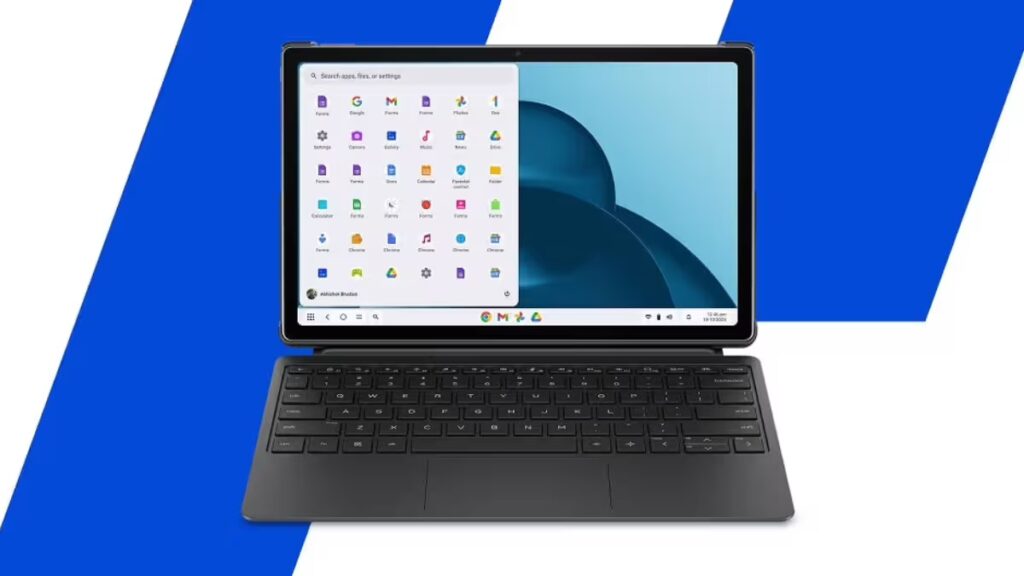

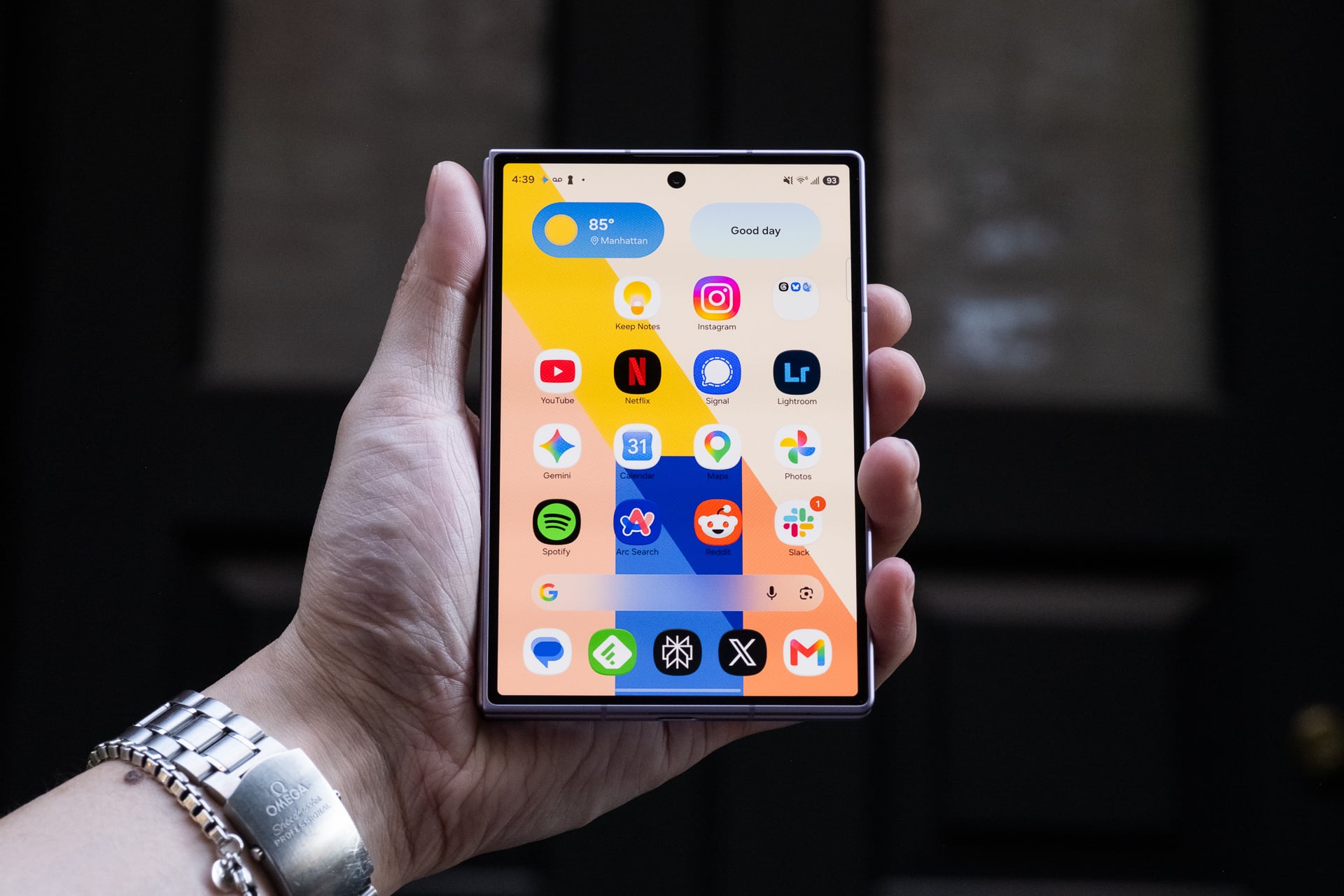

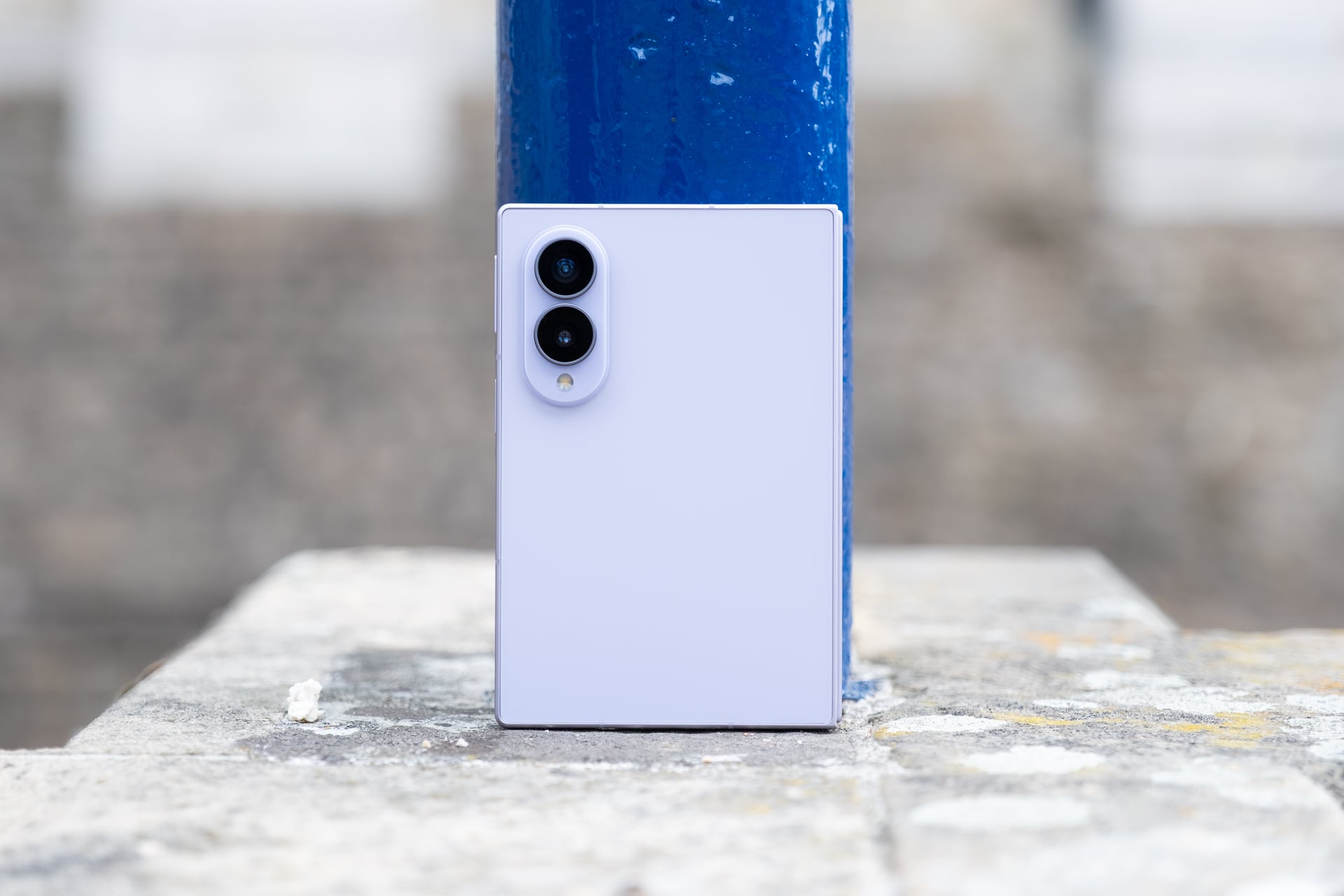



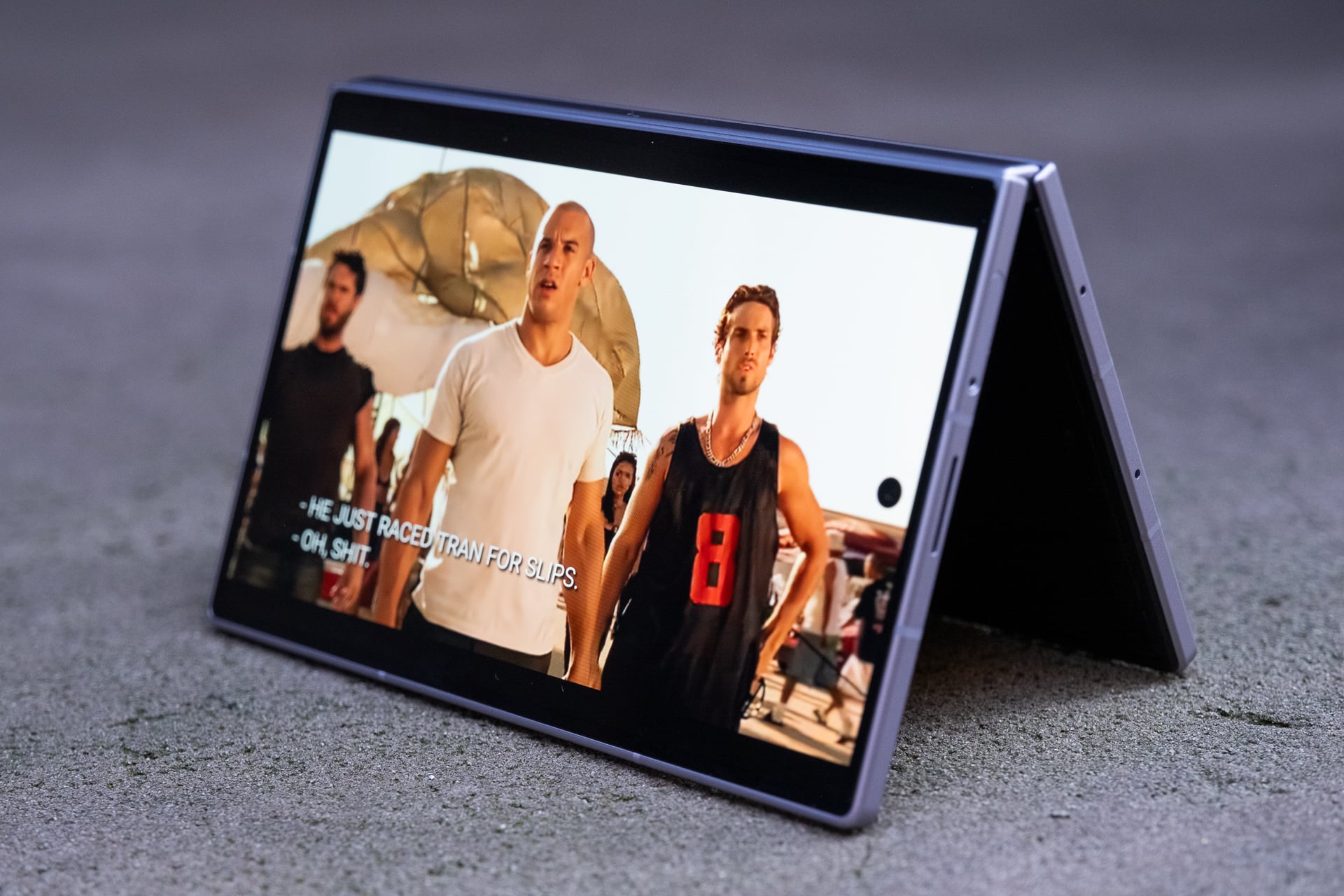
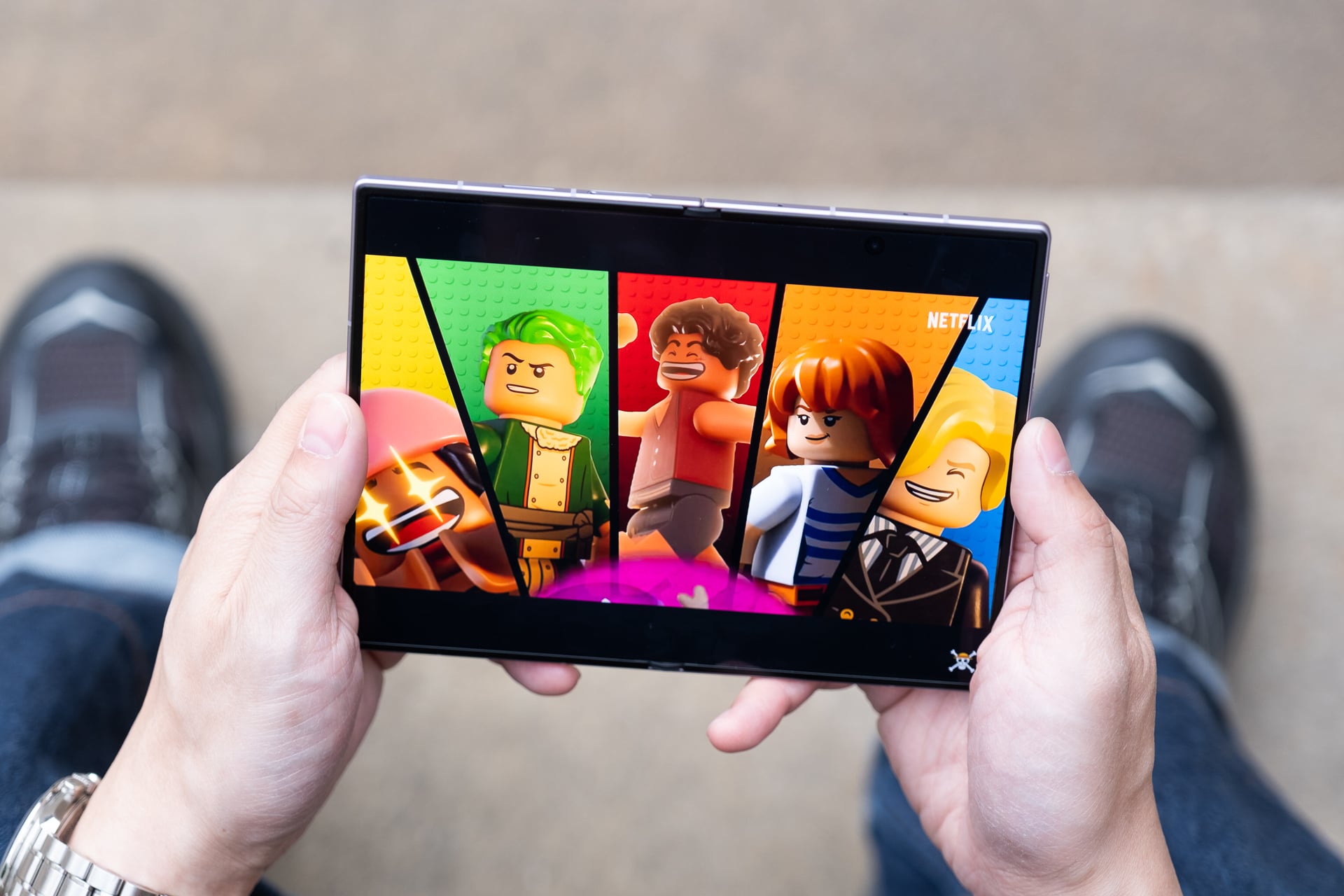
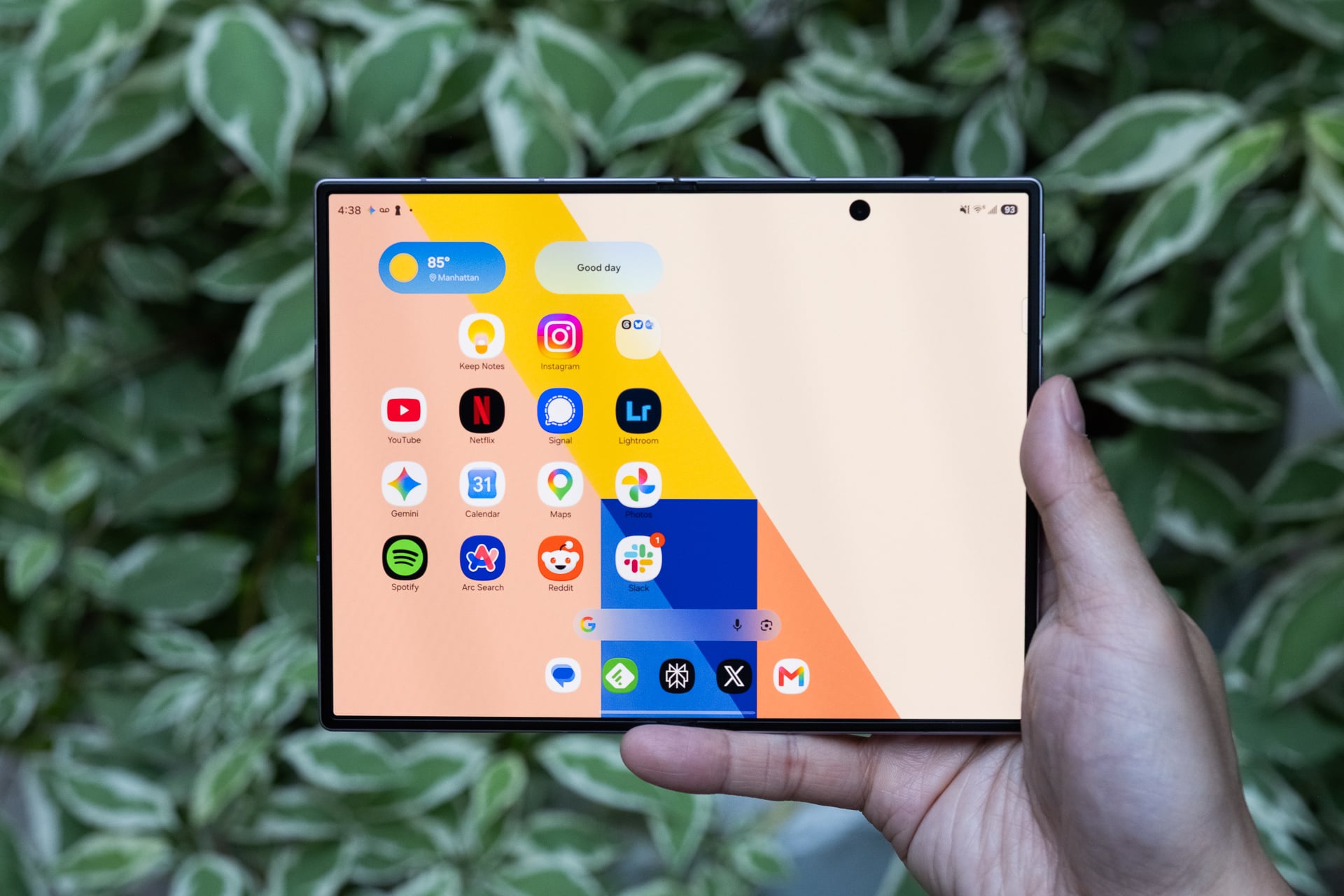
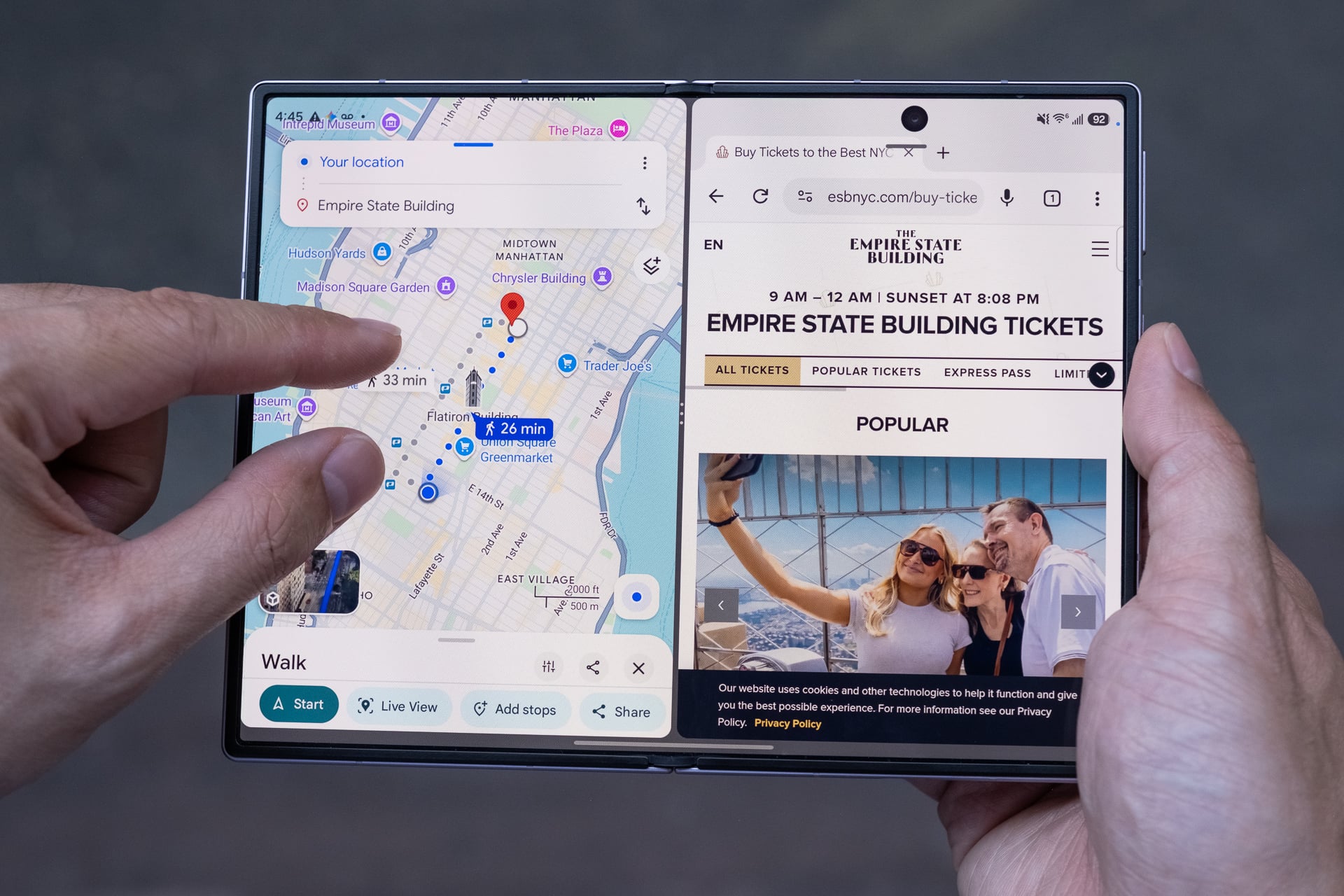

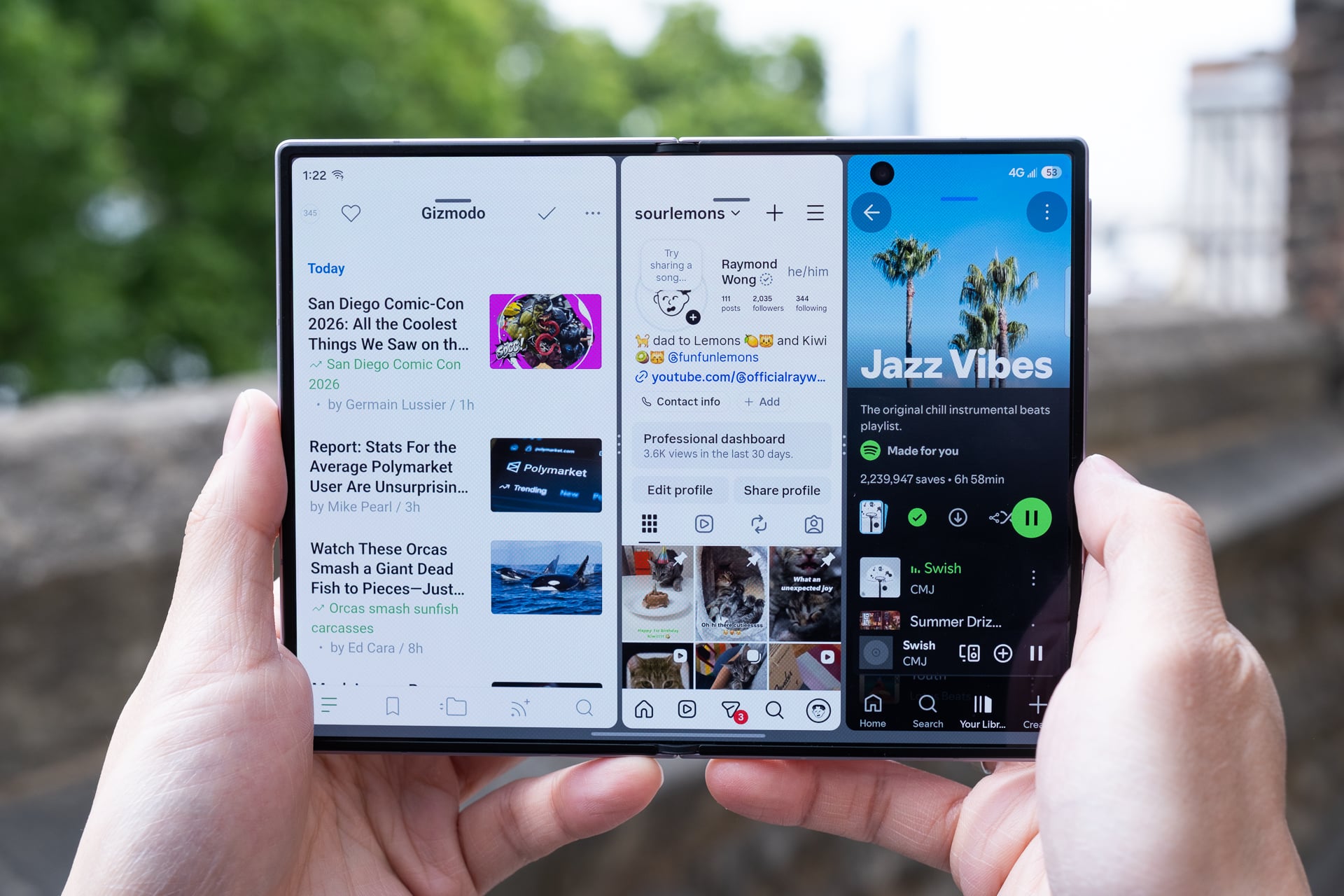
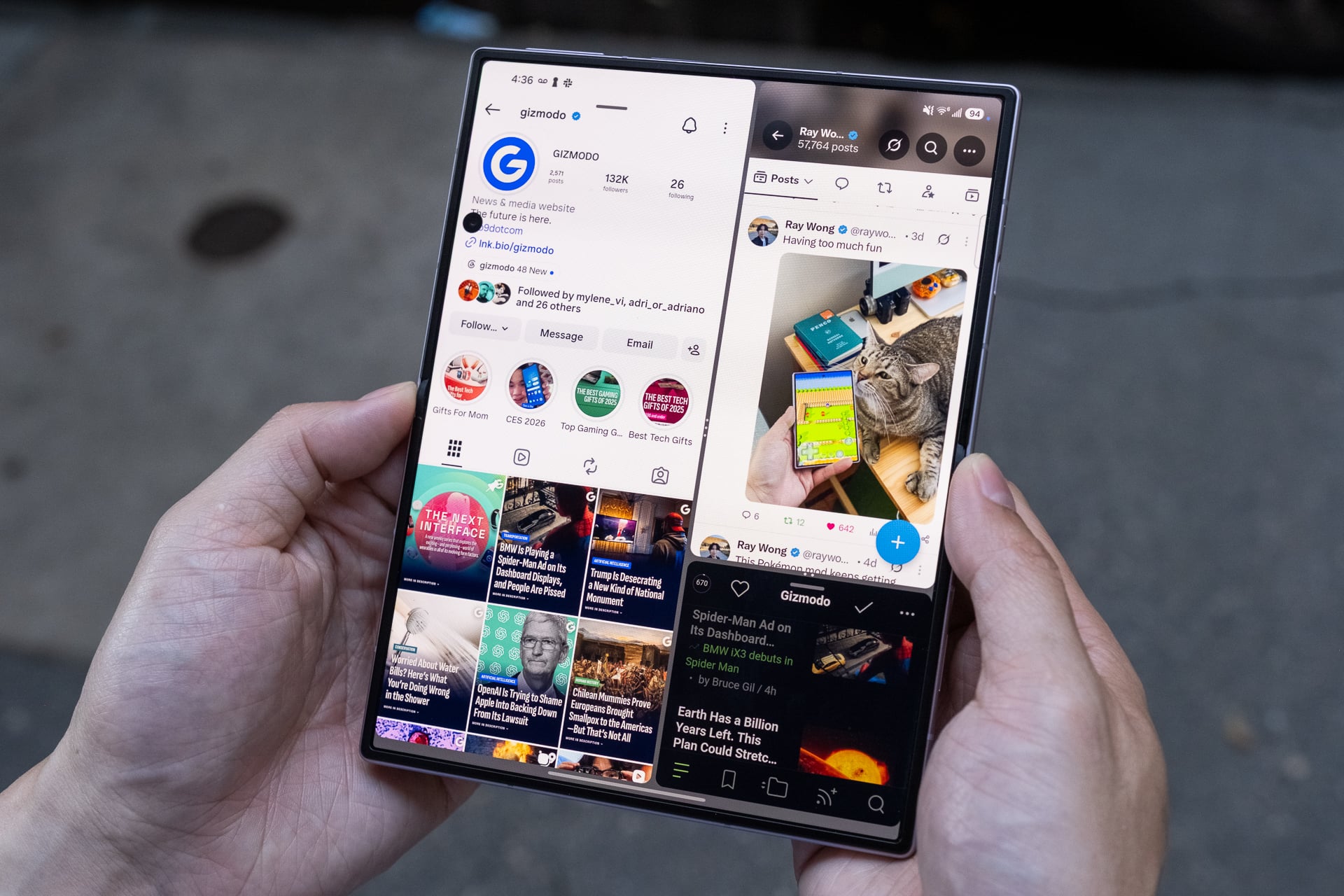

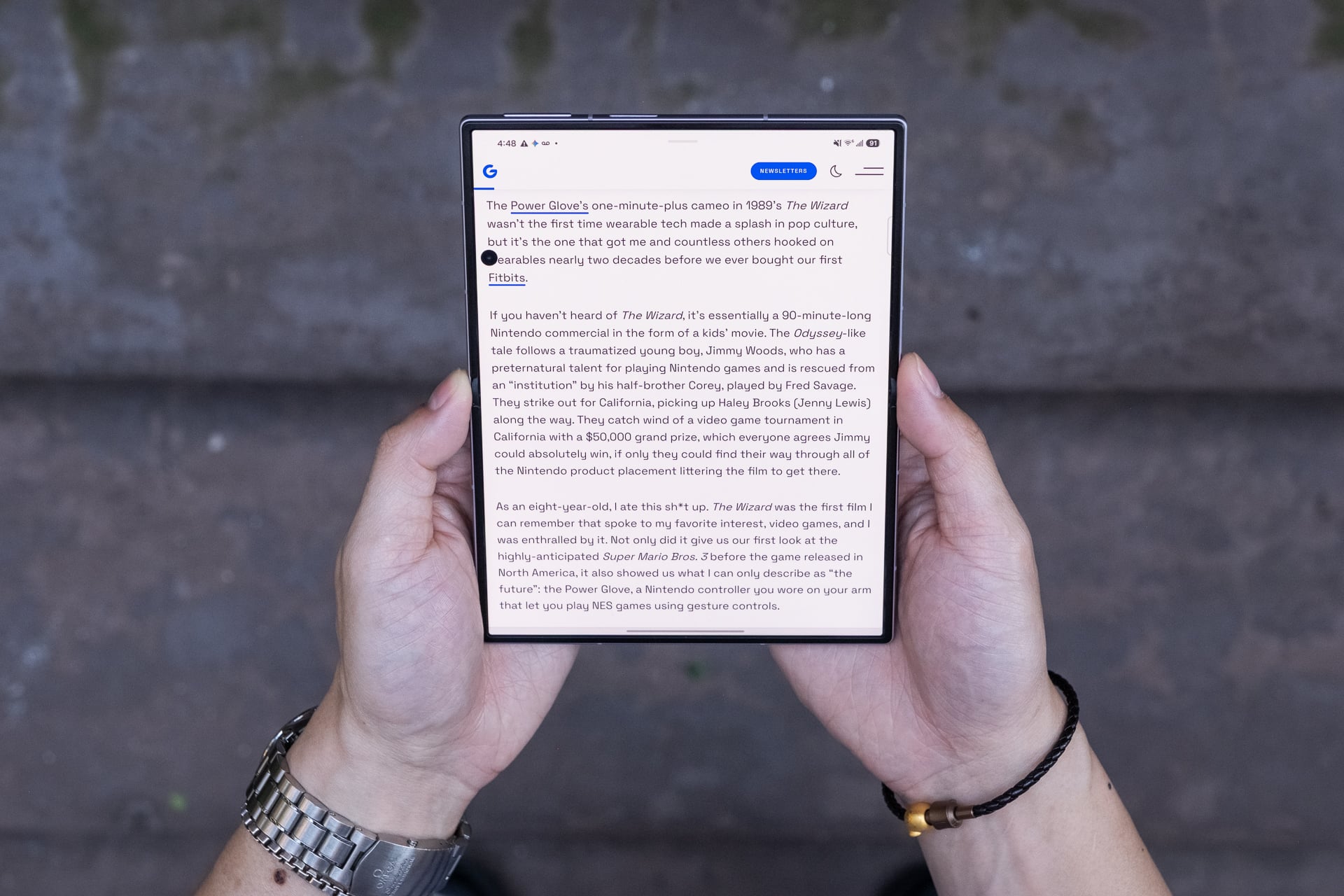
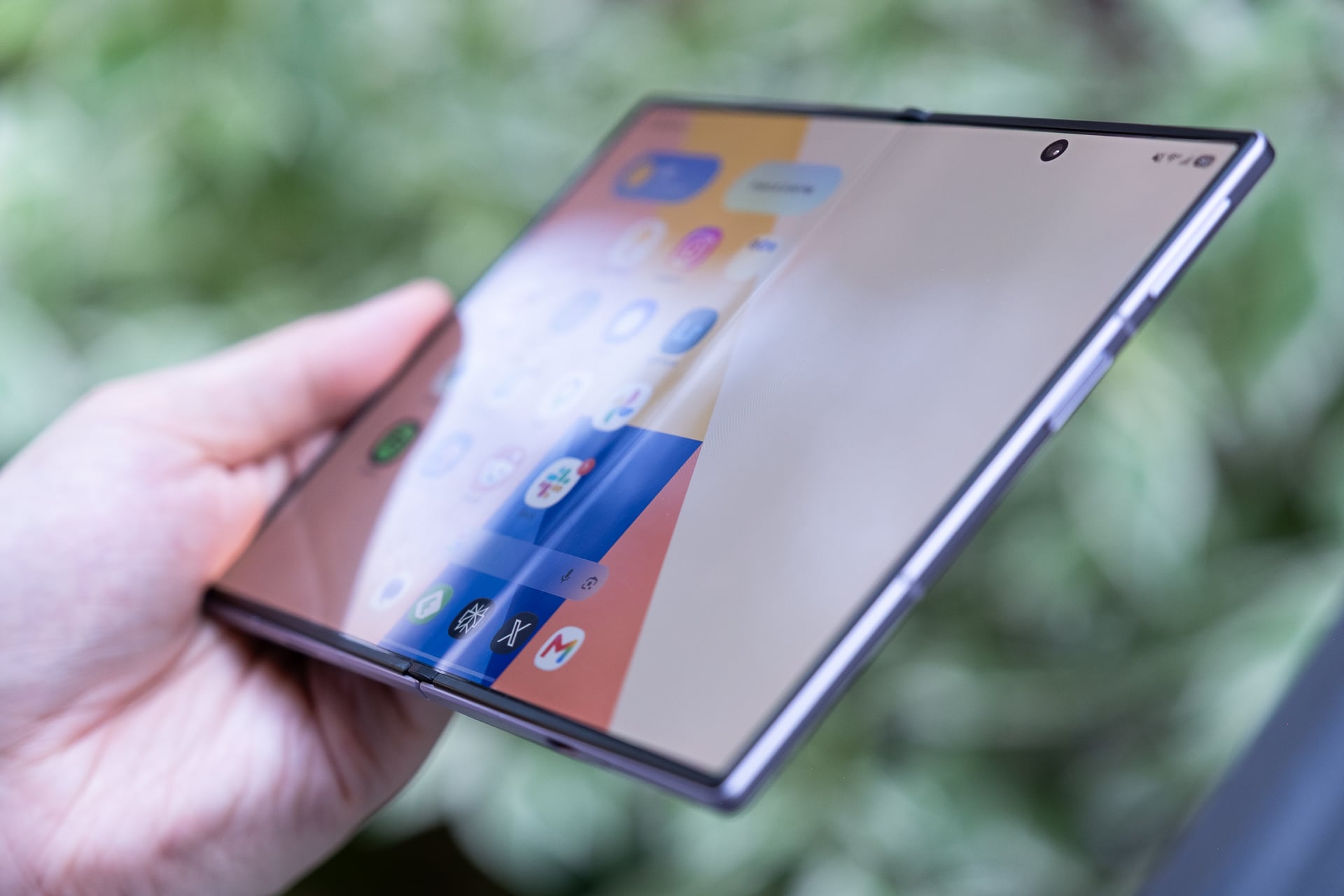

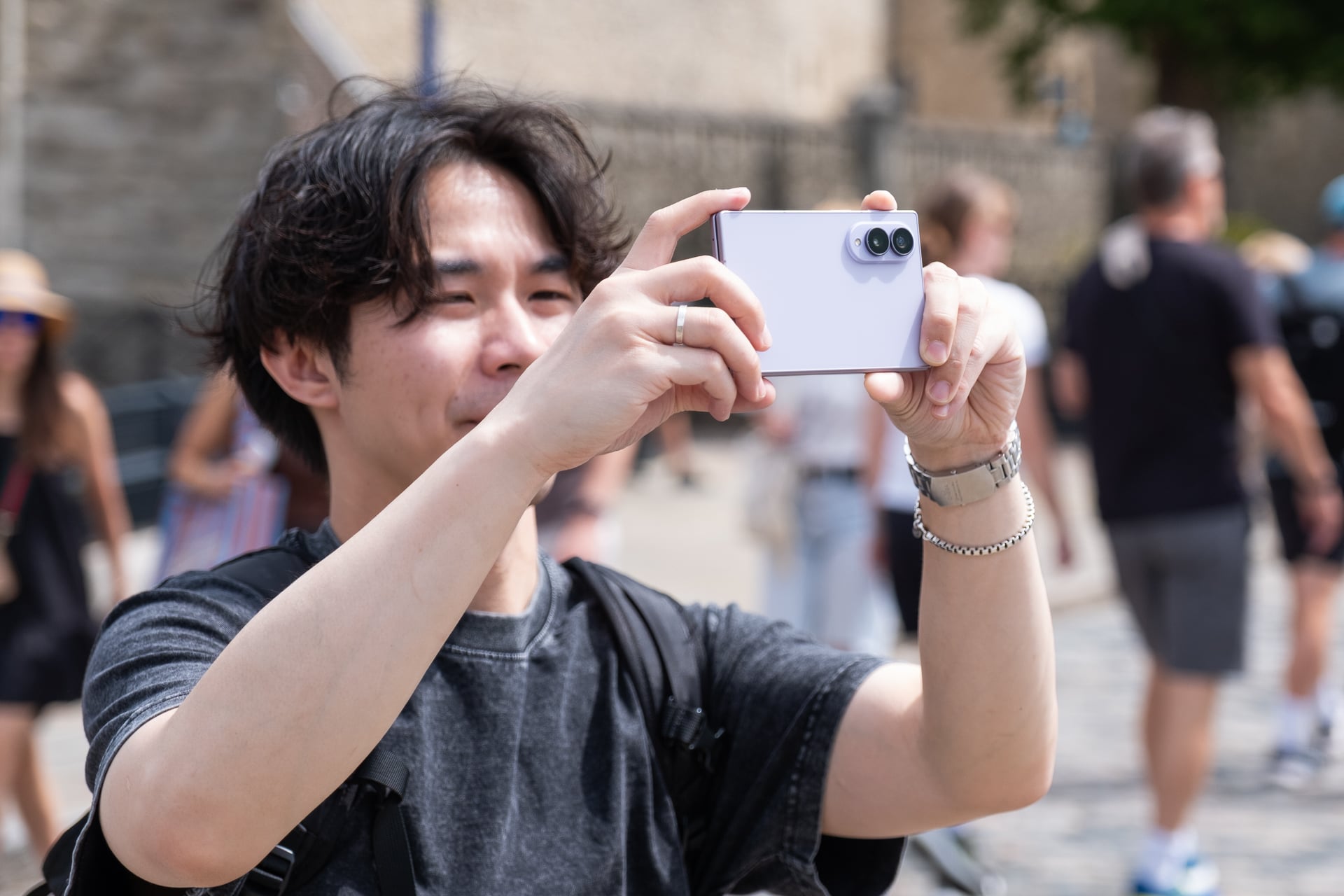



![Ford’s new electric truck, ‘Fathom’, starts at ,350 | TechCrunch
Ford’s next-generation electric truck will be called Fathom, and it will start at ,350 when it goes on sale in 2027, the company said on Thursday.
A “destination and delivery” fee will bring that price up to ,945, putting the Fathom just below the ,000 mark that Ford has targeted since it first started talking more openly about the project in 2025.
The truck, when it arrives next year, represents a major bet for Ford. It’s the automaker’s second all-electric truck after the F-150 Lightning (third, if you count the limited-run Ranger EV from the late 1990s). But like many of its peers, the company has dramatically pulled back on its once-ambitious plans to build electric vehicles.
The Fathom is the first vehicle Ford is building on its new “Universal EV Platform,” or UEV, which will power a number of different EVs and involves a brand-new assembly line process meant to cut costs. It’s an attempt by CEO Jim Farley to try and catch up to category leader Tesla, as well as the many Chinese EVs that he’s argued against allowing into the U.S. market — all while building the truck in Louisville, Kentucky.
Deliveries begin in “fall 2027,” and Ford said on Thursday that it won’t reveal the truck until “early 2027,” which is when it will start taking pre-orders.
We do have some details, though. Ford has already said the Fathom will have Apple Maps built into its operating system, and on Thursday, the company said the truck will support Android Auto and Apple CarPlay. Notably, it will not support Apple’s next-generation CarPlay Ultra.
The Fathom will have five seats, which is more interior space than a Toyota Rav4; a “large, high-resolution touch screen,” and a “digital car key.” It will be capable of bidirectional power, much like the Lightning and the hybrid F-150.
Every Fathom will also be “BlueCruise-capable,” meaning it will come with the tech integrated, but buyers will likely have to pay extra to enable Ford’s hands-free advanced driver assistance system. The truck is supposed to have a newer, more powerful version of BlueCruise that Ford says will eventually be capable of handling supervised driving from starting point to destination. Eyes-off driving is expected in 2028.
The Fathom’s starting price also only includes the “standard range” lithium iron phosphate battery pack. Ford hasn’t yet said how many miles the truck can drive on a single charge.
Ford said the name represents “a deep understanding of the person who would drive” the truck, and how their “motivations look a little different from the traditional truck customer’s.”
“[T]he name had to do more than sound good. It had to capture a mindset, shifting the focus from specs to a spirit of adaptability,” the company wrote.
Electric trucks have not done terribly well in the U.S.. The Lightning only moved a little more than 10,000 units in its best quarter, and though Tesla’s Cybertruck had a higher peak, it has since crashed out.
Ford is gambling by choosing the truck form factor for its first UEV platform vehicle. But there are some inherent upsides: The Fathom and other vehicles built on the platform will be the first that Ford has designed from the ground up to use electric powertrains. That should mean fewer tradeoffs on range, efficiency, and overall packaging of the vehicle.
Both the Fathom and UEV have been in the works for a few years. It started as a skunkworks project that Farley tasked former Tesla exec Alan Clarke with leading, as TechCrunch first reported in 2024. The team is flush with talent from Rivian, Tesla and Apple’s now-defunct car project, and has purportedly been working in isolation in Los Angeles, separated from the bureaucracy of the rest of the company.
All of this likely contributed to getting the Fathom’s starting price to just under ,000, a major accomplishment in a market where the average new car costs ,000. The truck won’t have a lot of competition in that range — it’s essentially going up against just the spartan, Jeff Bezos-backed Slate pickup, and a few non-truck EVs like the Chevy Bolt.
Ford has found a ton of success with its small, low-cost Maverick pickup, which comes in both internal combustion and hybrid powertrain variants. The Fathom is an attempt to bottle that lightning, without going the way of the Lightning.
When you purchase through links in our articles, we may earn a small commission. This doesn’t affect our editorial independence.#Fords #electric #truck #Fathom #starts #TechCrunchelectric trucks,EVs,Ford](https://i0.wp.com/techcrunch.com/wp-content/uploads/2026/08/Ford-Fathom-Hero-Still-16x9_v2.jpg?resize=1200%2C675&ssl=1 "Ford’s new electric truck, ‘Fathom’, starts at ,350 | TechCrunch
Ford’s next-generation electric truck will be called Fathom, and it will start at ,350 when it goes on sale in 2027, the company said on Thursday.
A “destination and delivery” fee will bring that price up to ,945, putting the Fathom just below the ,000 mark that Ford has targeted since it first started talking more openly about the project in 2025.
The truck, when it arrives next year, represents a major bet for Ford. It’s the automaker’s second all-electric truck after the F-150 Lightning (third, if you count the limited-run Ranger EV from the late 1990s). But like many of its peers, the company has dramatically pulled back on its once-ambitious plans to build electric vehicles.
The Fathom is the first vehicle Ford is building on its new “Universal EV Platform,” or UEV, which will power a number of different EVs and involves a brand-new assembly line process meant to cut costs. It’s an attempt by CEO Jim Farley to try and catch up to category leader Tesla, as well as the many Chinese EVs that he’s argued against allowing into the U.S. market — all while building the truck in Louisville, Kentucky.
Deliveries begin in “fall 2027,” and Ford said on Thursday that it won’t reveal the truck until “early 2027,” which is when it will start taking pre-orders.
We do have some details, though. Ford has already said the Fathom will have Apple Maps built into its operating system, and on Thursday, the company said the truck will support Android Auto and Apple CarPlay. Notably, it will not support Apple’s next-generation CarPlay Ultra.
The Fathom will have five seats, which is more interior space than a Toyota Rav4; a “large, high-resolution touch screen,” and a “digital car key.” It will be capable of bidirectional power, much like the Lightning and the hybrid F-150.
Every Fathom will also be “BlueCruise-capable,” meaning it will come with the tech integrated, but buyers will likely have to pay extra to enable Ford’s hands-free advanced driver assistance system. The truck is supposed to have a newer, more powerful version of BlueCruise that Ford says will eventually be capable of handling supervised driving from starting point to destination. Eyes-off driving is expected in 2028.
The Fathom’s starting price also only includes the “standard range” lithium iron phosphate battery pack. Ford hasn’t yet said how many miles the truck can drive on a single charge.
Ford said the name represents “a deep understanding of the person who would drive” the truck, and how their “motivations look a little different from the traditional truck customer’s.”
“[T]he name had to do more than sound good. It had to capture a mindset, shifting the focus from specs to a spirit of adaptability,” the company wrote.
Electric trucks have not done terribly well in the U.S.. The Lightning only moved a little more than 10,000 units in its best quarter, and though Tesla’s Cybertruck had a higher peak, it has since crashed out.
Ford is gambling by choosing the truck form factor for its first UEV platform vehicle. But there are some inherent upsides: The Fathom and other vehicles built on the platform will be the first that Ford has designed from the ground up to use electric powertrains. That should mean fewer tradeoffs on range, efficiency, and overall packaging of the vehicle.
Both the Fathom and UEV have been in the works for a few years. It started as a skunkworks project that Farley tasked former Tesla exec Alan Clarke with leading, as TechCrunch first reported in 2024. The team is flush with talent from Rivian, Tesla and Apple’s now-defunct car project, and has purportedly been working in isolation in Los Angeles, separated from the bureaucracy of the rest of the company.
All of this likely contributed to getting the Fathom’s starting price to just under ,000, a major accomplishment in a market where the average new car costs ,000. The truck won’t have a lot of competition in that range — it’s essentially going up against just the spartan, Jeff Bezos-backed Slate pickup, and a few non-truck EVs like the Chevy Bolt.
Ford has found a ton of success with its small, low-cost Maverick pickup, which comes in both internal combustion and hybrid powertrain variants. The Fathom is an attempt to bottle that lightning, without going the way of the Lightning.
When you purchase through links in our articles, we may earn a small commission. This doesn’t affect our editorial independence.#Fords #electric #truck #Fathom #starts #TechCrunchelectric trucks,EVs,Ford")