×
Everything HP Announced at CES 2026: New OmniBook, Chromebooks & More

Everything HP Announced at CES 2026: New OmniBook, Chromebooks & More

At CES 2026, HP announced a wide range of new devices across its consumer, gaming, and business segments. It unveiled new OmniBook laptops, updated Chromebooks, all-in-one desktops, and even refreshed the HyperX gaming lineup. HP also previewed new software features shipping with its future PCs. Here’s a complete look at everything HP announced at CES 2026.

New HP OmniBook and OmniStudio Lineup

HP’s Omnibook series has always been about striking a balance between premium design and everyday usability, coupled with capable performance. We’ve tested plenty of such laptops, including the Omnibook Ultra and the X, both of which have ranked really high in all metrics. To continue this legacy, the OmniBook Ultra 14 will be offered with either Qualcomm’s Snapdragon X2 Elite processors or next-gen Intel Core Ultra chips, giving users flexibility depending on whether they want ARM efficiency or x86 performance. Up front, you get a 14-inch OLED display with up to 3K resolution, making it ideal for media consumption and sharp everyday visuals.

HP is also pushing AI pretty hard here. According to the company, the OmniBook Ultra 14 is built to handle both on-device and cloud-based AI workloads. There’s also an interesting posture-detection feature built in, which monitors how you use the laptop during long sessions and nudges you toward healthier working habits.

image from HP OmniStudio X 27 at CES 2026

Alongside the laptops, HP introduced the OmniStudio X 27, a next-gen all-in-one desktop aimed at families, home users, and creatives. It features a 27-inch Neo LED display with 100 percent colour coverage, clearly targeting content creation and professional workflows. One neat touch is Thunderbolt Share support, which lets you directly connect a laptop to the AIO for fast file transfers and peripheral sharing. The tilting camera can also be adjusted to show documents or desk views during video calls, which feels surprisingly practical.

Beyond these flagships, HP refreshed its entire OmniBook portfolio, including the OmniBook X, OmniBook 7, OmniBook 5, and OmniBook 3 series. These will be available in multiple screen sizes and configurations, covering everything from premium machines to entry-level options. Processor choices span AMD Ryzen AI, Intel Core Ultra, and Qualcomm Snapdragon X2 chips, with a clear focus on better efficiency and AI performance across the board.

New HP Chromebooks
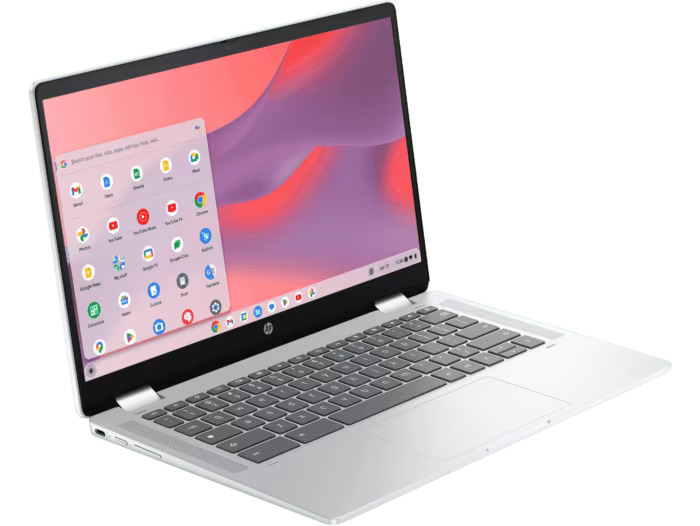
image from Chromebook Plus x360 14

HP rolled out a refreshed Chromebook lineup aimed at users who want simplicity, flexibility, and affordability. The first one is the Chromebook Plus x360 14, which features a 360-degree hinge that lets it switch between laptop, tablet, and tent modes. Paired with a 2K display, it’s clearly aimed at users who want one device for both work and entertainment

Next up is the Chromebook x360 14, which also sports a convertible design and a 2K 16:10 display. HP says this model is meant for users who want a more versatile Chromebook experience, whether that’s multitasking, sketching, or casual media use. Beyond that, the Chromebook Plus 14 leans more toward productivity and collaboration. It also comes with a 2K display and an upgraded Full HD front-facing camera, making it better suited for video calls, online meetings, and day-to-day work.HP Gaming Hardware Under HyperX

New HyperX Gaming Laptops & Monitors
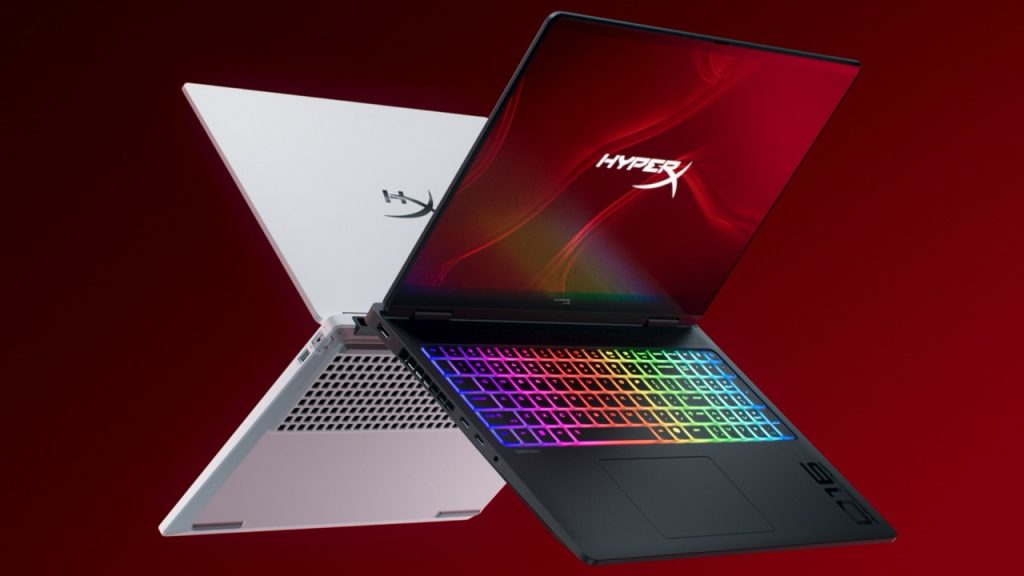
image for HyperX OMEN MAX 16

On the gaming side, HP leaned into performance and experimentation under its HyperX branding. The HyperX OMEN MAX 16 is an ultra-high-end gaming laptop refreshed for 2026. It supports Intel Core Ultra 200HX or AMD Ryzen AI processors, paired with NVIDIA GeForce RTX 50-series laptop GPUs. HP has also introduced a new cooling system with an additional fan to keep thermals in check. Display options go all the way up to a 16-inch OLED panel with a 240Hz refresh rate, which should make competitive gaming buttery smooth.

For desktop gamers, the HyperX OMEN OLED 34 is a 34-inch ultra-wide monitor with a QD-OLED panel. It offers a 21:9 WQHD resolution, a 360Hz refresh rate, and a 0.03ms response time—clearly targeting esports and high-FPS gamers. It also includes 100W USB-C power delivery and a built-in KVM switch, letting you control multiple systems with a single keyboard and mouse.

HP also showed off the HyperX Clutch Tachi, its first Xbox-licensed leverless arcade controller. It uses magnetic switches and allows deep customisation of button mapping and actuation through HP’s software, making it especially appealing to fighting-game and competitive players.

Finally, there’s the HyperX and Neurable gaming headset, which is more of a concept than a finished product. Designed in collaboration with Neurable, the open headset uses neurotechnology to track focus and cognitive signals in real time—hinting at a future where gaming gear adapts to how you’re actually feeling and performing.

HP EliteBook X G2 Series

A person working on the HP EliteBook X G2 laptop

Wrapping things up on the business side, HP expanded its enterprise lineup with the EliteBook X G2 Series. These laptops will be available with Snapdragon X2 Elite, Intel Core Ultra Series 3, and AMD Ryzen AI processors, giving IT teams plenty of configuration options. HP says the EliteBook X G2 series is built specifically for AI-assisted workflows, Copilot+ PC features, and enterprise-grade security.

Source link
#Announced #CES #OmniBook #Chromebooks

#HyperX #Pulsefire #Saga #Review #Gaming #Mouse #ShapeHP,HyperX">HyperX Pulsefire Saga Review: This Gaming Mouse Changes Shape
	
If you’re someone who spends hours gaming, you already know how important a good mouse is. The problem? Most gaming mice look different on paper but feel almost identical in hand. With so many options out there, it’s getting harder to find something that actually stands out. The HyperX Pulsefire Saga tries to flip that idea on its head with a modular design. Instead of adjusting your grip to the mouse, you can tweak the mouse itself to match your comfort. It also promises strong performance, with features such as a 26K DPI sensor and an 8K polling rate. But beyond the specs, I wanted to see if the modular design makes it better to use in real gameplay. 


        HyperX Pulsefire SagaDeepti PathakSummaryAfter using the HyperX Pulsefire Saga for a while, it’s clear that it’s more than just a gaming mouse. From a functionality standpoint, I can say it’s held up incredibly well. The sensor is fast and reliable, and the lightweight design is a big plus for long-term use.


Design and Build


The first thing I noticed when I started using the HyperX Pulsefire Saga was how light it felt in my hand. At just 69 grams, it felt easy to control without feeling too fragile. While gaming, this made tracking and quick reactions feel smoother. What really makes this mouse different is its modular build. I was able to change the top shell, button covers, and side buttons within seconds. The magnetic system works well, and everything clicks into place securely. Even after changing configurations multiple times, the build stayed consistent.


In terms of comfort, I used it for long sessions, sometimes up to a few hours at a stretch. The weight, or lack thereof, helps a lot with comfort, and I didn’t experience the strain that I normally get with a heavier mouse. There are a couple of things that didn’t quite work for me, though. The side buttons don’t really feel as high-quality as the rest of the mouse, and there’s a little wobble if you look up close. The scroll wheel is also a bit smaller, but these are just nitpicks. 


Overall, the module design is more about function than style, especially if you like to have control over mouse comfort.


Performance


In terms of performance, this mouse does not disappoint. The 26K DPI sensor shines for tracking, and the ability to reach an 8K polling rate is a clear indicator that this mouse is intended for precision use. I tested it with games like Valorant and GTA V, and the performance was pretty stellar. The movements felt smooth, and I did not feel jitters or unusual behavior. 


Whether I was making small aim corrections or fast flicks, it reacted instantly. This made it easier to stay consistent during matches. The clicks have a fast and responsive feel, particularly when you’re firing weapons in FPS games.


With a wired mouse, I found that the cable didn’t interfere with my gaming experience because it was flexible enough to allow natural movement. Overall, performance is accurate, fast, and reliable, which is particularly important for a competitive gamer.


Software and Battery


Since this is a wired mouse, battery life isn’t something you need to worry about. I could just plug it in and start playing without worrying about charging or interruptions, which I found really convenient.


For software, HyperX provides NGENUITY. I used it to customize DPI settings, adjust the polling rate, and play around with RGB lighting. The controls are easy to understand, so setting things up didn’t take much effort. There are also options to remap buttons and fine-tune performance settings. It gives enough control for most users without feeling overwhelming.


That said, once I finished setting things up, I didn’t really need to open the software again. It works well, but it’s more of a one-time setup tool rather than something you’ll use regularly.


Verdict


After using the HyperX Pulsefire Saga for a while, it’s clear that it’s more than just a gaming mouse. You can currently buy this mouse from Amazon for Rs. 3,990. I played around with a few settings before finding one that felt comfortable to use, and once I got into the swing of things, it was much more comfortable. From a functionality standpoint, I can say it’s held up incredibly well. The sensor is fast and reliable, and the lightweight design is a big plus for long-term use.


One or two things could be improved, particularly the side buttons and the wheel, but they didn’t really affect my overall experience. If you’re like me and want a slightly more personalized, comfortable experience, this mouse makes a lot of sense.

#HyperX #Pulsefire #Saga #Review #Gaming #Mouse #ShapeHP,HyperX

HyperX provides NGENUITY. I used it to customize DPI settings, adjust the polling rate, and play around with RGB lighting. The controls are easy to understand, so setting things up didn’t take much effort. There are also options to remap buttons and fine-tune performance settings. It gives enough control for most users without feeling overwhelming.

That said, once I finished setting things up, I didn’t really need to open the software again. It works well, but it’s more of a one-time setup tool rather than something you’ll use regularly.

Verdict

After using the HyperX Pulsefire Saga for a while, it’s clear that it’s more than just a gaming mouse. You can currently buy this mouse from Amazon for Rs. 3,990. I played around with a few settings before finding one that felt comfortable to use, and once I got into the swing of things, it was much more comfortable. From a functionality standpoint, I can say it’s held up incredibly well. The sensor is fast and reliable, and the lightweight design is a big plus for long-term use.

One or two things could be improved, particularly the side buttons and the wheel, but they didn’t really affect my overall experience. If you’re like me and want a slightly more personalized, comfortable experience, this mouse makes a lot of sense.

#HyperX #Pulsefire #Saga #Review #Gaming #Mouse #ShapeHP,HyperX">HyperX Pulsefire Saga Review: This Gaming Mouse Changes Shape

If you’re someone who spends hours gaming, you already know how important a good mouse is. The problem? Most gaming mice look different on paper but feel almost identical in hand. With so many options out there, it’s getting harder to find something that actually stands out. The HyperX Pulsefire Saga tries to flip that idea on its head with a modular design. Instead of adjusting your grip to the mouse, you can tweak the mouse itself to match your comfort. It also promises strong performance, with features such as a 26K DPI sensor and an 8K polling rate. But beyond the specs, I wanted to see if the modular design makes it better to use in real gameplay.

HyperX Pulsefire Saga

Deepti Pathak

Summary

After using the HyperX Pulsefire Saga for a while, it’s clear that it’s more than just a gaming mouse. From a functionality standpoint, I can say it’s held up incredibly well. The sensor is fast and reliable, and the lightweight design is a big plus for long-term use.

Design and Build

HyperX Pulsefire Saga Review: This Gaming Mouse Changes Shape
	
If you’re someone who spends hours gaming, you already know how important a good mouse is. The problem? Most gaming mice look different on paper but feel almost identical in hand. With so many options out there, it’s getting harder to find something that actually stands out. The HyperX Pulsefire Saga tries to flip that idea on its head with a modular design. Instead of adjusting your grip to the mouse, you can tweak the mouse itself to match your comfort. It also promises strong performance, with features such as a 26K DPI sensor and an 8K polling rate. But beyond the specs, I wanted to see if the modular design makes it better to use in real gameplay. 


        HyperX Pulsefire SagaDeepti PathakSummaryAfter using the HyperX Pulsefire Saga for a while, it’s clear that it’s more than just a gaming mouse. From a functionality standpoint, I can say it’s held up incredibly well. The sensor is fast and reliable, and the lightweight design is a big plus for long-term use.


Design and Build


The first thing I noticed when I started using the HyperX Pulsefire Saga was how light it felt in my hand. At just 69 grams, it felt easy to control without feeling too fragile. While gaming, this made tracking and quick reactions feel smoother. What really makes this mouse different is its modular build. I was able to change the top shell, button covers, and side buttons within seconds. The magnetic system works well, and everything clicks into place securely. Even after changing configurations multiple times, the build stayed consistent.


In terms of comfort, I used it for long sessions, sometimes up to a few hours at a stretch. The weight, or lack thereof, helps a lot with comfort, and I didn’t experience the strain that I normally get with a heavier mouse. There are a couple of things that didn’t quite work for me, though. The side buttons don’t really feel as high-quality as the rest of the mouse, and there’s a little wobble if you look up close. The scroll wheel is also a bit smaller, but these are just nitpicks. 


Overall, the module design is more about function than style, especially if you like to have control over mouse comfort.


Performance


In terms of performance, this mouse does not disappoint. The 26K DPI sensor shines for tracking, and the ability to reach an 8K polling rate is a clear indicator that this mouse is intended for precision use. I tested it with games like Valorant and GTA V, and the performance was pretty stellar. The movements felt smooth, and I did not feel jitters or unusual behavior. 


Whether I was making small aim corrections or fast flicks, it reacted instantly. This made it easier to stay consistent during matches. The clicks have a fast and responsive feel, particularly when you’re firing weapons in FPS games.


With a wired mouse, I found that the cable didn’t interfere with my gaming experience because it was flexible enough to allow natural movement. Overall, performance is accurate, fast, and reliable, which is particularly important for a competitive gamer.


Software and Battery


Since this is a wired mouse, battery life isn’t something you need to worry about. I could just plug it in and start playing without worrying about charging or interruptions, which I found really convenient.


For software, HyperX provides NGENUITY. I used it to customize DPI settings, adjust the polling rate, and play around with RGB lighting. The controls are easy to understand, so setting things up didn’t take much effort. There are also options to remap buttons and fine-tune performance settings. It gives enough control for most users without feeling overwhelming.


That said, once I finished setting things up, I didn’t really need to open the software again. It works well, but it’s more of a one-time setup tool rather than something you’ll use regularly.


Verdict


After using the HyperX Pulsefire Saga for a while, it’s clear that it’s more than just a gaming mouse. You can currently buy this mouse from Amazon for Rs. 3,990. I played around with a few settings before finding one that felt comfortable to use, and once I got into the swing of things, it was much more comfortable. From a functionality standpoint, I can say it’s held up incredibly well. The sensor is fast and reliable, and the lightweight design is a big plus for long-term use.


One or two things could be improved, particularly the side buttons and the wheel, but they didn’t really affect my overall experience. If you’re like me and want a slightly more personalized, comfortable experience, this mouse makes a lot of sense.

#HyperX #Pulsefire #Saga #Review #Gaming #Mouse #ShapeHP,HyperX

The first thing I noticed when I started using the HyperX Pulsefire Saga was how light it felt in my hand. At just 69 grams, it felt easy to control without feeling too fragile. While gaming, this made tracking and quick reactions feel smoother. What really makes this mouse different is its modular build. I was able to change the top shell, button covers, and side buttons within seconds. The magnetic system works well, and everything clicks into place securely. Even after changing configurations multiple times, the build stayed consistent.

In terms of comfort, I used it for long sessions, sometimes up to a few hours at a stretch. The weight, or lack thereof, helps a lot with comfort, and I didn’t experience the strain that I normally get with a heavier mouse. There are a couple of things that didn’t quite work for me, though. The side buttons don’t really feel as high-quality as the rest of the mouse, and there’s a little wobble if you look up close. The scroll wheel is also a bit smaller, but these are just nitpicks.

Overall, the module design is more about function than style, especially if you like to have control over mouse comfort.

Performance

performance of mouse

In terms of performance, this mouse does not disappoint. The 26K DPI sensor shines for tracking, and the ability to reach an 8K polling rate is a clear indicator that this mouse is intended for precision use. I tested it with games like Valorant and GTA V, and the performance was pretty stellar. The movements felt smooth, and I did not feel jitters or unusual behavior.

Whether I was making small aim corrections or fast flicks, it reacted instantly. This made it easier to stay consistent during matches. The clicks have a fast and responsive feel, particularly when you’re firing weapons in FPS games.

With a wired mouse, I found that the cable didn’t interfere with my gaming experience because it was flexible enough to allow natural movement. Overall, performance is accurate, fast, and reliable, which is particularly important for a competitive gamer.

Software and Battery

Since this is a wired mouse, battery life isn’t something you need to worry about. I could just plug it in and start playing without worrying about charging or interruptions, which I found really convenient.

For software, HyperX provides NGENUITY. I used it to customize DPI settings, adjust the polling rate, and play around with RGB lighting. The controls are easy to understand, so setting things up didn’t take much effort. There are also options to remap buttons and fine-tune performance settings. It gives enough control for most users without feeling overwhelming.

That said, once I finished setting things up, I didn’t really need to open the software again. It works well, but it’s more of a one-time setup tool rather than something you’ll use regularly.

Verdict

After using the HyperX Pulsefire Saga for a while, it’s clear that it’s more than just a gaming mouse. You can currently buy this mouse from Amazon for Rs. 3,990. I played around with a few settings before finding one that felt comfortable to use, and once I got into the swing of things, it was much more comfortable. From a functionality standpoint, I can say it’s held up incredibly well. The sensor is fast and reliable, and the lightweight design is a big plus for long-term use.

One or two things could be improved, particularly the side buttons and the wheel, but they didn’t really affect my overall experience. If you’re like me and want a slightly more personalized, comfortable experience, this mouse makes a lot of sense.

#HyperX #Pulsefire #Saga #Review #Gaming #Mouse #ShapeHP,HyperX

Project Hail Mary has only been in theaters for a few weeks, but its alien star, Rocky, has already become a legend. He’s got merch, hundreds of millions in box office dollars, and was even quoted during the Artemis 2 space mission. And to think it all began with puppeteer James Ortiz walking a hand-sized puppet all over Ryan Gosling’s body.

The Los Angeles Times recently posted a lovely little profile on Ortiz, who has been a successful, well-known puppeteer long before his work as both the puppeteer and voice of Rocky in Project Hail Mary. So when he got called in to audition to help bring the character to life, he didn’t use the larger-sized puppet the filmmakers had made. No, instead, he used a smaller puppet of his own creation that apparently looks oddly familiar.

“For a chemistry read with Gosling, with the film’s producers also present, Ortiz opted for using a version of Rocky he had made himself, which looked like Thing from The Addams Family; built off a fancy glove, instead of the larger puppet the production had available,” the article says. “That his hand version of Rocky could climb onto Gosling, and interact with the actor more directly, allowed for an amusing rapport to develop instantly between them.”

Once he had the job, the Rocky puppet that would be in the movie was designed by famed creature creator Neal Scanlan. Ortiz, though, being a seasoned pro himself, also provided input. “I had, ultimately, a lot of input, never on how Rocky looked, but a lot on how he was operated and what materials he was made out of,” Ortiz told the Times. “I was able to pick what types of fiberglass we were using to cast him out of, because I knew, given the amount of improvisation that we would be doing on set, [that] I needed a puppet that could do anything.”

And, we think, the results speak for themselves.

Read more about Ortiz’s journey to Project Hail Mary over at the LA Times. The film is still in theaters.

Want more io9 news? Check out when to expect the latest Marvel, Star Wars, and Star Trek releases, what’s next for the DC Universe on film and TV, and everything you need to know about the future of Doctor Who.

#Hands #Rocky #Hired #Project #Hail #MaryJames Ortiz,Project Hail Mary">How the Hands Behind Rocky Got Hired for ‘Project Hail Mary’
                Project Hail Mary has only been in theaters for a few weeks, but its alien star, Rocky, has already become a legend. He’s got merch, hundreds of millions in box office dollars, and was even quoted during the Artemis 2 space mission. And to think it all began with puppeteer James Ortiz walking a hand-sized puppet all over Ryan Gosling’s body. The Los Angeles Times recently posted a lovely little profile on Ortiz, who has been a successful, well-known puppeteer long before his work as both the puppeteer and voice of Rocky in Project Hail Mary. So when he got called in to audition to help bring the character to life, he didn’t use the larger-sized puppet the filmmakers had made. No, instead, he used a smaller puppet of his own creation that apparently looks oddly familiar.

 “For a chemistry read with Gosling, with the film’s producers also present, Ortiz opted for using a version of Rocky he had made himself, which looked like Thing from The Addams Family; built off a fancy glove, instead of the larger puppet the production had available,” the article says. “That his hand version of Rocky could climb onto Gosling, and interact with the actor more directly, allowed for an amusing rapport to develop instantly between them.” Once he had the job, the Rocky puppet that would be in the movie was designed by famed creature creator Neal Scanlan. Ortiz, though, being a seasoned pro himself, also provided input. “I had, ultimately, a lot of input, never on how Rocky looked, but a lot on how he was operated and what materials he was made out of,” Ortiz told the Times. “I was able to pick what types of fiberglass we were using to cast him out of, because I knew, given the amount of improvisation that we would be doing on set, [that] I needed a puppet that could do anything.”

 And, we think, the results speak for themselves. Read more about Ortiz’s journey to Project Hail Mary over at the LA Times. The film is still in theaters.  Want more io9 news? Check out when to expect the latest Marvel, Star Wars, and Star Trek releases, what’s next for the DC Universe on film and TV, and everything you need to know about the future of Doctor Who.      #Hands #Rocky #Hired #Project #Hail #MaryJames Ortiz,Project Hail Mary

but its alien star, Rocky, has already become a legend. He’s got merch, hundreds of millions in box office dollars, and was even quoted during the Artemis 2 space mission. And to think it all began with puppeteer James Ortiz walking a hand-sized puppet all over Ryan Gosling’s body.

The Los Angeles Times recently posted a lovely little profile on Ortiz, who has been a successful, well-known puppeteer long before his work as both the puppeteer and voice of Rocky in Project Hail Mary. So when he got called in to audition to help bring the character to life, he didn’t use the larger-sized puppet the filmmakers had made. No, instead, he used a smaller puppet of his own creation that apparently looks oddly familiar.

“For a chemistry read with Gosling, with the film’s producers also present, Ortiz opted for using a version of Rocky he had made himself, which looked like Thing from The Addams Family; built off a fancy glove, instead of the larger puppet the production had available,” the article says. “That his hand version of Rocky could climb onto Gosling, and interact with the actor more directly, allowed for an amusing rapport to develop instantly between them.”

Once he had the job, the Rocky puppet that would be in the movie was designed by famed creature creator Neal Scanlan. Ortiz, though, being a seasoned pro himself, also provided input. “I had, ultimately, a lot of input, never on how Rocky looked, but a lot on how he was operated and what materials he was made out of,” Ortiz told the Times. “I was able to pick what types of fiberglass we were using to cast him out of, because I knew, given the amount of improvisation that we would be doing on set, [that] I needed a puppet that could do anything.”

And, we think, the results speak for themselves.

Read more about Ortiz’s journey to Project Hail Mary over at the LA Times. The film is still in theaters.

Want more io9 news? Check out when to expect the latest Marvel, Star Wars, and Star Trek releases, what’s next for the DC Universe on film and TV, and everything you need to know about the future of Doctor Who.

#Hands #Rocky #Hired #Project #Hail #MaryJames Ortiz,Project Hail Mary">How the Hands Behind Rocky Got Hired for ‘Project Hail Mary’How the Hands Behind Rocky Got Hired for ‘Project Hail Mary’
                Project Hail Mary has only been in theaters for a few weeks, but its alien star, Rocky, has already become a legend. He’s got merch, hundreds of millions in box office dollars, and was even quoted during the Artemis 2 space mission. And to think it all began with puppeteer James Ortiz walking a hand-sized puppet all over Ryan Gosling’s body. The Los Angeles Times recently posted a lovely little profile on Ortiz, who has been a successful, well-known puppeteer long before his work as both the puppeteer and voice of Rocky in Project Hail Mary. So when he got called in to audition to help bring the character to life, he didn’t use the larger-sized puppet the filmmakers had made. No, instead, he used a smaller puppet of his own creation that apparently looks oddly familiar.

 “For a chemistry read with Gosling, with the film’s producers also present, Ortiz opted for using a version of Rocky he had made himself, which looked like Thing from The Addams Family; built off a fancy glove, instead of the larger puppet the production had available,” the article says. “That his hand version of Rocky could climb onto Gosling, and interact with the actor more directly, allowed for an amusing rapport to develop instantly between them.” Once he had the job, the Rocky puppet that would be in the movie was designed by famed creature creator Neal Scanlan. Ortiz, though, being a seasoned pro himself, also provided input. “I had, ultimately, a lot of input, never on how Rocky looked, but a lot on how he was operated and what materials he was made out of,” Ortiz told the Times. “I was able to pick what types of fiberglass we were using to cast him out of, because I knew, given the amount of improvisation that we would be doing on set, [that] I needed a puppet that could do anything.”

 And, we think, the results speak for themselves. Read more about Ortiz’s journey to Project Hail Mary over at the LA Times. The film is still in theaters.  Want more io9 news? Check out when to expect the latest Marvel, Star Wars, and Star Trek releases, what’s next for the DC Universe on film and TV, and everything you need to know about the future of Doctor Who.      #Hands #Rocky #Hired #Project #Hail #MaryJames Ortiz,Project Hail Mary

Project Hail Mary has only been in theaters for a few weeks, but its alien star, Rocky, has already become a legend. He’s got merch, hundreds of millions in box office dollars, and was even quoted during the Artemis 2 space mission. And to think it all began with puppeteer James Ortiz walking a hand-sized puppet all over Ryan Gosling’s body.

The Los Angeles Times recently posted a lovely little profile on Ortiz, who has been a successful, well-known puppeteer long before his work as both the puppeteer and voice of Rocky in Project Hail Mary. So when he got called in to audition to help bring the character to life, he didn’t use the larger-sized puppet the filmmakers had made. No, instead, he used a smaller puppet of his own creation that apparently looks oddly familiar.

“For a chemistry read with Gosling, with the film’s producers also present, Ortiz opted for using a version of Rocky he had made himself, which looked like Thing from The Addams Family; built off a fancy glove, instead of the larger puppet the production had available,” the article says. “That his hand version of Rocky could climb onto Gosling, and interact with the actor more directly, allowed for an amusing rapport to develop instantly between them.”

Once he had the job, the Rocky puppet that would be in the movie was designed by famed creature creator Neal Scanlan. Ortiz, though, being a seasoned pro himself, also provided input. “I had, ultimately, a lot of input, never on how Rocky looked, but a lot on how he was operated and what materials he was made out of,” Ortiz told the Times. “I was able to pick what types of fiberglass we were using to cast him out of, because I knew, given the amount of improvisation that we would be doing on set, [that] I needed a puppet that could do anything.”

And, we think, the results speak for themselves.

Read more about Ortiz’s journey to Project Hail Mary over at the LA Times. The film is still in theaters.

Want more io9 news? Check out when to expect the latest Marvel, Star Wars, and Star Trek releases, what’s next for the DC Universe on film and TV, and everything you need to know about the future of Doctor Who.

#Hands #Rocky #Hired #Project #Hail #MaryJames Ortiz,Project Hail Mary

During their flyby of the far side of the moon, the Artemis II astronauts aboard the Orion spacecraft saw as many as six flashes emerging from the lunar surface. Surprisingly, they were witnessing small meteorites impacting the ground and producing brief flashes of light.

NASA’s control room recorded the team’s surprise during the mission livestream, although the cameras did not pick up the flashes. According to the astronauts, the flashes were white or blue-white and lasted less than a second. The cameras they were using to document the moon weren’t fast enough to record them.

Foto del polo sur de la luna

Lunar surface replete with craters generated by meteorite collisions.

Photograph: NASA

The crew was flying between 6,000 and 7,000 kilometers away. Under normal conditions, these impacts would have gone unnoticed. However, at the time they were studying the solar eclipse, which left the far side of the moon completely dark. That extreme contrast allowed them to distinguish the brief flashes that emerged from the surface.

Before the trip, the Artemis II team trained to identify possible meteorite impacts on the moon. They immediately recognized what they were seeing and reported it according to their protocols. NASA later confirmed that these were natural collisions on the satellite, a scenario they have been monitoring for years. The agency has not yet released a statement, but the conversation was recorded on the YouTube livestream.

Solar eclipse as seen by the Artemis II mission. Photographs like this will help researchers study the behavior of the...

It was during this solar eclipse that the astronauts saw most of the impact flashes.

Photograph: NASA

The Problem of Meteorites on the Moon

Since the idea of building permanent lunar bases first arose, different teams have assessed the risks to future inhabitants. Today, the two major challenges are “moonquakes” and meteorite impacts. For the former, there are plans to install seismographs to help understand the phenomenon. For the meteorites, astronomers already know the approximate frequency, and observations such as the six recent flashes help to refine existing models.

On Earth, the atmosphere destroys most meteorites before they reach the ground. Only the larger ones make it through, and it’s a rare scenario. The moon lacks that protective layer, which means any fragment of space rock ends up impacting the surface. The hundreds of millions of lunar craters prove it.

In space exploration, even small objects can pose a risk. For example, a micrometeorite traveling at tens of kilometers per second can puncture thin materials or damage essential equipment. Fragments whose surface area exceed centimeters act as high-energy projectiles, similar to bullets, and could compromise a habitat. Objects larger than 1 meter across generate craters; while they’re extremely rare, they pose a real risk.

#Artemis #Astronauts #Witnessed #Meteorites #Colliding #Moonspace,nasa,moon,spacecraft,artemis,asteroids,astronauts">Artemis II Astronauts Witnessed 6 Meteorites Colliding With the MoonDuring their flyby of the far side of the moon, the Artemis II astronauts aboard the Orion spacecraft saw as many as six flashes emerging from the lunar surface. Surprisingly, they were witnessing small meteorites impacting the ground and producing brief flashes of light.NASA’s control room recorded the team’s surprise during the mission livestream, although the cameras did not pick up the flashes. According to the astronauts, the flashes were white or blue-white and lasted less than a second. The cameras they were using to document the moon weren’t fast enough to record them.Lunar surface replete with craters generated by meteorite collisions.
Photograph: NASAThe crew was flying between 6,000 and 7,000 kilometers away. Under normal conditions, these impacts would have gone unnoticed. However, at the time they were studying the solar eclipse, which left the far side of the moon completely dark. That extreme contrast allowed them to distinguish the brief flashes that emerged from the surface.Before the trip, the Artemis II team trained to identify possible meteorite impacts on the moon. They immediately recognized what they were seeing and reported it according to their protocols. NASA later confirmed that these were natural collisions on the satellite, a scenario they have been monitoring for years. The agency has not yet released a statement, but the conversation was recorded on the YouTube livestream.It was during this solar eclipse that the astronauts saw most of the impact flashes.
Photograph: NASAThe Problem of Meteorites on the MoonSince the idea of building permanent lunar bases first arose, different teams have assessed the risks to future inhabitants. Today, the two major challenges are “moonquakes” and meteorite impacts. For the former, there are plans to install seismographs to help understand the phenomenon. For the meteorites, astronomers already know the approximate frequency, and observations such as the six recent flashes help to refine existing models.On Earth, the atmosphere destroys most meteorites before they reach the ground. Only the larger ones make it through, and it’s a rare scenario. The moon lacks that protective layer, which means any fragment of space rock ends up impacting the surface. The hundreds of millions of lunar craters prove it.In space exploration, even small objects can pose a risk. For example, a micrometeorite traveling at tens of kilometers per second can puncture thin materials or damage essential equipment. Fragments whose surface area exceed centimeters act as high-energy projectiles, similar to bullets, and could compromise a habitat. Objects larger than 1 meter across generate craters; while they’re extremely rare, they pose a real risk.#Artemis #Astronauts #Witnessed #Meteorites #Colliding #Moonspace,nasa,moon,spacecraft,artemis,asteroids,astronauts

Artemis II astronauts aboard the Orion spacecraft saw as many as six flashes emerging from the lunar surface. Surprisingly, they were witnessing small meteorites impacting the ground and producing brief flashes of light.

NASA’s control room recorded the team’s surprise during the mission livestream, although the cameras did not pick up the flashes. According to the astronauts, the flashes were white or blue-white and lasted less than a second. The cameras they were using to document the moon weren’t fast enough to record them.

Foto del polo sur de la luna

Lunar surface replete with craters generated by meteorite collisions.

Photograph: NASA

The crew was flying between 6,000 and 7,000 kilometers away. Under normal conditions, these impacts would have gone unnoticed. However, at the time they were studying the solar eclipse, which left the far side of the moon completely dark. That extreme contrast allowed them to distinguish the brief flashes that emerged from the surface.

Before the trip, the Artemis II team trained to identify possible meteorite impacts on the moon. They immediately recognized what they were seeing and reported it according to their protocols. NASA later confirmed that these were natural collisions on the satellite, a scenario they have been monitoring for years. The agency has not yet released a statement, but the conversation was recorded on the YouTube livestream.

Solar eclipse as seen by the Artemis II mission. Photographs like this will help researchers study the behavior of the...

It was during this solar eclipse that the astronauts saw most of the impact flashes.

Photograph: NASA

The Problem of Meteorites on the Moon

Since the idea of building permanent lunar bases first arose, different teams have assessed the risks to future inhabitants. Today, the two major challenges are “moonquakes” and meteorite impacts. For the former, there are plans to install seismographs to help understand the phenomenon. For the meteorites, astronomers already know the approximate frequency, and observations such as the six recent flashes help to refine existing models.

On Earth, the atmosphere destroys most meteorites before they reach the ground. Only the larger ones make it through, and it’s a rare scenario. The moon lacks that protective layer, which means any fragment of space rock ends up impacting the surface. The hundreds of millions of lunar craters prove it.

In space exploration, even small objects can pose a risk. For example, a micrometeorite traveling at tens of kilometers per second can puncture thin materials or damage essential equipment. Fragments whose surface area exceed centimeters act as high-energy projectiles, similar to bullets, and could compromise a habitat. Objects larger than 1 meter across generate craters; while they’re extremely rare, they pose a real risk.

#Artemis #Astronauts #Witnessed #Meteorites #Colliding #Moonspace,nasa,moon,spacecraft,artemis,asteroids,astronauts">Artemis II Astronauts Witnessed 6 Meteorites Colliding With the Moon

During their flyby of the far side of the moon, the Artemis II astronauts aboard the Orion spacecraft saw as many as six flashes emerging from the lunar surface. Surprisingly, they were witnessing small meteorites impacting the ground and producing brief flashes of light.

NASA’s control room recorded the team’s surprise during the mission livestream, although the cameras did not pick up the flashes. According to the astronauts, the flashes were white or blue-white and lasted less than a second. The cameras they were using to document the moon weren’t fast enough to record them.

Foto del polo sur de la luna

Lunar surface replete with craters generated by meteorite collisions.

Photograph: NASA

The crew was flying between 6,000 and 7,000 kilometers away. Under normal conditions, these impacts would have gone unnoticed. However, at the time they were studying the solar eclipse, which left the far side of the moon completely dark. That extreme contrast allowed them to distinguish the brief flashes that emerged from the surface.

Before the trip, the Artemis II team trained to identify possible meteorite impacts on the moon. They immediately recognized what they were seeing and reported it according to their protocols. NASA later confirmed that these were natural collisions on the satellite, a scenario they have been monitoring for years. The agency has not yet released a statement, but the conversation was recorded on the YouTube livestream.

Solar eclipse as seen by the Artemis II mission. Photographs like this will help researchers study the behavior of the...

It was during this solar eclipse that the astronauts saw most of the impact flashes.

Photograph: NASA

The Problem of Meteorites on the Moon

Since the idea of building permanent lunar bases first arose, different teams have assessed the risks to future inhabitants. Today, the two major challenges are “moonquakes” and meteorite impacts. For the former, there are plans to install seismographs to help understand the phenomenon. For the meteorites, astronomers already know the approximate frequency, and observations such as the six recent flashes help to refine existing models.

On Earth, the atmosphere destroys most meteorites before they reach the ground. Only the larger ones make it through, and it’s a rare scenario. The moon lacks that protective layer, which means any fragment of space rock ends up impacting the surface. The hundreds of millions of lunar craters prove it.

In space exploration, even small objects can pose a risk. For example, a micrometeorite traveling at tens of kilometers per second can puncture thin materials or damage essential equipment. Fragments whose surface area exceed centimeters act as high-energy projectiles, similar to bullets, and could compromise a habitat. Objects larger than 1 meter across generate craters; while they’re extremely rare, they pose a real risk.

#Artemis #Astronauts #Witnessed #Meteorites #Colliding #Moonspace,nasa,moon,spacecraft,artemis,asteroids,astronauts

Post Comment