OmniPad 12 as an alternative to carrying a conventional laptop, particularly for students, young professionals, first-time PC buyers, and small businesses. The tablet runs Android 16 and can be used for everything from attending online classes and taking notes to working on documents, presentations, video calls, and light content creation.
HP OmniPad 12 Specifications
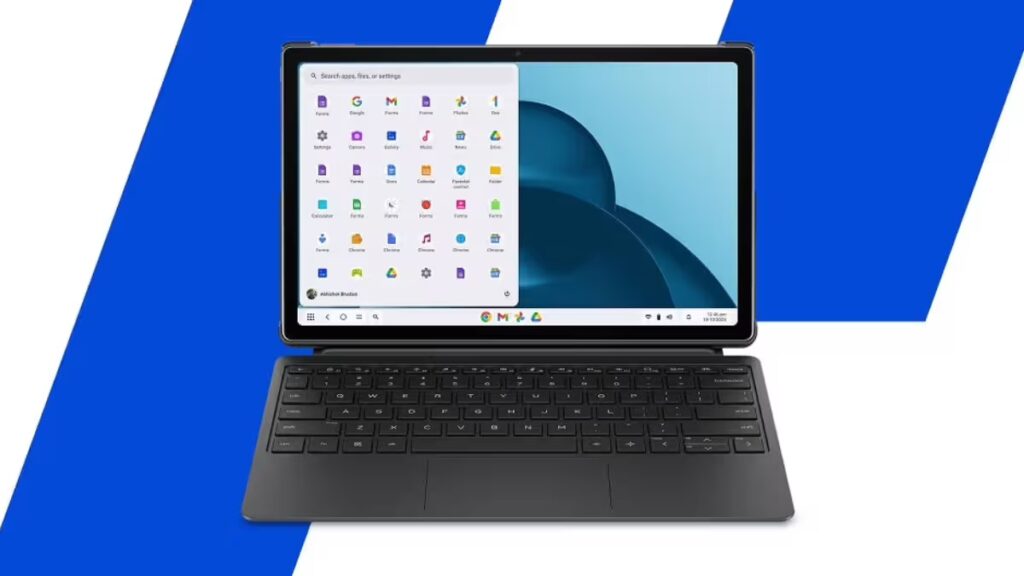
The HP OmniPad 12 features a 12-inch 2K touchscreen with a 16:10 aspect ratio, 90Hz refresh rate, and up to 400 nits of brightness. The detachable keyboard lets you switch between a conventional tablet setup and something closer to a lightweight laptop when you need to get some work done. Without the keyboard attached, the tablet weighs around 600 grams, making it relatively easy to carry around.
Under the hood, the OmniPad 12 is powered by a Qualcomm Snapdragon 6 Gen 3, paired with 8GB of LPDDR5 RAM and UFS storage. There’s also a microSD card slot supporting up to 1TB of expandable storage, which should come in handy if you plan on keeping a lot of documents, videos, or other files locally.
HP claims the tablet can deliver up to 18 hours of battery life on a single charge. For video calls and online classes, you get an 8MP front camera, a 13MP rear camera, and dual high-SNR microphones. There are also quad speakers with DTS Ultra support for watching movies or listening to music. Connectivity options include Wi-Fi 6E, Bluetooth 5.2, and a USB 2.0 Type-C port.
Price, Availability, and Launch Offers
The HP OmniPad 12 starts at ₹48,999 in India and is available in Denim Blue and Meteor Silver. Buyers can pick it up through HP’s online store, Amazon, Flipkart, Reliance, Croma, Vijay Sales, and HP World stores. HP is also offering ₹5,000 cashback on eligible bank credit cards during the launch period.
Perhaps the more interesting launch offer is the bundled one-year AI subscription package, which HP values at ₹96,000. According to the company, buyers get access to services powered by GPT-5, Claude 4, Gemini 2.5, Perplexity, Grok 4, and DeepSeek for one year.
OmniPad 12 as an alternative to carrying a conventional laptop, particularly for students, young professionals, first-time PC buyers, and small businesses. The tablet runs Android 16 and can be used for everything from attending online classes and taking notes to working on documents, presentations, video calls, and light content creation.
HP OmniPad 12 Specifications
The HP OmniPad 12 features a 12-inch 2K touchscreen with a 16:10 aspect ratio, 90Hz refresh rate, and up to 400 nits of brightness. The detachable keyboard lets you switch between a conventional tablet setup and something closer to a lightweight laptop when you need to get some work done. Without the keyboard attached, the tablet weighs around 600 grams, making it relatively easy to carry around.
Under the hood, the OmniPad 12 is powered by a Qualcomm Snapdragon 6 Gen 3, paired with 8GB of LPDDR5 RAM and UFS storage. There’s also a microSD card slot supporting up to 1TB of expandable storage, which should come in handy if you plan on keeping a lot of documents, videos, or other files locally.
HP claims the tablet can deliver up to 18 hours of battery life on a single charge. For video calls and online classes, you get an 8MP front camera, a 13MP rear camera, and dual high-SNR microphones. There are also quad speakers with DTS Ultra support for watching movies or listening to music. Connectivity options include Wi-Fi 6E, Bluetooth 5.2, and a USB 2.0 Type-C port.
Price, Availability, and Launch Offers
The HP OmniPad 12 starts at ₹48,999 in India and is available in Denim Blue and Meteor Silver. Buyers can pick it up through HP’s online store, Amazon, Flipkart, Reliance, Croma, Vijay Sales, and HP World stores. HP is also offering ₹5,000 cashback on eligible bank credit cards during the launch period.
Perhaps the more interesting launch offer is the bundled one-year AI subscription package, which HP values at ₹96,000. According to the company, buyers get access to services powered by GPT-5, Claude 4, Gemini 2.5, Perplexity, Grok 4, and DeepSeek for one year.
#HPs #OmniPad #Replace #LaptopHP">HP’s New OmniPad 12 Wants to Replace Your Laptop for ₹48,999
HP has expanded its tablet lineup in India with the launch of the HP OmniPad 12, its first OmniPad designed specifically for the Indian market. Starting at ₹48,999, the Android tablet comes with a detachable keyboard, a 12-inch 2K display, a Snapdragon processor, and up to 18 hours of claimed battery life.
HP is positioning the OmniPad 12 as an alternative to carrying a conventional laptop, particularly for students, young professionals, first-time PC buyers, and small businesses. The tablet runs Android 16 and can be used for everything from attending online classes and taking notes to working on documents, presentations, video calls, and light content creation.
HP OmniPad 12 Specifications
The HP OmniPad 12 features a 12-inch 2K touchscreen with a 16:10 aspect ratio, 90Hz refresh rate, and up to 400 nits of brightness. The detachable keyboard lets you switch between a conventional tablet setup and something closer to a lightweight laptop when you need to get some work done. Without the keyboard attached, the tablet weighs around 600 grams, making it relatively easy to carry around.
Under the hood, the OmniPad 12 is powered by a Qualcomm Snapdragon 6 Gen 3, paired with 8GB of LPDDR5 RAM and UFS storage. There’s also a microSD card slot supporting up to 1TB of expandable storage, which should come in handy if you plan on keeping a lot of documents, videos, or other files locally.
HP claims the tablet can deliver up to 18 hours of battery life on a single charge. For video calls and online classes, you get an 8MP front camera, a 13MP rear camera, and dual high-SNR microphones. There are also quad speakers with DTS Ultra support for watching movies or listening to music. Connectivity options include Wi-Fi 6E, Bluetooth 5.2, and a USB 2.0 Type-C port.
Price, Availability, and Launch Offers
The HP OmniPad 12 starts at ₹48,999 in India and is available in Denim Blue and Meteor Silver. Buyers can pick it up through HP’s online store, Amazon, Flipkart, Reliance, Croma, Vijay Sales, and HP World stores. HP is also offering ₹5,000 cashback on eligible bank credit cards during the launch period.
Perhaps the more interesting launch offer is the bundled one-year AI subscription package, which HP values at ₹96,000. According to the company, buyers get access to services powered by GPT-5, Claude 4, Gemini 2.5, Perplexity, Grok 4, and DeepSeek for one year.
#HPs #OmniPad #Replace #LaptopHP
HP has expanded its tablet lineup in India with the launch of the HP OmniPad…
Updated June 2026: I’ve tested a number of new laptops that I’ve added or considered for this update, including the Lenovo IdeaPad Slim 5x, HP OmniBook Ultra, HP OmniBook 3, Asus Zenbook A16, Acer Swift 16 Ai, and Asus TUF Gaming A14. I’ve also included mention of announcements from Computex.
The Laptops I Recommend Most
Apple
MacBook Air (M5, 2026)
When friends or family ask what laptop to buy, I always start with the MacBook Air. It is far more powerful than its compact size suggests. With the new M5 chip, its GPU matches the M3 Pro MacBook Pro, easily handling everything from gaming to video editing. That’s not at all what the MacBook Air is designed for, but the performance is there when you want to dabble. It’s what makes it feel like a do-it-all machine, all contained in a fanless chassis that’s still one of the thinnest laptops you can buy. Oh, and did I mention it’ll last well over a full work day away from the wall and perform as well on battery as when plugged in? In almost every aspect, it’s the gold standard.
While the lower price of the new MacBook Neo might be tempting, the MacBook Air is the better choice for anyone working at a computer all day. With its superior performance, extra memory, faster storage, and Thunderbolt ports, you will never have to question if you have the right tool for the job. (And unless you already know you need a MacBook Pro, you probably don’t.)
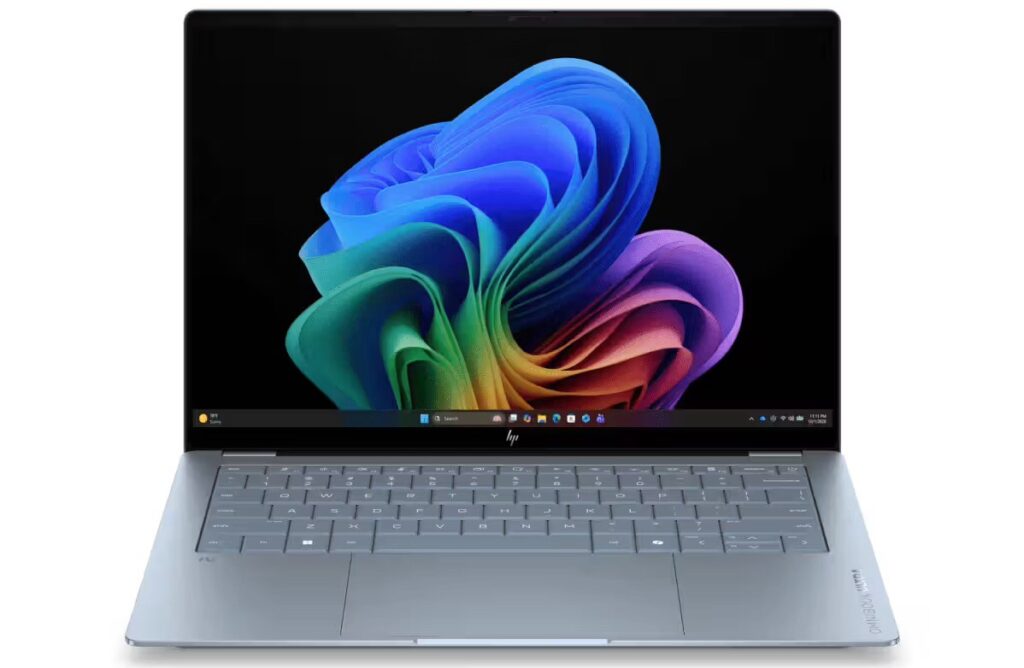
If you prefer Windows or need it for specific applications, the HP OmniBook Ultra 14 is the strongest alternative to the MacBook Air. It might just be the best laptop HP has ever made. The device is beautifully built and incredibly sturdy, with a thin chassis (though the height of the feet makes it taller on the table next to the MacBook Air), an oversized haptic trackpad, and polished metal edges. I also appreciate the three Thunderbolt 4 ports split between both sides for convenient charging, as well as the surprisingly good speakers.
I tested the high-end model, which features a fast Snapdragon X2 Elite and 32 GB of RAM, and a gorgeous 2880 x 1800 OLED display. The screen offers near-perfect colors, excellent brightness, and astounding HDR performance. It doesn’t get much better than this. My only real complaint is that the glossy OLED screen is quite reflective and lacks an anti-glare coating. The displays of the two configurations of the OmniBook Ultra are quite different though. Hopefully there will be more configuration options in the near future, as I’d love to see something with the higher-end OLED panel available in a cheaper configuration. The base configuration sold directly from HP is lower resolution and dimmer.
My other favorite alternative to the 15-inch MacBook Air is the Lenovo IdeaPad Slim 5x. I was impressed by the overall package for this laptop, which retails for $900 before any discounts. It’s not as refined as the OmniBook Ultra or MacBook Air, but it makes up for it in other areas. For example, while it lacks a haptic trackpad, it boasts a fantastic 2560 x 1600 OLED display with a 165-Hz refresh rate. I highly recommend the $30 upgrade from the base panel to get this screen. Additionally, while it is slightly thicker than the MacBook Air, that extra space allows for a great selection of ports, including HDMI, USB-A, and an SD card slot.
But the smart thing about the IdeaPad Slim 5x is that it undercuts the MacBook Air and competitive Windows laptops in terms of price. When it comes down to it, it’s currently the best Windows laptops under $1,000.
I used to recommend the Surface Laptop 13.8 (also known as the 7th Edition) as one of my top picks. While I still love this laptop, it’s risen in price dramatically and no longer feels like a good value, especially since it’s two years old at this point. I’ve been waiting for Microsoft to refresh the Surface Laptop to Qualcomm’s Snapdragon X2 chips for improved performance, which still hasn’t happened. In the meantime, I’ll just keep waiting for the Surface Laptop Ultra that comes out later this year.
Cheap Laptops That Are Actually Good
While “cheap” means something different to everyone, the best budget laptops generally fall under $750. This is where Windows truly shines, offering great specs for less money. Thanks to the latest processors from Qualcomm and Intel, these laptops now offer battery life that rivals Apple. The best deal I’ve tested is the HP OmniBook 5. It features a Snapdragon X processor, 16 GB of RAM, 512 GB of storage, and a 14-inch OLED screen. Discounts fluctuate frequently, but right now you can find it directly from HP deal for $660, which is an incredible value.
Updated June 2026: I’ve tested a number of new laptops that I’ve added or considered for this update, including the Lenovo IdeaPad Slim 5x, HP OmniBook Ultra, HP OmniBook 3, Asus Zenbook A16, Acer Swift 16 Ai, and Asus TUF Gaming A14. I’ve also included mention of announcements from Computex.
The Laptops I Recommend Most
Apple
MacBook Air (M5, 2026)
When friends or family ask what laptop to buy, I always start with the MacBook Air. It is far more powerful than its compact size suggests. With the new M5 chip, its GPU matches the M3 Pro MacBook Pro, easily handling everything from gaming to video editing. That’s not at all what the MacBook Air is designed for, but the performance is there when you want to dabble. It’s what makes it feel like a do-it-all machine, all contained in a fanless chassis that’s still one of the thinnest laptops you can buy. Oh, and did I mention it’ll last well over a full work day away from the wall and perform as well on battery as when plugged in? In almost every aspect, it’s the gold standard.
While the lower price of the new MacBook Neo might be tempting, the MacBook Air is the better choice for anyone working at a computer all day. With its superior performance, extra memory, faster storage, and Thunderbolt ports, you will never have to question if you have the right tool for the job. (And unless you already know you need a MacBook Pro, you probably don’t.)
If you prefer Windows or need it for specific applications, the HP OmniBook Ultra 14 is the strongest alternative to the MacBook Air. It might just be the best laptop HP has ever made. The device is beautifully built and incredibly sturdy, with a thin chassis (though the height of the feet makes it taller on the table next to the MacBook Air), an oversized haptic trackpad, and polished metal edges. I also appreciate the three Thunderbolt 4 ports split between both sides for convenient charging, as well as the surprisingly good speakers.
I tested the high-end model, which features a fast Snapdragon X2 Elite and 32 GB of RAM, and a gorgeous 2880 x 1800 OLED display. The screen offers near-perfect colors, excellent brightness, and astounding HDR performance. It doesn’t get much better than this. My only real complaint is that the glossy OLED screen is quite reflective and lacks an anti-glare coating. The displays of the two configurations of the OmniBook Ultra are quite different though. Hopefully there will be more configuration options in the near future, as I’d love to see something with the higher-end OLED panel available in a cheaper configuration. The base configuration sold directly from HP is lower resolution and dimmer.
My other favorite alternative to the 15-inch MacBook Air is the Lenovo IdeaPad Slim 5x. I was impressed by the overall package for this laptop, which retails for $900 before any discounts. It’s not as refined as the OmniBook Ultra or MacBook Air, but it makes up for it in other areas. For example, while it lacks a haptic trackpad, it boasts a fantastic 2560 x 1600 OLED display with a 165-Hz refresh rate. I highly recommend the $30 upgrade from the base panel to get this screen. Additionally, while it is slightly thicker than the MacBook Air, that extra space allows for a great selection of ports, including HDMI, USB-A, and an SD card slot.
But the smart thing about the IdeaPad Slim 5x is that it undercuts the MacBook Air and competitive Windows laptops in terms of price. When it comes down to it, it’s currently the best Windows laptops under $1,000.
I used to recommend the Surface Laptop 13.8 (also known as the 7th Edition) as one of my top picks. While I still love this laptop, it’s risen in price dramatically and no longer feels like a good value, especially since it’s two years old at this point. I’ve been waiting for Microsoft to refresh the Surface Laptop to Qualcomm’s Snapdragon X2 chips for improved performance, which still hasn’t happened. In the meantime, I’ll just keep waiting for the Surface Laptop Ultra that comes out later this year.
Cheap Laptops That Are Actually Good
While “cheap” means something different to everyone, the best budget laptops generally fall under $750. This is where Windows truly shines, offering great specs for less money. Thanks to the latest processors from Qualcomm and Intel, these laptops now offer battery life that rivals Apple. The best deal I’ve tested is the HP OmniBook 5. It features a Snapdragon X processor, 16 GB of RAM, 512 GB of storage, and a 14-inch OLED screen. Discounts fluctuate frequently, but right now you can find it directly from HP deal for $660, which is an incredible value.
#Testing #Hundreds #Laptops #Models #Recommendlaptops,laptop,mac,macbook,buying guides,hp,dell,lenovo,intel,amd,shopping,qualcomm">After Testing Hundreds of Laptops, These Are the Models I Recommend
I’ve been reviewing laptops for well over a decade, sometimes testing over 30 devices per year. As you can probably guess, they aren’t all winners, and many should be avoided, no matter how cheap the discount is. Good news: It’s my job to recommend laptops that fit your budget and won’t make you regret your purchase six months later. So, don’t fall for the marketing, fake sales, or knockoff brands on Amazon. These are my favorite laptops that I’ve tested myself and would highly recommend you buy.
Updated June 2026: I’ve tested a number of new laptops that I’ve added or considered for this update, including the Lenovo IdeaPad Slim 5x, HP OmniBook Ultra, HP OmniBook 3, Asus Zenbook A16, Acer Swift 16 Ai, and Asus TUF Gaming A14. I’ve also included mention of announcements from Computex.
The Laptops I Recommend Most
Apple
MacBook Air (M5, 2026)
When friends or family ask what laptop to buy, I always start with the MacBook Air. It is far more powerful than its compact size suggests. With the new M5 chip, its GPU matches the M3 Pro MacBook Pro, easily handling everything from gaming to video editing. That’s not at all what the MacBook Air is designed for, but the performance is there when you want to dabble. It’s what makes it feel like a do-it-all machine, all contained in a fanless chassis that’s still one of the thinnest laptops you can buy. Oh, and did I mention it’ll last well over a full work day away from the wall and perform as well on battery as when plugged in? In almost every aspect, it’s the gold standard.
While the lower price of the new MacBook Neo might be tempting, the MacBook Air is the better choice for anyone working at a computer all day. With its superior performance, extra memory, faster storage, and Thunderbolt ports, you will never have to question if you have the right tool for the job. (And unless you already know you need a MacBook Pro, you probably don’t.)
If you prefer Windows or need it for specific applications, the HP OmniBook Ultra 14 is the strongest alternative to the MacBook Air. It might just be the best laptop HP has ever made. The device is beautifully built and incredibly sturdy, with a thin chassis (though the height of the feet makes it taller on the table next to the MacBook Air), an oversized haptic trackpad, and polished metal edges. I also appreciate the three Thunderbolt 4 ports split between both sides for convenient charging, as well as the surprisingly good speakers.
I tested the high-end model, which features a fast Snapdragon X2 Elite and 32 GB of RAM, and a gorgeous 2880 x 1800 OLED display. The screen offers near-perfect colors, excellent brightness, and astounding HDR performance. It doesn’t get much better than this. My only real complaint is that the glossy OLED screen is quite reflective and lacks an anti-glare coating. The displays of the two configurations of the OmniBook Ultra are quite different though. Hopefully there will be more configuration options in the near future, as I’d love to see something with the higher-end OLED panel available in a cheaper configuration. The base configuration sold directly from HP is lower resolution and dimmer.
My other favorite alternative to the 15-inch MacBook Air is the Lenovo IdeaPad Slim 5x. I was impressed by the overall package for this laptop, which retails for $900 before any discounts. It’s not as refined as the OmniBook Ultra or MacBook Air, but it makes up for it in other areas. For example, while it lacks a haptic trackpad, it boasts a fantastic 2560 x 1600 OLED display with a 165-Hz refresh rate. I highly recommend the $30 upgrade from the base panel to get this screen. Additionally, while it is slightly thicker than the MacBook Air, that extra space allows for a great selection of ports, including HDMI, USB-A, and an SD card slot.
But the smart thing about the IdeaPad Slim 5x is that it undercuts the MacBook Air and competitive Windows laptops in terms of price. When it comes down to it, it’s currently the best Windows laptops under $1,000.
I used to recommend the Surface Laptop 13.8 (also known as the 7th Edition) as one of my top picks. While I still love this laptop, it’s risen in price dramatically and no longer feels like a good value, especially since it’s two years old at this point. I’ve been waiting for Microsoft to refresh the Surface Laptop to Qualcomm’s Snapdragon X2 chips for improved performance, which still hasn’t happened. In the meantime, I’ll just keep waiting for the Surface Laptop Ultra that comes out later this year.
Cheap Laptops That Are Actually Good
While “cheap” means something different to everyone, the best budget laptops generally fall under $750. This is where Windows truly shines, offering great specs for less money. Thanks to the latest processors from Qualcomm and Intel, these laptops now offer battery life that rivals Apple. The best deal I’ve tested is the HP OmniBook 5. It features a Snapdragon X processor, 16 GB of RAM, 512 GB of storage, and a 14-inch OLED screen. Discounts fluctuate frequently, but right now you can find it directly from HP deal for $660, which is an incredible value.
I've been reviewing laptops for well over a decade, sometimes testing over 30 devices per…
announced a new line of Windows PCs equipped with NVIDIA RTX Spark, designed to enhance AI computing experiences. They’re targeting creators, gamers, and developers who need to run intense apps and use new AI workflows. HP wants these PCs to be super capable, ultra-responsive, and ready for what’s ahead.
The new lineup includes the OmniBook Ultra 16 and OmniBook X 14. Both come with NVIDIA RTX Spark tech, which blends AI and superior graphics while boosting battery efficiency. So, HP is all about amazing performance without sacrificing battery life or mobility. The company claims these laptops will rank among the world’s thinnest models without compromising battery life.
Built For Creators, Gamers, And AI Developers
The platform gives us the computing power for video production, digital design, and content creation. Plus, gamers get better graphics and a more responsive experience. AI developers can make and test AI models right on their computers, too. This mix of AI and graphics tech makes advanced computing easier for a lot more people to use.
Along with its new AI laptops, HP is expanding into desktops, workstations, and enterprise systems. The company is preparing a compact RTX Spark-powered desktop that combines strong AI performance with a space-saving design. HP is also building advanced systems using NVIDIA GB300 technology for demanding business tasks. Furthermore, for those needing more security, there’s the ZGX Nano. It provides a safe space to develop and deploy AI without worries.
Expected Price and Availability
HP plans to launch the OmniBook Ultra 16 and OmniBook X 14 later in 2026. The company has not revealed pricing details for either laptop yet. More details about the devices are expected closer to release. HP also plans to launch the OmniDesk Mini Desktop PC in August 2026. Buyers can expect further information about features and pricing before the products reach the market.
announced a new line of Windows PCs equipped with NVIDIA RTX Spark, designed to enhance AI computing experiences. They’re targeting creators, gamers, and developers who need to run intense apps and use new AI workflows. HP wants these PCs to be super capable, ultra-responsive, and ready for what’s ahead.
The new lineup includes the OmniBook Ultra 16 and OmniBook X 14. Both come with NVIDIA RTX Spark tech, which blends AI and superior graphics while boosting battery efficiency. So, HP is all about amazing performance without sacrificing battery life or mobility. The company claims these laptops will rank among the world’s thinnest models without compromising battery life.
Built For Creators, Gamers, And AI Developers
The platform gives us the computing power for video production, digital design, and content creation. Plus, gamers get better graphics and a more responsive experience. AI developers can make and test AI models right on their computers, too. This mix of AI and graphics tech makes advanced computing easier for a lot more people to use.
Along with its new AI laptops, HP is expanding into desktops, workstations, and enterprise systems. The company is preparing a compact RTX Spark-powered desktop that combines strong AI performance with a space-saving design. HP is also building advanced systems using NVIDIA GB300 technology for demanding business tasks. Furthermore, for those needing more security, there’s the ZGX Nano. It provides a safe space to develop and deploy AI without worries.
Expected Price and Availability
HP plans to launch the OmniBook Ultra 16 and OmniBook X 14 later in 2026. The company has not revealed pricing details for either laptop yet. More details about the devices are expected closer to release. HP also plans to launch the OmniDesk Mini Desktop PC in August 2026. Buyers can expect further information about features and pricing before the products reach the market.
#Introduces #NextGeneration #PCs #NVIDIA #RTX #SparkHP">HP Introduces Next-Generation AI PCs With NVIDIA RTX Spark
HP has announced a new line of Windows PCs equipped with NVIDIA RTX Spark, designed to enhance AI computing experiences. They’re targeting creators, gamers, and developers who need to run intense apps and use new AI workflows. HP wants these PCs to be super capable, ultra-responsive, and ready for what’s ahead.
The new lineup includes the OmniBook Ultra 16 and OmniBook X 14. Both come with NVIDIA RTX Spark tech, which blends AI and superior graphics while boosting battery efficiency. So, HP is all about amazing performance without sacrificing battery life or mobility. The company claims these laptops will rank among the world’s thinnest models without compromising battery life.
Built For Creators, Gamers, And AI Developers
The platform gives us the computing power for video production, digital design, and content creation. Plus, gamers get better graphics and a more responsive experience. AI developers can make and test AI models right on their computers, too. This mix of AI and graphics tech makes advanced computing easier for a lot more people to use.
Along with its new AI laptops, HP is expanding into desktops, workstations, and enterprise systems. The company is preparing a compact RTX Spark-powered desktop that combines strong AI performance with a space-saving design. HP is also building advanced systems using NVIDIA GB300 technology for demanding business tasks. Furthermore, for those needing more security, there’s the ZGX Nano. It provides a safe space to develop and deploy AI without worries.
Expected Price and Availability
HP plans to launch the OmniBook Ultra 16 and OmniBook X 14 later in 2026. The company has not revealed pricing details for either laptop yet. More details about the devices are expected closer to release. HP also plans to launch the OmniDesk Mini Desktop PC in August 2026. Buyers can expect further information about features and pricing before the products reach the market.
The EliteBook and ProBook series are clearly aimed at enterprise users, with features like HP Wolf Security and HP Sure View privacy protection. HP claims some configurations can deliver up to 85 TOPS of AI performance, though realistically, most users will probably care more about battery life and everyday responsiveness than AI numbers alone.
The OmniBook lineup, on the other hand, targets mainstream users and creators. Models like the OmniBook Ultra 14, OmniBook X, OmniBook 5, and OmniBook 3 focus heavily on portability and AI-assisted features like posture correction, gesture controls, and smart meeting enhancements. HP is also bundling compact GaN chargers with some models, which is genuinely useful for people constantly traveling with their laptops.
New Work Stations
For professionals working with demanding AI or rendering workloads, HP has launched new Z-series workstations in India, including the HP Z8 Fury G6i, HP ZGX Nano G1n AI Station, HP Z4 G6i, and HP ZBook X G2i 16. These machines can be configured with both AMD and Intel hardware and are aimed at creators, developers, engineers, and enterprise users handling heavy workflows.
HP also announced updates to its Workforce Experience Platform (WXP), which now includes AI-driven tools for device management and workflow automation. The goal here is to help IT teams monitor devices more efficiently and identify system issues before they become major problems.
The EliteBook and ProBook series are clearly aimed at enterprise users, with features like HP Wolf Security and HP Sure View privacy protection. HP claims some configurations can deliver up to 85 TOPS of AI performance, though realistically, most users will probably care more about battery life and everyday responsiveness than AI numbers alone.
The OmniBook lineup, on the other hand, targets mainstream users and creators. Models like the OmniBook Ultra 14, OmniBook X, OmniBook 5, and OmniBook 3 focus heavily on portability and AI-assisted features like posture correction, gesture controls, and smart meeting enhancements. HP is also bundling compact GaN chargers with some models, which is genuinely useful for people constantly traveling with their laptops.
New Work Stations
For professionals working with demanding AI or rendering workloads, HP has launched new Z-series workstations in India, including the HP Z8 Fury G6i, HP ZGX Nano G1n AI Station, HP Z4 G6i, and HP ZBook X G2i 16. These machines can be configured with both AMD and Intel hardware and are aimed at creators, developers, engineers, and enterprise users handling heavy workflows.
HP also announced updates to its Workforce Experience Platform (WXP), which now includes AI-driven tools for device management and workflow automation. The goal here is to help IT teams monitor devices more efficiently and identify system issues before they become major problems.
#Launches #PCs #OmniPad #Tablet #Workstations #IndiaHP">HP Launches 20+ New AI PCs, OmniPad Tablet, And Workstations In India
HP has announced a massive refresh of its India lineup with more than 20 new products spanning laptops, tablets, AI workstations, collaboration gear, and even printers. And yes, just like every other tech launch in 2026, the letters “AI” were everywhere. Still, there are a couple of genuinely interesting products here, especially HP’s first Android tablet for India and a bizarre new “keyboard PC” that honestly looks straight out of a sci-fi setup.
HP OmniPad 12
Windows tablets are nothing new and have been on the market for ages. So, when HP announced its new OmniPad, we all thought it would be a Windows tablet for creative users. Well, it’s not. The OmniPad 12 is powered by the Qualcomm Snapdragon SM6475Q processor and runs Android, optimized for the bigger screen. The front houses a 12-inch 2K (1,200×2,000 pixels) multi-touch display with a 90Hz refresh rate and a peak brightness of 400 nits.
For cameras, HP has included a 13MP rear sensor alongside a front-facing 8MP camera for video calls. The company claims the 31Wh battery can deliver up to 18 hours of usage. Pricing starts at ₹48,999, which places the OmniPad 12 directly against Apple’s iPad Air and premium Android tablets from Samsung. We should get our hands on a review unit soon to see how well it actually stacks up.
PC in a Keyboard?
Among all the announcements, the HP EliteBoard G1a Next Gen AI PC is probably the strangest. HP describes it as the world’s first AI keyboard PC, which basically means the entire computer is built into a keyboard.
HP says the machine can deliver up to 50 TOPS of NPU performance using the AMD processor and is designed for hybrid work environments where portability and simplicity matter. While AI branding is becoming exhausting at this point, the compact form factor itself is actually pretty interesting.
EliteBook, ProBook, And OmniBook Get AI Upgrades
Beyond the bizarrness of the EliteBoard, HP has refreshed almost its entire laptop lineup in India with new processors. This includes the EliteBook X G2, EliteBook 8 G2, ProBook 4 G2, and several new OmniBook models.
The EliteBook and ProBook series are clearly aimed at enterprise users, with features like HP Wolf Security and HP Sure View privacy protection. HP claims some configurations can deliver up to 85 TOPS of AI performance, though realistically, most users will probably care more about battery life and everyday responsiveness than AI numbers alone.
The OmniBook lineup, on the other hand, targets mainstream users and creators. Models like the OmniBook Ultra 14, OmniBook X, OmniBook 5, and OmniBook 3 focus heavily on portability and AI-assisted features like posture correction, gesture controls, and smart meeting enhancements. HP is also bundling compact GaN chargers with some models, which is genuinely useful for people constantly traveling with their laptops.
New Work Stations
For professionals working with demanding AI or rendering workloads, HP has launched new Z-series workstations in India, including the HP Z8 Fury G6i, HP ZGX Nano G1n AI Station, HP Z4 G6i, and HP ZBook X G2i 16. These machines can be configured with both AMD and Intel hardware and are aimed at creators, developers, engineers, and enterprise users handling heavy workflows.
HP also announced updates to its Workforce Experience Platform (WXP), which now includes AI-driven tools for device management and workflow automation. The goal here is to help IT teams monitor devices more efficiently and identify system issues before they become major problems.
The first thing I noticed when I started using the HyperX Pulsefire Saga was how light it felt in my hand. At just 69 grams, it felt easy to control without feeling too fragile. While gaming, this made tracking and quick reactions feel smoother. What really makes this mouse different is its modular build. I was able to change the top shell, button covers, and side buttons within seconds. The magnetic system works well, and everything clicks into place securely. Even after changing configurations multiple times, the build stayed consistent.
In terms of comfort, I used it for long sessions, sometimes up to a few hours at a stretch. The weight, or lack thereof, helps a lot with comfort, and I didn’t experience the strain that I normally get with a heavier mouse. There are a couple of things that didn’t quite work for me, though. The side buttons don’t really feel as high-quality as the rest of the mouse, and there’s a little wobble if you look up close. The scroll wheel is also a bit smaller, but these are just nitpicks.
Overall, the module design is more about function than style, especially if you like to have control over mouse comfort.
Performance
In terms of performance, this mouse does not disappoint. The 26K DPI sensor shines for tracking, and the ability to reach an 8K polling rate is a clear indicator that this mouse is intended for precision use. I tested it with games like Valorant and GTA V, and the performance was pretty stellar. The movements felt smooth, and I did not feel jitters or unusual behavior.
Whether I was making small aim corrections or fast flicks, it reacted instantly. This made it easier to stay consistent during matches. The clicks have a fast and responsive feel, particularly when you’re firing weapons in FPS games.
With a wired mouse, I found that the cable didn’t interfere with my gaming experience because it was flexible enough to allow natural movement. Overall, performance is accurate, fast, and reliable, which is particularly important for a competitive gamer.
Software and Battery
Since this is a wired mouse, battery life isn’t something you need to worry about. I could just plug it in and start playing without worrying about charging or interruptions, which I found really convenient.
For software, HyperX provides NGENUITY. I used it to customize DPI settings, adjust the polling rate, and play around with RGB lighting. The controls are easy to understand, so setting things up didn’t take much effort. There are also options to remap buttons and fine-tune performance settings. It gives enough control for most users without feeling overwhelming.
That said, once I finished setting things up, I didn’t really need to open the software again. It works well, but it’s more of a one-time setup tool rather than something you’ll use regularly.
Verdict
After using the HyperX Pulsefire Saga for a while, it’s clear that it’s more than just a gaming mouse. You can currently buy this mouse from Amazon for Rs. 3,990. I played around with a few settings before finding one that felt comfortable to use, and once I got into the swing of things, it was much more comfortable. From a functionality standpoint, I can say it’s held up incredibly well. The sensor is fast and reliable, and the lightweight design is a big plus for long-term use.
One or two things could be improved, particularly the side buttons and the wheel, but they didn’t really affect my overall experience. If you’re like me and want a slightly more personalized, comfortable experience, this mouse makes a lot of sense.
The first thing I noticed when I started using the HyperX Pulsefire Saga was how light it felt in my hand. At just 69 grams, it felt easy to control without feeling too fragile. While gaming, this made tracking and quick reactions feel smoother. What really makes this mouse different is its modular build. I was able to change the top shell, button covers, and side buttons within seconds. The magnetic system works well, and everything clicks into place securely. Even after changing configurations multiple times, the build stayed consistent.
In terms of comfort, I used it for long sessions, sometimes up to a few hours at a stretch. The weight, or lack thereof, helps a lot with comfort, and I didn’t experience the strain that I normally get with a heavier mouse. There are a couple of things that didn’t quite work for me, though. The side buttons don’t really feel as high-quality as the rest of the mouse, and there’s a little wobble if you look up close. The scroll wheel is also a bit smaller, but these are just nitpicks.
Overall, the module design is more about function than style, especially if you like to have control over mouse comfort.
Performance
In terms of performance, this mouse does not disappoint. The 26K DPI sensor shines for tracking, and the ability to reach an 8K polling rate is a clear indicator that this mouse is intended for precision use. I tested it with games like Valorant and GTA V, and the performance was pretty stellar. The movements felt smooth, and I did not feel jitters or unusual behavior.
Whether I was making small aim corrections or fast flicks, it reacted instantly. This made it easier to stay consistent during matches. The clicks have a fast and responsive feel, particularly when you’re firing weapons in FPS games.
With a wired mouse, I found that the cable didn’t interfere with my gaming experience because it was flexible enough to allow natural movement. Overall, performance is accurate, fast, and reliable, which is particularly important for a competitive gamer.
Software and Battery
Since this is a wired mouse, battery life isn’t something you need to worry about. I could just plug it in and start playing without worrying about charging or interruptions, which I found really convenient.
For software, HyperX provides NGENUITY. I used it to customize DPI settings, adjust the polling rate, and play around with RGB lighting. The controls are easy to understand, so setting things up didn’t take much effort. There are also options to remap buttons and fine-tune performance settings. It gives enough control for most users without feeling overwhelming.
That said, once I finished setting things up, I didn’t really need to open the software again. It works well, but it’s more of a one-time setup tool rather than something you’ll use regularly.
Verdict
After using the HyperX Pulsefire Saga for a while, it’s clear that it’s more than just a gaming mouse. You can currently buy this mouse from Amazon for Rs. 3,990. I played around with a few settings before finding one that felt comfortable to use, and once I got into the swing of things, it was much more comfortable. From a functionality standpoint, I can say it’s held up incredibly well. The sensor is fast and reliable, and the lightweight design is a big plus for long-term use.
One or two things could be improved, particularly the side buttons and the wheel, but they didn’t really affect my overall experience. If you’re like me and want a slightly more personalized, comfortable experience, this mouse makes a lot of sense.
If you’re someone who spends hours gaming, you already know how important a good mouse is. The problem? Most gaming mice look different on paper but feel almost identical in hand. With so many options out there, it’s getting harder to find something that actually stands out. The HyperX Pulsefire Saga tries to flip that idea on its head with a modular design. Instead of adjusting your grip to the mouse, you can tweak the mouse itself to match your comfort. It also promises strong performance, with features such as a 26K DPI sensor and an 8K polling rate. But beyond the specs, I wanted to see if the modular design makes it better to use in real gameplay.
HyperX Pulsefire Saga
Deepti Pathak
Summary
After using the HyperX Pulsefire Saga for a while, it’s clear that it’s more than just a gaming mouse. From a functionality standpoint, I can say it’s held up incredibly well. The sensor is fast and reliable, and the lightweight design is a big plus for long-term use.
Design and Build
The first thing I noticed when I started using the HyperX Pulsefire Saga was how light it felt in my hand. At just 69 grams, it felt easy to control without feeling too fragile. While gaming, this made tracking and quick reactions feel smoother. What really makes this mouse different is its modular build. I was able to change the top shell, button covers, and side buttons within seconds. The magnetic system works well, and everything clicks into place securely. Even after changing configurations multiple times, the build stayed consistent.
In terms of comfort, I used it for long sessions, sometimes up to a few hours at a stretch. The weight, or lack thereof, helps a lot with comfort, and I didn’t experience the strain that I normally get with a heavier mouse. There are a couple of things that didn’t quite work for me, though. The side buttons don’t really feel as high-quality as the rest of the mouse, and there’s a little wobble if you look up close. The scroll wheel is also a bit smaller, but these are just nitpicks.
Overall, the module design is more about function than style, especially if you like to have control over mouse comfort.
Performance
In terms of performance, this mouse does not disappoint. The 26K DPI sensor shines for tracking, and the ability to reach an 8K polling rate is a clear indicator that this mouse is intended for precision use. I tested it with games like Valorant and GTA V, and the performance was pretty stellar. The movements felt smooth, and I did not feel jitters or unusual behavior.
Whether I was making small aim corrections or fast flicks, it reacted instantly. This made it easier to stay consistent during matches. The clicks have a fast and responsive feel, particularly when you’re firing weapons in FPS games.
With a wired mouse, I found that the cable didn’t interfere with my gaming experience because it was flexible enough to allow natural movement. Overall, performance is accurate, fast, and reliable, which is particularly important for a competitive gamer.
Software and Battery
Since this is a wired mouse, battery life isn’t something you need to worry about. I could just plug it in and start playing without worrying about charging or interruptions, which I found really convenient.
For software, HyperX provides NGENUITY. I used it to customize DPI settings, adjust the polling rate, and play around with RGB lighting. The controls are easy to understand, so setting things up didn’t take much effort. There are also options to remap buttons and fine-tune performance settings. It gives enough control for most users without feeling overwhelming.
That said, once I finished setting things up, I didn’t really need to open the software again. It works well, but it’s more of a one-time setup tool rather than something you’ll use regularly.
Verdict
After using the HyperX Pulsefire Saga for a while, it’s clear that it’s more than just a gaming mouse. You can currently buy this mouse from Amazon for Rs. 3,990. I played around with a few settings before finding one that felt comfortable to use, and once I got into the swing of things, it was much more comfortable. From a functionality standpoint, I can say it’s held up incredibly well. The sensor is fast and reliable, and the lightweight design is a big plus for long-term use.
One or two things could be improved, particularly the side buttons and the wheel, but they didn’t really affect my overall experience. If you’re like me and want a slightly more personalized, comfortable experience, this mouse makes a lot of sense.