×
How To Silence Your Apple Watch: 2025 Guide

How To Silence Your Apple Watch: 2025 Guide

Imagine you’re in a meeting, watching a movie at the cinema, or attending an event when your Apple Watch starts beeping or vibrating. It is very embarrassing when everyone around you is quiet. Thankfully, you silence the notifications and taps without missing a step. In this guide, we’ll show you a few different ways to silence your Apple Watch.

Different Methods to Silence Your Apple Watch

1. Quick Mute Using Your Palm

You don’t always have time to tap buttons when your watch goes off. Just cover the screen with your hand, and the sound will stop. However, you need to ensure that the gesture feature is enabled first. To activate this feature:

  1. Go to the Settings app on your Apple Watch.
  2. Tap on Gestures from the list.
  3. Turn on the Cover to Mute option.

2. Keep Things Quiet with Theater Mode

If you want your Apple Watch to remain quiet and not display notifications when you move your wrist, Theater Mode is ideal. It’s perfect for dark places like cinemas or late-night events. To turn it on:

  1. Open the Control Center by swiping up.
  2. Find the icon that looks like “Comedy and Tragedy Masks.”
  3. Tap it once. It will turn orange to show it’s active.
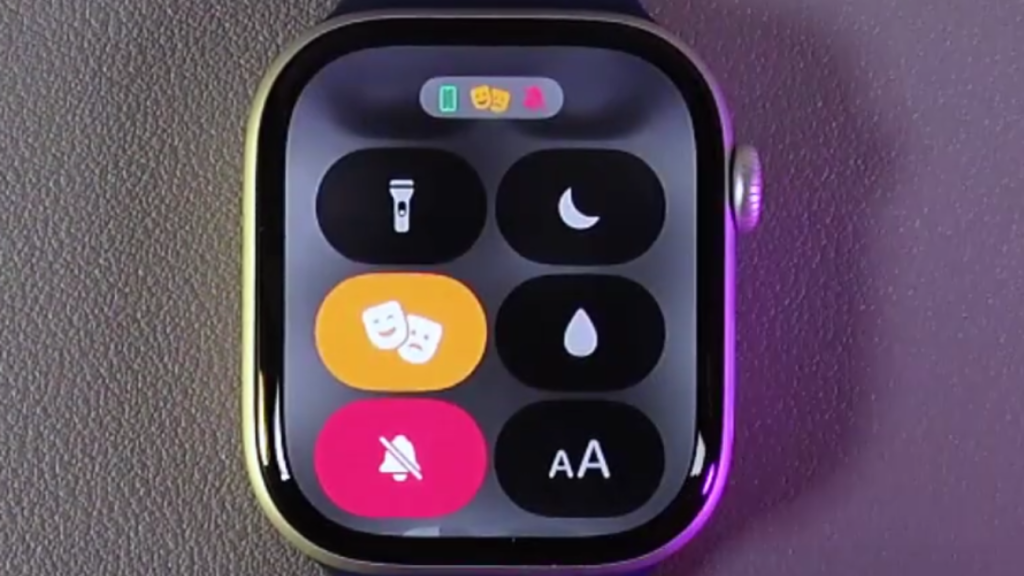
    image to Keep Things Quiet with Theater Mode

3. Quickly Silence Sounds with Control Center

Unlike Do Not Disturb, Silent Mode has to be turned on directly from your Apple Watch. It’s great when you want a sound-free experience but still want to receive alerts quietly. To turn it on:

  1. Press the Side Button to open the Control Center.
  2. Tap on the bell icon once.
  3. When the icon shows a line through it, Silent Mode is active.
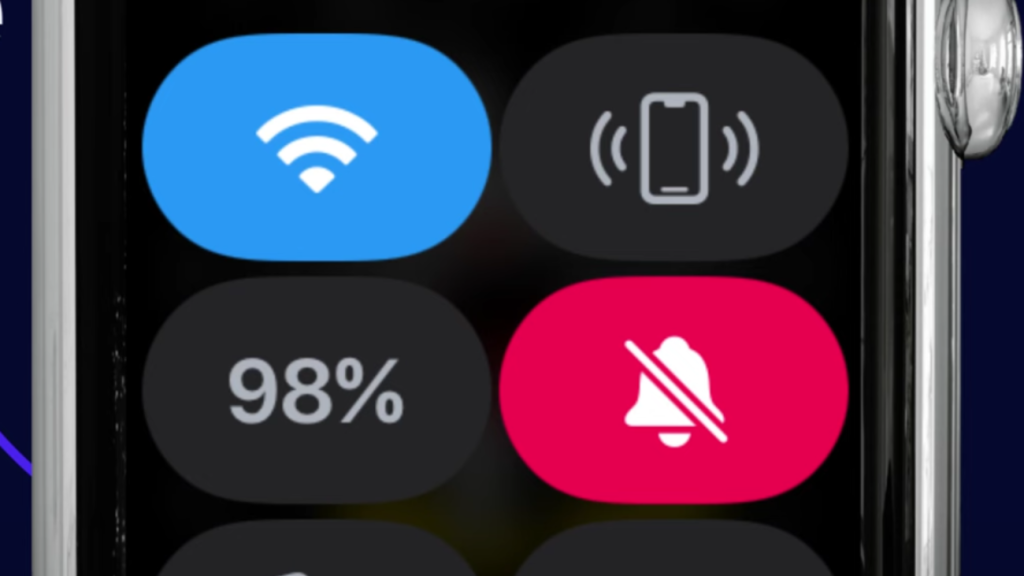
    image to Quickly Silence Sounds with Control Center

4. Keep Distractions Away with DND Mode

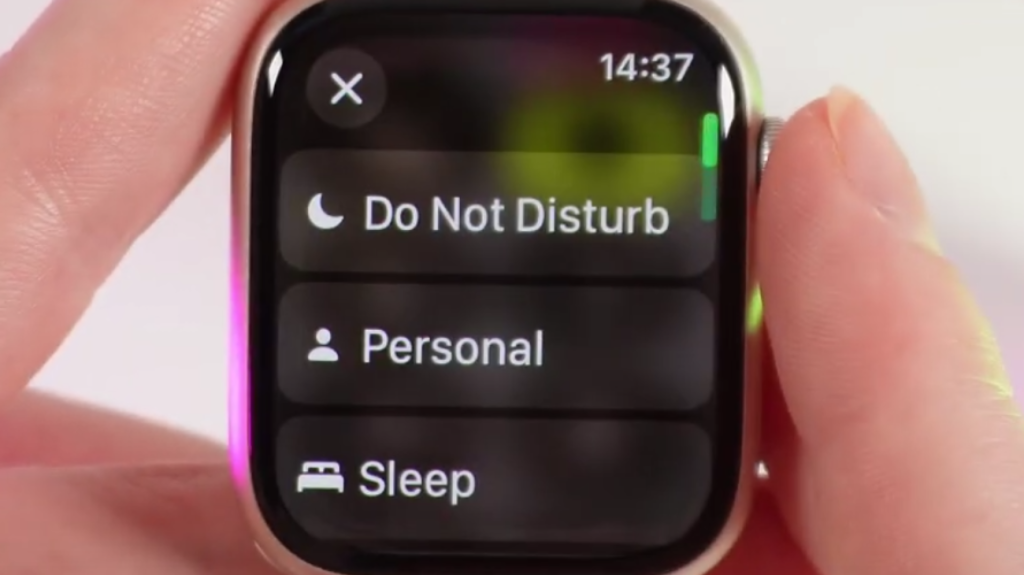
If you want complete silence from your Apple Watch, Do Not Disturb is a great option. It stops all notifications from making noise or lighting up the screen until you decide to turn it off. To turn it on:

  1. Swipe up from the bottom of your Apple Watch screen to open Control Center.
  2. Tap the Moon symbol.
  3. Select Do Not Disturb.
    image to click DND to Silence Your Apple Watch

Each option provides something slightly different. Use Silent Mode for regular silencing, Do Not Disturb for quiet time, Theater Mode when darkness and quiet are preferred, and Cover to Mute for fast, in-a-hurry situations. Choose what suits you best, based on your current location and activities.

Source link
#Silence #Apple #Watch #Guide

suggested that GLP-1s can tamp down people’s unhealthy urges for alcohol, cocaine, and even vices like gambling. And earlier this month, researchers in Denmark published data from the first double-blinded, randomized, and placebo-controlled trial of semaglutide for alcohol use disorder in The Lancet. Over a 26-week period, the study found that people on semaglutide consumed less alcohol than those given a placebo and experienced noticeably fewer heavy drinking days when they did drink.

Can Ozempic Treat Alcoholism? Here’s What You Should Know
                Semaglutide (the active ingredient in Ozempic and Wegovy) and other GLP-1 medications have rapidly become some of the most popular drugs in the world. Originally developed for type 2 diabetes, GLP-1s are now better known for treating obesity. In the near future, though, these drugs could have yet another vital use as treatments for alcohol addiction and other substance use disorders. Over the past few years, a growing base of evidence has suggested that GLP-1s can tamp down people’s unhealthy urges for alcohol, cocaine, and even vices like gambling. And earlier this month, researchers in Denmark published data from the first double-blinded, randomized, and placebo-controlled trial of semaglutide for alcohol use disorder in The Lancet. Over a 26-week period, the study found that people on semaglutide consumed less alcohol than those given a placebo and experienced noticeably fewer heavy drinking days when they did drink. © siamionau pavel via Shutterstock There are other similar studies underway, including in the United States. Some are testing semaglutide for other kinds of substance use disorder, like opioids. Others are testing newer drugs like tirzepatide (a dual agonist that pairs GLP-1 with the hunger-related hormone GIP).

 I reached out to an outside expert, Asim Shah, a professor and executive vice chair of psychiatry and behavioral sciences at Baylor College of Medicine, to talk about the emerging science surrounding GLP-1s and addiction treatment. We discussed the leading theory behind why GLP-1s can reduce addiction, his opinion of the recent Lancet trial, and what it will take for these drugs to be widely adopted as treatments for substance use disorders. The following has been lightly edited for clarity and grammar.

 Ed Cara, Gizmodo: Do we have any sort of sense yet as to how or why GLP-1s seem to be working well against substance use disorders? Asim Shah: So the craving, or pleasure, center of the brain is related to dopamine, which is a brain neurotransmitter. Whenever you crave something and you eat it or you take it, that gives you pleasure. That is the dopamine functioning in the brain. And all of this is related to the same thing, whether it’s a craving for food, craving for smoking, craving for alcohol, any drug. That’s the neurobiological mechanism of craving and pleasure, and it’s all the same mechanism.

 © Mohammed_Al_Ali via Shutterstock And incidentally, we found out that the people who were losing weight on these GLP-1s, they often also stopped smoking cigarettes and their addiction got better with alcohol. It was an incidental finding, but it’s something people are now trying to study more closely. Gizmodo: Speaking of studies, what do you make of the newest trial published in The Lancet this month? Shah: So this was a 26 week study, which had about 100 patients, half and half men and women both. In our world, 100 patients is a medium sized study; a larger one might usually have 300, 400, 600 patients. So this is a medium sized study, which is decent. It’s not bad. And in my opinion, it was done pretty well, not a lot of bias in the study that I saw.

 Now, of course, this is not a definitive study. And you need to follow up with these patients after the weeks of study. We call these start-up studies, and they are what we base future, longer and bigger studies on. So it’s a good base, and there are other studies on the way. Gizmodo: Broadly speaking, what are the questions that these longer and larger studies need to try answering? Shah: So there are a couple of things. These are different substances that people are looking at; one is alcohol, one smoking, the other is opiates. So the next studies we should be doing is to see whether GLP-1s like semaglutide can limit more than one of these addictions. Because the mechanism is the same mechanism for all the cravings and the addictions. So can it reduce all of these or just one if somebody is taking it?

 © Sebastien Bozon/AFP via Getty If we do keep seeing an effect here, it’s also important to know how quickly this happens and whether it can be sustained after you stop using a GLP-1. That’s why we have to follow people after these sorts of trials, to see if the effect can last after they stop taking the medication or if it requires people needing to stay on the drug for the effect. Gizmodo: These sort of studies are happening. But what should be the current takeaway for people with these addictions and their doctor? Is this something that could be used in the real world right now? Shah: Because they’re not approved right now, the takeaway should be that if you already have a current indication to take a GLP-1 which is for diabetes or obesity, certainly take it. If you also get an added advantage of stopping your smoking or alcohol use disorder, that is well and good because we don’t have approval for these disorders currently.

 So in other words, if somebody comes to us and says, “Hey, I want to start these medicines for smoking cessation or alcohol use disorder,” we may not be able to prescribe it because there’s no approval. But they can be part of a study which is going on in some centers for those disorders. And if somebody already is using them for diabetes or so, and in addition, they get a benefit for alcoholism, that’s great, too.      #Ozempic #Treat #Alcoholism #Heresaddiction,Alcoholism,GLP-1s,Ozempic,Q&As
© siamionau pavel via Shutterstock

There are other similar studies underway, including in the United States. Some are testing semaglutide for other kinds of substance use disorder, like opioids. Others are testing newer drugs like tirzepatide (a dual agonist that pairs GLP-1 with the hunger-related hormone GIP).

I reached out to an outside expert, Asim Shah, a professor and executive vice chair of psychiatry and behavioral sciences at Baylor College of Medicine, to talk about the emerging science surrounding GLP-1s and addiction treatment. We discussed the leading theory behind why GLP-1s can reduce addiction, his opinion of the recent Lancet trial, and what it will take for these drugs to be widely adopted as treatments for substance use disorders. The following has been lightly edited for clarity and grammar.

Ed Cara, Gizmodo: Do we have any sort of sense yet as to how or why GLP-1s seem to be working well against substance use disorders?

Asim Shah: So the craving, or pleasure, center of the brain is related to dopamine, which is a brain neurotransmitter. Whenever you crave something and you eat it or you take it, that gives you pleasure. That is the dopamine functioning in the brain. And all of this is related to the same thing, whether it’s a craving for food, craving for smoking, craving for alcohol, any drug. That’s the neurobiological mechanism of craving and pleasure, and it’s all the same mechanism.

The obesity medication Saxenda, made with liraglutide
© Mohammed_Al_Ali via Shutterstock

And incidentally, we found out that the people who were losing weight on these GLP-1s, they often also stopped smoking cigarettes and their addiction got better with alcohol. It was an incidental finding, but it’s something people are now trying to study more closely.

Gizmodo: Speaking of studies, what do you make of the newest trial published in The Lancet this month?

Shah: So this was a 26 week study, which had about 100 patients, half and half men and women both. In our world, 100 patients is a medium sized study; a larger one might usually have 300, 400, 600 patients. So this is a medium sized study, which is decent. It’s not bad. And in my opinion, it was done pretty well, not a lot of bias in the study that I saw.

Now, of course, this is not a definitive study. And you need to follow up with these patients after the weeks of study. We call these start-up studies, and they are what we base future, longer and bigger studies on. So it’s a good base, and there are other studies on the way.

Gizmodo: Broadly speaking, what are the questions that these longer and larger studies need to try answering?

Shah: So there are a couple of things.

These are different substances that people are looking at; one is alcohol, one smoking, the other is opiates. So the next studies we should be doing is to see whether GLP-1s like semaglutide can limit more than one of these addictions. Because the mechanism is the same mechanism for all the cravings and the addictions. So can it reduce all of these or just one if somebody is taking it?

Boxes of the GLP-1 medication Ozempic
© Sebastien Bozon/AFP via Getty

If we do keep seeing an effect here, it’s also important to know how quickly this happens and whether it can be sustained after you stop using a GLP-1. That’s why we have to follow people after these sorts of trials, to see if the effect can last after they stop taking the medication or if it requires people needing to stay on the drug for the effect.

Gizmodo: These sort of studies are happening. But what should be the current takeaway for people with these addictions and their doctor? Is this something that could be used in the real world right now?

Shah: Because they’re not approved right now, the takeaway should be that if you already have a current indication to take a GLP-1 which is for diabetes or obesity, certainly take it. If you also get an added advantage of stopping your smoking or alcohol use disorder, that is well and good because we don’t have approval for these disorders currently.

So in other words, if somebody comes to us and says, “Hey, I want to start these medicines for smoking cessation or alcohol use disorder,” we may not be able to prescribe it because there’s no approval. But they can be part of a study which is going on in some centers for those disorders. And if somebody already is using them for diabetes or so, and in addition, they get a benefit for alcoholism, that’s great, too.

#Ozempic #Treat #Alcoholism #Heresaddiction,Alcoholism,GLP-1s,Ozempic,Q&As">Can Ozempic Treat Alcoholism? Here’s What You Should Know
                Semaglutide (the active ingredient in Ozempic and Wegovy) and other GLP-1 medications have rapidly become some of the most popular drugs in the world. Originally developed for type 2 diabetes, GLP-1s are now better known for treating obesity. In the near future, though, these drugs could have yet another vital use as treatments for alcohol addiction and other substance use disorders. Over the past few years, a growing base of evidence has suggested that GLP-1s can tamp down people’s unhealthy urges for alcohol, cocaine, and even vices like gambling. And earlier this month, researchers in Denmark published data from the first double-blinded, randomized, and placebo-controlled trial of semaglutide for alcohol use disorder in The Lancet. Over a 26-week period, the study found that people on semaglutide consumed less alcohol than those given a placebo and experienced noticeably fewer heavy drinking days when they did drink. © siamionau pavel via Shutterstock There are other similar studies underway, including in the United States. Some are testing semaglutide for other kinds of substance use disorder, like opioids. Others are testing newer drugs like tirzepatide (a dual agonist that pairs GLP-1 with the hunger-related hormone GIP).

 I reached out to an outside expert, Asim Shah, a professor and executive vice chair of psychiatry and behavioral sciences at Baylor College of Medicine, to talk about the emerging science surrounding GLP-1s and addiction treatment. We discussed the leading theory behind why GLP-1s can reduce addiction, his opinion of the recent Lancet trial, and what it will take for these drugs to be widely adopted as treatments for substance use disorders. The following has been lightly edited for clarity and grammar.

 Ed Cara, Gizmodo: Do we have any sort of sense yet as to how or why GLP-1s seem to be working well against substance use disorders? Asim Shah: So the craving, or pleasure, center of the brain is related to dopamine, which is a brain neurotransmitter. Whenever you crave something and you eat it or you take it, that gives you pleasure. That is the dopamine functioning in the brain. And all of this is related to the same thing, whether it’s a craving for food, craving for smoking, craving for alcohol, any drug. That’s the neurobiological mechanism of craving and pleasure, and it’s all the same mechanism.

 © Mohammed_Al_Ali via Shutterstock And incidentally, we found out that the people who were losing weight on these GLP-1s, they often also stopped smoking cigarettes and their addiction got better with alcohol. It was an incidental finding, but it’s something people are now trying to study more closely. Gizmodo: Speaking of studies, what do you make of the newest trial published in The Lancet this month? Shah: So this was a 26 week study, which had about 100 patients, half and half men and women both. In our world, 100 patients is a medium sized study; a larger one might usually have 300, 400, 600 patients. So this is a medium sized study, which is decent. It’s not bad. And in my opinion, it was done pretty well, not a lot of bias in the study that I saw.

 Now, of course, this is not a definitive study. And you need to follow up with these patients after the weeks of study. We call these start-up studies, and they are what we base future, longer and bigger studies on. So it’s a good base, and there are other studies on the way. Gizmodo: Broadly speaking, what are the questions that these longer and larger studies need to try answering? Shah: So there are a couple of things. These are different substances that people are looking at; one is alcohol, one smoking, the other is opiates. So the next studies we should be doing is to see whether GLP-1s like semaglutide can limit more than one of these addictions. Because the mechanism is the same mechanism for all the cravings and the addictions. So can it reduce all of these or just one if somebody is taking it?

 © Sebastien Bozon/AFP via Getty If we do keep seeing an effect here, it’s also important to know how quickly this happens and whether it can be sustained after you stop using a GLP-1. That’s why we have to follow people after these sorts of trials, to see if the effect can last after they stop taking the medication or if it requires people needing to stay on the drug for the effect. Gizmodo: These sort of studies are happening. But what should be the current takeaway for people with these addictions and their doctor? Is this something that could be used in the real world right now? Shah: Because they’re not approved right now, the takeaway should be that if you already have a current indication to take a GLP-1 which is for diabetes or obesity, certainly take it. If you also get an added advantage of stopping your smoking or alcohol use disorder, that is well and good because we don’t have approval for these disorders currently.

 So in other words, if somebody comes to us and says, “Hey, I want to start these medicines for smoking cessation or alcohol use disorder,” we may not be able to prescribe it because there’s no approval. But they can be part of a study which is going on in some centers for those disorders. And if somebody already is using them for diabetes or so, and in addition, they get a benefit for alcoholism, that’s great, too.      #Ozempic #Treat #Alcoholism #Heresaddiction,Alcoholism,GLP-1s,Ozempic,Q&As

that GLP-1s can tamp down people’s unhealthy urges for alcohol, cocaine, and even vices like gambling. And earlier this month, researchers in Denmark published data from the first double-blinded, randomized, and placebo-controlled trial of semaglutide for alcohol use disorder in The Lancet. Over a 26-week period, the study found that people on semaglutide consumed less alcohol than those given a placebo and experienced noticeably fewer heavy drinking days when they did drink.

Can Ozempic Treat Alcoholism? Here’s What You Should Know
                Semaglutide (the active ingredient in Ozempic and Wegovy) and other GLP-1 medications have rapidly become some of the most popular drugs in the world. Originally developed for type 2 diabetes, GLP-1s are now better known for treating obesity. In the near future, though, these drugs could have yet another vital use as treatments for alcohol addiction and other substance use disorders. Over the past few years, a growing base of evidence has suggested that GLP-1s can tamp down people’s unhealthy urges for alcohol, cocaine, and even vices like gambling. And earlier this month, researchers in Denmark published data from the first double-blinded, randomized, and placebo-controlled trial of semaglutide for alcohol use disorder in The Lancet. Over a 26-week period, the study found that people on semaglutide consumed less alcohol than those given a placebo and experienced noticeably fewer heavy drinking days when they did drink. © siamionau pavel via Shutterstock There are other similar studies underway, including in the United States. Some are testing semaglutide for other kinds of substance use disorder, like opioids. Others are testing newer drugs like tirzepatide (a dual agonist that pairs GLP-1 with the hunger-related hormone GIP).

 I reached out to an outside expert, Asim Shah, a professor and executive vice chair of psychiatry and behavioral sciences at Baylor College of Medicine, to talk about the emerging science surrounding GLP-1s and addiction treatment. We discussed the leading theory behind why GLP-1s can reduce addiction, his opinion of the recent Lancet trial, and what it will take for these drugs to be widely adopted as treatments for substance use disorders. The following has been lightly edited for clarity and grammar.

 Ed Cara, Gizmodo: Do we have any sort of sense yet as to how or why GLP-1s seem to be working well against substance use disorders? Asim Shah: So the craving, or pleasure, center of the brain is related to dopamine, which is a brain neurotransmitter. Whenever you crave something and you eat it or you take it, that gives you pleasure. That is the dopamine functioning in the brain. And all of this is related to the same thing, whether it’s a craving for food, craving for smoking, craving for alcohol, any drug. That’s the neurobiological mechanism of craving and pleasure, and it’s all the same mechanism.

 © Mohammed_Al_Ali via Shutterstock And incidentally, we found out that the people who were losing weight on these GLP-1s, they often also stopped smoking cigarettes and their addiction got better with alcohol. It was an incidental finding, but it’s something people are now trying to study more closely. Gizmodo: Speaking of studies, what do you make of the newest trial published in The Lancet this month? Shah: So this was a 26 week study, which had about 100 patients, half and half men and women both. In our world, 100 patients is a medium sized study; a larger one might usually have 300, 400, 600 patients. So this is a medium sized study, which is decent. It’s not bad. And in my opinion, it was done pretty well, not a lot of bias in the study that I saw.

 Now, of course, this is not a definitive study. And you need to follow up with these patients after the weeks of study. We call these start-up studies, and they are what we base future, longer and bigger studies on. So it’s a good base, and there are other studies on the way. Gizmodo: Broadly speaking, what are the questions that these longer and larger studies need to try answering? Shah: So there are a couple of things. These are different substances that people are looking at; one is alcohol, one smoking, the other is opiates. So the next studies we should be doing is to see whether GLP-1s like semaglutide can limit more than one of these addictions. Because the mechanism is the same mechanism for all the cravings and the addictions. So can it reduce all of these or just one if somebody is taking it?

 © Sebastien Bozon/AFP via Getty If we do keep seeing an effect here, it’s also important to know how quickly this happens and whether it can be sustained after you stop using a GLP-1. That’s why we have to follow people after these sorts of trials, to see if the effect can last after they stop taking the medication or if it requires people needing to stay on the drug for the effect. Gizmodo: These sort of studies are happening. But what should be the current takeaway for people with these addictions and their doctor? Is this something that could be used in the real world right now? Shah: Because they’re not approved right now, the takeaway should be that if you already have a current indication to take a GLP-1 which is for diabetes or obesity, certainly take it. If you also get an added advantage of stopping your smoking or alcohol use disorder, that is well and good because we don’t have approval for these disorders currently.

 So in other words, if somebody comes to us and says, “Hey, I want to start these medicines for smoking cessation or alcohol use disorder,” we may not be able to prescribe it because there’s no approval. But they can be part of a study which is going on in some centers for those disorders. And if somebody already is using them for diabetes or so, and in addition, they get a benefit for alcoholism, that’s great, too.      #Ozempic #Treat #Alcoholism #Heresaddiction,Alcoholism,GLP-1s,Ozempic,Q&As
© siamionau pavel via Shutterstock

There are other similar studies underway, including in the United States. Some are testing semaglutide for other kinds of substance use disorder, like opioids. Others are testing newer drugs like tirzepatide (a dual agonist that pairs GLP-1 with the hunger-related hormone GIP).

I reached out to an outside expert, Asim Shah, a professor and executive vice chair of psychiatry and behavioral sciences at Baylor College of Medicine, to talk about the emerging science surrounding GLP-1s and addiction treatment. We discussed the leading theory behind why GLP-1s can reduce addiction, his opinion of the recent Lancet trial, and what it will take for these drugs to be widely adopted as treatments for substance use disorders. The following has been lightly edited for clarity and grammar.

Ed Cara, Gizmodo: Do we have any sort of sense yet as to how or why GLP-1s seem to be working well against substance use disorders?

Asim Shah: So the craving, or pleasure, center of the brain is related to dopamine, which is a brain neurotransmitter. Whenever you crave something and you eat it or you take it, that gives you pleasure. That is the dopamine functioning in the brain. And all of this is related to the same thing, whether it’s a craving for food, craving for smoking, craving for alcohol, any drug. That’s the neurobiological mechanism of craving and pleasure, and it’s all the same mechanism.

The obesity medication Saxenda, made with liraglutide
© Mohammed_Al_Ali via Shutterstock

And incidentally, we found out that the people who were losing weight on these GLP-1s, they often also stopped smoking cigarettes and their addiction got better with alcohol. It was an incidental finding, but it’s something people are now trying to study more closely.

Gizmodo: Speaking of studies, what do you make of the newest trial published in The Lancet this month?

Shah: So this was a 26 week study, which had about 100 patients, half and half men and women both. In our world, 100 patients is a medium sized study; a larger one might usually have 300, 400, 600 patients. So this is a medium sized study, which is decent. It’s not bad. And in my opinion, it was done pretty well, not a lot of bias in the study that I saw.

Now, of course, this is not a definitive study. And you need to follow up with these patients after the weeks of study. We call these start-up studies, and they are what we base future, longer and bigger studies on. So it’s a good base, and there are other studies on the way.

Gizmodo: Broadly speaking, what are the questions that these longer and larger studies need to try answering?

Shah: So there are a couple of things.

These are different substances that people are looking at; one is alcohol, one smoking, the other is opiates. So the next studies we should be doing is to see whether GLP-1s like semaglutide can limit more than one of these addictions. Because the mechanism is the same mechanism for all the cravings and the addictions. So can it reduce all of these or just one if somebody is taking it?

Boxes of the GLP-1 medication Ozempic
© Sebastien Bozon/AFP via Getty

If we do keep seeing an effect here, it’s also important to know how quickly this happens and whether it can be sustained after you stop using a GLP-1. That’s why we have to follow people after these sorts of trials, to see if the effect can last after they stop taking the medication or if it requires people needing to stay on the drug for the effect.

Gizmodo: These sort of studies are happening. But what should be the current takeaway for people with these addictions and their doctor? Is this something that could be used in the real world right now?

Shah: Because they’re not approved right now, the takeaway should be that if you already have a current indication to take a GLP-1 which is for diabetes or obesity, certainly take it. If you also get an added advantage of stopping your smoking or alcohol use disorder, that is well and good because we don’t have approval for these disorders currently.

So in other words, if somebody comes to us and says, “Hey, I want to start these medicines for smoking cessation or alcohol use disorder,” we may not be able to prescribe it because there’s no approval. But they can be part of a study which is going on in some centers for those disorders. And if somebody already is using them for diabetes or so, and in addition, they get a benefit for alcoholism, that’s great, too.

#Ozempic #Treat #Alcoholism #Heresaddiction,Alcoholism,GLP-1s,Ozempic,Q&As">Can Ozempic Treat Alcoholism? Here’s What You Should Know

Semaglutide (the active ingredient in Ozempic and Wegovy) and other GLP-1 medications have rapidly become some of the most popular drugs in the world. Originally developed for type 2 diabetes, GLP-1s are now better known for treating obesity. In the near future, though, these drugs could have yet another vital use as treatments for alcohol addiction and other substance use disorders.

Over the past few years, a growing base of evidence has suggested that GLP-1s can tamp down people’s unhealthy urges for alcohol, cocaine, and even vices like gambling. And earlier this month, researchers in Denmark published data from the first double-blinded, randomized, and placebo-controlled trial of semaglutide for alcohol use disorder in The Lancet. Over a 26-week period, the study found that people on semaglutide consumed less alcohol than those given a placebo and experienced noticeably fewer heavy drinking days when they did drink.

Can Ozempic Treat Alcoholism? Here’s What You Should Know
                Semaglutide (the active ingredient in Ozempic and Wegovy) and other GLP-1 medications have rapidly become some of the most popular drugs in the world. Originally developed for type 2 diabetes, GLP-1s are now better known for treating obesity. In the near future, though, these drugs could have yet another vital use as treatments for alcohol addiction and other substance use disorders. Over the past few years, a growing base of evidence has suggested that GLP-1s can tamp down people’s unhealthy urges for alcohol, cocaine, and even vices like gambling. And earlier this month, researchers in Denmark published data from the first double-blinded, randomized, and placebo-controlled trial of semaglutide for alcohol use disorder in The Lancet. Over a 26-week period, the study found that people on semaglutide consumed less alcohol than those given a placebo and experienced noticeably fewer heavy drinking days when they did drink. © siamionau pavel via Shutterstock There are other similar studies underway, including in the United States. Some are testing semaglutide for other kinds of substance use disorder, like opioids. Others are testing newer drugs like tirzepatide (a dual agonist that pairs GLP-1 with the hunger-related hormone GIP).

 I reached out to an outside expert, Asim Shah, a professor and executive vice chair of psychiatry and behavioral sciences at Baylor College of Medicine, to talk about the emerging science surrounding GLP-1s and addiction treatment. We discussed the leading theory behind why GLP-1s can reduce addiction, his opinion of the recent Lancet trial, and what it will take for these drugs to be widely adopted as treatments for substance use disorders. The following has been lightly edited for clarity and grammar.

 Ed Cara, Gizmodo: Do we have any sort of sense yet as to how or why GLP-1s seem to be working well against substance use disorders? Asim Shah: So the craving, or pleasure, center of the brain is related to dopamine, which is a brain neurotransmitter. Whenever you crave something and you eat it or you take it, that gives you pleasure. That is the dopamine functioning in the brain. And all of this is related to the same thing, whether it’s a craving for food, craving for smoking, craving for alcohol, any drug. That’s the neurobiological mechanism of craving and pleasure, and it’s all the same mechanism.

 © Mohammed_Al_Ali via Shutterstock And incidentally, we found out that the people who were losing weight on these GLP-1s, they often also stopped smoking cigarettes and their addiction got better with alcohol. It was an incidental finding, but it’s something people are now trying to study more closely. Gizmodo: Speaking of studies, what do you make of the newest trial published in The Lancet this month? Shah: So this was a 26 week study, which had about 100 patients, half and half men and women both. In our world, 100 patients is a medium sized study; a larger one might usually have 300, 400, 600 patients. So this is a medium sized study, which is decent. It’s not bad. And in my opinion, it was done pretty well, not a lot of bias in the study that I saw.

 Now, of course, this is not a definitive study. And you need to follow up with these patients after the weeks of study. We call these start-up studies, and they are what we base future, longer and bigger studies on. So it’s a good base, and there are other studies on the way. Gizmodo: Broadly speaking, what are the questions that these longer and larger studies need to try answering? Shah: So there are a couple of things. These are different substances that people are looking at; one is alcohol, one smoking, the other is opiates. So the next studies we should be doing is to see whether GLP-1s like semaglutide can limit more than one of these addictions. Because the mechanism is the same mechanism for all the cravings and the addictions. So can it reduce all of these or just one if somebody is taking it?

 © Sebastien Bozon/AFP via Getty If we do keep seeing an effect here, it’s also important to know how quickly this happens and whether it can be sustained after you stop using a GLP-1. That’s why we have to follow people after these sorts of trials, to see if the effect can last after they stop taking the medication or if it requires people needing to stay on the drug for the effect. Gizmodo: These sort of studies are happening. But what should be the current takeaway for people with these addictions and their doctor? Is this something that could be used in the real world right now? Shah: Because they’re not approved right now, the takeaway should be that if you already have a current indication to take a GLP-1 which is for diabetes or obesity, certainly take it. If you also get an added advantage of stopping your smoking or alcohol use disorder, that is well and good because we don’t have approval for these disorders currently.

 So in other words, if somebody comes to us and says, “Hey, I want to start these medicines for smoking cessation or alcohol use disorder,” we may not be able to prescribe it because there’s no approval. But they can be part of a study which is going on in some centers for those disorders. And if somebody already is using them for diabetes or so, and in addition, they get a benefit for alcoholism, that’s great, too.      #Ozempic #Treat #Alcoholism #Heresaddiction,Alcoholism,GLP-1s,Ozempic,Q&As
© siamionau pavel via Shutterstock

There are other similar studies underway, including in the United States. Some are testing semaglutide for other kinds of substance use disorder, like opioids. Others are testing newer drugs like tirzepatide (a dual agonist that pairs GLP-1 with the hunger-related hormone GIP).

I reached out to an outside expert, Asim Shah, a professor and executive vice chair of psychiatry and behavioral sciences at Baylor College of Medicine, to talk about the emerging science surrounding GLP-1s and addiction treatment. We discussed the leading theory behind why GLP-1s can reduce addiction, his opinion of the recent Lancet trial, and what it will take for these drugs to be widely adopted as treatments for substance use disorders. The following has been lightly edited for clarity and grammar.

Ed Cara, Gizmodo: Do we have any sort of sense yet as to how or why GLP-1s seem to be working well against substance use disorders?

Asim Shah: So the craving, or pleasure, center of the brain is related to dopamine, which is a brain neurotransmitter. Whenever you crave something and you eat it or you take it, that gives you pleasure. That is the dopamine functioning in the brain. And all of this is related to the same thing, whether it’s a craving for food, craving for smoking, craving for alcohol, any drug. That’s the neurobiological mechanism of craving and pleasure, and it’s all the same mechanism.

The obesity medication Saxenda, made with liraglutide
© Mohammed_Al_Ali via Shutterstock

And incidentally, we found out that the people who were losing weight on these GLP-1s, they often also stopped smoking cigarettes and their addiction got better with alcohol. It was an incidental finding, but it’s something people are now trying to study more closely.

Gizmodo: Speaking of studies, what do you make of the newest trial published in The Lancet this month?

Shah: So this was a 26 week study, which had about 100 patients, half and half men and women both. In our world, 100 patients is a medium sized study; a larger one might usually have 300, 400, 600 patients. So this is a medium sized study, which is decent. It’s not bad. And in my opinion, it was done pretty well, not a lot of bias in the study that I saw.

Now, of course, this is not a definitive study. And you need to follow up with these patients after the weeks of study. We call these start-up studies, and they are what we base future, longer and bigger studies on. So it’s a good base, and there are other studies on the way.

Gizmodo: Broadly speaking, what are the questions that these longer and larger studies need to try answering?

Shah: So there are a couple of things.

These are different substances that people are looking at; one is alcohol, one smoking, the other is opiates. So the next studies we should be doing is to see whether GLP-1s like semaglutide can limit more than one of these addictions. Because the mechanism is the same mechanism for all the cravings and the addictions. So can it reduce all of these or just one if somebody is taking it?

Boxes of the GLP-1 medication Ozempic
© Sebastien Bozon/AFP via Getty

If we do keep seeing an effect here, it’s also important to know how quickly this happens and whether it can be sustained after you stop using a GLP-1. That’s why we have to follow people after these sorts of trials, to see if the effect can last after they stop taking the medication or if it requires people needing to stay on the drug for the effect.

Gizmodo: These sort of studies are happening. But what should be the current takeaway for people with these addictions and their doctor? Is this something that could be used in the real world right now?

Shah: Because they’re not approved right now, the takeaway should be that if you already have a current indication to take a GLP-1 which is for diabetes or obesity, certainly take it. If you also get an added advantage of stopping your smoking or alcohol use disorder, that is well and good because we don’t have approval for these disorders currently.

So in other words, if somebody comes to us and says, “Hey, I want to start these medicines for smoking cessation or alcohol use disorder,” we may not be able to prescribe it because there’s no approval. But they can be part of a study which is going on in some centers for those disorders. And if somebody already is using them for diabetes or so, and in addition, they get a benefit for alcoholism, that’s great, too.

#Ozempic #Treat #Alcoholism #Heresaddiction,Alcoholism,GLP-1s,Ozempic,Q&As
Bartesian is the Keurig of cocktails. After trying several automatic cocktail makers on the market, it was the only cocktail maker I could see fitting into my normal routine. It works like any capsule-style device, but with booze. You fill the Bartesian’s glass bottles with your liquor of choice, make sure there’s water in the reservoir, plop in a cocktail capsule (these typically cost $2-3), choose your drink strength, press “mix,” and then a drink comes out. (If you’ve got kids, the Bartesian Professional version comes with a lock that will stymie curious fingers.)

Do you need a Bartesian to make cocktails? Of course you don’t. You can dump tequila into sour mix anytime and call it a margarita. But perhaps you’d like to make an espresso martini, a blackberry margarita, and also a Long Island Iced Tea? The Bartesian is a sort of shortcut to a home bar, without having to store all the mixers—and a bit of a novelty. It will be fun, and silly, and the drinks are kind of fine in a Spring Break way: strong and sweet and with sometimes fun flavors. Don’t expect sophistication. Expect a bit of a party trick, the sort of thing that makes a summer a little more fun.

You’ll, of course, want a Bartesian coupon to make that fun more accessible. Luckily, the current Bartesian discount codes are good for up to 35% off.

Save up to 35% With a Bartesian Cocktail Subscription

Standard pods on the Bartesian come in packs of 8, for $20 to $25. But if you know you plan to use the cocktail machine often—garden parties, art gallery openings, a really cool barber shop, an interesting home life, Friday afternoon margaritaville—the easiest way to save on the Bartesian pods is to sign up for a cocktail subscription. No Bartesian subscription discount codes are required. Subscription boxes always cost $20, so get the ones that’d be otherwise expensive for a 20% discount—then get additional tiered discounts of Bartesian depending on volume and frequency. If you order often or in large quatnities, this can add up to 35% off the regular price.

Save 15% (Or More) When You Purchase a Cocktail Bundle

I can’t tell you what to do. But at current discounts on Bartesian cocktail bundles and add-ons, only a sucker buys a Bartesian as a standalone item. If you flip to the Bartesian bundles page, you can find multiple bundles that offer glassware and cocktail variety packs for about the same price as the machine by itself. The Mom Bundle in particular costs less than the Bartesian Pro machine by itself, but includes 8 margarita capsules and two glasses. As of April 2026, Bartesian is also offering a Mother’s Day deal, offering $100 off the Bartesian Pro or the Bartesian Duet as long as you add a cocktail capsule pack to your order. Presumably, if you are buying the machine, you’ll want the cocktail capsules anyway.

Bartesian Rewards Club: Get More for Your Buck

Bartesian also has a loyalty program that they’re calling, alternately, the Bartesian Club, the Bartesian Rewards Club, or Bartesian Mixologist Rewards. One way or the other, it doesn’t cost anything to sign up, and you get discounts. Basically, you earn 4 to 6 points per dollar you spend, plus get additional points for referring other customers, following Bartesian on Instagram, or just having a birthday. If you get a thousand points, you can redeem them for a $10 discount. There are also exclusive members-only tiers. Rewards are bigger if you’re a big spender. Here are the three membership tiers.

Earn 2,500 Points and Give $25 When You Refer a Friend

The biggest rewards bonus comes when you refer a friend who then buys a Bartesian or otherwise spends at least $150 on the site. Use the friend referral page here, and your friend will get a $25 discount using a Bertesian referral coupon code if they buy a Bartesian after using your link. You’ll also get 2,500 points on the Bartesian Rewards Club. Which is to say, you also get $25.

#Top #Bartesian #Discount #Codescoupons,shopping">Top Bartesian Discount Codes: 35% OffBartesian is the Keurig of cocktails. After trying several automatic cocktail makers on the market, it was the only cocktail maker I could see fitting into my normal routine. It works like any capsule-style device, but with booze. You fill the Bartesian’s glass bottles with your liquor of choice, make sure there’s water in the reservoir, plop in a cocktail capsule (these typically cost -3), choose your drink strength, press “mix,” and then a drink comes out. (If you’ve got kids, the Bartesian Professional version comes with a lock that will stymie curious fingers.)Do you need a Bartesian to make cocktails? Of course you don’t. You can dump tequila into sour mix anytime and call it a margarita. But perhaps you’d like to make an espresso martini, a blackberry margarita, and also a Long Island Iced Tea? The Bartesian is a sort of shortcut to a home bar, without having to store all the mixers—and a bit of a novelty. It will be fun, and silly, and the drinks are kind of fine in a Spring Break way: strong and sweet and with sometimes fun flavors. Don’t expect sophistication. Expect a bit of a party trick, the sort of thing that makes a summer a little more fun.You’ll, of course, want a Bartesian coupon to make that fun more accessible. Luckily, the current Bartesian discount codes are good for up to 35% off.Save up to 35% With a Bartesian Cocktail SubscriptionStandard pods on the Bartesian come in packs of 8, for  to . But if you know you plan to use the cocktail machine often—garden parties, art gallery openings, a really cool barber shop, an interesting home life, Friday afternoon margaritaville—the easiest way to save on the Bartesian pods is to sign up for a cocktail subscription. No Bartesian subscription discount codes are required. Subscription boxes always cost , so get the ones that’d be otherwise expensive for a 20% discount—then get additional tiered discounts of Bartesian depending on volume and frequency. If you order often or in large quatnities, this can add up to 35% off the regular price.Save 15% (Or More) When You Purchase a Cocktail BundleI can’t tell you what to do. But at current discounts on Bartesian cocktail bundles and add-ons, only a sucker buys a Bartesian as a standalone item. If you flip to the Bartesian bundles page, you can find multiple bundles that offer glassware and cocktail variety packs for about the same price as the machine by itself. The Mom Bundle in particular costs less than the Bartesian Pro machine by itself, but includes 8 margarita capsules and two glasses. As of April 2026, Bartesian is also offering a Mother’s Day deal, offering 0 off the Bartesian Pro or the Bartesian Duet as long as you add a cocktail capsule pack to your order. Presumably, if you are buying the machine, you’ll want the cocktail capsules anyway.Bartesian Rewards Club: Get More for Your BuckBartesian also has a loyalty program that they’re calling, alternately, the Bartesian Club, the Bartesian Rewards Club, or Bartesian Mixologist Rewards. One way or the other, it doesn’t cost anything to sign up, and you get discounts. Basically, you earn 4 to 6 points per dollar you spend, plus get additional points for referring other customers, following Bartesian on Instagram, or just having a birthday. If you get a thousand points, you can redeem them for a  discount. There are also exclusive members-only tiers. Rewards are bigger if you’re a big spender. Here are the three membership tiers.Earn 2,500 Points and Give  When You Refer a FriendThe biggest rewards bonus comes when you refer a friend who then buys a Bartesian or otherwise spends at least 0 on the site. Use the friend referral page here, and your friend will get a  discount using a Bertesian referral coupon code if they buy a Bartesian after using your link. You’ll also get 2,500 points on the Bartesian Rewards Club. Which is to say, you also get .#Top #Bartesian #Discount #Codescoupons,shopping

trying several automatic cocktail makers on the market, it was the only cocktail maker I could see fitting into my normal routine. It works like any capsule-style device, but with booze. You fill the Bartesian’s glass bottles with your liquor of choice, make sure there’s water in the reservoir, plop in a cocktail capsule (these typically cost $2-3), choose your drink strength, press “mix,” and then a drink comes out. (If you’ve got kids, the Bartesian Professional version comes with a lock that will stymie curious fingers.)

Do you need a Bartesian to make cocktails? Of course you don’t. You can dump tequila into sour mix anytime and call it a margarita. But perhaps you’d like to make an espresso martini, a blackberry margarita, and also a Long Island Iced Tea? The Bartesian is a sort of shortcut to a home bar, without having to store all the mixers—and a bit of a novelty. It will be fun, and silly, and the drinks are kind of fine in a Spring Break way: strong and sweet and with sometimes fun flavors. Don’t expect sophistication. Expect a bit of a party trick, the sort of thing that makes a summer a little more fun.

You’ll, of course, want a Bartesian coupon to make that fun more accessible. Luckily, the current Bartesian discount codes are good for up to 35% off.

Save up to 35% With a Bartesian Cocktail Subscription

Standard pods on the Bartesian come in packs of 8, for $20 to $25. But if you know you plan to use the cocktail machine often—garden parties, art gallery openings, a really cool barber shop, an interesting home life, Friday afternoon margaritaville—the easiest way to save on the Bartesian pods is to sign up for a cocktail subscription. No Bartesian subscription discount codes are required. Subscription boxes always cost $20, so get the ones that’d be otherwise expensive for a 20% discount—then get additional tiered discounts of Bartesian depending on volume and frequency. If you order often or in large quatnities, this can add up to 35% off the regular price.

Save 15% (Or More) When You Purchase a Cocktail Bundle

I can’t tell you what to do. But at current discounts on Bartesian cocktail bundles and add-ons, only a sucker buys a Bartesian as a standalone item. If you flip to the Bartesian bundles page, you can find multiple bundles that offer glassware and cocktail variety packs for about the same price as the machine by itself. The Mom Bundle in particular costs less than the Bartesian Pro machine by itself, but includes 8 margarita capsules and two glasses. As of April 2026, Bartesian is also offering a Mother’s Day deal, offering $100 off the Bartesian Pro or the Bartesian Duet as long as you add a cocktail capsule pack to your order. Presumably, if you are buying the machine, you’ll want the cocktail capsules anyway.

Bartesian Rewards Club: Get More for Your Buck

Bartesian also has a loyalty program that they’re calling, alternately, the Bartesian Club, the Bartesian Rewards Club, or Bartesian Mixologist Rewards. One way or the other, it doesn’t cost anything to sign up, and you get discounts. Basically, you earn 4 to 6 points per dollar you spend, plus get additional points for referring other customers, following Bartesian on Instagram, or just having a birthday. If you get a thousand points, you can redeem them for a $10 discount. There are also exclusive members-only tiers. Rewards are bigger if you’re a big spender. Here are the three membership tiers.

Earn 2,500 Points and Give $25 When You Refer a Friend

The biggest rewards bonus comes when you refer a friend who then buys a Bartesian or otherwise spends at least $150 on the site. Use the friend referral page here, and your friend will get a $25 discount using a Bertesian referral coupon code if they buy a Bartesian after using your link. You’ll also get 2,500 points on the Bartesian Rewards Club. Which is to say, you also get $25.

#Top #Bartesian #Discount #Codescoupons,shopping">Top Bartesian Discount Codes: 35% Off

Bartesian is the Keurig of cocktails. After trying several automatic cocktail makers on the market, it was the only cocktail maker I could see fitting into my normal routine. It works like any capsule-style device, but with booze. You fill the Bartesian’s glass bottles with your liquor of choice, make sure there’s water in the reservoir, plop in a cocktail capsule (these typically cost $2-3), choose your drink strength, press “mix,” and then a drink comes out. (If you’ve got kids, the Bartesian Professional version comes with a lock that will stymie curious fingers.)

Do you need a Bartesian to make cocktails? Of course you don’t. You can dump tequila into sour mix anytime and call it a margarita. But perhaps you’d like to make an espresso martini, a blackberry margarita, and also a Long Island Iced Tea? The Bartesian is a sort of shortcut to a home bar, without having to store all the mixers—and a bit of a novelty. It will be fun, and silly, and the drinks are kind of fine in a Spring Break way: strong and sweet and with sometimes fun flavors. Don’t expect sophistication. Expect a bit of a party trick, the sort of thing that makes a summer a little more fun.

You’ll, of course, want a Bartesian coupon to make that fun more accessible. Luckily, the current Bartesian discount codes are good for up to 35% off.

Save up to 35% With a Bartesian Cocktail Subscription

Standard pods on the Bartesian come in packs of 8, for $20 to $25. But if you know you plan to use the cocktail machine often—garden parties, art gallery openings, a really cool barber shop, an interesting home life, Friday afternoon margaritaville—the easiest way to save on the Bartesian pods is to sign up for a cocktail subscription. No Bartesian subscription discount codes are required. Subscription boxes always cost $20, so get the ones that’d be otherwise expensive for a 20% discount—then get additional tiered discounts of Bartesian depending on volume and frequency. If you order often or in large quatnities, this can add up to 35% off the regular price.

Save 15% (Or More) When You Purchase a Cocktail Bundle

I can’t tell you what to do. But at current discounts on Bartesian cocktail bundles and add-ons, only a sucker buys a Bartesian as a standalone item. If you flip to the Bartesian bundles page, you can find multiple bundles that offer glassware and cocktail variety packs for about the same price as the machine by itself. The Mom Bundle in particular costs less than the Bartesian Pro machine by itself, but includes 8 margarita capsules and two glasses. As of April 2026, Bartesian is also offering a Mother’s Day deal, offering $100 off the Bartesian Pro or the Bartesian Duet as long as you add a cocktail capsule pack to your order. Presumably, if you are buying the machine, you’ll want the cocktail capsules anyway.

Bartesian Rewards Club: Get More for Your Buck

Bartesian also has a loyalty program that they’re calling, alternately, the Bartesian Club, the Bartesian Rewards Club, or Bartesian Mixologist Rewards. One way or the other, it doesn’t cost anything to sign up, and you get discounts. Basically, you earn 4 to 6 points per dollar you spend, plus get additional points for referring other customers, following Bartesian on Instagram, or just having a birthday. If you get a thousand points, you can redeem them for a $10 discount. There are also exclusive members-only tiers. Rewards are bigger if you’re a big spender. Here are the three membership tiers.

Earn 2,500 Points and Give $25 When You Refer a Friend

The biggest rewards bonus comes when you refer a friend who then buys a Bartesian or otherwise spends at least $150 on the site. Use the friend referral page here, and your friend will get a $25 discount using a Bertesian referral coupon code if they buy a Bartesian after using your link. You’ll also get 2,500 points on the Bartesian Rewards Club. Which is to say, you also get $25.

#Top #Bartesian #Discount #Codescoupons,shopping

Post Comment