ASUS Launches Next Gen ZenBook S14, Duo, A-series & VivoBook Lineup In India
The Asus VivoBook and ZenBook laptops are quite the hotcakes in the Indian market, simply because they strike the right balance between portability and performance. Keeping up that momentum, the Taiwanese laptop maker has opened pre-orders for its latest premium Zenbook lineup in India, introducing a range of new laptops focused on design, portability, and AI-powered performance. The lineup includes the Zenbook S14, Zenbook DUO, Zenbook A14, and the upcoming Zenbook A16, alongside refreshed Vivobook models. Prices for the ZenBook series start at ₹1,79,990, while the Vivobook lineup begins at ₹98,990. Here’s everything you need to know about them.
What’s New with the ZenBooks & VivoBooks?
ASUS is doubling down on its “Design You Can Feel” philosophy with this launch. One of the key highlights is Ceraluminum, a proprietary material that aims to combine durability with a lightweight, premium finish. The flagship Zenbook S14, for instance, features an ultra-slim profile of around 1.1cm and weighs roughly 1.2kg, making it highly portable. It also gets a 14-inch 3K OLED display and a claimed battery life of up to 27 hours. Under the hood, the ZenBook S14 series packs Ultra Series 3 processors, with the highest tier going to the Ultra 9.
Meanwhile, the newest version of my favorite ZenBook Duo takes things to another level by packing dual 14-inch 3K 144Hz ASUS Lumina Pro OLED touch displays. It’s powered by Intel’s latest Core Ultra 7-series processors and offers 32 hours of claimed battery life. Lastly, there’s the Zenbook A Series (A14 & A16), which targets more casual, yet premium users. It’s made from the same Ceraluminum material and focuses primarily on portability, weighing under 1 kg. On the power side, the ZenBook A series uses the Snapdragon X2 series processors. While this should pay pretty big dividends in the battery life department, we have yet to test the laptops, so stay tuned for a full review.
The next-gen VivoBook classic series will be powered by the updated Intel Core Ultra 5 Series 3 processors, delivering 47 TOPS of NPU performance for all your AI tasks. On the other hand, the Vivobook S14 and S16 will feature sleeker metallic designs and Ultra 7 Series processors with up to 49 TOPS of NPU performance. Battery life for these is rated for 29 hours.
The Asus VivoBook and ZenBook laptops are quite the hotcakes in the Indian market, simply because they strike the right balance between portability and performance. Keeping up that momentum, the Taiwanese laptop maker has opened pre-orders for its latest premium Zenbook lineup in India, introducing a range of new laptops focused on design, portability, and AI-powered performance. The lineup includes the Zenbook S14, Zenbook DUO, Zenbook A14, and the upcoming Zenbook A16, alongside refreshed Vivobook models. Prices for the ZenBook series start at ₹1,79,990, while the Vivobook lineup begins at ₹98,990. Here’s everything you need to know about them.
What’s New with the ZenBooks & VivoBooks?
ASUS is doubling down on its “Design You Can Feel” philosophy with this launch. One of the key highlights is Ceraluminum, a proprietary material that aims to combine durability with a lightweight, premium finish. The flagship Zenbook S14, for instance, features an ultra-slim profile of around 1.1cm and weighs roughly 1.2kg, making it highly portable. It also gets a 14-inch 3K OLED display and a claimed battery life of up to 27 hours. Under the hood, the ZenBook S14 series packs Ultra Series 3 processors, with the highest tier going to the Ultra 9.
Meanwhile, the newest version of my favorite ZenBook Duo takes things to another level by packing dual 14-inch 3K 144Hz ASUS Lumina Pro OLED touch displays. It’s powered by Intel’s latest Core Ultra 7-series processors and offers 32 hours of claimed battery life. Lastly, there’s the Zenbook A Series (A14 & A16), which targets more casual, yet premium users. It’s made from the same Ceraluminum material and focuses primarily on portability, weighing under 1 kg. On the power side, the ZenBook A series uses the Snapdragon X2 series processors. While this should pay pretty big dividends in the battery life department, we have yet to test the laptops, so stay tuned for a full review.
The next-gen VivoBook classic series will be powered by the updated Intel Core Ultra 5 Series 3 processors, delivering 47 TOPS of NPU performance for all your AI tasks. On the other hand, the Vivobook S14 and S16 will feature sleeker metallic designs and Ultra 7 Series processors with up to 49 TOPS of NPU performance. Battery life for these is rated for 29 hours.
gaming laptops. But what if you’re tired of the conventional gaming laptop that has a screen on top and a keyboard on the bottom? That’s exactly the problem Asus wants to solve, as it has just opened pre-orders for its latest premium gaming product in India. The new lineup is headlined by the flagship ROG Zephyrus Duo, which features two screens and an NVIDIA GeForce RTX 5090 graphics card. Along with that, the company has also announced refreshed versions of the Zephyrus G14 and G16, the TUF Gaming A14, and the creator-focused ProArt PZ14. Here’s everything you need to know about them.
What’s Up With The Zephyrus Duo?
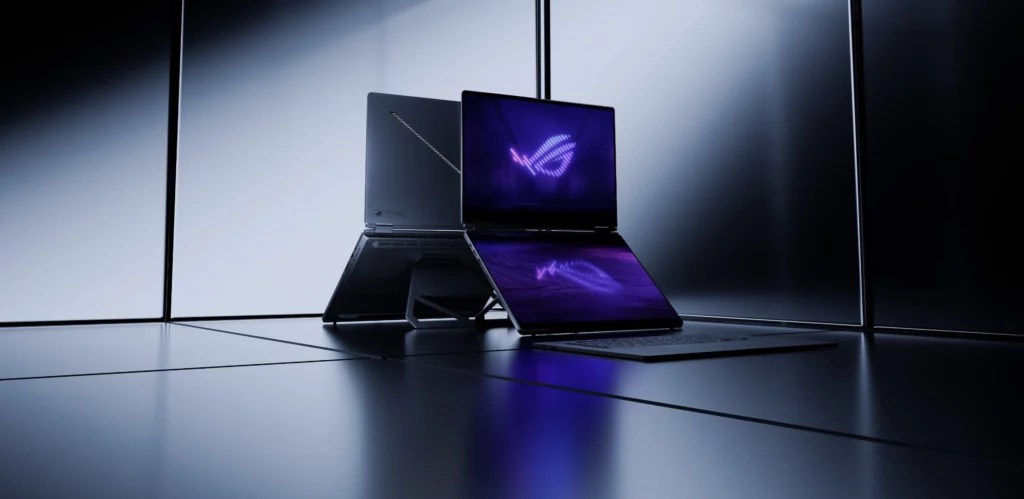
The biggest announcement is the new ROG Zephyrus Duo, ASUS’s latest take on the dual-screen gaming laptop concept. The laptop features two 16-inch 3K OLED touch displays, allowing users to run games, editing tools, livestream controls, or AI applications simultaneously. ASUS says the system is powered by up to an Intel Core Ultra 9 Series 3 processor and an NVIDIA GeForce RTX 5090 graphics card.
The secondary display can be used for multitasking, while a 320-degree hinge and detachable wireless keyboard allow the laptop to be used in multiple modes. ASUS has also included its Intelligent Cooling system with liquid metal thermal compound and a tri-fan setup to keep temperatures under control. The ROG Zephyrus Duo starts at ₹5,49,990, while the top-end RTX 5090 variant costs ₹6,99,990.
Zephyrus and TUF Series Get RTX 50-Series Upgrades
ASUS has also refreshed its popular Zephyrus G14 and G16 gaming laptops with NVIDIA’s latest RTX 50-series GPUs. The Zephyrus G14 continues to target users who want a powerful gaming laptop in a compact package. It weighs just 1.5kg and features a 3K ROG Nebula HDR OLED display with 100% DCI-P3 color coverage. ASUS pairs the display with Intel Core Ultra processors and up to RTX 5070 Ti graphics.
The larger Zephyrus G16 is aimed at users looking for more screen real estate without sacrificing portability. Despite packing a 16-inch display and a 90Wh battery, the laptop weighs under 2kg. It comes with Intel Core Ultra 9 processors and up to RTX 5080 graphics, depending on the configuration.
ASUS has also announced the TUF Gaming A14, a more affordable gaming laptop that weighs just 1.46kg. The laptop runs on AMD’s new AI-powered Gorgon Point processor paired with NVIDIA GeForce RTX 5060 graphics. ASUS says it has been designed for students, gamers, and creators who need a portable machine without giving up gaming performance.
Pricing starts at:
TUF A14 – ₹1,99,990
Zephyrus G14 Refresh – ₹2,59,990
Zephyrus G14 RTX 5070 – ₹3,69,990
Zephyrus G16 RTX 5070 Ti – ₹4,19,990
Zephyrus G16 RTX 5080 – ₹5,09,990
ProArt PZ14 for Creators
For creators, ASUS has introduced the new ProArt PZ14, a lightweight 2-in-1 device with a detachable keyboard. The laptop features a 14-inch 3K ASUS Lumina Pro OLED touchscreen with 100% DCI-P3 coverage and Pantone validation. It is powered by Qualcomm’s Snapdragon X2 Elite processor and offers up to 80 TOPS of AI performance. ASUS says the device can deliver up to 22 hours of battery life and supports the ASUS Pen for creators who sketch, design, or edit on the go. The ProArt PZ14 is priced at ₹2,69,990.
gaming laptops. But what if you’re tired of the conventional gaming laptop that has a screen on top and a keyboard on the bottom? That’s exactly the problem Asus wants to solve, as it has just opened pre-orders for its latest premium gaming product in India. The new lineup is headlined by the flagship ROG Zephyrus Duo, which features two screens and an NVIDIA GeForce RTX 5090 graphics card. Along with that, the company has also announced refreshed versions of the Zephyrus G14 and G16, the TUF Gaming A14, and the creator-focused ProArt PZ14. Here’s everything you need to know about them.
What’s Up With The Zephyrus Duo?
The biggest announcement is the new ROG Zephyrus Duo, ASUS’s latest take on the dual-screen gaming laptop concept. The laptop features two 16-inch 3K OLED touch displays, allowing users to run games, editing tools, livestream controls, or AI applications simultaneously. ASUS says the system is powered by up to an Intel Core Ultra 9 Series 3 processor and an NVIDIA GeForce RTX 5090 graphics card.
The secondary display can be used for multitasking, while a 320-degree hinge and detachable wireless keyboard allow the laptop to be used in multiple modes. ASUS has also included its Intelligent Cooling system with liquid metal thermal compound and a tri-fan setup to keep temperatures under control. The ROG Zephyrus Duo starts at ₹5,49,990, while the top-end RTX 5090 variant costs ₹6,99,990.
Zephyrus and TUF Series Get RTX 50-Series Upgrades
ASUS has also refreshed its popular Zephyrus G14 and G16 gaming laptops with NVIDIA’s latest RTX 50-series GPUs. The Zephyrus G14 continues to target users who want a powerful gaming laptop in a compact package. It weighs just 1.5kg and features a 3K ROG Nebula HDR OLED display with 100% DCI-P3 color coverage. ASUS pairs the display with Intel Core Ultra processors and up to RTX 5070 Ti graphics.
The larger Zephyrus G16 is aimed at users looking for more screen real estate without sacrificing portability. Despite packing a 16-inch display and a 90Wh battery, the laptop weighs under 2kg. It comes with Intel Core Ultra 9 processors and up to RTX 5080 graphics, depending on the configuration.
ASUS has also announced the TUF Gaming A14, a more affordable gaming laptop that weighs just 1.46kg. The laptop runs on AMD’s new AI-powered Gorgon Point processor paired with NVIDIA GeForce RTX 5060 graphics. ASUS says it has been designed for students, gamers, and creators who need a portable machine without giving up gaming performance.
Pricing starts at:
TUF A14 – ₹1,99,990
Zephyrus G14 Refresh – ₹2,59,990
Zephyrus G14 RTX 5070 – ₹3,69,990
Zephyrus G16 RTX 5070 Ti – ₹4,19,990
Zephyrus G16 RTX 5080 – ₹5,09,990
ProArt PZ14 for Creators
For creators, ASUS has introduced the new ProArt PZ14, a lightweight 2-in-1 device with a detachable keyboard. The laptop features a 14-inch 3K ASUS Lumina Pro OLED touchscreen with 100% DCI-P3 coverage and Pantone validation. It is powered by Qualcomm’s Snapdragon X2 Elite processor and offers up to 80 TOPS of AI performance. ASUS says the device can deliver up to 22 hours of battery life and supports the ASUS Pen for creators who sketch, design, or edit on the go. The ProArt PZ14 is priced at ₹2,69,990.
#ASUS #ROG #Zephyrus #Duo #RTX #PreOrder #IndiaAsus">ASUS ROG Zephyrus Duo With RTX 5090 Now Available for Pre-Order in India
It’s no secret that Asus knows how to make gaming laptops. But what if you’re tired of the conventional gaming laptop that has a screen on top and a keyboard on the bottom? That’s exactly the problem Asus wants to solve, as it has just opened pre-orders for its latest premium gaming product in India. The new lineup is headlined by the flagship ROG Zephyrus Duo, which features two screens and an NVIDIA GeForce RTX 5090 graphics card. Along with that, the company has also announced refreshed versions of the Zephyrus G14 and G16, the TUF Gaming A14, and the creator-focused ProArt PZ14. Here’s everything you need to know about them.
What’s Up With The Zephyrus Duo?
The biggest announcement is the new ROG Zephyrus Duo, ASUS’s latest take on the dual-screen gaming laptop concept. The laptop features two 16-inch 3K OLED touch displays, allowing users to run games, editing tools, livestream controls, or AI applications simultaneously. ASUS says the system is powered by up to an Intel Core Ultra 9 Series 3 processor and an NVIDIA GeForce RTX 5090 graphics card.
The secondary display can be used for multitasking, while a 320-degree hinge and detachable wireless keyboard allow the laptop to be used in multiple modes. ASUS has also included its Intelligent Cooling system with liquid metal thermal compound and a tri-fan setup to keep temperatures under control. The ROG Zephyrus Duo starts at ₹5,49,990, while the top-end RTX 5090 variant costs ₹6,99,990.
Zephyrus and TUF Series Get RTX 50-Series Upgrades
ASUS has also refreshed its popular Zephyrus G14 and G16 gaming laptops with NVIDIA’s latest RTX 50-series GPUs. The Zephyrus G14 continues to target users who want a powerful gaming laptop in a compact package. It weighs just 1.5kg and features a 3K ROG Nebula HDR OLED display with 100% DCI-P3 color coverage. ASUS pairs the display with Intel Core Ultra processors and up to RTX 5070 Ti graphics.
The larger Zephyrus G16 is aimed at users looking for more screen real estate without sacrificing portability. Despite packing a 16-inch display and a 90Wh battery, the laptop weighs under 2kg. It comes with Intel Core Ultra 9 processors and up to RTX 5080 graphics, depending on the configuration.
ASUS has also announced the TUF Gaming A14, a more affordable gaming laptop that weighs just 1.46kg. The laptop runs on AMD’s new AI-powered Gorgon Point processor paired with NVIDIA GeForce RTX 5060 graphics. ASUS says it has been designed for students, gamers, and creators who need a portable machine without giving up gaming performance.
Pricing starts at:
TUF A14 – ₹1,99,990
Zephyrus G14 Refresh – ₹2,59,990
Zephyrus G14 RTX 5070 – ₹3,69,990
Zephyrus G16 RTX 5070 Ti – ₹4,19,990
Zephyrus G16 RTX 5080 – ₹5,09,990
ProArt PZ14 for Creators
For creators, ASUS has introduced the new ProArt PZ14, a lightweight 2-in-1 device with a detachable keyboard. The laptop features a 14-inch 3K ASUS Lumina Pro OLED touchscreen with 100% DCI-P3 coverage and Pantone validation. It is powered by Qualcomm’s Snapdragon X2 Elite processor and offers up to 80 TOPS of AI performance. ASUS says the device can deliver up to 22 hours of battery life and supports the ASUS Pen for creators who sketch, design, or edit on the go. The ProArt PZ14 is priced at ₹2,69,990.
Its initial success hasn’t gone unnoticed, either. Ray-Ban Meta smart glasses have pulled Google, Samsung, and potentially even Apple into the mix, with the former two companies planning to release their own pair this year. And that’s not even counting the various other upstarts that have managed to carve out a niche already.
The interest in face-worn wearables is palpable, and in a lot of ways, smart glasses, for all of their obvious flaws, feel concrete. But as concrete as the interest is, the category also feels as nebulous as ever, and Meta, for all its popularity, is a perfect example.
Take apps, for instance. Meta has made some strides since the launch of the Meta Ray-Ban Display last year to try to add more functionality, but for the most part, it still feels like there’s not a ton to do once they’re on your face. You can get notifications, you can get directions, and you can swipe through Instagram Reels, and sure, it’s novel to be doing those things on a small screen on your face, but they don’t necessarily add up to a game-changing experience.
Meta clearly knows that those “core” apps aren’t enough, which is why it recently opened up its developer program for the Meta Ray-Ban Display so that people can make apps that use both the built-in screen as well as the included Neural Band, the wristband you use to control the UI inside the smart glasses.
While the apps being built are in early stages and aren’t being made generally available to people who own the smart glasses yet, initial results are… something? There are people making speedometers, apps that control your smart home, and Doom (because, of course). Someone even made the bold choice of making an app that can unlock your car. Again, they’re interesting ideas, but I’m not sure that any of them will have people rushing out to spend $800 on a pair of smart glasses.
Meta’s non-display smart glasses face similar issues. While I like the fact that you can use them as an open-ear audio device—they’re great for calling and listening to music while you’re riding a bike or exercising—some of the banner features of Meta’s “AI glasses” feel less-than-useful, and one of them is the AI itself.
Features like computer vision, which uses the camera on the smart glasses to answer questions about the world around you, are somewhat novel, but maybe not altogether useful for most. Don’t get me wrong, I think it could be great for accessibility purposes—people who have vision impairments could use computer vision to parse their surroundings. But for a general audience, the AI part of AI glasses can feel underwhelming, and I’m not the only one who thinks so.
“The biggest hurdle to success that I see so far for Meta is the quality of Meta AI and the slow nature of getting third-party apps onboard,” says Anshel Sag, principal analyst at Moor Insights & Strategy, which follows the consumer tech space closely. “The ways that they enhance my life in their most simple form, as smart glasses, are still pretty much paired to just Meta apps.”
Outside of translating a menu or telling you about items in your surroundings, I’ve yet to see lots of practical uses for computer vision, and that’s not even factoring in the bad habit that Meta AI has of getting things wrong, which is a real issue in my experience using the Ray-Ban Meta AI glasses.
I get that not every new gadget has to have a purpose right off the bat. Take the Apple Watch, for example, which entered the scene as a frivolous accessory to your iPhone. In many ways, you can write off smart glasses for the same reasons that people wrote off the Apple Watch at first. Yes, it delivers notifications and comes in a wearable form factor, but it mostly duplicates the experience of using your phone. And not only that, it’s utterly dependent on your phone to work, same as Meta’s Ray-Bans and Oakleys.
Those criticisms didn’t hold up forever, though. Eventually, the Apple Watch found health tracking features like heart rate monitoring and crash detection, and now it’s a device unto itself that also acts as an accessory to your iPhone. The thing is, health features aren’t exactly up for grabs anymore, though Meta has tried to introduce nutrition tracking as a feature, which uses the camera on the smart glasses to log what you eat and then gives you AI-powered recommendations. Whether that gets any traction remains to be seen, but I personally don’t envision loads of people lining up to have Meta AI shame them for their diets.
So, smart glasses will have to find their own niche, just like the Apple Watch, though whether such a niche really exists is anyone’s guess. It’s not that smart glasses can’t be useful at times—they can—but as it stands, even Meta lacks a “killer app” to drive adoption. Sure, people like recording stuff, but that is an entire can of worms from a privacy perspective, and for as many people that want smart glasses for their recording abilities, there are just as many that hate them for it.
Millions of units sold or not, smart glasses like Meta’s still feel like they’re a long way from the proverbial Apple Watch moment—a holy grail that is never guaranteed to arrive.
Its initial success hasn’t gone unnoticed, either. Ray-Ban Meta smart glasses have pulled Google, Samsung, and potentially even Apple into the mix, with the former two companies planning to release their own pair this year. And that’s not even counting the various other upstarts that have managed to carve out a niche already.
The interest in face-worn wearables is palpable, and in a lot of ways, smart glasses, for all of their obvious flaws, feel concrete. But as concrete as the interest is, the category also feels as nebulous as ever, and Meta, for all its popularity, is a perfect example.
Take apps, for instance. Meta has made some strides since the launch of the Meta Ray-Ban Display last year to try to add more functionality, but for the most part, it still feels like there’s not a ton to do once they’re on your face. You can get notifications, you can get directions, and you can swipe through Instagram Reels, and sure, it’s novel to be doing those things on a small screen on your face, but they don’t necessarily add up to a game-changing experience.
Meta clearly knows that those “core” apps aren’t enough, which is why it recently opened up its developer program for the Meta Ray-Ban Display so that people can make apps that use both the built-in screen as well as the included Neural Band, the wristband you use to control the UI inside the smart glasses.
While the apps being built are in early stages and aren’t being made generally available to people who own the smart glasses yet, initial results are… something? There are people making speedometers, apps that control your smart home, and Doom (because, of course). Someone even made the bold choice of making an app that can unlock your car. Again, they’re interesting ideas, but I’m not sure that any of them will have people rushing out to spend $800 on a pair of smart glasses.
Meta’s non-display smart glasses face similar issues. While I like the fact that you can use them as an open-ear audio device—they’re great for calling and listening to music while you’re riding a bike or exercising—some of the banner features of Meta’s “AI glasses” feel less-than-useful, and one of them is the AI itself.
Features like computer vision, which uses the camera on the smart glasses to answer questions about the world around you, are somewhat novel, but maybe not altogether useful for most. Don’t get me wrong, I think it could be great for accessibility purposes—people who have vision impairments could use computer vision to parse their surroundings. But for a general audience, the AI part of AI glasses can feel underwhelming, and I’m not the only one who thinks so.
“The biggest hurdle to success that I see so far for Meta is the quality of Meta AI and the slow nature of getting third-party apps onboard,” says Anshel Sag, principal analyst at Moor Insights & Strategy, which follows the consumer tech space closely. “The ways that they enhance my life in their most simple form, as smart glasses, are still pretty much paired to just Meta apps.”
Outside of translating a menu or telling you about items in your surroundings, I’ve yet to see lots of practical uses for computer vision, and that’s not even factoring in the bad habit that Meta AI has of getting things wrong, which is a real issue in my experience using the Ray-Ban Meta AI glasses.
I get that not every new gadget has to have a purpose right off the bat. Take the Apple Watch, for example, which entered the scene as a frivolous accessory to your iPhone. In many ways, you can write off smart glasses for the same reasons that people wrote off the Apple Watch at first. Yes, it delivers notifications and comes in a wearable form factor, but it mostly duplicates the experience of using your phone. And not only that, it’s utterly dependent on your phone to work, same as Meta’s Ray-Bans and Oakleys.
Those criticisms didn’t hold up forever, though. Eventually, the Apple Watch found health tracking features like heart rate monitoring and crash detection, and now it’s a device unto itself that also acts as an accessory to your iPhone. The thing is, health features aren’t exactly up for grabs anymore, though Meta has tried to introduce nutrition tracking as a feature, which uses the camera on the smart glasses to log what you eat and then gives you AI-powered recommendations. Whether that gets any traction remains to be seen, but I personally don’t envision loads of people lining up to have Meta AI shame them for their diets.
So, smart glasses will have to find their own niche, just like the Apple Watch, though whether such a niche really exists is anyone’s guess. It’s not that smart glasses can’t be useful at times—they can—but as it stands, even Meta lacks a “killer app” to drive adoption. Sure, people like recording stuff, but that is an entire can of worms from a privacy perspective, and for as many people that want smart glasses for their recording abilities, there are just as many that hate them for it.
Millions of units sold or not, smart glasses like Meta’s still feel like they’re a long way from the proverbial Apple Watch moment—a holy grail that is never guaranteed to arrive.
#Metas #Smart #Glasses #Long #Ways #Eureka #MomentMeta,Ray-Ban Meta,smart glasses,The Next Interface,Wearables">Meta’s Smart Glasses Are Long Ways From Their ‘Eureka’ Moment
Smart glasses have come a long way since the days of Google Glass. For one, they actually exist in a way that has been commercially viable, thanks mostly to Meta. With the help of Ray-Ban branding, Meta has sold millions of smart glasses, and, if recent reporting is any indication, it already has several more pairs on the way this year alone.
Its initial success hasn’t gone unnoticed, either. Ray-Ban Meta smart glasses have pulled Google, Samsung, and potentially even Apple into the mix, with the former two companies planning to release their own pair this year. And that’s not even counting the various other upstarts that have managed to carve out a niche already.
The interest in face-worn wearables is palpable, and in a lot of ways, smart glasses, for all of their obvious flaws, feel concrete. But as concrete as the interest is, the category also feels as nebulous as ever, and Meta, for all its popularity, is a perfect example.
Take apps, for instance. Meta has made some strides since the launch of the Meta Ray-Ban Display last year to try to add more functionality, but for the most part, it still feels like there’s not a ton to do once they’re on your face. You can get notifications, you can get directions, and you can swipe through Instagram Reels, and sure, it’s novel to be doing those things on a small screen on your face, but they don’t necessarily add up to a game-changing experience.
Meta clearly knows that those “core” apps aren’t enough, which is why it recently opened up its developer program for the Meta Ray-Ban Display so that people can make apps that use both the built-in screen as well as the included Neural Band, the wristband you use to control the UI inside the smart glasses.
While the apps being built are in early stages and aren’t being made generally available to people who own the smart glasses yet, initial results are… something? There are people making speedometers, apps that control your smart home, and Doom (because, of course). Someone even made the bold choice of making an app that can unlock your car. Again, they’re interesting ideas, but I’m not sure that any of them will have people rushing out to spend $800 on a pair of smart glasses.
Meta’s non-display smart glasses face similar issues. While I like the fact that you can use them as an open-ear audio device—they’re great for calling and listening to music while you’re riding a bike or exercising—some of the banner features of Meta’s “AI glasses” feel less-than-useful, and one of them is the AI itself.
Features like computer vision, which uses the camera on the smart glasses to answer questions about the world around you, are somewhat novel, but maybe not altogether useful for most. Don’t get me wrong, I think it could be great for accessibility purposes—people who have vision impairments could use computer vision to parse their surroundings. But for a general audience, the AI part of AI glasses can feel underwhelming, and I’m not the only one who thinks so.
“The biggest hurdle to success that I see so far for Meta is the quality of Meta AI and the slow nature of getting third-party apps onboard,” says Anshel Sag, principal analyst at Moor Insights & Strategy, which follows the consumer tech space closely. “The ways that they enhance my life in their most simple form, as smart glasses, are still pretty much paired to just Meta apps.”
Outside of translating a menu or telling you about items in your surroundings, I’ve yet to see lots of practical uses for computer vision, and that’s not even factoring in the bad habit that Meta AI has of getting things wrong, which is a real issue in my experience using the Ray-Ban Meta AI glasses.
I get that not every new gadget has to have a purpose right off the bat. Take the Apple Watch, for example, which entered the scene as a frivolous accessory to your iPhone. In many ways, you can write off smart glasses for the same reasons that people wrote off the Apple Watch at first. Yes, it delivers notifications and comes in a wearable form factor, but it mostly duplicates the experience of using your phone. And not only that, it’s utterly dependent on your phone to work, same as Meta’s Ray-Bans and Oakleys.
Those criticisms didn’t hold up forever, though. Eventually, the Apple Watch found health tracking features like heart rate monitoring and crash detection, and now it’s a device unto itself that also acts as an accessory to your iPhone. The thing is, health features aren’t exactly up for grabs anymore, though Meta has tried to introduce nutrition tracking as a feature, which uses the camera on the smart glasses to log what you eat and then gives you AI-powered recommendations. Whether that gets any traction remains to be seen, but I personally don’t envision loads of people lining up to have Meta AI shame them for their diets.
So, smart glasses will have to find their own niche, just like the Apple Watch, though whether such a niche really exists is anyone’s guess. It’s not that smart glasses can’t be useful at times—they can—but as it stands, even Meta lacks a “killer app” to drive adoption. Sure, people like recording stuff, but that is an entire can of worms from a privacy perspective, and for as many people that want smart glasses for their recording abilities, there are just as many that hate them for it.
Millions of units sold or not, smart glasses like Meta’s still feel like they’re a long way from the proverbial Apple Watch moment—a holy grail that is never guaranteed to arrive.
Aventon Soltera 3 (8/10), weighs 37 pounds and costs around $500 less than the Air. It’s a superb blend of push bike feel and lightweight electric power and with more power on offer, a faster top speed, and cheaper price, it remains the one to beat. But there’s no denying the appeal of the Fiido Air. It’s a beautiful bike to ride, with stylish looks, nimble acceleration, and push bike practicalities. At 30 pounds, it is impressively light, and easy to live with.
Lightweight electric bikes are starting to appear but competition remains slim. Ribble’s new aluminum Allgrit E AL Sportfit Apex weighs 30.4 pounds and has a hugely practical 12 speed SRAM Apex XPLR AXS gearing. It does cost twice as much, though. Carbon options are limited to a couple of folding designs for now, including the $2,420, 35-pound ADO Air Carbon, and $1,599 Urtopia Carbon Fold Step Thru that weighs just 31 pounds.
So the Fiido Air ticks a lot of boxes, and if you’re looking for a cool pedal-assist electric bike for short, flat urban rides, I highly recommend it. But if there are hills in your life, and you want to keep both hands on the handlebars at all times, the Fiido Air might not be the bike for you.
Aventon Soltera 3 (8/10), weighs 37 pounds and costs around $500 less than the Air. It’s a superb blend of push bike feel and lightweight electric power and with more power on offer, a faster top speed, and cheaper price, it remains the one to beat. But there’s no denying the appeal of the Fiido Air. It’s a beautiful bike to ride, with stylish looks, nimble acceleration, and push bike practicalities. At 30 pounds, it is impressively light, and easy to live with.
Lightweight electric bikes are starting to appear but competition remains slim. Ribble’s new aluminum Allgrit E AL Sportfit Apex weighs 30.4 pounds and has a hugely practical 12 speed SRAM Apex XPLR AXS gearing. It does cost twice as much, though. Carbon options are limited to a couple of folding designs for now, including the $2,420, 35-pound ADO Air Carbon, and $1,599 Urtopia Carbon Fold Step Thru that weighs just 31 pounds.
So the Fiido Air ticks a lot of boxes, and if you’re looking for a cool pedal-assist electric bike for short, flat urban rides, I highly recommend it. But if there are hills in your life, and you want to keep both hands on the handlebars at all times, the Fiido Air might not be the bike for you.
#Meet #Commuting #Companion #Lightweight #Fiido #Air #Carbon #Fiber #Ebikereviews,review,cycling,outdoors,bicycles">Meet Your New Commuting Companion: The Lightweight Fiido Air Carbon Fiber Ebike
It picks up quickly at lights, and acceleration—especially in Sport mode—is reassuringly quick when it’s time to overtake. I’m delighted by how effortless the overall performance is, and how smoothly the torque kicks in. What’s more, moving it, wheeling it through the house, lifting it onto bike racks, and even just doing basic things like locking it up, is just easier in every way. The motor is quiet, too. While not totally silent, it’s not a distraction.
Impressively, too, the Air can also be ridden reasonably easily without electric assist. A 30-pound single speed bike won’t set any track records, but if power does fail you—or more likely, you misjudge the battery level and forget to charge overnight like I did—it won’t be too much of a workout to get home.
But please don’t confuse this commuter-style electric bike with a powerful mid-drive motor electric bike. With a meagre motor and only one gear (and quite a low one at that) it does not love hills. Steady inclines are easy, but there’s one short, sharp-ish hill close to my office that requires me to stand up and pedal hard to get to the top. I wasn’t as gassed as I would be without any motor assistance, but I definitely wasn’t flying effortlessly up hills.
I’ve also become a convert to the brilliance of belt-drive bikes. They need less maintenance, last longer, and prevent greasy black marks on pant legs. Fiido uses a Gates belt drive here, one of the best systems available, and ideal for urban riding.
Competition and Verdict
WIRED’s current favorite commuter ebike, the Aventon Soltera 3 (8/10), weighs 37 pounds and costs around $500 less than the Air. It’s a superb blend of push bike feel and lightweight electric power and with more power on offer, a faster top speed, and cheaper price, it remains the one to beat. But there’s no denying the appeal of the Fiido Air. It’s a beautiful bike to ride, with stylish looks, nimble acceleration, and push bike practicalities. At 30 pounds, it is impressively light, and easy to live with.
Lightweight electric bikes are starting to appear but competition remains slim. Ribble’s new aluminum Allgrit E AL Sportfit Apex weighs 30.4 pounds and has a hugely practical 12 speed SRAM Apex XPLR AXS gearing. It does cost twice as much, though. Carbon options are limited to a couple of folding designs for now, including the $2,420, 35-pound ADO Air Carbon, and $1,599 Urtopia Carbon Fold Step Thru that weighs just 31 pounds.
So the Fiido Air ticks a lot of boxes, and if you’re looking for a cool pedal-assist electric bike for short, flat urban rides, I highly recommend it. But if there are hills in your life, and you want to keep both hands on the handlebars at all times, the Fiido Air might not be the bike for you.




Post Comment