×
Trump Lovingly Pats Elon Musk on Stomach During Dinner at White House

Trump Lovingly Pats Elon Musk on Stomach During Dinner at White House

Elon Musk attended a dinner Tuesday at the White House, held by President Donald Trump in honor of Saudi Arabia’s Crown Prince Mohammed bin Salman (MBS). And it seems like we can officially call it. The public spat between Musk and Trump is done. For now.

How can anyone be sure the messiness between the two men is over? When President Trump entered the room with MBS, he gave Musk a pat on the stomach.


Trump gave a speech at the dinner, livestreamed by major media outlets, praising Saudi Arabia’s pledge to invest $1 trillion in the U.S. The president also announced he was elevating the country to a “major non-NATO-ally,” which means the two countries will work on economic and military issues more closely.

Trump also gave a shout out to Nvidia and Apple CEO Tim Cook from the stage for “all of the money that you’re investing in the United States.” The president didn’t mention Musk in his speech, but who needs a shout-out when you’ve got yourself a belly pat.

The White House dinner landed on a particularly odd day, with the U.S. House of Representatives voting overwhelmingly Tuesday to release Department of Justice files on late sex trafficker Jeffrey Epstein. The House voted 427-1 in favor of releasing the files, with Rep. Clay Higgins, a Republican from Louisiana, as the lone vote against. Soon after, the Senate agreed to deem the legislation as passed without even a vote, and it’s now on its way to President Donald Trump’s desk for his signature.

It’s unclear when Trump might sign the Epstein Files Transparency Act since he’s a little busy tonight. But Musk’s presence at the East Room event is amusing, given how the billionaire oligarch exited his formal role in government on May 30. Musk was the head of the so-called Department of Government Efficiency (DOGE) before he left in a bizarre spectacle witnessed by reporters in the Oval Office of the White House.

Musk’s supposed “exit” from government was about personal relationships more than professional ones. SpaceX didn’t lose any contracts, for example, but he did briefly lose the respect of the man he’d helped install at 1600 Pennsylvania Avenue. It started when Musk showed up to the White House on May 30, with a black eye and an awkward demeanor (Musk stared up at the ceiling at one point), though the two men tried to make it sound like they were parting ways amicably.

Musk spent the next few days tweeting his criticism of the Republicans’ “Big Beautiful Bill,” arguing it didn’t do enough to restrict spending. And Trump eventually started pushing back at Musk, explaining by June 5 that he must have “Trump Derangement Syndrome,” and ridiculing his black eye.

Later that day, Musk exploded on X, accusing Trump of being in the Epstein files. You don’t need to take Musk’s word for it, given the fact that reporting from the Wall Street Journal indicates Pam Bondi has told Trump he’s in the files. The question is what being in the files actually means for Trump. The president’s name was in many of the emails recently released by a House subcommittee investigating Epstein.

After Musk’s public blow-up with Trump (he eventually deleted the tweets about Epstein), the billionaire pledged to start his own political party. Musk positioned his new party, dubbed the America Party, as something that would be more reasonable than the current Democratic and Republican parties. Musk, despite being a far-right kook, has often branded himself as a centrist in a world that’s gone too “woke,” with suggestions that the Overton Window has shifted to only make it look like he’s an extremist.

Not long after his falling out with Trump, Musk was asked on X where he would use his new political party to release the Epstein files, and he replied with an emoji reading “100.” However, Musk has let the idea for his party fizzle out completely. Perhaps Musk realized that third parties rarely make a dent in the U.S. system, which is designed to favor the two major parties. The best demonstration of this bias is the fact that Ross Perot won 19% of the popular vote in the 1992 presidential election and didn’t receive a single Electoral College vote. The system is simply rigged against third parties.

Musk’s expected arrival at the White House on Tuesday won’t be his first physical brush with Trump since their messy break-up in June. The two men were seen talking at a memorial service for MAGA influencer Charlie Kirk in September. Members of DOGE are reportedly planning a party in Austin, Texas, this weekend to celebrate the thawing of Musk and Trump’s relationship, according to the New York Times. Though it seems unclear whether Musk himself will show up for that one.

Other notable attendees of the dinner at the White House on Tuesday, according to the New York Times: Paramount CEO David Ellison, Chevron CEO Mike Wirth, Blackstone CEO Stephen A. Schwarzman, and General Motors CEO Mary Barra. The president’s son Donald Trump Jr. is also slated to attend.

Musk is firmly back on the Trump train, no matter what he said in their months apart. The billionaire told allies back in August that he’s worried a political party would siphon off Republican voters and hurt the Republicans in the upcoming midterm elections, according to the Wall Street Journal. It might seem weird for Musk to cozy up with Trump again after all that’s happened with the Epstein files, but as Gizmodo has frequently argued, these guys need each other. They clearly dislike each other personally, but oligarchies make for strange bedfellows.

Trump has built a powerful political machine and he holds the keys to federal contracts in the world’s wealthiest country. Musk is the world’s wealthiest person and he needs those federal contracts to keep his empire afloat. They don’t have to like hanging out together, but they have to work in tandem if they’re going to build the world they both want to see. It’s a world where they stay at the top in business and government. And it’s a world where masked men round up tens of thousands of immigrants (and the occasional Native American) in a quest to make America more white.

Source link
#Trump #Lovingly #Pats #Elon #Musk #Stomach #Dinner #White #House

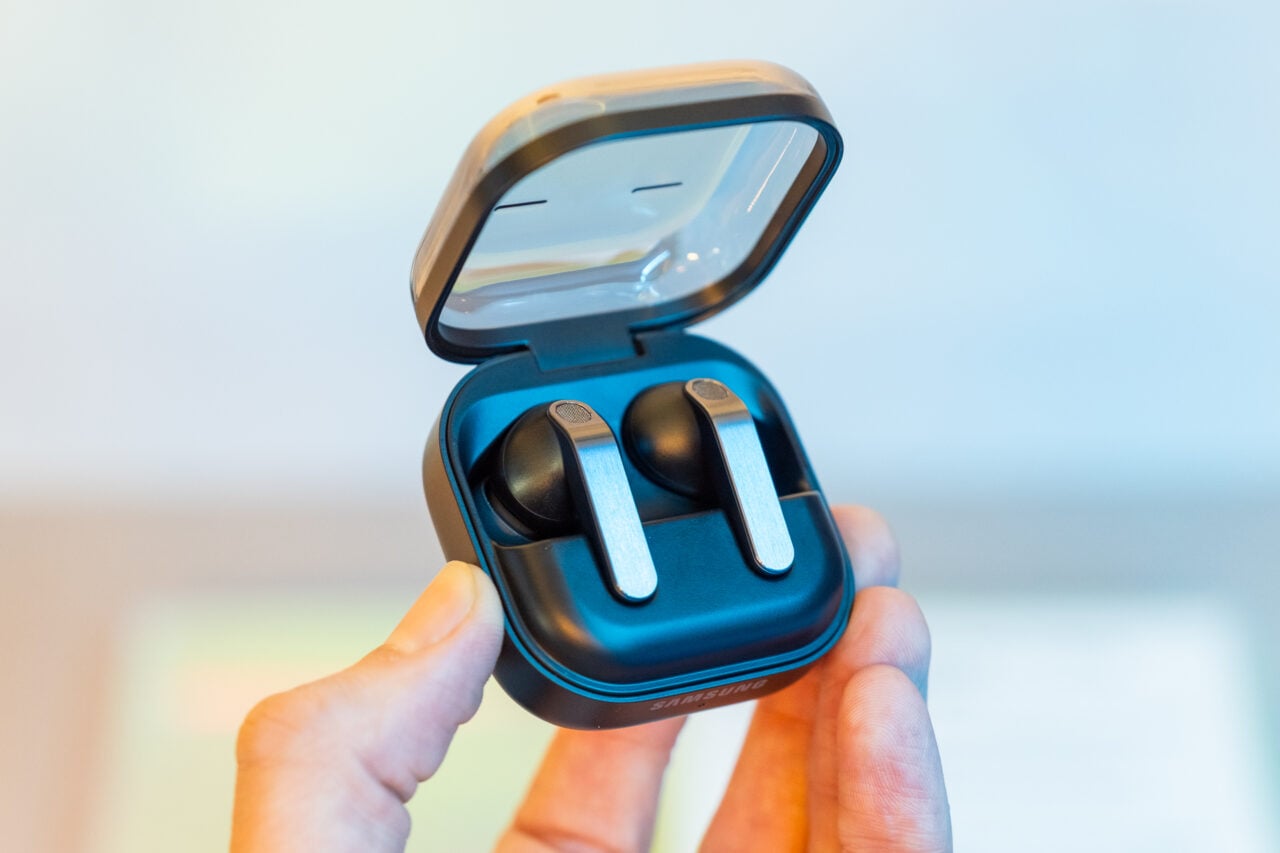
Open-style wireless earbuds are all the rage these days, but not all the major brands are on board yet. Samsung, for example, still has its semi-open-ear Galaxy Buds 4, but nothing quite as open as the Bose Ultra Open Earbuds or Nothing’s Ear Open. I should say Samsung doesn’t have anything fully open yet.

According to a leak from SammyGuru, Samsung is working on a new pair of Galaxy Buds called the Galaxy Buds Able, and it looks like that unreleased pair might opt for an open-style clip design if illustrations found in recent One UI firmware are anything to go by.

In addition to the open-style design, SammyGuru is also reporting that the Galaxy Buds Able will use bone conduction, which is suited for delivering sound without needing to plug up your ears with silicone ear tips. Another benefit of bone conduction is that it’s not prone to sound leakage, which is often a downside of most pairs of open wireless earbuds. Bone conduction is also often used in more fitness-focused wireless earbuds, so there’s a chance the Galaxy Buds Able might lean into running and other exercise applications.

While clip-style open wireless earbuds aren’t novel—Sony, SoundPeats, and JBL all have their own pairs now—it’d be a departure for Samsung and a big indicator that open wireless earbuds are having a huge moment right now. If the leaks pan out, one of the things I’m most interested to see is whether Samsung endeavors to provide any kind of noise reduction. Though full-on active noise cancellation (ANC) isn’t possible without ear tips, brands like Shokz have managed to provide a surprisingly effective level of noise reduction that scratches a similar itch. Shokz’s OpenFit Pro, for example, are its only pair with noise reduction, but they do have a bulkier design. They’re not exactly clip-style; instead, they loop around the back of your ears with a sound module that nestles into the outer ear.

Since the Galaxy Buds Able aren’t official yet, there’s no word on price or release date, but there’s a chance they could end up being unveiled this summer at Samsung’s next Unpacked event.

#Samsungs #Pair #Galaxy #Buds #Huge #Departureaudio,Galaxy Buds Pro,wireless earbuds">Samsung’s Next Pair of Galaxy Buds Look Like a Huge Departure
                Open-style wireless earbuds are all the rage these days, but not all the major brands are on board yet. Samsung, for example, still has its semi-open-ear Galaxy Buds 4, but nothing quite as open as the Bose Ultra Open Earbuds or Nothing’s Ear Open. I should say Samsung doesn’t have anything fully open yet.

 According to a leak from SammyGuru, Samsung is working on a new pair of Galaxy Buds called the Galaxy Buds Able, and it looks like that unreleased pair might opt for an open-style clip design if illustrations found in recent One UI firmware are anything to go by. In addition to the open-style design, SammyGuru is also reporting that the Galaxy Buds Able will use bone conduction, which is suited for delivering sound without needing to plug up your ears with silicone ear tips. Another benefit of bone conduction is that it’s not prone to sound leakage, which is often a downside of most pairs of open wireless earbuds. Bone conduction is also often used in more fitness-focused wireless earbuds, so there’s a chance the Galaxy Buds Able might lean into running and other exercise applications.  Samsung’s upcoming Galaxy Buds Able, spotted in One UI firmware, feature a unique clip-on bone conduction design that keeps your ears open while delivering sound in a whole new way.   Would you trade premium sound quality for more awareness and comfort in your daily listening?… — SammyGuru (@sammygurus) April 20, 2026  While clip-style open wireless earbuds aren’t novel—Sony, SoundPeats, and JBL all have their own pairs now—it’d be a departure for Samsung and a big indicator that open wireless earbuds are having a huge moment right now. If the leaks pan out, one of the things I’m most interested to see is whether Samsung endeavors to provide any kind of noise reduction. Though full-on active noise cancellation (ANC) isn’t possible without ear tips, brands like Shokz have managed to provide a surprisingly effective level of noise reduction that scratches a similar itch. Shokz’s OpenFit Pro, for example, are its only pair with noise reduction, but they do have a bulkier design. They’re not exactly clip-style; instead, they loop around the back of your ears with a sound module that nestles into the outer ear.

 Since the Galaxy Buds Able aren’t official yet, there’s no word on price or release date, but there’s a chance they could end up being unveiled this summer at Samsung’s next Unpacked event.      #Samsungs #Pair #Galaxy #Buds #Huge #Departureaudio,Galaxy Buds Pro,wireless earbuds

semi-open-ear Galaxy Buds 4, but nothing quite as open as the Bose Ultra Open Earbuds or Nothing’s Ear Open. I should say Samsung doesn’t have anything fully open yet.

According to a leak from SammyGuru, Samsung is working on a new pair of Galaxy Buds called the Galaxy Buds Able, and it looks like that unreleased pair might opt for an open-style clip design if illustrations found in recent One UI firmware are anything to go by.

In addition to the open-style design, SammyGuru is also reporting that the Galaxy Buds Able will use bone conduction, which is suited for delivering sound without needing to plug up your ears with silicone ear tips. Another benefit of bone conduction is that it’s not prone to sound leakage, which is often a downside of most pairs of open wireless earbuds. Bone conduction is also often used in more fitness-focused wireless earbuds, so there’s a chance the Galaxy Buds Able might lean into running and other exercise applications.

While clip-style open wireless earbuds aren’t novel—Sony, SoundPeats, and JBL all have their own pairs now—it’d be a departure for Samsung and a big indicator that open wireless earbuds are having a huge moment right now. If the leaks pan out, one of the things I’m most interested to see is whether Samsung endeavors to provide any kind of noise reduction. Though full-on active noise cancellation (ANC) isn’t possible without ear tips, brands like Shokz have managed to provide a surprisingly effective level of noise reduction that scratches a similar itch. Shokz’s OpenFit Pro, for example, are its only pair with noise reduction, but they do have a bulkier design. They’re not exactly clip-style; instead, they loop around the back of your ears with a sound module that nestles into the outer ear.

Since the Galaxy Buds Able aren’t official yet, there’s no word on price or release date, but there’s a chance they could end up being unveiled this summer at Samsung’s next Unpacked event.

#Samsungs #Pair #Galaxy #Buds #Huge #Departureaudio,Galaxy Buds Pro,wireless earbuds">Samsung’s Next Pair of Galaxy Buds Look Like a Huge DepartureSamsung’s Next Pair of Galaxy Buds Look Like a Huge Departure
                Open-style wireless earbuds are all the rage these days, but not all the major brands are on board yet. Samsung, for example, still has its semi-open-ear Galaxy Buds 4, but nothing quite as open as the Bose Ultra Open Earbuds or Nothing’s Ear Open. I should say Samsung doesn’t have anything fully open yet.

 According to a leak from SammyGuru, Samsung is working on a new pair of Galaxy Buds called the Galaxy Buds Able, and it looks like that unreleased pair might opt for an open-style clip design if illustrations found in recent One UI firmware are anything to go by. In addition to the open-style design, SammyGuru is also reporting that the Galaxy Buds Able will use bone conduction, which is suited for delivering sound without needing to plug up your ears with silicone ear tips. Another benefit of bone conduction is that it’s not prone to sound leakage, which is often a downside of most pairs of open wireless earbuds. Bone conduction is also often used in more fitness-focused wireless earbuds, so there’s a chance the Galaxy Buds Able might lean into running and other exercise applications.  Samsung’s upcoming Galaxy Buds Able, spotted in One UI firmware, feature a unique clip-on bone conduction design that keeps your ears open while delivering sound in a whole new way.   Would you trade premium sound quality for more awareness and comfort in your daily listening?… — SammyGuru (@sammygurus) April 20, 2026  While clip-style open wireless earbuds aren’t novel—Sony, SoundPeats, and JBL all have their own pairs now—it’d be a departure for Samsung and a big indicator that open wireless earbuds are having a huge moment right now. If the leaks pan out, one of the things I’m most interested to see is whether Samsung endeavors to provide any kind of noise reduction. Though full-on active noise cancellation (ANC) isn’t possible without ear tips, brands like Shokz have managed to provide a surprisingly effective level of noise reduction that scratches a similar itch. Shokz’s OpenFit Pro, for example, are its only pair with noise reduction, but they do have a bulkier design. They’re not exactly clip-style; instead, they loop around the back of your ears with a sound module that nestles into the outer ear.

 Since the Galaxy Buds Able aren’t official yet, there’s no word on price or release date, but there’s a chance they could end up being unveiled this summer at Samsung’s next Unpacked event.      #Samsungs #Pair #Galaxy #Buds #Huge #Departureaudio,Galaxy Buds Pro,wireless earbuds

Open-style wireless earbuds are all the rage these days, but not all the major brands are on board yet. Samsung, for example, still has its semi-open-ear Galaxy Buds 4, but nothing quite as open as the Bose Ultra Open Earbuds or Nothing’s Ear Open. I should say Samsung doesn’t have anything fully open yet.

According to a leak from SammyGuru, Samsung is working on a new pair of Galaxy Buds called the Galaxy Buds Able, and it looks like that unreleased pair might opt for an open-style clip design if illustrations found in recent One UI firmware are anything to go by.

In addition to the open-style design, SammyGuru is also reporting that the Galaxy Buds Able will use bone conduction, which is suited for delivering sound without needing to plug up your ears with silicone ear tips. Another benefit of bone conduction is that it’s not prone to sound leakage, which is often a downside of most pairs of open wireless earbuds. Bone conduction is also often used in more fitness-focused wireless earbuds, so there’s a chance the Galaxy Buds Able might lean into running and other exercise applications.

While clip-style open wireless earbuds aren’t novel—Sony, SoundPeats, and JBL all have their own pairs now—it’d be a departure for Samsung and a big indicator that open wireless earbuds are having a huge moment right now. If the leaks pan out, one of the things I’m most interested to see is whether Samsung endeavors to provide any kind of noise reduction. Though full-on active noise cancellation (ANC) isn’t possible without ear tips, brands like Shokz have managed to provide a surprisingly effective level of noise reduction that scratches a similar itch. Shokz’s OpenFit Pro, for example, are its only pair with noise reduction, but they do have a bulkier design. They’re not exactly clip-style; instead, they loop around the back of your ears with a sound module that nestles into the outer ear.

Since the Galaxy Buds Able aren’t official yet, there’s no word on price or release date, but there’s a chance they could end up being unveiled this summer at Samsung’s next Unpacked event.

#Samsungs #Pair #Galaxy #Buds #Huge #Departureaudio,Galaxy Buds Pro,wireless earbuds

I was delighted to see that the Acer Chromebook Plus 516 didn’t skimp on a crappy touchpad. That goes a long way toward improving the experiencing of actually using the laptop on a moment-by-moment basis. I wasn’t annoyed every time I had to click-and-drag or select a bit of text. This one’s biggest weakness is definitely the screen, which is true of just about every cheap Chromebook I’ve tested. The colors are ugly and desaturated, giving the whole thing a sickly green tint. It’s also not the sharpest in the world, as it’s stretching 1920 x 1200 pixels across a large, 16-inch screen. But in terms of usability and performance, the Acer Chromebook Plus 516 is a great value, combining an Intel Core i3 processor with 8 GB of RAM and a 128 GB of storage. For a Chromebook that’s often on sale for $350, it’s a steal.

While we’re here, let’s go even cheaper, shall we? Asus has two dirt-cheap Chromebooks that I tested last year that I was mildly impressed by. The Asus Chromebook CX14 and CX15. Notice in the name that these are not “Chromebook Plus” models, meaning they can be configured with less RAM and storage, and even use lower-powered processors. That’s exactly what you get on the cheaper configurations of the CX14 and CX15, which is how you sometimes get prices down to as low as $130. I definitely recommend the version with 8 GB of RAM, but regardless of which you choose, the both the CX14 and larger CX15 are mildly attractive laptops. You’d know that’s a big compliment if you’ve seen just how ugly Chromebooks of this price have been in the past.

With these, though, I appreciate the relatively thin bezels and chassis thickness, as well as the larger touchpad and comfortable keyboard. The CX15 even comes in a striking blue color. The touchpad isn’t great, nor is the display. Like the Acer Chromebook Plus 516, it suffers from poor color reproduction and only goes up to 250 nits of brightness. It only has a 720p webcam too, which makes video calls a bit rough. But that’s going to be true of nearly all the competition (and there isn’t much).

Of the two models, I definitely prefer the CX14 though, as it doesn’t have a numberpad and off-center touchpad, which I’ve always found to be awkward to use. Look—no one’s going to love using a computer that costs the less than $200, but if it’s what you can afford, the Asus Chromebook CX14 will at least get you by without too much frustration.

Whatever you do, don’t just head over to Amazon and buy whatever ancient Chromebook is selling for $100 for your kid. It’s worth the extra cash to get something with better battery life, a more modern look, and decent performance.

Other Good Chromebooks We’ve Tested

We’ve tested dozens and dozens of Chromebooks over the past years, having reviewed every major release across the spectrum of price. Unlike Macs and Windows laptops, Chromebooks tends to stick around a bit longer though, and aren’t refreshed as often. I stand by my picks above, but here are a few standouts from our testing that are still worth buying for the right person.

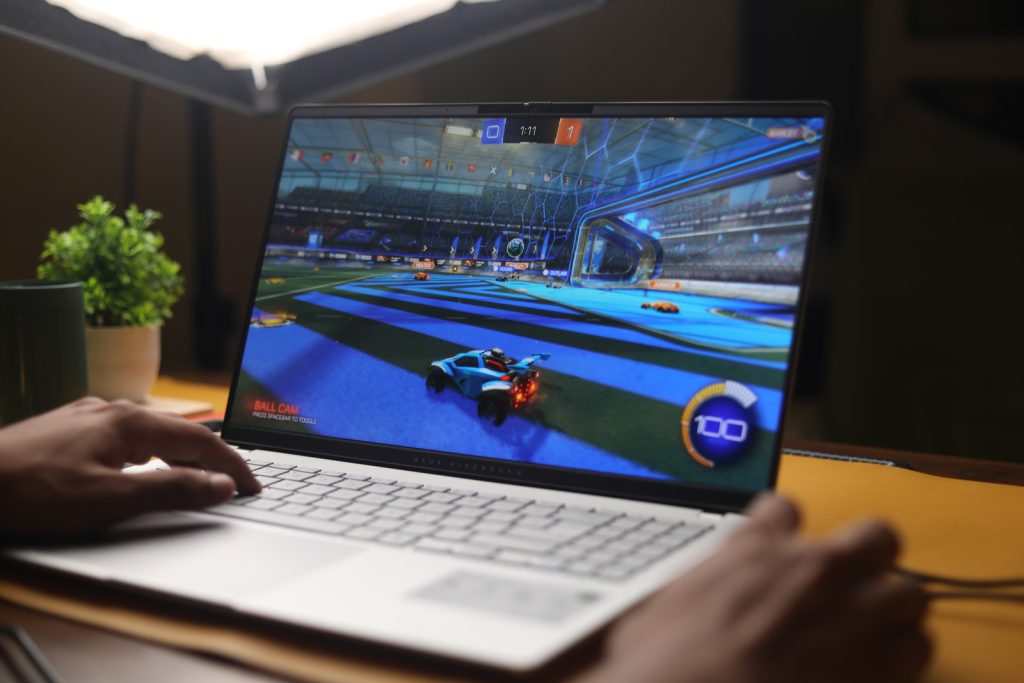
Image may contain Computer Electronics Laptop Pc Computer Hardware Computer Keyboard and Hardware

Photograph: Daniel Thorp-Lancaster

#Chromebooks #Correctchromebooks,laptops,buying guides,google">The Best Chromebooks Are Doing Their Best to Course CorrectI was delighted to see that the Acer Chromebook Plus 516 didn’t skimp on a crappy touchpad. That goes a long way toward improving the experiencing of actually using the laptop on a moment-by-moment basis. I wasn’t annoyed every time I had to click-and-drag or select a bit of text. This one’s biggest weakness is definitely the screen, which is true of just about every cheap Chromebook I’ve tested. The colors are ugly and desaturated, giving the whole thing a sickly green tint. It’s also not the sharpest in the world, as it’s stretching 1920 x 1200 pixels across a large, 16-inch screen. But in terms of usability and performance, the Acer Chromebook Plus 516 is a great value, combining an Intel Core i3 processor with 8 GB of RAM and a 128 GB of storage. For a Chromebook that’s often on sale for 0, it’s a steal.While we’re here, let’s go even cheaper, shall we? Asus has two dirt-cheap Chromebooks that I tested last year that I was mildly impressed by. The Asus Chromebook CX14 and CX15. Notice in the name that these are not “Chromebook Plus” models, meaning they can be configured with less RAM and storage, and even use lower-powered processors. That’s exactly what you get on the cheaper configurations of the CX14 and CX15, which is how you sometimes get prices down to as low as 0. I definitely recommend the version with 8 GB of RAM, but regardless of which you choose, the both the CX14 and larger CX15 are mildly attractive laptops. You’d know that’s a big compliment if you’ve seen just how ugly Chromebooks of this price have been in the past.With these, though, I appreciate the relatively thin bezels and chassis thickness, as well as the larger touchpad and comfortable keyboard. The CX15 even comes in a striking blue color. The touchpad isn’t great, nor is the display. Like the Acer Chromebook Plus 516, it suffers from poor color reproduction and only goes up to 250 nits of brightness. It only has a 720p webcam too, which makes video calls a bit rough. But that’s going to be true of nearly all the competition (and there isn’t much).Of the two models, I definitely prefer the CX14 though, as it doesn’t have a numberpad and off-center touchpad, which I’ve always found to be awkward to use. Look—no one’s going to love using a computer that costs the less than 0, but if it’s what you can afford, the Asus Chromebook CX14 will at least get you by without too much frustration.Whatever you do, don’t just head over to Amazon and buy whatever ancient Chromebook is selling for 0 for your kid. It’s worth the extra cash to get something with better battery life, a more modern look, and decent performance.Other Good Chromebooks We’ve TestedWe’ve tested dozens and dozens of Chromebooks over the past years, having reviewed every major release across the spectrum of price. Unlike Macs and Windows laptops, Chromebooks tends to stick around a bit longer though, and aren’t refreshed as often. I stand by my picks above, but here are a few standouts from our testing that are still worth buying for the right person.Photograph: Daniel Thorp-Lancaster#Chromebooks #Correctchromebooks,laptops,buying guides,google

Asus Chromebook CX14 and CX15. Notice in the name that these are not “Chromebook Plus” models, meaning they can be configured with less RAM and storage, and even use lower-powered processors. That’s exactly what you get on the cheaper configurations of the CX14 and CX15, which is how you sometimes get prices down to as low as $130. I definitely recommend the version with 8 GB of RAM, but regardless of which you choose, the both the CX14 and larger CX15 are mildly attractive laptops. You’d know that’s a big compliment if you’ve seen just how ugly Chromebooks of this price have been in the past.

With these, though, I appreciate the relatively thin bezels and chassis thickness, as well as the larger touchpad and comfortable keyboard. The CX15 even comes in a striking blue color. The touchpad isn’t great, nor is the display. Like the Acer Chromebook Plus 516, it suffers from poor color reproduction and only goes up to 250 nits of brightness. It only has a 720p webcam too, which makes video calls a bit rough. But that’s going to be true of nearly all the competition (and there isn’t much).

Of the two models, I definitely prefer the CX14 though, as it doesn’t have a numberpad and off-center touchpad, which I’ve always found to be awkward to use. Look—no one’s going to love using a computer that costs the less than $200, but if it’s what you can afford, the Asus Chromebook CX14 will at least get you by without too much frustration.

Whatever you do, don’t just head over to Amazon and buy whatever ancient Chromebook is selling for $100 for your kid. It’s worth the extra cash to get something with better battery life, a more modern look, and decent performance.

Other Good Chromebooks We’ve Tested

We’ve tested dozens and dozens of Chromebooks over the past years, having reviewed every major release across the spectrum of price. Unlike Macs and Windows laptops, Chromebooks tends to stick around a bit longer though, and aren’t refreshed as often. I stand by my picks above, but here are a few standouts from our testing that are still worth buying for the right person.

Image may contain Computer Electronics Laptop Pc Computer Hardware Computer Keyboard and Hardware

Photograph: Daniel Thorp-Lancaster

#Chromebooks #Correctchromebooks,laptops,buying guides,google">The Best Chromebooks Are Doing Their Best to Course Correct

I was delighted to see that the Acer Chromebook Plus 516 didn’t skimp on a crappy touchpad. That goes a long way toward improving the experiencing of actually using the laptop on a moment-by-moment basis. I wasn’t annoyed every time I had to click-and-drag or select a bit of text. This one’s biggest weakness is definitely the screen, which is true of just about every cheap Chromebook I’ve tested. The colors are ugly and desaturated, giving the whole thing a sickly green tint. It’s also not the sharpest in the world, as it’s stretching 1920 x 1200 pixels across a large, 16-inch screen. But in terms of usability and performance, the Acer Chromebook Plus 516 is a great value, combining an Intel Core i3 processor with 8 GB of RAM and a 128 GB of storage. For a Chromebook that’s often on sale for $350, it’s a steal.

While we’re here, let’s go even cheaper, shall we? Asus has two dirt-cheap Chromebooks that I tested last year that I was mildly impressed by. The Asus Chromebook CX14 and CX15. Notice in the name that these are not “Chromebook Plus” models, meaning they can be configured with less RAM and storage, and even use lower-powered processors. That’s exactly what you get on the cheaper configurations of the CX14 and CX15, which is how you sometimes get prices down to as low as $130. I definitely recommend the version with 8 GB of RAM, but regardless of which you choose, the both the CX14 and larger CX15 are mildly attractive laptops. You’d know that’s a big compliment if you’ve seen just how ugly Chromebooks of this price have been in the past.

With these, though, I appreciate the relatively thin bezels and chassis thickness, as well as the larger touchpad and comfortable keyboard. The CX15 even comes in a striking blue color. The touchpad isn’t great, nor is the display. Like the Acer Chromebook Plus 516, it suffers from poor color reproduction and only goes up to 250 nits of brightness. It only has a 720p webcam too, which makes video calls a bit rough. But that’s going to be true of nearly all the competition (and there isn’t much).

Of the two models, I definitely prefer the CX14 though, as it doesn’t have a numberpad and off-center touchpad, which I’ve always found to be awkward to use. Look—no one’s going to love using a computer that costs the less than $200, but if it’s what you can afford, the Asus Chromebook CX14 will at least get you by without too much frustration.

Whatever you do, don’t just head over to Amazon and buy whatever ancient Chromebook is selling for $100 for your kid. It’s worth the extra cash to get something with better battery life, a more modern look, and decent performance.

Other Good Chromebooks We’ve Tested

We’ve tested dozens and dozens of Chromebooks over the past years, having reviewed every major release across the spectrum of price. Unlike Macs and Windows laptops, Chromebooks tends to stick around a bit longer though, and aren’t refreshed as often. I stand by my picks above, but here are a few standouts from our testing that are still worth buying for the right person.

Image may contain Computer Electronics Laptop Pc Computer Hardware Computer Keyboard and Hardware

Photograph: Daniel Thorp-Lancaster

#Chromebooks #Correctchromebooks,laptops,buying guides,google

Post Comment